Best TV Streaming Stick: Top Picks For Every Budget
The best TV streaming stick combines sharp video, quick menus, strong Wi-Fi, and simple voice control.
You may have a good TV but still face slow apps, poor menus, or missing streaming services. A streaming stick can give that older screen a fresh start without the cost of a new television. I tested these picks by looking at picture quality, setup, remote design, app access, speed, and daily ease of use. I also considered the needs of 4K viewers, budget shoppers, Roku fans, Alexa users, and households that still enjoy live TV. This guide helps you find the best TV streaming stick for your room, budget, and viewing habits.

Roku Streaming Stick Plus with…
4K streaming made simple: With America’s TV streaming platform exploring popular apps—plus tons of free movies, shows, and live TV—is as easy as it is fun. Based on hours streamed—Hypothesis…

Roku Streaming Stick HD with…
HD streaming made simple: With America’s TV streaming platform, exploring popular apps—plus tons of free movies, shows, and live TV—is as easy as it is fun. Based on hours streamed—Hypothesis…

Amazon Fire TV Stick 4K…
Advanced 4K streaming – Elevate your entertainment with the next generation of our best-selling 4K stick, with improved streaming performance optimized for 4K TVs. The new Fire TV experience (2026…
Roku Streaming Stick Plus

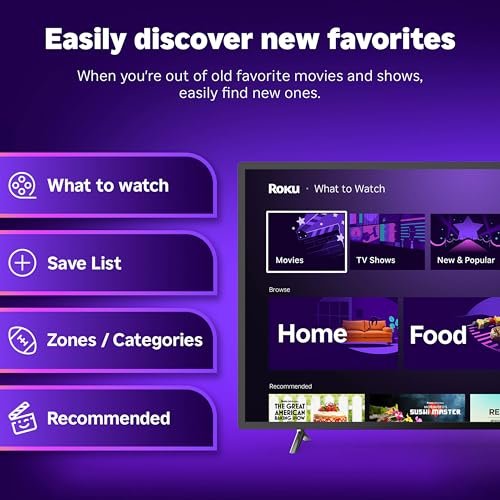
The Roku Streaming Stick Plus is a strong all-around pick for viewers who want 4K streaming without a bulky box. It supports 4K resolution and HDR10+, so compatible movies and shows can look bright, clear, and full of detail. The compact stick hides behind the TV and keeps the setup clean. Roku’s menu also feels calm and simple, which helps when you switch between many services.
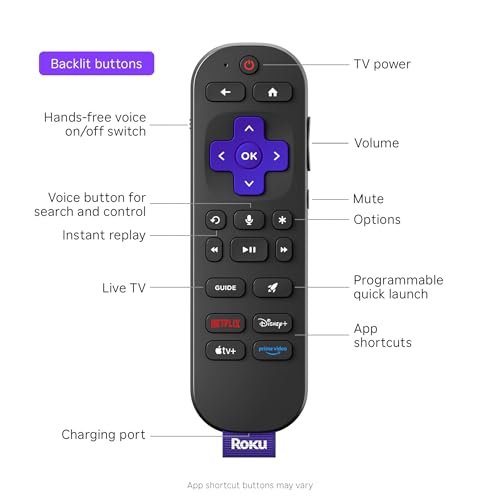
The included voice remote makes it easy to search for a movie, open an app, or control playback. I like Roku’s broad app support because it covers major paid services, free channels, music apps, and many live-TV options. Wi-Fi performance depends on your router and room layout, but the stick is a good fit for most apartments and family rooms. For many shoppers, this is the best TV streaming stick when ease of use matters most.
Pros:
- 4K resolution gives compatible content a sharp look
- HDR10+ can improve contrast and color on supported TVs
- Simple Roku interface is easy for new users
- Voice remote speeds up searches and app control
- Small design keeps the area behind the TV neat
- Wide access to paid, free, and live streaming apps
Cons:
- Picture benefits depend on a compatible 4K HDR TV
- Roku may show sponsored content on parts of the home screen
- It does not offer the same Alexa-focused smart-home control as Fire TV
Roku Streaming Stick HD

The Roku Streaming Stick HD makes sense for a basic HD television, a guest room, or a shopper who wants to spend less. It focuses on Full HD streaming rather than 4K, which is still enough for many older TVs. The stick plugs into an HDMI port and uses a small footprint, so it works well in tight spaces. Roku’s clean layout helps family members find apps without a long learning curve.
The voice remote adds useful search tools and reduces the need to type with direction buttons. I find this model especially practical for bedrooms and second TVs where premium picture features may not matter. It can access the same broad Roku-style app range, including free content and popular subscription services. If you want a simple TV upgrade at a modest cost, this model can be the best TV streaming stick for HD use.
Pros:
- Good match for Full HD and older televisions
- Compact stick fits behind most TV panels
- Voice search makes finding shows faster
- Roku menus are clear and easy to learn
- Supports many popular streaming and free-TV apps
- Useful low-cost choice for a second room
Cons:
- It does not stream in native 4K
- It cannot show the full benefit of HDR content
- Heavy users may prefer a faster premium player
Amazon Fire TV Stick 4K Plus

The Amazon Fire TV Stick 4K Plus targets viewers who want strong 4K playback, quick search, and close Alexa integration. Its support for 4K content helps compatible TVs deliver a more detailed image. Wi-Fi 6 can improve connection efficiency when you use a compatible router with several devices online. The stick also supports a large mix of subscription apps, free channels, and live-TV choices.
Amazon’s AI-powered Fire TV search can make natural requests more useful than simple title searches. You can ask for a genre, actor, or type of show, then browse results with the Alexa voice remote. Fire TV works especially well in homes that already use Echo speakers, Ring products, or other Alexa devices. Among the models in this guide, this may be the best TV streaming stick for an Amazon-centered smart home.
Pros:
- 4K streaming supports detailed images on compatible TVs
- Wi-Fi 6 can help with busy home networks
- AI-powered search can make discovery more natural
- Alexa remote supports voice search and device commands
- Offers free, paid, and live-TV viewing options
- Works well with many Alexa smart-home products
Cons:
- Fire TV’s home screen can feel busier than Roku’s layout
- Some features need compatible Alexa devices or services
- 4K and HDR quality depend on your TV, cable, and content
Amazon Fire TV Stick 4K Select

The Fire TV Stick 4K Select is built for shoppers who want to enter 4K streaming without moving to a larger media box. It brings the Fire TV platform to a small HDMI stick and supports 4K viewing with compatible equipment. The interface places streaming apps, free channels, and live options in one familiar space. Alexa voice control also helps when typing a long title would feel slow.
This model is a practical middle ground for a family room, dorm, or rental home. It gives you more picture potential than an HD-only stick while keeping the installation easy. I recommend checking your TV’s HDMI support and home network before buying, since real-world playback depends on the whole setup. For an Alexa fan who wants an affordable 4K upgrade, this is a serious best TV streaming stick contender.
Pros:
- Brings 4K streaming to a compact stick design
- AI-assisted search helps locate shows and movies
- Alexa remote makes hands-free searches simple
- Includes access to free and live-TV content
- Small size works well behind wall-mounted TVs
- Good step up from a basic HD streaming device
Cons:
- Fire TV menus include recommendations and sponsored content
- It may feel less simple for users new to Amazon devices
- Not every streaming title is available in 4K
Amazon Fire TV Stick HD

The Amazon Fire TV Stick HD is a sensible choice for an older 1080p TV or a small screen in a bedroom. It focuses on HD playback, free channels, live TV, and the familiar Fire TV experience. The Alexa Voice Remote lets you search by speaking instead of slowly entering each letter. It also includes access to smart-home controls, which can be useful if your household already uses Alexa.
I would choose this model for a simple setup where 4K is not needed. It can turn a standard TV into a useful streaming screen with less clutter than a separate set-top box. The interface does present many recommendations, so users who prefer a very plain home page may like Roku more. Still, for Amazon households on a budget, this model is one of the best TV streaming stick options for HD viewing.
Pros:
- Designed for affordable HD streaming
- Alexa Voice Remote makes searches quick
- Supports free channels and live-TV content
- Offers convenient smart-home controls
- Compact body is easy to install and hide
- Good fit for bedrooms, offices, and older TVs
Cons:
- It does not provide 4K video output
- HDR features are not the main focus
- Amazon recommendations can make the home screen feel crowded
Roku Ultra Streaming Player

The Roku Ultra is not a stick, but it deserves attention if you want the strongest Roku-style experience in this group. This dedicated streaming player is made for 4K viewing and sits near the top of Roku’s device range. Its larger body can support features that are less common on tiny HDMI sticks, including a more complete set of connection and control options. It is a good match for a main TV where speed and convenience matter every day.
The Ultra also suits viewers who want a premium Roku remote and a more stable home theater setup. Its box design does take more shelf space, so it is less hidden than a stick. I would pair it with a good 4K TV, a strong router, and a sound system for the best result. If the phrase best TV streaming stick is being used loosely to mean the best compact streaming upgrade, the Roku Ultra is the premium Roku alternative.
Pros:
- Premium Roku experience for a main living-room TV
- 4K streaming supports detailed home theater viewing
- Dedicated player design can offer strong daily performance
- Easy Roku interface works well for mixed-age households
- Voice remote simplifies searches and playback
- Better suited to demanding viewers than a basic HD stick
Cons:
- It is larger than a streaming stick
- Usually costs more than entry-level HDMI devices
- May offer more hardware than a casual viewer needs
My Recommendation
I recommend the Roku Streaming Stick Plus for most people who want the best TV streaming stick. It balances 4K quality, HDR10+ support, a small design, broad app access, and a very easy menu. It is the safest choice for families that use many streaming services and do not want to learn a complex system. The Roku Streaming Stick HD is better for a basic 1080p TV or a low-cost second-room setup.
Choose the Fire TV Stick 4K Plus if Alexa, Wi-Fi 6, and smart search matter most. Pick the Fire TV Stick 4K Select for a lower-cost 4K entry point, or choose the Fire TV Stick HD for an older television. The Roku Ultra is the better premium pick when you want a dedicated player for your main home theater. Prices and stock can change, so check the current Amazon listing before you buy.
| Best for | Why |
|---|---|
| Most households | Roku Streaming Stick Plus offers simple menus, 4K video, and broad app support. |
| Alexa smart homes | Fire TV Stick 4K Plus adds Alexa control, smart search, and Wi-Fi 6 support. |
| Older HD televisions | Roku Streaming Stick HD and Fire TV Stick HD provide useful streaming without paying for 4K. |
How I Evaluated the Best TV Streaming Stick
A streaming device can look impressive on a product page, yet daily use tells a better story. I focus first on setup, because a good device should not turn a simple TV upgrade into a long technical task. I also check how fast the home screen loads, how quickly apps open, and how easy it is to return to a show. These small moments shape your experience more than a long list of features.
Picture quality matters, but only when the rest of the system supports it. A 4K stick cannot create true 4K detail from an HD television. Your TV, HDMI port, internet plan, router, and the show itself all play a role. That is why I treat resolution as one part of the buying decision rather than the only reason to choose a model.
I also look closely at the remote. A voice button can save time, but it should not replace useful playback keys. A good remote should feel natural in the hand and respond without repeated clicks. I consider power and volume control, app shortcuts, search tools, and the ease of replacing batteries.
4K, HDR, and HD: What Do You Need?
4K video has about four times the pixels of Full HD. On a compatible large screen, that extra detail can make faces, text, sports lines, and landscape shots look cleaner. You need a 4K TV and 4K content to see the full gain. Many streaming services also require a higher subscription tier for some 4K titles.
HDR means high dynamic range. It can improve bright highlights, dark scenes, and color depth when the TV and content support the same format. HDR10 is common, while HDR10+ can adjust the image scene by scene on supported equipment. A streaming stick may support these formats, but your TV still controls the final image.
An HD stick remains a smart buy for a 1080p TV. You will not gain much by paying extra for 4K hardware if the screen cannot display it. HD models also work well in kitchens, guest rooms, and offices. The right device is the one that matches the screen you use, not the one with the biggest number on the box.
Streaming Speed and Wi-Fi Tips
Most streaming problems come from the network, not the stick. A weak signal can cause pauses, blurry video, or slow app loading. Place your router in an open area when possible, and avoid hiding it inside a cabinet. A streaming stick behind a wall-mounted TV may also sit in a difficult signal spot.
Wi-Fi 6 can help a busy home handle many connected devices. It does not guarantee faster streaming if your internet plan is slow or your router does not support the standard. In a small home with a strong network, a normal dual-band connection may work very well. I would pay for a premium Wi-Fi feature only when your home network can use it.
For steady 4K playback, many services recommend a reliable connection of roughly 15 to 25 Mbps per stream, though the exact need varies. Other family members may use bandwidth for games, video calls, or downloads. If your connection struggles, lower the video quality or improve the router location before blaming the streaming player.
Roku or Fire TV?
Roku is often the easier platform for people who want a simple starting screen. Its menus place the apps you use near the center of the experience. The platform also works across many brands and supports a broad selection of streaming services. I often suggest Roku to parents, older users, and anyone who wants fewer layers between the remote and the show.
Fire TV makes more sense for people who already use Amazon services. Alexa search can help you find content with natural voice requests. Fire TV also brings free channels, live-TV options, and smart-home controls into one system. Its home page is more content-heavy, which some users enjoy and others find distracting.
Neither platform is perfect for every household. App support can change, and some services may look or work slightly differently from one platform to another. Before buying, make sure your must-have apps are available. Both Roku and Fire TV cover the major names, but your personal list should make the final call.
Setup Guide for a Streaming Stick
Start by plugging the device into an open HDMI port on your TV. Use the included power cable and adapter when the TV’s USB port cannot supply enough power. Turn on the TV, select the correct HDMI input, and follow the on-screen setup steps. You will normally connect to Wi-Fi, sign in, install updates, and link your streaming accounts.
Keep the remote close during setup. You may need it to pair with the device and control the TV’s volume or power. Give the stick time to update before judging its speed. A new device often performs several background tasks during the first few minutes.
For the best picture, set the device to match your TV’s capabilities. If your TV supports 4K and HDR, allow compatible video modes. If it only supports HD, use the HD setting. Correct settings prevent blank screens, odd colors, and needless signal changes.
Who Should Buy a Streaming Stick?
A streaming stick is ideal for someone with an older smart TV that now feels slow. TV makers may stop updating apps after several years, while a separate streaming device can keep the screen useful. It is also a good choice for renters because it is easy to unplug and move. Students can take one from a dorm TV to a shared apartment with little effort.
It also works well for people who want to avoid cable boxes. A streaming stick gives access to subscription services, free channels, and some live-TV platforms through one remote. It does not make every channel free, and it does not replace every cable package. Still, it can reduce clutter and give you more control over what you watch.
A dedicated streaming device may be less useful if your smart TV already has fast software, current apps, and a good remote. In that case, compare the device’s unique benefits with its cost. You may want a stick for better search or a cleaner interface, but you do not need one simply because it is available.
Important Buying Features
Resolution support
Choose HD for a basic 1080p TV and 4K for a compatible 4K screen. If you plan to upgrade your TV soon, a 4K model can provide more future value. Do not confuse upscaling with native 4K. Upscaling can make HD content look cleaner, but it does not add the same detail as true 4K video.
Voice control
Voice search is one of the most useful streaming features. It saves time when a title is hard to spell or when you want to search by actor. Alexa is a stronger fit for Amazon households, while Roku voice tools focus on finding content within the Roku experience. Voice results can vary, so I still like a remote with direct playback buttons.
App access
Check for the services you use most. Major platforms usually support Netflix, Prime Video, Disney+, Max, Hulu, YouTube, and many others, but app lists can change. Free, local, and live-TV services may also differ by region. A streaming stick is only useful if it opens the content you want.
Remote features
Look for volume and power buttons if you want to reduce remote clutter. Dedicated app buttons can help, although they may not match your personal viewing habits. A lost remote can cause frustration, so consider whether the platform offers a phone app or another control method.
Power and HDMI space
Most sticks use one HDMI port and a separate power connection. Check the back of your TV before ordering if other devices already fill the ports. A short HDMI extender may help with crowded ports or poor Wi-Fi placement. Never force the stick into a tight space that bends the connector.
Common Mistakes to Avoid
The first mistake is buying a 4K device for an HD-only screen and expecting a dramatic picture upgrade. The second is ignoring the router. Even the best TV streaming stick cannot fix a weak or overloaded wireless network. I also suggest checking whether your preferred service requires a paid plan, since the device itself does not unlock every show for free.
Another mistake is assuming every HDMI port supports the same features. Some TVs have one port with better 4K or HDR support than the others. Read the TV manual or look for labels near the ports. If the screen stays black after setup, check the input, power adapter, HDMI connection, and video setting before returning the device.
Finally, do not judge a player only by its maximum resolution. A simple interface, stable app support, and a good remote may improve your day more than a small picture difference. The best TV streaming stick should remove friction, not add another confusing menu to your room.
FAQs Of Best TV Streaming Stick
What is the best TV streaming stick for most people?
The Roku Streaming Stick Plus is the best overall choice for many households. It offers 4K support, HDR10+, voice control, a compact design, and a simple interface. It works especially well for viewers who use several streaming services.
Is a 4K streaming stick worth it for an HD TV?
Usually, no. An HD TV cannot display native 4K detail. Choose an HD stick unless you plan to replace the television soon or want a 4K-ready device for future use.
Which is better, Roku or Fire TV?
Roku is often easier for simple navigation and mixed-age homes. Fire TV is a better match for Alexa users and Amazon-focused households. Both platforms support many major streaming services.
Does a streaming stick include free movies and TV shows?
The device gives you access to free services, but it does not make every movie or show free. Some apps offer ad-supported content, while others need a subscription or rental fee. Always check the service terms before watching.
Can a streaming stick improve an old smart TV?
Yes. It can provide newer app support, faster menus, and a better remote than an aging TV system. The TV still controls the screen resolution and sound limits, but the stick can make daily use feel much smoother.
Final Verdict: Which Should You Buy?
The Roku Streaming Stick Plus is my top pick for the best TV streaming stick. It offers the strongest balance of 4K quality, easy menus, voice control, and broad app access.
Choose Fire TV for Alexa features or an HD model for an older screen. Match the device to your TV and Wi-Fi for the best streaming value.