Best VR Headset: Top Picks For Immersive Gaming
The Meta Quest 3 is the best VR headset for most people seeking sharp, wireless, mixed-reality fun.
You may want to play a game, tour a new place, work in a large virtual room, or enjoy a film on a giant screen. Yet choosing a headset can feel hard when each model uses different lenses, controls, storage, and PC features. I tested the key differences that matter in daily use, from comfort and setup to game access and image quality. This guide will help you find the Best VR Headset for your budget, room, and play style.

Meta Quest 3 512GB |…
CARDBOARD MONKENAUT — Get our best Gorilla Tag bundle yet with this Amazon exclusive deal. Purchase Meta Quest 3 to get exclusive items, including the Gorilla Space Program Suit and…

Meta Quest 3S 128GB |…
CARDBOARD MONKENAUT — Get our best Gorilla Tag bundle yet with this Amazon exclusive deal. Purchase Meta Quest 3S to get exclusive items, including the Gorilla Space Program Suit and…
Meta Quest 3S 128GB |…
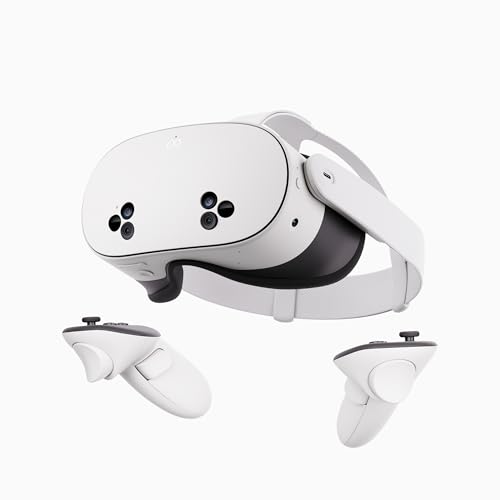
NO WIRES, MORE FUN — Break free from cords. Game, play, exercise and explore immersive worlds — untethered and without limits. 2X GRAPHICAL PROCESSING POWER — Enjoy lightning-fast load times…
How I Choose the Best VR Headset
A good VR headset should make virtual reality feel easy, not like a science project. I look first at the display, lens clarity, tracking, comfort, battery life, and game support. I also check whether the headset works on its own or needs a gaming PC. That choice can change the total cost by hundreds of dollars.
Wireless headsets offer the simplest path into VR. You can move without a cable and set up most games in minutes. PC VR headsets can offer better graphics, wider views, or sharper detail, but they need a strong computer and more desk space. There is no single winner for every player, so I matched each headset with the user who will enjoy it most.
Room setup also matters. Clear floor space helps prevent trips and bumps. Most modern headsets use inside-out tracking, so they can scan the room without outside sensors. Still, I advise using good lighting, keeping pets away during active games, and taking breaks if your eyes or head feel tired.
Meta Quest 3 512GB Gorilla Tag Bundle

The Meta Quest 3 remains the strongest all-around choice in this group. Its mixed-reality view lets you see your room while digital objects appear in front of you. The headset runs on its own, so you do not need a gaming PC or a console. Its 512GB storage also gives you room for a large game library, apps, videos, and future downloads.
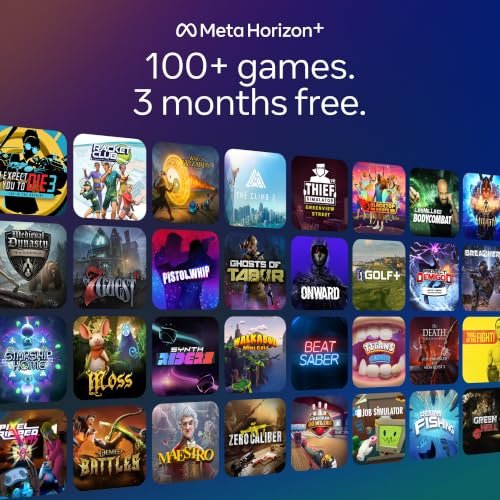
In daily use, the pancake lenses make the view feel clear across more of the screen. I can look with my eyes instead of turning my whole head each time. The Touch Plus controllers feel compact, and hand tracking works well for simple menus and supported apps. The included Gorilla Tag bundle adds a playful start for new users, while the three-month Meta Horizon+ trial gives you more content to explore.
Pros:
- Sharp pancake lenses provide a broad, clear viewing area.
- 512GB storage holds many large games without constant deleting.
- Wireless, standalone design makes setup quick and simple.
- Color passthrough supports useful mixed-reality games and apps.
- Compact Touch Plus controllers feel natural during active play.
- Hand tracking can reduce the need to use controllers in menus.
- Access to a large Quest game library helps new owners find content.
- The included game bundle and Horizon+ trial add value at the start.
Cons:
- The soft facial interface may feel warm during long sessions.
- Battery life is still limited compared with the length of many games.
- A premium head strap may improve comfort for extended use.
- Some demanding PC games still need a capable computer and good Wi-Fi.
My Recommendation
The Meta Quest 3 512GB is my top Best VR Headset pick for most adults, families, and serious beginners. It gives you a strong mix of clear lenses, useful mixed reality, wireless freedom, and generous storage. I especially like it for people who want to play fitness games, social games, action titles, and PC VR without buying separate hardware.
This model also suits a household with more than one player. The large storage can reduce the need to manage games, and the standalone system makes it easy to move from one room to another. I would add a better strap if comfort matters more than keeping the first setup simple. Overall, this bundle offers excellent long-term value when available at a competitive price.
Meta Quest 3S 128GB Gorilla Tag Bundle

The Meta Quest 3S brings the current Quest platform to buyers who want to spend less. It uses the same broad family of standalone apps and games as the Quest 3. You can play without wires, scan a play area, and access mixed-reality features through its passthrough cameras. This Gorilla Tag bundle also gives first-time owners a fun way to start.
The 128GB capacity works well for casual players who install a few favorite games at a time. Its Fresnel lens design does not offer the same edge-to-edge clarity as the Quest 3, but the center view can still look bright and engaging. The headset is easy to share with friends because it does not require a PC or a complex room sensor system. The three-month Horizon+ trial adds a useful test period for the wider game library.
Pros:
- Lower entry cost makes modern VR easier to try.
- Standalone operation removes the need for a console or PC.
- Access to the current Quest game and app platform.
- Passthrough view supports room awareness and mixed-reality content.
- Simple boundary setup helps new users get started fast.
- Lightweight controllers work well for games and fitness apps.
- The Gorilla Tag bundle gives new owners an immediate activity.
- The Horizon+ trial lets buyers sample more content before subscribing.
Cons:
- 128GB storage can fill quickly with large modern games.
- Fresnel lenses have a smaller clear area than the Quest 3 lenses.
- The basic facial interface may not suit every face shape.
- Battery life remains short for long travel or group play sessions.
My Recommendation
I recommend the Quest 3S 128GB to a first-time buyer who wants the Best VR Headset experience at a lower price. It is a good fit for children old enough to use VR safely, casual players, families, and people who are unsure how often they will play. It also works well as a guest headset for a living room.
Choose it over the Quest 3 when price matters more than lens clarity and storage. I would choose the 512GB Quest 3 for a heavy player, but the 3S is a smart entry model for short sessions and shared use. Watch the storage limit, and plan to uninstall games you no longer play. This bundle offers strong value when the sale price is right.
Meta Quest 3S 128GB Renewed Premium

This renewed premium Meta Quest 3S offers a lower-cost way to enter wireless VR. It keeps the key all-in-one features of the 3S, including room tracking, wireless play, and access to Quest apps. The 128GB model suits users who prefer a small set of games rather than a huge library. A renewed unit can make sense when the seller clearly explains its inspection and return terms.
I see this version as a practical pick for a guest room, a teen who is starting VR, or a buyer who wants to test the platform. The headset should feel familiar to anyone comparing it with a new Quest 3S, but the condition of a renewed product can vary. Check the included charger, controllers, facial interface, and warranty when it arrives. If all parts are present and the price is much lower, the savings can be meaningful.
Pros:
- Renewed pricing can reduce the cost of modern standalone VR.
- Wireless design allows play in more than one room.
- Quest software support provides many games and useful apps.
- Room scanning makes setup easier for beginners.
- Mixed-reality passthrough adds more than traditional closed VR.
- Compact controllers support sports, action, and rhythm games.
- 128GB is enough for a light user with a managed library.
- The premium renewed grade may offer better value than older used stock.
Cons:
- Renewed condition may vary from unit to unit.
- Buyers should inspect the lenses, straps, controllers, and battery.
- 128GB storage leaves less room for large game collections.
- The 3S lens system is less clear at the edges than Quest 3.
- Warranty and return coverage depend on the listing and seller.
My Recommendation
This renewed Quest 3S is best for a careful bargain hunter. It can be the Best VR Headset value for someone who wants current Quest features but does not need a factory-new box. I would consider it for a second headset, a family game room, or a new user who wants to keep the first purchase modest.
Buy only after checking the return policy and item condition. On arrival, I would test both controllers, the cameras, the speakers, the charging port, and the battery before downloading many games. If the unit passes those checks, it delivers the same basic style of play as a new 3S at a potentially lower cost. It is a value pick, not the safest choice for buyers who want zero uncertainty.
Pimax Crystal Super for PC VR

The Pimax Crystal Super targets PC VR users who want extreme detail and a very wide view. Its listed 3840-by-3840 resolution per eye is aimed at reducing the soft look that can appear in distant scenery. The ultrawide 140-degree field of view can help a racing cockpit or flight deck feel more open. This is a specialist headset, so it asks more from your computer and your setup.
The DisplayPort connection suits users who want a direct PC link for demanding simulators. Eye tracking can support features such as dynamic rendering in compatible software, which may help a powerful computer focus detail where you look. The large visual canvas can make signs, instruments, and road edges easier to inspect. Still, high resolution does not remove the need for a strong graphics card, careful settings, and patience during setup.
Pros:
- Very high per-eye resolution targets sharp PC VR images.
- Wide field of view creates a more open sense of space.
- DisplayPort connection supports a direct wired PC VR signal.
- Eye tracking can improve supported performance and interaction.
- Strong fit for flight, racing, space, and cockpit simulators.
- Fine detail can help users read virtual instruments and signs.
- PC access opens large simulator and mod communities.
- High-end optics appeal to enthusiasts who value image quality first.
Cons:
- It needs a powerful gaming PC for the best results.
- A wired connection limits freedom during active room-scale games.
- The headset can feel heavy during long sessions.
- Setup and software tuning take more time than a standalone Quest model.
- It is costly for casual users who play only a few short games.
My Recommendation
The Pimax Crystal Super is best for a PC VR enthusiast, simulator fan, or owner of a high-end gaming computer. For that audience, it may be the Best VR Headset for reading gauges, spotting distant objects, and enjoying a broad view. I would choose it for flight simulation and racing before I chose it for quick party games.
This headset makes less sense for a first-time buyer who wants plug-and-play fun. Check your computer, graphics card, DisplayPort output, room space, and preferred tracking system before ordering. If your system can drive its high resolution, the visual gain can feel like cleaning a foggy window. For serious simulation, its value comes from detail and immersion rather than simple convenience.
Meta Quest 3S 256GB Renewed Premium
The 256GB renewed Quest 3S solves the main weakness of the 128GB model: limited space. You can keep more large games installed and spend less time managing storage. It still offers wireless, standalone play, room tracking, and mixed-reality features. That makes it a useful middle ground for users who like the 3S design but want a larger library.
The 3S lens system remains best when you keep your eyes near the center of the view. In fast games, that limit may not bother you, and the extra storage can matter more. The renewed premium label means I would still inspect the device as soon as it arrives. A working battery, clean lenses, and responsive controllers will decide whether the discount feels worthwhile.
Pros:
- 256GB storage gives heavy users more room than the basic model.
- Standalone play keeps the system simple and portable.
- Mixed reality supports games, home tasks, and social apps.
- Wireless tracking avoids external base stations and cables.
- Quest compatibility offers a broad choice of content.
- Renewed pricing may deliver strong storage per dollar.
- Useful for families who share one headset across several users.
- Good fit for fitness players who install several active games.
Cons:
- Renewed condition can differ from a brand-new headset.
- Fresnel lenses offer less edge clarity than Quest 3 pancake lenses.
- Battery runtime may not cover a full day of travel.
- It may cost close to a new model during some sales.
- A larger game library still requires regular charging and updates.
My Recommendation
I recommend this model to a frequent Quest player who wants 256GB storage without paying full new-product pricing. It can be the Best VR Headset choice for a family that shares games, a fitness fan, or a user who dislikes deleting downloads. The extra storage gives the headset more breathing room than the 128GB version.
I would choose this renewed 256GB model over the renewed 128GB version if the price gap is small. However, I would choose the new Quest 3 if sharp edge-to-edge text and premium lenses matter most. Confirm the seller’s return terms and test every function at once. When the condition is good, this headset offers a strong balance of space, ease, and cost.
HTC Vive Focus Vision Wired Bundle

The HTC Vive Focus Vision Wired Bundle is aimed at users who want a flexible XR headset with a clear path to PC VR. Its DisplayPort streaming kit can provide a direct wired connection for compatible computers. That feature is useful when you want stable image quality and low wireless traffic. The headset also supports standalone-style use, giving it more range than a PC-only visor.
This model suits people who already understand the Vive ecosystem or want a headset for work and simulation as well as games. The wired bundle can reduce the guesswork around buying a separate PC connection accessory. As with any PC VR system, the computer still needs the right ports, drivers, and power. I would plan the cable route before play because even a good headset feels less immersive when the cord catches your arm.
Pros:
- DisplayPort bundle offers a direct route to PC VR streaming.
- Flexible XR design can support both work and entertainment.
- Strong option for users already familiar with HTC Vive products.
- Wired play can provide a stable signal for demanding content.
- Useful for simulation, training, visualization, and gaming.
- Included PC kit may reduce the need for extra accessories.
- Room tracking supports a cleaner setup than external sensor systems.
Cons:
- The cable reduces freedom during active room-scale play.
- PC compatibility depends on ports, drivers, and system power.
- The Vive software ecosystem may feel less simple than Quest.
- It may be more headset than a casual buyer needs.
- Extra setup time can frustrate users who want instant play.
My Recommendation
The HTC Vive Focus Vision Wired Bundle is best for PC VR users, trainers, designers, and Vive fans who want a direct wired option. I would consider it when stable PC streaming matters more than total wireless freedom. It can be the Best VR Headset for a home simulator or a work space that needs repeatable headset sessions.
This is not my first pick for a family buying its first VR device. Quest models are easier for most beginners and have a simpler wireless routine. Before buying, confirm that your computer meets the headset requirements and that the DisplayPort connection fits your system. If those needs line up, the bundle gives focused users a practical bridge between standalone XR and PC VR.
Best For Comparison
| Best for | Why |
|---|---|
| Most people and long-term owners | Meta Quest 3 combines sharp lenses, 512GB storage, wireless play, and mixed reality. |
| Low-cost entry into VR | Meta Quest 3S offers simple standalone play and broad Quest app support. |
| High-end PC simulation | Pimax Crystal Super delivers very high resolution and a wide field of view. |
What to Check Before Buying a VR Headset
Lens quality and the sweet spot
The lens is the window between your eyes and the virtual world. Pancake lenses, used by the Quest 3, usually give a wider clear area. Fresnel lenses can still look good, but you may need to move your head more often to keep text sharp. If you read menus, work in virtual screens, or play cockpit games, lens quality deserves extra weight.
A small sweet spot does not make a headset bad. It means you must set the strap and eye position with care. I take time to adjust the headset before judging its image. A poor fit can make even a strong display look blurry.
Standalone or PC VR?
A standalone headset includes its own processor, storage, battery, cameras, and software. You can open the box, connect the headset, draw a safe boundary, and play. This design fits most people who want a simple Best VR Headset for home use. It also makes the headset easy to carry.
PC VR can deliver richer graphics and larger simulation worlds. The computer does the heavy work, while the headset shows the result. The trade-off includes a cable, more setup, and a higher total price. The Pimax and HTC models in this guide make the most sense when you already own a strong computer.
How much storage do you need?
Storage holds games, apps, videos, and system files. A 128GB headset can work for a casual user who keeps only a few games installed. Larger games can take a lot of space, so active players may prefer 256GB or 512GB. I see 512GB as the least stressful choice for a family or a user who dislikes deleting content.
You cannot usually add a memory card to a Quest headset. Think about how you use a phone: if you take many photos and keep many apps, you likely want more storage. If you stream media and install only a few games, 128GB may be enough.
Comfort and fit
Comfort can matter more than a small change in resolution. A front-heavy headset may press on your cheeks or forehead after an hour. The stock strap may work for short play, but a better strap can improve balance and make longer sessions easier. I also suggest wiping the facial interface and keeping it dry between users.
Your eyes need breaks, too. Follow the safety advice in the headset manual. Stop if you feel dizzy, sick, strained, or unwell. New users often do better with short sessions and calm games before trying fast movement or roller-coaster scenes.
Tracking and room safety
Inside-out tracking uses cameras on the headset to follow movement. It removes the need to mount external sensors and helps keep setup simple. Bright, even room light usually helps the cameras, while very dark rooms can cause problems. Reflective glass, blank walls, and fast motion may also affect tracking in some spaces.
Clear the floor before you play. Keep cords, tables, pets, and other people outside the active zone. The headset boundary helps, but it cannot replace common sense. I treat room setup like clearing a small stage before a show.
Controllers and hand tracking
Controllers remain the best choice for many games because they provide buttons, sticks, and a firm grip. Hand tracking works well for menus, browsing, and some creative apps. It can feel magical when you pinch to select an item, but it is not ideal for every action game. Check the included controllers and batteries before your first long session.
Mixed reality features
Mixed reality blends camera views of your room with virtual objects. It can turn a table into a game board or place a screen on a wall. Color passthrough makes the view more useful than the grainy black-and-white cameras found on older headsets. The Quest 3 and Quest 3S make this feature easy for most buyers.
Passthrough is not a replacement for direct vision. You should still remove hazards and avoid using the headset near stairs. Treat the camera view as a helpful tool, not a guarantee of safety.
Battery life and charging
Most wireless headsets last only a few hours, depending on the game, brightness, tracking, and wireless use. That is enough for a normal session but not always enough for a long trip. A power bank or battery strap can extend play, but it adds weight or another cable. Charge the headset after use so it is ready when you are.
PC headsets with a wired connection avoid some battery limits, though the cable can reduce movement. This is one reason simulator fans may prefer a wired setup. For active games, wireless freedom often feels worth more than endless battery life.
Game library and software support
A headset is only as good as the content you can enjoy on it. The Quest platform has a broad range of fitness, rhythm, social, action, creative, and family apps. PC VR adds simulation titles and a wide range of computer-based games. HTC and Pimax buyers should check their preferred store and game compatibility before ordering.
Subscription trials can help new owners sample content. Still, read renewal terms and cancel before a trial ends if you do not want a paid plan. A free trial adds value, but it should not decide the whole purchase.
Privacy and account needs
VR headsets use cameras, microphones, motion sensors, and account services. Read the privacy controls and review which permissions each app requests. Create a strong account password and use a separate profile if several people share the headset. Parents should review age guidance and play areas before children use VR.
I also advise buying from a seller with clear support and return terms. This matters most for renewed products. Keep the box and accessories until you have tested the headset fully.
How These Headsets Compare in Real Use
For quick setup, the Quest 3S models lead the group. They turn on, scan the room, and open the Quest library with little fuss. The Quest 3 takes the same easy path but adds better lenses and more storage in the 512GB version. That difference becomes clear when you read small text or glance toward the edge of a virtual screen.
For pure image detail, the Pimax Crystal Super stands apart. Its high resolution aims at users who inspect distant scenery, gauges, and cockpit controls. The trade-off is clear: it needs a powerful PC and careful setup. A casual player may notice the work before noticing the benefit.
For wired PC use, the HTC Vive Focus Vision bundle offers a direct route. It targets a user who values a steady computer connection and may use the headset for more than games. The cable limits free movement, but it can suit a seated simulator or a fixed work area. I would not buy it without checking computer support first.
For value, the answer depends on the condition and sale price. A new Quest 3S lowers risk, while a renewed premium model may save money. The renewed 256GB version is more appealing than the 128GB version when you plan to keep many games. Always compare the final price, warranty, accessories, and return policy.
Who Should Buy the Meta Quest 3?
The Quest 3 is the safest recommendation for most buyers because it avoids major compromises. It works without a PC, yet it can also connect to a computer for compatible PC VR games. Its pancake lenses improve everyday clarity, and the 512GB capacity reduces storage stress. It feels like a complete system rather than a starter toy.
It also gives new users a gentle learning curve. You can begin with calm experiences, then move into fitness, social apps, and action games. Mixed reality adds variety when you want to stay aware of your room. If you can afford it, this is the Best VR Headset I would buy for a friend who has not tried VR.
Who Should Buy a Quest 3S?
The Quest 3S makes sense when price is the main concern. It carries the current Quest experience without requiring a computer. New users can try popular games and see if VR fits their life before spending more. The 128GB model suits light use, while the 256GB renewed version fits a larger library.
The 3S is also practical for families. It is easy to move and simple to use after a short lesson. I would set clear play times, keep the room clean, and check the fit for each user. If a buyer later wants sharper lenses, the Quest 3 remains the natural upgrade.
Who Should Buy a Pimax or HTC Headset?
Pimax and HTC models target a more focused buyer. Choose Pimax when maximum detail and a wide field of view matter most, especially in flight and racing simulators. Choose HTC when you want a flexible XR headset with a direct DisplayPort PC option and you value the Vive ecosystem. Both need more planning than a wireless Quest model.
These headsets reward users who enjoy tuning settings. You may need to adjust resolution, refresh rate, tracking, and cable placement. That work can feel worthwhile when a cockpit becomes clear and life-size. It can also feel like too much if you only want a ten-minute game after work.
FAQs Of Best VR Headset
What is the Best VR Headset for most people?
The Meta Quest 3 512GB is the best overall choice for most people. It offers sharp pancake lenses, wireless play, mixed reality, and large storage. It also works as a standalone headset and can connect to a PC for compatible content.
Is the Meta Quest 3S good for beginners?
Yes. The Quest 3S is simple to set up and does not need a gaming PC. Its lower price makes it a good first step into VR. Choose more storage if you plan to keep many large games installed.
Do I need a gaming PC for a Quest headset?
No. Quest 3 and Quest 3S headsets can run many games on their own. A compatible gaming PC can add access to PC VR titles and richer graphics, but it is optional for normal Quest use.
Is a wired VR headset better than a wireless model?
Neither is always better. A wired headset can offer a stable PC connection and high-end graphics. A wireless headset is easier to set up and much better for moving around freely. Pick based on your games, computer, and room.
How much storage should a VR headset have?
Choose 128GB for light use, 256GB for regular play, and 512GB for a large family library. Modern games can use a lot of space. More storage reduces the need to uninstall games.
Final Verdict: Which Should You Buy?
The Meta Quest 3 512GB is the Best VR Headset here for most buyers. It offers the best mix of clear lenses, wireless freedom, mixed reality, storage, and easy setup.
Choose Quest 3S for value, Pimax for high-end simulation, or HTC for wired PC VR. Compare comfort, storage, computer needs, and return terms before you buy the best VR headset for your home.