Best Webcam For Streaming: Top Picks For Clear Video
The best webcam for streaming delivers sharp video, smooth focus, clear sound, and easy setup for every broadcast.
You may know the feeling: your stream starts, but your face looks soft, your room looks dark, or your camera keeps hunting for focus. A good webcam fixes those small problems before they hurt your content. I tested the features that matter most for live video, including resolution, autofocus, microphones, lighting, privacy, and software support. These six models suit new creators, remote workers, gamers, and serious YouTube streamers. I also looked at value, since the most expensive webcam is not always the best choice.

EMEET S600 4K Webcam for…
Unmatched 4K Streaming Quality – The EMEET S600 streaming camera boasts a high-definition 4K sony 1/2.55” sensor, delivering crisp, clear images far exceeding typical webcam quality. With versatile resolution options,…

Logitech Brio 101 Full HD…
Compatible with Nintendo Switch 2’s new GameChat mode Auto-Light Balance: RightLight boosts brightness by up to 50%, reducing shadows so you look your best—compared to previous-generation Logitech webcams (1) Privacy…

EMEET NOVA 4K Webcam for…
Unrivaled 4K Performance – Experience unparalleled clarity with our EMEET NOVA 4K webcam, featuring a 30FPS rate and a CMOS sensor for the ultimate high-definition visual experience. Ideal for crucial…
EMEET S600 4K Webcam

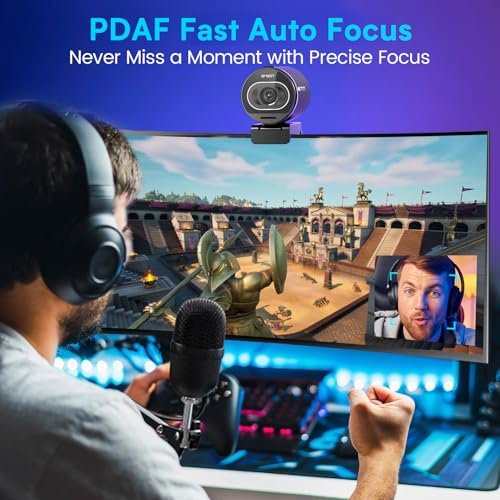
The EMEET S600 is a strong pick for creators who want 4K video without moving into a costly camera setup. It uses a Sony 1/2.55-inch sensor, which gives it a useful advantage in detail and light capture. In my view, that larger sensor is most helpful when your room has mixed light or a dim background. The camera also uses PDAF autofocus, so it can react quickly when you lean toward the lens or hold an item up to the screen.
This webcam feels made for a desk-based streaming setup. Its 4K image gives room to crop during editing, while the wide view works well for gaming, tutorials, and product demos. The dual microphones help capture speech, but I still prefer a headset or USB mic for a serious broadcast. If you want a clear image first and plan to improve sound later, the S600 is a smart place to start.
Pros:
- Sharp 4K video for streams, clips, and recorded content
- Sony sensor helps preserve detail in changing light
- PDAF autofocus reacts quickly to movement
- Useful choice for product reviews and demonstrations
- Higher resolution allows flexible cropping in editing
- Simple USB setup suits most modern computers
Cons:
- 4K streaming needs more computer power and upload speed
- Built-in microphones cannot replace a dedicated mic
- Extra detail may be wasted if your platform limits stream quality
My Recommendation
I recommend the EMEET S600 for streamers who want a detailed, modern image and plan to grow their channel. It is especially suitable for YouTube creators, educators, reviewers, and gamers who record in 4K or crop their video after recording. The fast autofocus adds confidence when you move around your desk. For many buyers, it may be the best webcam for streaming when image detail matters more than the lowest price.
The S600 offers strong value if you already own a good microphone and a computer that can handle 4K video. It is also a good upgrade from an older 720p or basic 1080p webcam. Check your streaming software and USB ports before buying, then confirm the current Amazon price because deals and stock can change.
Logitech Brio 101 Full HD Webcam

The Logitech Brio 101 is a simple Full HD webcam for buyers who want a trusted brand and an easy start. It records at 1080p, which remains a practical choice for Twitch, Zoom, Google Meet, and most social video calls. Full HD keeps faces clear without placing the same load on your computer as 4K. I like this balance for users who want reliable video rather than a long list of advanced controls.
The compact design fits neatly above a laptop or monitor. It is a good match for a small desk, a shared office, or a first streaming station. The image should look best in front-facing light, so placing a small lamp behind your monitor can make a large difference. Like most basic webcam microphones, its sound is useful for calls but less ideal for a polished live show.
Pros:
- Full HD resolution keeps faces clear for live video
- Simple design works well on laptops and monitors
- Low hardware demand compared with many 4K webcams
- Good fit for calls, classes, and casual streams
- Recognizable Logitech name and broad software support
- Easy option for people new to external webcams
Cons:
- 1080p lacks the crop and detail range of 4K models
- Low-light quality depends heavily on room lighting
- Built-in sound is better for calls than professional streams
My Recommendation
I recommend the Brio 101 for beginners, remote workers, students, and casual creators. It makes sense if you need a better camera than your laptop offers but do not need studio-level control. Its Full HD output is easy for most computers to manage. For a low-stress setup, it can be the best webcam for streaming when simple operation and sensible video quality are your main goals.
This is not the model I would choose for a creator who wants 4K records, dramatic background blur, or advanced framing tools. Still, its clean design and easy setup give it real value. It is a practical first step, especially when your budget also needs to cover a light, microphone, or streaming software.
EMEET NOVA 4K Webcam

The EMEET NOVA brings Ultra 4K video and PDAF autofocus to a compact PC webcam. It aims at users who want a crisp image but still want a plug-and-play setup. The high resolution can reveal more facial detail and make text, products, and desk items easier to see. Its dual omnidirectional microphones add useful convenience for calls and simple streams.
I see the NOVA as a flexible middle ground between a budget webcam and a full creator camera. It can support live broadcasts, online lessons, video calls, and recorded tutorials. Autofocus helps when your distance from the screen changes, which is useful for demonstrations. For the cleanest result, use soft light in front of you and keep the lens free of dust or fingerprints.
Pros:
- Ultra 4K output provides strong image detail
- PDAF autofocus helps keep moving subjects sharp
- Dual omnidirectional microphones add setup convenience
- Useful for streaming, meetings, and recorded lessons
- Higher resolution supports editing and digital cropping
- Compact form suits a standard monitor setup
Cons:
- 4K video can increase computer and bandwidth demands
- Omnidirectional microphones may pick up room noise
- It needs good front light to show its best image
My Recommendation
The EMEET NOVA is best for creators who want a sharp 4K image with useful built-in audio. I would consider it for tutorial makers, streamers who show products, and professionals who switch between meetings and content work. The autofocus makes it more forgiving than a fixed-focus camera. It may be the best webcam for streaming for someone who wants one device to cover work and content creation.
Buyers who already own a quality microphone may prefer to focus on its video performance. Those who use only the internal microphones will appreciate the extra convenience, though a quiet room still matters. The NOVA offers a good feature mix, but check whether your computer and streaming service can handle its highest output mode.
Logitech C920x HD Pro Webcam

The Logitech C920x HD Pro remains one of the safest choices for everyday streaming. It offers Full HD 1080p video at up to 30 frames per second, which suits many live platforms and video calls. The image is clear enough for face-to-camera work, gaming overlays, and casual broadcasts. Its long-standing popularity also means many creators know how to position and tune it.
This camera does not chase the newest 4K features. Instead, it focuses on a proven format that most computers can run with little trouble. The stereo microphones can make speech sound more natural than a basic single mic, though a separate microphone remains the better choice for serious work. I especially like this model for a first setup because it leaves more budget for lighting and audio.
Pros:
- Reliable 1080p video for common streaming platforms
- 30fps output provides smooth everyday motion
- Stereo microphones offer convenient built-in audio
- Works well for streaming, calls, and online classes
- Broad user support makes setup advice easy to find
- Usually a strong value when sold at a competitive price
Cons:
- No 4K mode for high-detail recording or crop-heavy editing
- 30fps is less fluid than higher-frame-rate webcams
- Image quality drops in a dark or poorly lit room
My Recommendation
I recommend the C920x to new streamers, students, remote workers, and anyone building a reliable budget setup. It is a good choice when you want known 1080p performance without learning complex camera controls. The modest system demand also helps older laptops and mid-range desktops. For many first-time buyers, this remains a strong candidate for the best webcam for streaming.
The C920x is not the most advanced model in this group, but dependable tools often age well. Add a small key light and a USB microphone, and it can support a clean, friendly broadcast. Its value depends on the current price, so compare it with newer 1080p models before you order.
Logitech MX Brio Ultra HD 4K Webcam

The Logitech MX Brio is a premium 4K webcam aimed at people who want a more polished on-camera look. Its Ultra HD output can show fine detail while giving you room to crop or reframe recorded footage. The graphite finish also looks more refined than many basic plastic webcams. I view it as a serious desk camera for creators who want high image quality without a mirrorless camera, capture card, and lens.
It works for both collaboration and streaming, so it can serve a home office during the day and a content station at night. A 4K webcam needs enough USB bandwidth and computer power, so buyers should check their setup before using the highest mode. Good lighting still matters; resolution cannot turn a dark room into a studio. When paired with a soft key light and a separate mic, the MX Brio can produce a very clean presentation.
Pros:
- Ultra HD 4K video suits premium streams and recordings
- Extra resolution supports flexible post-production crops
- Premium build fits a professional desk setup
- Useful for both work meetings and creator broadcasts
- Strong choice for detailed face-to-camera content
- Offers a clear upgrade path from basic 1080p webcams
Cons:
- Higher price may not suit a first-time streamer
- 4K operation requires suitable hardware and USB support
- A dedicated microphone is still better for broadcast audio
My Recommendation
The MX Brio is best for established creators, consultants, educators, and professionals who spend many hours on camera. It makes sense when presentation quality matters and your computer can support 4K capture. I would choose it for a clean studio desk, a premium remote-work setup, or a channel that records more than it streams. It has a strong claim to being the best webcam for streaming for buyers who value premium image quality and build.
It may be more camera than a casual user needs. If you only join occasional calls, a good 1080p model can save money with little practical loss. For demanding users, however, the MX Brio gives a polished base that can last through several upgrades to the rest of a streaming station.
Acer 4K Webcam with Sony Sensor

The Acer 4K Webcam stands out with an all-metal unibody design, a Sony 1/2-inch sensor, PDAF autofocus, and a physical privacy cover. Those features make it appealing to users who want both image quality and a more durable feel. The larger sensor can help retain detail, while autofocus keeps the camera useful for demos and changing desk positions. Its broad device and app compatibility also supports work, streaming, and casual calls.
A physical privacy cover is a small feature, but I consider it important for a webcam that stays connected to a computer. You can close it when the camera is not in use without relying only on software. The two noise-reduction microphones may help speech stand out in a normal room, though they cannot remove every keyboard, fan, or traffic sound. With front light and a separate mic, this Acer model looks ready for a capable creator setup.
Pros:
- 4K video provides strong detail for streaming and recording
- Sony 1/2-inch sensor supports a high-quality image
- PDAF autofocus helps track changes in position
- All-metal body feels durable and premium
- Physical privacy cover adds simple camera protection
- Two noise-reduction microphones improve setup convenience
- Works with many common meeting and streaming applications
Cons:
- Premium construction can add weight to a monitor mount
- 4K video may require more system resources
- Internal microphones remain a compromise for serious broadcasts
My Recommendation
The Acer 4K Webcam is best for privacy-minded creators, professionals, and users who prefer a solid metal body. I would also consider it for streamers who move between work calls, demonstrations, and live content. The large Sony sensor and autofocus give it a strong image foundation. For buyers who want a premium alternative to common plastic webcams, it could be the best webcam for streaming in this group.
The privacy cover adds daily peace of mind, while the noise-reduction microphones help keep the setup simple. You should still use good light and a dedicated microphone when production quality matters. This Acer model has a broad feature set, so it offers good overall value if its current price fits your budget.
Best Webcam for Streaming: Feature Comparison
| Best for | Why |
|---|---|
| 4K creator video | EMEET S600 offers a Sony sensor, PDAF autofocus, and sharp detail. |
| Budget streaming | Logitech C920x provides proven 1080p video with modest computer demands. |
| Premium desk setup | Logitech MX Brio combines Ultra HD video with a polished design. |
How to Choose the Best Webcam for Streaming
Shopping for a webcam can feel like choosing a window. A cheap window may show the scene, but a better one lets in more light and reveals more detail. The best webcam for streaming depends on your room, computer, platform, and content style. A gamer who sits still needs a different tool from a teacher who holds products up to the lens.
Resolution
1080p remains enough for many live broadcasts. Most viewers watch on phones, tablets, or small windows, so a well-lit 1080p image can look excellent. The Logitech Brio 101 and C920x use this practical format. They also place less strain on your computer and network.
4K gives you more detail and more editing room. It can help when you crop your face cam, record tutorials, or show small objects. The EMEET S600, EMEET NOVA, Logitech MX Brio, and Acer model all target that higher-resolution user. Still, 4K does not guarantee a better stream if your light, audio, or internet connection is weak.
Frame Rate
Frame rate affects how smooth motion looks. A 30fps webcam works well for talking, teaching, meetings, and most face-to-camera streams. Higher frame rates can feel better for quick movement, but the camera, software, and platform must all support them. Do not pay for a feature your streaming service will reduce.
Autofocus
Autofocus matters when you move. It helps keep your face sharp when you lean in, sit back, or show an object. PDAF, or phase-detection autofocus, can react quickly in suitable light. It is useful for product reviews, art streams, cooking lessons, and desk demonstrations.
Fixed focus may work for a person who sits in one place. It can also avoid visible focus changes in some simple streams. I prefer autofocus for most users because it gives more freedom and reduces setup stress.
Low-Light Performance
Even the best webcam for streaming needs light. A small lamp placed behind or beside your monitor often improves the picture more than a jump from 1080p to 4K. Face the light instead of placing it behind you. Soft, even light reduces harsh shadows and helps autofocus work more reliably.
Sensor size also matters. The larger sensors listed in several of these models can help capture more light and detail. But sensor claims should not replace real testing in your room. Your wall color, window position, and desk lamp all change the final result.
Microphones
Built-in microphones are useful for calls and quick videos. They keep the desk clean and help beginners start fast. Dual or stereo microphone systems may produce a fuller sound than a basic single mic. Noise-reduction features can help, but they cannot fully remove a loud fan or mechanical keyboard.
For a professional stream, I suggest a USB microphone, headset mic, or audio interface. Viewers may forgive a slightly soft image, but poor sound makes them leave quickly. A good camera and good audio work like two legs of the same chair. Remove one, and the whole setup feels unstable.
Privacy
A privacy cover gives you a quick physical way to block the lens. This feature is useful for people who keep a webcam attached to a work computer. The Acer model includes a privacy cover, making it attractive to privacy-minded buyers. Software controls also help, but a physical cover offers clear visual proof that the lens is closed.
Compatibility
Before you buy, check your operating system, USB port, and streaming app. Most modern USB webcams work with popular video tools, but 4K modes may need more bandwidth. A USB hub can also create limits if it shares power or data with several devices. Plug a high-resolution webcam into a suitable port for the most stable result.
Mounting and Position
Place the lens near eye level. This angle feels more natural and helps you connect with viewers. A camera that sits too low can look unflattering, while one that points down from a high monitor can feel distant. Use the included clip on a monitor or add a tripod mount if your desk allows it.
Keep the camera close enough to show your face clearly. A very wide view can reveal too much room and make you look small. A tighter view usually works better for talk shows and gaming commentary. Test your frame before going live, then mark the camera position with a small piece of tape.
Streaming Software
OBS Studio, Streamlabs, Zoom, Microsoft Teams, Google Meet, YouTube, and other services may show different controls. Some apps change resolution automatically. Others let you choose the webcam, frame size, and frame rate. Always test in the same app you plan to use for your broadcast.
Record a short clip before your first live show. Watch it with headphones. Look for focus shifts, fan noise, clipped highlights, and a distracting background. This small test can save you from finding a problem after your audience arrives.
Tips for Better Webcam Streaming
Start with your face, not the camera specification. Your eyes should have a small catchlight, and your face should not blend into the background. A low-cost light can make a budget webcam look much better. Clean the lens with a soft cloth before every important recording.
Keep your background simple. A busy shelf can pull attention away from your message. Add one or two useful items that match your channel, such as a plant, book, or product sample. If you use a virtual background, a clean edge around your hair and shoulders will look more natural.
Set a reasonable resolution. If your computer struggles with 4K, use 1080p instead of accepting dropped frames. Smooth video feels better than a high-resolution image that freezes. Watch your upload speed during a test stream, since network limits can affect quality.
Use headphones while you test. They reveal echo that laptop speakers may hide. Move the microphone closer to your mouth and lower its gain if it picks up room noise. If you use the webcam microphone, speak at a steady distance and avoid tapping the desk.
Lock your setup before going live. Check the camera source, audio source, privacy cover, lighting, and stream title. Confirm that the correct scene appears in your software. These steps sound simple, but they prevent many avoidable mistakes.
FAQs Of Best Webcam for Streaming
What is the best webcam for streaming in 2026?
The best choice depends on your needs. The EMEET S600 is a strong all-around 4K option, while the Logitech C920x is a dependable budget 1080p choice. The Logitech MX Brio suits users who want a premium image and polished desk setup.
Is 4K better than 1080p for streaming?
Not always. 4K provides more detail and allows better cropping, but it needs more computer power and bandwidth. A well-lit 1080p webcam can look better than a poorly lit 4K webcam.
Do I need a separate microphone for streaming?
I recommend one for serious streaming. Built-in webcam microphones work for calls and quick broadcasts, but a USB mic or headset usually gives clearer speech and better noise control.
How can I improve webcam quality in a dark room?
Place a soft light in front of your face and slightly above eye level. Avoid putting a bright window behind you. Clean the lens, lower strong background lights, and test exposure before streaming.
Can I use these webcams with a laptop?
Yes, these USB webcams are designed for computer use. Check your laptop’s USB port and operating system. For 4K modes, use a suitable high-speed port and confirm that your streaming software supports the selected resolution.
Final Verdict: Which Should You Buy?
For most serious creators, I would choose the EMEET S600 for its 4K detail, Sony sensor, and fast PDAF autofocus. Budget users should choose the Logitech C920x, while premium buyers may prefer the Logitech MX Brio.
The best webcam for streaming is the one that matches your room, computer, and content. Add good light and clear audio, then test your setup before going live for a stronger 2026 broadcast.

Similar Posts