Best Smart Plug: Top Picks For Smarter Homes
The best smart plug adds simple voice control, schedules, and remote access to almost any ordinary household device.
You may have left a lamp on, forgotten the coffee maker, or wished a fan would turn off at bedtime. A smart plug solves these small problems without replacing your appliances. I tested the key features that matter most, including setup, app control, voice support, Wi-Fi limits, safety listings, and daily ease of use. The six options below suit different homes, budgets, and smart assistants.
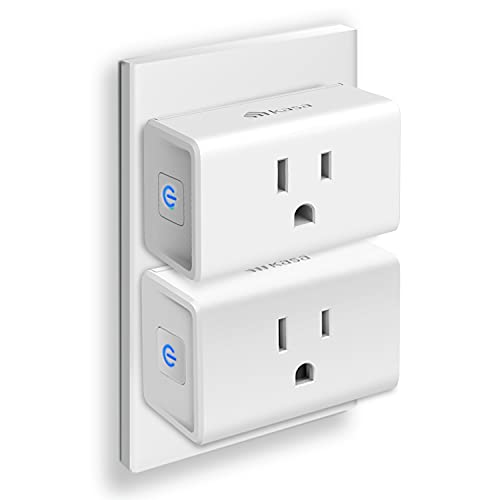
Kasa Smart Plug Ultra Mini…
Voice control: Kasa smart plugs that work with Alexa and Google Home Assistant. Enjoy the hands free convenience of controlling any home electronic appliances with your voice via Amazon Alexa…

Kasa Smart Plug Mini 15A,…
Voice control: Kasa smart plugs that work with Alexa and Google Home Assistant. Enjoy the hands free convenience of controlling any home electronic appliances with your voice via Amazon Alexa…

Govee Smart Plug, WiFi Plugs…
Stability Upgrade: Supports Bluetooth or WiFi connection, which is more stable and faster than plugs that can only be connected through WiFi. No disconnection worries, control all your home appliances…
Kasa Smart Plug Ultra Mini 2-Pack

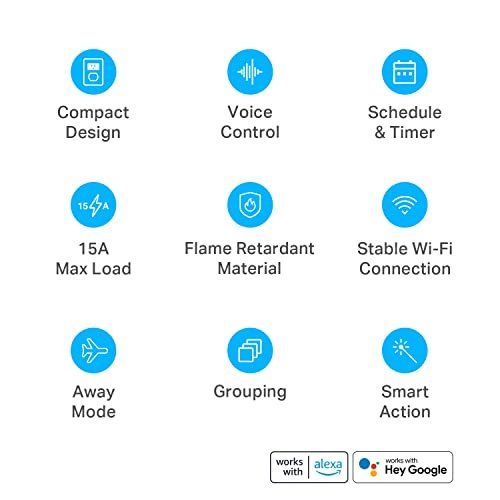
The Kasa Smart Plug Ultra Mini is a compact choice for lamps, fans, chargers, and other everyday devices. Its small body helps preserve space on a standard outlet. The plug supports Alexa and Google Home, so I could add voice control without buying a separate hub. It uses a 2.4GHz Wi-Fi connection and carries a 15-amp rating.
The Kasa app makes it easy to create schedules and timers. I like the away mode because it can turn connected lights on and off at varied times when nobody is home. The UL certification is also a useful safety detail for buyers who want a recognized testing mark. This two-pack works well in a bedroom, office, or small apartment where every outlet matters.
Pros:
- Very compact design leaves room for the second outlet
- Works with Amazon Alexa and Google Home
- No separate smart-home hub is needed
- 15-amp rating suits many common household loads
- UL certified for added buyer confidence
- Useful schedules, timers, and away controls
- Helpful two-pack for basic room automation
Cons:
- Supports 2.4GHz Wi-Fi only
- Does not offer built-in energy monitoring
- Not designed to control high-load heating devices without checking their power needs
My Recommendation
I recommend this Kasa model to renters, students, and first-time smart-home users. It is small, simple, and broad enough for lamps, fans, holiday lights, and chargers. The two-pack gives you a low-cost way to automate two devices in one room. If you want the Best Smart Plug for compact size and dependable basic control, this is one of the strongest starting points.
Always check the appliance label before connecting it. A smart plug should not replace an appliance’s built-in safety controls. For routine lighting and small appliances, this Kasa pack offers strong value and is widely available.
Kasa Smart Plug Mini 4-Pack

The Kasa Smart Plug Mini four-pack is made for buyers who want to automate several devices at once. Each plug supports up to 15 amps and connects directly to a 2.4GHz Wi-Fi network. The mini form helps prevent a crowded outlet, which matters when you use two plugs side by side. Alexa and Google Home support also make it easy to include the plugs in voice routines.
Kasa’s app gives each plug its own schedule and timer. You can also group several plugs, which is handy for a living room or holiday display. I find the four-pack more practical than buying single plugs when you already know you want several rooms connected. It offers the same basic idea as the smaller pack, but the larger set brings better coverage for a whole apartment or family home.
Pros:
- Four plugs cover several rooms or devices
- Compact body helps keep both wall outlets usable
- 15-amp capacity fits many lights and small appliances
- Alexa and Google Home compatibility
- App-based remote control from a phone
- Schedules and countdown timers support daily routines
- No hub or monthly subscription is required for basic control
Cons:
- 2.4GHz Wi-Fi only may require an older network band
- No power-use readings for tracking electricity
- Four plugs may be more than needed for a small room
My Recommendation
This pack suits families, home offices, and anyone building a smart home on a budget. I would choose it for lamps, fans, desk equipment, seasonal lights, and chargers. It is especially useful when you want the Best Smart Plug value across several spaces instead of buying one unit at a time. The broad Alexa and Google Home support keeps setup familiar for most users.
Buyers should still confirm that each appliance stays within the plug’s electrical rating. Avoid using a basic smart plug with devices that draw large startup loads unless the manufacturer clearly approves that use. For everyday automation, this four-pack gives you a practical mix of price, control, and convenience.
Govee Smart Plug 4-Pack

The Govee Smart Plug four-pack offers a simple way to control several outlets through Wi-Fi. It works with Alexa and Google Assistant, and it does not need a separate hub. The plugs support 2.4GHz networks, which is common for small smart-home devices. Govee also lists ETL and FCC certifications, giving buyers useful information about product testing and regulatory compliance.
The app supports timers, schedules, and group control. That group feature can turn several lamps on together, such as lights around a living room or a holiday display. I like this type of control because it reduces repeated taps and makes a routine feel automatic. The four-pack is a strong fit for users who want broad coverage without adding a complex smart-home platform.
Pros:
- Four outlets provide good whole-room coverage
- Works with Alexa and Google Assistant
- Group control can operate several plugs together
- Timers and schedules support daily routines
- No hub is required for normal Wi-Fi control
- ETL and FCC certifications are clearly listed
- Useful for lamps, fans, chargers, and seasonal lights
Cons:
- Works with 2.4GHz Wi-Fi only
- Does not provide energy-use monitoring
- App features may feel less familiar to users already invested in another brand
My Recommendation
I recommend Govee to shoppers who want group control and a four-plug bundle. It is a good match for holiday lighting, bedrooms, shared living spaces, and small offices. If you use Google Assistant and want an alternative to the most common Kasa choices, this may be the Best Smart Plug set for simple multi-device routines. The ETL and FCC markings also help it stand out in a crowded budget category.
Keep the plugs near a reliable 2.4GHz signal during setup. A weak signal can make any Wi-Fi plug appear faulty, even when the hardware works properly. For buyers who want timers and group scenes at a reasonable cost, Govee offers useful everyday value.
Amazon Smart Plug for Alexa

The Amazon Smart Plug is built for people who already use Alexa. Its main appeal is a simple setup that fits into the Alexa app rather than asking you to learn another smart-home system. You can use voice commands to control a lamp, fan, or other compatible device. This focus makes the plug feel less like a gadget and more like a natural part of an Alexa home.
Alexa routines can connect the plug to times, voice commands, and other compatible devices. For example, you could turn on a lamp at sunset or shut off a fan when you say a chosen phrase. I would not pick this model for a Google Home household because its strongest feature is Alexa integration. For Alexa users, however, the familiar setup can remove much of the usual smart-plug friction.
Pros:
- Designed for easy Alexa-based control
- Simple setup through the Alexa app
- Voice commands work well for common routines
- Can join Alexa schedules and household routines
- Useful for lamps, fans, and small appliances
- Good choice for homes that already use Echo devices
- Amazon branding offers a familiar support path
Cons:
- Best suited to Alexa users
- May not be the right choice for a Google-only household
- No built-in energy monitoring
- Requires a stable Wi-Fi connection for remote control
My Recommendation
This is the Best Smart Plug for a home centered on Alexa. I recommend it to Echo owners who want a quick setup and do not need advanced electrical data. It is also a good gift for someone who already speaks to Alexa every day. The biggest benefit is not a long list of features; it is the short path from opening the box to controlling a lamp by voice.
If you plan to mix Alexa and Google Home, choose a plug with clearly stated support for both platforms. Also remember that voice control does not work during an internet or Wi-Fi outage. Within an Alexa-first home, this Amazon plug remains a clean and convenient option.
Kasa Smart Plug HS103P4 4-Pack

The Kasa HS103P4 is a four-pack made for basic Wi-Fi outlet control. It works with Alexa and supports scheduled operation for lights and small appliances. The pack gives you four matching plugs, so the setup feels consistent across a home. I see it as a practical choice for buyers who want a proven Kasa-style experience without paying for advanced monitoring features.
You can use the Kasa app to turn a device on or off from a phone. Schedules can help create a morning lamp routine, shut off a fan at night, or make a home look occupied during travel. The plug does not need a hub, which keeps the total system cost low. Its older, straightforward design may lack newer extras, but that simplicity can be a real advantage.
Pros:
- Four-pack offers strong coverage for multiple devices
- Alexa compatibility supports hands-free control
- Kasa app provides remote operation and schedules
- No dedicated hub is required
- Matching plugs make room-by-room setup easy
- Useful for lights, fans, chargers, and small appliances
- Simple feature set is easy for beginners to understand
Cons:
- Does not include energy monitoring
- May have a less compact shape than newer mini models
- Works best with 2.4GHz Wi-Fi networks
My Recommendation
I recommend the HS103P4 to buyers who want a dependable four-pack and do not need the newest design. It is a sensible pick for dorm rooms, rental homes, guest rooms, and basic holiday-light control. For many shoppers, this can be the Best Smart Plug deal when the main goal is to add several scheduled outlets at a low total cost. Kasa’s familiar app also helps reduce the learning curve.
Before purchase, compare its size with nearby plugs and power strips. A smart plug can block an adjacent socket if the outlet is already crowded. If you need a smaller body, the Kasa Ultra Mini may fit better; if you need four simple outlets, this pack remains a useful value.
GHome Smart Plug With App Control

The GHome Smart Plug targets shoppers who want app-based remote control with Alexa and Google Home support. It connects through a 2.4GHz Wi-Fi network and does not need a separate hub. The app can help you set timers and control the outlet while you are away. GHome also lists ETL and FCC certifications, which gives the product useful safety and compliance information.
This plug is a good fit for simple tasks such as turning on a bedside lamp, scheduling a coffee station, or shutting off a fan. App control can be useful when your hands are full or when you are already in bed. Voice support adds another layer of convenience for compatible routines. I would consider it when price and broad assistant support matter more than advanced power data.
Pros:
- Works with Alexa and Google Home
- Remote app control supports use away from home
- Timer functions help prevent devices from running too long
- No hub is needed for standard setup
- ETL and FCC listed
- Useful for lamps, fans, chargers, and small appliances
- Simple option for buyers building a low-cost smart home
Cons:
- 2.4GHz Wi-Fi only
- No energy-use display or power history
- App quality and future support deserve attention before buying multiple units
My Recommendation
I recommend GHome for budget shoppers who want both Alexa and Google Home compatibility. It may be the Best Smart Plug for a mixed-assistant home where one person uses Alexa and another uses Google. The timers and app controls cover the basic needs most people have. It is also a reasonable option for a first smart outlet or a temporary rental setup.
As with any lesser-known smart-home brand, I suggest checking current app support and product availability before expanding your system. Keep the plug on a secure home network and use a strong account password. For simple remote switching, this GHome model offers useful features without requiring a hub.
How I Compare the Best Smart Plug Options
A smart plug is only useful when it works every time you need it. I look first at setup, app stability, voice compatibility, and the physical size of the plug. A low price means little if the unit blocks the second outlet or drops its connection each day. I also check the listed electrical rating and safety marks before recommending a model.
All six products in this guide focus on 2.4GHz Wi-Fi. That is common because this band reaches farther through walls than 5GHz, but it can confuse shoppers with newer routers. Many dual-band routers support both bands, yet the plug may need your phone to connect to 2.4GHz during setup. If pairing fails, move closer to the router and temporarily disable band steering if your router requires it.
I also separate remote switching from true energy management. None of the listed products should be treated as a power meter unless the product page clearly states that feature. A schedule can reduce waste, but it cannot tell you how many kilowatt-hours an appliance uses. For that job, look for a smart plug with certified energy monitoring.
What Can You Use a Smart Plug For?
Smart plugs work best with devices that remember their last power state. Lamps are the classic example. When the plug supplies power, the lamp turns on, and you can then control it through an app, schedule, or voice assistant. Fans, holiday lights, phone chargers, and some coffee makers can also work well.
A smart plug cannot usually control every function on an appliance. It only controls the flow of power. If a device needs you to press a button after power returns, the plug may not start it automatically. I always recommend testing the appliance before leaving it connected while nobody is home.
Do not connect a plug to a load that exceeds its rating. Be careful with heaters, hair dryers, air conditioners, pumps, and motors because they can draw high current or create a large startup surge. Follow the plug maker’s instructions and the appliance manual. A smart feature should add convenience, not remove good electrical judgment.
Important Smart Plug Features to Check
Voice Assistant Support
Voice support can make a smart plug feel like a small helper. You can say, “Turn off the bedroom lamp,” instead of reaching for your phone. Alexa and Google Home are the two main platforms shown across these products. Choose a plug that matches the assistant you already use.
Compatibility can change over time, so I check the current product listing and app information before purchase. A plug that works with Alexa may not work with Google Home. Some products support both, while Amazon’s own plug focuses on Alexa. This small detail can prevent a frustrating return.
Schedules and Timers
Schedules are more useful than simple remote control. You can turn lights on at sunset, switch off a fan at bedtime, or set a charger to stop after a chosen period. Timers can also help prevent a device from running all night. These features work best when the plug keeps its schedule even if you do not open the app every day.
Look for away or random modes if you want a lived-in look during travel. A routine that turns a lamp on at the same time each day can look predictable. Random timing feels more natural. Still, use this feature as a small security aid, not as a replacement for locks, cameras, or an alarm system.
Plug Size
Size matters more than many buyers expect. A large smart plug may cover the second outlet or block a nearby power strip socket. Mini designs solve this problem and are easier to hide behind furniture. The Kasa Ultra Mini is particularly attractive when outlet space is tight.
Measure the space around your outlet before ordering several plugs. Also check whether the outlet sits behind a desk, bed, or cabinet. A compact plug is not just more attractive; it can make the difference between a clean setup and a frustrating one.
Safety and Certification Marks
Safety marks deserve close attention. UL, ETL, and FCC references provide useful information, but they mean different things. UL and ETL relate to product safety testing by recognized organizations, while FCC rules address certain radio-frequency and electronic interference requirements. I treat these marks as one part of a careful buying decision.
A certification mark does not mean you can ignore the electrical rating. Check the voltage, amperage, device type, and instructions. Keep the plug dry unless it is specifically made for outdoor use. Never cover it with fabric or place it where heat can build up.
App and Account Security
A Wi-Fi plug connects to your home network, so basic security matters. Use a strong, unique password for the app account. Keep your router firmware and plug app updated. If your router offers a separate guest or smart-device network, that can help isolate low-risk gadgets from computers and private files.
Turn on two-step verification when the app provides it. Review the permissions the app requests, and remove old devices when you no longer use them. These habits take only a few minutes but help protect every connected product in your home.
Smart Plug Setup Tips
Start by placing the plug near your router. Plug it into the wall, install the maker’s app, and follow the pairing steps. Use the 2.4GHz network if the instructions request it. Name the plug by room and device, such as “Office Lamp,” rather than using a number.
After setup, test the physical button on the plug. Then test the app control from the same room. Next, walk to another part of the home and try again. This simple test shows whether the Wi-Fi signal reaches the outlet.
Create one schedule before building a complex routine. Watch it for a day or two. If it works, add voice control or group scenes. I prefer this slow approach because it makes faults easier to find. A clear device name also helps voice assistants understand you.
Best Smart Plug Buying Advice for Different Homes
For a Small Apartment
Choose a compact two-pack such as the Kasa Ultra Mini. It gives you control over a lamp and fan without taking over the wall. Small homes often have limited outlets, so the physical design matters as much as the app. A simple schedule can make one room feel more comfortable without adding clutter.
For a Whole-House Starter Kit
A four-pack provides better value when you need several outlets. The Kasa Smart Plug Mini, Kasa HS103P4, and Govee pack all fit this role. Compare assistant support, current price, and the app you prefer. Buying one brand for several rooms also makes naming and troubleshooting easier.
For Alexa Users
The Amazon Smart Plug is the most natural choice for a home built around Alexa. Its main strength is a familiar setup and direct routine support. Kasa also works well for Alexa users and may offer more flexibility if you later add Google Home. The right answer depends on whether you value Amazon simplicity or broader brand flexibility.
For Google Home Users
Choose a model that clearly lists Google Home or Google Assistant support. Kasa, Govee, and GHome all fit this need based on their listed features. Test the plug in the Google Home app before creating several rooms and routines. This avoids building a system around a product that does not behave as expected.
For Holiday Lights
Four-packs are useful for holiday displays because you can group several light sets. Set a start time and an evening shutoff time. Check the total power draw of the lights and any outdoor-use instructions. Indoor smart plugs should stay indoors, even if the connected lights are rated for outdoor use.
Best Features at a Glance
| Best for | Why |
|---|---|
| Small spaces | Kasa Ultra Mini has a compact body and includes two plugs for basic room control. |
| Alexa-first homes | Amazon Smart Plug offers a familiar Alexa setup, while Kasa adds a broader alternative. |
| Multi-room value | Kasa Mini, Kasa HS103P4, Govee, and GHome four-packs cover several devices at once. |
Common Mistakes to Avoid
The first mistake is buying a plug without checking assistant support. A device that works with Alexa may not work with Google Home. The second mistake is ignoring outlet size. A plug that blocks the second socket can make a good product feel useless.
Another mistake is connecting a high-load appliance without reading the specifications. Smart plugs are not universal power adapters. They are switching tools with limits. Check the appliance label and the plug manual before use.
Some buyers also expect a smart plug to work without internet. The physical button may still work, but remote app access and cloud routines can stop during an outage. If local control matters to you, research whether the chosen brand supports it. Most basic Wi-Fi plugs are designed around a cloud-connected app.
Finally, avoid adding too many automations at once. A simple routine is easier to trust. Start with one lamp or fan, learn how the app behaves, and then expand. Smart-home control should feel like a quiet convenience, not another chore.
FAQs Of Best Smart Plug
What is the best smart plug for most people?
The Kasa Smart Plug Mini four-pack is a strong all-around choice. It offers several plugs, app control, Alexa and Google Home support, schedules, and a compact design. The best choice can change if you use Alexa only or need energy monitoring.
Do smart plugs work without Wi-Fi?
Most Wi-Fi smart plugs need Wi-Fi for app control, voice commands, and remote access. Many still include a physical button for local on and off control. Exact offline behavior depends on the brand and model.
Can I use a smart plug with a heater?
Use extreme care. Check the heater’s power draw, startup load, and the smart plug’s instructions. Do not use a basic plug with a high-load heater unless the manufacturer clearly approves that setup.
Do smart plugs save electricity?
A smart plug does not automatically reduce power use. Schedules can stop devices from running when you do not need them. Choose a model with energy monitoring if you want to measure electricity use.
Why will my smart plug not connect?
Make sure your phone and plug use the correct 2.4GHz network. Move the plug closer to the router, check the Wi-Fi password, and reset the plug according to its manual. Avoid pairing it through a weak signal or crowded network.
Final Verdict: Which Should You Buy?
For most homes, I would buy the Kasa Smart Plug Mini four-pack. It balances size, price, app control, and Alexa and Google Home support. The Amazon Smart Plug is best for Alexa-only users, while the Kasa Ultra Mini suits tight outlets.
The Best Smart Plug is the one that matches your assistant, load, and room. Choose a certified model, check its rating, and start with simple schedules. These small devices can make daily life easier without a costly smart-home rebuild.