Best AI Educational Devices: Top Smart Learning Tools
The best AI educational devices make learning faster, more personal, and easier to enjoy at home or school.
A child may need help with a new language, while a student may struggle to keep clear notes during a long lesson. An adult learner may want quick summaries without staring at a phone all day. The best AI educational devices solve these small but real problems with translation, voice notes, smart answers, and guided interaction. I reviewed the key features, learning value, ease of use, and limits of five popular options. My goal is simple: help you choose a useful learning tool, not just another clever gadget.

Language Translator Device 2025, AI…
【Real-Time AI Voice & Text Translation】Experience 0.5-second two-way translation across 148+ languages with 98% accuracy, powered by advanced AI. Perfect for fast-paced business meetings, travel conversations, or language learning. 【Accurate…

Comulytic Note Pro AI Voice…
PRODUCTIVITY STARTER KIT INCLUDED: Launch your high-efficiency workflow with zero recurring costs. Comulytic Note Pro comes with a Lifetime Free Starter Plan featuring Unlimited Transcription and Basic Summaries ($0/mo)—powerful enough…

FancyDove AI Assistant Device, Unlimited…
No Subscription & Lifetime Access – Pay Once, Use AI Forever: Enjoy powerful AI chat, writing, translation, and tutoring with no recurring fees. One-time purchase gives you long-term AI access…
AI Language Translator Device 2025

This compact translator is built for real-time voice and photo translation. Its listing supports more than 148 languages through online and offline modes, though exact language support can vary by feature. That makes it useful for language practice, travel, family talks, and school projects. I like the simple purpose: speak, listen, and learn without opening several apps.
The AI and ChatGPT features may help users understand words, phrases, and short questions in a more natural way. The photo tool can also help learners read signs, menus, labels, or printed study material. Offline support is a major benefit when Wi-Fi is weak or unavailable. Still, users should check the current Amazon listing for supported offline languages, battery details, and software terms before buying.
Pros:
- Supports voice translation for two-way conversations
- Offers photo translation for printed words and signs
- Lists more than 148 online and offline languages
- Useful for language learning and travel practice
- Portable design fits easily in a bag or pocket
- Can reduce phone use during lessons or trips
Cons:
- Translation quality may change with accents, noise, or slang
- Some functions may need internet access
- Offline language support may not cover every listed language
My Recommendation
I recommend this device for students who learn a second language, families who speak more than one language, and travelers who want a dedicated tool. It can turn a short conversation into a useful lesson. It also helps shy learners practice without feeling watched by a class. Among the Best AI Educational Devices, this is one of the clearest choices for language work.
It is not a full language course, and it should not replace a teacher, workbook, or regular speaking practice. However, it can serve as a handy bridge between study and real life. Check the latest listing for updates, accessories, warranty details, and language limits. Its value is strongest when the user needs quick help often.
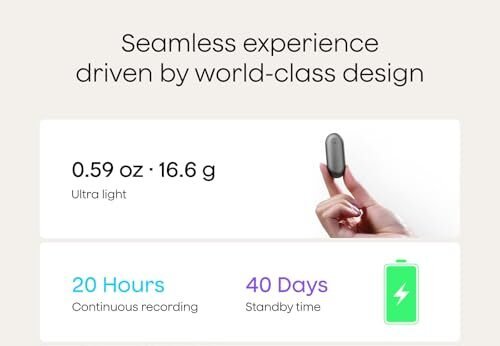
Comulytic Note Pro AI Voice Recorder

The Comulytic Note Pro is aimed at people who learn through listening. It records spoken content and uses AI tools to help turn long audio into notes. This can help with lectures, meetings, interviews, study groups, and personal voice memos. Instead of trying to write every word, a student can stay focused on the speaker.
Good note-taking still needs human review. AI may miss a soft voice, a technical term, or an unclear sentence. I would use this recorder as a second set of ears, not as a perfect school record. Before recording a class or meeting, always ask for permission and follow school, workplace, and local privacy rules.
The main appeal is time. A learner can revisit key points instead of sorting through pages of rushed notes. Voice recording may also help students who have trouble writing quickly or who learn better by hearing ideas again. The exact AI functions, storage method, transcription limits, and app needs should be confirmed on the product page before purchase.
Pros:
- Records lectures and spoken lessons for later review
- AI note tools may reduce manual writing time
- Helpful for students who learn best through audio
- Useful for meetings, interviews, and study groups
- Can help users find the main ideas in long recordings
- Small form factor is easier to carry than a laptop
Cons:
- AI summaries can contain errors or missing details
- Clear audio may depend on distance and background noise
- Recording people without consent can create privacy concerns
My Recommendation
This recorder is best for college students, adult learners, researchers, tutors, and busy professionals. It suits anyone who leaves a lesson with many thoughts but few usable notes. I especially like it for review after class because the learner can listen again and compare the AI summary with the original recording. It earns a place among the Best AI Educational Devices for audio-based study.
I would not buy it for a young child without adult guidance. Children may need help managing recordings, sharing files, and understanding privacy. For older students, the device can support focus and memory, but it should not become a reason to stop active listening. Its overall value depends on reliable recording, easy file access, and the current terms for AI features.
FancyDove AI Assistant Device

The FancyDove AI Assistant Device is designed for quick, conversational help. Its listing highlights unlimited AI use with no subscription needed, which may appeal to families who dislike monthly fees. A learner can ask for an explanation, a new example, a study idea, or help with a simple question. The small assistant format may feel less distracting than a phone full of alerts.
AI answers still need care. A child may receive a confident answer that is incomplete or wrong, especially on complex subjects. I suggest using the device to start learning, then checking important facts in a textbook, class source, or trusted reference. Parents should also review how the device connects, what data it stores, and what controls are available.
This assistant may work well as a daily learning companion. It can explain a hard word in easier language or offer a different way to understand a math step. That matters when a student feels stuck and needs a calm first response. However, it should support thinking rather than do all the thinking for the user.
Pros:
- No subscription claim may lower long-term ownership cost
- Conversational format feels simple for quick questions
- Can help explain school topics in plain language
- Useful for brainstorming stories, projects, and study plans
- May reduce the need to reach for a smartphone
- Suitable for learners who prefer spoken interaction
Cons:
- AI answers require fact checks and adult guidance
- Device features and access may depend on network service
- It may not offer the depth of a teacher or full course
My Recommendation
I see the FancyDove as a good fit for families, teens, and adult learners who want an easy AI helper without a recurring plan. It is best for short questions, idea generation, and simple explanations. Parents can use it to guide a child toward better questions instead of handing over a finished answer. In the Best AI Educational Devices group, this model stands out for its subscription-free claim.
The value is attractive if the no-subscription terms remain clear and active. Buyers should review privacy information, account setup, connectivity, warranty coverage, and age guidance. I would choose it for flexible home learning, but not as a replacement for books, teachers, or careful research. Think of it as a friendly study lamp: useful, but it cannot do the work for you.
AICase AI Smart Translator

The AICase AI Smart Translator combines translation with recording and AI transcription tools. Its listing states support for 136 languages and includes app control. It may also transcribe and summarize audio from lectures, meetings, calls, and travel situations. That blend makes it more flexible than a basic phrase translator.
Students can use it to record a language lesson, review a conversation, or turn spoken ideas into text. The summary feature may help users find the main points faster. Yet no automated transcript is perfect, especially when several people speak at once. I would always check names, numbers, formulas, and important instructions against the original audio.
The app connection is both a strength and a point to inspect. App control may make files easier to manage, but it can add setup steps and account needs. Buyers should confirm whether the non-Pro version includes the tools they want. They should also look at current limits for transcription, summaries, storage, offline work, and supported languages.
Pros:
- Combines translation, recording, and transcription tools
- Lists support for up to 136 languages
- Useful for lectures, meetings, calls, and travel
- AI summaries can make long audio easier to review
- App control may simplify file management
- Can support both language study and note-taking
Cons:
- The non-Pro version may have feature limits
- Transcripts can contain errors in noisy settings
- Some app features may require internet access or an account
My Recommendation
I recommend the AICase for learners who want one device for language practice and audio notes. It suits travelers, university students, language teachers, and people who attend many talks or meetings. The recording and summary tools add useful depth beyond simple translation. For many buyers, it is one of the most versatile Best AI Educational Devices in this group.
Choose it when you value several tools in one small device. Choose a simpler translator if you only need basic conversation help. Before ordering, check the current listing for the difference between the non-Pro and Pro versions. If the app is easy to use and the limits fit your needs, this device can save time every week.
AI Panda Companion Toy for Kids

This interactive panda is a screen-free AI companion made for children ages three and up, according to the product listing. Its soft design may help a child feel more comfortable during play and simple learning activities. The toy is promoted for development, emotional support, and conversation. That makes it different from a translator or note device because it focuses on gentle, child-friendly interaction.
Screen-free play can be helpful when parents want less tablet time. A child may talk, ask questions, practice words, or create pretend stories with the panda. Still, parents should stay involved and treat the toy as a play aid, not a child-care replacement. The current listing should be checked for internet needs, data controls, charging details, age warnings, and the type of AI interaction offered.
I like the idea of learning through play because young children often learn best when they feel safe and curious. A plush companion may invite more speech than a cold screen. However, parents need to watch for repeated answers, unclear content, or behavior that does not suit the child. The strongest results will come when adults add books, outdoor play, songs, and real conversation.
Pros:
- Soft plush design may feel welcoming to young children
- Screen-free format can support less tablet use
- Encourages speech, questions, and pretend play
- Designed for children ages three and up
- May offer comfort during quiet play or bedtime routines
- Can support early language and social practice
Cons:
- Parents must review privacy and data settings
- AI interaction may not suit every child or family
- It should not replace adult care, books, or teacher support
My Recommendation
This panda is best for families seeking a screen-free learning toy for a preschool child. It may help a child practice speech, imagination, and simple social skills in a playful way. I would use it during short, supervised sessions and then build on the child’s questions with a book or hands-on activity. It is the most child-centered option among these Best AI Educational Devices.
The toy offers the most value when parents want interaction without another bright display. It is not ideal for families who want a formal lesson plan, advanced subject help, or complete control without checking the product settings. Review the age range, safety information, charging method, and privacy terms before purchase. A cuddly toy can open the door to learning, but a caring adult still walks through it.
How I Evaluated the Best AI Educational Devices
I looked beyond long feature lists. A device can claim advanced AI and still be hard to use. I focused on the task it solves, the age or user group it fits, and the amount of daily effort it demands. I also considered portability, privacy, internet needs, and the risk of incorrect AI output.
For educational use, accuracy matters more than flashy design. Translation tools should make conversation easier without hiding their limits. Note tools should save time while keeping the original audio available for review. AI assistants should encourage questions, not replace judgment.
I also considered value over time. A low purchase price may not feel low if the device needs a costly plan. A free feature may have limits that matter after heavy use. Since Amazon listings and software terms can change, I recommend checking the latest price, warranty, subscription details, and customer questions before ordering.
What to Look For Before Buying
Choose the right learning task
Start with the problem, not the gadget. A language learner needs translation and practice tools. A college student may need recording and summaries. A young child may benefit more from guided play than from a device that gives long answers.
The best AI educational devices are not all best for the same person. A translator may be perfect for a bilingual family but unnecessary for a child who only needs reading help. Write down the main task first. Then compare products by that task.
Check internet and app needs
Some AI tools need a Wi-Fi connection or a paired phone. Others may offer limited offline functions. This matters in classrooms, road trips, camps, and homes with weak service.
Read the product details closely. Look for words such as online, offline, app control, cloud service, account, and subscription. These terms can change the real cost and ease of use.
Review privacy settings
Educational devices may record voices, store transcripts, or send questions to a cloud service. Parents should know what data the product handles and how to delete it. Adults should ask permission before recording teachers, classmates, clients, or family members.
For children, privacy deserves extra care. Use parental controls when available. Keep the device in shared spaces during early use. Teach children not to share names, addresses, passwords, or private family details with an AI tool.
Think about accuracy
AI can sound sure even when it is wrong. This is why I treat AI output as a helpful draft. I check facts that affect grades, health, money, travel, or safety.
Translation can also miss tone and culture. A direct translation may sound rude or strange. Encourage learners to compare the answer with a teacher, native speaker, dictionary, or trusted source.
Consider age and attention span
A device for a preschooler should be simple and durable. A college student may want advanced controls and file export. A busy adult may care most about battery life and fast setup.
The best educational tool fits the learner’s habits. If setup takes too long, the device may sit in a drawer. If it gives too many distractions, it may harm focus instead of improving it.
Best Features by User Type
| Best for | Why |
|---|---|
| Language learners and travelers | The AI Language Translator Device 2025 offers voice and photo translation for practice and real conversations. |
| Lecture-heavy students and professionals | The Comulytic Note Pro and AICase can help record, transcribe, and review spoken information. |
| Families with young children | The FancyDove and AI Panda provide simple AI interaction, while the panda adds a soft, screen-free play format. |
How to Use AI Devices as Learning Tools
I get the best results when I give an AI device a clear job. Instead of asking, “Teach me science,” I ask, “Explain photosynthesis in five simple steps.” A child might ask for three rhyming words. A language learner might request a slow practice dialogue about ordering food.
Short prompts help users notice weak answers. They also make learning less passive. After the device responds, ask the learner to explain the idea in their own words. This simple step shows whether the tool helped or only made noise.
For note devices, I suggest a three-part review. First, listen to the recording or read the transcript. Next, mark the main idea and two useful details. Finally, write one question that remains unclear. This turns an automatic summary into active study.
For translator devices, repeat the phrase aloud. Change one word and try again. Then use the phrase in a real sentence. A translator becomes more educational when the learner practices instead of only pressing a button.
Common Mistakes to Avoid
The first mistake is buying based on the word “AI” alone. AI is a tool, not a guarantee of quality. Look at the microphone, display, app, language list, battery, and support terms too.
The second mistake is assuming every listed language works in every mode. Voice, text, photo, and offline translation may each have different limits. Confirm the details that matter most to your use.
The third mistake is skipping privacy checks. A device that records a lesson can be useful, but it also creates responsibility. Ask for consent and learn how to erase files.
The fourth mistake is letting the device do all the work. If a student copies an answer without thinking, learning becomes shallow. Use AI to explain, quiz, translate, or organize. Keep the final thinking with the learner.
Are AI Educational Devices Safe for Children?
Safety depends on the device, the settings, and the adult’s guidance. A screen-free toy may reduce visual stimulation, but it can still collect or process voice data. A smart assistant may answer a child’s question, but it may also misunderstand the child.
I recommend starting with short sessions. Listen to the answers. Keep personal data private. Turn off features that the child does not need. Parents should also follow the age guidance on the Amazon listing and the maker’s instructions.
AI should add to a child’s world, not shrink it. Outdoor play, books, crafts, music, teachers, and family talks still matter most. The best AI educational devices support those experiences instead of replacing them.
FAQs Of Best AI Educational Devices
What are the best AI educational devices for language learning?
A dedicated translator is often the best choice for voice practice, travel, and two-way conversation. The AI Language Translator Device 2025 and AICase model both target language use. Compare language counts, offline support, photo tools, app needs, and current feature limits before buying.
Can AI educational devices replace teachers?
No. They can explain, organize, translate, and offer practice. A teacher provides context, care, correction, motivation, and judgment that a device cannot match. Use AI as a study aid, not as the main source of education.
Do these devices need Wi-Fi?
Some features may work offline, while AI answers, app tools, cloud transcription, or updated language packs may need internet access. The exact rule varies by product and feature. Check the current Amazon listing and user guide before purchase.
Are AI voice recorders legal to use in class?
Rules differ by school, workplace, state, and country. Always ask the teacher or other speakers for permission before recording. Store recordings safely and delete them when they are no longer needed.
What should parents check before buying an AI toy?
Check the age range, privacy policy, microphone or recording behavior, internet needs, parental controls, charging method, and return terms. Watch the first sessions and teach children not to share private details.
Final Verdict: Which Should You Buy?
For most language learners, I would choose the AI Language Translator Device 2025. The AICase is better for users who also need recording and summaries, while Comulytic suits lecture-heavy study. FancyDove fits general AI help, and the panda fits young children.
The Best AI Educational Devices work best when they support real practice. Check privacy, internet needs, accuracy, and current Amazon terms before ordering. Choose the device that solves your daily learning problem.