Best AI Gadgets for Productivity: Top Tools to Work Smarter
The best AI gadgets for productivity capture ideas, block distractions, and turn busy work into clear next steps.
You sit down to work, then a message arrives. A meeting starts. Three ideas vanish before you can write them down. This is the daily clutter that steals focus. The right AI gadget can act like a small second brain: it can record thoughts, help organize information, or make phone distractions harder to reach. I tested these tools by looking at ease of use, useful features, privacy, comfort, and value. These picks cover different needs, from meeting notes to deep focus, so you can choose a tool that fits your workday instead of adding more noise.
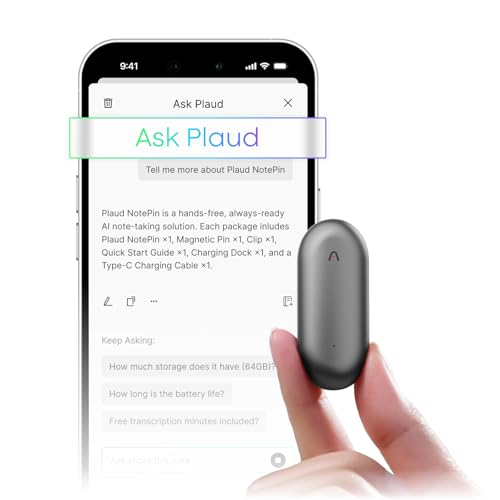
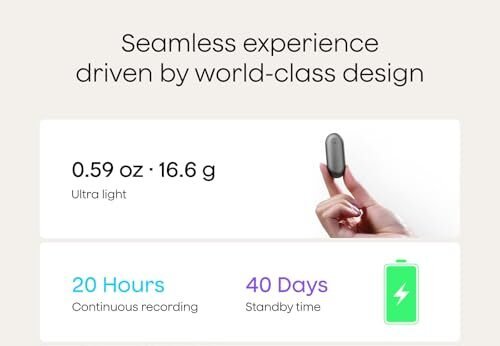
Plaud NotePin Wearable AI Voice…
Plaud Intelligence: Capture conversations in 112 languages and generate accurate transcripts with the Plaud App and Web. Plaud Intelligence uses leading models like GPT-5.5, Claude Sonnet 4.6, and Gemini 3.1…
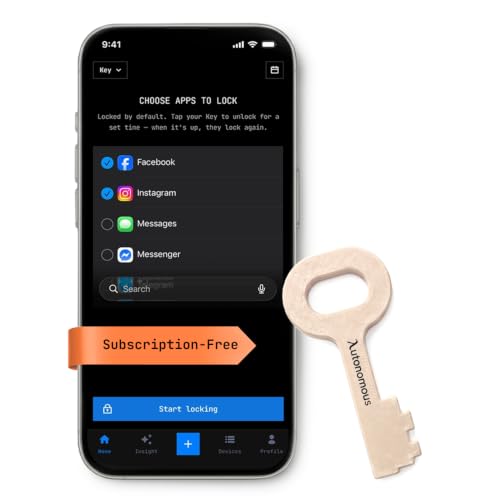
Autonomous Key Access Blocker Device…
PHONE LOCK THAT WORKS WHEN WILLPOWER DOESN’T — Built-in screen time settings take two seconds to ignore; the Autonomous Key doesn’t. Pick your most distracting apps (social media, games, news),…
Plaud NotePin Wearable AI Voice…
Plaud Intelligence: Capture conversations in 112 languages and generate accurate transcripts with the Plaud App and Web. Plaud Intelligence uses leading models like GPT-5.5, Claude Sonnet 4.6, and Gemini 3.1…
Plaud NotePin Wearable AI Recorder

The Plaud NotePin is a small wearable voice recorder built for people who think faster than they type. You can clip or wear it while talking through ideas, attending a meeting, or walking between tasks. Its main appeal is simple: it keeps your hands free while it captures spoken notes. The Cosmic Gray finish also looks more like a small smart accessory than a bulky recording device.
After recording, an AI note service can help turn speech into text and organize the main points. That can save time after interviews, calls, lessons, and quick voice memos. I like this style of gadget because it moves note taking out of the way while a conversation is happening. Still, users should check local recording laws and ask for consent when another person may be recorded.
Pros:
- Hands-free design for meetings and walks
- Compact size that is easy to carry
- Useful for spoken ideas and quick reminders
- AI-assisted transcription can reduce typing time
- Wearable format keeps the recorder close
- Neutral gray color suits work and travel
Cons:
- AI features may depend on an app or paid service
- Voice accuracy can change with noise and distance
- Recording others without permission may create legal concerns
My Recommendation
I recommend this version to writers, students, consultants, sales staff, and anyone who gets useful ideas away from a desk. It is especially helpful for people who dislike stopping a conversation to type notes. The biggest benefit is the smooth path from spoken thought to a searchable record. Among the Best AI Gadgets for Productivity, this one is the strongest choice for capturing information before it slips away.
| Best for | Why |
|---|---|
| Meeting notes | It lets you focus on the speaker instead of the keyboard. |
| Writers and creators | You can save rough ideas while walking or working away from a desk. |
| Busy professionals | A small wearable recorder fits into a fast daily routine. |
Choose it if hands-free recording matters more than a long list of extra features. The value depends on how often you record and whether the related AI plan fits your budget. Availability and service terms can change, so I suggest checking the current Amazon listing before buying.
Autonomous Phone Access Blocker in Beige

The Autonomous Key Access Blocker takes a different approach to productivity. Instead of asking you to use more screen tools, it helps make distracting apps harder to reach. The beige unit is designed for phones used with iPhone and Android devices. This can create a clear pause between the urge to scroll and the choice to return to work.
That pause matters because small interruptions can break the rhythm of deep work. A blocker can support a planned study session, writing period, or morning without social feeds. The product is promoted as subscription-free and includes AI insights to help users understand phone habits. I would still review its setup steps and device support before ordering, since access systems can work differently across phone models.
Pros:
- Helps reduce access to distracting apps
- Supports focused work without relying only on willpower
- Designed for both iPhone and Android users
- Subscription-free positioning may lower long-term cost
- AI insights can make screen habits easier to understand
- Soft beige color looks calm on a desk
Cons:
- It may feel inconvenient when you need fast phone access
- Compatibility should be checked before purchase
- It cannot remove every form of digital distraction
My Recommendation
This is one of the Best AI Gadgets for Productivity for people who already know what distracts them but still reach for the phone. Students, remote workers, gamers, and creators may benefit most from a physical barrier. It works best when you set a clear goal, such as one hour of reading or a phone-free work block. I would not buy it for someone who needs constant access to calls, maps, or urgent work apps.
| Best for | Why |
|---|---|
| Deep work | It creates a real barrier between you and tempting apps. |
| Students | It can support study blocks when social feeds keep pulling attention away. |
| Screen-time control | AI insights may help show patterns that are hard to notice alone. |
The main value here is behavioral, not flashy. A blocker will not make you productive by itself, but it can remove one common obstacle. Check the current listing for phone compatibility, setup details, and availability before placing an order.
Plaud NotePin in Sunset Purple
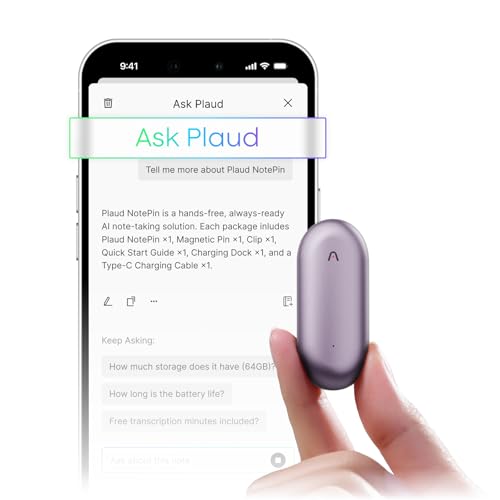
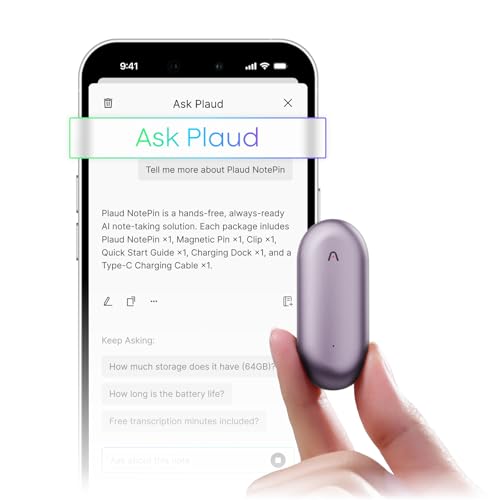
The Sunset Purple Plaud NotePin has the same practical idea as the gray model, but it adds a brighter personal style. This is a wearable AI voice recorder for users who want to save spoken notes without holding a phone. You can use it for meeting ideas, personal reflections, interview notes, and reminders. The small format makes it easier to keep nearby when inspiration arrives.
I see this model as a good match for people who want their tools to show some personality. Color does not change recording quality, but it can make an accessory easier to spot in a bag or on a desk. AI transcription and summaries may help turn a long voice note into useful action points, depending on the software and plan in use. As with any recorder, clear consent and careful handling of private audio remain important.
Pros:
- Hands-free recording supports natural conversations
- Distinct purple finish is easy to recognize
- Useful for ideas, interviews, and voice reminders
- AI tools can reduce manual note sorting
- Small design travels well
- Can help users stay engaged during meetings
Cons:
- Color preference may not suit a formal workplace
- Transcription results may need review and correction
- Cloud or app features may have separate terms or limits
My Recommendation
I would choose the Sunset Purple model for students, coaches, creators, and professionals who want a useful recorder with a more visible look. It belongs on a shortlist of the Best AI Gadgets for Productivity because it helps preserve thoughts at the exact moment they appear. It is also a better fit than a phone for users who want fewer screen interruptions while taking notes. Buy it when color, comfort, and fast voice capture all matter to you.
| Best for | Why |
|---|---|
| Creative work | The wearable format makes it easy to save ideas before they fade. |
| Students and learners | Spoken study notes can be reviewed and organized later. |
| People who want style | The purple finish gives the practical tool a more personal feel. |
Its value grows with regular use. If you often say, “I will remember that later,” this device can give those thoughts a safe place. Review current storage, app, privacy, and subscription details on Amazon before deciding.
Autonomous Phone Blocker in Brown
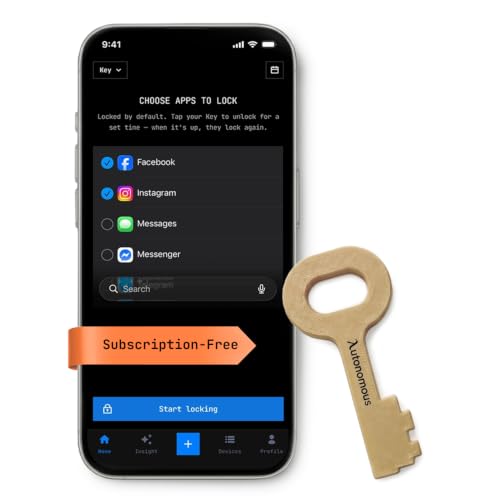
The brown Autonomous Key Access Blocker is made for the same problem as the beige version: the phone is useful, but it can also become a trap. Its purpose is to reduce easy access to distracting apps and encourage more deliberate phone use. The brown finish gives it a warmer, less clinical look on a home office desk. For many users, a physical tool feels more serious than another app reminder.
This device may help during writing, homework, meditation, or planned offline time. The product description highlights AI insights, which may help users see when and why they lose focus. I like that the concept aims to change the environment rather than blame the user. However, no blocker is perfect, so success will depend on your goals, habits, and willingness to keep the device active.
Pros:
- Physical access control can make distraction less automatic
- Works with iPhone and Android use cases
- May support better focus during scheduled work periods
- AI insights can reveal repeated phone habits
- Subscription-free design may simplify ownership
- Brown finish suits many home office spaces
Cons:
- It can slow access when you need an app quickly
- Some users may find the routine hard to maintain
- Phone and operating system support should be confirmed
My Recommendation
The brown version is best for home-office workers, freelancers, and families who want a visible focus aid. I would place it among the Best AI Gadgets for Productivity for anyone who has tried app timers and ignored them. Its strength is the small moment of friction it adds before a distraction. Pick this finish if you prefer a warm, subtle accessory and want to build phone-free work sessions.
| Best for | Why |
|---|---|
| Remote workers | It can help separate work time from casual phone browsing. |
| Freelancers | It supports self-made work rules without needing an employer system. |
| Home offices | The brown color blends into a calm desk setup. |
This product offers the most value when you use it as part of a simple plan. Set a work block, define which apps you need, and keep your phone out of reach when possible. Confirm the latest device details and availability on Amazon because product support can change.
Plaud NotePin in Lunar Silver

The Lunar Silver Plaud NotePin is the cleanest-looking option in this group. It offers the same hands-free voice capture concept in a finish that fits a modern desk, office, or travel kit. I find silver accessories easy to pair with other devices, and the light color makes the unit simple to spot. It is built for people who want a discreet tool that can stay ready throughout the day.
Use it to record a thought, summarize a conversation, or preserve a list while your hands are busy. The AI workflow can help convert speech into text and make long recordings easier to review. It will not replace careful editing, since names, technical terms, and background noise can affect a transcript. Still, the time saved can be meaningful for anyone who spends hours turning conversations into written notes.
Pros:
- Professional silver finish suits many settings
- Wearable design keeps both hands free
- Useful for meetings, calls, and personal notes
- AI transcription can speed up review
- Small size supports daily carry
- Helps reduce the need to type during conversations
Cons:
- AI output may require proofreading
- Privacy rules matter when recording meetings or calls
- Some advanced features may rely on an app or service plan
My Recommendation
I recommend the Lunar Silver NotePin to consultants, managers, interviewers, and professionals who want a polished wearable recorder. It may be the best-looking choice among these Best AI Gadgets for Productivity, especially for formal work settings. The key benefit is not simply recording; it is reducing the mental load of remembering every detail. If you prefer a neutral finish and plan to use the device often, this model offers strong everyday value.
| Best for | Why |
|---|---|
| Office meetings | The silver style looks neat and professional in a work setting. |
| Interviews | Hands-free capture lets you focus on the person speaking. |
| Daily voice notes | Its small design makes quick recording easy to repeat each day. |
The Lunar Silver version is a good balance of function and appearance. I would select it when you want a recorder that does not look out of place in a client meeting. Check the Amazon page for current pricing, included features, and service terms before purchase.
How AI Gadgets Improve Productivity
Productivity is not about filling every minute. It is about giving your best attention to the task that matters. AI gadgets can help in three simple ways: they capture information, reduce mental clutter, and protect focus. Each role solves a different problem.
A voice recorder helps when your hands or eyes are busy. You can speak an idea while walking, save a question during a meeting, or record a reminder before it disappears. AI transcription then gives you a written starting point. This is useful because memory often loses small details soon after a conversation ends.
A phone blocker supports the other side of the problem. Instead of helping you collect more information, it helps you avoid too much information. Notifications, short videos, and social feeds can act like open tabs in your mind. A physical block can close some of those tabs before they steal your work session.
The best AI gadgets for productivity do not try to run your whole life. Good tools stay quiet until you need them. They remove a small point of friction, then let you think, write, learn, or rest. That is why I judge these products by the habits they support, not by the number of features listed on a box.
What I Look For in the Best AI Gadgets for Productivity
Simple daily use
A productivity gadget must be easy to use when you are tired or rushed. If setup takes too long, the product may sit in a drawer. I look for clear controls, quick access, and a design that fits a real routine. The best tool should feel like a shortcut, not another project.
Useful AI, not empty hype
AI should save time or improve clarity. Transcription, summaries, and habit insights can do that when they work well. A long feature list means little if the output needs more work than the original task. I favor tools that create a useful first draft while leaving the final decision to the user.
Privacy and consent
Voice tools can handle sensitive information. Before recording, I check who may hear the audio, where files may be stored, and how long they remain available. I also follow local rules for recording conversations. A productivity gain is not worth exposing private data or damaging trust.
Comfort and portability
A wearable recorder should feel light enough for long use. A focus device should fit naturally in a home or office space. Small details matter here. A product that is easy to carry and easy to see is more likely to become part of your day.
Cost beyond the first purchase
The device price is only one part of ownership. Some AI services use monthly plans, usage limits, or cloud storage. I recommend checking those details before buying. Subscription-free products can be attractive, but users should still confirm what the base device can do on its own.
Which Plaud NotePin Color Should You Choose?
The three Plaud NotePin listings serve the same main use: hands-free voice capture. The practical difference is color and personal style. Cosmic Gray is the safest choice for most work spaces. Sunset Purple feels more expressive and is easy to find in a crowded bag. Lunar Silver has the most polished, neutral look.
Do not choose based on color alone if your needs are different. First, confirm that the recording workflow fits your phone and your preferred note system. Then check current AI service terms, storage rules, and included features. Once those points match, pick the finish you will enjoy wearing and using.
Phone Blocker Beige vs. Brown
The beige and brown Autonomous phone blockers focus on the same goal: less access to distracting apps and more control over screen time. The choice is mostly visual. Beige has a light, soft look that fits bright desks and simple rooms. Brown feels warmer and may blend better with wood furniture and home office setups.
The more important choice is whether you need a physical barrier at all. If you often bypass app timers, this type of device may help. If your work depends on quick access to many apps, it could slow you down. I suggest starting with a clear use case, such as a 45-minute focus block, before making it part of your full routine.
How to Use AI Productivity Gadgets Well
Start with one problem. Do not buy a recorder and blocker, then change every habit in one day. Choose the task that causes the most waste. If forgotten ideas hurt your work, start with the NotePin. If phone use breaks your focus, start with the Autonomous blocker.
Set a small target. Record one meeting each day, or block distracting apps for one work session. Small wins build trust in the device. They also show whether the gadget fits your life before you spend more time or money on accessories and services.
Review AI output before you act on it. A transcript can miss a name. A summary can leave out context. AI is a helpful assistant, not a perfect witness. For important work, compare the summary with the original audio or your own memory.
Keep privacy in the routine. Tell people when you record. Avoid sensitive audio when you do not need it. Use strong account protection, update the app, and remove old files when they no longer serve a purpose. These simple steps make AI tools safer and easier to trust.
Are AI Gadgets Better Than Productivity Apps?
Not always. An app may be enough for someone who already manages screen time well. A gadget becomes useful when the physical object changes your behavior or removes a task. A recorder can be faster than opening a phone, finding an app, and typing. A blocker can work better than a reminder because it changes access itself.
I think the best AI gadgets for productivity work beside normal apps, not against them. Use a recorder to collect ideas, then place the important ones in your task system. Use a blocker during focus time, then restore access when work ends. The gadget handles one narrow job, while your main tools handle the larger plan.
Who Should Buy These AI Productivity Gadgets?
Students can use a NotePin to save lecture thoughts and review them later. Writers can speak rough ideas while walking. Managers can capture action points after a busy discussion. Remote workers can use a phone blocker to create a stronger line between work time and casual browsing.
These tools may also help people with busy minds. When every idea feels urgent, a voice recorder gives each thought a place to wait. When every notification feels important, a blocker creates a calm gap. The goal is not perfect focus. The goal is fewer small leaks in your attention.
People who need instant phone access may prefer a standard app. Users who handle confidential information should study privacy terms with care. Anyone buying a recorder for group conversations should understand consent rules in the places where recording occurs. A good match depends on the situation, not just the product rating.
FAQs Of Best AI Gadgets for Productivity
What are the Best AI Gadgets for Productivity?
The best options in this review are the Plaud NotePin wearable recorders and Autonomous phone access blockers. NotePin models help capture and organize spoken information. The blockers help reduce phone distractions and support focused work sessions.
Does the Plaud NotePin record and transcribe automatically?
The NotePin is designed to record spoken audio, while transcription and other AI features may depend on its connected software. Review the current product page for exact limits, supported features, and any service terms.
Are AI voice recorders legal to use in meetings?
Recording laws vary by state and country. Some places require the consent of one person, while others may require consent from everyone recorded. Always tell participants and follow the rules that apply to your meeting.
Can a phone blocker stop all distractions?
No device can remove every distraction. A blocker can add friction and make certain apps harder to reach. It works best with a clear schedule, a quiet workspace, and a realistic focus goal.
Do I need a subscription for these productivity gadgets?
It depends on the model and feature. The Autonomous listings are promoted as subscription-free, while AI recording tools may offer different service levels. Check the latest Amazon listing and app terms before buying.
Final Verdict: Which Should You Buy?
For most people, the Plaud NotePin is the best overall choice because it saves ideas without pulling out a phone. Choose the Autonomous blocker if distraction, not note taking, is your main problem.
The Best AI Gadgets for Productivity work best when they support one clear habit. Pick the tool that removes your biggest daily obstacle, and check current price, privacy terms, and availability before ordering.

Similar Posts
































