Best AI Coding Robots: Top Tools For Developers
The best AI coding robots make programming hands-on, playful, and easier to understand for curious learners.
A child may enjoy games but lose interest when coding feels like a page of hard commands. A coding robot changes that. Kids can write code, watch a robot move, find bugs, and try again. I tested the key buying points that matter most, including age fit, coding languages, setup, build quality, learning value, and room to grow. This guide compares five popular choices so you can find the best AI coding robots for a young beginner, a school project, or an older learner ready for Python and robotics.

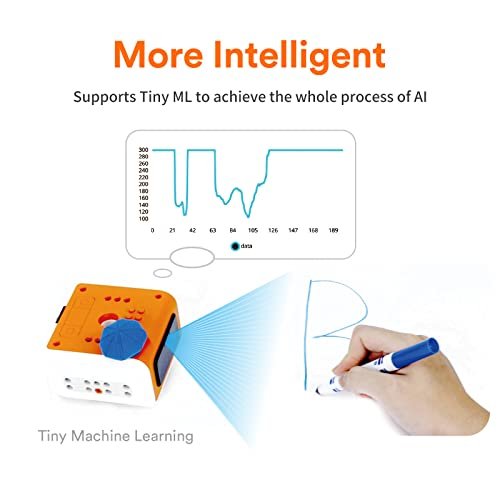
MatataStudio VinciBot Coding Robot for…
BE A CODING MASTER WHILE PLAYING: Kids can make VinciBot coding robot recognize items, ask weather, make it sing, dance, perform light shows, or express its mood through the LED…
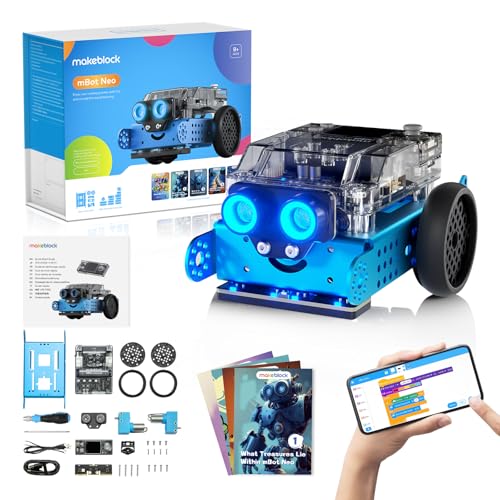
Makeblock mBot2 Coding Robot for…
Learn Through Play: Kids can ask mBot2 about the weather, make it sing, change the lights to make it move, or flip it over to watch it get grumpy! There…
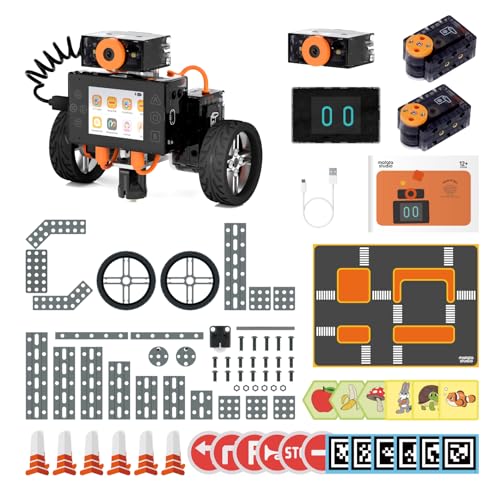
MatataStudio Nous AI Robot for…
MatataStudio Nous AI Robot: An educational STEM robotics kit for kids 12+ to learn and experiment with how AI works, computer programming with Scratch and Python, electronics assembly and robotics…
MatataStudio VinciBot Coding Robot

MatataStudio VinciBot is a strong middle-ground pick for children who want more than a simple remote-control toy. It supports visual coding with Scratch and also introduces Python, which gives the robot a useful path from basic blocks to text-based programming. The design suits kids around ages 8 to 12, but the right age still depends on reading skill and patience. I like this type of learning path because the child can start with quick wins and move toward real code.
VinciBot works best when a child learns by doing. Instead of staring at a screen, the learner creates a command and sees the result through movement, lights, sounds, or sensor actions. That instant feedback makes errors feel like part of the game rather than a failure. Parents should still plan to help with the first setup, app connection, and early lessons because robotics kits can feel confusing before the child learns the basic controls.
Pros:
- Supports both Scratch and Python learning
- Good fit for children moving beyond beginner coding
- Hands-on robot feedback makes lessons memorable
- Offers room for creative projects and experiments
- Can help connect coding with sensors and motion
- More useful for long-term learning than a single-purpose toy
Cons:
- Younger children may need adult help at the start
- Python work may feel advanced for a first-time coder
- Battery charging and app setup add extra steps
My Recommendation
I recommend VinciBot for a child who already enjoys puzzles, Scratch games, or building toys and now wants a bigger challenge. It is one of the best AI coding robots for families seeking a clear bridge between block coding and Python. It also suits homeschool lessons, after-school STEM work, and parent-child projects. I would not choose it as the first coding toy for a child who cannot yet follow simple screen instructions. Its overall value comes from the learning runway: the child can begin with blocks and keep growing instead of outgrowing the robot quickly. Check the current Amazon listing for included parts, software support, and price before ordering.
Makeblock mBot2 Coding Robot

Makeblock mBot2 is built for children who like to assemble, test, and rebuild. The kit supports Scratch and Python, so it can serve both visual learners and students ready for more direct coding. Its educational appeal comes from the mix of construction and programming. A child does not just tell a finished toy what to do; the building process helps explain how motors, sensors, wheels, and structure work together.
In my view, mBot2 feels especially useful for ages 8 to 14 and older beginners. It gives kids a project with enough depth for repeated use, rather than a short activity that ends after one afternoon. The build may take longer than expected if the child works alone, but that is not always a bad thing. Assembly teaches patience, careful reading, and problem solving before the first line of code even runs.
Pros:
- Combines robot building with coding practice
- Supports Scratch and Python programming
- Good age range for school and home STEM work
- Encourages repeated projects instead of one-time play
- Helps explain the link between hardware and software
- Works well for children who enjoy mechanical projects
Cons:
- Assembly can take time and close attention
- Not ideal for a child who wants instant play
- Some advanced projects may need adult guidance
My Recommendation
mBot2 is my best choice for a young maker who likes LEGO-style building, machines, and open-ended projects. Among the best AI coding robots, it stands out as a balanced learning kit because it gives equal weight to construction and code. I would also consider it for classrooms, robotics clubs, and families with more than one child who may share project ideas. It offers strong value when the goal is skill growth rather than a quick electronic toy. Before buying, review the current listing to confirm the package contents and software details.
MatataStudio Nous AI Robot

MatataStudio Nous is aimed at older learners who want a more serious robotics and coding experience. Its recommended audience starts around age 12, and that makes sense because Python, sensors, and AI-related concepts can require stronger reading and problem-solving skills. The robot supports Scratch and Python, giving students two ways to create behavior. That combination can make a difficult topic feel less like a lecture and more like a lab.
Nous is not the choice I would make for a preschooler or a child who needs very simple instructions. It is better suited to a teen who can follow a project guide, troubleshoot a connection, and accept that the first attempt may not work. I appreciate that it invites deeper exploration, since AI and robotics are best learned through small tests. Still, families should check the device, app, and computer requirements before purchase because advanced kits may rely on a compatible setup.
Pros:
- Designed for older children and teen learners
- Supports Scratch and Python coding
- Introduces more advanced robotics concepts
- Encourages independent projects and testing
- Useful for STEM clubs and technology classes
- Offers a better challenge for learners past simple blocks
Cons:
- Too advanced for many younger beginners
- May require a computer, app, or other setup steps
- Students may need help when debugging complex projects
My Recommendation
I recommend Nous for teens, motivated preteens, and adult-supported learners who want to explore AI and robotics beyond basic commands. It is one of the best AI coding robots for a student who sees coding as a future skill rather than only a game. It may also fit a science fair, coding club, or home lab where the learner has time to test ideas. The value is highest for a curious student who enjoys solving problems and does not expect instant results. Confirm current compatibility and included accessories on Amazon before placing an order.
Ozobot Evo Coding Robot Kit

Ozobot Evo is a compact coding robot made for younger learners, with a listed age range around 5 to 11. Its small size makes it less intimidating than a large construction kit, and children can begin with simple visual coding ideas. This can be a major advantage for a first introduction to sequences, commands, and cause and effect. A child draws or builds an instruction, then watches the robot respond like a tiny learner on the table.
I see Ozobot Evo as an easy entry point for families and teachers who want short, low-pressure lessons. It can support classroom activities because children can share tracks, compare results, and talk about why a command worked. The trade-off is that older or advanced users may want more hardware depth and longer projects. It is also wise to supervise younger children around small parts and keep expectations realistic about what a compact beginner robot can do.
Pros:
- Friendly starting point for young coding learners
- Small size fits desks, tables, and classrooms
- Makes sequencing and logic easy to see
- Works well for short lessons and group activities
- Less mechanical work than a full buildable robot
- Can help children gain confidence before harder coding kits
Cons:
- Advanced learners may outgrow it sooner
- Small parts call for supervision with young children
- Screen or app use may be part of the learning process
My Recommendation
Ozobot Evo is best for a first-time coder, a kindergarten or elementary student, or a teacher who needs an approachable group activity. Of the best AI coding robots in this guide, it offers one of the gentlest introductions to coding logic. I would choose it for a child who learns through color, motion, and quick feedback rather than long written lessons. It gives good value when ease of use matters more than advanced Python work. Review the current Amazon page for the exact kit contents and recommended software before buying.
Petoi Bittle X V2 Robot Dog

Petoi Bittle X V2 takes coding into a more advanced and exciting form: a programmable quadruped robot dog. The pre-assembled design can save time compared with a full build kit, while the open-source approach gives experienced learners more room to inspect, change, and expand the robot. Its alloy servos and four-legged structure make it feel closer to a real robotics project than a simple car robot. This is a strong option for older students, hobbyists, and adults who want to learn through motion.
A robot dog also creates a different kind of challenge. Walking requires several motors to work together, so learners can see how timing, balance, and control affect performance. The voice-control and AI-related features may add fun, but buyers should not confuse them with a complete artificial intelligence course. Bittle X V2 is best when the user enjoys code, electronics, and troubleshooting. It may feel too complex for a child who only wants a toy that works without setup.
Pros:
- Pre-assembled format can reduce build time
- Four-legged design makes robotics more engaging
- Open-source approach supports deeper experimentation
- Useful for advanced STEM and hobby projects
- Motion control teaches timing and coordination
- Offers more technical depth than many beginner robots
Cons:
- Not the best choice for very young beginners
- Advanced setup and coding may require experience
- Robot dogs can need careful handling and maintenance
My Recommendation
I recommend Bittle X V2 for a teen, college student, maker, or adult hobbyist who wants a serious robotics challenge in a small format. It belongs among the best AI coding robots for users who care about open-source learning and mechanical motion. I would not buy it as a first toy for a child who has never used code or electronics. Its value comes from the ability to keep exploring after the first demonstration, especially for users who enjoy adjusting movement and testing new behaviors. Check the Amazon listing for current hardware, controller, software, and accessory details.
How I Compared the Best AI Coding Robots
Choosing a coding robot is not only about the number of sensors or the word “AI” on the box. I look at the full learning experience. A robot should make the first project feel possible, but it should also offer enough depth to stay useful after the first week. I also consider the adult experience because setup, charging, software, and support can shape whether a child keeps using the kit.
Age and Skill Level
Age labels offer a helpful starting point, but they do not tell the whole story. A patient seven-year-old may handle a simple block-coding activity, while a ten-year-old may need help reading a project guide. Older learners may want Python, electronics, or open-source access. I matched each robot with the type of learner most likely to enjoy it.
For a young beginner, Ozobot Evo makes the most sense. For a child ready to build, mBot2 is more suitable. VinciBot sits between beginner and advanced use. Nous and Bittle X V2 demand more focus, so they work better for teens and experienced users.
Coding Languages and Learning Path
Scratch uses visual blocks that snap together. This removes many typing errors and helps children learn order, loops, events, and conditions. The Scratch Foundation uses these core ideas to introduce creative computing to young learners. Python uses typed commands, so it can teach a more direct programming habit, but it may feel hard at first.
That is why support for both Scratch and Python matters. A child can begin with blocks, then repeat the same idea in text. The transition is not automatic, but a robot that supports both styles gives the learner more options. In this comparison, VinciBot, mBot2, and Nous offer the clearest growth path for users who want to progress.
Build and Setup
A buildable robot can teach valuable skills, but it also adds friction. Children must sort parts, follow steps, and sometimes tighten small screws. That process can build confidence when an adult treats it as part of the lesson. It can also cause frustration if the child expects instant play.
Ozobot Evo offers a simpler start. Bittle X V2 reduces assembly with a pre-assembled format, but its software and robotics concepts remain advanced. mBot2 gives the most traditional maker experience in this group. Before buying, I suggest checking whether the package includes the battery, charging equipment, controller, and other items your planned project requires.
Project Depth
The best AI coding robots should support more than one short demonstration. Look for projects that change speed, react to sensors, follow a path, use conditions, or combine several actions. A robot becomes more valuable when the learner can ask, “What happens if I change this command?”
VinciBot and mBot2 offer a strong balance for repeated projects. Nous gives older learners more room to explore advanced ideas. Bittle X V2 offers the most unusual mechanical challenge because walking is harder to control than rolling. Ozobot Evo works well for short activities, but advanced users may eventually want more hardware options.
Safety, Privacy, and Screen Use
Parents should check more than a robot’s movement. Review the app permissions, account needs, internet requirements, and voice features before allowing a child to use the kit alone. A voice-controlled robot may need a microphone or connected device, and that can create privacy questions. I also recommend adult supervision for small parts, charging, moving motors, and classroom use.
The Federal Trade Commission has long advised families to think about children’s privacy when connected toys collect or transmit information. Buyers should read the current product documentation rather than assume every robot works offline. These checks do not reduce the fun. They help the family use the robot with confidence.
Best Features at a Glance
| Best for | Why |
|---|---|
| Young beginners | Ozobot Evo offers simple, visual coding with quick feedback. |
| Growing coders | VinciBot and mBot2 support a path from Scratch to Python. |
| Advanced learners | Nous and Bittle X V2 provide more challenging robotics projects. |
What Does “AI” Mean in a Coding Robot?
The term AI can mean different things in a toy listing. Some robots use sensors and programmed rules. Others may include voice control, recognition features, or software that helps the robot respond to input. These features can be useful, but they do not always mean the robot runs a modern generative AI model.
I prefer to judge the learning value first. A child who learns conditions, loops, sensor input, and debugging gains real programming skills even when the robot uses simple rules. The National Science Foundation describes computational thinking as a way to solve problems through ideas such as decomposition, patterns, and algorithms. Coding robots can make those ideas visible.
For parents, the main question is simple: does the robot help the learner understand how code creates action? If the answer is yes, the product can provide real STEM value. The “AI” label should add context, not replace careful research.
Tips for Getting More From a Coding Robot
Start With One Small Goal
Do not begin with the biggest project in the manual. Ask the child to make the robot move forward, stop, and turn. Then add one new idea, such as a light, sound, sensor reaction, or repeat command. Small wins create momentum.
Let the Child Find the Bug
It can be tempting to fix the code right away. I suggest asking questions instead. What did the robot do? What did you expect? Which command controls that action? This turns a mistake into a short investigation.
Keep a Project Notebook
A simple notebook can hold drawings, code notes, and test results. The learner can write what changed between version one and version two. This habit helps connect creative play with the careful process used by real programmers.
Use Real-World Challenges
Give the robot a task with a clear purpose. It might deliver a small object, follow a path, avoid a barrier, or perform a dance. A goal gives the code meaning. It also makes it easier to measure success.
Protect Time for Free Play
Not every session needs a lesson. Free play lets children invent strange ideas and test limits. That open time often leads to better questions than a strict worksheet. A good coding robot should feel like a tool for imagination, not another chore.
Which Coding Robot Is Best for Different Users?
Best for a First Coding Experience
Ozobot Evo is the simplest recommendation for a young child who has little or no coding experience. It offers a small learning curve and quick results. The child can see the link between an instruction and a robot action without first completing a long mechanical build.
Best for a Growing Elementary Student
VinciBot is a better fit when the learner already understands basic blocks and wants more choices. Its Scratch and Python support can help prevent early boredom. It also gives parents a way to keep the same robot as the child develops.
Best for Building and Coding Together
Makeblock mBot2 is the strongest choice for a child who likes to build machines. The assembly becomes part of the education. It can also encourage teamwork when siblings or classmates divide tasks between building, coding, and testing.
Best for Teen Robotics Study
MatataStudio Nous suits a motivated older learner. It presents more challenge and can support longer projects. This is the robot I would consider when the student wants to learn beyond simple commands and has an adult or teacher available for support.
Best for an Advanced Hobbyist
Petoi Bittle X V2 is the most specialized option. Its robot-dog design creates a memorable challenge, and the open-source angle may appeal to users who want to inspect and alter the system. It requires more patience, but that is also what makes it rewarding.
Common Buying Mistakes to Avoid
Buying by the Age Label Alone
The age range does not measure every child’s reading level, motor skill, or patience. Read the setup steps and project examples. A robot listed for ages 8 and up may still need adult help if the kit uses Python or many parts.
Assuming Every Kit Includes Everything
Some robots require a compatible phone, tablet, computer, battery, or charger. Product packages can change over time. I always advise checking the current Amazon listing and the manufacturer’s instructions before purchase.
Expecting AI to Do the Learning
A robot cannot replace practice. It can make practice more engaging, but the child still needs to plan, test, and debug. The best AI coding robots act like a friendly lab partner. They do not do the thinking for the learner.
Ignoring Storage and Charging
Small parts disappear easily. A storage box or labeled tray can save many hours. Charging also matters. A robot that sits empty after every session will not receive much use, no matter how impressive its features look.
Choosing Complexity Without Support
Advanced hardware sounds exciting, but a difficult first experience may cause a child to quit. Match the product to the learner’s current skill. It is better to complete five simple projects than abandon one oversized project.
FAQs Of Best AI Coding Robots
What is the best AI coding robot for beginners?
Ozobot Evo is a good starting choice for many young beginners because it offers simple, visible coding activities. For an older child who wants to build and learn Python later, VinciBot may offer more room to grow.
Are coding robots useful for learning Python?
Yes. Robots such as VinciBot, mBot2, and Nous support Python-based learning. Python can feel harder than Scratch because the learner must type exact commands, so starting with visual blocks may help.
Do coding robots need Wi-Fi?
Requirements vary by model and project. Some features may need an app, computer, Bluetooth connection, or internet access. Check the current product instructions and app details before buying.
Are AI coding robots safe for children?
They can be safe when used as directed. Adults should supervise small parts, moving motors, charging, and connected features. Parents should also review app permissions and voice or data settings.
Can adults use these coding robots?
Yes. Adults may enjoy mBot2, Nous, or Bittle X V2 for robotics practice and hobby projects. Ozobot Evo is more focused on young learners, while Bittle X V2 offers the most technical depth in this group.
Final Verdict: Which Should You Buy?
For most growing learners, I would choose MatataStudio VinciBot because it balances Scratch, Python, hands-on play, and long-term value. Ozobot Evo is better for young beginners, while Bittle X V2 suits advanced users.
The best AI coding robots turn hard ideas into visible action. Check age fit, software needs, included parts, and current Amazon pricing before you buy.

Similar Posts
































