Best Ergonomic Keyboard: Top Picks For Comfort
The best ergonomic keyboard blends natural hand support, easy setup, and comfort for long hours at your desk.
If your wrists ache after typing, your shoulders feel tight, or your fingers tire by midafternoon, your keyboard may be part of the problem. A good ergonomic keyboard acts like a gentle guide for your hands. It helps keep your wrists straighter, your elbows relaxed, and your fingers closer to a natural position. I compared split layouts, wave designs, wrist rests, wireless links, backlighting, and daily-use details to find the strongest options for work, study, gaming, and home use.

Logitech Ergo K860 Wireless Ergonomic…
Improved Typing Posture: Type more naturally with a curved, split keyframe and reduce muscle strain on your wrists and forearms thanks to the sloping keyboard design Pillowed Wrist Rest: Curved…

Logitech Wave Keys Wireless Ergonomic…
Feel the Wave: Get comfier with Wave Keys, the ergonomic wireless keyboard shaped to help workdays go easier on you Type in comfort all day long: The wavy design of…

SABLUTE Ergonomic Wireless Keyboard and…
Premium Comfort & Craftsmanship: Experience the luxury of a silky-smooth faux lambskin leather palm rest paired with a refined matte finish. Unlike fabric, this synthetic leather is durable, sweat-proof, and…
Logitech Ergo K860 Wireless Keyboard

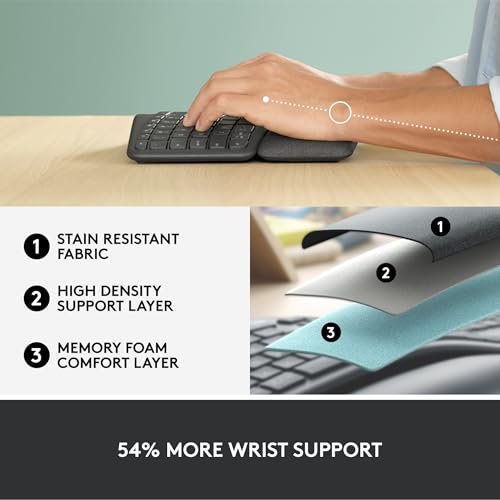
The Logitech Ergo K860 remains one of the most complete choices for people who type all day. Its curved, split design helps place each hand at a more natural angle. The raised center gives the board a subtle tent shape, while the sloped front can reduce pressure on the wrists. The included cushioned palm rest also gives your hands a soft place to land between tasks.
This keyboard uses a full-size layout with a number pad, so it suits office work, spreadsheets, and home budgets. It connects wirelessly and supports more than one device, which makes switching between a computer and a laptop simple. The keys use a low-profile design with a quiet feel that fits shared rooms. It does take time to learn because the center gap and curved layout feel different from a flat keyboard.
Pros:
- Split design encourages a more natural hand position
- Soft palm rest supports the wrists during long sessions
- Full-size layout includes a useful number pad
- Wireless connection keeps the desk clear
- Multi-device support helps users switch between systems
- Quiet keys work well in offices and shared spaces
- Adjustable front legs let you change the typing angle
Cons:
- Large shape takes more desk space than a flat keyboard
- Learning curve may last several days
- Not designed for users who prefer mechanical key switches
The Ergo K860 is best for office staff, writers, students, and anyone who spends many hours entering text. It gives more support than a standard keyboard without demanding a highly unusual hand position. I especially like the number pad because many ergonomic boards remove it to save space. If you want a premium wireless board with a strong wrist rest, this is one of the safest picks in the Best Ergonomic Keyboard search.
Logitech Wave Keys Wireless Keyboard

The Logitech Wave Keys takes a softer approach to ergonomic typing. Instead of using a sharply divided split, it forms a gentle wave across the key rows. This shape guides your fingers without making the keyboard feel like a major change. A built-in palm rest adds support and helps create a smooth transition from the desk to the keys.
I see this model as a strong choice for people who want comfort but do not want a dramatic split board. Its wireless setup keeps cables away from the work area, and the full layout remains familiar for most users. The quiet key action suits calls, study rooms, and open offices. The curved profile may not offer enough correction for someone who needs a fully split or tented design.
Pros:
- Gentle wave shape feels easy to learn
- Integrated palm rest supports relaxed wrists
- Familiar layout reduces the adjustment period
- Wireless design gives the desk a cleaner look
- Full-size format works well for daily office tasks
- Quiet typing helps reduce noise around others
Cons:
- Less adjustable than a true split ergonomic keyboard
- Wide body needs more room than a compact model
- Built-in wrist support cannot be removed or replaced easily
The Wave Keys is best for a new ergonomic keyboard buyer who wants a simple first step. It offers a more natural curve than a flat board but avoids the steep learning curve of aggressive split layouts. I would choose it for general typing, email, school work, and remote work. For many people, this balance makes it the most approachable Best Ergonomic Keyboard option.
SABLUTE Ergonomic Keyboard and Mouse Combo

The SABLUTE ergonomic combo stands out by including both a keyboard and a mouse. Its wave key layout aims to keep the hands in a more natural position than a straight, flat board. A soft faux lambskin palm rest adds a cushioned feel, which may appeal to users who dislike hard plastic wrist supports. The rechargeable battery also removes the need to keep buying disposable batteries.
Backlighting gives this model extra appeal for dim rooms and evening work. The keyboard supports common desktop systems, including Windows, Mac, and Chrome OS, though key labels and shortcuts can vary by platform. The included mouse makes this a useful value pick for someone building a whole workstation at once. It may feel less refined than a premium Logitech model, and buyers should confirm the layout and connection details before ordering.
Pros:
- Includes a matching wireless mouse
- Rechargeable battery helps reduce battery waste
- Large battery capacity supports extended use between charges
- Backlighting helps with low-light typing
- Soft palm rest feels comfortable against the skin
- Wave layout offers a simple ergonomic transition
- Works with several popular operating systems
Cons:
- Combo design gives fewer customization choices
- Backlighting may require more frequent charging
- Key feel and build quality may not match premium brands
- Mouse shape may not suit every hand
This is best for budget-focused users who need a keyboard and mouse in one purchase. It also suits dorm rooms, home offices, and starter workstations where value matters. I would consider it for people who want backlit keys and rechargeable power without paying for two separate accessories. In the Best Ergonomic Keyboard category, it offers a broad feature list for the money.
Logitech Wave Keys Wireless Keyboard Rose

The rose version of the Logitech Wave Keys offers the same basic ergonomic idea as the graphite model, but adds a warmer color for a more personal desk setup. Its wave shape supports a relaxed hand path without separating the keyboard into two distinct halves. The integrated wrist rest helps keep the lower arms supported during long writing sessions. This design can feel less intimidating for someone moving away from a basic office keyboard.
Like the graphite version, it focuses on quiet and familiar typing rather than gaming features. The full-size arrangement gives easy access to navigation keys and the number pad. Wireless operation helps keep the desk tidy, which matters in small home offices. The rose finish may show dust or marks more clearly than a darker surface, and the keyboard still needs a short adjustment period.
Pros:
- Friendly wave design suits first-time ergonomic users
- Rose color adds style to a home or personal workspace
- Integrated wrist rest provides steady support
- Full-size layout works for numbers and office commands
- Quiet keys fit shared spaces
- Wireless design reduces cable clutter
Cons:
- Color choice may not suit a professional office
- Wave design offers less correction than a split model
- Large footprint can crowd a small desk
I recommend the rose Wave Keys to home workers, students, and anyone who wants comfort with a softer visual style. It works well when the keyboard must look good as well as feel good. The design is easy to understand, so users can gain comfort without rebuilding their typing habits from scratch. It is a strong Best Ergonomic Keyboard choice for a calm, attractive desk.
ProtoArc EK01 Plus Backlit Keyboard

The ProtoArc EK01 Plus combines a full-size ergonomic layout with Bluetooth connectivity and backlit keys. Its curved shape helps guide the hands toward a less rigid position. The blue finish gives it a distinct look, while the full layout keeps the number pad available for work. This combination makes it useful for people who want comfort but also need practical office features.
Backlighting is helpful when the room is dark or when you work late without using a bright desk lamp. Bluetooth pairing can reduce cable clutter and make the keyboard useful with compatible computers and tablets. The board is a good middle ground between a basic flat model and a more specialized split board. Buyers who need a very soft wrist rest or a deeply separated layout may want another option.
Pros:
- Backlit keys support work in dim rooms
- Full-size layout includes a number pad
- Bluetooth connection supports a clean desk setup
- Curved design offers a more relaxed typing path
- Distinct blue finish adds visual character
- Useful for home offices and evening work
Cons:
- Backlight can increase power use
- Not as strongly split as advanced ergonomic boards
- Wrist support may feel limited for some users
- Bluetooth setup depends on device compatibility
The ProtoArc EK01 Plus is best for users who type in low light and want a full-size wireless keyboard. It is also a good fit for people who like a more colorful desk accessory. I would choose it over a plain board when backlighting matters, but I would not expect the same wrist correction as a true split model. It remains a flexible option in this Best Ergonomic Keyboard review.
Perixx PERIBOARD-512B Wired Keyboard

The Perixx PERIBOARD-512B takes a direct and practical approach. It uses a split keyboard layout with a curved shape that helps separate the hands. A built-in wrist rest supports the lower palms, while the wired USB connection provides a simple plug-and-play setup. For a desk computer that stays in one place, the cable can be an advantage rather than a drawback.
This model uses a US English layout and gives users a full-size set of keys. It does not need batteries, wireless pairing, or charging, so it stays ready whenever the computer is on. The split design may help users who feel cramped on a straight keyboard, but it requires a stronger adjustment period than a wave model. Its black plastic body looks plain, yet the focus stays on function and daily comfort.
Pros:
- Split layout encourages better hand separation
- Wired USB connection offers reliable input
- No batteries or charging are required
- Built-in wrist rest supports daily typing
- Full-size US English layout suits office work
- Useful for fixed desktop workstations
- Often costs less than premium wireless models
Cons:
- Wired cable limits desk placement
- Split layout takes time to learn
- Plain design lacks backlighting
- May be too wide for a small desk
The Perixx is best for desktop users who want a true split layout at a sensible price. It also suits workplaces that prefer wired devices for simple control and dependable connection. I like it for a permanent workstation where charging is an unwanted task. If your main goal is hand separation rather than wireless freedom, this is a practical Best Ergonomic Keyboard contender.
My Recommendation
| Best for | Why |
|---|---|
| Long office and writing sessions | The Logitech Ergo K860 offers the strongest mix of split support, wrist comfort, wireless use, and a full-size layout. |
| First-time ergonomic keyboard buyers | The Logitech Wave Keys gives a gentle wave shape that feels familiar and needs less adjustment. |
| Low-cost desktop comfort | The Perixx PERIBOARD-512B provides a true split layout and reliable wired USB connection without battery care. |
After comparing these models, I would place the Logitech Ergo K860 at the top for most serious office users. Its split shape, cushioned wrist rest, full-size layout, and wireless design cover the needs I see most often. It does not force users to give up the number pad or learn a highly unusual layout. The Logitech Wave Keys comes close for people who want an easier transition, while the Perixx is a smart wired choice.
Choose the SABLUTE if you need a keyboard and mouse together, especially with backlighting and rechargeable power. Choose the ProtoArc if evening typing and a full-size wireless layout matter most. The rose Wave Keys offers the same practical comfort as the graphite version with a more personal look. In every case, remember that an ergonomic design cannot fix poor desk height, a bent wrist, or long periods without breaks.
How to Choose the Best Ergonomic Keyboard
Buying an ergonomic keyboard is not only about finding the most curved product. The right model must match your body, desk, work habits, and computer. A keyboard that helps one person may feel awkward to another. I look at the layout first, then the wrist support, key feel, connection type, size, and special features.
Split Layout or Wave Design?
A split keyboard places the left and right key groups farther apart. This can help reduce inward wrist rotation and give the elbows more room. Some split keyboards also let you change the distance and angle between the two halves. They often provide the strongest ergonomic effect, but they also need the most practice.
A wave keyboard uses a curved row instead of a deep center split. It offers a gentler change from a normal keyboard. This design suits users who want more comfort but still need familiar spacing. The Logitech Wave Keys models are good examples of this approach.
Neither design guarantees pain relief. Research and workplace guidance often focus on neutral posture, relaxed shoulders, and regular breaks rather than one magic product. If you already have wrist pain, numbness, or weakness, speak with a medical professional. A keyboard can support better habits, but it cannot diagnose or treat an injury.
Why Wrist Support Matters
A palm rest can reduce the need to hold your hands above the desk. It may also stop the front edge of the keyboard from pressing into your palms. The best support feels soft but stable. It should let your wrists stay level rather than bend sharply upward.
Do not press your wrists hard into the rest while typing. Use it mainly when you pause or move across the keyboard. Keep your fingers light and your shoulders loose. A soft rest, such as the one on the Ergo K860, can make a long workday feel less tiring, but only when you keep a relaxed posture.
Key Feel and Typing Noise
Most keyboards in this review use low-profile or office-style keys. They suit fast text entry and create less sound than many mechanical gaming boards. Quiet keys help in shared offices, libraries, and bedrooms. They also make calls less distracting for people nearby.
Mechanical switches can offer a sharper feel and more repair options, but they are not always ergonomic. A loud or stiff switch may increase fatigue for some users. Look for a key action that feels light and steady. If possible, test a keyboard before committing to long daily use.
Wireless Versus Wired Connection
Wireless keyboards create a clean desk and make it easier to move the board. They work well with laptops, home offices, and flexible work areas. However, wireless models need battery care and may require pairing. Keep the charging cable nearby so a low battery does not interrupt an important task.
A wired keyboard offers a stable connection with no charging. The Perixx PERIBOARD-512B is a good example of this simple approach. Wired models work especially well for fixed desktop stations. The trade-off is cable clutter and less freedom to move the keyboard.
Full-Size, Compact, or Tenkeyless?
A full-size keyboard includes a number pad and dedicated navigation keys. It is useful for finance work, data entry, accounting, and spreadsheets. It also gives new users a layout that feels familiar. The downside is its wide footprint.
A compact keyboard saves desk space but may remove the number pad or function keys. That can help users keep the mouse closer to the body. A smaller board may be better for a narrow desk, but it can slow down number-heavy work. Pick the size that matches your daily tasks rather than choosing based only on appearance.
Backlighting and Battery Use
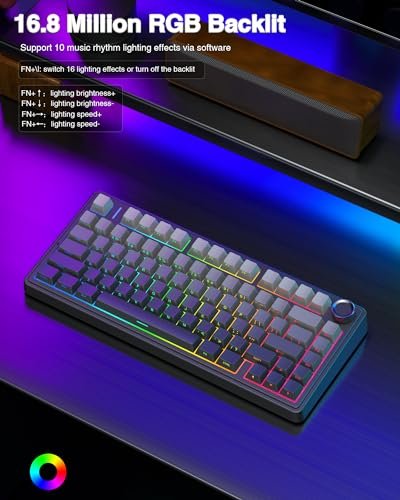
Backlighting helps you see key labels in a dark room. It can reduce the need for a bright lamp, especially during late work or study. The ProtoArc and SABLUTE models offer this useful feature. Still, lighting can use more power, so it may shorten the time between charges on wireless products.
Backlighting is not essential for daytime office work. If your room is bright and you know the layout, plain keys may offer better battery life and lower cost. Treat lighting as a comfort feature, not the main measure of an ergonomic keyboard.
Operating System Support
Check the key labels and shortcut support before buying. Windows, macOS, and Chrome OS may use different commands. A keyboard can still type on several systems, but special keys may not behave in the same way.
The SABLUTE specifically targets several common platforms, which makes it useful for mixed-device homes. Wireless models may also support multiple devices, but the exact switching method can differ. Read the current product details before purchase because software and compatibility can change over time.
How I Judge Ergonomic Keyboards
I judge each keyboard by how well its shape supports a neutral typing posture. I also consider the wrist rest, key spacing, layout, connection, size, and setup time. Comfort matters, but so does daily usefulness. A keyboard that feels good yet lacks a number pad may not suit an accountant or office manager.
I also separate real ergonomic features from marketing language. A curved shell alone does not make a keyboard ergonomic. The design should help reduce awkward reach and support relaxed hands. I give extra value to products that offer clear benefits without making basic tasks hard.
For this 2026 buying guide, I also considered current needs such as hybrid work, multi-device homes, dim-room typing, rechargeable power, and smaller desks. These needs shape how people use keyboards now. The best ergonomic keyboard for a remote worker may not be the best one for a wired office computer. That is why I included several design types instead of naming only one style.
Ergonomic Keyboard Setup Tips
Place the keyboard close enough that your elbows stay near your sides. Keep the keys at a height that lets your forearms stay level with the desk. Your wrists should remain straight, not sharply bent toward the ceiling or floor. If your desk is high, a keyboard tray or lower chair position may help.
Keep the mouse close to the keyboard. Reaching far to the side can add strain to the shoulder. A split keyboard can make the center area available for the mouse, which may shorten that reach. Change positions during the day instead of holding one posture for hours.
Take brief breaks often. Look away from the screen, relax your hands, and stand when possible. The National Institute for Occupational Safety and Health and other workplace health groups emphasize neutral posture, task variety, and sensible work habits. These simple steps work best alongside a well-fitted keyboard.
Give yourself time to learn a new layout. Start with short sessions and increase the time as your accuracy improves. Do not force speed on the first day. A few mistakes are normal when moving from a straight keyboard to a wave or split model.
FAQs Of Best Ergonomic Keyboard
What is the best ergonomic keyboard for long work hours?
The Logitech Ergo K860 is the strongest overall choice for long office sessions. Its split layout, cushioned palm rest, full-size format, and wireless design provide a useful mix of comfort and function.
Are split ergonomic keyboards hard to learn?
They can take several days to feel normal. The keys may sit in new places, and the center split can affect typing speed at first. Short practice sessions usually make the transition easier.
Is a wireless ergonomic keyboard better than a wired model?
Neither is always better. Wireless models reduce cable clutter and suit flexible desks, while wired models avoid charging and pairing. Choose wireless for movement and wired for simple, fixed use.
Can an ergonomic keyboard stop wrist pain?
It may reduce awkward wrist positions, but it cannot promise pain relief. Desk height, posture, breaks, and mouse use also matter. Seek medical advice for ongoing pain, numbness, or weakness.
Should I buy a keyboard with a wrist rest?
A wrist rest can add comfort, especially during pauses and long work sessions. Choose one that supports the palms without forcing the wrists upward. A soft, stable rest is usually more comfortable than a hard, sharp edge.
Final Verdict: Which Should You Buy?
The Logitech Ergo K860 is the best ergonomic keyboard for most long-hour office users. Its split layout and cushioned support offer the best overall balance.
Choose Wave Keys for an easy transition, Perixx for wired value, or SABLUTE and ProtoArc for extra features. Match the keyboard to your posture, space, and work style.