Best Mechanical Keyboard: Top Picks For Every Typist
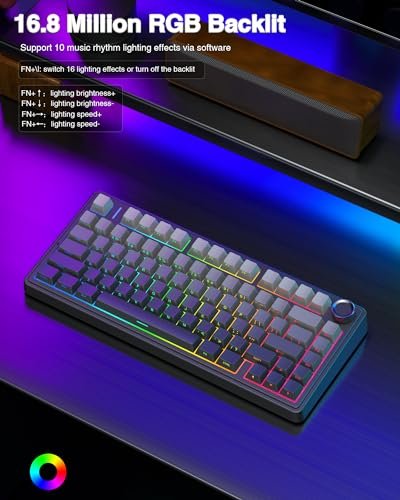
The best mechanical keyboard blends fast switches, solid build quality, useful layouts, and comfort for long daily use.
You may know the feeling: your old keyboard feels flat, loud, or slow after a long workday. Keys stick, wrists hurt, and gaming commands can miss at the worst time. A mechanical keyboard can change that with a more crisp key press, better feedback, and a stronger feel under your fingers. I tested the most useful traits for work, play, and travel, including switch feel, layout, wireless modes, keycaps, sound, and software support. These six models stand out for different needs, so you can choose with less guesswork.

AULA F75 Pro Wireless Mechanical…
Tri-mode Connection Keyboard: AULA F75 Pro wireless mechanical keyboards work with Bluetooth 5.0, 2.4GHz wireless and USB wired connection, can connect up to five devices at the same time, and…

Redragon Mechanical Gaming Keyboard Wired,…
Brilliant Color Illumination- With 11 unique backlights, choose the perfect ambiance for any mood. Adjust light speed and brightness among 5 levels for a comfortable environment, day or night. The…

ASUS ROG Strix Scope II…
Full-Size Premium Wired Keyboard: The ROG Strix Scope II X is a 100% keyboard with a number pad and wired USB-C connectivity. The aluminum top plate and PBT doubleshot keycaps…
AULA F75 Pro Wireless Mechanical Keyboard

The AULA F75 Pro offers the compact layout many users want without feeling cramped. Its 75% design keeps the function row and arrow keys while removing the number pad. That saves desk space and leaves more room for a mouse. I also like the control knob, since it gives quick access to volume and other supported controls.
This keyboard uses pre-lubed Reaper switches, side-printed PBT keycaps, and RGB backlighting. The hot-swap design lets you change compatible switches later without soldering. It supports 2.4GHz wireless, Bluetooth 5.0, and USB-C wired use, so it can move from a desktop to a laptop with little fuss. The sturdy case and layered sound design give each press a fuller feel than many low-cost boards.
Pros:
- Compact 75% layout keeps useful navigation keys
- Hot-swap sockets allow simple switch upgrades
- Tri-mode connection supports wired and wireless use
- Pre-lubed switches feel smooth out of the box
- PBT keycaps resist shine better than common ABS caps
- Control knob makes volume changes fast
- RGB lighting adds clear desk appeal
Cons:
- The compact layout lacks a dedicated number pad
- Wireless battery life can vary with lighting use
- Some advanced lighting controls may take time to learn
My Recommendation
I recommend the AULA F75 Pro for buyers who want a custom-style board without building one from separate parts. It suits gamers, writers, students, and home-office users who value a compact footprint. The three connection modes are useful if you switch between a desktop, tablet, and laptop. The hot-swap sockets also protect your investment, because you can change the typing feel later.
For many buyers, this is a strong candidate for the Best Mechanical Keyboard because it covers the features that matter most at a mid-range price. It feels more personal than a basic office keyboard, yet it does not demand deep keyboard knowledge. Check the current Amazon listing for available colors, layout details, and pricing before ordering.
Redragon Wired Mechanical Gaming Keyboard

This Redragon keyboard focuses on simple wired gaming performance. A wired USB connection avoids the battery checks and pairing steps that come with wireless models. Its red mechanical switches offer a light, linear press that works well for rapid game inputs. The board also includes anti-ghosting support, which helps the keyboard register several keys pressed at once.
The 11 backlight modes give the board a bright gaming look without needing a complex setup. Double-shot PBT keycaps add a durable surface and help the legends stay readable over time. The hot-swap red switches give you a path to try other compatible switches in the future. Since it works with PC and Mac, it can serve as a simple daily board as well as a gaming tool.
Pros:
- Wired USB connection offers low setup effort
- Linear red switches suit quick repeated presses
- Anti-ghosting supports busy game controls
- Hot-swap sockets support future switch changes
- Double-shot PBT keycaps offer strong wear resistance
- Eleven lighting modes add visual variety
- PC and Mac compatibility improves flexibility
Cons:
- A wired cable limits desk placement
- It does not offer Bluetooth or 2.4GHz wireless modes
- Users who prefer tactile feedback may find red switches too light
My Recommendation
I would choose this Redragon model for a budget-focused gamer who wants a direct, no-nonsense setup. It is also a good first mechanical keyboard for a student or casual PC user. The wired format keeps the price and maintenance simple. You plug it in, select a lighting mode, and start typing or playing.
This keyboard may be the Best Mechanical Keyboard for users who do not need wireless freedom or a premium custom case. It offers the useful basics: mechanical switches, durable keycaps, anti-ghosting, and switch replacement support. If your desk already has a fixed gaming station, its wired design should not feel like a serious drawback.
ASUS ROG Strix Scope II X Full-Size Keyboard

The ASUS ROG Strix Scope II X takes a different path from the compact boards in this guide. Its full-size layout includes a dedicated number pad, function row, navigation cluster, and arrow keys. That format works well for spreadsheets, data entry, and games that use many keys. It also gives your hands a familiar reach if you are moving from a standard office keyboard.
This wired model uses pre-lubed ROG NX Snow V2 linear switches and PBT keycaps. Its hot-swap support lets experienced users replace compatible switches when they want a new sound or feel. RGB lighting adds customization, while PC and Mac support broadens its use beyond gaming. The larger case takes more space, but it can feel stable during fast play and long typing sessions.
Pros:
- Full-size layout includes a useful number pad
- Pre-lubed linear switches provide a smooth key press
- Hot-swap support allows later switch changes
- PBT keycaps handle heavy daily use well
- RGB lighting supports a customized desk setup
- Wired USB connection keeps the setup dependable
- PC and Mac support adds practical range
Cons:
- The full-size case needs more desk space
- It does not provide wireless connection modes
- Linear switches may feel less informative for touch typists
My Recommendation
This ASUS keyboard is best for gamers and office users who need every key close at hand. It makes sense for finance work, coding, editing, and games with number-pad commands. I also suggest it for people who dislike compact layouts and do not want to relearn key positions. The stable full-size frame feels like a dependable tool rather than a small travel board.
It can be the Best Mechanical Keyboard for a user who values a complete layout over a small footprint. The hot-swap feature gives it more long-term value than a fixed-switch board. Choose it when you have enough desk room and prefer a wired connection that stays ready whenever the computer is on.
AULA F99 Wireless Mechanical Keyboard

The AULA F99 is made for users who want a near-full layout with a compact shape. Its 99% design keeps the number pad while reducing some of the open space found on a traditional full-size keyboard. That can save room without forcing you to give up number entry. It is a helpful middle ground for work, school, and gaming.
This keyboard includes Bluetooth 5.0, 2.4GHz wireless, and USB-C wired modes. Its hot-swappable sockets work with compatible switches, and the pre-lubed linear switches aim for a smooth, easy press. RGB backlighting gives it a modern custom-board look. Support for PC, tablets, PlayStation, and Xbox makes it a flexible choice for homes with several devices.
Pros:
- 99% layout keeps a dedicated number pad
- Tri-mode connection supports several device types
- Hot-swap sockets allow future customization
- Pre-lubed linear switches feel smooth for long sessions
- RGB backlighting creates a flexible visual setup
- USB-C wired mode provides a backup connection
- Console support expands its role beyond PC use
Cons:
- The 99% form still uses more space than a 75% board
- Wireless battery performance depends on lighting and use
- Some buyers may prefer a quieter tactile switch
My Recommendation
I recommend the AULA F99 to people who need a number pad but want a cleaner desk than a full-size board provides. It is a strong fit for spreadsheet work, online shopping, gaming, and home-office tasks. The wireless options also help if your desk changes from work mode to entertainment mode. Console support makes it useful in a shared gaming space.
This model deserves attention in any Best Mechanical Keyboard comparison because it balances layout, wireless freedom, and customization. It gives up little in daily function while trimming some excess width. Pick it when a 75% board feels too small but a traditional full-size keyboard feels too large.
Logitech MX Mechanical Wireless Keyboard

The Logitech MX Mechanical takes a more refined approach to wireless typing. Its low-profile tactile switches give a clear bump while keeping the board slimmer than many classic mechanical keyboards. That feel can help writers and office users know when a key has activated. The graphite finish also blends into a work setup better than a bright gaming design.
Logitech designed this model for productivity, and its wireless focus supports that goal. The illuminated keys help in dim rooms, while the compact height may reduce the tall, raised feel some users dislike. It is a practical option for people who type across several devices. The tactile version is especially useful for users who want feedback without choosing a loud clicky switch.
Pros:
- Low-profile design looks clean and saves desk height
- Tactile switches provide clear typing feedback
- Wireless operation reduces cable clutter
- Illumination helps with low-light typing
- Professional graphite finish suits office spaces
- Comfortable choice for long writing sessions
- Logitech productivity focus supports multi-device workflows
Cons:
- Low-profile switches limit some custom switch choices
- It offers less gaming-focused lighting than RGB boards
- The slim design may feel less traditional to mechanical keyboard fans
My Recommendation
The Logitech MX Mechanical is best for writers, office workers, and hybrid users who want mechanical feedback in a clean package. I would choose it for a home office, shared workspace, or laptop desk. Its tactile action gives each press a small signal, like a quiet nod from the keyboard. That can make long typing feel more controlled without adding a sharp click.
It may be the Best Mechanical Keyboard for productivity, not for RGB-heavy gaming. Buyers should select it when a refined wireless board matters more than hot-swap parts or a dramatic gaming style. Its value comes from comfort, a slim profile, and a focused design that fits daily work.
Kisnt KN85 Wireless Mechanical Keyboard

The Kisnt KN85 is a 75% wireless keyboard with a warm retro beige style. Its layout keeps arrow keys and a function row while reducing the width of the board. That makes it easier to pair with a smaller desk or a large mouse pad. The design also gives a room a softer look than the usual black gaming keyboard.
The KN85 supports Bluetooth, 2.4GHz, and USB-C wired use. Its hot-swappable linear switches are aimed at a smooth press and a creamy sound profile. Custom RGB backlighting lets you adjust the look to match your desk. This combination suits users who care about both typing feel and visual character, especially when they want a board that does not look like every other gaming accessory.
Pros:
- 75% layout saves space while keeping key clusters
- Three connection modes improve everyday flexibility
- Hot-swap support allows switch experimentation
- Linear switches offer a smooth typing motion
- Retro beige finish adds a distinct design touch
- RGB backlighting supports personal desk themes
- USB-C mode provides reliable wired use
Cons:
- It does not include a number pad
- Linear switches may not suit users who want a strong bump
- Retro styling may not match every desk setup
My Recommendation
I would suggest the Kisnt KN85 to students, creators, and home users who want a compact board with personality. It works well for typing, casual gaming, and flexible wireless setups. The 75% shape offers a good balance for people who want more keys than a tiny 60% board. Its hot-swap design also gives curious users a simple way to explore keyboard tuning.
The KN85 could be the Best Mechanical Keyboard for a buyer who wants a stylish custom look at an accessible level. It is less suited to number-heavy work, but it feels at home on a creative desk. If color, sound, and wireless freedom matter as much as raw speed, this model deserves a close look.
How I Choose the Best Mechanical Keyboard
A good keyboard is not only about a high switch count or bright lights. I first look at the way the board will be used. A gamer may need fast linear switches and anti-ghosting, while a writer may prefer tactile feedback and a softer sound. A finance worker may need a number pad, but a small-desk user may gain more from a 75% layout.
I also check the connection type. Wired boards offer simple, steady use and never need a battery. Bluetooth helps with tablets and office devices, while 2.4GHz wireless often gives a more direct desktop link. Tri-mode keyboards offer the most choice, but they also add more settings to manage. I prefer a board that keeps USB-C wired use available as a safety net.
Switch feel deserves close attention. Linear switches move in one smooth path and often suit games or fast repeat presses. Tactile switches add a bump that can help with typing accuracy. Clicky switches make a louder sound and appeal to users who enjoy a sharp response, but none of the six models here centers on a loud clicky design. Your ideal switch is the one that feels good after an hour, not just after one test press.
Keycap material also affects long-term use. PBT plastic usually resists the oily shine that can appear on ABS caps after months of typing. Double-shot legends create the characters through two layers of plastic, which can support better wear resistance. Still, the feel depends on the full design, including stabilizers, plate, case, and mounting style. A strong keycap cannot fix a poor spacebar.
Hot-swap support is another feature I value. It lets you change compatible switches without using a soldering iron. That matters when your taste changes or a switch wears out. Buyers should still check switch socket type and compatibility before ordering, because “hot-swappable” does not mean every switch fits every board.
Layout choice can change your whole desk. A 60% board saves the most space but removes the function row and arrow keys. A 75% board keeps those important keys in a smaller frame. A 96% or 99% board keeps the number pad while trimming empty gaps. A full-size board remains the easiest option for users who rely on a familiar layout and dedicated controls.
Sound is personal, but the room matters. A keyboard that sounds pleasant in a private office may bother someone in a shared space. Case foam and pre-lubed switches can reduce harsh noise, yet no mechanical keyboard is fully silent unless it uses special silent switches and dampening. If you share a room, consider a tactile or linear board with a softer build rather than choosing only by appearance.
Ergonomics matter, too. A mechanical keyboard can feel better than a flat membrane model, but a tall case may raise your hands. A wrist rest, a neutral wrist angle, and short breaks can help. The Occupational Safety and Health Administration advises workers to keep wrists in a neutral position and arrange the keyboard at a comfortable height. I treat those basics as important as switch speed.
Best Mechanical Keyboard Comparison Table
| Best for | Why |
|---|---|
| Compact custom feel | AULA F75 Pro and Kisnt KN85 offer 75% layouts, hot-swap support, RGB lighting, and three connection modes. |
| Number-pad work and gaming | AULA F99 gives a compact near-full layout, while ASUS ROG Strix Scope II X provides a familiar full-size design. |
| Simple or professional use | Redragon suits wired budget gaming, while Logitech MX Mechanical favors clean wireless productivity and tactile feedback. |
Mechanical Keyboard Buying Tips for 2026
In 2026, buyers have more choice than ever. You can find simple wired boards, compact custom models, low-profile office keyboards, and wireless boards with several connection modes. That variety is useful, but it can also make shopping feel like standing in front of a wall of cereal boxes. Start with your layout, then choose your switch type, and only after that compare lighting and case style.
For gaming, look for a stable USB connection, a switch that resets quickly, and reliable key registration. Linear switches often feel fast, but speed alone does not make a player better. A good key layout and easy access to controls can matter more. Features such as adjustable actuation may help some users, but they are not required for a strong gaming experience.
For work, focus on comfort, sound, and the keys you use all day. A number pad helps with figures and spreadsheets. A tactile switch can give useful feedback without the louder sound of a clicky switch. Wireless support can reduce cable clutter, but keep an eye on battery status and use the included receiver or wired cable as needed.
For a first mechanical keyboard, hot-swap support offers a safe path into the hobby. You can start with the included switches and learn what you like. Later, you can try a heavier tactile switch, a smoother linear switch, or a quieter option. This is more practical than buying several complete keyboards just to compare switch feel.
Always confirm the operating system and layout before purchase. Most modern boards support Windows, and many also work with macOS, but key labels and shortcut layers may differ. A compact board may use a function key for commands that have their own keys on a full-size model. Read the current product listing for included accessories, software support, and regional layout details.
Price changes often on Amazon, especially during seasonal sales. I recommend checking the current price, seller, return policy, and warranty before you buy. Product photos can show a US layout, but the selected variant may differ. Taking one minute to confirm the exact model can prevent a frustrating return.
FAQs Of Best Mechanical Keyboard
What is the best mechanical keyboard for most people?
The AULA F75 Pro is a strong all-around choice for many users. Its 75% layout, hot-swap switches, RGB lighting, and wired and wireless modes cover work and gaming well. Choose the AULA F99 instead if you need a number pad.
Are mechanical keyboards good for typing?
Yes. Mechanical keyboards give each key its own switch, which can provide clearer feedback and a more consistent press. The best switch depends on your hands, sound preference, and typing style.
Are wireless mechanical keyboards reliable?
Modern 2.4GHz and Bluetooth boards can work very well for daily use. Wired mode remains useful for charging, setup, or situations where you want the most direct connection. Check battery needs before choosing a wireless model.
What keyboard size should I buy?
Choose 75% for a compact desk with arrow keys, 99% for a number pad in a smaller frame, and full-size for the most familiar layout. A 60% board saves space but requires more function-layer shortcuts.
Are hot-swappable keyboards worth it?
They are worth it if you may want to change switch feel later. Hot-swap sockets let you replace compatible switches without soldering. Confirm compatibility before buying replacement switches.
Final Verdict: Which Should You Buy?
The AULA F75 Pro is my top overall pick because it combines a useful 75% layout, smooth switches, hot-swap support, RGB, and three connection modes. The ASUS suits full-size users, while Logitech is best for quiet office work.
The Best Mechanical Keyboard is the one that matches your hands, desk, and daily tasks. Check the latest Amazon price and layout before ordering.

Similar Posts