Best Gaming Headset: Top Picks For Every Gamer
The best gaming headset blends clear sound, a strong mic, lasting comfort, and features that fit your game system.
You know the feeling: footsteps fade into noise, your squad asks you to repeat yourself, or your ears hurt before the match ends. A good gaming headset fixes those small problems and makes play feel more natural. I compared sound, comfort, microphone quality, connection type, battery needs, and platform support across these popular models. My goal is simple: help you find the Best Gaming Headset for your budget, games, and daily setup without wasting money on features you will not use.
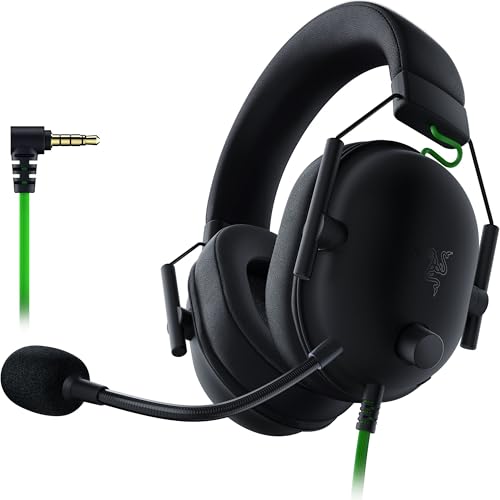
Razer BlackShark V2 X Gaming…
ADVANCED PASSIVE NOISE CANCELLATION — sturdy closed earcups fully cover ears to prevent noise from leaking into the headset, with its cushions providing a closer seal for more sound isolation….

Logitech G Astro A50 Multi-Platform…
PLAYSYNC AUDIO 3-System Switching: The A50 wireless gaming headset with mic connects to 3 platforms at once via USB-C so you can tap between Xbox, PS5, PC/Mac or Nintendo Switch/Switch…

SteelSeries Arctis Nova Elite -…
WORLD’S FIRST HI-RES CERTIFIED WIRELESS GAMING HEADSET — Arctis Nova Elite delivers breakthrough performance with 96kHz/24bit audio over 2.4GHz or Bluetooth, powered by the new GameHub and next-gen LC3+ codec…
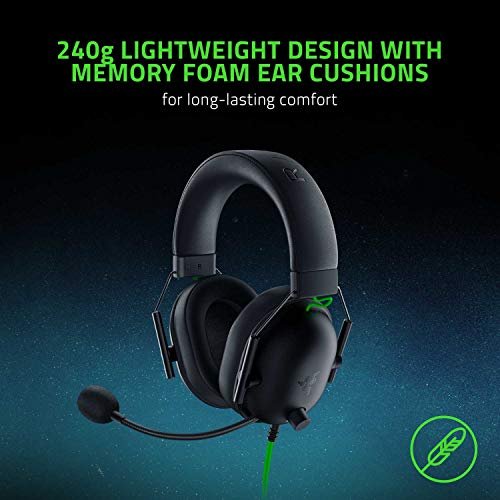
Razer BlackShark V2 X

The Razer BlackShark V2 X is a simple wired gaming headset with a strong focus on clear game sound. Its 50mm drivers give explosions, music, and voice chat enough range for most games. The 3.5mm plug works with PC, PlayStation, Xbox controllers, Nintendo Switch, and many mobile devices. That broad support makes it a smart pick for players who use more than one system.
I like the light frame because it does not feel heavy during long sessions. The memory foam cushions also help reduce outside noise without pressing too hard. Its 7.1 surround feature is designed for PC use and can add useful direction to footsteps and gunfire. Still, the headset needs a cable, and the surround software experience may vary by setup.
Pros:
- Light frame helps reduce neck strain
- Clear sound for games, music, and chat
- Memory foam cushions feel soft during long play
- 3.5mm plug supports many gaming systems
- Flexible microphone arm is easy to position
- Wired design avoids charging and wireless lag
Cons:
- No wireless mode
- Limited control over the basic 3.5mm connection
- Virtual surround features depend on compatible software
My Recommendation
The Razer BlackShark V2 X suits budget buyers, new PC gamers, and console players who want one headset for many devices. It is also a good choice for parents buying a first gaming headset because the controls are easy to understand. I would choose it for competitive games when low cost and clear voice chat matter more than wireless freedom. As a Best Gaming Headset for value, it offers a lot without adding needless extras.
Logitech G Astro A50

The Logitech G Astro A50 is made for players who want a polished wireless setup. It gives you freedom to move without a cable running to your controller or desk. The headset is built for multi-platform use, which makes it useful for homes with a PC, console, or more than one console. Its sound profile has the energy needed for action games while keeping speech easy to follow.
The charging base is one of its most useful parts. I can place the headset on the dock when I finish playing, so it is ready for the next session. Wireless controls also make it easy to adjust volume while keeping my hands on the game. This model costs more than a basic wired set, but the clean desk setup and easy charging can justify the extra cost for regular players.
Pros:
- Wireless design keeps the play area tidy
- Multi-platform support suits mixed gaming homes
- Charging base provides simple storage and charging
- Comfortable fit for long gaming sessions
- On-headset controls allow quick volume changes
- Strong sound presence works well for action games
Cons:
- Higher price than most wired headsets
- Dock needs space near the gaming setup
- Wireless features may require setup or software updates
My Recommendation
I recommend the Logitech G Astro A50 to serious players who switch between platforms and want a neat wireless station. It is especially useful for people who play every day and dislike charging loose cables or searching for a headset. The dock, comfort, and wireless ease make it a strong premium choice. If convenience matters as much as sound, this model may be your Best Gaming Headset.
SteelSeries Arctis Nova Elite

The SteelSeries Arctis Nova Elite targets players who want high-end wireless sound and broad control. Its listed features include high-resolution 96kHz/24-bit audio, carbon fiber speaker components, active noise cancellation, and AI noise rejection. It also supports 2.4GHz wireless and Bluetooth, so you can connect to gaming audio and another device in a flexible way. OmniPlay support is aimed at PC, PlayStation, and Xbox users who need a multi-system headset.
This is more than a plug-and-play headset, so it rewards players who enjoy tuning sound in an app. Multi-source mixing can help you hear game audio while staying connected to a phone or another source. Active noise cancellation can make a busy room feel calmer, while microphone noise rejection helps your team hear your voice. The trade-off is price, weight, and a learning curve that may feel excessive for casual play.
Pros:
- High-resolution audio supports detailed listening
- Active noise cancellation helps block room noise
- AI noise rejection can improve voice clarity
- 2.4GHz and Bluetooth offer flexible connections
- Multi-source mixing supports game and phone audio
- Wide platform focus benefits serious multi-system players
Cons:
- Premium price may exceed a casual gamer’s budget
- Many features require time in the companion app
- Advanced hardware may feel bulky for some users
My Recommendation
The Arctis Nova Elite is best for enthusiasts, streamers, and players who want deep control over sound and chat. It makes the most sense when you use several systems or need strong noise control in a busy home. I would not buy it only for simple party chat, but it is a powerful Best Gaming Headset option for demanding users. Check current compatibility and software support before buying, since advanced features can change with updates.
Turtle Beach Stealth 600 Wireless

The Turtle Beach Stealth 600 is a wireless headset for Xbox, PlayStation, PC, and mobile players. It aims to give users a relaxed experience without the price of a flagship model. The wireless connection removes the cable from your hands, while the built-in microphone supports team chat. Its platform range makes it a practical choice for gamers who move between a console and a computer.
The flip-to-mute mic is useful in real life because I can mute quickly when someone enters the room. The earcups and headband are shaped for comfort during long matches. Turtle Beach also gives this line a game-focused sound that can make voices and effects stand out. Remember that wireless pairing can differ by platform, so confirm the exact connection method for your system before placing an order.
Pros:
- Wireless play feels clean and unrestricted
- Works across several common gaming platforms
- Flip-to-mute microphone is fast and natural to use
- Comfort-focused design suits extended sessions
- Simple controls are easy for new users
- Good balance of features and mid-range cost
Cons:
- Battery charging is part of regular use
- Wireless support can vary by platform
- Plastic construction may not feel as premium as metal frames
My Recommendation
The Stealth 600 is best for console gamers who want wireless freedom without moving into luxury pricing. It also works well for families that share a headset between Xbox, PlayStation, PC, and mobile devices. I like it for casual multiplayer games, sports titles, and long weekend sessions. As a Best Gaming Headset for flexible wireless play, it gives most users the features they need at a sensible level.
HyperX Cloud Alpha

The HyperX Cloud Alpha remains a trusted wired headset because it focuses on the basics and does them well. Its dual-chamber drivers separate bass from mids, which can help keep loud effects from covering voices. The aluminum frame adds a solid feel without making the headset seem overly delicate. It works with PC, PlayStation, Xbox, Nintendo Switch, and mobile devices through a compatible wired connection.
The removable microphone is a useful touch for anyone who also listens to music or watches shows. Thick cushions and a padded headband make the Cloud Alpha pleasant for long play, though fit can vary with head size. The sound has enough bass for action games but stays clear for dialogue. It lacks modern wireless and active noise control features, yet its simple design means fewer things can fail or need charging.
Pros:
- Dual-chamber drivers help separate sound layers
- Aluminum frame feels strong and durable
- Detachable microphone supports flexible daily use
- Comfortable padding works well for long sessions
- Broad wired compatibility covers many devices
- No battery or wireless setup to manage
Cons:
- Wired cable limits movement
- No active noise cancellation
- Older design lacks some newer wireless features
My Recommendation
The HyperX Cloud Alpha is best for players who want proven comfort, clear sound, and a headset that can last for years with careful use. It is a strong fit for PC and console users who do not mind a cable. I would choose it over a cheaper model when build quality matters. For many buyers, this is the Best Gaming Headset for dependable wired performance and easy cross-platform use.
Logitech G522 Lightspeed Wireless

The Logitech G522 Lightspeed is a modern wireless headset built around Logitech’s Lightspeed connection. That type of wireless link is designed for responsive play, which matters in fast shooters and rhythm games. The black design is clean and easy to match with most gaming desks. It is aimed at players who want wireless comfort without stepping up to the most costly flagship models.
I see this headset as a useful middle ground between a basic wired set and a premium multi-source model. Wireless movement makes it easy to stand up or reach for a drink without removing the headset. Logitech’s software can also give PC users more control over sound and microphone settings. Buyers should still check battery details, platform support, and included accessories because features can differ by connection mode.
Pros:
- Lightspeed wireless connection suits fast games
- Clean design fits most gaming setups
- Cable-free movement improves daily comfort
- Software controls can help tune PC audio
- Good option for players moving from wired audio
- Onboard controls make quick changes convenient
Cons:
- Wireless charging remains part of ownership
- Some software features focus on PC use
- Platform support should be checked before purchase
My Recommendation
The Logitech G522 is best for PC gamers who want a clean desk, fast wireless audio, and software control. It also suits players who spend long hours at a computer and want to move freely. I would pick it for everyday gaming, voice chat, and general media use. It is a strong Best Gaming Headset contender for buyers who want modern wireless play at a more balanced price.
How I Chose the Best Gaming Headset
Buying a gaming headset is not only about loud bass or a famous logo. I look at how the headset behaves after the first hour, when small flaws become clear. A clamp that feels fine for ten minutes may hurt after a full match. A mic that sounds sharp in a store may pick up a fan, keyboard, or family noise at home.
I also check the connection first. A 3.5mm headset is simple and works with many controllers, but the cable can limit movement. Wireless models feel freer, yet they need charging and may use different methods on PC, Xbox, PlayStation, and mobile devices. A USB dongle, Bluetooth, and console wireless support are not always the same thing.
Sound Quality
Good gaming sound should help you hear detail, not only make effects loud. Footsteps, reload sounds, voices, and music should have room to stand apart. Large drivers do not guarantee better sound, so I pay attention to tuning and separation as well.
Surround sound can help with direction, but virtual surround is not magic. It uses software to create a wider sense of space. Some players like it, while others prefer stereo because it sounds more natural. I suggest trying both modes when a headset or game allows it.
Bass adds impact to racing games and action scenes. Too much bass can hide quiet sounds, though. The best gaming headset for competitive play often uses a more balanced sound rather than a heavy boom.
Microphone Performance
A headset mic should make your voice clear without forcing you to speak loudly. A boom mic near the mouth usually performs better than a tiny mic built into a mobile earbud. Flip-to-mute arms are useful because they turn muting into one quick movement.
Noise rejection matters in busy rooms. It can reduce the sound of a keyboard, fan, or air conditioner, but it cannot remove every loud noise. I still recommend placing the microphone close to your mouth and keeping the mic opening away from direct breath.
Streamers may need more than a headset mic can offer. A separate USB microphone can sound fuller, but it costs more and takes desk space. For team chat, a good headset microphone is usually enough.
Comfort and Fit
Comfort depends on weight, clamp force, cushion shape, and headband design. Memory foam often feels soft, but the material may become warm. Fabric cushions breathe better for some users, while leather-like cushions can block more outside sound.
Glasses wearers should watch clamp pressure around the arms of their frames. A flexible headband and softer ear pads can help. People with larger ears should check the inner earcup size, not just the outside shape.
I also consider adjustment range. A headset should sit firmly without squeezing. If it slides when you turn your head, the fit may hurt immersion and make the mic move away from your mouth.
Wired or Wireless?
Wired headsets offer a clear benefit: no battery. They also tend to cost less and work with simple analog ports. A 3.5mm model can connect to a controller, laptop, handheld console, or phone adapter. The main drawback is cable clutter and the risk of pulling the headset from your head.
Wireless headsets suit players who move around or dislike cables. Most gaming wireless models use a USB receiver for low-delay audio. Bluetooth helps with phones and tablets, but standard Bluetooth can have delay or microphone limits in some gaming setups.
A wireless headset is only useful when it works with your platform. Xbox, PlayStation, PC, Switch, and mobile devices can use different connection rules. I always check the product listing and the included dongle before ordering.
Battery Life and Charging
Battery life affects how relaxed wireless gaming feels. A long battery can cover many sessions, but every battery eventually needs a charge. A charging dock helps because it gives the headset a fixed home.
Some models support use while charging. That feature can save a match when the battery runs low. I still prefer a routine: place the headset on its dock or connect its cable after each long session.
Do not compare battery claims without checking the test mode. Lighting, Bluetooth use, volume, and microphone settings can change the result. Real use may not match the highest number on a box.
Platform Compatibility
PC users often get the most options. USB software may unlock equalizers, surround modes, mic filters, and firmware updates. Console users may have fewer controls, especially when they connect through a controller.
PlayStation and Xbox support can differ even when both systems appear in a product title. Some wireless headsets require a system-specific version or a switch on the receiver. A wired model often avoids this issue, but newer phones may need a USB-C or Lightning adapter.
Nintendo Switch players should check handheld and docked modes. Mobile users should confirm whether the headset includes the right cable or Bluetooth mode. Compatibility is one of the easiest details to overlook when shopping for the Best Gaming Headset.
Build Quality and Controls
A good headset should survive normal daily use. I look for a flexible headband, firm hinges, clean cable joints, and earcups that do not wobble too much. Metal parts can add strength, but they may also add weight.
Controls should be easy to find by touch. Volume wheels are faster than tiny buttons, while separate game and chat controls can help multiplayer users. A mute switch or flip-to-mute mic adds useful feedback during a busy match.
The best control layout depends on your habits. If you often change volume, use a wheel. If you mute often, choose a clear mute button or a mic arm that flips up.
Best for Table
| Best for | Why |
|---|---|
| Best budget wired choice | Razer BlackShark V2 X gives clear sound, broad compatibility, and low weight at a modest cost. |
| Best premium multi-platform choice | SteelSeries Arctis Nova Elite offers high-resolution audio, ANC, dual wireless modes, and source mixing. |
| Best balanced wireless choice | Turtle Beach Stealth 600 combines wireless freedom, simple controls, and broad platform support. |
Gaming Headset Features That Matter Most
A product page can list many numbers, but not every number improves your games. Driver size, for example, tells you the speaker diameter. It does not tell you if the sound is balanced or if the headset feels good.
The same is true for surround labels. A virtual 7.1 mode may help some users locate sounds, but it can also make music or voices sound less natural. I treat it as an extra feature, not the main reason to buy.
Microphone design, fit, and connection often affect daily use more than small sound claims. A comfortable headset with a clear mic can feel better than a flashy model that hurts after one hour. That is why I place real use above marketing language.
Do You Need Active Noise Cancellation?
Active noise cancellation, or ANC, uses microphones and processing to reduce steady outside sounds. It can help with air conditioners, fans, and traffic. It is less effective against sudden voices, claps, or a barking dog.
ANC adds cost and can change the sound. Some players enjoy the quiet space it creates, while others do not need it in a calm room. If your room is quiet, comfort and microphone quality may offer more value.
The SteelSeries Arctis Nova Elite is the clear choice among these products for buyers who want ANC. For everyone else, passive earcup padding may be enough.
Does a Higher Price Mean Better Sound?
Not always. A premium headset may add wireless modes, ANC, a charging dock, better controls, and stronger software. Those extras can be valuable, but they do not guarantee that its sound will match your taste.
Budget wired models often give excellent voice chat and game detail. They also avoid battery wear. If you play from one device at a desk, saving money on wireless features may be the smart move.
I suggest setting your main need first. Choose sound and comfort for competitive play, wireless freedom for a living room setup, or multi-platform support for several systems. Then compare price.
How Should a Gaming Headset Fit?
The earcups should surround your ears or sit comfortably on them without strong pressure. The headband should rest on your head rather than press one small spot. Adjust the band before judging the fit.
Keep the microphone about one finger-width from the corner of your mouth. This distance usually gives a clear voice without too much breath noise. Move the mic slightly to the side if plosive sounds become strong.
Take short breaks during long sessions. Even the Best Gaming Headset cannot replace healthy listening habits. Lower volume helps protect your ears and can make long sessions more comfortable.
How Do You Clean a Gaming Headset?
Turn the headset off and unplug it first. Wipe hard surfaces with a soft, slightly damp cloth. Do not spray liquid into the earcups, buttons, microphone, or charging port.
For removable cushions, follow the maker’s care instructions. Let damp pads dry fully before use. Avoid harsh cleaners because they can damage synthetic leather, fabric, or printed parts.
Dust around the microphone and ports can affect daily performance. A soft brush can remove loose dust without pushing it deeper. Store the headset where pets, food, and sharp objects cannot damage it.
FAQs Of Best Gaming Headset
What is the Best Gaming Headset for most players?
The best choice depends on your system and budget. The Turtle Beach Stealth 600 is a balanced wireless option, while the HyperX Cloud Alpha is a reliable wired choice. PC users who want premium control may prefer the SteelSeries Arctis Nova Elite.
Are wired gaming headsets better than wireless models?
Wired headsets do not need charging and often cost less. Wireless headsets offer more freedom and a cleaner setup. Neither type is always better, so choose the connection that fits your room and gaming habits.
Can I use these headsets with a phone?
Several models support mobile use, but the exact method differs. A 3.5mm model may need a phone adapter, while a wireless model may use Bluetooth. Check the included cables and platform details before buying.
Is 7.1 surround sound important for gaming?
It can improve direction in some games, but it is not essential. Many players prefer stereo because it sounds more natural. Good tuning, comfort, and a clear microphone usually matter more.
How long should a gaming headset last?
A headset can last for years when you store it safely and avoid pulling its cable or bending its frame. Pads and cables may wear before the main speakers. Wireless batteries can also lose capacity over time.
Final Verdict: Which Should You Buy?
For most buyers, the Turtle Beach Stealth 600 is the Best Gaming Headset balance of comfort, wireless freedom, and platform support. Choose the Razer BlackShark V2 X for low-cost wired play, or the SteelSeries Arctis Nova Elite for premium sound and control.
The right gaming headset should make play easier, not add work. Match your choice to your system, comfort needs, mic use, and budget for better long-term value.

Similar Posts