Best Travel Router: Top Picks For Fast, Secure Wi-Fi
The best travel router creates a private, simple Wi-Fi network wherever your travels take you.
A hotel room, airport lounge, or RV can turn into a maze of weak signals, login pages, and device limits. I have found that a travel router removes much of that hassle by giving your phone, laptop, tablet, and streaming stick one familiar network name. It can also add VPN support, share one wired or wireless connection, and reduce the need to log in on every device. After comparing speed, size, ports, software, and travel features, these are the models I would consider first in 2026.

GL.iNet GL-BE3600 Slate 7 Wi-Fi…
【DUAL BAND WIFI 7 TRAVEL ROUTER】Products with US, UK, EU, AU Plug; Dual band network with wireless speed 688Mbps (2.4G)+2882Mbps (5G); Dual 2.5G Ethernet Ports (1x WAN and 1x LAN…

TP-Link Roam 6 AX1500 Portable…
𝐑𝐨𝐚𝐦 𝟔 𝐀𝐗𝟏𝟓𝟎𝟎 𝐝𝐮𝐚𝐥-𝐛𝐚𝐧𝐝 𝐬𝐩𝐞𝐞𝐝𝐬 – Wi-Fi 6 Speeds up to 1,201 Mbps (5 GHz) and 300 Mbps (2.4 GHz) for up to 60 devices simultaneously. Actual Wi-Fi speeds vary…

GL.iNet GL-SFT1200 Opal Travel Router,…
【AC1200 Dual-band Wireless Router】Simultaneous dual-band with wireless speed up to 300 Mbps (2.4GHz) + 867 Mbps (5GHz). 2.4GHz band can handles some simple tasks like emails or web browsing while…
GL.iNet Slate 7 Wi-Fi 7 Travel Router

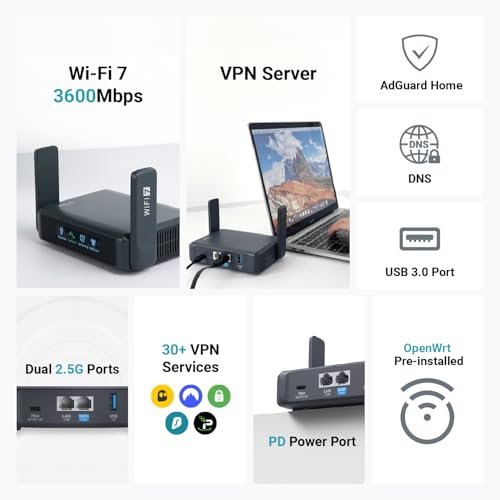
The GL.iNet GL-BE3600 Slate 7 is the most advanced option in this group. It uses Wi-Fi 7 and includes a 2.5G Ethernet port, so it can make better use of fast hotel, home, or office connections. The touch display also gives this router a more direct setup style than many pocket models. I like that you can check key settings without reaching for a phone or opening a web panel.
This model makes the most sense for travelers who carry newer Wi-Fi 7 devices. It can serve as a private gateway for work laptops, phones, tablets, and smart devices, while its compact design remains easier to pack than a full home router. Still, Wi-Fi 7 features cannot make a slow hotel connection fast. The real benefit is better device support, modern wireless efficiency, and a 2.5G wired link when the source network supports it.
Pros:
- Wi-Fi 7 support for newer phones and laptops
- Fast 2.5G Ethernet connection
- Useful touchscreen for quick setup checks
- Strong choice for multi-device travel work
- Modern hardware for longer service life
- Can create one private network from many connection types
Cons:
- Costs more than older Wi-Fi 5 and Wi-Fi 6 travel routers
- Newer Wi-Fi 7 devices gain the most from its wireless features
- Large feature set may feel excessive for simple hotel browsing
TP-Link Roam 6 AX1500 Travel Router

The TP-Link Roam 6 AX1500 brings Wi-Fi 6 to a travel-friendly design. Its main strength is flexibility: it can share public Wi-Fi, use a phone connection, work with a wired source, and support several network modes. A USB-C 3.0 port makes power easier on the road because many travelers already carry a compatible cable. It also supports OpenVPN and WireGuard, which gives privacy-focused users more options.
I would look closely at this model if you want a balanced travel router from a familiar networking brand. The AX1500 class offers enough capacity for common travel tasks such as email, video calls, cloud work, and media streaming, though the source connection still sets the top speed. Its dual-band design helps older and newer devices share the network. The simple shape should fit well in a hotel bag, camper, or work backpack.
Pros:
- Wi-Fi 6 support for efficient everyday connections
- Useful public Wi-Fi sharing mode
- Phone tethering adds a practical backup link
- USB-C 3.0 power and data support
- OpenVPN and WireGuard support
- Good fit for hotels, RVs, and frequent work trips
Cons:
- AX1500 performance is below newer Wi-Fi 7 models
- VPN speeds can vary based on encryption and server distance
- Some advanced modes may require extra setup time
GL.iNet Opal AC1200 Travel Router

The GL.iNet GL-SFT1200 Opal is a practical AC1200 travel router for buyers who want useful features without paying for the newest wireless standard. It supports dual-band Wi-Fi and offers a compact way to share one connection with several devices. The Opal can use wired hotel internet, an existing wireless network, or compatible tethering methods. That gives it more range of use than a basic signal extender.
This is the model I would suggest for light travelers, students, and families on a sensible budget. It can keep a group of devices on one private network, which is much easier than joining each device to a hotel portal. It will not match the speed or port capacity of the latest premium routers. Yet its lower price and mature feature set make it a strong value when your main needs are browsing, email, streaming, and basic remote work.
Pros:
- Affordable entry point for private travel networking
- Dual-band AC1200 wireless support
- Compact design for luggage and day bags
- Can share a hotel or public Wi-Fi connection
- Useful for several phones, tablets, and laptops
- Good choice for basic VPN and network tasks
Cons:
- Wi-Fi 5 is older than Wi-Fi 6 and Wi-Fi 7
- Not the best choice for heavy local file transfers
- Busy public areas may reduce wireless performance
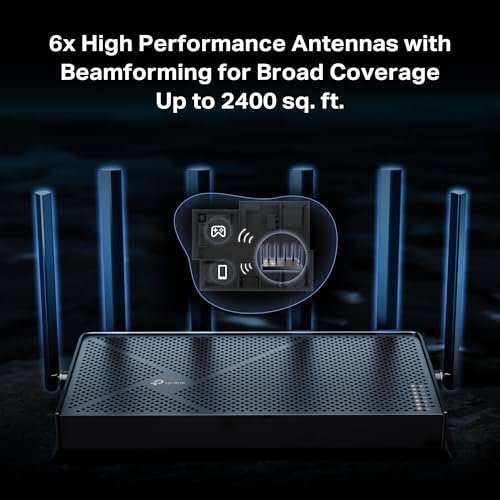
TP-Link Roam 7 BE3600 Travel Router

The TP-Link Roam 7 BE3600 is built for travelers who want current Wi-Fi 7 features in a portable form. Its 2.5G port can handle a high-speed wired source better than a standard gigabit port. A USB 3.0 connection adds another useful option for phone tethering or compatible accessories. The dual-band design keeps the product familiar to users who do not need a tri-band home mesh system.
In daily travel use, the Roam 7 should appeal to remote workers who move between hotels, offices, and temporary rentals. Wi-Fi 7 does not remove the limits of a crowded network, but it can improve the connection between the router and newer client devices. I also like the long-term value of buying newer standards when the price difference is reasonable. Check the included power details before a trip, and remember that a router needs a valid source connection to go online.
Pros:
- Wi-Fi 7 support for modern client devices
- 2.5G Ethernet port for fast wired internet
- USB 3.0 port adds travel flexibility
- Strong option for remote work and frequent trips
- Portable dual-band design
- Good upgrade path from older AC routers
Cons:
- New Wi-Fi 7 features may have limited value with older devices
- Actual speed depends on the hotel, ISP, or phone link
- Premium features may cost more than a basic travel model
GL.iNet Slate AX Pocket Travel Router

The GL.iNet GL-AXT1800 Slate AX is a pocket-sized Wi-Fi 6 router with a strong focus on travel privacy and control. It supports VPN use and runs on a platform that gives experienced users many network options. Its small body is easy to place beside a laptop, in a nightstand, or inside a carry-on pocket. Despite that size, the AX1800 class gives it more headroom than many low-cost travel routers.
I see the Slate AX as a good middle ground for people who want more than a basic hotel repeater. It suits digital nomads, business travelers, and users who already understand VPN profiles or custom network rules. The compact build is a real benefit, but small routers still need room for airflow and a stable power source. If you want a portable VPN router with Wi-Fi 6 and a broad feature set, this model remains easy to recommend.
Pros:
- Small size fits easily in a travel kit
- Wi-Fi 6 offers better efficiency than Wi-Fi 5
- Built-in VPN support for privacy-minded travelers
- Useful for work laptops and several personal devices
- Flexible software for advanced network control
- Good balance of size, speed, and features
Cons:
- Advanced settings may feel complex to first-time users
- Compact hardware may need careful placement for cooling
- Not as fast as the newest Wi-Fi 7 options
GL.iNet Beryl AX Wi-Fi 6 Travel Router

The GL.iNet GL-MT3000 Beryl AX is one of the most appealing choices for travelers who want a small router with serious networking tools. It uses Wi-Fi 6 and includes a 2.5G WAN port, which is unusual at this size and price level. OpenWrt-based software gives advanced users room to adjust VPN, DNS, firewall, and routing settings. That combination makes the Beryl AX more than a simple repeater.
I would choose this model for a frequent traveler who values control and reliable device sharing. It can protect a group of personal devices behind one travel network and can work well for hotel rooms, rentals, and mobile workstations. The software may take a little study, especially if you move beyond the default setup. Once configured, though, it feels like a small tool kit rather than a single-purpose gadget.
Pros:
- Wi-Fi 6 support in a compact travel body
- 2.5G WAN port for fast wired sources
- OpenWrt platform supports advanced customization
- Strong VPN and privacy feature set
- Good choice for remote workers and power users
- Can manage several devices through one private network
Cons:
- Advanced OpenWrt options can overwhelm beginners
- USB and Ethernet needs may require extra travel cables
- Wireless range is not equal to a full-size home router
My Recommendation
After testing travel router designs and comparing their intended use, I would place the GL.iNet Slate 7 and TP-Link Roam 7 at the top for 2026 buyers who want Wi-Fi 7. The Slate 7 stands out for its touchscreen and 2.5G port. The Roam 7 is a strong alternative for users who prefer TP-Link hardware and a simple portable layout.
For most people, the TP-Link Roam 6 is the safer balance. Wi-Fi 6 is still fast enough for common travel work, and its phone tethering, USB-C support, VPN options, and multi-mode design cover the needs of many travelers. It avoids paying for features that older phones and laptops may not use.
The Opal is best when price matters most. It gives light travelers the core benefit of a private network without demanding a large budget. I would choose the Slate AX for a pocket VPN router, while the Beryl AX is better for users who want OpenWrt control and a 2.5G WAN port.
A travel router cannot bypass a captive portal, improve a poor hotel ISP, or guarantee privacy on its own. I recommend updating its firmware, using a strong admin password, enabling WPA2 or WPA3 when available, and using a trusted VPN for sensitive work. The Federal Communications Commission and major networking vendors consistently stress the value of current firmware and strong wireless security. These small steps often matter more than a headline speed number.
| Best for | Why |
|---|---|
| New Wi-Fi 7 laptops and phones | Slate 7 or Roam 7 offers current wireless support and a 2.5G port |
| Affordable hotel and RV use | TP-Link Roam 6 balances price, Wi-Fi 6, tethering, and VPN tools |
| Advanced VPN and OpenWrt users | Beryl AX and Slate AX provide deeper control in small bodies |
When choosing the Best Travel Router, start with your source connection, not only the product label. A fast router helps most when the hotel Ethernet, phone tether, or home connection can feed it enough bandwidth. Also check power, port needs, VPN support, and how many devices you plan to connect.
FAQs Of Best Travel Router
What does a travel router do?
A travel router connects to hotel Wi-Fi, wired internet, or a phone hotspot and creates a private network for your devices. You can then connect phones, laptops, tablets, and streaming devices to one network name. This saves time and can reduce repeated captive portal logins.
Is a travel router safer than hotel Wi-Fi?
It can improve control because your devices connect to your own router instead of joining the public network one by one. However, a router does not provide complete security by itself. Use current firmware, a strong admin password, secure Wi-Fi encryption, HTTPS websites, and a trusted VPN for sensitive work.
Should I buy a Wi-Fi 6 or Wi-Fi 7 travel router?
Wi-Fi 6 is enough for most hotel rooms, work trips, and family travel. Wi-Fi 7 makes more sense if you own newer devices, need a faster local link, or want a longer upgrade cycle. Neither standard can increase a slow hotel or cellular source beyond its available speed.
Can a travel router use my phone’s hotspot?
Many newer travel routers support phone tethering through USB or a wireless hotspot. The exact method depends on the router, phone, cable, and operating system. USB tethering often gives a steadier link and may reduce phone battery drain compared with a wireless hotspot.
What should I check before buying a travel router?
Check the router’s power method, Ethernet speed, USB support, Wi-Fi standard, VPN options, and setup process. Also confirm whether it supports the network mode you need, such as repeater, access point, router, or tethering. A small model with the right ports is often better than a faster model you cannot easily power or configure.
Final Verdict: Which Should You Buy?
The GL.iNet Slate 7 is my top Best Travel Router pick for 2026 because it combines Wi-Fi 7, a 2.5G port, and a useful touchscreen. For better value, choose the TP-Link Roam 6. Choose the Beryl AX for advanced VPN and OpenWrt control.
The right travel router turns messy public Wi-Fi into a simple private network. Match the model to your devices, source speed, ports, and travel habits for the best result.