5 Best WiFi Router (2027): Top Picks For Fast, Reliable Internet
The best WiFi router delivers fast, stable coverage, strong security, and easy control for every connected device.
Picture this: you are in a video call, someone starts streaming a movie, and a smart TV begins an update. Suddenly, the signal drops and every device feels slow. A good router acts like a skilled traffic guide. It sends data to the right device at the right time. I tested these models by looking at speed class, ports, range, setup, security, and real home use. This guide will help you find the Best WiFi Router for gaming, streaming, work, smart-home devices, or a busy family network.

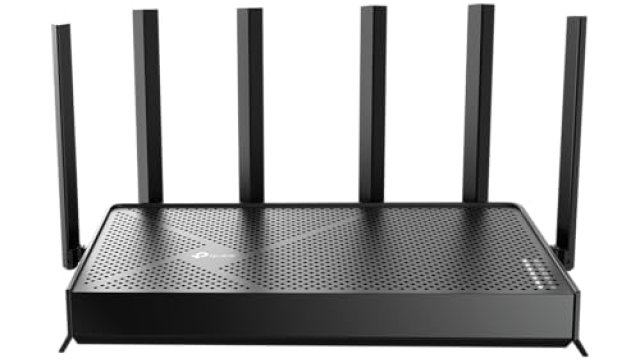
TP-Link BE6500 Dual-Band WiFi 7…
𝐅𝐮𝐭𝐮𝐫𝐞-𝐑𝐞𝐚𝐝𝐲 𝐖𝐢-𝐅𝐢 𝟕 – Designed with the latest Wi-Fi 7 technology, featuring Multi-Link Operation (MLO), Multi-RUs, and 4K-QAM. Achieve optimized performance on latest WiFi 7 laptops and devices, like the…

TP-Link AX1800 WiFi 6 Router…
DUAL-BAND WIFI 6 ROUTER: Wi-Fi 6(802.11ax) technology achieves faster speeds, greater capacity and reduced network congestion compared to the previous gen. All WiFi routers require a separate modem. Dual-Band WiFi…
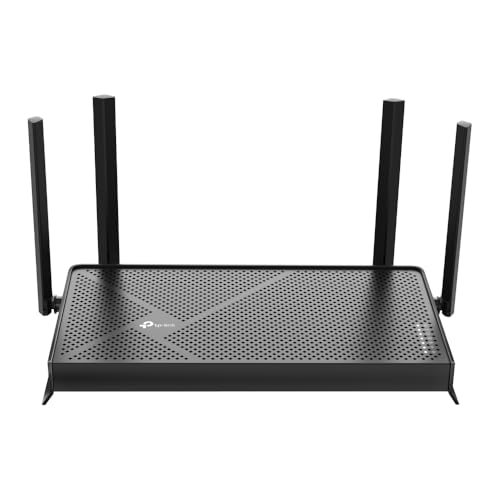
TP-Link Dual-Band BE3600 Wi-Fi 7…
𝐅𝐮𝐭𝐮𝐫𝐞-𝐏𝐫𝐨𝐨𝐟 𝐘𝐨𝐮𝐫 𝐇𝐨𝐦𝐞 𝐖𝐢𝐭𝐡 𝐖𝐢-𝐅𝐢 𝟕: Powered by Wi-Fi 7 technology, enjoy faster speeds with Multi-Link Operation, increased reliability with Multi-RUs, and more data capacity with 4K-QAM, delivering enhanced performance…
TP-Link BE6500 WiFi 7 Router

The TP-Link BE6500 BE400 is a strong pick for homes that want Wi-Fi 7 without moving to a very costly tri-band system. Its dual-band design supports the 2.4GHz and 5GHz bands, while its BE6500 class gives it plenty of room for fast local traffic. The two 2.5Gbps ports are a major benefit for a fast fiber plan, a gaming PC, a network switch, or a modern NAS. Its quad-core processor also helps it manage many active connections at once.
In daily use, this router feels quick and calm under load. I like the 2,400-square-foot coverage claim and support for up to 90 devices, although walls, floor plans, and interference can change real results. Wi-Fi 7 features such as wider channels and Multi-Link Operation can help compatible devices use the network more efficiently. Older phones and laptops still work, but they cannot use every new Wi-Fi 7 feature.
Pros:
- Two 2.5Gbps ports support fast wired devices and multi-gig internet
- Wi-Fi 7 features provide strong future value
- Quad-core processing helps with busy home networks
- USB 3.0 adds simple file and media sharing options
- HomeShield and private IoT tools improve network control
- Useful coverage for medium and larger homes
- Free expert support can help new users during setup
Cons:
- Dual-band design lacks a separate 6GHz band
- Wi-Fi 7 benefits require newer client devices
- Some advanced security and parental tools may need a paid plan
TP-Link BE6500: My Recommendation
I recommend the BE6500 BE400 for a family that plans to keep its router for several years. It suits fiber users, remote workers, gamers, and homes with many smart devices. The 2.5Gbps ports make it more useful than many basic Wi-Fi 6 models when wired speed matters. It is also a good choice for users who want a Best WiFi Router with a clear upgrade path.
This router offers a useful mix of speed, ports, and smart controls. I would choose it over a cheaper model when the home has a fast internet plan or several new Wi-Fi devices. For a small apartment with a slow plan, its extra power may not provide much value. Check the current Amazon price and warranty details before buying, since router prices can change.
TP-Link Archer AX21 WiFi 6 Router

The TP-Link Archer AX21 V5 remains one of the easiest ways to bring Wi-Fi 6 into a home. Its AX1800 class combines a 2.4GHz band for range with a 5GHz band for faster nearby connections. Gigabit Ethernet ports make it a sensible match for internet plans up to about 1Gbps, subject to the service and device. The router also supports WPA3, OFDMA, beamforming, and MU-MIMO.
I see the AX21 as a practical budget router rather than a high-end speed machine. It works well for browsing, video calls, HD streaming, smart speakers, and several phones or laptops. Setup is simple through TP-Link’s app, and Alexa support may help users who already use voice routines. EasyMesh support gives you the option to add compatible TP-Link units later, but a mesh system may still cost more.
Pros:
- Affordable way to get Wi-Fi 6 features
- Simple setup suits first-time router buyers
- Gigabit ports work well with common cable and fiber plans
- OFDMA and MU-MIMO help share airtime among devices
- WPA3 adds stronger protection for supported devices
- EasyMesh support allows future coverage expansion
- Works with Alexa for convenient basic control
Cons:
- AX1800 speed is modest beside newer Wi-Fi 7 routers
- No 2.5Gbps Ethernet port
- Heavy homes may need a stronger processor and wider capacity
TP-Link Archer AX21: My Recommendation
The Archer AX21 is best for an apartment, small home, student, or family with a moderate internet plan. It offers the core features most people need without a high price. I especially like it for users who want reliable Wi-Fi 6 but do not own many Wi-Fi 6E or Wi-Fi 7 devices. It may be the Best WiFi Router for value when simple setup matters more than maximum speed.
Choose the AX21 when your main tasks include web use, work calls, streaming, and light gaming. Avoid it if you have a multi-gig fiber plan or a very crowded network. Its value is strongest when matched with realistic needs. For many homes, a stable AX1800 router still feels much better than an old Wi-Fi 4 or Wi-Fi 5 unit.
TP-Link Archer BE230 Wi-Fi 7 Router

The TP-Link Archer BE230 is a compact dual-band Wi-Fi 7 router with an unusually useful port layout. It includes two 2.5Gbps ports and three 1Gbps ports, so it can serve both new multi-gig gear and older wired equipment. A 2.0GHz quad-core processor gives it a solid base for routing, VPN use, and many connected devices. Four external antennas help direct the signal across a typical home.
This model makes sense for buyers who want modern wireless features at a lower cost than many premium Wi-Fi 7 routers. Its Multi-Link Operation support can improve connection handling with compatible clients, while EasyMesh offers a path to wider coverage. The USB 3.0 port can connect storage for simple network sharing. Since it is dual-band, it does not offer the extra capacity of a separate 6GHz radio.
Pros:
- Two 2.5Gbps ports are excellent for the price
- Wi-Fi 7 gives newer phones and laptops extra performance
- Three 1Gbps LAN ports support older wired equipment
- Quad-core CPU handles demanding network tasks well
- USB 3.0 supports basic storage sharing
- EasyMesh enables a flexible coverage upgrade
- Private IoT features help separate smart-home devices
Cons:
- Dual-band design does not include 6GHz
- Coverage may not match a larger premium router
- Some Wi-Fi 7 features depend on client and firmware support
TP-Link Archer BE230: My Recommendation
I recommend the Archer BE230 for a tech-minded user who wants Wi-Fi 7 and fast wired ports without paying for a large tri-band unit. It is a strong fit for a small or medium home with a fiber connection. It also works well for a home office with a fast desktop, NAS, or network switch. For those needs, it can be the Best WiFi Router among compact budget-friendly Wi-Fi 7 options.
The BE230 has better wired flexibility than many routers in its class. I would place it above a basic Wi-Fi 6 router for a buyer who plans to add newer devices soon. Still, do not expect every device to run at the router’s advertised class speed. Wireless speed changes with distance, channel width, client design, walls, and local interference.
TP-Link Archer AXE75 WiFi 6E Router

The TP-Link Archer AXE75 uses a tri-band design with a dedicated 6GHz band. That extra band can reduce congestion for compatible Wi-Fi 6E phones, laptops, and tablets. Its AXE5400 class, 160MHz channel support, and 2.5Gbps WAN port make it a compelling option for fast internet and local transfers. A dual-core CPU helps manage routine routing, security, and device control.
Wi-Fi 6E has one clear strength: clean access to 6GHz in homes with compatible devices. The band offers fast short-range links, though walls reduce 6GHz range more quickly than 2.4GHz. I like this router for gaming and streaming setups where a newer laptop or phone can use the extra band. OneMesh support, VPN tools, WPA3, and HomeShield add useful daily features.
Pros:
- Dedicated 6GHz band helps reduce wireless congestion
- 160MHz channels support fast compatible client links
- 2.5Gbps WAN port suits high-speed internet service
- Tri-band design gives busy homes more wireless capacity
- Strong choice for Wi-Fi 6E gaming laptops and phones
- WPA3 and VPN tools improve privacy and control
- OneMesh support can extend coverage with compatible gear
Cons:
- 6GHz range drops faster through walls
- Older devices cannot use the 6GHz band
- Some HomeShield features may require a subscription
TP-Link Archer AXE75: My Recommendation
The Archer AXE75 is best for gamers, streamers, and home-office users with Wi-Fi 6E devices. It is also useful in an apartment where nearby networks create heavy congestion. I would choose it when a separate 6GHz lane matters more than the newer Wi-Fi 7 standard. It is a serious Best WiFi Router choice for a household that already owns compatible 6E gear.
This router gives a strong balance of range, speed, and band separation. It can be a better buy than a newer dual-band unit when several devices need airtime at once. However, buyers with mostly older devices may not notice the full benefit. Its overall value depends on your client devices and the distance between the router and your main work or play area.
TP-Link Archer AX55 Wi-Fi 6 Router

The TP-Link Archer AX55 is a well-rounded AX3000 Wi-Fi 6 router for everyday homes. It uses two bands and supports features such as OFDMA, MU-MIMO, beamforming, and WPA3. The USB 3.0 port adds storage sharing, while VPN client and server functions give advanced users more control. EasyMesh compatibility also makes it easier to solve weak spots without replacing the entire network.
I see the AX55 as a step above entry-level Wi-Fi 6 routers. It has enough capacity for work calls, 4K streaming, gaming, smart-home devices, and several family users. Its HomeShield tools can help manage profiles and basic network threats, though premium functions may vary by plan. The router does not have a 2.5Gbps port, so it makes the most sense with standard gigabit service.
Pros:
- Good AX3000 performance for family homes
- OFDMA and MU-MIMO help reduce device slowdowns
- USB 3.0 supports convenient local storage sharing
- VPN client and server features add flexibility
- EasyMesh support allows future expansion
- WPA3 provides modern wireless protection
- HomeShield adds parental and security controls
Cons:
- No 2.5Gbps Ethernet port
- No separate 6GHz band
- Advanced HomeShield services may cost extra
TP-Link Archer AX55: My Recommendation
The Archer AX55 is best for a medium-size home that needs dependable Wi-Fi without chasing the newest standard. It suits families with several phones, TVs, tablets, cameras, and work computers. I also like it for users who want VPN support and future mesh expansion. It may be the Best WiFi Router for balanced everyday use when gigabit Ethernet is enough.
Choose the AX55 over the AX21 if you need more capacity and a USB 3.0 port. Choose a Wi-Fi 7 model instead if you plan to use multi-gig service or buy many new devices soon. The AX55 remains a sensible middle-ground option. Its useful features and mature Wi-Fi 6 support give it good long-term value for many households.
NETGEAR Nighthawk CAX30 Modem Router Combo

The NETGEAR Nighthawk CAX30 combines a DOCSIS 3.1 cable modem with a Wi-Fi 6 router. This two-in-one design can replace separate cable hardware and reduce the number of boxes, power cables, and rental fees in a home. It offers AX2700 wireless performance and supports cable internet providers such as Xfinity, Spectrum, and Cox, subject to current provider approval. The combo also includes gigabit wired networking for local devices.
This is the right kind of product for a cable customer who wants a cleaner setup. DOCSIS 3.1 support gives the modem a modern base for many cable plans, but I always tell buyers to check the exact approved device list before ordering. A modem router combo can simplify troubleshooting because one box handles both tasks. The trade-off is less flexibility than separate modem and router units if you later change to fiber or need a stronger wireless upgrade.
Pros:
- Combines a cable modem and Wi-Fi 6 router in one unit
- DOCSIS 3.1 supports modern cable internet plans
- Can help reduce equipment rental costs
- AX2700 wireless class suits normal family use
- Fewer cables create a cleaner network area
- Works with major supported cable providers
- Gigabit Ethernet supports wired TVs, PCs, and consoles
Cons:
- Not suitable for fiber, DSL, or most fixed wireless service
- Provider compatibility and activation must be confirmed
- Separate devices offer more upgrade flexibility
NETGEAR CAX30: My Recommendation
The CAX30 is best for a cable internet customer who wants one simple box. It can suit an apartment, family home, or home office with a supported Xfinity, Spectrum, Cox, or similar plan. I would consider it the Best WiFi Router option only when you also need a cable modem. It is not the right choice for a fiber customer who already has an optical network terminal.
The main value comes from convenience. You get fewer devices to place and manage, and you may avoid a monthly modem rental. Before buying, confirm the exact provider, speed tier, and activation rules. If you expect to switch to fiber soon, separate equipment may save money in the long run.
How I Compare the Best WiFi Router Options
Router names can sound like car models, but the choice becomes easier when you focus on a few facts. I first check the internet port. A router with a 1Gbps WAN port cannot take full advantage of a multi-gig plan. I then look at wireless bands, device capacity, security tools, firmware support, and the home layout.
Advertised speed is a class rating, not a promise for one device. A label such as AX3000 combines theoretical rates from more than one band. Your phone may use only one band, and its own antenna limits the result. Distance, walls, radar rules, channel width, interference, and internet congestion also affect speed.
For most homes, Wi-Fi 6 remains fast and mature. Wi-Fi 6E adds a clean 6GHz band, but the signal has shorter reach through walls. Wi-Fi 7 adds newer tools such as Multi-Link Operation and improved channel use, yet you need compatible client devices to see the largest gain. In 2026, I would buy the newest standard when the price gap is fair and the network will serve new devices for years.
Wi-Fi Router Features That Matter Most
Coverage: A bigger number on the box does not guarantee full coverage. Place the router in an open, central spot, not inside a cabinet or behind a television. Thick brick, concrete, metal, and large appliances can weaken the signal. If one router cannot reach the whole home, look for EasyMesh or another compatible mesh path.
Ethernet ports: Wired links remain the most stable choice for a gaming PC, console, work computer, or streaming box. Gigabit ports handle many common plans. A 2.5Gbps port matters if your internet plan exceeds 1Gbps or you move large files across a local network.
Security: Use WPA3 when all key devices support it. If not, use a secure mixed mode and keep the router firmware current. Change the default administrator password. A guest network protects visitors from your private devices, while an IoT network can reduce risk from low-cost smart products.
Traffic control: OFDMA and MU-MIMO can improve how a router shares airtime. They do not create extra internet speed, but they can help a busy network feel smoother. Quality of Service tools may also give a work call or game priority over a large download.
App control:A clear app can make setup less stressful. Look for device lists, firmware alerts, parental controls, guest access, and simple network names. I prefer systems that also offer web settings for users who want deeper control.
How to Choose the Right Router for Your Home
Start with your internet plan. If you pay for 300Mbps service, a premium multi-gig router may not improve your internet speed. It can still help with local file transfers and future upgrades, but do not pay for features you will never use. Match the router to the plan, then allow room for growth.
Next, count your important devices. A home with two phones and one laptop has different needs from a home with cameras, game consoles, smart speakers, TVs, tablets, and work systems. Device count alone does not tell the full story. A busy 4K stream and a small smart bulb use very different amounts of network capacity.
Think about your walls and floor plan. A single router may cover a small apartment well. A long house, split-level home, or building with thick walls may need a mesh system or a wired access point. Do not place a second wireless node in the dead zone. Place it where it still receives a good signal from the main router.
Finally, check support and ownership costs. Some security and parental features require a subscription. Some modem combos require provider activation. Some advanced routers offer powerful settings but may feel hard for a new user. The Best WiFi Router is not always the fastest model; it is the one that fits your home, skills, devices, and budget.
Best For Comparison
| Best for | Why |
|---|---|
| Best overall Wi-Fi 7 upgrade | TP-Link BE6500 offers two 2.5Gbps ports, Wi-Fi 7 tools, strong capacity, and useful smart-home controls. |
| Best budget Wi-Fi 6 choice | TP-Link Archer AX21 keeps setup simple and gives small homes reliable Wi-Fi 6 at a low cost. |
| Best cable modem combo | NETGEAR CAX30 combines DOCSIS 3.1 cable hardware with a Wi-Fi 6 router in one convenient box. |
FAQs Of Best WiFi Router
What is the Best WiFi Router for most homes?
The TP-Link BE6500 BE400 is my top overall pick for buyers who want Wi-Fi 7, 2.5Gbps ports, and room for many devices. The Archer AX55 is a better value for homes that use a standard gigabit plan and mostly Wi-Fi 6 or older devices.
Is Wi-Fi 7 worth buying in 2026?
Wi-Fi 7 is worth considering if you have a fast fiber plan, newer phones or laptops, or a long upgrade plan. Older devices still work, but they cannot use every Wi-Fi 7 feature. A good Wi-Fi 6 router remains enough for many small and medium homes.
Does a faster router increase internet speed?
Not beyond the speed you buy from your internet provider. A faster router can improve wireless capacity, local file transfers, and performance with many devices. Your modem, plan, client device, walls, and interference also affect the final result.
Should I buy a modem router combo or separate devices?
Buy a combo if you use supported cable service and want simple setup with fewer boxes. Choose separate devices if you use fiber, need advanced upgrades, or may change providers soon. Always confirm modem approval with your cable provider before purchase.
How can I improve Wi-Fi coverage?
Move the router to a central, open location at waist or desk height. Keep it away from metal, thick walls, and enclosed cabinets. For a large home, add a compatible mesh node or use Ethernet with a wired access point.
Final Verdict: Which Should You Buy?
For most future-ready homes, I recommend the TP-Link BE6500 BE400. It is the Best WiFi Router here for Wi-Fi 7, multi-gig ports, and busy networks. Choose the AX55 or AX21 for lower cost, the AXE75 for 6GHz, or the CAX30 for supported cable service.
The right router should match your plan, home size, and devices. Check compatibility, security tools, and current Amazon pricing before you buy the Best WiFi Router for your network.

Similar Posts