How To Choose The Right Charging Cable: Best Guide
The right charging cable matches your device, charger, power needs, connector, and safety requirements.
Learning how to choose the right charging cable can save you time, protect your devices, and prevent slow or unreliable charging. The best choice is not always the most expensive cable. It depends on connector type, charging speed, data transfer, length, build quality, and compatibility. This guide explains each factor in simple terms so you can buy with confidence.
Why Choosing the Right Charging Cable Matters
A charging cable is more than a wire. It connects your device to power, and many cables also transfer data, video, or audio. A poor match may charge slowly, fail to connect, or become hot during use.
Knowing how to choose the right charging cable also helps you avoid common shopping mistakes. A cable may look correct but support only low power. Another may fit your phone but not work well with a fast charger.
The right cable can offer:
• Faster and more stable charging
• Safer power delivery
• Better data transfer speeds
• Longer service life
• Less clutter from unnecessary cables
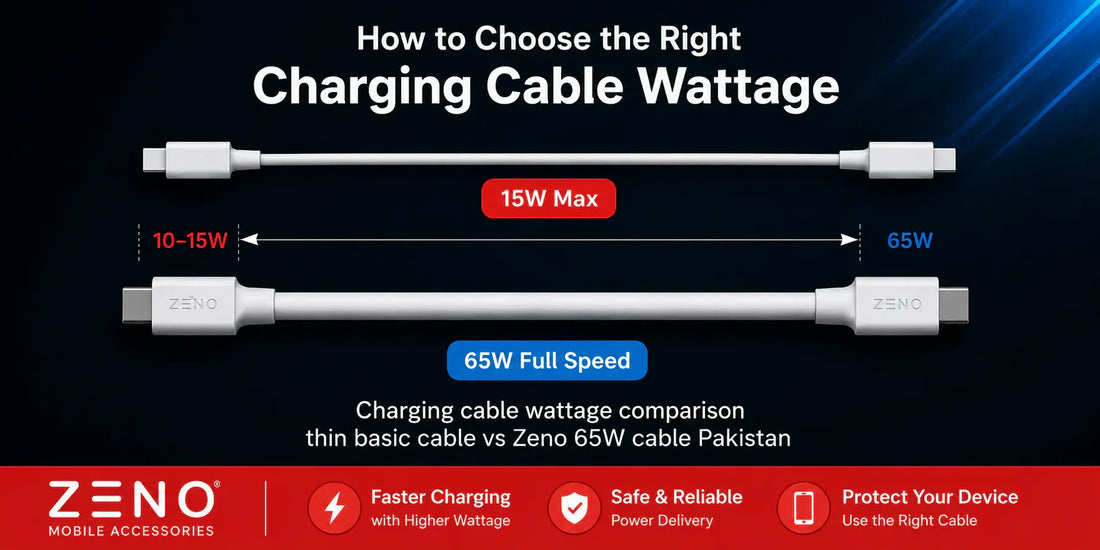
I have seen people buy a high-watt charger and then use an old cable that limits the entire setup. The charger was ready for fast power, but the cable acted like a narrow road during rush hour. The device could only receive a small amount of power.
Check the Connector Type First
The connector is the plug that enters your device. Start by checking this before comparing speed or price. A cable cannot help if its connector does not fit.
The most common connector types are:
• USB-C: Used on most new Android phones, tablets, laptops, headphones, game devices, and many accessories.
• Lightning: Used on many older iPhones, iPads, and Apple accessories.
• Micro-USB: Found on older phones, small electronics, cameras, speakers, and some battery packs.
• USB-A: The older, wide rectangular plug found on many wall chargers, computers, and car adapters.
A cable name describes both ends. For example, USB-C to USB-C has USB-C plugs on both sides. USB-A to USB-C has one older USB-A plug and one USB-C plug.
When learning how to choose the right charging cable, inspect both the device port and the charger port. A USB-C phone may need a USB-C to USB-C cable for modern fast charging. If your wall charger has a USB-A port, you need a USB-A to USB-C cable instead.
Do not force a plug into a port. If it feels wrong, stop and check the connector. Force can bend contacts or damage the device port.
Match the Cable to Your Device
Your device determines the cable’s basic requirements. Read the device manual or check the manufacturer’s specifications when possible.
For a phone, ask these questions:
• What connector does the phone use?
• Does it support fast charging?
• What charging standard does it use?
• Does it need a certified cable?
• Will the cable also connect to a computer?
For a laptop, the power needs are more demanding. Many USB-C laptops require a cable that supports USB Power Delivery and a suitable watt rating. A simple phone cable may fit the port but still fail to charge the laptop properly.
Tablets, handheld game systems, cameras, and portable monitors may also need more power than a basic cable can provide. Compatibility is about more than physical fit. The cable must support the correct electrical and data features.
This is a key part of how to choose the right charging cable: fit tells you that the cable can connect, but its specifications tell you whether it can work well.
Understand Charging Speed and Wattage
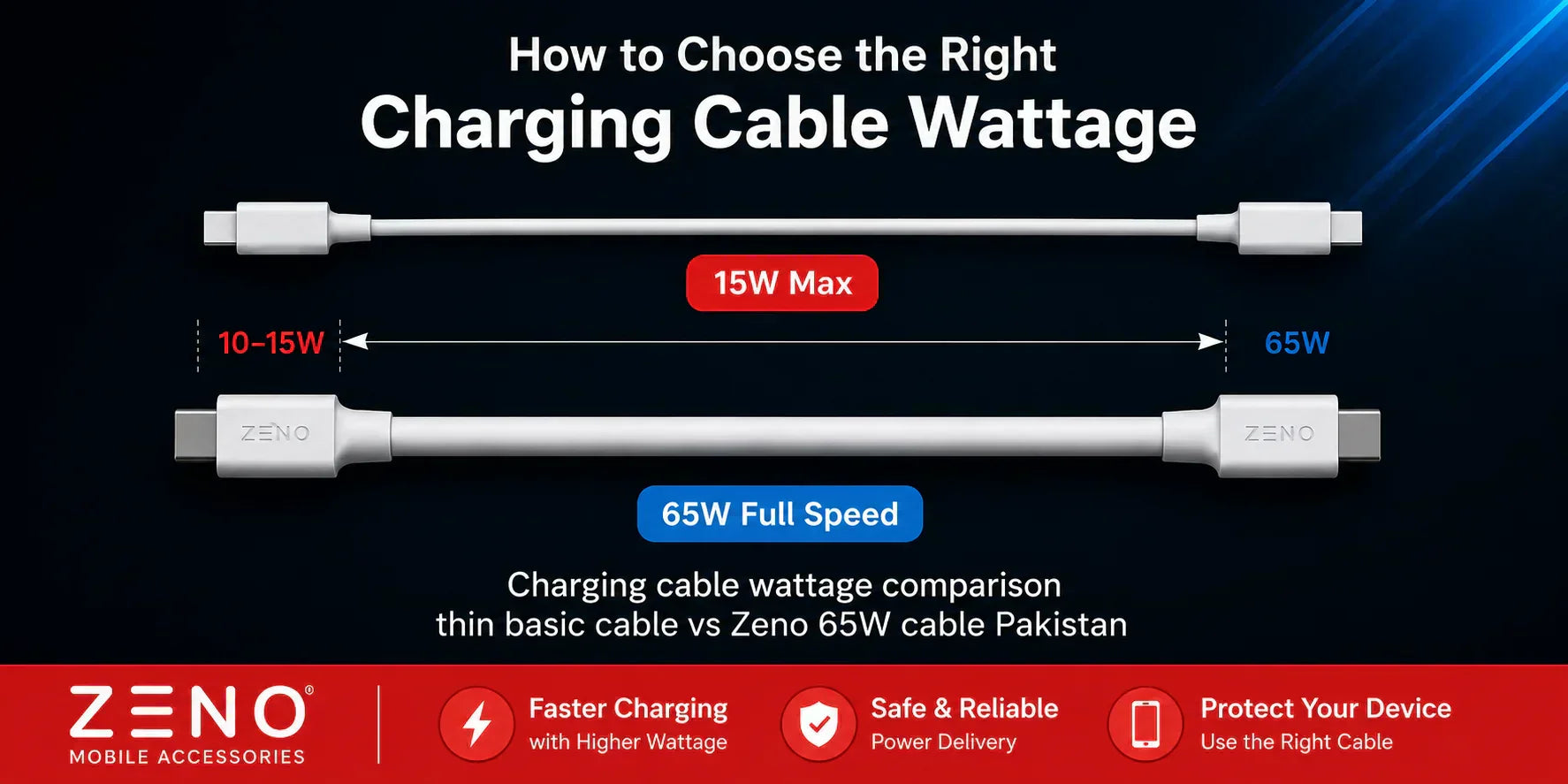
Charging speed depends on the device, charger, cable, and charging protocol. The slowest part often limits the full system.
Wattage measures power. You can estimate it with this simple formula:
Power in watts = voltage × current
For example, 5 volts at 3 amps equals 15 watts. A USB-C Power Delivery setup may use higher voltage and current to provide much more power.
Check these cable ratings:
• Maximum wattage: The highest power the cable is designed to carry.
• Maximum current: Often listed as 3A or 5A.
• Voltage support: Important for laptops and high-power devices.
• Power Delivery support: Needed for many USB-C fast-charging systems.
A 60W cable may be enough for a phone, tablet, or small laptop. A larger laptop may need a 100W or 240W cable. Newer USB Power Delivery specifications can support up to 240W with the proper equipment, but the device, charger, and cable must all support that level.
A higher-rated cable will not force extra power into your device. The charger and device communicate to set a safe power level. However, using a cable with too low a rating may reduce charging speed or prevent charging under heavy use.
When deciding how to choose the right charging cable, match the cable rating to the charger and device. Do not judge speed by the cable’s appearance.
Look for USB-C Power Delivery Support
USB-C describes the connector shape. It does not always describe speed, power, or data performance. Two USB-C cables may look identical but work very differently.
USB Power Delivery, often called USB PD, is a charging standard that allows compatible devices to negotiate power. It is common with phones, tablets, laptops, monitors, and power banks.
A USB-C cable may list:
• USB PD
• 60W, 100W, or 240W
• 3A or 5A
• E-marker chip
An electronically marked cable, often called an e-marked cable, helps identify cables designed for higher power or advanced performance. High-power USB-C cables should clearly state their capabilities.
Be careful with vague labels such as “turbo,” “super fast,” or “premium speed.” These terms may not provide useful technical information. Look for clear ratings and standards instead.
One lesson I learned while testing different cable types is that clear labeling matters more than attractive packaging. A plain cable with complete specifications is often a smarter choice than a flashy cable with no ratings.
Consider Data Transfer Speed
Some charging cables transfer data. Others are made mainly for power. If you plan to connect your device to a computer, storage drive, camera, or monitor, data speed matters.
Common USB data categories include:
• USB 2.0: Suitable for basic syncing and charging, but slow for large files.
• USB 3.x: Faster for photos, videos, backups, and external drives.
• USB4: Designed for high-speed data and advanced USB-C connections.
A cable can support fast charging but slow data transfer. This is common with USB-C cables that use USB 2.0 data wiring. They may charge a phone well but take a long time to move large video files.
If you need display output, check for video support such as DisplayPort over USB-C. Not every USB-C port or cable can send video.
For everyday phone charging, USB 2.0 may be enough. For photographers, editors, gamers, and laptop users, a faster data cable can save hours over time.
This is another important part of how to choose the right charging cable: decide whether the cable is only for power or also for data and video.

Choose the Right Cable Length
Cable length affects comfort, charging speed, and durability. A longer cable gives you more freedom, but it may be less convenient to carry.
Useful cable lengths include:
• 3 feet: Good for desks, nightstands, and travel.
• 6 feet: Useful beside a bed, sofa, or office chair.
• 10 feet or more: Helpful when the outlet is far away, but best for lower-power everyday use unless the cable has clear high-power specifications.
Long cables may have more electrical resistance. In some cases, this can reduce performance, especially when the cable is thin or poorly made. A long cable is not automatically bad, but it should have a suitable power rating.
For a bedside charger, I usually prefer a 6-foot cable. It gives enough reach without creating a tangled mess. For travel, a 3-foot cable is easier to pack.
When learning how to choose the right charging cable, choose the shortest length that feels comfortable. This can reduce clutter and make the cable easier to protect.

Check Build Quality and Durability
A cable usually fails at the ends. Repeated bending puts stress on the connector and the flexible section near the plug. Strong strain relief can help reduce this damage.
Look for:
• Reinforced connector housings
• Flexible strain relief
• Strong outer braiding or thick insulation
• Smooth, secure plugs
• Clear brand and specification labels
Braided cables can resist cuts and surface wear, but braiding alone does not guarantee quality. A poorly built braided cable may still fail inside the connector.
Avoid sharply bending a cable near the plug. Do not pull the cable from the wire. Grip the connector when unplugging it. These simple habits can extend cable life.
I once kept a cable in a car where it was bent at the same sharp angle every day. It looked fine from the outside, but charging became intermittent. The failure was hidden inside the insulation. That experience reinforced a practical rule: durability comes from both good design and careful use.

Check Safety and Certification
Safety should be a central part of how to choose the right charging cable. A low-quality cable may use weak materials, poor insulation, or incorrect wiring.
Buy from a trusted brand or seller. Look for accurate specifications, warranty support, and recognized compliance marks. USB-IF certification can provide extra confidence for compatible USB products, although certification is not the only sign of quality.
Be cautious when a cable:
• Has no brand or specifications
• Feels unusually light or loose
• Becomes hot during normal use
• Has a damaged connector
• Produces repeated charging interruptions
• Is sold with extreme claims and no technical details
A little warmth during charging can be normal. Excessive heat, burning smells, sparks, or discoloration are not normal. Stop using the cable if you notice these signs.
Safety also depends on the charger and device. A high-quality cable cannot make a damaged charger safe. Replace damaged equipment as a complete system when needed.
Decide Whether You Need a Certified Lightning Cable
Lightning cables use Apple’s connector design. For many Apple devices, certification can matter. Certified cables are designed to meet required performance standards and reduce compatibility problems.
Uncertified cables may show warning messages, fail to sync, or stop working after a software update. Some may charge at a slower rate or fit poorly.
When buying a Lightning cable, check for:
• Certification details
• A reliable brand
• Strong connector construction
• The correct USB end for your charger
• A clear warranty or return policy
Not every inexpensive cable is poor, and not every expensive cable is excellent. The most useful signs are proper certification, honest specifications, and reliable quality control.
Compare USB-A and USB-C Cable Ends
USB-A remains common in older wall chargers, cars, computers, and power banks. USB-C is now more common in newer chargers and devices.
Choose USB-A to USB-C when:
• Your charger has a USB-A port.
• Your car adapter uses USB-A.
• You need to connect an older computer to a newer device.
Choose USB-C to USB-C when:
• Your charger has a USB-C port.
• You need modern USB Power Delivery.
• You are charging a laptop, tablet, or newer phone.
• You want a more flexible setup for newer devices.
USB-C to USB-C usually provides a more modern connection, but the cable’s internal features still matter. Check its power and data ratings before buying.
A common mistake in how to choose the right charging cable is buying a USB-C cable simply because it looks new. USB-C is a connector, not a guarantee of fast charging or fast data.
Choose the Best Cable for Common Situations
Different situations call for different cable features. Use the following guide to narrow your choice.
For a smartphone
Choose the correct connector, then check fast-charging support. A durable 3-foot or 6-foot cable is enough for most people.
For a laptop
Choose a USB-C to USB-C cable with enough wattage for the laptop. Check whether it supports 60W, 100W, or a higher level.
For a car
Pick a cable that fits the car charger and reaches the phone without stretching. A shorter, flexible cable often works best.
For travel
Choose a compact cable with strong strain relief. A multi-device cable can save space, but confirm that it supports the power and data features you need.
For gaming
Look for reliable power delivery and suitable length. If you connect accessories or external storage, check data speed as well.
For a power bank
Match the cable to both the power bank and the device. A cable with the wrong connector or low power rating may charge slowly.
These examples show why how to choose the right charging cable depends on the full setup, not just the phone or tablet.
Avoid Multi-Connector Cables Unless You Need One
Multi-connector cables may include USB-C, Lightning, and Micro-USB ends. They can be useful for travel or shared households, but they also have limits.
Their advantages include:
• Less packing space
• One cable for several devices
• Convenient emergency charging
Their limitations include:
• Possible lower data performance
• Shared power limits
• More connector points that can wear out
• Less convenient use with thick phone cases
A multi-connector cable is a good backup. For daily use, a dedicated cable often offers better performance and durability.
If you own several devices, consider a charging station with separate, well-rated cables. This setup may cost more at first but can be easier to manage.
Make a Simple Buying Checklist
Before you purchase, review this checklist:
-
Identify the connector on your device.
-
Identify the connector on your charger.
-
Check the device’s maximum charging power.
-
Check the cable’s wattage and current rating.
-
Decide whether you need fast data transfer.
-
Choose a practical length.
-
Inspect build quality and strain relief.
-
Check certification or compliance information.
-
Buy from a trusted seller.
-
Keep the receipt and warranty details.
This process makes how to choose the right charging cable much easier. It also prevents you from paying for features you do not need.
Common Mistakes to Avoid
Many charging cable problems come from small buying errors. Avoid these common mistakes:
• Choosing a cable only because it fits
• Assuming every USB-C cable has the same speed
• Buying a high-watt charger but using a low-rated cable
• Ignoring data transfer needs
• Selecting a cable that is too short
• Trusting exaggerated marketing terms
• Using damaged or frayed cables
• Buying from an unknown seller with no product details
• Pulling the cable by the wire
• Leaving cables bent tightly near the connector
The safest approach is simple: match the cable to the complete charging system. This is the core lesson behind how to choose the right charging cable.
Frequently Asked Questions About How to Choose the Right Charging Cable
How do I know which charging cable my phone needs?
Check the port on your phone and the port on your charger. Then confirm whether your phone supports fast charging, USB Power Delivery, or a certified connector.
Are all USB-C cables the same?
No. USB-C cables can differ in charging power, data speed, video support, and construction. Always check the cable’s wattage and data specifications.
Does a longer charging cable charge more slowly?
It can, especially if the cable is poorly made or has a low power rating. A well-built long cable can work well, but use the shortest length that meets your needs.
Can I use a higher-watt cable with my phone?
Yes, in most cases. The phone and charger control the power level, so a higher-rated cable does not force unsafe power into the phone.
What cable do I need to charge a laptop?
Many laptops need a USB-C to USB-C cable that supports USB Power Delivery. Check the laptop’s required wattage and choose a cable rated at or above that level.
Is a braided charging cable better?
A braided cable may resist surface wear and tangling, but braiding alone does not prove quality. Connector strength, internal wiring, ratings, and warranty also matter.
Why does my cable charge but not transfer data?
Some cables are designed mainly for charging and have limited or no data wiring. Use a cable with a stated USB data rating if you need to sync files or connect storage.
Conclusion
Choosing the right charging cable starts with the connector, but it should not end there. Check power ratings, charging standards, data speed, length, durability, and safety before you buy.
The best cable is the one that matches your device and charger without unnecessary features. Use the checklist in this guide, avoid vague product claims, and replace any cable that becomes damaged or unusually hot.
Now that you know how to choose the right charging cable, review the cables you use every day and upgrade the weakest link. Share your experience or explore more device-charging guides to build a safer, faster setup.