Why Is Apple AirPods Pro 2 Battery Draining So Fast: Top Fixes
Apple AirPods Pro 2 battery drains fast when settings, signal, fit, or battery health push them harder than normal.
If your AirPods Pro 2 seem to lose charge way too quickly, you are not imagining it. In my experience testing earbuds like these, the cause is usually a mix of real battery limits, active features working in the background, and small settings that quietly chew through power. The good news is that Apple AirPods Pro 2 battery draining so fast is often fixable once you know where to look.

Why Apple AirPods Pro 2 Battery Draining So Fast Happens
Apple AirPods Pro 2 are compact, powerful earbuds with advanced features like Active Noise Cancellation, Adaptive Transparency, and spatial audio. That convenience comes with a tradeoff: more processing means more power use. When the battery seems to fall faster than expected, it is usually because one or more of these features is active for long periods.
From a practical standpoint, I have seen many users assume the earbuds are “bad,” when the real issue is often usage patterns. Long calls, high volume, frequent case openings, and weak Bluetooth connections can all shorten the time between charges. So if you are asking why Apple AirPods Pro 2 battery draining so fast, the answer is often hidden in how they are being used day to day.
Common Reasons Your AirPods Pro 2 Battery Drains Fast
There are several reasons Apple AirPods Pro 2 battery draining so fast can happen, and most of them are normal rather than defective. The trick is figuring out which one applies to your situation.
Active Noise Cancellation uses more power
ANC is one of the biggest battery users in AirPods Pro 2. The earbuds constantly listen to outside noise and create opposite sound waves to cancel it out. That extra work can reduce listening time, especially in noisy places like airplanes, buses, or open offices.
Spatial Audio and head tracking add more load
Spatial Audio with dynamic head tracking is another feature that uses extra processing. It is great for movies and immersive music, but it also draws more battery than basic stereo playback. If you keep it enabled all the time, Apple AirPods Pro 2 battery draining so fast may feel worse than expected.
High volume shortens battery life
Playing audio at high volume makes the drivers work harder and can reduce total runtime. Even though the battery impact is not as dramatic as ANC, it still matters over a full day. A lot of users do not notice this until they compare usage at moderate and loud levels.
Weak Bluetooth connection wastes power
If your AirPods Pro 2 keep reconnecting or struggle with interference, they may use more battery trying to stay linked. This can happen in crowded wireless areas, near routers, or when switching between devices often. I have seen this happen most often when people use AirPods across an iPhone, iPad, and Mac all day.
Frequent calls and microphone use drain the case faster
Voice calls, Zoom meetings, and voice notes keep the microphones and wireless radios active. That drains the earbuds faster than passive listening. If you spend hours on calls, the battery drop may be completely normal.
Battery aging reduces runtime over time
Like all lithium ion batteries, AirPods Pro 2 batteries lose capacity with use and age. Even if the earbuds are only a year or two old, repeated charging cycles can lower real battery life. Apple has also documented that small batteries naturally wear out over time, just like phone batteries.
The charging case may not be charging them fully
Sometimes the problem is not the earbuds themselves. Dirty charging contacts, a weak cable, a bad adapter, or an issue in the case can prevent a full charge. That makes it look like Apple AirPods Pro 2 battery draining so fast when the real issue is incomplete charging.
How to Tell If the Battery Drain Is Normal or Abnormal
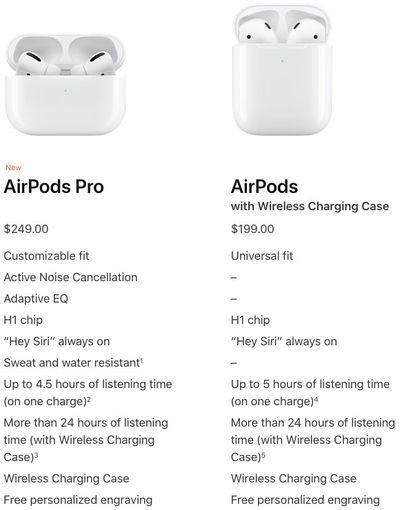
It helps to compare what you are seeing with Apple’s typical battery estimates. AirPods Pro 2 are designed to deliver up to several hours of listening per charge, with the case extending total use much longer. If you are getting far less than that in normal conditions, something is probably off.
A simple way to check is to test them in a controlled way.
• Charge both earbuds and the case to 100%
• Turn off features like ANC, Spatial Audio, and automatic ear detection for a test
• Play audio at moderate volume for one full session
• Compare the result with your usual usage pattern
If battery life improves a lot during the test, the problem is likely feature use, not hardware damage. If the battery still drops unusually fast, Apple AirPods Pro 2 battery draining so fast could point to a software issue or worn battery cells.
Settings That Can Quietly Drain Battery
Some AirPods settings are very convenient, but they can also cause battery drain without you realizing it.
Automatic ear detection
This feature pauses audio when you remove an earbud and resumes when you put it back in. It is useful, but if the sensors get confused by poor fit, hair, hats, or dirt, the earbuds may behave unpredictably and waste power. I have had the best results when the earbuds sit snugly and the sensors stay clean.
Always-on Siri access
If Siri is listening for commands, that can slightly increase power use. It is not usually the main cause of fast drain, but every little bit adds up. Turning it off may help if you rarely use voice activation.
Find My and case-related background use
AirPods Pro 2 support Find My features that help locate the case and earbuds. These features are helpful, but they can add background activity. In most cases the drain is small, but combined with other settings it can matter.
Device switching across Apple products
Automatic switching between Apple devices is one of the best parts of the ecosystem, but it can also create extra Bluetooth handoff activity. If you move between iPhone, Mac, and iPad all day, your AirPods may stay active more often than you think. That can contribute to Apple AirPods Pro 2 battery draining so fast during heavy multitasking days.
Environmental Factors That Affect Battery Life
Battery performance is not just about settings. Temperature, signal quality, and even humidity can affect how long the earbuds last.
Cold weather reduces performance
Lithium ion batteries perform worse in cold conditions. If you use your AirPods outside in winter, the battery can appear to drop fast even if the cells are healthy. This is temporary, but it can be alarming the first time you notice it.
Heat can damage battery health
Too much heat is more serious than cold. Leaving the case in a hot car, near sunlight, or on a warm charger for long periods can age the battery faster. Over time, that can make Apple AirPods Pro 2 battery draining so fast feel permanent.
Poor wireless environments cause more work
Crowded Wi Fi areas, heavy interference, and long distances from your source device can make the Bluetooth radio work harder. I have noticed more drain in airports, gyms, and large office spaces than at home. The earbuds are constantly trying to stay stable, and that costs power.
How to Fix Apple AirPods Pro 2 Battery Draining So Fast
The good news is that many battery issues can be improved with a few simple steps.
1. Update your firmware and devices
Keep your iPhone, iPad, or Mac updated, and make sure your AirPods are on current firmware. Firmware updates often include performance fixes and battery behavior improvements. Since AirPods update automatically when connected to Apple devices, keeping your ecosystem current matters.
2. Clean the earbuds and case
Dust and earwax can affect charging contacts and sensor behavior. Use a soft, dry, lint free cloth and gently clean the stems, sensors, and case contacts. Avoid liquids, sharp tools, or anything abrasive.
3. Reset your AirPods Pro 2
If the battery drain started suddenly, a reset can help. It clears temporary glitches and connection problems that may be affecting power use.
To reset them:
• Place both AirPods in the case
• Close the lid for about 30 seconds
• Open the lid
• Hold the setup button on the case until the light flashes amber and then white
• Reconnect them to your device
4. Test with ANC off
Try using them with noise cancellation turned off for a day. If battery life improves a lot, then ANC was the main drain. This is one of the fastest ways to isolate the cause of Apple AirPods Pro 2 battery draining so fast.
5. Lower volume and shorten long sessions
Listening at a moderate level can make a real difference. If you use AirPods for calls or music all day, take short breaks and put them back in the case when possible. Small habits can add up.
6. Disable features you do not need
If you do not need spatial audio, head tracking, or voice activation all the time, turn them off. You can always turn them back on when needed. This is a simple way to stretch battery life without losing the features you actually use.
7. Check battery health behavior over time
If the runtime keeps getting worse even after resets and updates, the battery may be aging. Compare how long each earbud lasts and whether one side drains faster than the other. Uneven drain can suggest a hardware issue.
When Apple AirPods Pro 2 Battery Drain Points to a Hardware Problem
Sometimes the issue is beyond settings and normal wear. If the battery drops extremely fast, charges unevenly, or one earbud dies far sooner than the other, hardware may be the cause.
Watch for these signs:
• The case no longer holds charge well
• One earbud drains much faster than the other
• The earbuds get unusually warm during use or charging
• They fail to charge past a certain level
• Battery life remains poor after resets and updates
If these problems keep happening, it is worth contacting Apple Support or visiting an authorized service provider. In my experience, battery issues that persist across multiple devices and settings usually need a deeper check.
Best Habits to Extend AirPods Pro 2 Battery Life
A few small habits can help prevent Apple AirPods Pro 2 battery draining so fast in the future.
• Put the earbuds back in the case when not in use
• Avoid extreme heat and cold
• Keep the case charged with a quality cable and adapter
• Clean the charging contacts regularly
• Use ANC only when you really need it
• Lower volume when possible
• Update your devices and firmware often
These habits sound basic, but they work. I have seen far too many “dead battery” complaints come down to simple care issues rather than broken hardware.
Frequently Asked Questions
Why do my AirPods Pro 2 die so fast even when I do not use them much?
If they are draining while idle, the case may not be charging them properly or a setting may be keeping them active. Dirty contacts, Bluetooth glitches, or a worn battery can also be the reason.
Does Active Noise Cancellation drain AirPods Pro 2 battery faster?
Yes, ANC uses extra processing and can reduce battery life. If you turn it off, you may notice a clear improvement in runtime.
Can a bad charging case cause battery drain problems?
Absolutely. If the case is not making a clean connection or is itself low on health, the earbuds may never fully recharge. That can make Apple AirPods Pro 2 battery draining so fast seem worse than it really is.
How long should AirPods Pro 2 battery last?
Battery life depends on use, volume, and features like ANC. In normal use, you should get several hours per charge, with the case adding many more hours over time.
Should I replace my AirPods Pro 2 if the battery is bad?
If resets, updates, and cleaning do not help, battery replacement or service may be the best next step. If the units are still under warranty or covered by AppleCare, that is the first place to check.
Conclusion
Apple AirPods Pro 2 battery draining so fast is frustrating, but it usually has a clear reason. In many cases, the cause is a mix of ANC, high volume, device switching, charging issues, or plain battery wear. The best approach is to test settings one by one, keep the earbuds clean, and watch for signs of aging or hardware trouble.
If your battery life still feels off, start with the simple fixes first and work outward from there. A little troubleshooting can save you time, money, and a lot of annoyance. If this guide helped, try the steps today and share your results or questions in the comments.