5 Best AI Pet Cameras: Top Picks For Smarter Pet Care
The best AI pet cameras blend clear video, smart alerts, pet tracking, and simple two-way care.
Leaving a dog or cat home alone can feel like leaving a small child with a closed door. You may wonder if your pet is safe, calm, eating, or getting into trouble. A smart camera gives you a window into that quiet time. The best AI pet cameras do more than send motion alerts. They can help tell a pet from a person, follow movement, record key moments, and let you speak through the app. I reviewed the features, likely use cases, and limits of five popular indoor cameras to help you choose with less guesswork.

PETLIBRO AI Dog Camera Pet…
Multi-Pet Recognition: This advanced AI pet camera indoor with phone app can recognize up to 5 distinct cats and dogs from full-body angles. Your pet’s day will be labeled and…
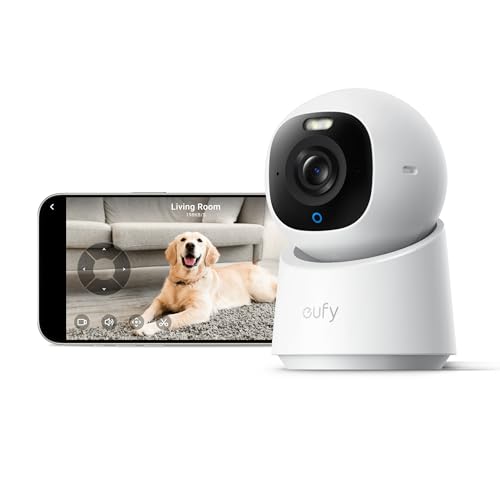
eufy Security 4K Indoor Camera…
【𝟒𝐊 𝐔𝐥𝐭𝐫𝐚-𝐂𝐥𝐞𝐚𝐫, 𝟐𝟒/𝟕 𝐑𝐞𝐜𝐨𝐫𝐝𝐢𝐧𝐠】 Capture every detail, day or night, with crystal-clear 4K recording. Stay connected with family, baby, nanny and pets using the built-in two-way audio for real-time communication….

ARENTI 4MP Pet Camera P2Q,…
1 – 4MP Resolution & Dual WiFi Bands – Arenti pet camera provides 2.5K 4MP ultra clear live stream which allows you to monitor pets, babies or elderly. This WiFi…
PETLIBRO AI Dog Camera

The PETLIBRO AI Dog Camera is built for pet parents who want more than a live video feed. It offers a 360-degree view, 1080p video, night vision, and two-way audio. Its multi-pet recognition feature aims to separate one pet from another, which can be useful in homes with several dogs or cats. The phone app also presents daily activity analysis and smart summaries, so I would not need to watch hours of footage to understand the day.
The wide view is helpful when a pet moves from a sofa to a floor bed or food area. AI summaries may also make daily check-ins faster for busy owners. I like this approach because a good pet camera should reduce worry, not create another full-time screen to monitor. Still, AI results can vary with lighting, camera angle, pet size, and movement, so I would treat summaries as helpful guidance rather than a medical report.
Pros:
- 360-degree view helps cover a larger indoor space
- 1080p video provides a clear view for everyday pet checks
- Night vision supports low-light monitoring
- Multi-pet recognition can help distinguish pets in the same home
- Daily activity analysis gives useful routine clues
- Smart summaries can save time when reviewing events
- Two-way audio lets you comfort or redirect a pet remotely
Cons:
- AI recognition may make mistakes in poor light or crowded scenes
- Some advanced app features may depend on account or service terms
- 1080p is useful, but it is not as detailed as a 2K or 4K camera
My Recommendation
I recommend the PETLIBRO AI Dog Camera for multi-pet homes and owners who want activity insight, not only live video. It is one of the Best AI Pet Cameras for people who often miss the exact time a pet becomes active. The recognition tools may help owners learn which pet is moving, resting, or causing a noise. That can be useful when one animal needs special care or a different routine.
This camera also suits owners who want a wide view without buying several fixed cameras. The 360-degree design can reduce blind spots in a main room, while night vision helps during evening checks. I would place it where furniture does not block the lens and where the camera can see the pet’s usual resting area. Overall, it offers strong smart features for pet households, subject to current Amazon stock and app terms.
| Best for | Why |
|---|---|
| Homes with more than one pet | Multi-pet recognition may help separate activity between animals. |
| Busy pet owners | Daily analysis and smart summaries can shorten review time. |
| Wide-room monitoring | The 360-degree view can cover more space than a fixed lens. |
eufy Security 4K Indoor Camera E30

The eufy Security 4K Indoor Camera E30 stands out for shoppers who want high image detail and a camera that can also serve as a home security tool. Its 4K resolution may show more detail than a basic 1080p pet cam, especially when a pet sits farther from the camera. The listing also presents it as a no-subscription camera that works as a pet camera. That makes it appealing to owners who want to limit recurring costs.
A sharper image can help when I need to check whether a pet has knocked over a bowl, moved into a corner, or left the visible area. It may also give a clearer view of a room during a quick security check. However, high resolution does not remove the need for good light, steady Wi-Fi, and sensible placement. Video quality may also use more storage and bandwidth, so I would review storage settings before turning on constant recording.
Pros:
- 4K resolution can deliver highly detailed indoor video
- No-subscription positioning may reduce long-term ownership cost
- Can serve as both a pet monitor and indoor security camera
- Higher detail helps with distant pets and small room events
- Useful choice for owners who prefer one camera for two jobs
- Strong fit for checking a room after an alert
Cons:
- 4K video may need more storage and network capacity
- A high-resolution camera cannot prevent blind spots caused by furniture
- Some smart functions may vary by firmware, app version, or region
My Recommendation
The eufy E30 is one of the Best AI Pet Cameras for people who care most about image detail and subscription-free use. I would choose it for a pet that spends time across a larger room or for an owner who also wants indoor security coverage. The 4K image may make small details easier to inspect. That can matter when a pet’s behavior changes or when I need to identify what happened during a short event.
This model is also a good match for shoppers who dislike monthly fees. Before buying, I would confirm the current storage method, app features, and support for the exact phone and network setup. A 4K camera works best with a strong router and a clear view. For buyers seeking a flexible indoor camera with sharp video, it offers solid value when available at a competitive price.
| Best for | Why |
|---|---|
| Detailed video | 4K resolution can make distant or small room events easier to see. |
| No-monthly-fee shoppers | The product is promoted as a no-subscription indoor camera. |
| Pet and home monitoring | It can work as both a pet camera and an indoor security camera. |
ARENTI 4MP Pet Camera P2Q

The ARENTI P2Q is a practical indoor camera for pet owners who want a higher-than-basic image and broad wireless compatibility. It uses a 4MP camera and supports 5GHz Wi-Fi 6 according to the product listing. The free phone app makes it easy to check a pet from a mobile device without adding a separate viewing screen. For many homes, that simple setup is more useful than a long list of complex features.
I see this camera as a sensible choice for a living room, office, or pet room where the camera can stay in one main position. A 4MP image should provide more detail than standard 1080p in many viewing conditions. Still, Wi-Fi 6 support does not guarantee a strong signal in every house, and the camera still needs a compatible network setup. I would check the app permissions and privacy settings during installation.
Pros:
- 4MP resolution offers useful detail for indoor pet viewing
- 5GHz Wi-Fi support can help on compatible networks
- Wi-Fi 6 support suits newer home routers
- Free phone app keeps daily viewing simple
- Useful for owners who want mobile access without a dedicated monitor
- Compact indoor design can fit many shelves and tables
Cons:
- 5GHz signals may have less range through walls than 2.4GHz signals
- Older routers or crowded networks may need extra setup work
- Feature availability can depend on the app and current service policy
My Recommendation
I recommend the ARENTI P2Q for pet owners who want a capable, app-based camera without making the setup feel like a security project. It belongs among the Best AI Pet Cameras for newer homes with a modern router and owners who value a free phone app. The 4MP resolution is a useful middle ground. It gives more detail than a simple entry-level camera without requiring the highest video setting.
This camera is best for monitoring one main room, checking a sleeping pet, or keeping an eye on a work area while away. I would not place it at the far end of a large home unless the wireless signal remains strong there. Buyers should also confirm the exact app, storage, and alert features before purchase. For straightforward phone viewing, it can deliver good everyday value.
| Best for | Why |
|---|---|
| Modern Wi-Fi homes | 5GHz and Wi-Fi 6 support may work well with newer routers. |
| Simple phone access | The free app lets owners view the camera from a mobile device. |
| One-room monitoring | The 4MP image suits common living rooms, offices, and pet areas. |
SensForge 2.5K Pan-Tilt Pet Camera

The SensForge 2.5K indoor camera combines pan-tilt movement with free AI human and pet detection. It includes a 64GB SD card, two-way talk, dual-band Wi-Fi, and no-subscription positioning. Those features create a strong value case for shoppers who want local recording and smart alerts in one package. The pan-tilt design can follow or scan a wider area than a camera that only faces forward.
The included 64GB card is especially useful for buyers who want to start recording without shopping for storage on day one. Local storage may also reduce the need for a monthly cloud plan, though I would still review how recordings are protected and how long they remain available. The 2.5K resolution should offer a clear view for daily checks. As with any motion camera, fast movement, shadows, and pets behind furniture can affect detection.
Pros:
- 2.5K video provides a clear view for routine monitoring
- Pan-tilt movement can cover a wider indoor area
- Free AI human and pet detection helps sort motion alerts
- 64GB SD card is included for local recording
- Dual-band Wi-Fi supports more network options
- Two-way talk allows remote voice contact
- No-subscription design may lower ongoing costs
Cons:
- Pan-tilt tracking may not follow every fast-moving pet
- Local storage still needs checking, formatting, and occasional management
- AI detection can send false alerts in busy rooms
My Recommendation
The SensForge is one of the Best AI Pet Cameras for shoppers who want a broad feature set without a required subscription. I especially like its included 64GB card for owners who want local video storage from the start. The pan-tilt design also suits a room where a pet moves between several areas. It can act like a small lookout that turns its head instead of staring at one wall.
This model fits budget-minded owners, renters, and families who want pet and human detection in the same device. I would choose it for a medium-sized room and place it where the camera has a clear view of the floor. Users should test alert sensitivity during the first week. Overall, the included storage and free AI detection make it an attractive package when the current price is right.
| Best for | Why |
|---|---|
| Local recording | The included 64GB SD card gives buyers a ready storage option. |
| Wide-area viewing | Pan and tilt movement can cover more than a fixed camera. |
| Subscription-conscious owners | Free detection and local storage may reduce recurring costs. |
Cloarks 2K Pan/Tilt Security Camera

The Cloarks 2K Pan/Tilt Security Camera is a flexible indoor option for pet owners who want AI motion detection and several storage choices. The listing describes pet, dog, and baby camera use, along with a phone app, two-way audio, a siren, and 24/7 monitoring. It supports TF card and cloud storage, giving users more than one way to save clips. The pan-and-tilt format is useful when a pet does not stay in one place.
A 2K image offers a useful step up from basic HD for many rooms. The app can help owners check in, talk to a pet, or review an alert while away. The siren may help with security, but I would use it carefully because sudden loud sounds can startle sensitive animals. Storage needs close attention, since cloud plans and card recording can have different limits, fees, and retention rules.
Pros:
- 2K resolution offers clear everyday video
- Pan and tilt movement can reduce fixed-angle blind spots
- AI motion detection may help filter ordinary activity
- Pet, dog, and baby camera use adds household flexibility
- Two-way audio supports remote reassurance or training cues
- TF card and cloud storage provide more recording choices
- Built-in siren adds a security feature for suitable situations
Cons:
- A siren may frighten some pets if used too often
- Cloud storage terms may vary and may include paid options
- Pan-tilt cameras can still miss areas blocked by furniture
My Recommendation
I would suggest the Cloarks camera for families who want one indoor device for pets, children, and general room awareness. It is among the Best AI Pet Cameras for owners who want storage flexibility. The 2K view, pan-and-tilt movement, app access, and two-way audio cover the core needs of most homes. The extra siren feature may also appeal to people who want a basic security role from the same camera.
This model is a good choice for a busy room where pets move between a floor, couch, and doorway. I would set alert zones and test the microphone before relying on it for remote communication. Owners of nervous animals should keep the siren disabled unless there is a clear reason to use it. With sensible settings, the Cloarks offers a broad feature mix at a practical price point.
| Best for | Why |
|---|---|
| Multi-use households | It can monitor pets, babies, and general indoor activity. |
| Storage flexibility | TF card and cloud options give users more recording choices. |
| Rooms with moving pets | Pan and tilt movement can follow a larger viewing area. |
How I Compare the Best AI Pet Cameras
Choosing a pet camera is not only about buying the highest resolution. A sharp picture helps, but smart alerts, camera movement, app quality, and storage often matter more in daily use. I look at how quickly an owner can check a pet, understand an alert, and act when needed. A camera should feel like a calm helper, not a noisy alarm that cries wolf all day.
I also consider the pet’s habits. A cat that sleeps in one room may need a simple fixed view. A young dog that moves, chews, and explores may benefit from pan-tilt coverage and activity alerts. Homes with several pets may gain more from recognition tools than from extra pixels. The Best AI Pet Cameras should match the pet, room, network, and budget.
Video quality and night vision
Most owners can manage with 1080p video for a small room. Higher 2K, 2.5K, 4MP, or 4K output can show more detail, but the benefit depends on distance and lighting. I prefer a clear, stable image over a very high resolution that stutters on a weak network. Night vision matters because many pets become active after sunset, when a normal camera may show little more than a dark shape.
AI detection and smart alerts
AI detection can help separate pets from people or ordinary motion. This may cut down alerts caused by curtains, sunlight, or a passing car outside the window. Yet no consumer camera understands every scene perfectly. I recommend starting with moderate sensitivity, watching the alert history, and adjusting the camera after a few days.
Pan, tilt, and viewing range
A pan-tilt camera can cover more space, but it cannot see through a sofa or around a closed door. Placement remains the first line of defense against blind spots. I place a camera high enough to avoid curious paws but low enough to see the floor. I also keep the lens away from direct sunlight, reflective glass, and loud appliances.
Storage and subscription costs
Storage is easy to overlook when comparing products. Some cameras save clips to a memory card. Others use cloud plans, while some offer both. A no-subscription camera may cost more at first but save money over time. Before buying, I check whether the camera works without a paid plan, whether local recording needs a separate card, and how the app handles deleted clips.
Privacy and home network safety
A pet camera sits inside a private home, so privacy deserves the same care as video quality. I use a strong, unique account password and turn on two-step login when the app supports it. I keep firmware updated and avoid placing a camera in a bedroom or other private area unless there is a clear need. I also check microphone controls and camera sharing permissions.
Setup Tips for Better Pet Camera Results
Good setup can make an affordable camera work better than an expensive camera placed badly. First, test the Wi-Fi signal where the camera will sit. Then point the lens toward the pet’s normal path rather than toward a blank wall. Leave enough room in the frame for movement, especially if the camera uses motion detection.
Next, spend time with the alert settings. Let the camera learn normal activity through real use, if its app offers that option. Reduce alerts from areas such as windows, fans, and curtains. If the camera sends too many alerts, I would rather adjust the detection zone than disable alerts completely.
Test the two-way audio with another person in the room. Check if the sound has a delay, echo, or sharp volume jump. Speak in a calm voice because some pets may react to a voice that seems to come from nowhere. I use remote audio to reassure a pet or interrupt mild mischief, not as a replacement for exercise, training, or care.
Finally, check the camera at night and during the brightest part of the day. A lens that looks perfect at noon may show glare at sunset. A pet that blends into a dark rug may be hard to see in night mode. These small tests help the Best AI Pet Cameras deliver more reliable results.
Which Camera Type Fits Your Pet?
For a single calm cat, a fixed indoor camera may be enough. The ARENTI P2Q can suit this type of use when the owner wants a clear 4MP view and simple phone access. For an active dog that crosses a room, a pan-tilt model may offer better coverage. The SensForge and Cloarks cameras both fit that need in different ways.
For homes with several animals, recognition and activity tools can offer more useful context. The PETLIBRO model is the strongest match for that purpose because its listed features focus on multi-pet recognition and daily summaries. If image detail is the top concern, the eufy E30 deserves attention. Its 4K output may make small events easier to inspect.
There is no single winner for every home. The Best AI Pet Cameras are the ones that answer your main worry. If the worry is “What is my pet doing?” choose smart activity tools. If it is “What happened in the room?” choose better detail and storage. If it is “Can I cover the whole space?” choose pan-tilt movement and place it well.
Common Buying Mistakes to Avoid
One common mistake is paying for resolution while ignoring the app. A pet camera can have a sharp lens but still frustrate you if alerts arrive late or clips are hard to find. I read the setup steps and check the storage model before focusing on megapixels. Simple controls often matter more than a long feature list.
Another mistake is assuming AI means perfect judgment. AI can label motion, but it may confuse a shadow with a pet or miss an animal hidden under furniture. I use smart alerts as a helpful filter, not as proof that a pet is healthy or safe. If a pet has a medical issue, a camera cannot replace professional care.
Some buyers also forget about audio. A microphone and speaker can be useful, but sound quality varies. A delayed voice may confuse a dog, and a loud speaker may upset a cat. Test the feature at home before using it for training or reassurance.
Finally, shoppers may overlook ongoing costs. A low-priced camera can become expensive if useful features require a monthly plan. I compare the full cost for the first year, including any memory card, cloud storage, or replacement accessories. This approach makes it easier to judge the real value of the Best AI Pet Cameras.
FAQs Of Best AI Pet Cameras
What does AI do in a pet camera?
AI can help identify pets, people, or movement and then send more useful alerts. Some cameras also create activity summaries or recognize more than one pet. Results can vary with lighting, camera position, and the animal’s movement.
Do I need a subscription for an AI pet camera?
Not always. Some models support local storage or offer key alerts without a monthly plan. Always check the current product listing and app terms because cloud features may differ by model.
Is 1080p enough for watching a dog or cat?
1080p is often enough for a small room and normal check-ins. A 2K, 4MP, 2.5K, or 4K camera may show more detail across a larger room. Strong Wi-Fi and good light are just as important as resolution.
Are pet cameras safe for indoor use?
They are generally safe when placed securely and used with a protected account. Keep cords away from pets, update the camera firmware, and use a strong password. Avoid pointing the camera at areas where privacy is important.
Can a pet camera replace a pet sitter?
No. A camera can show behavior and let you speak to a pet, but it cannot provide food, water, exercise, or emergency help. Use it as a monitoring tool, not as a replacement for hands-on care.
Final Verdict: Which Should You Buy?
For multi-pet homes, I would choose the PETLIBRO AI Dog Camera for its recognition tools, wide view, and daily summaries. The eufy E30 is better for sharp 4K video and no-subscription use, while SensForge offers strong local-storage value.
The Best AI Pet Cameras make remote pet care feel simpler and calmer. Match the camera to your room, Wi-Fi, pet habits, and storage needs before buying.