5 Best AI Glasses For Work: Top Smart Picks
The best AI glasses for work combine hands-free help, clear audio, useful cameras, and all-day comfort.
Picture this: you are carrying a box, checking a repair note, or speaking with a client who uses another language. Your phone is in your pocket, but the answer you need is right in front of you. The best AI glasses for work can reduce that small daily struggle with voice help, open-ear audio, camera tools, translation, and hands-free recording. I reviewed the features, design, safety details, and likely work use of these five models to help you choose with care.

AI Smart Glasses with Camera,8MP…
【1080P HD Video & 8MP Photo Capture】AI smart glasses with a built-in 8MP HD camera that support 1080P video recording and high-definition photo capture. Equipped with anti-shake algorithm, recording glasses…
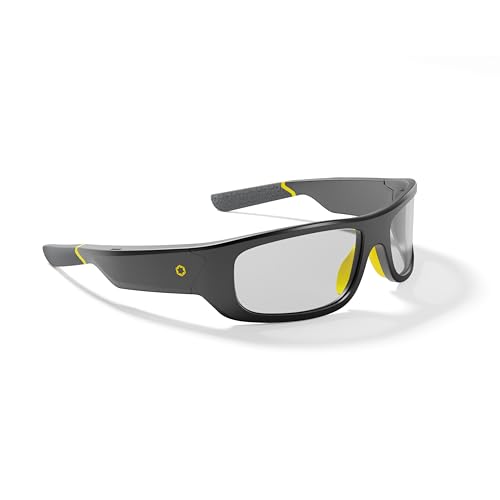
Lucyd Armor Bluetooth Safety Glasses,…
AWARD-WINNING SAFETY — Red Dot Design Award 2026 Winner and the first ANSI Z87.1-certified smart safety glasses. The TR90 frame is engineered for all-day comfort and built to meet U.S.,…

AI Smart Glasses with Camera,…
【AI Real-Time Translation & ChatGPT Assistant】AI glasses break language barriers instantly with AI real-time translation. The built-in ChatGPT voice assistant helps you communicate, learn, and handle travel or business conversations…
AI Smart Glasses With 8MP Camera

This camera smart glasses model aims to put several useful tools in one familiar frame. The listing highlights an 8MP camera, 1080P anti-shake video, real-time translation, an AI voice assistant, object recognition, and Bluetooth audio. Its photochromic lens can darken in bright light, which may help people who move between indoor and outdoor work areas. For a busy worker, that mix feels like carrying a small assistant without holding another device.
The camera may suit field notes, quick visual records, and training clips better than long-form professional video. The 1080P output is practical for reference, but buyers should not expect the same detail as a dedicated camera. Open-ear Bluetooth sound can let you hear prompts while still noticing nearby people and equipment. I also like the broad use case for sales staff, warehouse leads, technicians, property workers, and travelers who need basic translation support.
Pros:
- 8MP camera supports quick work photos and visual notes
- 1080P anti-shake video helps reduce rough footage
- Photochromic lens works across changing light
- AI voice assistant offers hands-free control
- Object recognition may help with simple visual tasks
- Real-time translation can aid basic conversations
- Bluetooth audio keeps the ears open to the work area
Cons:
- 1080P video is not ideal for high-detail production work
- AI features may depend on the phone, app, or network
- Camera use may raise privacy concerns in shared workplaces
My Recommendation
I recommend this model for workers who want a broad feature set at a practical level. It is especially useful for site visits, retail work, travel, inspections, and simple documentation. The photochromic lens gives it more flexibility than a fixed dark lens, while the voice and translation tools may reduce phone handling. If you need a compact pair of smart glasses for everyday work tasks, this is a strong starting point in the Best AI Glasses for Work category.
Lucyd Armor Bluetooth Safety Glasses

The Lucyd Armor takes a different path from camera-first AI glasses. Its main appeal is the combination of Bluetooth audio, a TR90 frame, ANSI Z87.1 safety positioning, and a photochromic lens. That makes it more focused on work protection and communication than on recording. For many jobs, this is the smarter choice because a rugged work frame matters more than a high-resolution camera.
TR90 is commonly used for lightweight, flexible eyewear frames, though fit and comfort still depend on face shape. The ANSI Z87.1 marking is important, but I always advise checking the exact safety rating and workplace rules before using any eyewear around impact or chemical hazards. Bluetooth sound can support calls, music, or spoken instructions without sealing the ears. The photochromic lens may also help workers who move from a shop floor to a loading area or from an office to a sunny site.
Pros:
- ANSI Z87.1 safety positioning suits many work environments
- TR90 frame is designed for a light, flexible feel
- Photochromic lens adapts to changing brightness
- Bluetooth audio supports calls and spoken work cues
- Camera-free design may feel less intrusive in private workplaces
- Useful for maintenance, construction support, workshops, and outdoor tasks
Cons:
- It does not offer the camera features found on the other models
- Safety eyewear does not replace a full workplace risk assessment
- Audio quality and battery life can vary with use and phone connection
My Recommendation
I would choose the Lucyd Armor for workers who put safety and comfort first. It is a good fit for shop floors, workshops, light industrial areas, outdoor service calls, and jobs that do not allow casual recording. People who want phone audio in a safety-style frame may find more value here than in camera glasses. Among the Best AI Glasses for Work, this is the clearest pick for buyers who need Bluetooth eyewear with a safety-minded design rather than a built-in camera.
4K AI Smart Glasses With Open-Ear Audio
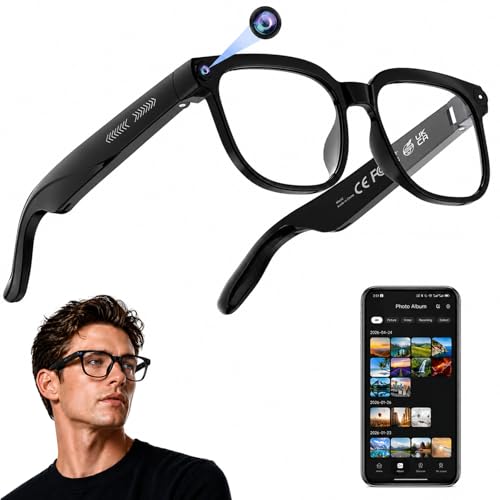
This model stands out with a listed 4K camera, photo capture, real-time translation, AI assistant support, open-ear audio, and object recognition. The transparent lens gives it a more neutral look for office use, travel, retail, and customer-facing work. A higher video resolution can preserve more detail in signs, labels, demonstrations, and work records. Still, actual results depend on lighting, stabilization, storage, compression, and the companion app.
The open-ear design is useful when you need sound but cannot block the room around you. A technician could listen to a spoken checklist while watching a machine, and a traveler could use translation while keeping awareness of traffic or other people. The camera may also help create short training clips or document a process from a first-person view. Because this is a camera product, I would always explain the recording function before using it around customers, coworkers, or confidential information.
Pros:
- Listed 4K video offers higher detail than basic 1080P models
- Transparent lens gives a low-key look for daily wear
- Open-ear audio supports awareness of nearby sounds
- Real-time translation helps during travel and client contact
- Object recognition can support simple visual questions
- Photo capture is useful for signs, products, and field notes
- AI assistant access reduces the need to reach for a phone
Cons:
- Higher-resolution recording may use more storage and battery
- Camera rules can limit use in offices and private work sites
- AI translation and recognition may not work equally well in every setting
My Recommendation
This is the model I would consider for content capture, travel support, demonstrations, and visual work notes. It makes the most sense for sales teams, trainers, field staff, property professionals, and people who need more detail in recorded clips. The clear lens also feels less like outdoor sunglasses in a normal office. If image quality is your top concern, this product deserves close attention when comparing the Best AI Glasses for Work.
iONCT AI Smart Glasses With 8MP HD Video

The iONCT model keeps its feature list simple and useful. It is listed with an 8MP camera, HD video, and real-time translation. That combination may appeal to a worker who wants visual capture and language help without paying for a long list of advanced tools. In daily use, simple controls can be a real advantage because work gear should not create another steep learning curve.
An 8MP camera can handle quick photos of labels, equipment, receipts, signs, and job progress. HD video may work well for short records, but it is best to treat these glasses as a hands-free note tool rather than a replacement for a professional camera. Translation can help with basic phrases and short exchanges, yet important business or safety instructions still deserve a human check. I see this model as a practical choice for mobile workers who value basic features over a complex interface.
Pros:
- 8MP camera supports useful everyday photo capture
- HD video is suitable for basic work documentation
- Real-time translation can assist with simple conversations
- Focused feature list may be easier for new users
- Hands-free design helps during inspections and walk-throughs
- Useful for retail, travel, service calls, and field notes
Cons:
- HD video offers less detail than the listed 4K competitor
- Feature information may depend on the companion software
- Translation should not replace a qualified interpreter for critical work
My Recommendation
I recommend the iONCT glasses for beginners who want camera and translation tools without an overly broad feature list. They may suit delivery staff, sales workers, travelers, inspectors, and small business owners who need quick visual records. Buyers who care most about ease and basic value may prefer this model over a more feature-heavy option. It is a sensible lower-complexity choice in a Best AI Glasses for Work comparison.
SGUKZF 4K EIS AI Smart Glasses
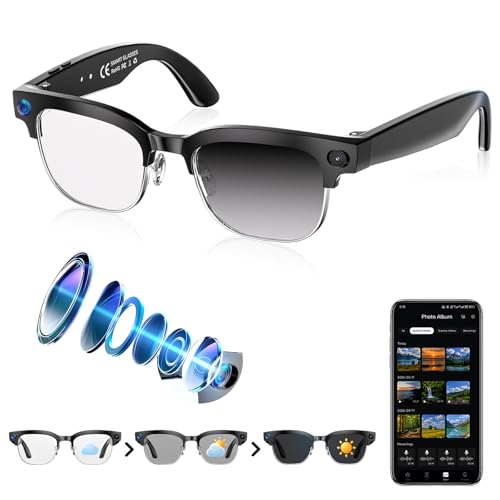
The SGUKZF model combines a listed 4K camera with EIS anti-shake video, photo capture, real-time translation, open-ear Bluetooth audio, object recognition, and a photochromic lens. EIS, or electronic image stabilization, can help smooth small hand and body movements during recording. That feature may matter when you walk through a job site or record a demonstration while using both hands. The photochromic lens adds flexibility for workers who move between different lighting conditions.
This pair looks suited to active work and travel. Open-ear audio lets you hear spoken prompts while keeping some awareness of the environment, and the AI tools may help with quick questions or visual tasks. The 4K label sounds impressive, but I would still check sample footage, app support, storage limits, and battery details before buying. Like any camera glasses, this model needs clear rules around consent, private data, and workplace recording.
Pros:
- Listed 4K capture can preserve fine visual detail
- EIS anti-shake support may improve walking footage
- Photochromic lens suits indoor and outdoor transitions
- Open-ear Bluetooth audio keeps the surroundings audible
- Real-time translation supports travel and customer contact
- Object recognition adds hands-free visual assistance
- Useful for training, inspections, travel, and field service
Cons:
- 4K recording may shorten battery life or fill storage faster
- Electronic stabilization cannot remove all motion blur
- Privacy rules may prevent camera use in some workplaces
My Recommendation
I would pick the SGUKZF for active users who want a balance of high-resolution video, stabilization, open-ear sound, and changing-light support. It fits field service, property tours, travel work, training, and product demonstrations. The feature mix is wider than the simpler iONCT option, but it may also require more setup and battery planning. For buyers seeking flexible recording and AI tools, it is one of the more complete Best AI Glasses for Work options listed here.
How I Compare the Best AI Glasses for Work
AI glasses can look similar on a product page, but their best uses differ. I start with the work problem, not the largest number in the title. A camera helps with records and visual notes, while Bluetooth audio helps with calls and spoken instructions. A safety frame may matter more than AI if your job involves dust, impact, or bright outdoor light.
I also look at how much phone support the glasses may need. Many consumer smart glasses use a phone app, a wireless connection, and cloud services for advanced AI functions. That means the glasses may not act as a fully independent computer. Before buying, check whether your phone supports the app, whether the required service works in your area, and whether a subscription may apply.
Comfort is another key test. Smart glasses sit on the face for hours, so frame weight, nose fit, temple pressure, lens shape, and heat all matter. A pair that feels exciting for ten minutes may feel tiring after a full shift. I prefer a frame that feels like normal eyewear and has controls that are easy to learn.
Camera Quality and Work Records
A built-in camera can save time when you need a quick first-person record. A worker can photograph a meter, label, product shelf, damaged item, or room condition without putting down a tool. This can make a small task feel smooth instead of clumsy. The best results usually come from good light, a steady head position, and a clear subject.
Do not judge camera quality by resolution alone. A 4K label does not tell you how well the camera handles shadows, motion, color, sound, or file transfer. EIS may reduce some shake, but it cannot make fast movement perfectly smooth. If you plan to make polished training videos, use the glasses for a point-of-view angle and a dedicated camera for the main production.
Privacy deserves equal attention. A camera indicator, workplace policy, and clear consent process can help protect coworkers and customers. Never record confidential screens, private meetings, protected health information, or restricted work areas without approval. A responsible buyer treats recording as a work tool, not a hidden feature.
AI Assistant and Object Recognition
Voice assistants can help with reminders, questions, simple notes, and hands-free control. They are most useful when your hands are busy or your phone is not easy to reach. For example, a technician might ask for a short checklist while looking at a machine. A sales worker might request a quick translation before greeting a visitor.
Object recognition can be helpful, but it is not magic. The system may identify common items while missing small labels, unusual parts, poor lighting, or complex scenes. I would use it as a second set of eyes, not as the final authority for safety, medical, legal, or technical decisions. Human review still matters.
AI performance can also change over time. App updates may add tools or change menus, while a weak internet connection may slow cloud-based answers. This is why I rate clear setup, stable Bluetooth, and simple controls as highly as flashy claims. The best AI glasses for work should reduce friction, not add more troubleshooting.
Translation for Offices, Travel, and Service Work
Real-time translation is one of the most attractive features in this group. It may help workers greet visitors, understand a short request, or follow a basic exchange. Open-ear audio can make the experience feel more natural because you do not need to hold a phone between both people.
Still, translation tools have limits. Speech speed, accents, background noise, slang, and technical words can cause errors. For contracts, safety steps, medical details, or sensitive customer issues, use a qualified interpreter or verify the result with a fluent speaker. Treat AI translation as a helpful bridge, not a perfect replacement for human skill.
Open-Ear Audio for Work
Open-ear audio sends sound toward the ear without fully sealing it. This design can help you hear a call, prompt, or audio note while remaining aware of nearby voices. That is useful in offices, stores, workshops, and service areas. It can feel less isolating than traditional earbuds.
There is a trade-off. Open-ear sound may leak at higher volumes, and busy streets or loud machinery can overpower it. Hearing safety still comes first. Keep volume at a safe level, follow local rules, and never let an audio prompt distract you near vehicles, moving tools, or other hazards.
Photochromic Lenses and Changing Light
Photochromic lenses can darken in bright light and become clearer indoors. This is useful for workers who go from a warehouse to a parking lot, or from a sunny site to an office. It may reduce the need to swap between clear and tinted eyewear.
The change is not instant, and performance can vary by lens type and temperature. A photochromic lens may not become as dark inside a vehicle as it does outdoors because the windshield blocks some ultraviolet light. If you need strict glare control or certified protection, compare the lens details with your job requirements.
Battery, App, and Connection Tips
Camera recording, Bluetooth audio, AI processing, and bright lens systems all use power. Before a shift, charge the glasses and the phone that supports them. If you plan to record often, carry a charging case or cable when the product supports one.
Pair the glasses in a quiet place and update the companion app before an important job. Test the microphone, speaker, camera, voice trigger, and file transfer at home. This small check can prevent a frustrating moment with a customer or client.
Also review the return policy and warranty. Smart eyewear combines optics, electronics, software, and a battery, so more parts can fail than with ordinary glasses. Amazon availability and prices can change, so check the current listing for fit options, included accessories, shipping, and seller support.
Best For Comparison
| Best for | Why |
|---|---|
| Safety-focused work | Lucyd Armor offers a TR90 frame, Bluetooth audio, photochromic lenses, and ANSI Z87.1 safety positioning. |
| High-detail recording | The 4K AI models from the transparent-lens and SGUKZF listings target clearer video and visual records. |
| Simple everyday assistance | The 8MP and iONCT models offer practical camera and translation features for basic hands-free tasks. |
My Recommendation
For most buyers, I would start with the 4K AI Smart Glasses with the transparent lens if detailed recording is the main need. They offer a strong mix of camera resolution, open-ear audio, translation, and visual assistance. For active outdoor work, the SGUKZF may be more appealing because it adds EIS and a photochromic lens. For safety-first buyers, the Lucyd Armor is the more sensible choice.
The right product depends on your daily routine. A camera-heavy model can help with training and records, while a safety-style model can better match a workshop or service setting. In my view, the best AI glasses for work are the ones you will wear comfortably, use legally, and trust for the task at hand. Check the current Amazon listing for the latest price, availability, app details, and included parts.
Who Should Buy AI Glasses for Work?
AI glasses may suit people who often need both hands. Field technicians, inspectors, delivery staff, sales workers, trainers, travel professionals, and property agents can all benefit from quick visual access and voice tools. The glasses can act like a small bridge between the physical world and digital information.
They may also help people who dislike reaching for a phone during every small task. A spoken reminder or short call can be easier through open-ear audio. A quick photo can be faster than taking out a phone. These small time savings can add up across a busy day.
However, not every office needs smart glasses. If your work involves sensitive data, strict no-camera rules, or long periods of screen focus, a standard headset may be better. Smart eyewear should solve a clear problem. It should not become another gadget that sits in a drawer.
Who Should Avoid Camera Smart Glasses?
People who work around confidential records should think carefully before buying a camera model. Hospitals, legal offices, schools, research labs, and secure facilities may restrict recording. Even when recording is legal, coworkers may feel uncomfortable if the camera is not clearly explained.
Workers around heavy machines also need caution. Audio, voice prompts, or camera use must never distract you from a hazard. Smart glasses do not replace approved eye protection unless the exact product carries the required certification for your task. When in doubt, follow the employer’s safety manager and written policy.
How to Choose the Best AI Glasses for Work
First, decide whether you need a camera. If you only want calls and spoken prompts, the Lucyd Armor may be a better match. If you need visual records, compare the 8MP and 4K models. Do not pay for camera features that your workplace will not allow you to use.
Next, consider the lens. A transparent lens works well for indoor offices and customer-facing roles. A photochromic lens is more flexible when you move outdoors. Safety-rated eyewear may be the right path for workshops and job sites, but confirm the exact standard for your work.
Then check sound and control. Open-ear audio is useful for awareness, yet it may not be loud enough in a noisy area. Voice controls can feel natural, but buttons are helpful when speech recognition fails. I prefer products that offer more than one way to control basic functions.
Finally, review software support. Ask how the glasses connect, where photos are stored, and whether the AI needs an internet link. Read recent customer reviews for battery life, app reliability, comfort, and customer service. Product titles can highlight exciting features, but real ownership often depends on these less glamorous details.
Workplace Privacy and Responsible Use
Before using camera glasses at work, ask for permission. Tell people when you are recording and stop when someone objects. Keep recordings only as long as needed, and use secure storage for business files. A clear habit protects trust.
Do not assume a small camera is invisible or acceptable. Some workplaces ban all recording devices, even when the purpose is harmless. A manager may also require written consent for training videos, customer interactions, or site documentation. Responsible use is part of buying the best AI glasses for work.
AI answers also need review. A visual assistant can misunderstand a tool, label, or instruction. It may offer an answer that sounds certain but is wrong. Use AI to support your judgment, then confirm important facts with company procedures, manuals, or a qualified expert.
FAQs Of Best AI Glasses for Work
What are the best AI glasses for work?
The best choice depends on your job. The 4K models suit visual records, the Lucyd Armor suits safety-focused audio use, and the 8MP or iONCT models suit basic camera and translation tasks.
Can AI glasses replace a smartphone at work?
No. Most smart glasses still rely on a phone, app, Bluetooth connection, or internet service for many features. They work best as a hands-free companion rather than a full phone replacement.
Are camera smart glasses legal to use at work?
Rules vary by location, company, and industry. Always ask your employer, respect consent, and avoid recording private conversations, confidential screens, or restricted areas.
Do photochromic lenses work indoors?
They usually become clearer indoors and darker in strong outdoor light. The change may take time, and they may not darken fully inside a car because the windshield blocks some ultraviolet light.
Are open-ear AI glasses safe around machinery?
Open-ear audio can preserve awareness, but it does not make every work area safe. Follow workplace rules, protect your hearing, and never let audio or camera use distract you near hazards.
Final Verdict: Which Should You Buy?
The 4K transparent-lens model is my top pick for most work users because it blends detailed video, translation, AI help, and open-ear audio. Choose Lucyd Armor for safety-focused Bluetooth use, or SGUKZF for active recording and EIS.
The best AI glasses for work should fit your task, privacy rules, and comfort needs. Check the latest Amazon price, stock, warranty, and app details before ordering.