5 Best AI Glasses: Top Smart Eyewear Picks For 2026
The best AI glasses blend hands-free help, clear audio, useful cameras, and a frame you can wear all day.
Picture walking through a new city with your phone buried in a bag. You want directions, a quick photo, or help reading a sign, but stopping every few minutes feels slow and awkward. The best AI glasses aim to make those small tasks feel natural. They can pair with a phone, play open-ear sound, capture first-person video, and offer smart tools such as object recognition or translation. I reviewed the main strengths, trade-offs, and ideal uses of the models below so you can choose with confidence.

Meta Ray-Ban (Gen 2) Wayfarer…
#1 SELLING AI GLASSES – Tap into iconic style for men and women, and advanced technology with the newest generation of Ray-Ban Meta smart AI glasses. Capture photos and video…

Meta Ray-Ban (Gen 2) Wayfarer…
#1 SELLING AI GLASSES – Tap into iconic style for men and women, and advanced technology with the newest generation of Ray-Ban Meta smart AI glasses. Capture photos and video…

AI Smart Glasses with Camera,…
【AI Real-Time Translation & ChatGPT Assistant】AI glasses break language barriers instantly with AI real-time translation. The built-in ChatGPT voice assistant helps you communicate, learn, and handle travel or business conversations…
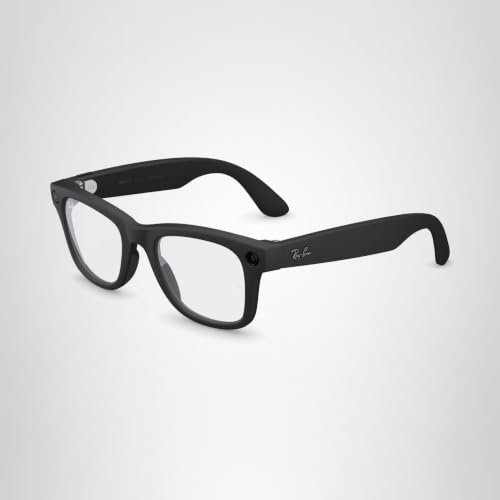
Meta Ray-Ban Gen 2 Wayfarer Clear

The Meta Ray-Ban Gen 2 Wayfarer is the most familiar-looking option in this group. Its matte black frame keeps the classic Wayfarer shape, while the clear lenses suit indoor use, office work, and evening walks. The design feels more like normal eyewear than a small computer strapped to your face. That matters because comfort and social ease often decide whether smart glasses stay in your daily routine.
This model is a strong fit for hands-free calls, music, quick photos, and voice-based help through a connected phone. The open-ear speakers let you hear audio while keeping your ears free for nearby sounds. The camera is useful for short clips and point-of-view memories, although it should not replace a dedicated camera for serious photo work. I also recommend checking app, phone, and regional AI support before buying because available features can change with software updates.
Pros:
- Classic Wayfarer style feels easy to wear in public
- Clear lenses work well indoors and in low-light settings
- Open-ear audio keeps the ears free for street sounds
- Useful for calls, music, photos, and voice commands
- Strong choice for users who want a known smart-glasses platform
- Hands-free capture helps during travel, walks, and family events
Cons:
- Clear lenses can feel too bright outdoors without added sun protection
- AI tools depend on a phone, app setup, and supported regions
- Camera and audio performance cannot match full-size dedicated devices
Meta Ray-Ban Gen 2 Wayfarer Transitions

The Transitions version offers the same basic smart-glasses idea in a more flexible lens package. The lenses are designed to adjust as light changes, so you can move from a bright sidewalk to an indoor space without changing frames. The matte black Wayfarer shape remains understated and easy to match with casual clothes. For many buyers, this is the more practical version because it reduces the need to carry a second pair of glasses.
I see this model as a travel-friendly choice for people who want one pair for many parts of the day. It can support hands-free audio, calls, voice interaction, and camera use while the lenses adapt to changing light. Keep in mind that photochromic lenses do not always behave like dedicated sunglasses, especially inside a car where windshield glass may limit the light change. The best experience comes from treating the lens shift as a convenience, not as a substitute for every type of prescription or sun lens.
Pros:
- Light-changing lenses suit mixed indoor and outdoor routines
- Wayfarer styling looks like ordinary premium eyewear
- Reduces the need to carry separate clear and tinted glasses
- Open-ear speakers support calls and music without blocking the ear canal
- Good match for travelers, commuters, and busy parents
- Hands-free controls can reduce phone use during simple tasks
Cons:
- Lens darkening may vary with weather and light conditions
- Photochromic lenses may not darken fully behind some windshields
- Higher cost may not make sense if you only want basic audio glasses
4K AI Glasses with Translation
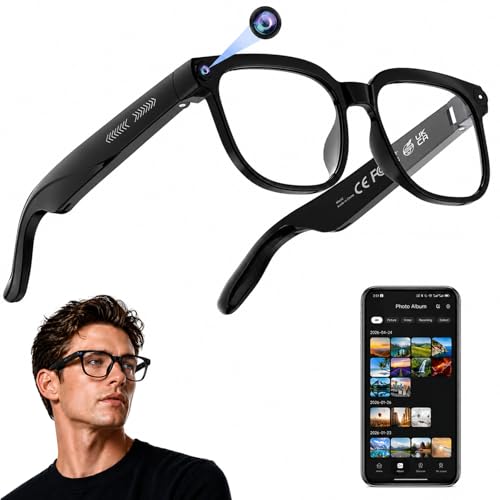
This transparent-lens model focuses on features rather than a famous fashion label. Its product listing highlights 4K video and photo capture, real-time translation, an AI assistant, open-ear audio, and object recognition. That combination makes it appealing to travelers, students, and curious users who want to test several smart tools in one frame. The clear look also gives it a light, tech-forward style.
The camera may help you record a walk, a repair task, or a travel scene from your own view. Translation and recognition tools can be useful, but their results depend on software quality, network access, lighting, language support, and the clarity of what the camera sees. I would buy this model for experimentation and practical trips rather than assume that every AI feature works offline or with perfect accuracy. Before ordering, check the current listing for app compatibility, storage details, charging method, and privacy controls.
Pros:
- 4K video claim targets buyers who value sharper hands-free footage
- Translation tools may help during travel and language practice
- Object recognition adds an extra layer of hands-free assistance
- Open-ear audio allows awareness of nearby people and traffic
- Transparent styling stands out from traditional black frames
- Combines camera, audio, and AI features in one device
Cons:
- Actual AI results can depend heavily on the companion app and network
- Transparent frames may not suit buyers who want a classic look
- Recording raises privacy concerns in homes, schools, and public places
- Advertised video quality may vary with motion, light, and compression
8MP Bluetooth AI Camera Glasses

These Bluetooth camera glasses take a simpler route. The listed 8MP camera aims to give men and women an easy way to record photos and video without holding a phone. That can help during bike rides, hikes, DIY work, cooking, or casual events when both hands are busy. The product is less about a polished brand ecosystem and more about adding a camera to familiar-looking eyewear.
I would consider this pair for buyers who mainly want first-person recording and wireless audio. Bluetooth pairing can make calls or music more convenient, but the overall experience will depend on the phone app and the control layout. An 8MP label alone does not guarantee sharp footage, since lens quality, stabilization, exposure, and file processing matter too. If you want advanced translation or a deep AI assistant, compare the software details closely before choosing this camera-first option.
Pros:
- 8MP camera targets everyday photo and video capture
- Bluetooth support can add hands-free calls and audio
- Useful for active tasks where holding a phone is inconvenient
- Unisex design may suit a wide range of casual users
- Simple camera focus can appeal to buyers who dislike complex setups
- Potentially useful for short clips, notes, and personal memories
Cons:
- Camera performance may change in low light or fast movement
- Advanced AI features are less clear than on feature-rich models
- Phone app quality and file transfer speed deserve careful checking
- Bluetooth glasses still need regular charging
SGUKZF 4K EIS Photochromic AI Glasses
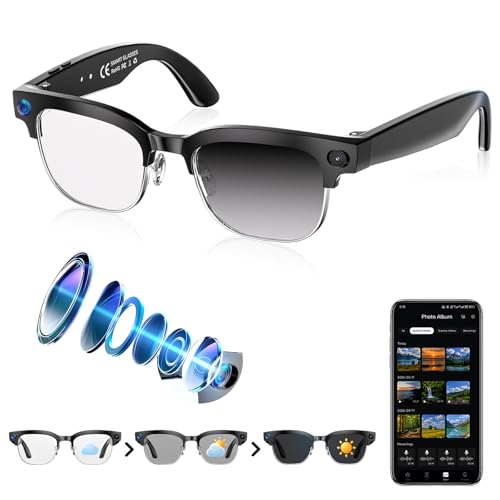
The SGUKZF model is aimed at buyers who want a broad feature list and lenses that can change with the light. Its listing highlights 4K video, EIS anti-shake support, real-time translation, open-ear Bluetooth audio, object recognition, and recording. Photochromic lenses add useful flexibility for walks, travel, and outdoor activities. On paper, it is one of the most ambitious choices in this group.
Electronic image stabilization can help smooth small hand or head movements, although no software can remove every shake during running or rough activity. I like the blend of camera tools and open-ear sound for sightseeing because it can keep a phone in a pocket for longer. Still, feature-heavy glasses need careful setup, and AI tools may rely on a companion app or online service. Look for clear information about supported languages, battery life, storage, warranty, and data handling before treating this as a full travel assistant.
Pros:
- 4K recording claim suits buyers who want detailed video
- EIS may reduce small shakes in everyday footage
- Photochromic lenses can adapt to changing light
- Translation and object recognition expand hands-free use
- Open-ear Bluetooth audio supports music, calls, and prompts
- Strong feature mix for travel, outdoor use, and casual recording
Cons:
- Many features may require more setup than basic Bluetooth glasses
- Stabilization results depend on movement, light, and software
- Photochromic performance can vary outdoors and behind vehicle glass
- AI accuracy and language coverage need confirmation before purchase
My Recommendation
I recommend the Meta Ray-Ban Gen 2 Wayfarer Clear for buyers who want the most balanced daily experience. Its familiar frame, clear lenses, open-ear audio, camera, and connected AI tools make it easier to wear often. Choose the Transitions version if you move between indoor and outdoor spaces and prefer one adaptable pair. These are the Best AI Glasses for shoppers who value design, comfort, and a more established user experience over a long list of unverified features.
Choose the 4K translation model or SGUKZF pair if travel tools, object recognition, and higher-resolution recording matter most to you. Pick the 8MP Bluetooth model when your main goal is simple camera capture and wireless sound. Every option has a different strength, so the right buy depends on whether you value fashion, light changes, video detail, or price. Check the latest Amazon listing for fit options, warranty terms, app support, and availability.
| Best for | Why |
|---|---|
| Best daily smart glasses | Meta Ray-Ban Gen 2 Wayfarer Clear offers a familiar style and balanced features. |
| Best for changing light | Meta Ray-Ban Gen 2 Transitions reduces the need to switch between clear and tinted lenses. |
| Best for travel features | The 4K or SGUKZF models focus on translation, recognition, and hands-free recording. |
How I Evaluated the Best AI Glasses
I do not judge smart glasses by a feature list alone. A camera can promise high resolution, but the glasses still need a comfortable fit, simple controls, usable sound, and a reliable way to move files to a phone. I also look at how well the product fits a normal day. If charging is hard, pairing is confusing, or the frame feels odd after 20 minutes, the smart features lose much of their value.
I compared the products across six areas: comfort, audio, camera use, AI tools, lens choice, and daily convenience. I also considered privacy because glasses with cameras can affect people around you. The Federal Trade Commission has long advised consumers to understand how connected products collect and use data, and that advice matters here. A small camera light or recording notice does not replace good manners, local rules, or consent.
What Are AI Glasses?
AI glasses are wearable frames that combine some mix of a camera, microphone, speaker, Bluetooth connection, and smart software. They usually pair with a phone, which handles much of the processing and internet access. Some models can answer voice questions, describe objects, translate text, record video, play music, or handle calls. Others use “AI” mainly as a label for camera and Bluetooth functions.
That difference is important. A true AI feature needs software that can understand a request or image and return a useful result. A camera that only saves video is still useful, but it is not the same as an assistant that can answer questions. I suggest reading the product description for exact app names and supported functions instead of assuming every pair offers the same level of intelligence.
Key Features to Check Before Buying
Camera quality
Camera resolution gives you a starting point, not the full picture. A higher number of pixels can help with detail, but lens design and light control often matter more in real use. Electronic stabilization may make walking clips smoother, while a wide view can capture more of a scene. Ask whether the glasses record photos, video, or both, and check how the files transfer to your phone.
Think about your own use. A traveler may want quick clips of a market or trail. A parent may want hands-free memories at a child’s event. A repair worker may want a short view of a task. For these jobs, fast capture may matter more than cinema-grade quality.
Audio and microphone performance
Most smart glasses use open-ear speakers. They sit near the ear instead of sealing the ear canal, which lets you hear traffic, people, and other sounds. That design is helpful outside, but it cannot isolate noise as well as closed earbuds. Loud streets and strong wind can reduce speech clarity and music detail.
Microphones also face a challenge. They must pick up your voice while rejecting wind and nearby noise. Call quality may be fine in a quiet room but weaker on a busy sidewalk. I recommend checking reviews that discuss real calls, not only music playback.
Lens type and eye comfort
Clear lenses are best for indoor use and evening wear. Tinted lenses help in bright sun, while photochromic or Transitions lenses can shift as the light changes. Prescription compatibility is another key point. A frame may look suitable for prescription lenses but still require an approved optical partner or a specific lens range.
Photochromic lenses are convenient, but they do not darken in the same way as sunglasses in every setting. They may respond more slowly in cold weather and may stay lighter inside a car. If you spend many hours driving or in strong sun, confirm the exact lens behavior before you buy.
Battery and charging
Smart glasses are small, so battery space is limited. Camera recording, calls, AI queries, and loud audio can use power faster than light music playback. A charging case may extend use during a day, but it also adds another item to carry. Check the current product page for stated run time and learn whether the figure applies to mixed use or a single task.
I prefer glasses that show a clear battery level in the app. A simple charging routine also helps. Charge the glasses when you place your phone on the charger, and keep the case in your daily bag if you travel often.
Phone and app compatibility
Many AI glasses depend on a companion app. The app may handle setup, firmware updates, camera files, voice settings, and AI access. Confirm that the app supports your iPhone or Android device before ordering. Also check whether certain tools need a paid plan, a specific operating system, or an internet connection.
Software support can shape long-term value. A frame with fewer features but a stable app may be better than a low-cost pair with a crowded menu and rare updates. Read recent customer feedback and look for clear instructions. If a listing does not explain the app, that is a reason to proceed carefully.
Privacy and recording signals
Camera glasses deserve extra care in public. Tell people when you plan to record, and avoid private spaces such as restrooms, locker rooms, medical rooms, and closed meetings. Do not record sensitive conversations without permission. A visible indicator may show that the camera is active, but it does not make every recording appropriate.
Review the app permissions as well. A camera app may ask for access to photos, Bluetooth, microphones, location, contacts, or notifications. Grant only what the product needs. Use a strong phone passcode, install updates, and remove the app if you stop using the glasses.
Meta Ray-Ban Versus Generic AI Glasses
The Meta Ray-Ban models have a major advantage in design recognition. They look close to ordinary Wayfarer frames, so many users feel comfortable wearing them in daily life. That can be more valuable than an extra camera mode because a device only helps when you remember to wear it. Their familiar style may also make conversations about recording easier.
Generic AI glasses often compete with a longer feature list. Some advertise 4K video, translation, recognition, stabilization, and Bluetooth sound at the same time. That can create strong value if the software works as promised. The trade-off is less certainty about app quality, updates, support, fit, and data practices.
In simple terms, Meta Ray-Ban is the safer lifestyle choice for many buyers. The generic models are more attractive to experimenters who want a low-cost way to test camera and AI features. Neither path is automatically right for every person. Your best choice depends on how much you value brand support, appearance, advanced functions, and budget.
Are AI Glasses Worth It?
AI glasses can be worth it when they solve a repeated small problem. They can reduce phone use during walks, make calls easier while cooking, and help you capture a moment without reaching into a pocket. Travelers may enjoy quick translation or directions. People who dislike earbuds may prefer open-ear sound.
They are less useful if you expect a full heads-up display or a complete replacement for your phone. Most camera-and-audio glasses do not place maps or text directly in front of your eyes. They also need charging, a phone connection, and careful privacy habits. Think of them as a lightweight control layer for your phone, not a magic window into the internet.
Best Uses for AI Smart Glasses
Travel: AI glasses can help with hands-free photos, audio prompts, and language tools. They are useful when your hands carry luggage or when you want to stay aware of your surroundings. Still, keep a phone available for detailed maps and emergency contact.
Outdoor walks: Open-ear sound lets you listen to music or a call while hearing bikes, cars, and people. This does not remove the need for caution. Keep volume low and pause audio before crossing roads.
Family events: A wearable camera can capture your view without making you hold a phone. Ask before recording other people, especially children who are not your own. A short clip is more useful when everyone feels comfortable.
Work and DIY: Camera glasses can document steps, show a problem to a remote helper, or record a task for later review. They may help with simple notes and checklists. They should not replace required safety gear or workplace recording rules.
Accessibility support: Voice control, audio descriptions, and text recognition may assist some users. Results vary, so users should test the features in a safe setting. Buyers with visual, hearing, or mobility needs should also ask a specialist whether a model fits their specific needs.
What I Would Not Expect From AI Glasses
I would not expect perfect object recognition. AI can misread a sign, confuse an object, or miss details in glare. Translation can also fail with slang, poor lighting, fast speech, or unsupported languages. Treat these tools as helpful suggestions, not as the only source for a safety or health decision.
I would not expect private listening in every place. Open-ear audio can leak sound, and nearby noise can make you raise the volume. I also would not expect all-day camera use on one charge. Recording and wireless transfer can place a heavy load on a small battery.
Finally, I would not buy solely because a listing says “4K” or “AI.” Check the real app, warranty, storage method, return policy, and customer feedback. Specs create interest, but daily reliability creates value.
Setup Tips for a Better First Day
Start by charging the glasses and case fully. Install the companion app from the official app store, then pair the glasses in a quiet room. Update the firmware before testing the camera or assistant. This simple process can prevent many early connection problems.
Next, adjust the fit without forcing the frame. The camera should point where you expect, and the arms should sit evenly. Test a short photo, a short video, a phone call, and low-volume audio. Check where files save and learn how to delete them.
Set a recording habit from the start. Tell friends when the camera is on, use the visible recording signal, and avoid sensitive spaces. Create a folder for saved clips so your phone does not fill with forgotten files. These small habits make the Best AI Glasses easier and safer to use.
Care and Maintenance Tips
Clean lenses with a soft microfiber cloth. Avoid paper towels, household glass cleaner, and rough shirt fabric because they can damage lens coatings. Keep the glasses in their case when you place them in a bag. Small scratches can make camera previews and normal vision less pleasant.
Keep the charging contacts dry and free of dust. Do not wear electronic glasses in heavy rain unless the manufacturer clearly rates them for that use. Sweat, water, and heat can shorten the life of small electronics. Store the case away from direct sun and extreme temperatures.
Install important security updates through the official app. If the glasses begin to disconnect, remove the pairing and set them up again rather than repeatedly pressing random controls. Save important photos to your phone or cloud storage because wearable memory may be limited.
How to Choose the Right Pair for You
Begin with your main task. If you want everyday calls and music, prioritize comfort, microphones, and open-ear sound. If you want travel help, focus on translation, recognition, app support, and battery life. If you want video, compare stabilization, file transfer, lens direction, and storage.
Then choose the lens. Clear lenses suit indoor users and evening wear. Transitions or photochromic lenses suit people who move through changing light. If you need prescription lenses, confirm the optical process before purchase. Do not assume that every frame accepts the same lens type.
Finally, decide how much uncertainty you can accept. A recognized platform may cost more but offer clearer support and updates. A generic model may offer more features for less money but need more research. I would rather buy a simple pair that fits my routine than an impressive pair that stays in a drawer.
FAQs Of Best AI Glasses
What are the Best AI Glasses for everyday use?
The Meta Ray-Ban Gen 2 Wayfarer Clear is the strongest everyday choice in this comparison. It combines a familiar frame with clear lenses, open-ear audio, camera tools, and connected AI features. The Transitions version is better if you often move between indoor and outdoor light.
Do AI glasses need a phone?
Most camera and assistant glasses need a phone for setup, internet access, app control, updates, or file transfer. Some basic audio functions may work after pairing, but advanced AI tools often depend on the companion app. Check the product listing for phone and operating system requirements.
Can AI glasses translate languages?
Some models advertise real-time translation, including the 4K translation model and SGUKZF glasses listed here. Results depend on supported languages, network access, microphone quality, and software. Use translation as a helpful aid, and confirm important details with a person or trusted tool.
Are camera glasses legal to use in public?
Laws and rules vary by location and setting. Even where recording is legal, people may expect notice and consent. Avoid private spaces, follow workplace or school rules, and never record sensitive conversations without permission.
Can I wear AI glasses all day?
You may be able to wear them for long periods if the frame fits well and the lenses suit your eyes. Weight, battery life, heat, glare, and audio volume affect comfort. Take breaks, keep the volume modest, and stop using them if they cause eye strain or discomfort.
Final Verdict: Which Should You Buy?
The Meta Ray-Ban Gen 2 Wayfarer Clear is the best overall pick for daily wear, while the Transitions model is better for changing light. Choose the 4K or SGUKZF pair for travel features and the 8MP model for simple camera use.
The Best AI Glasses should fit your routine, phone, budget, and privacy needs. Check current Amazon details before ordering, then start with safe, simple tasks.

Similar Posts
































