Best AI Drones for Beginners: Top Easy Picks
The best AI drones for beginners combine simple controls, smart flight help, safe design, and useful cameras.
You may want smooth aerial videos, but the first flight can feel like trying to steer a kite in strong wind. A beginner drone should reduce that stress, not add more buttons and confusing menus. AI tools such as optical flow, subject tracking, gesture control, and automatic return can help new pilots learn with more confidence. I reviewed these models for flight support, camera value, portability, battery claims, and ease of use. This guide to the Best AI Drones for Beginners focuses on practical choices for adults, kids, families, and new aerial photographers.

DCX Volo X EZ AI…
SMART TECH THAT FLIES FOR YOU: Our camera drone AI-assisted features like Follow Me and Obstacle Avoidance for beginners make it easy to capture smooth aerial shots; this 4k drone…
GPS Drone with EIS 2K…
7.22-Inch Screen Remote Control: Instant Flight, No Phone Needed – Experience true plug-and-play flying. The included remote features a large 7.22-inch display for real-time FPV, eliminating the need for a…

Drone with AI Optical Flow…
[AI-POWERED “NEVER-LOST” DRONE | 2-Step Flight for Kids & Beginners] Say goodbye to first-flight fear with this drone with camera for kids! The S118S drone fuses AI Optical Flow Vision…
DCX Volo X EZ AI Drone

The DCX Volo X EZ stands out as the most advanced option in this group. It pairs a 4K camera with AI-assisted flight control, which can make early flights feel less demanding. Its advertised 360-degree obstacle avoidance is aimed at helping the aircraft notice hazards around it. That feature can be useful when a new pilot focuses more on the phone screen than on the drone itself.
This model also lists FAA approval and U.S. support, two points that may matter to first-time buyers. I would still check the current FAA rules for your exact flight area before takeoff because registration, Remote ID, and airspace duties can depend on the drone’s weight and how you use it. The Volo X EZ looks best for adults who want a beginner-friendly start without giving up room to grow. It feels more like a learning tool than a simple indoor toy.
Pros:
- 4K camera aims to produce sharper travel and outdoor footage
- AI-assisted flight control can reduce the learning curve
- Advertised 360-degree obstacle avoidance adds useful flight help
- Designed for adults who want more than a basic toy drone
- Foldable style should make transport easier between locations
- U.S. support may help with setup and early questions
- Offers room to build piloting skills over time
Cons:
- Advanced features may require more setup than a toy drone
- Obstacle avoidance cannot replace careful pilot attention
- Outdoor wind may still affect a lightweight beginner aircraft
- Camera quality can vary with light, movement, and phone settings
My Recommendation
I recommend the DCX Volo X EZ for an adult beginner who wants the strongest mix of smart flight help and camera potential. It is also a good fit for someone who expects to move from simple practice flights to travel photos or family videos. The obstacle system can act like a second set of eyes, but it should not be treated as an invisible shield. I always suggest starting in a wide, open field and learning the basic controls before using automated modes.
Among the Best AI Drones for Beginners, this is the one I would choose for a new pilot who values support, image quality, and future growth. Its advertised features give it a clear edge over simpler models. Check the current Amazon listing for price, package contents, battery details, and availability before ordering.
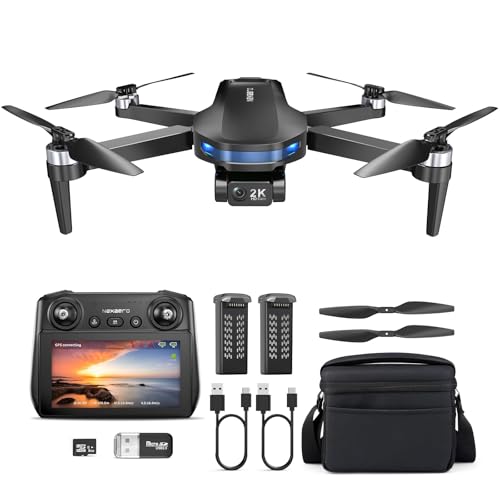
GPS Drone With EIS 2K Camera

This GPS drone takes a different path from the Volo X EZ. Instead of focusing only on obstacle awareness, it gives beginners several navigation and camera tools, including GPS positioning, electronic image stabilization, Follow Me, AI Track, and automatic return. The included 7.22-inch screen on the remote controller may appeal to pilots who do not want to rely on a phone. A built-in display can also make the setup feel more direct during a quick outdoor flight.
The listing claims up to 64 minutes of flight time, which likely depends on the included batteries and test conditions. Real flight time can drop with wind, cold weather, heavy use, and repeated camera work. The under-249-gram design may help with portability and some recreational registration rules, but pilots should confirm the current FAA requirements. For a beginner, GPS and automatic return can provide a helpful safety net, especially when the drone flies farther than expected.
Pros:
- GPS positioning can help the drone hold its place outdoors
- Automatic return may help recover the aircraft after signal or battery concerns
- Electronic image stabilization can reduce small camera shakes
- Large 7.22-inch remote screen offers a phone-free viewing option
- Advertised 64-minute total flight time supports longer practice sessions
- Follow Me and AI Track add simple creative shooting modes
- Foldable, lightweight design should pack well for trips
- Three speed settings can help beginners progress at a comfortable pace
Cons:
- GPS functions need open sky and may take time to lock on
- Advertised flight time is not the same as time per battery
- 2K footage has less detail than a good 4K camera
- Automatic return still depends on proper setup and a safe return path
My Recommendation
I would choose this GPS model for a beginner who wants steady outdoor practice and a remote with its own screen. It may suit travelers, parents, and new pilots who want Follow Me or AI Track without buying a separate phone mount. The three speed settings are especially useful because a first flight should feel calm, not rushed. GPS can help, but I would still keep the drone within sight and avoid trees, wires, roads, crowds, and restricted areas.
This is one of the Best AI Drones for Beginners for users who care more about navigation, long sessions, and easy viewing than maximum camera detail. It offers a balanced feature set at a likely midrange price. Before purchase, review the latest listing for battery count, charging time, controller details, and the exact weight stated by the manufacturer.
AI Optical Flow Drone With Voice Control
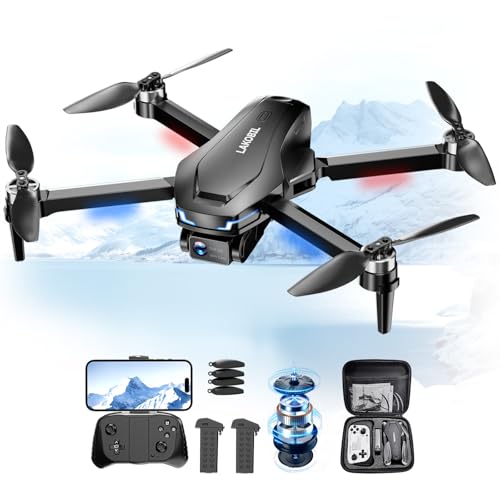
This foldable AI drone is built around easy play and simple control. It uses AI optical flow, voice control, and gesture control to make basic commands less intimidating for kids and adults. A one-key start can help new users get airborne without working through a long control sequence. The 1080p camera is suited to casual clips, fun selfies, and first-person viewing rather than high-end filmmaking.
The listing includes two batteries with a stated 26-minute total flight time. That can give a new pilot enough time to practice takeoff, landing, turns, and short camera flights before charging. Brushless motors are another positive point because they often offer better efficiency and durability than small brushed motors, although performance still depends on design and care. This model may work best indoors in a clear room or outdoors on a calm day.
Pros:
- AI optical flow can help support steadier low-altitude hovering
- Voice and gesture controls make casual flying more engaging
- One-key start can simplify the first takeoff
- 1080p camera supports basic FPV viewing and quick clips
- Two batteries allow more practice than a single-battery package
- Foldable body is convenient for storage and travel
- Brushless motors may provide useful efficiency and motor life
- 3D flips add a fun feature for supervised recreational use
Cons:
- 1080p video offers less detail than 2K or 4K alternatives
- Optical flow can work less reliably over dark, shiny, or blank surfaces
- Voice and gesture commands may need practice in noisy spaces
- Shorter advertised flight time limits longer outdoor sessions
My Recommendation
I recommend this model for families, kids with adult supervision, and adults who want a fun first drone at a lower feature level. It is less focused on serious aerial photography and more focused on simple control, tricks, and shared play. The optical-flow system can help inside a suitable room, but users should remove fragile items and keep people and pets away from the flight path. Outdoor flights should wait for calm weather.
For shoppers comparing the Best AI Drones for Beginners, this is the most approachable choice for light entertainment and basic practice. Its voice and gesture features give it a playful personality that traditional entry drones may lack. Check the current Amazon page for age guidance, included accessories, spare battery options, and the latest price.
PLEGBLE 4K Beginner FPV Drone

The PLEGBLE 4K Beginner FPV Drone is a simple option for shoppers who want a 4K-labeled camera without stepping into a large professional aircraft. Its main appeal is a straightforward beginner format with a first-person view experience. FPV can make the flight feel vivid because the pilot sees the camera view while steering. That can turn a short backyard flight into a more exciting learning session.
This drone may suit buyers who prefer a compact, easy-to-store model for casual use. As with any small drone, the camera result will depend on light, vibration, wind, and the quality of the app or transmission system. A 4K label does not automatically mean the same image quality as a stabilized premium camera. I would treat this model as a practical entry point for learning and fun rather than a replacement for a dedicated aerial camera.
Pros:
- 4K camera specification is attractive for casual aerial photos
- FPV view can make practice flights more immersive
- Beginner-focused design may feel less complex than a pro drone
- Compact format should make storage simple
- Useful option for first-time pilots who want camera features
- Can serve as a low-risk way to explore aerial video
Cons:
- Listing details should be checked for GPS, obstacle sensing, and battery data
- Camera quality may vary in low light or windy conditions
- FPV transmission can show delay or lose clarity at longer distances
- New pilots still need to learn manual steering and safe landing habits
My Recommendation
I would suggest the PLEGBLE to a beginner who wants a compact FPV drone with a 4K camera label and a simple starting point. It is a reasonable fit for casual users, teens with supervision, and adults who want to test aerial video before spending more. I would check the full package list carefully because battery quantity, controller style, app support, and flight aids can change the daily experience. A clear practice area matters more than a long range claim during the first few flights.
In a list of the Best AI Drones for Beginners, this model is best viewed as the camera-first budget choice. It may not offer the same smart assistance as the first three models, but it can still provide an accessible way to learn FPV flying. Confirm the current Amazon specifications and return terms before ordering.
What Makes the Best AI Drones for Beginners?
AI drone features can sound impressive, but beginners need useful help rather than a long list of technical terms. The best systems support a stable hover, track a person, avoid some objects, or return home after a problem. They should also let the pilot turn those tools off and learn manual control. Smart features work best as a co-pilot, not as a replacement for good judgment.
I look at five main areas when reviewing a beginner drone. These are control, safety, camera quality, battery use, and setup. A drone can have a sharp camera and still be poor for a new pilot if the controls feel jumpy. In the same way, an affordable drone can be a great first choice if it stays calm, starts easily, and survives normal learning mistakes.
Flight Assistance
Optical flow uses visual data from the ground to help a drone hold position. It works best over surfaces with visible texture and enough light. A plain white floor, glossy table, dark carpet, or dim room can confuse the system. GPS provides a different kind of support by using satellite signals to help with position outdoors.
Obstacle avoidance can be valuable, but buyers should understand its limits. Sensors may miss thin branches, wires, glass, dark objects, or fast-moving people. They may also perform differently in bright sun, low light, fog, or tight spaces. I still recommend slow speed, open areas, and direct visual contact on every flight.
Camera Quality
Resolution is only one part of a good drone camera. A 4K camera can record more detail than a 1080p camera, but vibration and poor light can ruin both. Electronic image stabilization can help smooth small shakes. A gimbal usually gives more advanced stabilization, but these beginner models focus on lighter and simpler designs.
Think about the type of footage you want. A 1080p camera can work well for social clips and family memories. A 2K camera gives a little more detail for crops and edits. A 4K camera offers more room to trim a frame, but the final result still depends on the lens, sensor, app, and transmission system.
Battery and Flight Time
Manufacturers often state a total flight time based on several batteries. A package that claims 26 minutes may include two batteries that provide about 13 minutes each under ideal conditions. Cold air, wind, fast flight, and frequent climbs can shorten that time. I prefer packages with spare batteries because practice improves when the pilot does not have to stop after one short flight.
Always inspect the charging method. Some small drones use a USB cable, while others use a dedicated charger or charging hub. A spare battery is helpful only if it is easy to charge safely. Never leave a charging battery unattended, and stop using one that swells, becomes very hot, or shows damage.
Weight and FAA Rules
Drone weight matters in the United States. Recreational flyers generally must follow FAA safety rules, take the required TRUST test, and follow airspace limits. Drones that weigh more than 0.55 pounds, or 250 grams, typically need registration for recreational use. A drone under 250 grams may qualify for an exception when used only for recreation, but that does not remove other safety duties.
Rules can change, and use matters. A drone used for work, paid content, or other non-recreational purposes may have different requirements. Remote ID rules can also apply based on the drone and operation. I advise every new pilot to review current FAA guidance, check airspace before flight, and avoid airports, emergency scenes, stadiums, and restricted locations.
Controller and App Setup
A good controller should make the two sticks feel clear and predictable. The left stick usually controls altitude and yaw. The right stick controls forward, backward, and side-to-side movement. New pilots should learn these actions one at a time instead of trying to record video during the first flight.
Phone apps can add camera views, tracking modes, gesture commands, and firmware updates. They can also bring permission requests, Wi-Fi issues, and compatibility problems. Before leaving home, charge the controller, connect the phone if required, update the app, and test the controls without taking off. This small habit can prevent a great deal of frustration.
How I Compared These Beginner AI Drones
I compared these models by asking a simple question: how much help does a new pilot receive without losing control? I considered the advertised AI tools, camera format, navigation features, portability, and included accessories. I also looked at whether each drone seems aimed at a serious adult beginner, a casual family user, or a child learning under supervision.
I do not treat marketing language as proof of perfect flight. “AI,” “4K,” “long range,” and “obstacle avoidance” can describe useful features, but the real result depends on weather, light, battery health, signal conditions, and pilot skill. That is why I included limits for each model. An honest review should show both the bright side and the rough edges.
I also separate advertised performance from guaranteed performance. For example, a 64-minute claim may describe combined battery time. A 4K label describes resolution, not necessarily dynamic range or professional detail. GPS can help with position, but it does not make a drone safe to fly near people. These details help shoppers choose with clear expectations.
Best Uses for Each Drone
| Best for | Why |
|---|---|
| Adult beginners and travel video | The DCX Volo X EZ combines a 4K camera, AI-assisted flight control, and advertised 360-degree obstacle avoidance. |
| GPS practice and longer sessions | The GPS model offers a built-in screen, automatic return, Follow Me, AI Track, and an advertised 64-minute total flight time. |
| Kids, families, and indoor fun | The optical-flow model adds voice and gesture control, a one-key start, two batteries, and simple 1080p FPV use. |
Beginner Flight Tips That Protect Your Drone
Start with a calm day and a wide, open space. Avoid a crowded park for the first flight because people, trees, and distractions leave little room for mistakes. Place the drone on level ground, confirm the propellers are secure, and wait for the controller and aircraft to connect. If the model uses GPS, wait for the proper status before launching outdoors.
Keep the first flight low. Practice takeoff, hover, landing, and gentle turns before testing flips or tracking modes. I like to fly a small square at walking speed because it teaches direction without creating panic. Once those movements feel natural, try a short forward flight and bring the drone back to the launch point.
Do not depend on the live camera view alone. Keep the aircraft within visual line of sight and watch its position in the real world. The screen can narrow your attention, especially when you are trying to frame a photo. If the video freezes, look up and fly the drone by sight or land it safely.
Wind is one of the biggest surprises for beginners. A drone may feel stable in a living room but drift outdoors when a breeze rises. Small aircraft can use a great deal of power while fighting wind. If the drone struggles to return, stop filming, lower the height if safe, and bring it back slowly.
Learn the return-to-home behavior before you need it. Some models return to the launch point, while others may land or rise to a preset height first. Obstacles between the drone and home can still cause trouble. Set a safe return height in an open area, and never assume an automatic feature understands every object in its path.
Use tracking modes in clear spaces only. Follow Me and AI Track can create fun walking or cycling videos, but the drone may not see a wire, branch, pole, or passing vehicle. Keep a spotter nearby when possible. Stop the mode at once if the drone moves in an unsafe direction.
Store the aircraft in a dry place away from heat. Remove the battery for long storage, and keep propellers free of dust and cracks. A tiny bend can cause vibration or poor control. Replace damaged propellers rather than trying to straighten them by hand.
Common Mistakes New Drone Owners Make
The first mistake is buying only for camera resolution. A high number on the box does not teach a pilot how to hover. Control feel, stability, battery access, and support often matter more during the first month. If a drone is hard to control, the camera may never get a fair chance.
The second mistake is flying too far too soon. Range claims often come from open, interference-free test areas. Homes, trees, hills, Wi-Fi networks, and weather can reduce the real signal distance. Stay close until you understand the drone’s response and battery use.
The third mistake is ignoring the local rules. A beginner may think a small drone is not subject to airspace limits. In reality, weight does not make every location legal. Check FAA airspace tools and local park rules before flight, and respect privacy by avoiding windows and private gatherings.
The fourth mistake is using automated modes before learning the emergency controls. A tracking mode can look easy, but a pilot must know how to stop it. Read the manual and practice the pause or stop function at a safe height. A fast response can save the aircraft when an unexpected object enters the flight path.
The fifth mistake is trusting one battery number. A new owner may see “64 minutes” and expect one hour of nonstop flight. Product packages often add several battery estimates together. Plan for shorter real sessions and buy approved spare batteries if you want more time.
AI Features Explained in Plain English
AI-assisted flight control usually means software helps interpret sensor data and adjust the drone. It may support hovering, tracking, or gesture commands. The term does not mean the drone can make every flight decision correctly. It still needs a pilot who understands the area and can take control.
AI Track attempts to keep a selected person or object in view. The feature works best when the subject stands out from the background and moves at a modest speed. Crowds, trees, shadows, and low light can make tracking less reliable. Use it as a creative tool, not as a safety system.
Gesture control recognizes a hand pose or motion and maps it to an action. It can help capture a photo without touching the controller. Voice control can perform simple commands when the drone supports that function. Both features may struggle with noise, accents, distance, or unclear gestures, so keep the controller ready.
Optical flow is not the same as GPS. It uses a downward camera or sensor to judge movement near the ground. GPS uses satellite signals and works mainly outdoors with a clear view of the sky. Some drones use both systems, while others rely on optical flow alone.
Automatic return is another support feature that can respond to low battery or lost connection. The exact action depends on the model and settings. It may rise, travel back, or land. Before relying on it, read the manual and test the feature only in a safe, open location.
Who Should Buy a Beginner AI Drone?
A beginner AI drone suits a person who wants help while learning. It can be a good gift for an adult who enjoys gadgets, a family that wants outdoor fun, or a new creator who needs basic overhead clips. The right model should match the user’s patience and goals. A child may enjoy voice control, while a travel user may value GPS and a better camera.
These drones are not ideal for every job. A professional real estate shooter may need a larger sensor, gimbal stabilization, stronger wind resistance, and advanced flight logs. A racing pilot may prefer manual FPV equipment with a different control style. The Best AI Drones for Beginners focus on confidence, access, and low-friction learning.
Price also affects the best choice. A low-cost drone can make sense when the main goal is fun and basic practice. A more capable model may cost more but reduce the need to upgrade soon. I would rather see a buyer choose a stable, supported drone than pay extra for a feature they will not use.
Safety and Privacy Checklist
Before each flight, inspect the body, propellers, battery, and controller. Confirm that the drone has enough power to return with a safe reserve. Check the weather and look for wind, rain, power lines, trees, and people. If any part of the flight feels uncertain, wait for a better time.
Respect privacy. Do not record inside homes, look through windows, or follow people who have not agreed to be filmed. Avoid sensitive locations and never use a drone to interfere with emergency work. Safe flying protects both the aircraft and the public trust that makes this hobby possible.
Follow the current FAA rules for recreational flight. Take the required TRUST test if applicable, register the aircraft when required, and follow airspace restrictions. A product title or seller statement cannot replace official guidance. Rules may change, so verify them before your first launch and again if your use changes.
FAQs Of Best AI Drones for Beginners
What is the best AI drone for a first-time adult pilot?
The DCX Volo X EZ is the strongest choice for an adult who wants a 4K camera, AI-assisted flight control, and advertised obstacle avoidance. Its features give beginners room to grow. Always confirm current specifications and rules before flying.
Are AI drones easy for kids to fly?
Some are, but children should fly only with close adult supervision. The optical-flow model with voice and gesture control is the most playful option here. An adult should handle setup, weather checks, airspace checks, and emergency control.
Does a 4K drone always take better photos?
No. Resolution is only one part of image quality. Light, lens quality, vibration, stabilization, wind, and the camera app also matter. A steady 2K clip can look better than a shaky 4K clip.
Is a drone under 249 grams exempt from all FAA rules?
No. A sub-249-gram drone may qualify for a registration exception during recreational use, but other FAA safety and airspace rules still apply. Check the current official requirements for your flight and location.
Do obstacle sensors make a beginner drone crash-proof?
No. Sensors can miss wires, branches, glass, dark objects, and moving hazards. They may also work poorly in low light or bad weather. Keep the drone in sight and fly slowly in open areas.
Final Verdict: Which Should You Buy?
The DCX Volo X EZ is my top pick because it offers the best mix of 4K video, AI flight help, and advertised obstacle avoidance. The GPS model is better for screen-based outdoor practice, while the optical-flow drone suits family fun.
The Best AI Drones for Beginners can make learning feel less like a test and more like a guided adventure. Check the latest listing, FAA rules, and local airspace before you fly.