Best AI Meeting Recorders: Top Tools For 2026
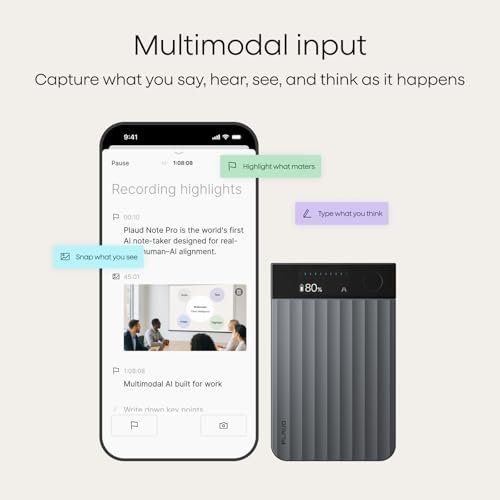
The best AI meeting recorders capture clear audio, create smart notes, and save hours of manual work.
You finish a long meeting, open your notebook, and find half the page covered in rushed phrases. Important tasks are missing, names are unclear, and nobody remembers who agreed to what. An AI meeting recorder works like a quiet second set of ears. It records the talk, turns speech into text, and can create a short summary with useful action points. I reviewed these devices for sound capture, ease of use, transcription help, portability, and daily value. This guide will help you find the right fit for work, school, calls, interviews, and team meetings.

Plaud Note Pro AI Voice…
AI-POWERED TRANSCRIPTION & MULTI-DIMENSIONAL SUMMARIES: Plaud Note Pro is your professional voice transcriber, delivering high-accuracy transcription in 112 languages with auto speaker labels. Powered by top AI models and thousands…

Pocket AI Voice Recorder, Auto…
YOUR AI PERSONAL ASSISTANT FOR EVERYDAY PRODUCTIVITY: More than a voice recorder, Pocket works as your AI personal assistant to capture, transcribe, and summarize meetings, calls, and ideas instantly. Core…

Pocket AI Voice Recorder, Auto…
YOUR AI PERSONAL ASSISTANT FOR EVERYDAY PRODUCTIVITY: More than a voice recorder, Pocket works as your AI personal assistant to capture, transcribe, and summarize meetings, calls, and ideas instantly. Core…
Plaud Note Pro AI Voice Recorder

The Plaud Note Pro is built for people who want a small recorder for meetings, phone calls, interviews, and quick voice notes. Its main appeal is the simple record, transcribe, and summarize workflow. I like this approach because it removes the need to type while people are speaking. The slim shape also makes it easier to carry than a full-size digital recorder.
For busy users, the AI layer can turn a long recording into a more useful work note. A transcript helps when you need to check a detail, while a summary can point you toward tasks and key topics. Results still depend on room noise, speaker distance, accents, and clear speech. Even so, this is one of the strongest options for users who want a polished device instead of a phone-only app.
Pros:
- Records meetings and calls in a compact form
- Designed for transcription and AI summaries
- Useful for work notes, interviews, and follow-up tasks
- Easy to carry in a pocket, bag, or laptop case
- Reduces the need to write notes during a discussion
- Helpful for reviewing exact details after a call
Cons:
- AI features may depend on an account or paid service plan
- Very noisy rooms can reduce transcript accuracy
- Users should check local rules before recording calls
My Recommendation
I recommend the Plaud Note Pro for consultants, managers, students, sales staff, and anyone who attends several meetings each week. It is especially helpful when your hands need to stay free for a laptop, presentation, or product demo. The recorder gives you a physical device for capture, then helps turn spoken words into a cleaner record. Among the Best AI Meeting Recorders, it is a strong pick for people who want a balanced mix of portability, call support, and smart note tools.
Pocket AI Voice Recorder in Space Gray

This Pocket AI Voice Recorder is aimed at users who prefer a small, simple note-taking device. The space gray finish looks quiet and professional, so it fits well in an office, classroom, or interview setting. Its key purpose is to capture speech and help convert it into text. That makes it useful when you want to stay engaged instead of staring at a phone screen.
I see this model as a practical tool for short meetings, lectures, interviews, and personal reminders. The pocket size makes it easy to keep close, which matters because the best recorder is often the one you remember to bring. AI notes can help organize a long recording, but you should still review names, numbers, and deadlines. No automatic transcript should replace a quick human check before you send notes to a client.
Pros:
- Compact design for daily carry
- Neutral space gray color suits work settings
- Supports automatic transcription and AI note tasks
- Useful for lectures, interviews, and small meetings
- Lets users focus on the speaker while recording
- Can help create a searchable record of spoken ideas
Cons:
- Small controls may take time to learn
- Accuracy can drop when several people speak at once
- Cloud or AI tools may require extra setup
My Recommendation
The space gray Pocket recorder is best for students, remote workers, writers, and people who want a low-profile device. It can act like a digital pocket notebook for classes, planning talks, and one-on-one meetings. I would choose it for users who care more about light weight and simple capture than advanced meeting-room controls. As one of the Best AI Meeting Recorders for everyday use, it offers a practical entry point into automatic transcription and AI note taking.
Pocket AI Voice Recorder in Sierra Blue
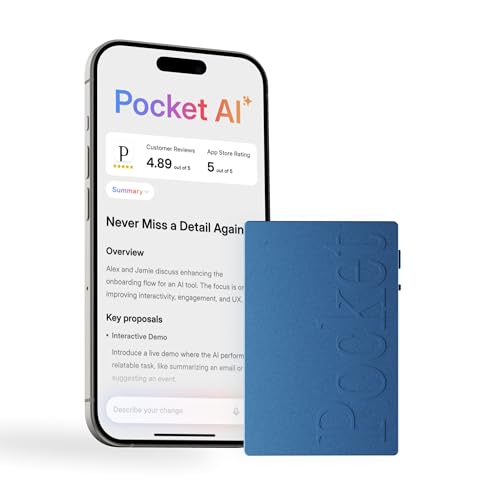
The Sierra Blue version gives the Pocket AI Voice Recorder a more personal look without changing its core purpose. It is made for people who want to capture speech, create a transcript, and use AI to shape the result into useful notes. The soft color may appeal to students, creators, and users who do not want another plain black gadget. Its small build should also make it easy to carry from a desk to a classroom or coffee shop.
In daily use, this type of recorder works best when placed near the main speaker. Clear input gives the transcription system a better chance to separate words and build sensible notes. I would use it for interviews, study sessions, planning talks, and short team discussions. It is less ideal for a large room with poor sound control, overlapping voices, or a speaker who sits far from the device.
Pros:
- Distinctive Sierra Blue finish
- Small size supports easy everyday carry
- Combines voice recording with automatic transcription
- AI note tools can reduce manual writing
- Good fit for students, creators, and casual work users
- Useful for saving ideas before they are forgotten
Cons:
- Color choice may not suit every business setting
- Multiple voices can challenge automatic transcripts
- Users may need an internet connection for some AI functions
My Recommendation
I recommend the Sierra Blue Pocket recorder for students, freelancers, interviewers, and creative users who want a friendly, portable design. It is a good match for someone who records ideas often but does not want to use a phone for every note. The color also makes it easier to spot in a crowded bag. For buyers comparing the Best AI Meeting Recorders, this model is a sensible choice when portability, simple AI notes, and personal style matter most.
Plaud Note Pro AI Recorder for Calls

This Plaud Note Pro listing is designed for the same broad need: recording spoken conversations and turning them into useful digital notes. It targets users who want help with meetings and calls without manually typing every sentence. I find that this type of device is most useful when a conversation contains many small details. A later transcript can act as a safety net when memory is not enough.
The AI summary feature may save time after a busy call by reducing a long recording to major points. That can help with follow-up emails, task lists, and project records. Still, I would review any generated summary before treating it as a final business document. AI can miss a soft “maybe,” confuse names, or overlook a change in tone when the audio is not clear.
Pros:
- Built around meeting and call recording
- Can support transcript review after conversations
- AI summaries may shorten post-meeting work
- Useful for customer calls and project discussions
- Portable design fits mobile work routines
- Helps create a record of decisions and questions
Cons:
- Generated notes still need careful review
- Call recording rules vary by state and location
- Some features may rely on software access or a subscription
My Recommendation
This Plaud Note Pro is best for sales teams, real estate agents, coaches, support staff, and remote professionals who spend much of the day on calls. It is also helpful for anyone who needs to revisit a conversation before making a decision. I would select it when call support and quick summaries rank above decorative design. It deserves a place among the Best AI Meeting Recorders for people who want a repeatable workflow from spoken call to follow-up note.
Comulytic Note Pro AI Meeting Recorder

The Comulytic Note Pro focuses on the growing need for automatic meeting notes. Instead of relying only on memory, you can use a recorder to preserve the discussion and review it later. The device is suited to people who want an AI note-taking tool with a dedicated hardware form. That can feel more natural than opening an app and changing phone settings before every meeting.
I would place this recorder near the center of a small table for team talks or one-on-one discussions. Good placement matters because no AI system can restore words that the microphone never captured. The transcription and note features may help turn a long discussion into a cleaner outline. For best results, tell other participants that recording is taking place and follow your workplace privacy policy.
Pros:
- Purpose-built for meetings and voice notes
- AI note-taking can reduce post-meeting admin work
- Dedicated hardware is easy to keep ready
- Useful for project planning and team discussions
- Can help preserve decisions, ideas, and next steps
- Good alternative to writing every detail by hand
Cons:
- Room noise may affect the final transcript
- Large meetings may need careful device placement
- AI processing and storage terms deserve close review
My Recommendation
The Comulytic Note Pro is best for small businesses, project leads, office teams, and users who want a dedicated meeting recorder. It makes the most sense for regular planning sessions where action items matter. I would choose it for a work desk or meeting room rather than a very loud public space. For shoppers seeking the Best AI Meeting Recorders, it is a practical option when meeting-focused note taking is the main goal.
How I Evaluated the Best AI Meeting Recorders
A good AI meeting recorder should do more than press a record button. I look at the full path from capture to useful notes. That means I consider microphone performance, control layout, transcription flow, summary quality, portability, privacy, and long-term cost. A device can sound impressive on a product page yet feel slow or confusing when a meeting starts.
I also separate hardware value from software value. The recorder may hold the sound, but the app or online service often handles transcription and summaries. That difference matters because cloud tools may need an account, an internet connection, or a paid plan. Before buying, check the current listing, supported languages, storage terms, and subscription details.
Recording Quality and Microphone Placement
Clear sound is the foundation of every transcript. A recorder placed close to the main speaker usually performs better than one left at the end of a long table. Fans, air conditioners, traffic, keyboard clicks, and side conversations can all reduce accuracy. I prefer a recorder that is easy to place and simple to start before the first person speaks.
Do not expect AI to work magic in a poor room. Even the Best AI Meeting Recorders need usable audio. A quiet room, steady speaker, and clear voice will usually produce better results than a noisy room with premium hardware.
Transcription and Speaker Clarity
Transcription turns spoken audio into words that you can scan and search. This saves time when you need to find a question, quote, name, or decision. Speaker labels can add more value, but they are not always perfect. Similar voices, interruptions, and people speaking at the same time can confuse the system.
I treat an AI transcript as a draft, not a legal record. Read it before sharing it with a team or client. Pay special attention to figures, dates, product names, medical terms, and contract language.
AI Summaries and Action Items
A summary should help you see the shape of a meeting at a glance. The most useful notes often include key topics, decisions, open questions, and next steps. A short summary can save more time than a long transcript when you only need the main idea.
However, a short note can also hide context. I like to keep the original audio and full transcript available. That way, I can check the source when a summary seems too simple or leaves out an important concern.
Battery, Storage, and Daily Carry
Portability affects how often you use a recorder. A slim device can stay in a laptop bag or pocket, ready for an unexpected interview or meeting. Battery life matters because a dead recorder is just a small paperweight. You should also check how recordings move to a phone or computer and whether the device stores them locally, online, or both.
For frequent users, charging habits matter as much as listed battery claims. I suggest charging after a long workday and testing the full workflow before a major meeting. Do not wait until an important client call to learn how the app works.
Privacy and Consent
Recording a conversation can create privacy, legal, and workplace concerns. U.S. recording laws vary by state, and some places require consent from everyone in the conversation. Company rules may also restrict recording customer calls, private discussions, or sensitive meetings.
Tell participants when recording starts, explain why you are recording, and stop if someone does not agree. Do not upload private audio to an AI service without checking its storage and data rules. This simple habit protects trust and reduces risk.
What Makes a Recorder Better Than a Phone App?
A phone app can be useful, but it competes with calls, messages, alerts, and low storage. A dedicated recorder gives you a single-purpose tool that you can start quickly. It may also offer a better physical position for capturing sound. The right choice depends on your routine, but hardware can remove several small points of friction.
I still suggest keeping a phone app as a backup. Test both tools in your own room before an important event. Real sound and real workflow reveal more than a short feature list.
Best For Comparison
| Best for | Why |
|---|---|
| Meetings and calls | Plaud Note Pro models focus on recording, transcription, and summaries for busy work users. |
| Students and daily carry | The Pocket AI recorders offer a small form for classes, interviews, reminders, and study notes. |
| Small team planning | Comulytic Note Pro suits users who want a dedicated device for meeting notes and action items. |
How to Get Better Results From an AI Meeting Recorder
Start with placement. Put the recorder near the main group, keep it away from a laptop fan, and avoid covering the microphones. If the meeting has a long table, place the device near the center when possible. For a one-on-one talk, keep it between both speakers.
Next, set a clear recording habit. Start a few seconds early and stop only after the final task or question is complete. Give the file a useful name if the app supports it. A name such as “March 2026 client planning” is far better than “Recording 17.”
Speak in short, clear turns during team meetings. Ask people to say their names before a formal interview or group call. If someone gives an important number, repeat it aloud for confirmation. These small steps help both the transcript and the final summary.
Review AI notes soon after the meeting. Correct names, dates, owners, and deadlines while the discussion remains fresh. Then send a short follow-up that confirms the agreed tasks. An AI tool can prepare the map, but you still need to choose the road.
Who Should Buy an AI Meeting Recorder?
These devices are useful for managers who need a record of decisions. They also help sales workers who review customer calls, students who revisit lectures, journalists who conduct interviews, and freelancers who manage several clients. Families and individuals may use them for personal reminders, though privacy still matters.
You may not need one if you attend very few meetings or already have a reliable approved work system. A dedicated recorder adds another device to charge and manage. For frequent meeting users, however, the time saved can justify the extra hardware.
Important Buying Tips for 2026
Product software changes faster than hardware. In 2026, check whether the AI features are included, limited by monthly minutes, or tied to a subscription. Also check the current privacy policy, supported languages, export formats, and account requirements. These details can change after a product launch.
Look for simple controls and clear status lights. You should know when a recording starts and stops. Check whether the device supports the kind of audio you need, such as room meetings, phone calls, or interviews. If you work with sensitive information, give data storage and deletion tools the same attention as sound quality.
Finally, compare the complete cost. The purchase price is only one part of ownership if transcription and summaries use a paid plan. Read the latest Amazon listing and the maker’s current terms before ordering. Prices, bundles, colors, and service limits can change.
FAQs Of Best AI Meeting Recorders
What is an AI meeting recorder?
An AI meeting recorder captures spoken audio and uses software to create a transcript, summary, or task list. Some models are dedicated devices, while others work mainly through a phone or computer app.
Are AI meeting recorder transcripts always accurate?
No. Accuracy depends on sound quality, speaker distance, accents, room noise, and overlapping voices. Always check names, dates, numbers, and action items before sharing the notes.
Do I need permission to record a meeting?
Often, yes. Recording laws differ across U.S. states, and workplace rules may be stricter. Tell participants about the recording and get the consent required in your location.
Do AI meeting recorders require a subscription?
Some AI features may require an account or paid plan. Check the current product listing and service terms for transcription minutes, storage limits, exports, and renewal costs.
Can I use an AI recorder for phone calls?
Some devices support call recording, but the method varies by model and phone type. Confirm compatibility before buying, and follow all consent and privacy rules.
Final Verdict: Which Should You Buy?
The Plaud Note Pro is the best overall choice for meetings and calls. Pocket models suit students and light daily use, while Comulytic fits small team planning.
The Best AI Meeting Recorders can turn missed notes into clear next steps. Check sound needs, privacy rules, software costs, and current availability before you buy.

Similar Posts
































