How To Set Up A Travel Router: Quick Setup Guide
A travel router lets you create a safer, private Wi-Fi network anywhere, in just a few simple steps.
If you travel often, set up a travel router once and it becomes your tiny networking sidekick. I’ve used travel routers in hotels, airports, and short-term rentals, and the difference is huge: fewer login headaches, better privacy, and a more stable connection for all your devices. In this guide, I’ll walk you through how to set up a travel router the right way, what to do before you leave, and the mistakes that can turn a simple setup into a frustrating one.
What a travel router does and why it matters
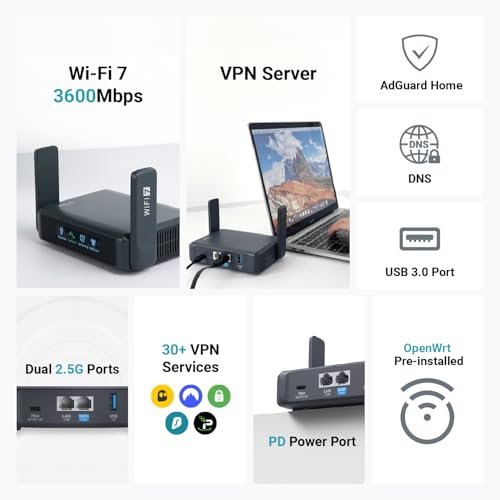
A travel router is a small, portable router built for life on the move. It connects to an existing internet source, like hotel Wi-Fi, an Ethernet port, or a mobile hotspot, and then creates your own private network.
That matters because public and shared networks are often slow, crowded, or insecure. A travel router can help you connect multiple devices at once, keep your phone and laptop on one trusted network, and sometimes improve reliability compared with logging in on each device separately.
In practice, it feels a little like carrying your home network in your backpack. You still depend on the internet source around you, but you get a cleaner and more controlled setup on top of it.

What you need before setting up a travel router
Before you start, gather the basics so the setup goes smoothly. The exact items depend on your model, but most people need only a few things.
- A travel router
- A power source, such as a USB adapter or wall charger
- An internet source, such as hotel Wi-Fi, Ethernet, or a phone hotspot
- A smartphone, tablet, or laptop for setup
- The router’s default login details from the manual or label
- A charging cable and, if needed, a short Ethernet cable
I’ve learned that half the battle is just being prepared. The first time I tried to set one up in a hotel room, I had the router but forgot the Ethernet cable, which turned a five-minute task into a scavenger hunt. Since then, I keep a small tech pouch ready before every trip.
How to set up a travel router step by step
Setting up a travel router is usually simple once you know the flow. Most models follow the same basic process, even if the menus look a little different.
1. Power on the travel router
Plug the router into power using the charger or USB port it supports. Wait for the lights to stabilize before moving to the next step.
Some routers boot in under a minute, while others take longer. If the manual mentions a status light, use that as your guide.
2. Connect your phone or laptop to the router
Look for the router’s default Wi-Fi name, which is often printed on a sticker or shown in the manual. Connect to that network first so you can reach the setup page.
If the router asks for a password, use the one listed on the device or in the manual. This initial connection is just for setup, so don’t worry if the network is not yet online.
3. Open the admin page or app
Many travel routers let you set them up through a browser or a mobile app. Common setup addresses include something like 192.168.0.1 or 192.168.1.1, but your model may use a different one.
Once you log in, change the default admin password if the router asks you to do that. This is one of the easiest ways to protect your device from unwanted access.
4. Choose your internet source
Now tell the router where to get internet from. This is the key step in how to set up a travel router, and it depends on where you are.
Common options include:
- Hotel or public Wi-Fi
- Ethernet from a wall jack or room port
- USB tethering from a phone
- A mobile hotspot or 4G LTE connection
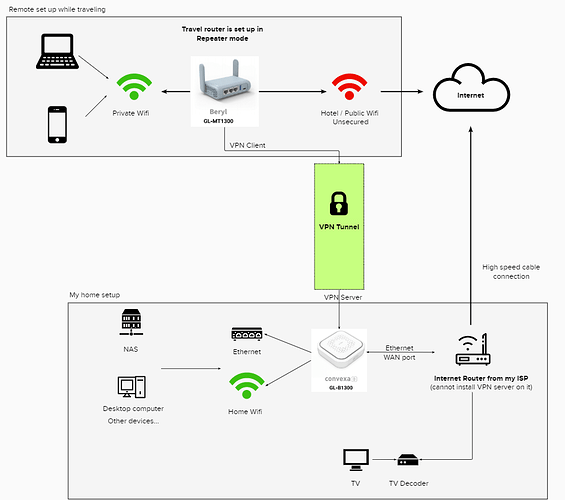
- A repeater mode if you want to extend an existing network
If you are using hotel Wi-Fi, the router may need to connect to a captive portal. That means you may have to open a browser, accept terms, or enter a room number before the internet works.
5. Set your new Wi-Fi name and password
Create a custom network name and a strong password. I usually pick a name that is easy to spot but not too personal.
A strong password should be long and unique. Avoid using obvious choices like your room number, your name, or “12345678.” If you travel with family or coworkers, share the password only with the people who need it.
6. Save the settings and reconnect
After you save the changes, the router will usually restart. Then reconnect your devices to the new Wi-Fi name you created.
At this stage, test the internet on your phone or laptop. If one device connects and another does not, the issue is often a simple password typo or a missed login page.
7. Test speed, stability, and device access
Open a website, stream a short video, or run a quick speed test. If the connection is weak, move the router closer to the source or away from thick walls and metal objects.
This is also a good time to confirm that all your devices can connect. A travel router is most useful when your phone, tablet, laptop, and streaming device all work without repeated logins.

Best ways to use a travel router while traveling
Once you know how to set up a travel router, the real value comes from using it well. Small habits can make the connection faster and more dependable.
- Place it near the strongest signal source, especially in hotel rooms
- Keep it away from TVs, microwaves, and other electronic clutter
- Use Ethernet when it is available, since wired connections are often more stable
- Update firmware before a long trip if the router supports it
- Save your preferred settings so you can reconnect faster next time
I’ve found that the router works best when I treat it like a signal bridge, not magic. If the hotel Wi-Fi is weak, the travel router cannot create speed from nothing. But it can make that weak signal easier for your devices to share and manage.
Common mistakes to avoid
A lot of setup problems come from small oversights. The good news is that most of them are easy to avoid.
- Leaving the default admin password unchanged
- Forgetting to log in to the hotel captive portal
- Using the wrong network mode for the situation
- Placing the router too far from the source signal
- Assuming the travel router improves internet speed by itself
- Ignoring firmware updates or security settings
One mistake I made early on was assuming every hotel network worked the same way. Some required a browser login on the router first, while others were fine after connecting a single device. Once you understand that the login process can vary, setup gets much less stressful.
Security tips for safer travel networking
Security is one of the biggest reasons people learn how to set up a travel router. Public networks can expose you to tracking, weak passwords, and fake access points.
To stay safer:
- Use WPA2 or WPA3 when available
- Change default passwords immediately
- Turn off remote admin access unless you truly need it
- Keep firmware current
- Use a VPN if your work or travel habits call for extra privacy
- Avoid logging into sensitive accounts on unknown networks unless you trust the setup
A travel router is not a full security shield, but it does add a useful layer of control. Think of it like locking your own door inside a larger shared building.
When a travel router is worth it
A travel router is especially useful if you often stay in hotels, use Airbnbs, work remotely, or travel with many devices. It can also help if you want one network for streaming boxes, gaming devices, tablets, and laptops.
It may be less necessary if you only travel once in a while and usually rely on your phone hotspot. Still, even occasional travelers often appreciate the convenience once they try it.
Here are a few situations where it really shines:
- Business trips with multiple work devices
- Family trips where everyone wants simple access
- Hotels with awkward login pages
- Rentals with one Ethernet port and too many devices
- Remote work setups that need more consistency
How to troubleshoot a travel router
If the router does not work right away, do not panic. Most issues have simple fixes.
Try this:
- Restart the router and the source device
- Recheck the Wi-Fi password
- Confirm the internet source actually works
- Move closer to the source signal
- Open the captive portal in a browser
- Switch between repeater, access point, or router mode if your model supports it
- Reset the router only if nothing else works
In my experience, the most common failure is the login portal, not the router itself. If the connection seems active but nothing loads, open a browser and try to finish the hotel or guest Wi-Fi sign-in there.
Frequently Asked Questions of How to Set Up a Travel Router
Do I need technical skills to set up a travel router?
No, most travel routers are built for simple setup and use. If you can follow an app or a browser wizard, you can usually get it running in a few minutes.
Can a travel router work with hotel Wi-Fi?
Yes, many travel routers are designed to work with hotel Wi-Fi. You may need to complete the hotel’s sign-in page through the router’s browser or captive portal first.
Is a travel router better than a phone hotspot?
It depends on your needs. A phone hotspot is simple and portable, but a travel router can offer a more stable shared network for several devices and may be easier for family or work travel.
Why is my travel router connected but I have no internet?
This usually means the router is connected to the Wi-Fi source but has not passed the captive portal login yet. Open a browser, complete the sign-in steps, and then test again.
Can I use a VPN with a travel router?
Yes, many travel routers support VPN setup or can work alongside a VPN on your devices. That can add privacy, but setup varies by model, so check the router’s features before you travel.
Conclusion
Setting up a travel router is one of those small travel skills that pays off fast. Once you know the steps, you can create a more private, organized, and dependable network wherever you go. The key is to prepare ahead, choose the right internet source, and avoid the common setup mistakes that trip people up.
If you travel with multiple devices or just want fewer connection headaches, a travel router is absolutely worth learning. Try the setup before your next trip so you can leave with confidence, not guesswork. If this guide helped, explore more travel tech tips, subscribe for updates, or leave a comment with your own setup experience.