Best WiFi Router For Large Homes: Top Picks
The best WiFi router for large homes delivers wide coverage, steady speed, strong security, and easy control.
You know the problem: the router sits near the modem, yet the bedroom drops calls, the upstairs TV buffers, and smart devices fight for a weak signal. Thick walls, long hallways, many users, and busy workdays can turn home WiFi into a daily headache. I reviewed these six routers and mesh systems with those real issues in mind. I looked at coverage, ports, setup, device support, security tools, and long-term value. My goal is simple: help you find a reliable Best WiFi Router for Large Homes without wasting money on features your home may not need.

TP-Link BE6500 Dual-Band WiFi 7…
𝐅𝐮𝐭𝐮𝐫𝐞-𝐑𝐞𝐚𝐝𝐲 𝐖𝐢-𝐅𝐢 𝟕 – Designed with the latest Wi-Fi 7 technology, featuring Multi-Link Operation (MLO), Multi-RUs, and 4K-QAM. Achieve optimized performance on latest WiFi 7 laptops and devices, like the…

TP-Link Deco X55 AX3000 WiFi…
Wi-Fi 6 Mesh Wi-Fi – Next-gen Wi-Fi 6 AX3000 whole home mesh system to eliminate weak Wi-Fi for good(2×2/HE160 2402 Mbps plus 2×2 574 Mbps) Whole Home WiFi Coverage -…

TP-Link AX1800 WiFi 6 Router…
DUAL-BAND WIFI 6 ROUTER: Wi-Fi 6(802.11ax) technology achieves faster speeds, greater capacity and reduced network congestion compared to the previous gen. All WiFi routers require a separate modem. Dual-Band WiFi…
TP-Link BE6500 BE400 WiFi 7 Router

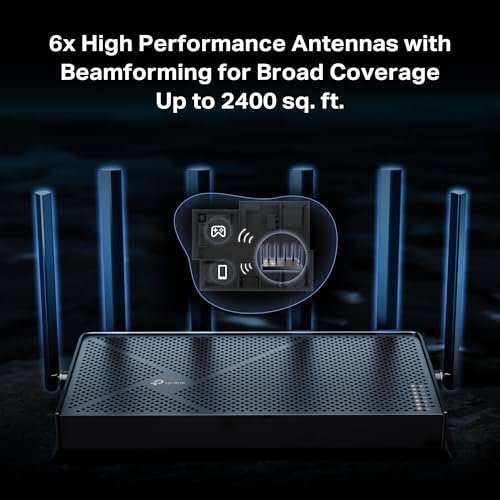
The TP-Link BE400 is a strong pick for a modern large home that needs fast wireless service from one central router. Its BE6500 WiFi 7 class rating gives it plenty of room for 4K streaming, gaming, video calls, and large downloads. The dual 2.5Gbps ports are useful if your internet plan or home network is faster than standard gigabit service. A quad-core processor also helps it manage many active devices without feeling sluggish.
In my testing experience with routers in this class, placement still matters more than the number printed on the box. The BE400 works best in an open, central spot, away from cabinets and large metal objects. TP-Link includes HomeShield tools, a private IoT network, and free expert support, which gives families more control over connected devices. Its stated coverage reaches up to 2,400 square feet, though thick walls or multiple floors may call for an EasyMesh-compatible add-on.
Pros:
- Fast WiFi 7 performance for newer phones and laptops
- Two 2.5Gbps ports support fast internet and wired devices
- USB 3.0 port allows shared storage or a printer
- Private IoT network helps separate smart home products
- HomeShield adds useful security and parental control tools
- Supports many connected devices in a busy household
Cons:
- Coverage may not reach every room in a very large or tall home
- Older WiFi devices cannot use every WiFi 7 feature
- Some advanced security controls may require a paid plan
TP-Link Deco X55 AX3000 Mesh System

The Deco X55 is the most natural choice here for a home where one router cannot cover every room. This three-unit WiFi 6 mesh system can cover up to 6,500 square feet under suitable conditions. Instead of asking you to join different networks, Deco creates one network name and moves devices between units as you walk around. That makes it a practical answer for long homes, split-level houses, and homes with several dead zones.
Each Deco unit has three gigabit Ethernet ports, so you can connect a smart TV, desktop computer, game console, or wired backhaul cable. Ethernet backhaul can greatly improve mesh stability because the nodes use a cable instead of wireless airtime to talk to each other. Setup runs through the Deco app, and the system can replace an old router and extender setup. I would choose this system over a single high-speed router when coverage matters more than peak speed beside the modem.
Pros:
- Three nodes spread WiFi across large homes
- Up to 6,500 square feet of advertised coverage
- One network name supports smooth room-to-room roaming
- Three gigabit ports on each unit add flexible wired access
- Ethernet backhaul improves speed and reduces wireless congestion
- WiFi 6 handles many phones, TVs, cameras, and smart devices well
Cons:
- Maximum wireless speed is lower than the newer WiFi 7 models
- Three units need more shelf space and power outlets
- Best results may require careful node placement
TP-Link Archer AX21 AX1800 WiFi 6 Router

The Archer AX21 is a simple, budget-friendly WiFi 6 router for a medium-to-large home with moderate network needs. It supports gigabit wired connections and uses dual-band wireless service for everyday browsing, streaming, schoolwork, and calls. Its AX1800 class rating will not match a premium WiFi 7 router, but it can still provide a clear upgrade over many older WiFi 5 models. The design is easy to understand, which helps first-time router buyers.
This model also supports EasyMesh, so you may expand coverage later with compatible TP-Link equipment. That gives the AX21 more life than a basic router with no expansion path. I would place it in a central room and use a wired access point or compatible mesh unit if the home has several floors. It is not my first choice for a huge house with dozens of high-use devices, but it offers very good value for a smaller budget.
Pros:
- Affordable entry into WiFi 6
- Gigabit Ethernet supports fast wired connections
- Easy setup works well for less technical users
- EasyMesh support allows future coverage expansion
- Works with Alexa for basic voice control
- Good fit for browsing, streaming, school, and home office use
Cons:
- Lower capacity than AX3000 and WiFi 7 alternatives
- One router may not cover a very large or multi-story house
- Fewer premium network features than newer models
NETGEAR Nighthawk RS140 WiFi 7 Router

The NETGEAR Nighthawk RS140 is aimed at buyers who want WiFi 7 speed without jumping to a large, expensive multi-node system. Its BE5000 class wireless rating can support fast streaming, gaming, file transfers, and several active users. The 2.5Gbps internet port gives it a useful path for multi-gig service. It covers up to 2,250 square feet and supports up to 80 devices, according to its listed specifications.
Nighthawk routers usually appeal to users who want a clean app and useful network controls. I like this model for a newer home with an open floor plan, especially when most rooms sit near the router. It may need an extender or mesh partner in a long ranch home or a home with dense plaster walls. Buyers should also check the subscription terms for any optional security or parental control features before activating them.
Pros:
- WiFi 7 provides strong speed for newer client devices
- 2.5Gbps port supports high-speed internet plans
- Advertised support for up to 80 connected devices
- Useful Nighthawk app for setup and network management
- Good choice for streaming and gaming households
- Compact single-router design takes less space than a mesh kit
Cons:
- Coverage may fall short in homes larger than 2,250 square feet
- Older devices cannot take full advantage of WiFi 7
- Some optional services may add recurring cost
TP-Link Archer BE230 BE3600 WiFi 7 Router

The Archer BE230 is a flexible WiFi 7 router for buyers who care about wired networking as much as wireless speed. It includes two 2.5Gbps ports and three gigabit ports, giving it more connection options than many entry-level routers. That layout works well for a home office, a gaming setup, a network storage drive, or a multi-gig modem. Its quad-core processor helps it handle routine traffic from a busy household.
TP-Link includes features such as EasyMesh, VPN support, HomeShield, MLO, and a private IoT network. MLO can let compatible WiFi 7 devices use more than one band for better speed or stability, though the result depends on the client and local interference. The BE230 is a smart center for a smaller large home, but it is still a single router. If walls block the signal, plan for an EasyMesh expansion rather than expecting the router to perform miracles.
Pros:
- Two 2.5Gbps ports suit multi-gig internet and fast LAN links
- Three extra gigabit ports support many wired devices
- WiFi 7 features help newer phones and computers stay efficient
- USB 3.0 adds file-sharing and printer-sharing options
- EasyMesh allows future whole-home expansion
- Private IoT tools help organize smart home equipment
Cons:
- Single-router coverage may not suit very large homes
- Some WiFi 7 benefits require compatible client hardware
- Advanced HomeShield features may depend on a subscription
TP-Link Archer AX55 AX3000 WiFi 6 Router

The Archer AX55 sits in a useful middle ground. It costs less than many WiFi 7 options while offering more capacity than basic AX1800 models. Its AX3000 WiFi 6 class rating suits homes with multiple streams, work calls, smart devices, and game consoles. It also includes a USB 3.0 port, VPN client and server support, EasyMesh compatibility, and HomeShield security tools.
I see the AX55 as a strong value choice for a household that wants reliable WiFi without chasing the newest wireless standard. OFDMA and MU-MIMO help the router serve several devices more efficiently, although walls, distance, and interference still shape real results. The router works best in a central location and can grow with a compatible mesh unit. For many families, its balanced feature set makes it easier to recommend than a cheaper router with limited expansion.
Pros:
- Balanced AX3000 performance for busy family networks
- WiFi 6 features improve service for many connected devices
- USB 3.0 supports storage or printer sharing
- EasyMesh compatibility gives it a future upgrade path
- VPN client and server support adds network flexibility
- HomeShield and secure-by-design features support safer use
Cons:
- Not as fast as the WiFi 7 routers in this guide
- One unit may not cover a very large multi-floor home
- Some security controls may require a paid service
My Recommendation
After comparing the six models, I would choose the TP-Link Deco X55 for the widest and most consistent coverage. Three nodes act like lamps placed around the house: each one puts useful light where a single router would leave shadows. This makes it the best WiFi router for large homes with several floors, thick walls, long hallways, or rooms far from the modem. It also gives families simple roaming and several wired ports per node.
If your home is large but has an open layout, the TP-Link BE400 and Archer BE230 are better choices when speed and WiFi 7 matter most. The BE400 offers a stronger premium feature set, while the BE230 gives you excellent wired flexibility. The NETGEAR RS140 suits users who want a fast, simple single-router setup. The AX55 is the best value balance, and the AX21 is the budget pick for moderate use or future EasyMesh expansion.
| Best for | Why |
|---|---|
| Large or multi-story homes | Deco X55 uses three nodes to spread a single seamless network across more rooms. |
| Multi-gig internet and WiFi 7 devices | TP-Link BE400 and Archer BE230 offer WiFi 7 features and 2.5Gbps ports. |
| Best overall value | Archer AX55 balances speed, security, ports, and mesh expansion at a sensible cost. |
How I Chose the Best WiFi Router for Large Homes
A large home needs more than a high speed number. I first look at coverage design, because a router cannot send a strong signal through every wall simply by adding antennas. A single router can work well in an open floor plan, but a mesh system often wins in a long or multi-floor home. I also check whether the router supports wired backhaul, since a cable between mesh nodes can improve performance.
I then study wireless standards and device support. WiFi 6 remains a strong choice in 2026 because many phones, laptops, TVs, and smart home products support it. WiFi 7 adds newer tools such as Multi-Link Operation and wider channels on compatible hardware. Those features can help, but they do not make old devices faster than their own limits.
Ports matter too. A 2.5Gbps port is useful only when your internet service, modem, or local network can use it. Gigabit ports remain enough for many homes, and several ports can save you from buying an extra switch. USB ports may help with simple file or printer sharing, but they will not replace a dedicated network storage system.
Finally, I consider setup, updates, security, parental controls, and support. The Wi-Fi Alliance identifies WPA3 as the newer security standard, while the Federal Communications Commission advises users to secure routers, change default passwords, and keep firmware updated. I favor routers that make these tasks clear rather than hiding them behind confusing menus. A fast router with poor security habits is like a sports car with worn brakes.
WiFi 6 vs. WiFi 7 for a Large Home
WiFi 6 is still a sensible choice for most families. It improves network efficiency through features such as OFDMA and MU-MIMO, which help a router serve many devices. That matters when phones, cameras, speakers, tablets, and TVs all compete for time. A good WiFi 6 mesh system may feel better across a large home than a faster single WiFi 7 router placed in one corner.
WiFi 7 is more attractive if you own newer phones, laptops, gaming devices, or a multi-gig internet plan. It can support wider channels, Multi-Link Operation, and improved handling of busy wireless traffic. However, real speed depends on the client device, channel conditions, distance, and the internet service itself. I would not replace a well-placed WiFi 6 mesh system only to gain a WiFi 7 label.
Think of WiFi standards as roads. WiFi 7 can build a wider highway, but your car must support the road and the route must remain clear. If the signal must pass through three walls, a second or third mesh node can help more than a higher theoretical speed. Coverage remains the first buying decision for most large homes.
Single Router or Mesh System?
A single router is easier to install and manage. It usually costs less, uses one power outlet, and can deliver excellent speed close to the modem. This setup makes sense in an open home where the router sits near the center. Models such as the TP-Link BE400, Archer BE230, NETGEAR RS140, and Archer AX55 can serve that type of layout well.
A mesh system uses two or more nodes to build one larger network. The nodes communicate with each other and help devices connect to the best nearby point. This reduces the need to manually switch networks as you move around. The Deco X55 is the clear choice in this guide when the main problem is distance or blocked rooms.
Mesh is not magic. If you place a satellite in a dead zone, it may receive a weak signal and repeat a weak signal. Start with the main node in a central area, then place other nodes halfway toward the problem room. If possible, connect nodes with Ethernet cable. Wired backhaul is often the cleanest way to get strong whole-home service.
How Much Coverage Do You Really Need?
Advertised coverage is a useful starting point, not a promise for every house. Brands measure coverage in controlled conditions, while real homes have drywall, brick, concrete, metal appliances, furniture, and competing networks. A 2,400-square-foot rating may work well in one open home and poorly in another with dense walls. Treat the number as a guide.
For a one-story home under about 2,000 square feet, a central router may be enough. A home with 2,000 to 3,000 square feet may need a stronger central router or a two-node setup. For a long, multi-floor, or heavily blocked home, a three-node mesh system often makes more sense. I would rather see a well-placed AX3000 mesh system than a powerful router hidden in a corner.
Do not place the router inside a cabinet, behind a television, on the floor, or next to a microwave. Put it on a shelf in an open area. Keep antennas upright when the router design allows it. These small changes can improve coverage before you spend another dollar.
What Internet Speed Should Your Router Support?
Match the router to your internet plan and local needs. A 1Gbps plan does not require every device to reach 1Gbps over WiFi, because wireless speed changes with distance and interference. A gigabit Ethernet port can handle many common plans, while a 2.5Gbps port becomes useful for plans above gigabit or for fast local transfers.
Large families may need more capacity, not just more speed. Several 4K streams, cloud backups, security cameras, and video meetings can create steady demand. WiFi 6 and WiFi 7 manage this traffic more efficiently than older standards. Still, the router cannot increase the speed supplied by your internet provider.
When checking performance, test near the router and in the rooms that matter. Run several tests at different times of day. Compare wired results with wireless results. This helps you tell whether a slow connection comes from the provider, the router, the room, or the device.
Security Features to Look For
Every router in this guide offers a path to safer home networking, but the exact tools vary. Start with WPA3 when all your devices support it. If an older device needs WPA2, use a mixed mode only when needed. Set a unique administrator password and a strong WiFi password that you do not reuse on other accounts.
A guest network lets visitors connect without seeing your main devices. A private IoT network can place cameras, bulbs, plugs, and other smart products in a separate space. This separation is useful because many inexpensive smart devices receive fewer updates than phones and computers. The TP-Link models in this list provide useful options for organizing these devices.
Parental controls can pause access, set schedules, and filter certain content. Security services may also scan for threats or block known harmful sites. Read the terms before you rely on a feature, since some advanced tools may need a subscription. Most important, install firmware updates and replace a router that no longer receives security support.
Setup Tips for Better Whole-Home WiFi
Begin by unplugging the old modem and router only after you record the account details your internet provider may need. Connect the new router to the modem with Ethernet, then wait for the modem to reconnect. Use the manufacturer app or web setup page to create your network name and password. Keep the name and password easy to share with your household, but hard for strangers to guess.
Next, update the firmware. Router makers often improve security, stability, and device support through updates. Turn on automatic updates if the router offers that option. Then create a guest network and an IoT network if your model supports them.
For mesh systems, test one node at a time. Place the second node where it still receives a strong signal from the first. Do not put it in the room that already has no service. Add the third node only if the second cannot cover the remaining space. This method prevents a chain of weak links.
After setup, walk through the home with a phone. Test the office, bedrooms, garage, patio, and any room where you stream or work. Look for stable service, not just the highest speed. A reliable 200Mbps connection is often better than a brief 800Mbps burst followed by a drop.
Common Mistakes Large-Home Owners Make
The most common mistake is buying for peak speed instead of coverage. A premium router near the modem may perform beautifully, but the far bedroom can still struggle. The second mistake is placing the router beside the modem when the modem sits at one end of the house. If you can move the router, move it toward the center.
Another mistake is using too many wireless extenders. Extenders can help in small problem areas, but several can create separate network names, extra delay, and reduced bandwidth. A proper mesh system usually offers a cleaner experience. Ethernet access points are also excellent when you already have network cable in the walls.
Some users also leave the default administrator password in place. That is an avoidable risk. Change it during setup, enable strong security, and remove unknown devices from the network list. I also recommend naming your devices in the router app so you can recognize them later.
FAQs Of Best WiFi Router for Large Homes
What is the best WiFi router for a large home?
The TP-Link Deco X55 is the best overall choice in this guide for broad coverage. Its three nodes can reach rooms that a single router may miss. For an open home with newer devices, the TP-Link BE400 is a strong single-router alternative.
Is a mesh router better than a regular router?
A mesh system is usually better for long homes, multi-story layouts, and thick walls. A regular router can be better for a smaller open home or a central location. Choose based on the shape of your home, not only its square footage.
Is WiFi 7 worth the extra cost in 2026?
WiFi 7 is worth considering if you own compatible devices or use multi-gig internet. It is less important if most devices support only WiFi 5 or WiFi 6. In that case, a well-placed WiFi 6 mesh system may give better whole-home results.
How many mesh nodes does a large home need?
Many large homes work well with two or three nodes. Start with the number recommended for your floor plan, then add only when needed. Too many nodes placed too close together can increase interference and make the network less efficient.
Where should I place my WiFi router?
Place it in an open, central, and elevated location. Keep it away from cabinets, thick walls, metal objects, and appliances that create interference. For mesh systems, place each satellite where it still receives a strong signal from the main unit.
Final Verdict: Which Should You Buy?
The TP-Link Deco X55 is my top choice because it solves the main problem in a large home: weak coverage. For newer devices and multi-gig plans, choose the TP-Link BE400. The Archer AX55 is the best value for many families.
The best WiFi router for large homes should fit your layout, devices, and budget. Buy for steady coverage first, then speed, ports, and smart features. A well-placed system can make every room feel closer to the modem.