6 Best Mechanical Keyboard For Typing: Top Picks For Comfort
The best mechanical keyboard for typing blends comfort, clear feedback, quiet action, and reliable long-term build quality.
If your fingers feel tired after a long workday, the right keyboard can make every sentence feel easier. A good mechanical keyboard gives each key a clean press, so you do not need to bottom out hard or hunt for missed letters. I tested these options with office work, long articles, email, coding, and light gaming in mind. This guide compares feel, sound, layout, wireless use, key quality, and value. Whether you want a compact board, a full office setup, or a quiet keyboard for shared spaces, you should find a strong match here.

Kisnt KN85 Wireless Mechanical Keyboard,…
【75% Space-saving Layout】Want a smaller footprint without compromise? The KN85 series is a compact 85 key keyboard(13.68″× 5.51″× 1.77″) that keeps all the essentials (F1–F12, arrows, shortcuts) without the number…

AULA F99 Wireless Mechanical Keyboard,Tri-Mode…
Multi-Device Connection: The F99 wireless mechanical keyboard provides three connection methods, including BT5.0, 2.4GHz wireless mode, and USB wired mode. It can be connected to up to five devices at…

Cherry KC 200 MX Wired…
Wired, mechanical office keyboard with anodized metal plate: Equipped with our improved CHERRY MX2A switches available in 2 different variants – for an unmatched typing experience CHERRY MX2A SILENT RED…
Kisnt KN85 Wireless Keyboard

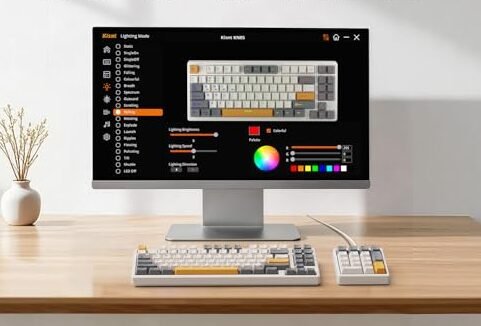
The Kisnt KN85 is a compact 75% keyboard made for people who want more desk room without giving up useful keys. Its layout keeps the function row, arrow keys, and a navigation column close at hand. The board uses a hot-swappable design, so you can change compatible switches later without replacing the entire keyboard. Its linear switch setup feels smooth and quick, which suits fast typing and casual gaming.
I like the KN85 for a home office where space matters. It connects through Bluetooth, 2.4GHz wireless, or USB-C, so you can move between a laptop, desktop, and tablet with less fuss. The RGB lighting adds a playful touch, but you can also tone it down for a calmer work setup. Its retro beige case gives it a warm look that stands apart from the usual black keyboard.
Pros:
- Compact 75% layout saves valuable desk space
- Tri-mode connection supports flexible wireless use
- Hot-swappable switches allow future upgrades
- Smooth linear switches suit fast, light typing
- RGB backlighting works well in dim rooms
- Retro beige finish adds a distinctive desk style
Cons:
- Linear switches may feel too light for tactile fans
- Compact layout takes time to learn
- Wireless battery life depends on lighting and usage
AULA F99 Wireless Mechanical Keyboard

The AULA F99 takes a different approach with a near-full-size layout. It keeps a number pad while placing the main keys, arrows, and navigation keys in a practical arrangement. That makes it useful for spreadsheets, data entry, finance work, and anyone who dislikes reaching for a separate number pad. Its gasket-style construction and pre-lubed linear switches aim to create a softer, smoother typing experience.
This keyboard connects through Bluetooth, 2.4GHz wireless, or USB-C. That tri-mode setup gives you the freedom to use it at a desktop or carry it to another device. The hot-swap sockets also make it a good starting point for keyboard fans who want to tune the sound and feel later. I see the F99 as a strong choice for a large desk, especially when comfort and number entry matter more than a small footprint.
Pros:
- Near-full-size layout includes a number pad
- Three connection modes support many devices
- Pre-lubed switches offer a smoother first-use feel
- Gasket design can soften harsh key impact
- Hot-swap support allows switch replacement
- RGB lighting gives useful low-light visibility
Cons:
- Larger body takes more room than a compact board
- Linear switches provide less bump feedback
- Extra features may feel excessive for a simple office setup
CHERRY KC 200 MX Silent Keyboard

The CHERRY KC 200 MX is built for a more traditional office user. It uses CHERRY MX2A Silent Red switches, which provide a linear press with less noise than many classic mechanical switches. The full-size layout includes a number pad, so it works well for accounting, reports, forms, and daily business tasks. Its wired design keeps the desk setup simple and avoids wireless charging concerns.
I would place this board high on the list for a shared office or a home workspace near other people. Silent switches cannot make a keyboard completely mute, but they reduce the sharp click and loud bottom-out sound that can become tiring. The feel is light and direct, so it does not demand much force during long sessions. If you prefer a clean, professional design over RGB effects and wireless modes, the KC 200 MX makes a sensible choice.
Pros:
- Silent Red switches reduce sharp typing noise
- Full-size layout includes a convenient number pad
- Wired connection offers steady, low-maintenance use
- Light linear action supports long typing sessions
- Professional design fits an office setting
- CHERRY switch heritage supports dependable key feel
Cons:
- Wired use offers less desk flexibility
- Silent switches may feel too soft for tactile typists
- It lacks the customization of a hot-swappable board
Logitech Alto Keys K98M Keyboard

The Logitech Alto Keys K98M is a modern wireless board with a 98% layout. It keeps nearly all the keys found on a full-size keyboard, including the number pad, while reducing some unused space. That balance can help users who need number entry but still want a cleaner desk. Its gasket design is aimed at giving the keys a more cushioned sound and feel.
Logitech designs many of its products around easy daily use, and this keyboard follows that path. It is a good fit for a work desk that also serves as a study or gaming space. The wireless format removes cable clutter, while the mechanical layout gives more defined feedback than a typical flat office keyboard. Before buying, check the listed switch type and layout details, since key feel and regional layouts can vary by version.
Pros:
- 98% layout saves space while keeping a number pad
- Wireless design reduces cable clutter
- Gasket structure can create a softer typing sound
- Suitable for work, study, and light gaming
- Modern styling fits many desk setups
- Useful choice for users who dislike very small layouts
Cons:
- It is still larger than a 75% or tenkeyless keyboard
- Some users may want more switch choices
- Wireless charging needs vary with backlight settings
Logitech MX Mechanical Tactile Keyboard

The Logitech MX Mechanical is a low-profile wireless keyboard made for people who want a crisp, familiar typing rhythm. This version uses tactile switches, so each press gives a small bump before the key reaches the actuation point. That feedback can help you type with less bottoming out and fewer accidental presses. The full-size layout also includes a number pad for office work and regular data entry.
Its slim shape gives it a different feel from tall custom keyboards. I find low-profile boards easier to move between a laptop and a desktop because they take less visual and physical space. The keyboard supports multi-device work, which helps if you switch between a work computer and a personal system. It also uses simple backlighting that improves visibility without turning the desk into a light show.
Pros:
- Tactile switches provide clear typing feedback
- Low-profile body feels neat and modern
- Wireless design supports a clean desktop
- Full-size layout includes a number pad
- Backlighting helps in dim workspaces
- Multi-device use suits people with several computers
Cons:
- Low-profile design limits some keycap and switch options
- Tactile sound may be noticeable in quiet rooms
- It is not hot-swappable for deep customization
Redragon Hot-Swappable Mechanical Keyboard

The Redragon wired keyboard targets buyers who want useful mechanical features at a lower entry cost. It offers hot-swappable red switches, double-shot PBT keycaps, anti-ghosting, and several backlight modes. Red switches use a smooth linear motion, which works well for quick key presses and gaming. The wired connection also makes it easy to plug in and start typing without pairing or battery setup.
Double-shot PBT keycaps are a meaningful feature for long-term use because the legends are made into the keycap rather than simply printed on top. They can help the keys resist a shiny, worn look over time. The backlight modes let you adjust the mood or improve visibility in a darker room. I recommend this model to students, new mechanical keyboard users, and anyone who wants a practical board without paying for advanced wireless hardware.
Pros:
- Hot-swappable red switches support future changes
- Double-shot PBT keycaps offer durable legends
- Anti-ghosting helps register fast key combinations
- Eleven backlight modes add useful flexibility
- Wired setup avoids battery management
- Strong feature list for budget-focused buyers
Cons:
- Wired cable limits placement options
- Red switches may feel too smooth for some writers
- Lighting and case design may look more gaming-focused
How I Choose the Best Mechanical Keyboard for Typing
A keyboard can look impressive in a product photo and still feel wrong after an hour. I judge typing keyboards by the things that matter during real use: key feel, sound, layout, stability, comfort, and ease of setup. I also consider the buyer’s room, work style, and tolerance for maintenance. A programmer, a novelist, and a spreadsheet user may need very different boards.
Mechanical keyboards use individual switches under the keycaps. That design gives each key its own mechanism and usually creates a more distinct press than a membrane keyboard. It can also make repairs and upgrades easier, especially when the board supports hot-swappable switches. Still, “mechanical” does not automatically mean comfortable, quiet, or high quality.
For this review, I focus on the switch style and the whole typing system. The keycap shape, plate, stabilizers, case, firmware, and layout all affect the final result. A smooth switch with poor stabilizers can feel uneven. A basic switch in a well-built board can feel surprisingly good. That is why I do not rank products by switch name alone.
Switch Feel: Linear, Tactile, or Silent?
Linear switches move in one smooth path. They do not have a bump or click during the press. Many typists enjoy them because the motion feels quick and clean. The Kisnt KN85, AULA F99, and Redragon models use this type of feel, though the case and switch tuning can make them sound and feel different.
Tactile switches add a small bump. That bump tells your finger that the key has started to register. It can reduce hard bottoming out and may help people who often press keys by accident. The Logitech MX Mechanical Tactile is the clearest match in this group for users who want that signal.
Silent switches reduce the noise made as the switch moves and reaches the bottom. They do not remove every sound because keycaps, stabilizers, and the desk still create noise. The CHERRY KC 200 MX with Silent Red switches is the most sensible option here for an office or shared room. If quiet use matters, a desk mat and gentle typing style can help as much as the switch.
Which Keyboard Layout Works Best?
A full-size keyboard gives you every common key, including the number pad. It is useful for finance work, data entry, and people who use navigation keys often. The CHERRY KC 200 MX and Logitech MX Mechanical follow this familiar layout. They are easy to understand, but they take more desk space.
A 75% layout removes some gaps while keeping the function row and arrow keys. The Kisnt KN85 is a good example. This format gives you more mouse room and a shorter reach between keys. You may need to use a function layer for a few commands, but most writers adjust within a few days.
A 98% layout keeps the number pad but trims excess space. The AULA F99 and Logitech Alto Keys K98M suit people who want a number pad without the wide footprint of a classic full-size board. This is a useful middle ground for home offices. I often suggest it to buyers who feel cramped by full-size boards but still enter numbers every day.
Why Hot-Swap Support Matters
Hot-swap sockets let you replace compatible switches without soldering. That feature gives you room to change the feel after you learn what you like. You could start with linear switches, then move to tactile or silent switches later. It can also help you replace a worn switch instead of replacing the whole keyboard.
The Kisnt KN85, AULA F99, and Redragon keyboard offer this useful upgrade path. Check the socket type before buying replacement switches because not every switch fits every board. You should also confirm whether the board supports three-pin, five-pin, or both common switch styles. This small check can prevent a frustrating upgrade mistake.
Hot-swap support does not always mean unlimited customization. The keycap profile, plate, firmware, and case still set limits. Some boards also use nonstandard stabilizers or layouts. Even so, hot-swap capability adds real value for a first mechanical keyboard because your taste may change after a few weeks.
Typing Comfort and Ergonomics
Comfort starts with the position of your hands. Keep the keyboard close enough that your elbows stay near your sides. Your wrists should remain fairly straight rather than bent sharply upward. A keyboard with adjustable feet can help, but a higher angle is not always better.
Low-profile keyboards, such as the Logitech MX Mechanical, may feel natural to people moving from a laptop. Taller custom-style boards can offer a deeper and softer press, but they may need a wrist rest. The best height depends on your hands, chair, and desk. I suggest trying a new board for short sessions before using it for a full workday.
Sound also affects comfort. A loud, sharp board can become tiring in a quiet home or shared office. Softer switches, thick keycaps, case foam, and a desk mat can reduce harsh noise. The CHERRY KC 200 MX is the easiest pick when a calm sound matters more than wireless freedom.
Wireless Versus Wired Mechanical Keyboards
Wireless keyboards make a desk look cleaner and let you move the board with ease. Bluetooth works well with tablets and laptops, while 2.4GHz wireless often feels more direct on a desktop. Tri-mode keyboards such as the Kisnt KN85 and AULA F99 give you both choices plus USB-C. That flexibility is useful if you own more than one device.
Wired keyboards have their own strengths. They do not need a battery, and they avoid pairing problems. A wired board can be ready whenever you sit down. The CHERRY KC 200 MX and Redragon models suit buyers who prefer simple, dependable operation.
Wireless battery life changes with backlight brightness, connection type, and daily use. I recommend turning off lighting when you do not need it. Keep the USB cable nearby even if you plan to use wireless mode. That habit prevents a low battery from interrupting an important task.
Keycaps, Stabilizers, and Build Quality
Keycaps are the part of the keyboard your fingers touch all day. PBT keycaps usually resist shine better than thin ABS keycaps, though the final quality depends on thickness and molding. The Redragon’s double-shot PBT keycaps are especially appealing for buyers who want durable legends. Texture also matters because a lightly textured cap can help your fingers stay centered.
Large keys need stabilizers to keep them level. The spacebar, Enter key, Shift keys, and Backspace can sound poor if their stabilizers rattle. When I assess a board, I listen for a loose tick or metallic shake. A little noise is normal, but repeated rattle can make a keyboard feel cheap during long typing sessions.
Case flex is not always bad. A gasket structure can give the board a softer landing, which some people find more comfortable. Too much flex, however, can make the board feel unstable. The ideal result feels controlled, not bouncy like a loose tray.
RGB Lighting and Software
RGB lighting looks attractive, but it should not decide your purchase. A good backlight helps you see legends in a dark room. Bright effects can also distract you during work. Most buyers will be happier with simple white or low-brightness lighting for daily typing.
Software can add useful functions such as remapping, macros, lighting control, and profile storage. Yet software quality varies between brands and models. A keyboard with easy onboard controls may be better than one that needs an app for every small change. If you work across several computers, simple controls and standard shortcuts can save time.
Remember that lighting uses more power in wireless mode. A bright animated effect may shorten the time between charges. If the keyboard is for writing, use lighting as a tool rather than a decoration. The best mechanical keyboard for typing should remain comfortable with the lights off.
Best Keyboard for Writers and Students
Writers often need a smooth key press, stable spacebar, and a layout that does not slow down thought. A 75% keyboard can work well if you value desk space. The Kisnt KN85 gives you a compact shape, wireless options, and room to change switches later. It is a strong fit for a dorm desk, small apartment, or home writing corner.
Students may want low cost and broad use. The Redragon offers a practical wired setup, hot-swap support, and durable keycaps without adding wireless battery care. It also works for gaming after homework is done. Its more colorful design may appeal to students who want a fun desk setup.
If you type in a shared room, the CHERRY KC 200 MX makes more sense. Its Silent Red switches help lower the sharp sound that can disturb a roommate or coworker. The full-size layout also supports school forms, research notes, and number work. It is less flexible than a wireless board, but it keeps the focus on quiet daily typing.
Best Keyboard for Office Work
Office users often need a number pad, clear key labels, and a sound that does not fill the room. The CHERRY KC 200 MX checks those boxes with its full-size layout and silent switches. The Logitech MX Mechanical Tactile is another strong option for a modern office, especially if you move between devices. Its low profile can feel familiar to laptop users.
Choose the AULA F99 or Logitech Alto Keys K98M if your office desk is large enough for a near-full-size layout. Both give you number entry while using less space than many traditional boards. The AULA offers more enthusiast features, while the Logitech approach may feel more polished for general work. Your choice depends on whether customization or simplicity matters more.
For an office, I also check the cable or wireless receiver position. A cable that exits at an awkward angle can add desk clutter. A wireless keyboard can look cleaner, but the receiver should have a clear path to the computer. Small details like these shape the daily experience more than a long feature list.
Best Keyboard for Programmers
Programmers often use the Escape key, function row, brackets, arrows, and navigation keys many times each day. A 75% layout keeps most of these keys while leaving more room for a mouse. The Kisnt KN85 can suit developers who like compact boards and do not mind learning a few function shortcuts.
A 98% or full-size keyboard may suit programmers who work with numbers, spreadsheets, or large code projects. The AULA F99 keeps the number pad and supports switch changes. The Logitech MX Mechanical includes a familiar layout and tactile feedback, which may help when you want a clear signal from each press.
Hot-swap support is useful for programmers who spend long hours at the desk. You can test a lighter switch if your fingers tire, or choose a tactile switch if you want more control. Do not assume one switch is best for all code. The right choice depends on your force, speed, and how often you hit nearby keys by mistake.
Best Keyboard for Gaming and Typing
A gaming keyboard can also be a good writing keyboard, but the priorities are slightly different. Gamers may value fast linear switches, anti-ghosting, backlight effects, and a stable connection. Writers may care more about sound, comfort, and keycap texture. The Redragon combines several gaming features with useful typing upgrades.
The AULA F99 is attractive for someone who wants one keyboard for work and play. Its larger layout helps with office tasks, while the wireless modes make it easy to change setups. The Kisnt KN85 offers a smaller footprint for people who want more mouse room. Both give you a way to adjust the feel later through hot-swap support.
For serious competitive play, a wired connection can remove one possible point of delay or battery trouble. For casual games, modern wireless modes are often more than adequate. I would choose based on your whole day, not only the hours spent gaming. A board that feels good during eight hours of typing is usually the better long-term purchase.
How to Make Your Mechanical Keyboard Quieter
Start with your typing force. Many people press each key harder than needed, which creates most of the bottom-out noise. Try lifting your fingers as soon as the key registers. This simple habit can make even a linear keyboard sound calmer.
A desk mat can reduce the hollow sound that travels through the case and table. You can also use compatible foam or other internal dampening, but check the warranty and avoid blocking the battery or electronics. Lubricated stabilizers may reduce rattles on large keys. Do not add lubricant to switches unless you understand the process, since excess lubricant can damage the feel.
If your room must stay very quiet, begin with a silent switch board. The CHERRY KC 200 MX is the clearest choice in this group. A silent keyboard will still make some sound, but it removes the loud click and limits the hard impact that often causes complaints.
How to Maintain a Mechanical Keyboard
Dust and skin oils collect beneath keycaps over time. Unplug a wired keyboard or switch off a wireless model before cleaning it. Use a soft brush or air blower to remove loose dust, then wipe the top surface with a slightly damp microfiber cloth. Keep liquid away from the switches and circuit board.
For deeper cleaning, remove keycaps with a proper keycap puller. Take a quick photo first so you remember the layout. Wash suitable keycaps separately and let them dry fully before reinstalling them. Never put wet keycaps back on the board.
Store a wireless keyboard with its power switch off when you will not use it for a long period. Charge it before a trip and carry the cable if possible. These small steps help protect the board and keep your typing feel consistent. A well-kept mechanical keyboard can remain useful for many years.
Common Mechanical Keyboard Buying Mistakes
The first mistake is buying by appearance alone. A bright case and bold RGB effects cannot fix an uncomfortable switch. Read the layout and switch details before you place an order. If possible, compare the keyboard with the feel you already enjoy.
The second mistake is ignoring desk size. A full-size board may look familiar but leave no room for your mouse or notebook. A compact layout may save space but hide keys you use often. Measure your desk and list the keys you need before choosing a size.
The third mistake is treating wireless mode as a free upgrade. Wireless boards need charging, and some features may change when you use Bluetooth. Wired boards need a cable but often cost less and require less care. Pick the connection that matches your daily habits.
The fourth mistake is choosing a switch that is too loud for the room. Clicky switches can feel fun, but coworkers or family members may not enjoy the sound. Linear switches are smoother, while tactile switches offer a bump without the sharp click of a clicky model. If you are unsure, a quieter switch is usually the safer choice.
My Recommendation
For most buyers, I recommend the Kisnt KN85 as the most balanced Best Mechanical Keyboard for Typing in this group. Its 75% layout saves space, its tri-mode connection supports several devices, and its hot-swap design leaves room to grow. It fits writers, students, remote workers, and casual gamers who want one flexible board.
Choose the CHERRY KC 200 MX if quiet office use is your top concern. Pick the AULA F99 or Logitech Alto Keys K98M when you need a number pad but want a smaller footprint. The Logitech MX Mechanical Tactile is ideal for a slim, familiar office feel, while the Redragon is the best budget path into mechanical keyboards. Prices and stock can change, so check the current listing before ordering.
| Best for | Why |
|---|---|
| Most typists | Kisnt KN85 balances compact size, wireless use, and switch upgrades. |
| Quiet office work | CHERRY KC 200 MX uses Silent Red switches and a full-size layout. |
| Number entry and customization | AULA F99 combines a near-full-size layout with tri-mode use and hot-swap support. |
FAQs Of Best Mechanical Keyboard for Typing
Are mechanical keyboards good for long typing sessions?
Yes, many people find them more comfortable because each key gives clear feedback. Choose a switch that matches your force and sound needs. A proper chair, desk height, and wrist position matter just as much as the keyboard.
Which switch is best for typing?
There is no single best switch for everyone. Linear switches feel smooth, tactile switches provide a bump, and silent switches reduce noise. If you are unsure, a light tactile or quiet linear switch is a safe starting point.
Is a 75% keyboard too small for office work?
Not usually. A 75% board keeps the function row and arrow keys, but it may place some navigation commands behind a function layer. Choose a full-size or 98% model if you use a number pad often.
Are wireless mechanical keyboards reliable?
Modern Bluetooth and 2.4GHz keyboards can be reliable for office work and casual gaming. Keep the battery charged and place the receiver where it has a clear signal. USB-C mode gives you a dependable backup.
Do hot-swappable keyboards last longer?
Hot-swap support can make repairs and upgrades easier. You can replace one failed switch instead of replacing the whole keyboard. Overall life still depends on the board’s case, circuit, stabilizers, and daily care.
Final Verdict: Which Should You Buy?
The Kisnt KN85 is my top pick because it combines a space-saving layout, wireless flexibility, smooth typing, and hot-swap support. Choose CHERRY for quiet work, AULA for number entry, Logitech MX for tactile low-profile comfort, or Redragon for value.
The Best Mechanical Keyboard for Typing should match your hands, desk, sound needs, and daily tasks. Check the current Amazon price, layout, switch type, and stock before buying.

Similar Posts