Best Gaming Mouse: Top Picks For Every Gamer
The best gaming mouse gives you fast aim, smooth control, comfort, and useful features without wasting your budget.
A poor mouse can turn a close match into a lost round. Maybe the sensor skips during a fast flick, the cable catches on your desk, or your hand aches after one long session. I tested these picks with comfort, click feel, tracking, software, weight, and value in mind. This guide covers wired, wireless, heavy, light, and feature-rich models, so you can find the Best Gaming Mouse for your grip, games, and desk setup.

Logitech G502 Hero Wired Gaming…
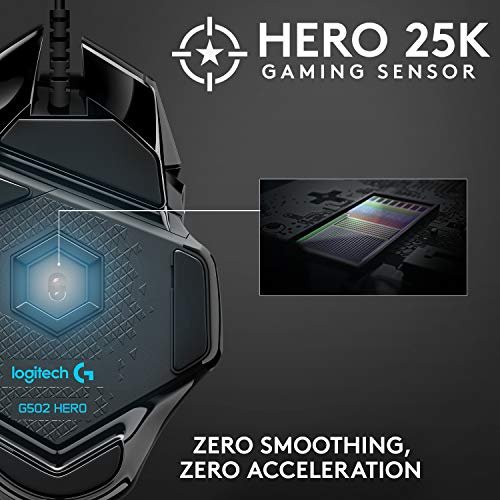
HERO Gaming Sensor: Next generation HERO mouse sensor delivers precision tracking up to 25600 DPI with zero smoothing, filtering or acceleration 11 programmable buttons and dual mode hyper-fast scroll wheel:…

Logitech G305 Lightspeed Wireless Gaming…
The next-generation optical HERO sensor delivers incredible performance and up to 10x the power efficiency over previous generations, with 400 IPS precision and up to 12,000 DPI sensitivity Ultra-fast LIGHTSPEED…
Razer Basilisk V3 Customizable RGB…
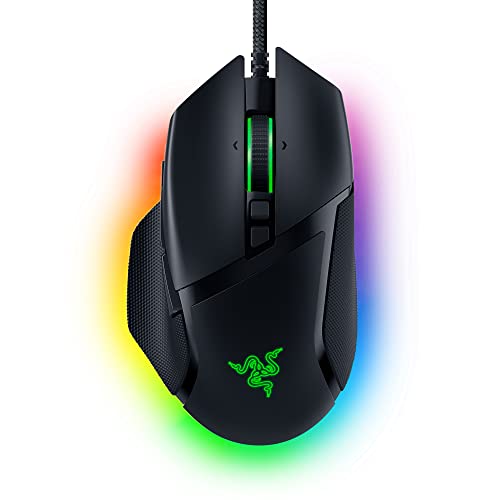
ICONIC ERGONOMIC DESIGN WITH THUMB REST — PC gaming mouse favored by millions worldwide with a form factor that perfectly supports the hand while its buttons are optimally positioned for…
Logitech G502 Hero Wired Gaming Mouse

The Logitech G502 Hero remains one of the most familiar gaming mice for a good reason. Its 25,600 DPI HERO sensor offers accurate tracking, while the broad shape gives your palm a steady place to rest. I also like the textured thumb rest and the clear separation between its main buttons. The wired connection keeps input simple and avoids battery care.
This mouse feels more like a control tool than a tiny racing car. You get programmable buttons, adjustable weights, onboard profiles, and a scroll wheel that can switch between ratchet and free-spin modes. That mix works well for shooters, role-playing games, work, and web use. It is not the lightest choice, but players who like a solid mouse may find that extra mass reassuring.
Pros:
- Accurate HERO sensor with wide DPI range
- Comfortable right-handed shape for palm and claw grips
- Many programmable buttons for games and work
- Adjustable weight system adds control
- Dual-mode scroll wheel suits games and long documents
- Wired design removes charging worries
Cons:
- Heavy compared with modern esports mice
- Shape does not suit left-handed users
- Cable can feel less tidy than wireless designs
My Recommendation
I recommend the G502 Hero to players who want one mouse for almost everything. It suits strategy games, MMOs, adventure games, and shooters where extra buttons help. It is also a smart pick for a user who prefers a stable palm rest over a low weight. As a value-focused Best Gaming Mouse, it gives you a large feature set at a common sale price.
Logitech G305 Lightspeed Wireless Mouse

The Logitech G305 is a simple wireless gaming mouse with a strong record for reliability. Its LIGHTSPEED connection feels quick and stable, so I rarely notice a difference between it and a wired model. The shape is compact and balanced, with two side buttons that cover the most common needs. It uses one AA battery, which makes replacement easy when you travel or play far from a charger.
The G305 has a practical design rather than a showy one. It does not include RGB lighting, a charging dock, or a soft rubber shell, but that helps keep the price and setup low. Its HERO sensor tracks well for both low and high sensitivity. The mouse is a little heavier than many newer ultralight models once the battery is installed, yet it still feels nimble for everyday play.
Pros:
- Reliable LIGHTSPEED wireless connection
- Excellent sensor performance for competitive play
- Long battery life reduces charging breaks
- Compact shape works well for claw and fingertip grips
- Removable AA battery is easy to replace
- Usually offers strong value for wireless gaming
Cons:
- No built-in rechargeable battery
- No RGB lighting or charging cable
- Shape may feel narrow for large hands
My Recommendation
The G305 is best for students, laptop users, and first-time wireless buyers. I would also choose it for a clean desk where a cable would get in the way. It delivers the core traits that matter most: good tracking, low wireless delay, and dependable buttons. If you want an affordable Best Gaming Mouse with few distractions, this model remains easy to recommend while stock lasts.
Razer Basilisk V3 Wired Gaming Mouse

The Razer Basilisk V3 is a comfortable wired mouse built for players who enjoy buttons and control. Its right-handed shape gives your thumb a clear ledge, and the angled design supports a relaxed palm grip. The Focus+ sensor offers precise movement, while Razer optical mouse switches provide a crisp click feel. I found the body especially useful for long sessions where a flat, small mouse can cause hand strain.
Its standout feature is the HyperScroll tilt wheel. You can use a notched mode for weapon selection or a free-spin mode for scrolling through long pages. The mouse also includes a sniper-style clutch button and several programmable controls. Razer Synapse lets you change buttons, sensitivity, lighting, and profiles, but new users may need time to learn the software.
Pros:
- Ergonomic shape supports long play sessions
- Precise sensor handles fast and slow movements
- Useful clutch button for temporary sensitivity changes
- Versatile scroll wheel has ratchet and free-spin modes
- Rich button and RGB customization in Synapse
- Optical switches provide a sharp, clean click
Cons:
- Right-handed shape limits grip options
- Wired cable may need desk management
- Many software options can feel complex at first
My Recommendation
I suggest the Basilisk V3 for RPG, MMO, strategy, and mixed-use players who want comfort plus control. It is also a fine choice for anyone who uses a mouse for work during the day and gaming at night. The extra buttons make sense without making the layout confusing. For users seeking the Best Gaming Mouse with a comfortable shape and strong customization, it is one of the safest wired picks.
Logitech G502 X Plus Wireless Mouse

The Logitech G502 X Plus Wireless takes the familiar G502 idea and trims some of the old weight. It uses LIGHTFORCE hybrid switches, combining optical actuation with a mechanical feel. The HERO 25K sensor tracks smoothly, and the LIGHTSPEED wireless system keeps the connection fast. I like the removable DPI-shift button because it lets you adjust the thumb area to match your hand.
This is a feature-rich mouse for people who do not want a bare esports shell. You get programmable controls, RGB lighting, onboard profiles, and a scroll wheel that supports both precise steps and free spin. The shape remains large and right-handed, so it feels secure rather than tiny. Battery life varies with lighting and use, and the premium price may be more than a casual player needs.
Pros:
- Fast LIGHTSPEED wireless performance
- HERO sensor provides dependable aim and tracking
- LIGHTFORCE switches offer fast actuation and clear feedback
- Comfortable shape with a useful thumb rest
- Adjustable DPI-shift button improves control
- Many controls and RGB features for advanced setups
Cons:
- More costly than basic wireless mice
- Large body may not suit small hands
- Battery life drops when RGB lighting stays active
My Recommendation
The G502 X Plus is best for serious PC players who want wireless freedom without giving up buttons. It fits MMO skills, productivity shortcuts, streaming controls, and single-player games very well. I would pick it over the older G502 when you want a lighter body and updated switches. It is a premium Best Gaming Mouse, so wait for a sale if your budget is tight.
Logitech G PRO X2 SUPERSTRIKE Mouse

The Logitech G PRO X2 SUPERSTRIKE is aimed at players who care about fast control and a clean competitive shape. Its wireless design keeps the desk clear, while the symmetrical profile makes it easier to use with a range of grips. Logitech positions this model around advanced click and input technology, so it targets users who want more adjustment than a standard mouse provides. The black and white finish also gives a modern look without relying on bright lighting.
Before buying, I would check the current software support, firmware notes, and included accessories. New technology can bring useful gains, but it may also require a short learning period. This mouse makes the most sense for competitive FPS players who already understand their preferred sensitivity and grip. Casual users may get better value from the simpler G305 or a feature-rich G502 model.
Pros:
- Wireless design keeps the play area clear
- Competitive shape supports fast aiming
- Advanced input features offer detailed control
- Clean, modern finish suits many desk setups
- Designed for players who value low-latency response
- Strong fit for focused FPS practice
Cons:
- Premium pricing may not suit casual players
- Advanced controls can take time to learn
- Availability and firmware support should be checked before purchase
My Recommendation
I recommend the G PRO X2 SUPERSTRIKE to competitive players who want the newest control features and a wireless setup. It is less useful for someone who only needs two side buttons and basic tracking. Competitive FPS users may appreciate its focused design more than MMO players will. As a newer Best Gaming Mouse option, it offers the most interest to enthusiasts who are willing to pay for fresh technology.
Razer Viper V3 Pro Wireless Mouse

The Razer Viper V3 Pro is built for speed. At about 54 grams, it feels very light during quick flicks, long swipes, and low-sensitivity FPS play. Its symmetrical shape has a higher rear that supports claw and fingertip grips, while the wireless connection keeps the mouse free from cable drag. The Focus Pro optical sensor is designed for accurate tracking at high performance levels.
Razer keeps the shell simple, which is exactly the point. You do not get a large number of side buttons or a heavy palm support, but every movement feels easy to start and stop. The mouse suits players who use a large mouse pad and move from the arm rather than the wrist alone. Small hands, palm-grip users, and people who enjoy many controls may prefer another shape.
Pros:
- Very light body helps fast aim and wide swipes
- Strong wireless performance for competitive gaming
- Accurate Focus Pro sensor supports high-level play
- Symmetrical shape suits claw and fingertip grips
- Low cable drag when charging or using wired mode
- Simple layout keeps the mouse easy to control
Cons:
- Limited buttons compared with MMO-focused mice
- Shape may not support a full palm grip well
- Premium price is high for a simple design
My Recommendation
The Viper V3 Pro is best for FPS players who want a light wireless mouse. I would choose it for games such as Valorant, Counter-Strike, Apex Legends, and Overwatch when fast aim matters more than extra controls. It rewards a relaxed grip and a large pad. If your goal is the Best Gaming Mouse for esports-style play, this is one of the strongest choices in this group.
How I Choose the Best Gaming Mouse
I start with the hand, not the marketing label. A high DPI number cannot fix a shape that causes pain, and RGB lights cannot improve a poor grip. I look at the length, width, hump, thumb rest, button reach, and total weight. I also consider whether the mouse suits a palm, claw, fingertip, or relaxed hybrid grip.
Next, I check the sensor and connection. A modern optical sensor should track without skips or unwanted smoothing at normal gaming settings. Wireless models should hold a stable link near the computer, while wired models should have a flexible cable that does not pull at the hand. I also test lift-off feel, button travel, scroll-wheel control, and the ease of changing settings.
Software matters more than many buyers expect. Good software lets you set DPI steps, remap buttons, save profiles, and update firmware without a maze of menus. I prefer onboard memory because it keeps key settings available on another computer. I also note whether lighting can be turned off, since extra effects can use battery power without helping aim.
What to Look for Before You Buy
Choose the right shape
Hand size and grip style should guide your choice. Palm users often like a larger shell with a raised rear and a clear thumb rest. Claw users need enough room for the palm while keeping the front buttons easy to reach. Fingertip users often prefer a shorter, lighter mouse that does not force the hand into one position.
Do not chase huge DPI numbers
DPI means dots per inch, or how far the pointer moves for a given hand movement. Most players do not need extreme settings. A clean sensor, stable feet, and a good pad matter more than a number that reaches the tens of thousands. I suggest choosing a comfortable sensitivity first, then using the sensor range as a safety margin.
Think about weight
Light mice can feel quick and easy to lift. Heavy mice can feel planted and calm, which some players prefer for browsing, strategy games, and precise work. There is no perfect weight for every hand. A 54-gram esports mouse may feel wonderful to one player and too empty to another.
Wired or wireless?
Wired mice cost less and never need a battery. They can also offer a very light design because the maker does not need to add a battery cell. Wireless mice give you a cleaner desk and remove cable drag. Current gaming wireless links can feel very fast, but you still need to charge the mouse or replace its battery.
How many buttons do you need?
Two side buttons are enough for many FPS games. Extra buttons help in MMOs, simulations, browsers, editing apps, and productivity work. Too many controls can also cause accidental presses. I advise buying the button layout you will use, not the layout that looks impressive in a product photo.
Best Gaming Mouse Comparison
| Best for | Why |
|---|---|
| Best overall control | Logitech G502 Hero offers a comfortable shape, many buttons, and a proven sensor. |
| Best affordable wireless | Logitech G305 gives reliable wireless play and strong tracking at a lower cost. |
| Best ergonomic wired choice | Razer Basilisk V3 adds a thumb rest, useful controls, and a smart scroll wheel. |
| Best premium all-rounder | Logitech G502 X Plus combines wireless freedom, lighting, and broad customization. |
| Best advanced competitive pick | Logitech G PRO X2 SUPERSTRIKE targets players who want newer input features. |
| Best lightweight FPS mouse | Razer Viper V3 Pro keeps the body light and the shape focused on fast aim. |
Setup Tips for Better Aim and Comfort
Start with a clean desk and a mouse pad that gives your chosen sensitivity enough room. If you use low sensitivity, a small pad can make you lift the mouse too often. Keep the mouse near your natural arm position, and do not bend your wrist sharply. Small changes in desk height can make a big difference during long sessions.
Set one main DPI value and use it for a few days. Constantly changing sensitivity can hide the real issue, which may be grip tension or poor posture. I place my index and middle fingers lightly on the main buttons and avoid squeezing the shell. Smooth control often comes from less force, not more force.
Keep firmware and software current, but do not change settings right before a tournament or ranked session. Test new button maps in a practice mode first. Clean the sensor area and mouse feet with care, and keep food crumbs away from the switches. These small habits help any Best Gaming Mouse last longer.
FAQs Of Best Gaming Mouse
What is the Best Gaming Mouse for FPS games?
The Razer Viper V3 Pro is the strongest FPS pick here because its light body, accurate sensor, and simple shape support fast aim. Your grip and hand size still matter more than the brand name.
Is a wireless gaming mouse as fast as a wired mouse?
A good modern wireless gaming mouse can feel as fast as a wired model. The Logitech LIGHTSPEED and Razer wireless systems in this guide are designed for low-latency play. Keep the receiver close to the mouse for the best link.
What DPI should I use for gaming?
There is no single correct DPI. Many players use a moderate setting and adjust in-game sensitivity. Pick a value that lets you turn comfortably without lifting the mouse too often.
Is a heavy mouse bad for gaming?
No. A heavy mouse can feel stable and comfortable, especially for palm users. A light mouse may help fast swipes, but comfort and control should decide your choice.
How long should a gaming mouse last?
Service life depends on use, switches, care, and build quality. Keep the mouse clean, avoid sharp cable bends, and update firmware when needed. A well-made mouse can provide years of useful play.
Final Verdict: Which Should You Buy?
The Razer Viper V3 Pro is my top pick for fast FPS play. For broad comfort and extra controls, choose the G502 X Plus or Basilisk V3.
The Best Gaming Mouse is the one that fits your hand and habits. Pick shape first, then sensor, weight, connection, and price for a confident buy.