Best AI Gadgets For Travel: Smart Trip Essentials
The best AI gadgets for travel make translation, navigation, hands-free recording, and in-flight comfort much easier.
You land in a new city, your phone battery is low, and a taxi driver speaks a language you do not know. At the same time, your boarding gate changes, your hands are full, and your travel plans sit inside one small screen. The Best AI Gadgets for Travel can reduce that stress. I looked at translation earbuds, smart glasses, a handheld translator, and an airplane phone mount to see which tools offer real value for common trips.

AI Translation Earbuds Real Time…
Supports 164 Languages Worldwide: Powered by cutting-edge AI translation technology, these translator earbuds real time support translation in 164 languages including English, Spanish, German, Italian, French, Japanese, Chinese, and more….

AI Smart Glasses with Camera,…
【AI Real-Time Translation & ChatGPT Assistant】AI glasses break language barriers instantly with AI real-time translation. The built-in ChatGPT voice assistant helps you communicate, learn, and handle travel or business conversations…

AI Translation Earbuds Real Time…
Supports 164 Languages Worldwide: Powered by cutting-edge AI translation technology, these translator earbuds real time support translation in 164 languages including English, Spanish, German, Italian, French, Japanese, Chinese, and more….
K08 AI Translation Earbuds, Black
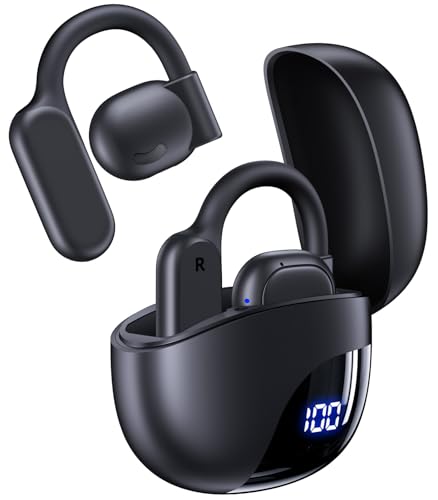
The K08 AI Translation Earbuds are made for travelers who want translation support in a familiar earbud design. The listing advertises real-time translation for up to 164 languages and up to 80 hours of playtime with the charging case. They connect through Bluetooth and can also work as normal wireless earphones for music, calls, and podcasts. The black finish looks simple, so the earbuds do not attract much attention in a busy airport.
I like the flexible role these earbuds can play during a trip. You can use them for a short chat at a hotel desk, then switch to music while waiting at the gate. Translation features often need a companion app, a phone connection, and a stable data link, so I would test the app before leaving home. The large language count sounds impressive, but actual accuracy may vary by language, accent, noise level, and internet access.
Pros:
- Advertised support for up to 164 languages
- Useful two-in-one design for translation and daily audio
- Long advertised playtime with the charging case
- Wireless Bluetooth connection works with many phones
- Compact size fits easily in a passport pouch or small bag
- Black finish looks discreet in public places
Cons:
- Translation may depend on a mobile app and internet access
- Real-time results can vary with accents and background noise
- Earbud fit may not suit every ear shape
My Recommendation
I recommend the black K08 earbuds for travelers who want one small device for basic translation and everyday listening. They suit solo tourists, students, and business travelers who may need quick help with menus, greetings, directions, or short questions. They are less ideal for legal, medical, or highly detailed conversations where a human interpreter remains safer. In my view, they are among the Best AI Gadgets for Travel when space matters and you already prefer earbuds.
| Best for | Why |
|---|---|
| Solo city travel | Quick translation support in a small, familiar format |
| Long flights | Useful for music, podcasts, calls, and language help |
| Light packers | One device handles two common travel tasks |
Before buying, check the current Amazon listing for app details, supported devices, and return terms. The best value comes from treating this product as a travel aid, not a perfect language replacement. If the app setup is smooth on your phone, the K08 can become a practical part of your carry-on kit.
AI Smart Glasses With Camera and Translation
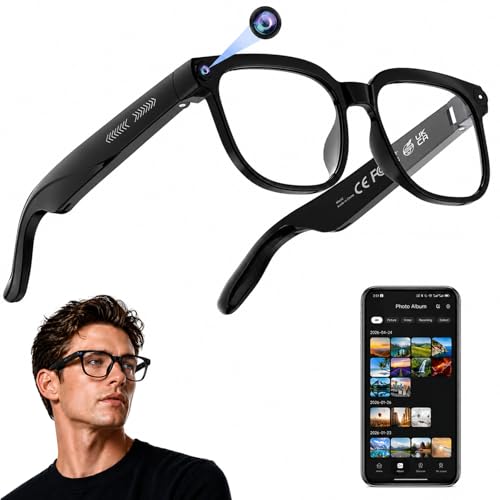
These AI smart glasses combine a camera, open-ear audio, Bluetooth, and assistant features in a wearable frame. The product listing highlights 4K HD photo and video capture, real-time translation, recording, and object recognition. The transparent lens style may suit travelers who want a normal-looking pair of glasses rather than a large camera device. Since the camera sits at eye level, it can capture a hands-free view while you walk, tour, or explore.
From a travel point of view, the hands-free design is the main attraction. You can keep both hands on a suitcase, take a quick photo, or listen to directions without holding your phone in front of your face. Still, I would check local privacy rules before recording people, museums, transit areas, or private spaces. AI functions can also rely on a phone app, cloud service, battery power, and a clear network connection, so these glasses should support your phone rather than replace it.
Pros:
- Hands-free photo and video capture
- Advertised 4K HD recording capability
- Open-ear audio helps you hear your surroundings
- AI assistant may support voice-based travel tasks
- Real-time translation can help with signs or conversations
- Object recognition may add context during sightseeing
- Wearable design keeps your hands free for luggage and maps
Cons:
- Camera use may raise privacy concerns in public places
- AI tools may need a paired phone, app, or online service
- Battery life can change with frequent video recording
- Transparent lenses may not suit bright outdoor conditions without added protection
My Recommendation
These glasses are best for travelers who value hands-free memories and quick access to digital help. They may appeal to content creators, tour fans, frequent walkers, and people who dislike pulling out a phone every few minutes. I would not buy them only for translation, because earbuds or a handheld translator may offer a more direct conversation tool. Among the Best AI Gadgets for Travel, this model stands out for combining a camera, audio, and visual assistance in one wearable device.
| Best for | Why |
|---|---|
| Hands-free sightseeing | Capture views and hear audio without holding a phone |
| Travel creators | Eye-level recording can show a natural walking view |
| Outdoor tours | Open-ear sound lets you stay aware of nearby activity |
Use these glasses with care and respect. Ask before recording when another person is clearly part of the scene. Also review storage, app permissions, charging, and phone compatibility before your trip. When used responsibly, they can make a city walk feel more fluid and less tied to a screen.
K08 AI Translation Earbuds, Pearl White
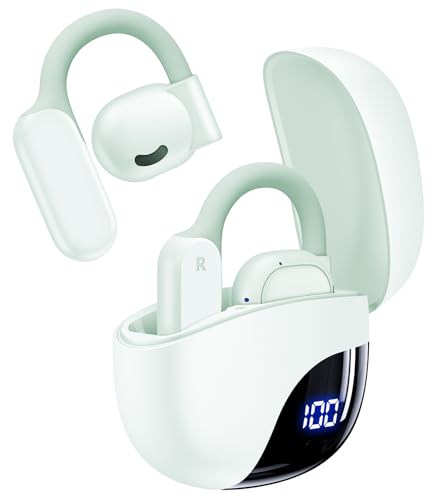
The pearl white K08 earbuds offer the same core travel idea as the black version in a lighter color. The listing promotes real-time translation across up to 164 languages and up to 80 hours of total playtime. They are designed to work as Bluetooth earphones, so you can use them for calls, music, and podcasts between translation sessions. The pale finish may appeal to travelers who prefer a clean, modern look.
Color does not change the main performance, but it can affect how easy the earbuds are to find in a dark bag. I would place them in a small case pocket and charge the case before every travel day. For translation, both people may need to speak in turn, and the phone app may handle much of the processing. That means the earbuds are most useful when the conversation is calm, the microphone has a clear view, and the user understands the device limits.
Pros:
- Advertised translation support for up to 164 languages
- Up to 80 hours of advertised playtime with the case
- Works as regular wireless earphones
- Light color makes the earbuds easy to spot in luggage
- Small design saves room in a personal bag
- Useful for travel, meetings, study, and casual talks
Cons:
- Translation performance may depend on app quality and connection
- White surfaces can show dirt more quickly than dark colors
- Small controls may be hard to use while walking
- Battery claims can vary with volume and feature use
My Recommendation
I would choose the pearl white version for travelers who want translation earbuds with a softer, more visible design. It is a good fit for couples, families, and students who need help during short daily conversations. The dual use is valuable because you do not carry a translation gadget that sits unused after one conversation. For shoppers comparing the Best AI Gadgets for Travel, this model makes sense when comfort, color choice, and normal Bluetooth audio matter.
| Best for | Why |
|---|---|
| Family vacations | Simple earbuds can help with short local conversations |
| Language learners | Supports listening practice along with translation use |
| Daily commuting abroad | Music and translation come in one compact device |
I suggest comparing the black and pearl white versions by price, delivery date, and current customer feedback. The core functions appear aimed at the same type of user, so the better deal may decide the choice. Either color can be useful, but neither should be your only plan in an emergency or complex discussion.
Enence PRO Real-Time Voice Translator

The Enence PRO is a dedicated voice translator rather than an earbud or wearable camera. Its main purpose is clear: help users communicate across language barriers through real-time voice translation. A handheld format may feel more natural at a hotel counter, market stall, rental desk, or restaurant table. It also lets both people look at the device instead of sharing one pair of earbuds.
I see a strong benefit in the simple, face-to-face format. A traveler can hold the device, choose a language, speak, and pass it across the table. Dedicated translators still need careful setup, and many rely on a companion app, Wi-Fi, mobile data, or a supported offline mode. I would download languages, test pronunciation, and save key phrases before departure rather than waiting until I reach a crowded airport.
Pros:
- Purpose-built for voice translation
- Easy face-to-face format for two speakers
- More visible and shared than a single earbud
- Useful at hotels, restaurants, shops, and transport desks
- May feel easier for users who dislike wearable tech
- Dedicated controls can reduce distractions from a full smartphone
Cons:
- May require internet, an app, or account setup for some functions
- Extra device to charge and carry
- Translation errors remain possible with slang and fast speech
- Less useful for silent signs than a phone camera tool
My Recommendation
The Enence PRO is best for travelers who want a clear, shared tool for spoken communication. I would consider it for older travelers, group leaders, business visitors, and anyone who finds tiny earbuds awkward. It can also help when you need to show the other person the translated text or let them speak into the same device. In a guide to the Best AI Gadgets for Travel, this translator earns attention because it focuses on one important task without adding a camera or audio extras.
| Best for | Why |
|---|---|
| Face-to-face talks | Both people can use one visible handheld device |
| Older travelers | No earbud fit or wearable camera is needed |
| Business trips | Useful for quick meetings and service conversations |
Check the current listing for language coverage, connection rules, and any service terms. I also recommend carrying a backup translation app and writing down your hotel address. A translator can open a door, but patience, simple words, and a friendly smile still do much of the work.
xiwxi Magnetic Airplane Phone Holder

The xiwxi Magnetic Airplane Phone Holder solves a small but very real travel problem: where to place your phone during a flight. The listing describes a 360-degree rotating mount for tray tables and desks, with carabiner clips for carrying. It is designed for iPhone, Galaxy, and other compatible phones, although magnetic attachment may require a suitable case, ring, or built-in magnet. The holder can support hands-free viewing of maps, shows, reading apps, or a video call before takeoff.
This is not an AI device by itself, but it supports the AI travel tools already on your phone. A secure viewing angle makes it easier to use translation apps, digital boarding passes, itinerary assistants, and offline guides. I would test the magnet with your exact phone and case before a trip, since weight and case thickness affect grip. Always follow crew instructions and stow the holder when the airline requires your tray table or personal items to be secured.
Pros:
- 360-degree rotation helps create a comfortable viewing angle
- Useful for airplane tray tables and hotel desks
- Carabiner clips make it easier to attach to a bag
- Supports hands-free viewing during long flights
- Can work with many iPhone and Galaxy setups
- Helps keep the phone off a small tray table surface
Cons:
- Magnetic strength depends on the phone and case
- Some thick or non-magnetic cases may need an adapter
- Not every tray table has the same shape or thickness
- It does not charge the phone or replace a power bank
My Recommendation
I recommend the xiwxi holder for frequent flyers, remote workers, and passengers who watch content on a phone. It is also useful for travelers who rely on an AI assistant, translation app, or digital itinerary during airport waits. This product is a practical add-on rather than a smart device, but useful travel gear does not need a flashy feature to earn space in a bag. For the Best AI Gadgets for Travel, it provides the stable phone position that many other tools need.
| Best for | Why |
|---|---|
| Long flights | Raises the phone for easier hands-free viewing |
| Remote work | Creates a simple stand for calls and notes |
| AI app users | Keeps translation and travel tools visible and accessible |
Confirm your phone’s magnetic setup before ordering. If your case does not hold well, a compatible magnetic ring may be needed. I also suggest pairing this holder with a power bank, since a perfect viewing angle does not help when the battery reaches zero.
How I Evaluate AI Travel Gadgets
Not every gadget with “AI” in its name deserves a place in a travel bag. I look first at the problem it solves, then at setup, battery use, portability, and phone support. A useful product should save time or reduce stress without creating a new chore. That standard matters because airports, train stations, and foreign streets leave little room for confusing controls.
I also separate advertised features from proven results. A listing may state a language count, camera resolution, or long playtime, but real use can change with network access, volume, weather, background sound, and app limits. I advise shoppers to read recent customer reviews and check the latest product page before purchase. Product software can change, and Amazon availability, price, and included parts can change as well.
What to Look For Before Buying
Start with language support if translation is your main goal. A gadget that covers 164 languages sounds broad, but you should confirm that your needed languages support voice input, voice output, and the mode you plan to use. Some devices work best online, while others may offer limited offline tools. I would never assume that every listed language performs equally well.
Next, check compatibility. Bluetooth earbuds may work with a phone but still need a specific app for translation. Smart glasses may require a newer operating system, account, or cloud connection. A magnetic phone holder may need a special case or ring. These details seem small at home, yet they become frustrating when you are standing at a gate with a suitcase.
Battery life also needs a closer look. “80 hours” usually refers to total use with a charging case and may not equal 80 hours of translation. Camera recording can drain smart glasses faster than simple audio. A translator may need charging after several active sessions. I recommend a compact power bank, short charging cables, and a test run at home.
Privacy deserves equal attention. Camera glasses can record people without making the process obvious, so local law and social rules matter. Do not record security staff, border officers, private conversations, or restricted displays without permission. AI services may process voice, images, or text through a phone or remote server. Review app permissions and disable features you do not need.
Best Ways to Use AI Gadgets While Traveling
Use translation earbuds for short, simple needs. Ask for a train platform, confirm a food ingredient, or greet a host. Speak slowly and use short sentences. If the result sounds odd, repeat the question in a simpler way rather than trusting one rushed translation.
Use a handheld translator when both people need to see and hear the exchange. This works well at a front desk or shop counter. Keep your phone nearby as a backup. A written address, printed booking, or saved map can help when the signal drops.
Use smart glasses for hands-free tasks, not constant recording. They can help you capture a view, listen to a prompt, or access an assistant while walking. Pause before entering a museum or private site. Treat the camera like a visible camera, even if the frame looks like ordinary eyewear.
Use the airplane phone holder during permitted parts of the flight. Place it where it does not block the tray, safety card, crew access, or another passenger. It can turn a cramped seat into a small viewing station. That simple comfort can make an overnight flight feel less like a long wait.
Are AI Gadgets Worth Packing?
For many travelers, the answer is yes, but only when the gadget matches the trip. A translator can be valuable on a first visit to a country where you do not speak the language. Smart glasses can help a creator or tour lover, while a phone holder can help almost any frequent flyer. The best AI gadgets for travel should earn their weight through repeated use.
I would avoid buying several devices that perform the same task. One pair of translation earbuds plus a backup phone app may be enough for a short vacation. A handheld translator makes more sense when you need shared conversations. A phone mount adds comfort but does not need to replace other gear.
Think of these products as bridge tools. They help connect you to people, places, and information, but they do not remove the need for common sense. Check facts, confirm prices, watch your belongings, and ask a person when the stakes are high. AI can make travel smoother, yet human judgment remains the strongest safety feature.
FAQs Of Best AI Gadgets for Travel
What are the best AI gadgets for international travel?
Translation earbuds and handheld voice translators are the strongest choices for international trips. Smart glasses can help with hands-free use, while a magnetic phone holder improves access to translation and travel apps.
Do AI translation earbuds work without Wi-Fi?
It depends on the model and app. Some functions may work through mobile data or offline language packs, but you should confirm the exact support before traveling.
Are smart glasses allowed on airplanes?
Rules can vary by airline and flight stage. Follow crew instructions, turn off wireless features when asked, and do not record restricted areas or other passengers without permission.
Will a magnetic phone holder damage my phone?
A normal compatible magnetic mount should not harm most modern phones, but it may affect some accessories or cards. Check your phone and case instructions before use.
Should I rely on AI for medical or legal translation?
No. AI translation can help with basic needs, but use a qualified human interpreter for medical, legal, immigration, or emergency communication.
Final Verdict: Which Should You Buy?
The black K08 translation earbuds offer the best balance for most travelers. They combine translation, music, calls, small size, and long advertised playtime. Choose the Enence PRO for shared conversations, or smart glasses for hands-free capture.
The Best AI Gadgets for Travel work best as helpful tools, not perfect replacements for people. Test each device before departure, carry a backup plan, and check current Amazon details for price and availability.