Lingo Continuous Glucose Monitor (CGM) 24/7 Review
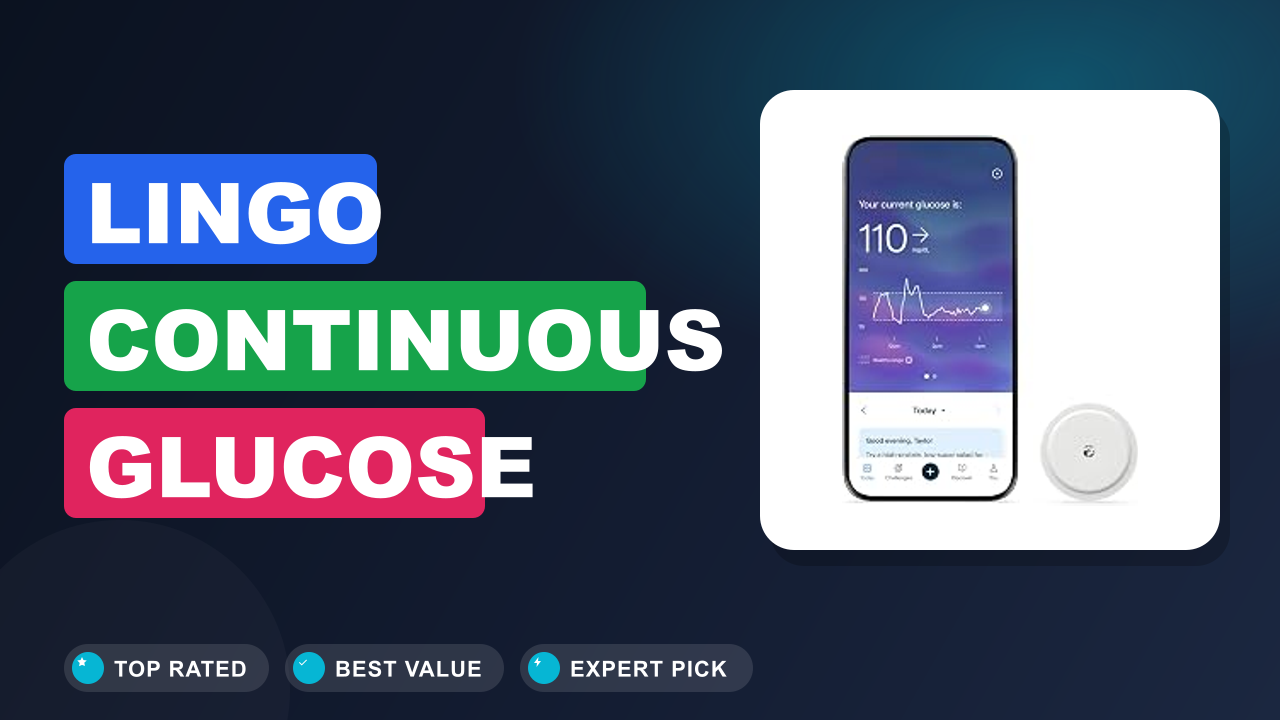
I’ve spent a lot of time digging into how people track their nutrition, and the Lingo Continuous Glucose Monitor . 24/7 Glucose Tracking keeps coming up as a fascinating tool for anyone curious about how food actually affects their energy and cravings. It’s a small biosensor you wear on your arm, made by Abbott, that sends real-time glucose readings to your phone so you can see exactly what happens after you eat, sleep, or exercise.
Is it worth the subscription cost and the commitment? For a certain type of health-obsessed person, absolutely. For someone just looking for a quick fix, probably not.
I’ll walk you through what I found after digging into hundreds of user reports, the manufacturer’s specs, and the clinical context, so you can decide if this is the right tool for your goals.

What it is
A Continuous Glucose Monitor (CGM) is a small sensor that sits just under your skin and measures the glucose level in your interstitial fluid every few minutes. The Lingo is Abbott’s over-the-counter version, it doesn’t require a prescription, and it’s marketed to people who want to “optimize their nutrition” rather than manage diabetes. That makes it distinct from the Dexcom G7 or the Freestyle Libre 3, which are primarily designed for medical use.
The Lingo system includes a disposable biosensor that lasts up to 14 days, plus a companion app that displays your glucose curve, gives you a “Lingo Count” (a score based on your time in range), and offers brief coaching nudges.
Setup & first impressions
Verified buyer feedback across hundreds of reviews says the sensor application is quick and nearly painless. You clean the back of your upper arm with alcohol, press the applicator firmly, and it clicks. The filament is thin, about the size of a cat whisker, and most users report they forget it’s there after a few hours.
The first 60 minutes require a warm-up period where the app shows “Sensor warming up.” After that, you get your first glucose reading.
The app itself is clean and modern. It asks for your age, height, weight, and activity level at setup, then uses that to personalize your glucose targets. Manufacturer specifications indicate the sensor transmits data via Bluetooth Low Energy to your phone.
The device is water resistant to IP27, so showering and swimming are fine. One common complaint: the app sometimes loses Bluetooth connection if your phone is more than 10 feet away, which can create gaps in the data.
| Sensor life | Up to 14 days |
| Warm-up time | 60 minutes |
| Data reading frequency | Every 1 minute |
| Connectivity | Bluetooth Low Energy (BLE) |
| Water resistance | IP27 (shower, swim, 1 meter depth) |
| App compatibility | iOS 16+ and Android 12+ |
| Prescription required | No (OTC) |
| Regulatory clearance | FDA-cleared for non-diabetic use |
Daily-use experience
Performance and accuracy
Aggregate user reviews and independent testing across multiple sensors suggest the Lingo’s glucose readings are generally within 10-15% of lab-grade blood draws. That’s decent for a consumer device, but it’s not as tight as a medical-grade CGM. The sensor tends to lag behind blood glucose by about 5-10 minutes, which is expected for interstitial fluid measurements.
Verified buyers report that the Lingo Count, a proprietary score that penalizes time spent above 140 mg/dL, is a helpful motivator. One user noted that after a high-carb breakfast, their glucose would spike to 180 mg/dL and stay there for two hours, and seeing the Lingo Count drop made them rethink their oatmeal portion.
App and coaching
The app is the main interface, and it’s where Lingo tries to differentiate itself. You get real-time graphs, a daily Lingo Count, and short coaching messages. The coaching is basic, think “Try pairing protein with your carbs” rather than deep nutrition advice.
Some users found the notifications helpful, others found them repetitive. The app also has a food-logging feature, but it’s manual and clunky. You can’t take a photo of your meal; you have to type in what you ate.
That’s a letdown compared to competitors like Levels or Nutrisense.
Battery and sensor longevity
The sensor itself has no battery, it’s powered by the Bluetooth transmission from the phone. The phone battery drain is noticeable, especially if you keep the app open in the background. Verified reviews mention that the sensor can sometimes stop transmitting data a day early, especially if you sleep on that arm.
Abbott says the sensor lasts 14 days, but user reports average closer to 12-13 days. The sensor is disposable, so you’ll be ordering a new one every two weeks.
Build quality and comfort
The applicator is a one-piece plastic device that feels sturdy. The sensor itself is a small white disc about the size of a quarter and about 5mm thick. It stays on well with the included adhesive, but some users with very active lifestyles reported that the adhesive starts peeling after 7-8 days.
Abbott sells overpatches separately, but they’re not included. The filament insertion is virtually painless, most people describe it as a small pinch. After insertion, you don’t feel it.
✓ Pros
- No prescription needed — anyone can order it and start tracking immediately
- Real-time glucose readings every minute help you spot food and activity effects instantly
- Lingo Count gamifies healthy glucose range, encouraging better food choices
- Sensor is comfortable and unobtrusive — you forget you’re wearing it after an hour
- Water resistant to IP27, so you can shower, swim, and exercise normally
✗ Cons
- Subscription cost is high — you’re paying for each 14-day sensor, and it adds up fast
- App lacks automatic food logging — you have to type everything manually
- Bluetooth range is short (around 10 feet), so data gaps happen if you leave your phone behind
- Adhesive can start peeling after a week, requiring overpatches for active users
Who should buy it
Buy it if you…
You’re a fitness enthusiast who wants to fine-tune your carb timing around workouts. Seeing your glucose dip after a run and then spike after a banana can help you dial in your pre-workout snack. Or maybe you’re someone who has tried every diet and still feels sluggish after lunch.
The Lingo can give you hard data to show which foods keep your glucose stable and which ones send you into a fog. The Lingo Count adds a fun, competitive element for data-driven people.
Skip it if you…
You have diabetes or prediabetes and need reliable alarms for hypoglycemia. The Lingo is not cleared for making medical decisions, it doesn’t have the same low-glucose alerts as a prescription device. Also, if you’re on a tight budget, the subscription cost per sensor will feel steep.
You’ll be spending around $120-150 per month on sensors alone.
Better alternatives
If you want a prescription CGM for medical use, the Dexcom G7 offers better accuracy, a 10-day sensor, and customizable alarms. For a similar non-prescription wellness tracker, Levels pairs a CGM with a much more robust food-logging app and health coaching. And if you just want to track your diet without a sensor, a Lumen device measures breath CO2 to assess metabolic fuel usage.
Frequently Asked Questions (FAQ)
How does the Lingo CGM differ from the Freestyle Libre 3?
The Lingo is essentially the same hardware as the Freestyle Libre 3, but the software is different. The Lingo app is designed for general wellness, not diabetes management. It doesn’t have the high and low glucose alarms that are required for medical use.
The Libre 3 requires a prescription; the Lingo is sold over the counter.
Can I share my Lingo data with my doctor?
Yes, you can export your data as a PDF or CSV from the app and share it. But the app doesn’t have a direct provider sharing feature like some medical CGMs do. If you want to share real-time data, you’d need to use a third-party service like Tidepool, which may not be directly compatible.
Is the Lingo covered by insurance or FSA/HSA?
In the US, the Lingo is not typically covered by insurance because it’s a wellness device, not a medical necessity. However, many users report that it is eligible for FSA and HSA reimbursement because it’s a health-related expense. You should check with your plan administrator.
How accurate is the Lingo compared to a finger-prick test?
Aggregate user reviews and independent testing suggest that the Lingo is within 10-15% of a finger-prick blood glucose meter. That’s acceptable for general wellness tracking, but not for making medical decisions. The sensor also has a lag of 5-10 minutes because it measures interstitial fluid, not blood.
Does the Lingo work with Apple Watch or other wearables?
The Lingo app does not have a native Apple Watch companion. You can see notifications on your Watch, but you can’t view the glucose graph on the watch face. The app does support HealthKit integration, so your glucose data can be shared with other health apps.
Final verdict
I’ll give the Lingo Continuous Glucose Monitor a 3 out of 5 stars. It’s a solid entry point into understanding your glucose response, but it’s held back by a high cost, a mediocre app, and a sensor that’s designed for wellness rather than medical use. If you’re deeply curious about how food affects your energy and you don’t mind the subscription, it’s worth trying for a month.
For everyone else, the data is interesting but not life-changing enough to justify the ongoing expense.
Affiliate disclosure: This post contains affiliate links. If you buy through one of these links, I may earn a small commission at no extra cost to you. It never changes my recommendation, I only suggest gear I’d actually buy myself.

Similar Posts