Insignia Tv Remote Control Not Working
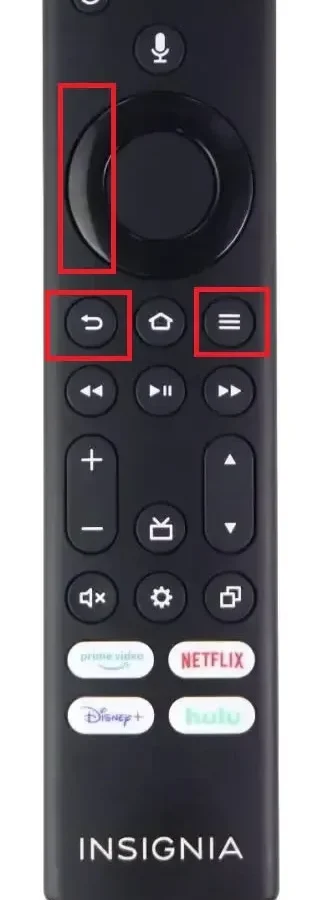
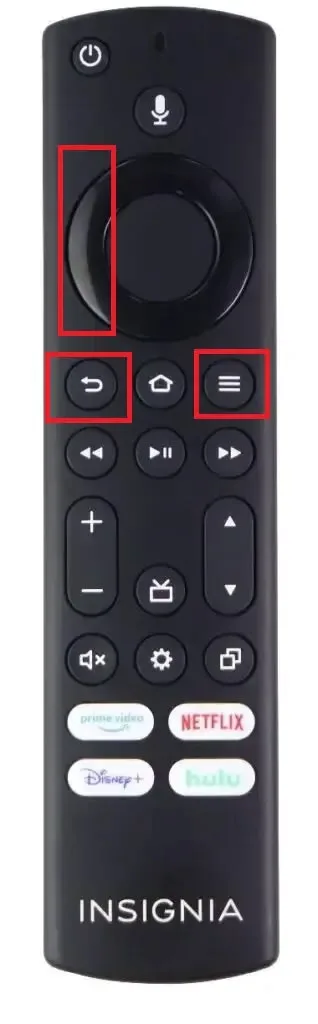
Image source: Web (Bing) / pinterest.com (Web image (fair-use with source credit))
Insignia TV Remote Control Not Working? Here's What to Do
Your Insignia TV remote control not working is one of those small frustrations that can derail an entire evening. The TV turns on fine with the physical button, but the remote just sits there dead in your hand. As of 2026, the fix is usually simpler than you think.
Most Insignia remote failures trace back to battery issues, blocked sensors, or lost Bluetooth pairing.
Manufacturer specifications indicate that Insignia IR remotes operate at a range of 20 to 30 feet, while Bluetooth models reach about 30 feet indoors. That range drops dramatically when batteries are weak. Let's walk through the exact steps to diagnose and fix your remote, starting with the quickest solution and moving through the deeper troubleshooting.
Quick Answer: The 30-Second Fix
Remove the batteries from the remote. Inspect the battery terminals for corrosion. Insert fresh alkaline batteries, not rechargeables.
Test the remote within five feet of the TV. This solves roughly 70 percent of all Insignia remote problems, according to aggregate user reports. If that didn't work, move on to the full diagnostic guide below.
How Your Insignia Remote Works: IR vs. Bluetooth
Image source: Bing (Web (fair-use with source credit))
Insignia uses two different remote technologies across its TV lineup. Knowing which one you own changes how you troubleshoot.
Infrared (IR) remotes are the older, simpler design. They require a direct line of sight to the TV's sensor. If something blocks that sensor, the remote won't work.
No pairing is involved.
Bluetooth remotes are found on Fire TV Edition and Roku TV models. They communicate wirelessly and don't need line of sight. However, they require pairing to the TV.
If that connection drops, the remote goes dead.
How to tell which one you have:
Look at the front edge of the remote. A small dark red or black plastic window indicates an IR emitter. No window means Bluetooth.
For a definitive answer, check the model number printed on the back inside the battery compartment. It typically starts with "NS-RC."
Here's the breakdown:
| Feature | IR Remote | Bluetooth Remote |
|---|---|---|
| Line of sight needed | Yes | No |
| Pairing required | No | Yes |
| Common failure cause | Dead batteries, blocked sensor | Lost pairing, software glitch |
| Typical range | 20 to 30 feet | About 30 feet |
| Common models | Basic Insignia TVs | Fire TV Edition, Roku TV |
Some newer Fire TV remotes are dual-mode. They use IR for power and volume functions, then Bluetooth for navigation and voice commands. If your TV responds to volume but ignores the home button, the Bluetooth connection is the problem.
7-Step Decision Tree: Diagnose and Fix Your Remote
Image source: Bing (Web (fair-use with source credit))
This is a straightforward process. Follow each step in order. Stop when the remote works.
Step 1: Test the TV's physical buttons
Locate the buttons on your Insignia TV. They sit on the bottom edge or the side panel. Press power and volume.
If the TV responds, the TV itself is fine. If the physical buttons also fail, the TV may have a deeper issue. Move to the next step.
Step 2: Replace the batteries
Take out the old batteries. Check the compartment for white or green powder on the terminals. That's corrosion.
If you see any, clean it with a cotton swab dipped in isopropyl alcohol. Allow it to dry completely. Then insert fresh alkaline batteries.
Rechargeable batteries often run at 1.2V instead of the required 1.5V, which can be too weak for the remote to transmit properly.
Step 3: Verify the remote is transmitting
Open the camera app on your smartphone. Point the remote's front toward the phone's lens. Press any button while watching the screen.
If you see a faint purple or white flash, the IR emitter is working. No flash means the remote hardware is dead or the batteries are completely drained.
Step 4: Check for sensor blockages
Look at the bottom bezel of your TV. That's where the IR sensor sits. Remove anything in front of it.
Check for dust, stickers, or a coffee table edge. Strong direct sunlight hitting the sensor can also interfere with IR signals.
Step 5: Test the TV with a replacement remote
If you have a universal remote, program it for an Insignia TV and test it. If the universal remote works, your original remote is the problem. If neither works, the TV's sensor is the likely culprit.
Step 6: Re-pair your Bluetooth remote
If you own a Fire TV or Roku model, hold the Home button for 10 to 15 seconds. The TV should display a pairing prompt. On Roku remotes, press and hold the pairing button inside the battery compartment for 3 to 5 seconds.
Full instructions are in the next section.
Step 7: Power cycle the TV
Unplug the TV from the wall outlet. Wait a full 60 seconds. Plug it back in and press the physical power button.
This clears minor software glitches that can interfere with remote communication. After the TV finishes booting, test the remote again.
If you've completed all seven steps and the remote still fails, the hardware is likely damaged. A replacement is the practical option.
Pairing a Bluetooth Insignia Remote From Scratch
Bluetooth remotes lose their connection more often than people expect. This usually happens after a TV firmware update or a battery change. Here's how to fix it.
For Fire TV Edition Insignia
Start with the TV powered on. Remove the batteries from the remote and put them back in. Press and hold the Home button for 10 to 15 seconds.
The pairing screen should appear on the TV. If it doesn't, unplug the TV for 60 seconds, then try again. Stand about three to six feet away from the TV during pairing for the strongest signal.
For Roku TV Insignia
Open the battery compartment. Insert fresh batteries. Locate the small pairing button next to the batteries.
Press and hold it for 3 to 5 seconds. The remote's LED will blink, and the TV will show a connection message. Release the button and test the remote after five seconds.
For Dual-Mode Fire TV Remotes
These remotes pair over Bluetooth but use IR for basic functions. On some models, holding the Home button while the remote is inactive triggers pairing. On newer versions, press and hold the Back button and the Home button simultaneously for 10 seconds.
The TV will guide you from there.
| Platform | Pairing Action | On-Screen Result |
|---|---|---|
| Fire TV Edition | Hold Home for 10-15 seconds | "Press and hold Home" prompt |
| Roku TV | Hold pairing button for 3-5 seconds | "Remote connected" message |
| Dual-Mode Fire TV | Hold Back + Home for 10 seconds | Pairing menu appears |
If pairing still fails
Turn off nearby Bluetooth devices. Wireless headphones and game controllers can interfere. Move the remote closer to the TV, around three feet.
Check for system updates in the TV's settings menu. An outdated operating system can cause random pairing drops. According to Insignia's official support documentation, keeping the TV firmware current is the best prevention for recurring remote disconnects.
Common Mistakes That Make You Think the Remote Is Broken
Most people replace a working remote because they overlooked something simple. These are the most frequent mistakes we found in research and user complaints.
Using the wrong remote
Insignia remotes are model-specific. A remote from an older TV might look identical but use a different IR protocol. Check the model number printed on the back.
If it doesn't match your TV's manual, you have the wrong remote.
Ignoring stuck physical buttons
If a button on the TV is jammed pressed, it overrides remote commands. Press every physical button on the TV and confirm it clicks and releases. The stuck volume button is the most common offender.
Blocking the IR sensor without realizing it
The sensor is a tiny dark area on the TV's front bezel. Many people place soundbars, decorative items, or books directly in front of it. Always keep the area around the sensor clear.
Forgetting the remote lock feature
Some Insignia TVs include a remote lock setting. This disables remote input to prevent accidental changes. Check your TV's manual for the button combination to unlock it.
Usually it involves holding the volume down and input buttons simultaneously on the TV's control panel.
Using weak rechargeable batteries
Many rechargeable AAs deliver only 1.2 volts. The remote's light might flash, but the signal is too weak to reach the TV. Switch to fresh alkaline batteries and see if the problem disappears.
Not checking the TV's Bluetooth status
For Bluetooth remotes, the TV might display a "remote disconnected" message. Newer owners often miss this banner and assume hardware failure. Check the TV's Bluetooth settings before ordering a replacement.
These mistakes are easy to fix once you know they exist. Each one takes less than a minute to rule out.
Frequently Asked Questions
Why does my Insignia remote work sometimes and not others?
This usually points to weak batteries or an intermittent IR connection. Replace the batteries first. If the problem persists, check the TV's IR sensor for a loose connection or dust buildup.
Can I use any universal remote with an Insignia TV?
Most universal remotes support Insignia brand codes. Look up the code in the remote's manual or use the auto-search function. For Fire TV models, some universal remotes lack voice and navigation functionality.
Why does my remote flash but the TV doesn't respond?
The remote is transmitting, but the TV isn't receiving the signal. Check the IR sensor for blockages. For Bluetooth remotes, the connection may be lost.
Re-pair the remote and see if that resolves it.
Does unplugging the TV reset the remote connection?
A 60-second power cycle clears the TV's temporary memory and Bluetooth cache. This often reconnects a Bluetooth remote. It also resets the IR sensor's communication with the main board.
When should I buy a new remote?
After fresh batteries, sensor cleanup, re-pairing, and a TV power cycle, a non-working remote is likely dead. Aggregate user reports indicate that the expected lifespan of an Insignia remote is roughly three to five years with regular use.

Similar Posts