Can AI Translation Devices Translate Conversations: Yes
Yes, AI translation devices can translate live conversations, but accuracy depends on language, noise, and internet access.
Modern AI translation devices can listen to speech, convert it into text, translate the meaning, and speak the result in another language. That process can happen within seconds, making travel, business meetings, customer service, and family conversations much easier. Still, these devices are not perfect interpreters. They may miss slang, tone, names, or cultural meaning.
This guide explains how conversation translation works, what these devices can and cannot do, how accurate they are, and how to choose and use one well. It also shares practical lessons that can help you avoid common mistakes when using an AI translator in real life.

How Do AI Translation Devices Translate Conversations?
AI translation devices use several systems at once. These systems work like a relay team, with each part handling one stage of the conversation.
The device first uses a microphone to capture speech. Speech recognition software then turns the audio into written words. A machine translation model changes those words into another language. Finally, text-to-speech software reads the translation aloud.
The process usually looks like this:
- You speak into the device.
- The device detects the language.
- Speech recognition creates a text version.
- An AI model translates the text.
- The device speaks or displays the result.
- The other person replies, and the process repeats.
This is why the answer to “can AI translation devices translate conversations” is yes. However, the device does not understand language in the same way a human interpreter does. It predicts meaning from patterns in speech, context, and language data.
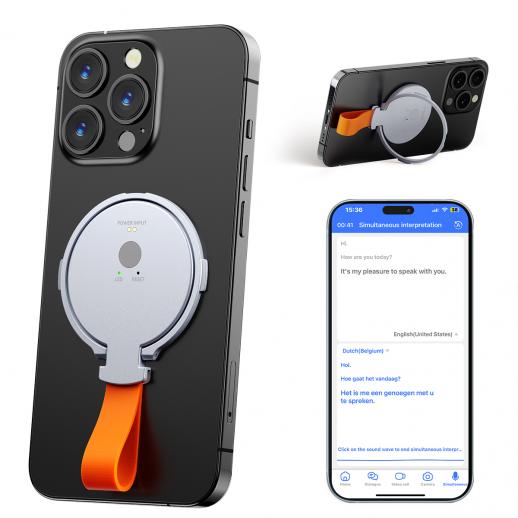
Some devices support turn-based conversations. Each person presses a button or waits for the other person to finish speaking. Newer systems may support automatic voice detection, which feels more natural because the conversation flows with fewer pauses.
The best devices also show the translated text on a screen. This is useful when the audio is unclear, the speaker has a strong accent, or the surroundings are noisy.
What Types of Conversations Can AI Translation Devices Handle?
AI translation devices work best with clear, short conversations. They can help with many daily situations, but their results depend on the setting and the language pair.
Common uses include:
• Asking for directions while traveling
• Ordering food at a restaurant
• Checking into a hotel
• Speaking with a taxi driver
• Asking simple questions in a store
• Helping family members communicate
• Supporting basic customer service
• Holding short work discussions
• Communicating during travel emergencies
For example, you might say, “Where is the nearest train station?” The device can translate the question and play it aloud. The other person can reply in their own language, and the device can translate that answer back to you.
AI translation devices may also help in schools, hospitals, and public services. Yet these settings need extra care. A small error about medicine, legal rights, allergies, or money can have serious results.
The answer to “can AI translation devices translate conversations” changes when the conversation becomes complex. A device may handle a simple request well but struggle with a fast debate, a joke, or a technical explanation.
Conversation types that may cause problems
AI tools often find these situations difficult:
• People speaking over each other
• Very fast speech
• Heavy background noise
• Strong regional accents
• Slang and local expressions
• Sarcasm and humor
• Technical terms
• Names and place names
• Emotional or sensitive topics
• Long sentences with unclear meaning
A useful rule is simple: the more important the conversation, the more carefully you should check the translation.

How Accurate Are AI Conversation Translators?
Accuracy varies by device, app, language, microphone quality, and network connection. Popular language pairs, such as English and Spanish, often receive stronger support than less common language pairs.
Many speech recognition systems perform well in quiet places with clear speech. They become less reliable in crowded airports, busy streets, restaurants, or group meetings. Even a good translation model cannot work well if it cannot hear the words correctly.
Accuracy also depends on context. The phrase “I’m feeling blue” does not usually mean that someone has a blue color. It means the person feels sad. A human listener uses context and culture to understand this. An AI system may translate the phrase correctly, but it can also produce a word-for-word result.
Studies of machine translation show that automated systems perform better with common sentences and standard language. They often perform worse with rare words, informal speech, mixed languages, and expressions that do not have a direct match.
A device may produce a grammatically correct sentence that still misses the speaker’s real intention. This is one reason the question “can AI translation devices translate conversations” needs a balanced answer. They can translate speech, but translation quality is not the same as full human understanding.
A practical accuracy guide
You can think of translation quality in three levels:
• Basic travel talk: Usually helpful and often accurate enough.
• Detailed personal or work talk: Useful, but check important points.
• Legal, medical, or high-risk talk: Do not rely on the device alone.
If the meaning matters, ask the speaker to repeat the sentence slowly. You can also use the screen to review the original and translated text.

What Is the Difference Between an AI Translation Device and a Translation App?
A translation app runs on a smartphone or tablet. A dedicated AI translation device is built mainly for language support.
Both options can use similar speech recognition and machine translation technology. The main difference is how easy they are to use in a conversation.
Translation apps
Translation apps often offer:
• Many language options
• Text translation
• Camera translation
• Voice translation
• Offline language packs
• Easy software updates
A phone is also cheaper for people who already own one. However, opening an app, passing the phone back and forth, and dealing with notifications can interrupt the conversation.
Dedicated translation devices
A separate device may offer:
• A simple interface
• Better microphones
• Fast access to conversation mode
• Two-screen designs
• Less distraction
• Longer battery life for translation tasks
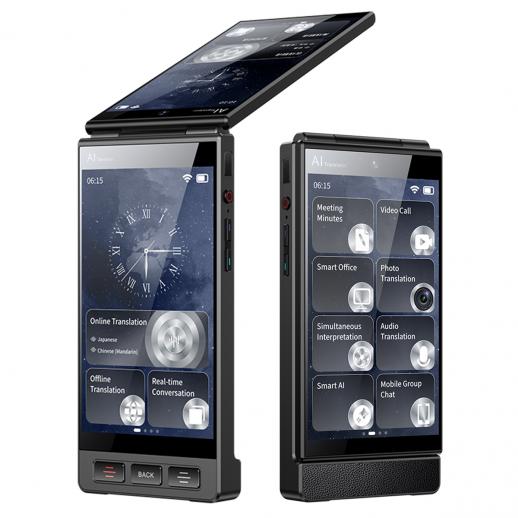
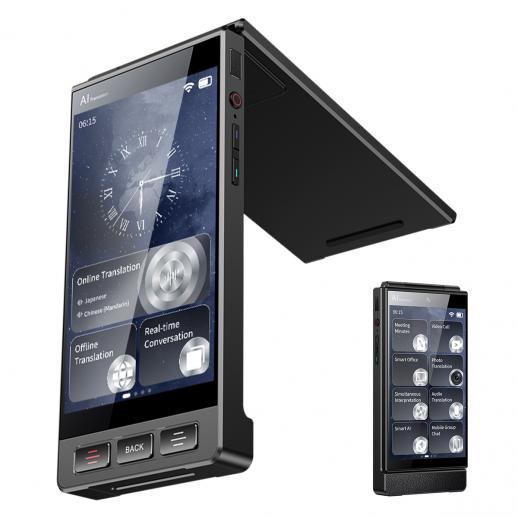
Some devices include two displays. One person can read the translation from one side, while the other person reads the reply from the other side. This design can feel more natural than sharing one phone.
The best choice depends on your needs. A traveler who needs occasional help may prefer a phone app. A tour guide, international salesperson, or frequent traveler may prefer a dedicated device.

Can AI Translation Devices Work Without Internet Access?
Some can, but offline translation usually supports fewer languages and may offer lower accuracy.
Online translation tools can connect to large cloud-based AI models. These models may use more language data and stronger computing power. Offline tools must store language models on the device, so they may have less room for advanced features.
Before buying or traveling with a device, check:
• Which languages work offline
• Whether voice translation works offline
• Whether both directions are supported
• How much storage the language packs need
• Whether offline mode supports conversation features
• How often the device needs an internet connection
Internet access may also affect speed. A weak connection can create long pauses between each sentence. This can make a conversation feel awkward, even when the final translation is correct.
For travel, offline support is valuable. Airports, rural areas, underground stations, and foreign mobile networks may not provide a stable connection. Download language packs before leaving home and test them in airplane mode.
So, can AI translation devices translate conversations without Wi-Fi? Some can, but you should not assume that every feature works offline. Always check the product details before relying on one.
Which Features Matter Most in a Conversation Translator?
A long list of supported languages does not always mean a device is useful. The most important features relate to sound quality, speed, privacy, and ease of use.
Microphone quality
A strong microphone can separate speech from background noise. This matters in airports, cafes, markets, and public streets.
Automatic language detection
Automatic detection saves time when two people switch between languages. It may still make mistakes when the languages sound similar, so manual selection should remain available.
Two-way conversation mode
This feature lets both people speak in turn. Some devices use buttons, while others detect pauses automatically.
Text display
A screen gives you a way to check what the device heard and what it translated. This is one of the most useful tools for catching errors.
Offline support
Offline mode helps when you have no signal or want to reduce data use.
Privacy controls
Voice data may be processed on the device or sent to a remote server. Check the privacy policy and learn whether recordings are stored.
Battery life
A translation device is not useful if its battery dies during a trip. Look for a full day of normal use or carry a small power bank.
Software updates
Language models improve over time. Regular updates may improve accuracy, add languages, or fix bugs.
When comparing devices, do not focus only on marketing terms such as “AI-powered.” Test the exact languages and situations you expect to use. The best device is the one that works well for your real conversations.

What Are the Main Benefits of AI Conversation Translation?
AI translation devices can remove many small barriers between people. They do not replace human connection, but they can open the first door.
Key benefits include:
• Faster communication during travel
• Less fear when speaking with strangers
• More independence for people who do not know the local language
• Support for multilingual families
• Easier customer service conversations
• Help with basic workplace communication
• Better access to signs, menus, and spoken instructions
They can also reduce the pressure on both speakers. A person does not need to know every word before starting a conversation. The device acts like a bridge while both people learn what the other means.
In my practical review framework, the most important benefit is not perfect grammar. It is confidence. People often avoid useful conversations because they fear making a mistake. A translator can make it easier to ask for help, show respect, and keep trying.
Still, use the device as a communication aid, not as a replacement for patience. Speak clearly, wait your turn, and confirm important details.
What Are the Limitations and Risks?
The answer to “can AI translation devices translate conversations” should always include their limits. These devices can make mistakes, and some mistakes may cause confusion or harm.
Meaning can change
A translation may be technically correct but still sound unnatural. Some languages use different levels of politeness, gender, or formality. A direct translation may sound rude even when the speaker had good intentions.
Speech recognition can fail
The device may mishear words because of:
• Noise
• Low volume
• An accent
• A blocked microphone
• Two people speaking at once
• Unusual names
• Poor pronunciation
Cultural details may disappear
Words often carry cultural meaning. A greeting, joke, or respectful phrase may not have a direct equivalent in another language.
Privacy may be unclear
Some tools send voice recordings to cloud servers for processing. Avoid sharing private medical, financial, legal, or business information unless you understand how the data is handled.
Emotional meaning is difficult
AI can translate words, but it may not fully capture fear, anger, humor, embarrassment, or affection. Tone can matter as much as vocabulary.
High-stakes errors can be serious
Do not depend only on an AI translator for:
• Medical instructions
• Consent forms
• Legal advice
• Immigration interviews
• Contracts
• Emergency treatment
• Financial agreements
In these situations, use a qualified human interpreter. A device can provide temporary help while you wait, but it should not make the final decision.

How to Use an AI Translation Device More Effectively
Good results depend on how you speak. You can improve translation quality with a few simple habits.
-
Speak in short sentences. Say one idea at a time.
-
Pause after each sentence. Give the device time to process your words.
-
Use common words. Avoid slang, jokes, and complex phrases when possible.
-
Face the microphone. Keep your mouth close enough for clear audio.
-
Reduce background noise. Move away from music, traffic, or crowds.
-
Confirm important details. Repeat dates, prices, names, and directions.
-
Use the display. Check what the device heard before accepting the translation.
-
Correct mistakes politely. Try a simpler sentence if the first translation is unclear.
-
Learn a few local phrases. Even basic greetings can build trust.
-
Keep a backup plan. Carry written addresses, screenshots, or a translation app.
One mistake people often make is speaking into the device as if it were a person. They rush, use long sentences, and keep talking while it processes. The better approach is to treat the device like a patient but literal helper.
For example, instead of saying, “Could you possibly tell me where I might find the bus stop that goes toward the old town?” say, “Where is the bus stop for the old town?” Short speech gives the system fewer chances to misunderstand.
Can AI Translation Devices Translate Group Conversations?
Most consumer devices are better at one-to-one conversations than group discussions. A group creates several problems at once.
The device must identify who is speaking, separate voices, detect language changes, and translate each sentence in the correct order. If people interrupt each other, the system may combine several sentences into one confusing result.
Some advanced tools offer speaker identification and automatic captions. These features can help in meetings, but they still need careful testing. A meeting with two clear speakers is easier than a dinner with six people speaking across a noisy table.
For group conversations, use these methods:
• Ask one person to speak at a time.
• Place the device near the main speaker.
• Repeat key points in simple words.
• Use live text when audio becomes unclear.
• Share written notes after the meeting.
• Have a human bilingual person review important decisions.
This is another reason the answer to “can AI translation devices translate conversations” depends on the context. One-to-one travel talk is a strong use case. Fast group discussion is much harder.
How Much Do AI Translation Devices Cost?
Prices vary based on hardware, language support, subscription plans, and online services. A free phone app may cover basic needs, while a dedicated device may cost more but offer better microphones and a simpler design.
Consider the total cost, not only the purchase price. Some devices may require:
• A monthly data plan
• A paid translation subscription
• Extra language packages
• Cloud processing fees
• Replacement accessories
A low-cost option may be enough for a short trip. A professional user should compare speed, privacy, offline tools, warranty support, and update policies.
Before buying, test the return policy if possible. Translation quality can vary greatly between language pairs. A device that works well for English and French may not perform as well for English and a less-supported language.
How to Choose the Best AI Translation Device
Start with your main use case. Do not buy a device only because it supports many languages or uses the word “AI.”
Use this checklist:
• Confirm the exact languages you need.
• Check whether both languages support voice conversation.
• Test online and offline features.
• Look for a strong microphone.
• Confirm battery life.
• Review privacy settings.
• Check the refund and warranty policy.
• Read recent user reviews from people using the same language pair.
• Look for text display and conversation history.
• Make sure updates are still provided.
If you travel often, size and battery life may matter most. If you work in a noisy place, microphone quality may be more important than the number of languages. If you discuss private information, privacy and offline processing should be high priorities.
A useful test is to prepare ten real sentences you expect to use. Include a question, a place name, a food item, a price, a time, and a polite request. Test the device in a quiet room and a busy place. This gives you a more honest result than reading a feature list.
Frequently Asked Questions About Can AI Translation Devices Translate Conversations
Can AI translation devices translate live speech?
Yes, many AI translation devices can translate live speech in near real time. They listen, convert speech into text, translate it, and play or display the result.
Are AI translation devices better than human interpreters?
No. AI devices are useful for simple, everyday communication, but skilled interpreters understand tone, culture, context, and sensitive details more deeply.
Do AI translation devices need Wi-Fi?
Some devices need Wi-Fi or mobile data for their strongest features. Others offer offline translation for selected languages, but offline accuracy and functions may be more limited.
Can an AI translator understand accents?
Many devices can understand common accents, but strong accents, unclear speech, and background noise may reduce accuracy. Speaking slowly and clearly can improve the result.
Can AI translation devices translate phone calls?
Some apps and services can translate phone or video calls, but support varies by device, operating system, and language. Check whether the tool supports two-way audio before relying on it.
Are AI translation devices safe for medical conversations?
They should not be the only tool used for medical communication. For diagnosis, treatment, consent, or medication instructions, use a qualified human interpreter whenever possible.
Can AI translation devices translate slang and jokes?
They can translate some slang and common expressions, but jokes, sarcasm, and cultural references are difficult. The device may translate the words without preserving the intended humor.
Conclusion
AI translation devices can translate conversations and make everyday communication much easier. They work best with clear speech, short sentences, supported languages, and quiet surroundings. They are valuable for travel and simple conversations, but they can still miss context, emotion, slang, and cultural meaning.
Use a translator as a helpful bridge, not as a perfect human interpreter. Test the device before your trip, download offline languages, protect private information, and confirm anything important. Explore trusted translation tools, compare devices for your language pair, and share your experience with AI conversation translation in the comments.