Do AI Translation Devices Require A SIM Card: SIM Card Guide
Most AI translation devices do not require a SIM card, but online features need Wi-Fi or mobile data.
The answer to “do AI translation devices require a SIM card” depends on the device, its translation modes, and how you plan to use it. Some translators work offline, some connect through Wi-Fi or a phone hotspot, and others include a built-in SIM or eSIM for mobile data. This guide explains the differences so you can choose a translator that works when you need it most.
Do AI translation devices require a SIM card?
No, many AI translation devices do not require a physical SIM card. They can connect to the internet through Wi-Fi or your smartphone’s mobile hotspot. Some models also download language packs, which lets them translate without any connection.
Still, online access often improves translation quality. Cloud-based AI systems can process more language data, understand context, and support more languages than a small device working alone.
When asking, “do AI translation devices require a SIM card,” think about three connection types:
• Wi-Fi connection: The device uses a home, hotel, airport, or public Wi-Fi network.
• Smartphone hotspot: The device connects to your phone and uses your phone’s cellular data.
• Built-in SIM or eSIM: The translator connects to a mobile network without your phone.
• Offline translation: The device uses stored language files and needs no network.
A SIM card is not what creates the translation. It simply gives the device a path to the internet. The translation engine may run on the device, in the cloud, or through a mix of both.

How AI translation devices connect to the internet
To understand do AI translation devices require a SIM card, it helps to see how these products send and receive data. Most smart translators use a microphone to capture speech. The device then changes speech into text, processes the meaning, and returns translated speech or text.
This process can happen in two ways.
Cloud-based translation
Cloud-based devices send speech to online servers. These servers use machine learning models to analyze the sentence and produce a translation.
This method can offer:
• More supported languages
• Better handling of long sentences
• Improved recognition of accents
• More accurate context in some language pairs
• Frequent software updates
The trade-off is the need for internet access. Without Wi-Fi, mobile data, or a hotspot, cloud translation may stop working.
On-device translation
Some devices store language models on internal memory. They can translate basic phrases without sending audio to the internet.
Offline translation is useful when you are:
• Hiking in a remote area
• Traveling on a plane
• Crossing a border with weak service
• Avoiding international data charges
• Handling private conversations
Offline tools may support fewer languages. They may also struggle more with slang, unclear speech, rare words, and complex grammar.

When an AI translation device needs a SIM card
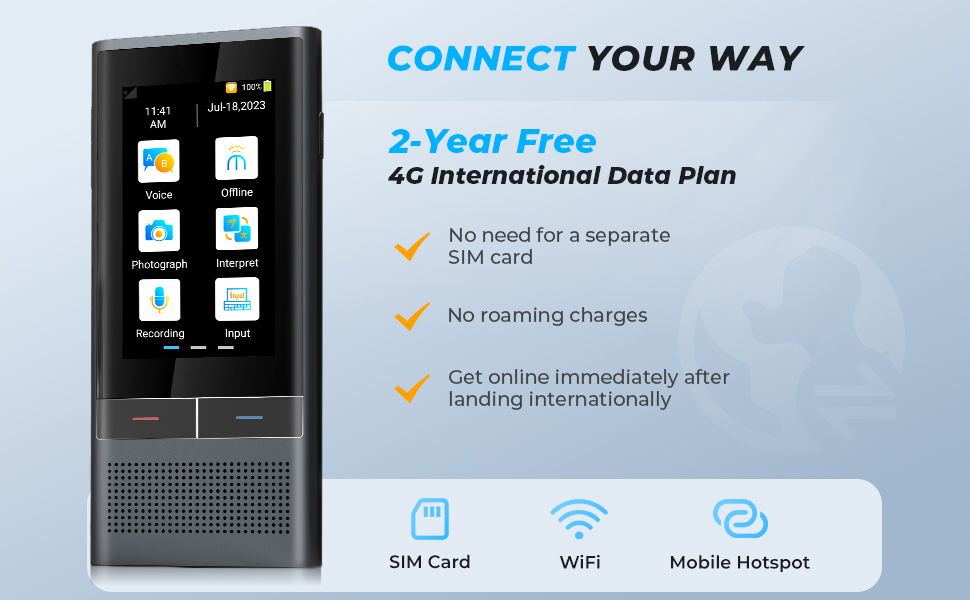
A SIM card may be useful when the translator has built-in cellular service. This feature allows the device to connect to a mobile network by itself.
You may need a SIM card or eSIM for:
• Translation on the go without a phone
• Real-time online translation outside Wi-Fi areas
• Voice calls through the translator
• Text messaging features
• Automatic software updates over cellular data
• Location-based services
Some products include a SIM or eSIM with a limited data plan. Others require you to buy a plan from a carrier or activate a subscription from the manufacturer.
Before buying, check whether the device is:
• Unlocked for other carriers
• Compatible with local network bands
• Limited to a certain country or region
• Sold with a data plan
• Dependent on a monthly subscription
• Compatible with a physical SIM, eSIM, or both
This is where the answer to do AI translation devices require a SIM card can change from one model to another. A device with built-in cellular service may work best for independent travel, while a Wi-Fi-only device may cost less.

Using an AI translator with Wi-Fi
Wi-Fi is the simplest way to use many AI translation devices. Connect the device to a trusted network, open the translation feature, and select the languages you need.
Hotel Wi-Fi can work well, but public networks may be slow or unsafe. Avoid entering sensitive account details on an unknown network. A busy airport network may also cause delays during speech translation.
For reliable use:
• Test the device before leaving home.
• Download offline language packs when available.
• Save the Wi-Fi setup steps in your travel notes.
• Use a password-protected network when possible.
• Keep a backup translation app on your phone.
The main benefit of Wi-Fi is that you do not need a separate cellular plan. The main weakness is that Wi-Fi is not always available when you are walking through a market, riding a train, or visiting a rural area.

Using a smartphone hotspot instead of a SIM card
A phone hotspot is often the best answer for travelers who ask, “do AI translation devices require a SIM card?” In this setup, the translator connects to your phone like any other Wi-Fi device.
Your phone then uses its own cellular connection to reach the translation service. The translator does not need its own SIM card.
This option works well when:
• Your phone has an international data plan.
• Local cellular service is strong.
• You want to manage one data plan.
• You already carry your phone everywhere.
• You do not want another monthly subscription.
However, a hotspot can drain your phone battery. It may also use more data than expected, especially when the device sends voice recordings to cloud servers.
Before your trip, check:
Whether your carrier allows hotspot use abroad.
The cost of international data.
Your monthly data limit.
Whether the phone supports the required network bands.
How to enable and secure a personal hotspot.
Use a strong hotspot password. Turn off hotspot sharing when you finish. These small steps reduce battery use and protect your connection.

Do AI translation devices work without internet?
Some do, but offline performance depends on the model and language pair. An offline translator may handle common phrases, basic questions, and everyday travel needs. It may not match the quality of a cloud-based system for long or complex conversations.
Offline language packs can be large. Download them while you have a fast Wi-Fi connection. Test them in airplane mode before your trip so you know what will work.
Offline mode is usually strongest for:
• Greetings
• Directions
• Food and restaurant phrases
• Numbers and times
• Simple shopping questions
• Basic travel emergencies
It may be weaker for:
• Medical details
• Legal language
• Regional slang
• Technical terms
• Fast group conversations
• Speech with heavy background noise
For medical, legal, or safety-critical communication, do not rely on a consumer translator alone. Ask a qualified human interpreter when accuracy could affect health, rights, or personal safety.
SIM card, eSIM, and subscription differences
A physical SIM card is a small chip that connects a device to a mobile network. An eSIM performs the same basic job through software built into the device.
When comparing do AI translation devices require a SIM card, remember that “SIM included” does not always mean “cell service is free forever.” The manufacturer may include a trial plan, a small amount of data, or service in selected countries.
Read the product terms carefully. Look for:
• The length of the included service
• Countries with coverage
• Data limits
• Renewal prices
• Roaming rules
• Activation requirements
• Cancellation terms
A translator may also need a subscription even when it connects through Wi-Fi. The subscription could cover cloud AI access, premium languages, voice calls, or software updates. Connection and payment are separate issues.
Do AI translation devices use a lot of data?
Usually, short translation requests use a modest amount of data. However, the total can rise when you use continuous conversation mode, voice calls, image translation, or frequent cloud processing.
Data use varies by device. Manufacturers may not publish exact figures, and background updates can add to the total.
To reduce data use:
• Download offline language packs.
• Use Wi-Fi for updates.
• Turn off automatic downloads.
• Avoid long recordings when a short phrase will work.
• Monitor hotspot data on your phone.
• Choose offline mode in areas with expensive roaming.
A local SIM card or travel eSIM may cost less than international roaming. Compare the full price before you travel. Also check whether the device supports the local carrier’s 4G or 5G bands.

Benefits of a SIM-enabled translation device
A SIM-enabled translator can feel like a direct line to the outside world. You turn it on, choose a language, and use it without first finding Wi-Fi or opening your phone.
Key benefits include:
• Independent operation: You can translate without carrying a connected phone.
• Faster setup: There is no need to join a new Wi-Fi network.
• Better mobility: The device can work while walking or traveling.
• Useful emergency access: You may have translation in places with no public Wi-Fi.
• Less phone sharing: You can keep your phone private while another person uses the translator.
This design may help tour guides, business travelers, aid workers, and families traveling in groups. It can also help people who do not want to manage phone apps.
The limitations are just as important. Cellular plans can expire. Coverage may fail in remote areas. The device may be locked to one provider, and international service may cost more than expected.
Benefits of a SIM-free translation device
A SIM-free device can be a better value for casual travelers. If you already have a phone with a good data plan, you can use a hotspot and avoid paying for a second connection.
Other benefits include:
• Lower purchase and operating costs
• No separate carrier account
• No SIM activation
• Simple use on home or hotel Wi-Fi
• Fewer cellular compatibility concerns
A SIM-free translator is also useful in settings where Wi-Fi is stable. For example, a business may place one in a reception area and connect it to a secure office network.
Its main weakness is dependence on another connection. If your phone battery dies and no Wi-Fi is available, online translation may stop.
How to choose the right AI translation device
The best device depends on your travel style, language needs, and tolerance for subscriptions. Do not choose only by the number of languages listed on the box.
Use this checklist:
Check offline language support. Confirm that the languages you need work without internet.
Check connection options. Look for Wi-Fi, hotspot support, physical SIM, or eSIM.
Check total cost. Add the device price, data plan, subscription, and roaming fees.
Check network compatibility. Confirm support for the countries you will visit.
Check microphone quality. Good microphones matter in noisy streets and busy stations.
Check battery life. A translator that dies at midday is not useful.
Check privacy settings. Learn whether audio is stored, shared, or deleted.
Check return rules. Test the device with real conversations while you can still return it.
Check update support. Language tools improve through firmware and software updates.
Carry a backup. Keep a phrasebook, translation app, or offline dictionary for emergencies.
A practical test is simple. Say a short phrase, a longer sentence, and a place name. Test the device in a quiet room and in a noisy area. This reveals more than a product description.
Privacy and security considerations
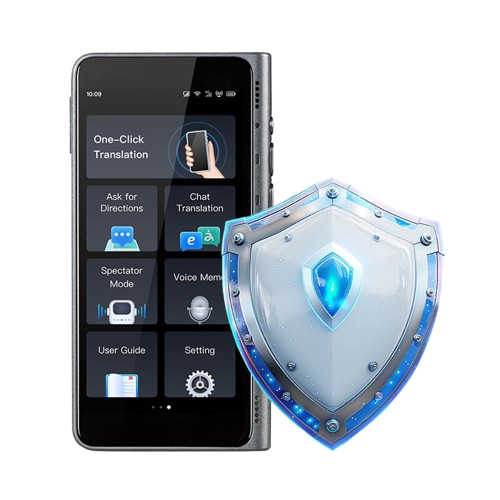
Online translation can involve sending your voice, text, or images to remote servers. Privacy rules differ by company and product. Read the privacy policy before using a translator for personal, medical, or business conversations.
Ask these questions:
• Is audio recorded?
• Is audio stored after translation?
• Is data used to train models?
• Can you delete your history?
• Is the connection encrypted?
• Does offline mode keep speech on the device?
Avoid sharing passwords, financial details, passport numbers, or confidential business information through an unknown service. An offline mode can reduce exposure, but it may not remove every privacy risk.
Public Wi-Fi also creates a security concern. Use trusted networks and keep the device software updated. If the product supports a cellular connection, a reputable carrier may provide a safer path than an open public hotspot.
Common mistakes to avoid
Many travel problems come from assuming a translation device will work everywhere. The question do AI translation devices require a SIM card is only one part of the buying decision.
Avoid these mistakes:
• Buying a Wi-Fi-only model for remote travel.
• Assuming every language works offline.
• Forgetting to download language packs.
• Ignoring subscription renewal terms.
• Failing to test the microphone.
• Relying on public Wi-Fi in an emergency.
• Not checking international data rates.
• Assuming translation is perfect for medical or legal speech.
• Leaving the device uncharged overnight.
• Carrying no backup communication method.
One common lesson from real travel use is that connection planning matters more than flashy features. A simple translator with tested offline packs can be more useful than an advanced model that cannot connect when you need it.
Frequently Asked Questions
Do AI translation devices require a SIM card for basic translation?
No. Many devices can translate through Wi-Fi, a smartphone hotspot, or downloaded offline language packs. A SIM card is needed only when the device depends on its own cellular connection.
Can I use an AI translator with my phone’s hotspot?
Yes. Most Wi-Fi-capable translation devices can connect to a phone hotspot. Your phone supplies the mobile data, so the translator does not need a separate SIM card.
Do AI translation devices work without Wi-Fi?
Some do. They need offline language packs that are downloaded before use, but offline translation may support fewer languages and simpler conversations.
Is a built-in eSIM better than a physical SIM card?
Neither option is always better. An eSIM is easier to activate remotely, while a physical SIM can be easier to replace or switch in some countries.
Will a SIM card make translation more accurate?
No. A SIM card provides internet access, but it does not improve translation by itself. Accuracy depends on the device, language model, software, microphone, and connection quality.
Can I use a translation device overseas?
Often, yes, but check network coverage, roaming rules, and regional restrictions first. A Wi-Fi or hotspot model may be easier to use abroad if the cellular version has limited country support.
Do all translation devices include free cellular data?
No. Some include a short trial or limited data, while others require a paid plan. Check the service terms before buying or traveling.
Conclusion
So, do AI translation devices require a SIM card? Usually, they do not. Wi-Fi, a phone hotspot, or offline language packs may be enough, while a built-in SIM or eSIM gives you more freedom when you travel without reliable Wi-Fi.
Choose based on your real needs. Check offline support, data costs, network coverage, privacy rules, and subscription terms before you buy. Test your device before departure, download backup language packs, and keep a second translation method ready. Explore trusted device guides and share your travel translation tips with others.

Similar Posts