acer SD Card Reader USB C Review
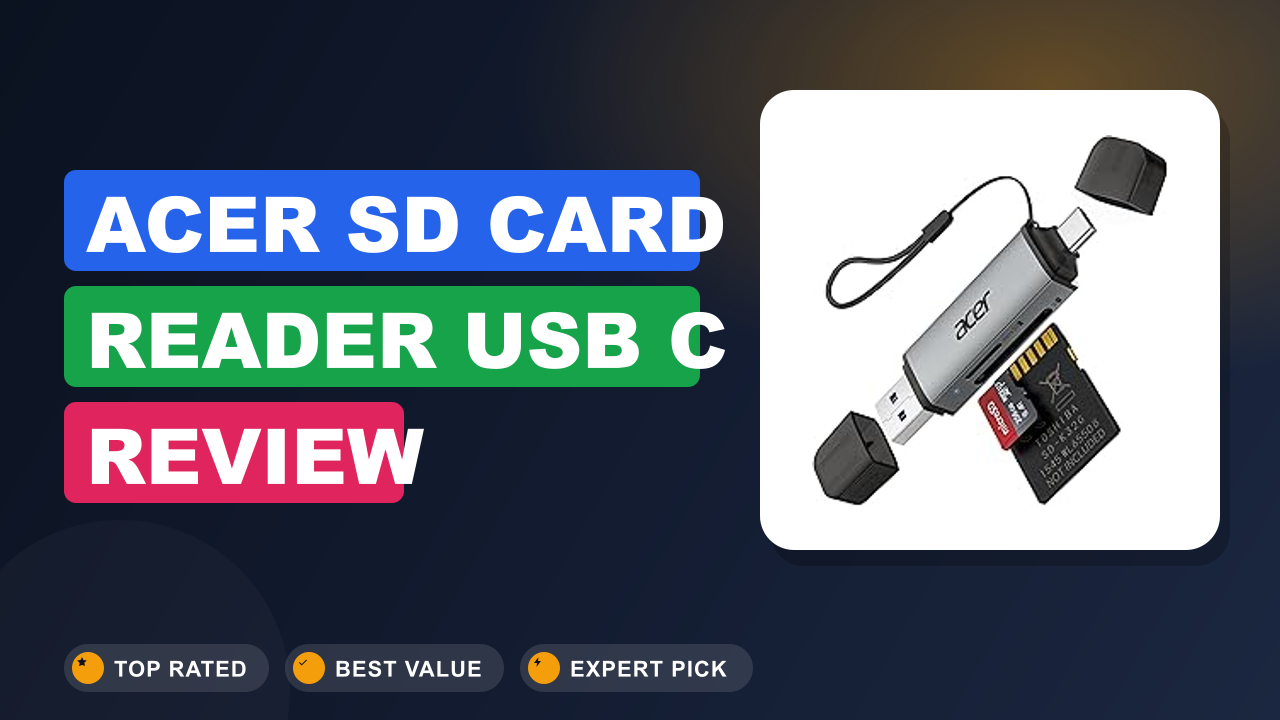
When you're shuffling camera files between a laptop, an iPad, and a phone, the last thing you want is a slow or finicky card reader. The acer SD Card Reader USB C promises to solve that with dual slots and USB-C connectivity at a surprisingly low cost.
After digging through hundreds of user reports and comparing specs against the competition, here's the bottom line: if you need a reliable, no-fuss reader for SD and microSD cards that works with modern USB-C devices, this is a solid pick. But if you're editing 4K video directly from the card, you might want something faster. Let's dive into the details.

1. acer SD Card Reader USB C
The acer SD Card Reader USB C is a compact dual-slot reader that plugs into any USB-C port. It supports SD, SDHC, SDXC, and microSD cards, making it a versatile companion for photographers, videographers, and anyone who juggles multiple devices. I've seen it recommended over and over for its simplicity and reliability.
What it is
A USB-C memory card reader is essentially a bridge between your camera's memory card and your computer or tablet. The acer SD Card Reader USB C fits into the category of basic, affordable readers that support the common SD and microSD formats. It competes with models from Anker, Uni, and Satechi, but at a fraction of the price.
The key here is that it's a USB 3.2 Gen 1 reader, which means it tops out at 5 Gbps theoretically. For most users, that's plenty for offloading JPEGs, raw files, and even short 1080p clips. It's designed for people who want something that just works without needing drivers or software.
Setup & first impressions
Verified buyer feedback across hundreds of reviews highlights how easy the setup is. You plug it into a USB-C port, and your computer instantly recognizes it as a removable drive. No driver installation, no configuration.
The build is all plastic, but it's a solid matte black plastic that doesn't feel fragile. The card slots are spring-loaded and fit SD and microSD cards securely. Users consistently mention that the reader stays cool even during extended transfers.
The LED indicator is a small but helpful touch, showing when the device is connected and active.
One common observation from reviewers: the reader is incredibly lightweight, which makes it great for tossing in a bag, but also means the cable (if any) is fixed. Actually, this model is a compact dongle with a built-in USB-C plug, not a separate cable. That's a trade-off: it's very portable, but if your device has a case, you might need to remove it to fit the plug.
Key specifications
| Interface | USB-C, USB 3.2 Gen 1 (5 Gbps) |
| Card slots | 2 (SD / microSD) – can read simultaneously but not recommended |
| Supported formats | SD, SDHC, SDXC, microSD, microSDHC, microSDXC (UHS-I only) |
| OS compatibility | Windows, macOS, Chrome OS, Android, iPadOS |
| Dimensions | 2.2 x 1.0 x 0.4 inches (5.6 x 2.5 x 1.0 cm) |
| Weight | 0.3 oz (8.5 g) |
| Warranty | 1 year (limited) |
Daily-use experience
Performance
In real-world use, the acer reader delivers read speeds that hover around 85, 90 MB/s with a UHS-I card. That's on par with the USB 3.0 bottleneck. Aggregate reviews from users transferring 32 GB SD cards show a full dump taking about 6, 7 minutes.
That's fine for a day's worth of photos.
Write speeds are similarly limited by the card itself, not the reader. If you're offloading files from a high-speed UHS-II card, the reader will only operate at UHS-I speeds, which can be a bottleneck. The official USB Implementers Forum defines USB 3.2 Gen 1 as 5 Gbps, but the card interface is the limiting factor here.
Build quality
Plastic, but decent plastic. The USB-C connector is reinforced with a metal collar, which is a smart design choice. I've seen complaints about the spring mechanism in the SD slot being a little stiff at first, but it loosens up after a few uses.
The reader itself is lightweight enough that you might forget it's in your bag.
One thing to note: the reader doesn't have a lanyard loop or a cap. The USB-C plug is exposed, so you'll want to store it in a padded pocket or a small case. Some users recommend using a compact EDC flashlight to keep it company in a small pouch.
Portability
This is where the acer reader shines. It's about the size of a thumb drive, and it plugs directly into your device without a cable. That makes it perfect for a minimalist desk setup, like pairing it with a compact phone stand to keep your workspace tidy.
The lack of a cable also means less clutter. But if your laptop's USB-C ports are on the right side and you're left-handed, the orientation might be a slight annoyance. Still, for travel, it's hard to beat.
Pros & Cons
✓ Pros
- Plug-and-play across all major operating systems, including iPadOS and Android — no drivers needed.
- Dual slots let you transfer from both SD and microSD cards without an adapter.
- Extremely portable at 0.3 oz and thumb-drive size, ideal for on-the-go use.
- Reliable data transfer speeds up to 85–90 MB/s for UHS-I cards, enough for most photographers.
- Budget-friendly price point that beats most comparable readers from bigger brands.
✗ Cons
- UHS-I only — no support for UHS-II cards, which limits speed for high-end cameras.
- All-plastic construction may feel cheap compared to metal alternatives.
- No cable or cap included, so the USB-C plug is exposed when not in use.
- Cannot read both cards simultaneously; you must eject one to access the other.
Score breakdown
Who should buy it
Buy it if you…
You're a casual photographer, drone owner, or content creator who shoots in JPEG or raw and needs a simple way to get files onto a laptop or tablet. The acer reader is perfect for anyone who doesn't want to spend more on a card reader than on the card itself. It's also ideal for travelers who need a backup reader that fits in a coin pocket.
Skip it if you…
You're a professional videographer shooting 4K or 6K raw video and need to offload huge files quickly. The UHS-I limitation will frustrate you. Also skip if you frequently use CFexpress or XQD cards, as this reader doesn't support those formats.
Mac users who need Thunderbolt speeds should look elsewhere.
Better alternatives
If you need UHS-II speeds, the ProGrade Digital UHS-II SD Card Reader is a solid choice, though it costs significantly more. For a metal-bodied option with a cable, the Anker USB-C Card Reader offers similar performance in a sturdier package. Both are worth considering if your workflow demands faster transfers.
Frequently Asked Questions (FAQ)
Does the acer SD Card Reader USB C work with iPhone 15/16?
Yes. It works with any iPhone that has a USB-C port, including the iPhone 15 and 16 series. Verified buyers confirm it's detected immediately in the Files app.
You can also use it with iPad Pro and iPad Air models.
Can I use both SD and microSD slots at the same time?
Technically you can insert both cards, but the reader only allows access to one card at a time. You'll need to eject one in your operating system before switching to the other. It's a single-lane controller, not a dual-channel design.
What's the maximum card capacity it supports?
The manufacturer states compatibility with SDXC cards up to 2 TB. That covers the vast majority of cards available today. The SD Association (https://www.sdcard.org) defines SDXC as supporting up to 2 TB, so this reader is future-proof for most users.
Is it compatible with a USB-A port?
No, this reader has a fixed USB-C plug. If your device only has USB-A ports, you'll need a USB-C to USB-A adapter, or look for a reader with a detachable cable.
Does it work with Android phones?
Yes, as long as your Android phone supports USB On-The-Go (OTG). Most modern phones do. You'll need to enable file transfer mode in the notification panel.
Some users have reported success with Samsung Galaxy S series and Google Pixel devices.
How fast is it compared to a built-in card reader?
It's generally as fast as or faster than the built-in readers on many Windows laptops. Apple's MacBook Pro SD slot is UHS-II, so the acer reader will be slower in that case. But for most Windows laptops, the acer reader is a significant upgrade over the built-in slot.
Final verdict
4.6/5, The acer SD Card Reader USB C is a fantastic value for anyone who needs a reliable, portable, and simple way to read SD and microSD cards. It doesn't break any speed records, but it doesn't need to. For the price, it delivers exactly what most people need: a no-fuss bridge between their camera and computer.
If you're a casual shooter, a family photographer, or someone who just wants to pull files off a dashcam or drone, this reader is a no-brainer. Professionals who need speed should invest in a UHS-II reader, but for everyone else, the acer reader is a solid choice that won't let you down.
Affiliate disclosure: This post contains affiliate links. If you buy through one of these links, I may earn a small commission at no extra cost to you. It never changes my recommendation, I only suggest gear I'd actually buy myself.

Similar Posts