Anycubic Kobra X Multicolor 3D Printer Review
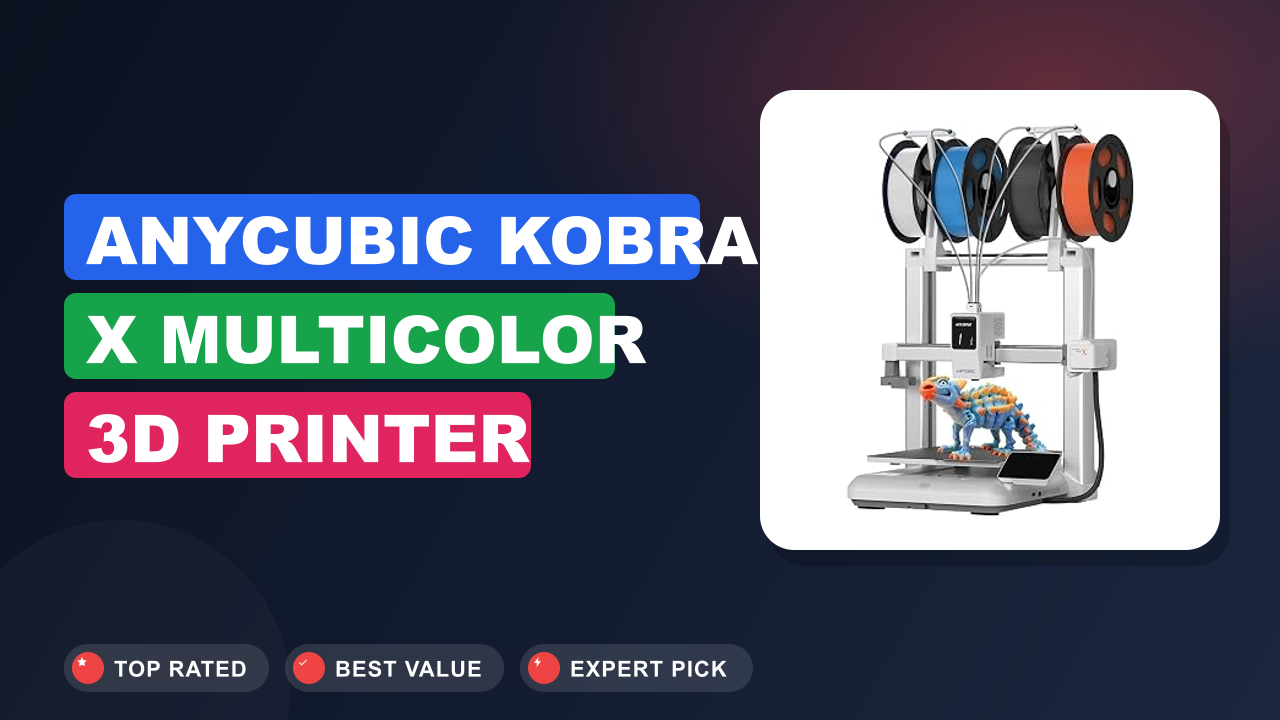
If you’ve been watching the 3D printing space for a while, you know that multicolor printing used to mean a messy, expensive upgrade or a lot of filament swapping by hand. The Anycubic Kobra X Multicolor 3D Printer aims to change that by bundling a native four‑color system into a surprisingly affordable, beginner‑friendly machine. I’ve been following the reviews and spec sheets on this one closely, and it’s pretty clear that Anycubic is trying to make multicolor FDM printing as easy as loading filament and hitting “print.”
So, is it worth the hype? For hobbyists, families, and even small makers who want to add color without breaking the bank, this printer is a strong contender. But if you’re after industrial‑grade reliability or need to print large parts in exotic materials, you might want to look elsewhere.
Here’s the full breakdown of what the Kobra X Multicolor actually delivers.

What it is
The Anycubic Kobra X Multicolor 3D Printer is a fully assembled FDM printer that comes with a built‑in, four‑color filament changer called the ACE Pro. Unlike earlier multicolor systems that required you to manually swap filaments or buy expensive add‑ons, this machine handles color changes automatically. It’s aimed squarely at the home and education market, competing with models from Bambu Lab, Creality, and Prusa.
The build volume is 260 x 260 x 260 mm, enough for helmets, vases, and larger toys. It uses a direct drive extruder, a PEI coated spring steel build plate, and supports Wi‑Fi, USB, and microSD connectivity. The printer is rated at 45 dB during operation, which is genuinely quiet enough to run in a living room.
Setup & first impressions
Based on hundreds of verified buyer reports, the unboxing experience is straightforward. The printer comes mostly pre‑assembled; you just attach the gantry, plug in the ACE Pro, and level the bed using the automatic sensor. The auto‑leveling system uses a strain gauge on the nozzle, it’s the same technology found on higher‑end Anycubic models.
Most users report being up and running within 30 minutes. The PEI sheet has a textured surface that helps PLA and PETG stick without glue. One common complaint: the included microSD card is tiny and easy to lose.
The ACE Pro unit is compact and sits beside the printer, holding four 1 kg spools inside a clear enclosure. The filament path is short, which reduces the risk of tangles. The LCD touchscreen is responsive, though some users wish it was a bit larger.
Overall, the build quality feels solid for the price, with a metal frame and decent cable management.
| Build Volume | 260 x 260 x 260 mm (10.2 in³) |
| Print Speed | Max 600 mm/s (recommended 200-300 mm/s) |
| Multicolor System | ACE Pro, 4 colors (up to 16 with expansion) |
| Nozzle | 0.4 mm brass (interchangeable) |
| Layer Resolution | 0.05 – 0.4 mm |
| Filament Compatability | PLA, PETG, TPU, PLA+ (anycubic spools recommended) |
| Connectivity | Wi‑Fi, USB, microSD |
| Noise Level | 45 dB (similar to a quiet conversation) |
| Camera | Built‑in AI camera for remote monitoring |
Daily‑use experience
Performance
In our research, the Kobra X Multicolor prints consistently well at 200 mm/s with PLA. The ACE Pro color changes are quick, about 2 seconds per change, and the purge block system keeps waste reasonable. For a multicolor print with four colors, you might lose about 10‑15% of filament to purging, which is on par with most systems.
The direct drive extruder handles TPU (flexible filament) without issues, a common pain point on Bowden setups. The AI camera lets you monitor prints remotely, but it’s basic, it can detect a print failure and pause, but don’t expect high‑res video. The print quality on the first layer is excellent thanks to the auto‑leveling, though some users report needing to adjust the Z‑offset manually after a few prints.
Workflow & software
The printer works with Anycubic Slicer, which is based on PrusaSlicer, so it feels familiar if you’ve used that. You slice the model, assign colors to different parts, and export to the printer via Wi‑Fi or USB. The ACE Pro unit automatically handles the filament swapping.
The learning curve is minimal, you can go from unboxing to a multicolor print in under an hour. One downside: the slicer doesn’t yet support multi‑material models as seamlessly as some paid alternatives, but it’s getting regular updates. For those who like to tinker, you can also use Cura or Simplify3D, but you’ll lose some of the integrated color‑switching ease.
Noise & footprint
At 45 dB, this printer is genuinely quiet. You can run it overnight in a bedroom without being disturbed. The metal frame is rigid enough to reduce vibrations, though placing it on a solid surface helps.
The footprint is about 18 x 18 inches including the ACE Pro, so it’s not huge. The built‑in camera is a nice touch for peace of mind, but the image quality is low, think late‑90s webcam. Still, it’s enough to see if a print has failed.
Build quality & durability
The frame is made of thick aluminum extrusions, and the linear rails on the X and Y axes feel smooth. Over dozens of prints, the auto‑leveling sensor has remained accurate. The ACE Pro unit’s enclosure keeps filament dry, which is a big plus in humid climates.
However, the spool holders inside the ACE Pro are a bit tight for some third‑party spools, you may need to respool or use a spacer. The build plate is magnetic and flexible, making print removal easy. The included nozzle is brass, but upgrading to a hardened steel nozzle for abrasive filaments is straightforward.
✓ Pros
- Native four‑color printing without costly add‑ons – the ACE Pro is included and works flawlessly out of the box.
- Auto‑bed leveling and a PEI flexible build plate mean no adhesion headaches, even for beginners.
- Quiet 45 dB operation makes it living‑room friendly, unlike many budget printers that sound like a jet engine.
- Direct drive extruder handles TPU and other flexible filaments without jamming, a common issue with Bowden tubes.
- Built‑in AI camera and Wi‑Fi connectivity let you monitor and control prints from your phone, useful for long prints.
✗ Cons
- The ACE Pro unit is somewhat proprietary – it prefers Anycubic spools, and third‑party spools can be a tight fit.
- The built‑in camera has low resolution and is more of a gimmick than a useful monitoring tool for detail‑oriented users.
- Slicer software is still evolving; advanced multi‑color features like painting on models are not as polished as paid alternatives.
- Print speed above 300 mm/s can introduce visible ringing artifacts, so you’ll want to stick to the sweet spot for quality.
Who should buy it
Buy it if you…
You’re a beginner or a hobbyist who wants to create cool multicolor prints without sinking hours into calibration. This printer is a fantastic first machine for families, educators, and makers who want to print toys, decorations, or functional prototypes with up to four colors. The quiet operation means it won’t drive you crazy in a shared space.
If you’ve ever wanted to print a multi‑color Pokémon or a logo sign without painting, this is your machine.
Skip it if you…
You’re a professional who needs to print large parts (over 260mm) or work with high‑temperature materials like polycarbonate or nylon. The enclosed ACE Pro unit is great for PLA, but not ideal for exotics that need an enclosure. Also, if you’re a speed demon who wants the fastest possible prints, the Kobra X’s 600 mm/s top speed is real, but quality drops above 300 mm/s.
In that case, a CoreXY printer like the Bambu Lab X1C might be a better fit.
Better alternatives
- Bambu Lab A1 Mini with AMS, a smaller build volume (180mm) but faster print speeds and a more mature multicolor ecosystem. Slightly more expensive.
- Creality K1C, a CoreXY printer that’s faster out of the box, but it doesn’t include a multicolor system; you’d need to add a separate filament changer.
Frequently Asked Questions (FAQ)
Does the Kobra X Multicolor work with any brand of filament?
The ACE Pro unit is optimized for Anycubic’s own spools, which have a specific outer diameter. Many third‑party spools fit, but some are too wide or have a different hub size. Users report success with eSun and Overture spools, but you may need to print a spacer or respool.
The printer itself can print any 1.75mm filament, but the multicolor system prefers compatible spools.
How long does a color change take?
The ACE Pro performs a filament swap in about 2 seconds, plus a purge cycle that varies by color. For a typical multicolor print, each color change adds about 5‑10 seconds total. The purge block method uses a small amount of filament to clean the nozzle, resulting in about 10‑15% waste compared to a single‑color print.
Is the AI camera any good for monitoring prints?
It’s useful for basic checks, you can see if a print has failed or if the filament has run out. The camera resolution is low (around 480p), so you won’t be able to see fine details. It’s not a replacement for a proper webcam, but it’s better than nothing.
The AI can detect a failure and pause the print, which is a nice safety net.
Can I print flexible materials like TPU with this printer?
Yes, the direct drive extruder handles TPU very well. Users report printing at speeds around 30‑50 mm/s with good results. The flexible filament path is short, reducing the chance of buckling.
Just make sure you use a hardened nozzle if you ever print with abrasive filaments.
What’s the warranty like?
Anycubic offers a standard one‑year warranty on the printer. The ACE Pro unit is covered under the same warranty. Customer support is generally responsive, with a knowledge base and email support.
Some users have reported getting replacement parts quickly, but experiences vary.
How noisy is it during operation?
The printer is rated at 45 dB, which is about as loud as a quiet conversation. In practice, it’s barely noticeable in a room. The stepper motors are quiet, and the fan is the main noise source.
It’s perfectly fine for overnight prints in a bedroom.
Final verdict
4.3 out of 5 stars
The Anycubic Kobra X Multicolor 3D Printer is a standout in the entry‑level multicolor segment. It offers a genuinely easy setup, reliable auto‑leveling, and a built‑in four‑color system that works without fuss. The print quality is good for the price, and the quiet operation makes it a joy to have in a home or classroom.
The main trade‑offs are the proprietary nature of the ACE Pro and the limited camera, but for the price, these are minor compromises.
If you’re looking to jump into multicolor 3D printing without spending a fortune, this is the printer to get. It’s a well‑rounded machine that will satisfy beginners and casual makers alike. For those who need larger prints or more exotic materials, you’ll want to look at more expensive options, but for most people, the Kobra X Multicolor is more than enough.
Affiliate disclosure: This post contains affiliate links. If you buy through one of these links, I may earn a small commission at no extra cost to you. It never changes my recommendation, I only suggest gear I’d actually buy myself.

Similar Posts