Best AI Reading Devices: Top Smart Picks
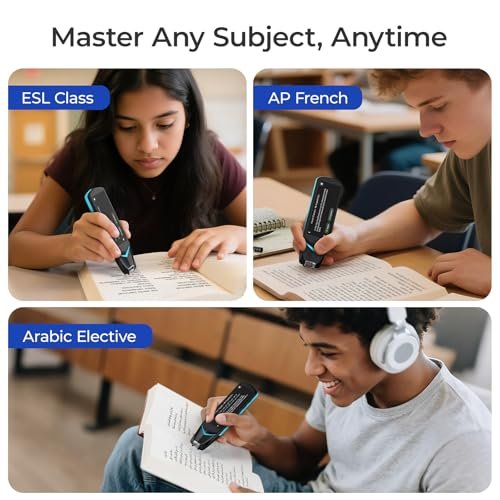
The best AI reading devices turn printed words, screens, and foreign text into clear speech, translation, and useful help.
A long page can feel like a wall when your eyes are tired, reading is difficult, or the words are in another language. I have found that the right AI reading device can act like a small bridge between the page and the reader. Some scan text and read it aloud, while others add translation, dictionaries, recording, or smart reading tools. In this guide, I compare five practical options for students, travelers, workers, children, and anyone who wants easier access to written information.
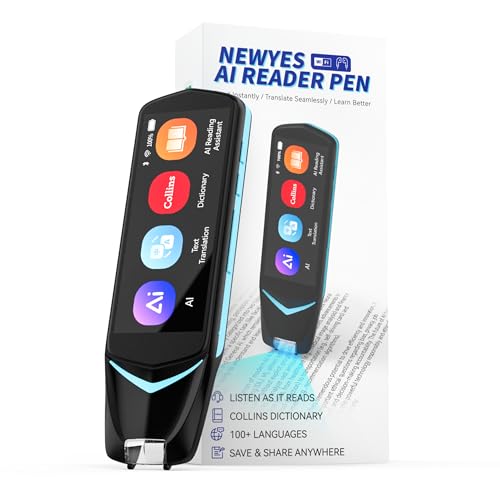
NEWYES AI Pen, Reading Pen…
AI-Powered Learning Excellence: Equipped with AI Dictionary, AI Homework Checker, and real-time AI Chat, this pen is your 24/7 study buddy. It integrates multi-language dictionaries for in-depth word explanations, plus…

OrCam Read – Artificial Intelligence…
OrCam Read has been recognized with the top CES 2021 Best of Innovation Award, in the Accessibility category! OrCam Read is a personal artificial intelligence (AI)-driven device unlike any other,…
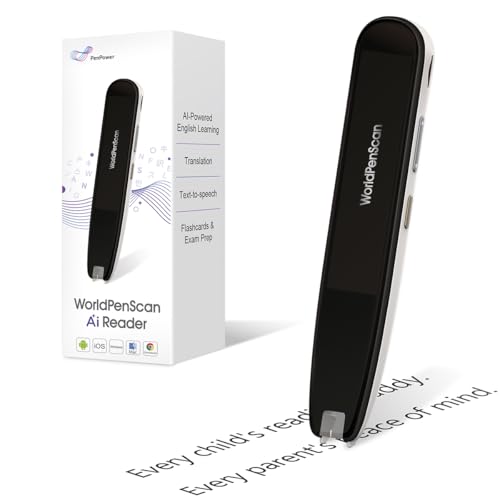
WorldPenScan AI Reader – Reading…
AI Reading Companion for Growing Readers – Help children stay engaged with every book. Scan difficult words, sentences, or ideas to get reading-level explanations with Quick AI. Tap Simplify for…
NEWYES AI Pen: Best Reading Pen for Text to Speech

The NEWYES AI Pen is a compact scan-and-read tool made for people who need help with printed text. It uses optical character recognition, often called OCR, to capture words from books, worksheets, labels, and other flat pages. The pen can then turn the scanned text into speech, which may help readers who struggle with small print, dyslexia, or visual fatigue. Its slim 3.99-inch form should also make it easy to carry in a pencil case, work bag, or pocket.
This model also lists photo translation, text translation, Bluetooth, and 16GB of storage. Those features give it more range than a basic talking pen. I see the strongest value here for students and adults who want one handheld tool for reading support and simple language help. Still, users should scan at a steady pace and keep the pen level for the best results.
Pros:
- Combines OCR scanning with text-to-speech support
- Small design fits well in a school bag or travel case
- Useful for students with reading or visual challenges
- Includes translation and photo translation functions
- Bluetooth adds flexibility for supported audio use
- 16GB storage can hold useful device content and files
- Works as a focused tool without the distractions of a full tablet
Cons:
- Scanning may take practice on curved or glossy pages
- Small controls may feel less comfortable for some users
- Text recognition can vary with poor lighting or unusual fonts
OrCam Read: Smart AI Reader for Large Amounts of Text
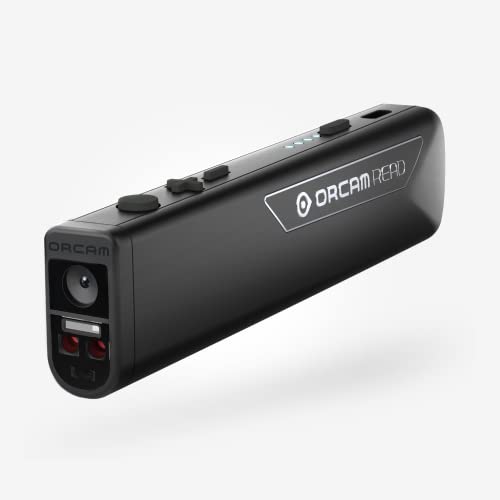
OrCam Read is built around one clear idea: make printed and digital text easier to hear. It is designed for people who face large amounts of text at school, work, or while traveling. The device uses artificial intelligence to recognize text and read it aloud, helping reduce the need to stare at every line. That can be useful for a person with low vision, reading fatigue, dyslexia, or a busy schedule.
The Smart Reading feature is the key reason to consider this model. Rather than treating every page as a simple block of words, a smart reader can help a user focus on useful details and move through content with less effort. I would consider OrCam Read a dedicated accessibility device rather than a general gadget. Its price and learning curve may be higher than those of a simple reading pen, but its focused design can offer a calmer reading experience.
Pros:
- Designed specifically for text access and reading support
- AI reading tools can help users manage long passages
- Useful at school, work, home, or during travel
- Can reduce visual strain caused by extended reading
- Dedicated controls may feel simpler than a phone app
- Strong fit for users with low vision or reading difficulties
- Supports a more private and focused reading routine
Cons:
- Specialized assistive hardware may cost more than basic scanners
- Users may need time to learn the controls and scan position
- Performance can depend on page layout, light, and print quality
WorldPenScan AI Reader: Best for Kids and Language Help
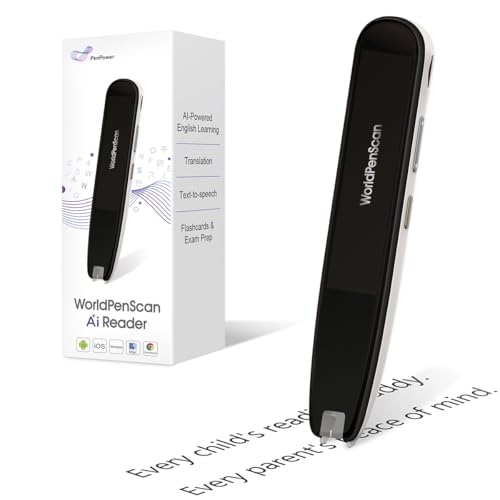
The WorldPenScan AI Reader takes the familiar reading pen idea and adds tools for language learning. Its listed features include a built-in dictionary, text-to-speech, translation, and an AI reading companion. It supports English, Spanish, and Chinese, so it may be a useful choice for multilingual homes, language classes, and young readers. A child can scan a word, hear it, check its meaning, and continue reading without reaching for a phone.
I like this type of device for homework because it keeps help close to the page. The dictionary function may support vocabulary building, while speech output can give a learner another way to hear pronunciation. Parents and teachers should still treat it as a support tool, not a replacement for instruction. The best results will come when children use it to understand a word and then return to the full sentence.
Pros:
- Combines reading support with dictionary access
- Text-to-speech can help children hear difficult words
- Supports English, Spanish, and Chinese reading needs
- Useful for vocabulary practice and language study
- AI companion features may offer extra reading guidance
- Portable shape works well for classroom or home use
- Can reduce the need to switch between books and phones
Cons:
- Young children may need help learning the scan technique
- Language coverage is narrower than that of some translator devices
- It may not replace a full dictionary or structured reading program
VIWOODS AiPaper Reader: Best E Ink AI Reading Device
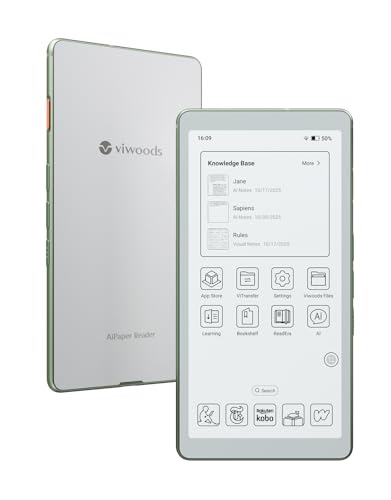
The VIWOODS AiPaper Reader is different from the scan pens in this roundup. It is a 6.13-inch E Ink reader with a Carta 1300 display, 300 pixels per inch, an adjustable front light, and 128GB of storage. E Ink aims to look more like ink on paper than a bright phone display, which can make long reading sessions feel more natural for many users. The thin, light design also suits readers who want to carry a digital library without carrying several books.
This model includes AI features and 4G connectivity, giving it a broader role than a basic e-reader. The large storage capacity is useful for books, documents, and other reading files, though users should confirm the supported file types before buying. The front light is helpful in dim rooms, while the E Ink screen remains best for reading rather than fast video or colorful web content. For readers who want a modern AI reading device with an e-reader shape, this is one of the most interesting options listed here.
Pros:
- 6.13-inch E Ink screen is suited to focused reading
- 300PPI resolution should keep text sharp and clear
- Carta 1300 display technology offers a paper-like reading style
- Adjustable front light helps in low-light rooms
- 128GB storage provides room for a large reading library
- 4G connectivity adds flexibility away from home Wi-Fi
- Lightweight design is easier to carry than printed books
Cons:
- E Ink refresh can feel slower than a phone or tablet screen
- Color media and video are not its main strengths
- Users should check app and file compatibility before purchase
- 4G features may involve extra setup or service limits
AI Translator Device: Best for Travel and Foreign Text

This AI translator device is aimed at travelers, business users, and anyone who needs language help on the move. The listing describes support for more than 150 languages, along with offline, recording, photo, voice, and real-time translation. Photo translation is especially relevant to reading because it can help users understand menus, signs, notices, and printed forms. The device also lists ChatGPT support, which may provide an extra way to ask for language help.
The main appeal is range. A reading pen is often better for a single line of text, while a translator device may be more useful when a traveler must switch between speech, images, and written language. Offline support can matter in airports, rural areas, or foreign places where mobile data is costly or weak. Translation quality can still vary by language pair, accent, noise, and sentence context, so I would use it as a helpful guide rather than a legal or medical authority.
Pros:
- Supports a very broad list of languages
- Photo translation helps with signs, menus, and printed text
- Voice translation can support face-to-face conversations
- Offline functions may work where Wi-Fi is unavailable
- Recording tools can help users review spoken information
- Useful for travel, work, study, and cross-language communication
- ChatGPT support adds a conversational layer to language help
Cons:
- Translation accuracy can change with context and dialect
- Some advanced functions may need updates or an internet connection
- It is less focused on long-form reading than a dedicated reader
- Users should not rely on machine translation for critical documents
My Recommendation
After comparing these Best AI Reading Devices, I would choose based on the task rather than the feature count. The NEWYES AI Pen is the most approachable pick for basic scanning, speech, and translation in a small body. OrCam Read is the better match for a person who needs dedicated reading assistance with large amounts of text. WorldPenScan stands out for children and language learners because it combines pronunciation, dictionary, and translation support.
The VIWOODS AiPaper Reader is the strongest fit for someone who wants an E Ink reading screen, large storage, front lighting, and connected AI features. The AI Translator Device makes more sense for travel, especially when photo and voice translation matter as much as reading. In my view, the Best AI Reading Devices are not one-size-fits-all tools; each one solves a different part of the reading problem.
| Best for | Why |
|---|---|
| Students and readers who need scanned text read aloud | The NEWYES AI Pen offers OCR, text-to-speech, translation, and a portable pen format. |
| Long reading sessions and digital books | The VIWOODS AiPaper Reader uses a sharp E Ink screen, front light, and generous storage. |
| Travelers and multilingual communication | The AI Translator Device combines photo, voice, recording, offline, and wide language support. |
How I Evaluate the Best AI Reading Devices
AI reading devices can look alike in a product photo, but they do not all serve the same reader. I start by asking what the device must read. A person working with printed worksheets may need a scan pen, while an avid e-book reader may need a full E Ink display. A traveler may care more about photo translation and offline use than about book storage.
I also look at how much work the device adds. A good tool should make reading easier, not create a new puzzle. Scan speed, clear speech, simple buttons, battery habits, and setup all matter in daily use. Even a device with many smart features can disappoint if the user must repeat every scan or search through complex menus.
Accessibility matters too. Text-to-speech can help people with dyslexia, low vision, attention challenges, or temporary eye strain. It can also help busy people listen while sorting papers or walking through a task. However, no AI reader recognizes every page perfectly, so I always recommend keeping normal reading tools available as a backup.
Reading Pen vs. E Ink Reader vs. AI Translator
A reading pen scans a small area of text. This makes it useful for a hard word, one sentence, or a short label. It is fast to carry and easy to place beside a workbook. The trade-off is that a pen usually requires careful movement across each line.
An E Ink reader handles longer content. It can store books and documents, and its paper-like display may feel gentler than a bright phone screen. It is less suited to quick scanning of a random page unless the text is already on the device or the model offers a camera and OCR tool.
An AI translator focuses on language changes. It may read a sign from a photo, translate speech, or help with a conversation. This makes it a strong travel companion, but it may not offer the same reading comfort as a dedicated e-reader or the same word-by-word support as a reading pen.
Key Features to Check Before You Buy
OCR and Text Recognition
OCR is the feature that turns an image of words into digital text. It is the base for most scan-and-read functions. Look for a device that can handle the languages and print styles you use most. Clean, dark print on a flat page is usually easier for any scanner than shiny paper, handwriting, or a curved label.
Text-to-Speech Quality
Speech should sound clear enough for regular use. A flat or rushed voice can make a long passage tiring. Check whether the device lets you adjust volume, speed, or language. A speed setting is helpful because a child learning a new word may need slow speech, while an adult may prefer a faster pace.
Translation Tools
Translation can mean several things. Some devices translate a scanned word. Others translate a full photograph, spoken sentence, or conversation. Read the language list with care because support may differ by feature. A device may support many languages for photo translation but fewer languages for offline voice translation.
Offline Operation
Offline support is valuable for travel and for places with poor service. It can also make a device more dependable at school or work. Still, offline tools may support fewer languages than online tools. Before buying, check which features work without Wi-Fi or mobile data.
Display and Lighting
If you want to read books for hours, display comfort deserves close attention. E Ink readers use a reflective screen that resembles paper. A front light can help at night without turning the whole room bright. Reading pens and translator devices usually have smaller screens, so they work best as support tools rather than full book readers.
Storage and Connectivity
Storage affects how many books, recordings, or documents you can keep. A high storage number is useful, but only if the device supports the files you need. Bluetooth may connect to audio accessories, while 4G can help a connected reader work away from Wi-Fi. These features can also add setup steps, so I would not pay extra for them unless they solve a real need.
Battery and Charging
A reading device should last through a class, trip, or workday. Frequent charging can break a good reading habit. Battery life changes with screen brightness, speech volume, wireless use, and translation activity. Treat advertised battery figures as a guide, not a promise for every use pattern.
Who Can Benefit From an AI Reading Device?
Students may use these tools to hear a worksheet, check a new word, or translate a passage. A reading pen can offer quick help without opening a phone, which may reduce distractions during homework. Teachers can also use a device to support learners who need another path into printed text.
People with dyslexia may benefit from hearing text while following along with the page. This can reduce the pressure of decoding every word alone. The device does not replace proven reading instruction, but it may make school, work, and daily tasks less frustrating.
People with low vision may prefer speech output over a small printed page. An E Ink reader with adjustable lighting may also provide a cleaner reading surface than a crowded phone screen. The best choice depends on vision needs, preferred text size, and whether the user wants to scan paper or read digital books.
Travelers can use AI translation tools for menus, signs, tickets, and simple conversations. This can bring calm to a place where every sign feels like a locked door. I still advise checking important details with a person or official source when a mistake could affect safety, money, medicine, or legal travel status.
Practical Tips for Better Scanning
Start with a flat page and good light. Keep the device straight and move at a slow, even pace. If the result is wrong, scan a shorter line instead of pressing harder or moving faster.
Glossy pages can reflect light into the scanner. Tilt the page or move to a softer light source when possible. Large headings, unusual fonts, columns, and colored backgrounds can also confuse OCR.
For children, I recommend a short practice session before homework begins. Show the child how to scan one word, listen, check the meaning, and return to the sentence. This turns the tool into a learning aid instead of a toy that interrupts every line.
For travel, download or test offline language tools before leaving home. Do not wait until an airport or remote road to discover that a key feature needs a connection. A small power bank can also protect against battery stress during long trips.
Are AI Reading Devices Accurate?
They can be very useful, but they are not perfect. OCR accuracy depends on print quality, page angle, lighting, language, and the shape of the text. Translation adds another layer because words can change meaning based on context.
I treat AI output as a strong first aid for reading, not as an unquestionable answer. For a recipe, school word, or travel sign, a small error may be easy to spot. For a prescription, contract, tax form, or safety notice, confirm the result with a trusted human or official translation.
Speech output can also misread names, abbreviations, symbols, and tables. If the sentence sounds strange, scan it again or inspect the original page. Good reading habits still matter, even when smart hardware does the first pass.
What Makes a Device Good for Dyslexia?
Many readers with dyslexia prefer tools that reduce the burden of decoding. Text-to-speech can let the user hear a word while seeing it. A dictionary or translation feature can also reduce the need to stop and search elsewhere.
Simple controls are important. Too many menus can create stress, especially during a timed task. A pen that scans one line or a reader with a clear reading mode may feel more useful than a device that offers dozens of features but hides the basic one.
Every reader is different. Some people need speech speed control. Others prefer a larger screen, more storage, or a built-in dictionary. The Best AI Reading Devices for dyslexia should support confidence and independence while fitting the reader’s own routine.
Privacy and Data Considerations
AI tools may process scanned text, photos, recordings, or voice input. Before using one for private work documents or personal information, review its privacy settings and service terms. Avoid scanning passwords, financial details, medical records, or confidential business pages unless you understand how the data is handled.
Offline functions may reduce the need to send information over a network. However, offline does not always mean that every part of the device works without an account or update. I recommend testing the reader in the exact way you plan to use it before trusting it with sensitive tasks.
Parents should also check child safety settings and decide whether internet-connected features are needed. A focused offline reading pen may be a better fit for a young student than a device with open online tools. The safest choice is the one that gives the needed help with the least unnecessary access.
Setup Advice for First-Time Users
Charge the device fully before the first serious reading session. Install required updates, select the correct language, and test speech volume in a quiet room. If the device uses an app, pair it at home while you have stable internet.
Next, try three types of text: a book page, a worksheet, and a label. This quick test shows how the device handles different fonts and layouts. It also helps you learn the best angle and speed for scanning.
Save the manual and charging cable in one place. Reading devices often become family tools, and clear storage prevents lost accessories. If a child uses the device, add a simple case or pouch to protect it in a backpack.
Common Buying Mistakes to Avoid
The first mistake is choosing the device with the longest feature list. More features do not always mean better reading. A student who needs word pronunciation may gain more from a simple pen than from a large connected reader.
The second mistake is ignoring language support. Check the exact languages for OCR, speech, translation, and offline use. These lists may not match, and a device that supports one language in one mode may not support it in another.
The third mistake is forgetting the reading surface. A scan pen is not a full e-reader, and an E Ink reader is not always a fast translator. Match the hardware to the pages, screens, and situations you face most often.
The final mistake is skipping real-world practice. A device may work well on a clean sample page but struggle with glossy magazines or small labels. Buy from a seller with clear return terms when possible, and test the main feature early.
FAQs Of Best AI Reading Devices
What is the best AI reading device for dyslexia?
A text-to-speech reading pen or a dedicated assistive reader is often the best starting point. The NEWYES AI Pen offers portable scanning, while OrCam Read is designed for broader reading support. Choose the model that matches the reader’s comfort, text volume, and need for simple controls.
Can AI reading devices read books aloud?
Some devices can scan and read sections of a printed book aloud. An E Ink reader may read digital books if the file and software are supported. A small reading pen is better for short sections than for scanning an entire book.
Do AI reading devices work without Wi-Fi?
Some do, but offline support varies by model and feature. Translation, AI chat, updates, and cloud tools may need a connection. Check the product details for the exact offline languages and functions before buying.
Are AI translator devices good for reading signs?
Yes, photo translation can help with signs, menus, labels, and short notices. Results depend on lighting, image quality, language, and context. Confirm important safety or legal information with an official source.
Is an E Ink reader better than a reading pen?
Neither is always better. An E Ink reader is better for long digital books and documents. A reading pen is better for scanning a printed word or sentence and hearing it right away.
Final Verdict: Which Should You Buy?
For most users, the NEWYES AI Pen is the best starting pick for portable text-to-speech and translation. Choose OrCam Read for dedicated accessibility, VIWOODS for E Ink reading, WorldPenScan for kids, or the AI Translator for travel.
The Best AI Reading Devices make text feel less like a barrier and more like a clear path. Match the tool to your pages, language, and daily needs before you buy.

Similar Posts
































