Best AI Devices for Students: Top Picks for Smarter Study
The best AI devices for students make lectures, study notes, language work, and daily tasks faster and easier.
A student may enter class with a laptop, a phone, and good plans, then leave with pages of rushed notes and missed details. An AI device can act like a quiet study partner. It can record a lecture, reduce background noise, turn speech into text, or help with language gaps. I reviewed these devices with real student needs in mind, including ease of use, storage, portability, privacy, and daily value. The right choice should save time without adding another hard tool to learn.

Comulytic Note Pro AI Voice…
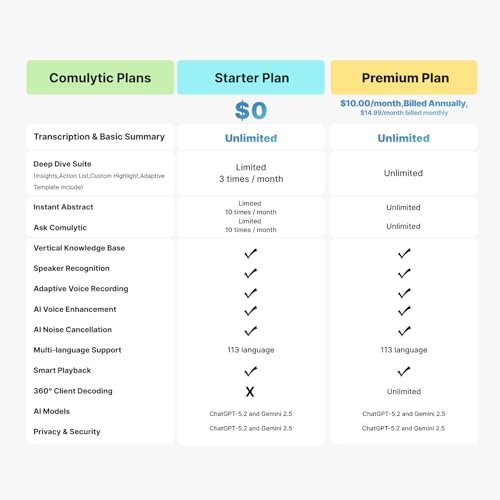
| Comulytic AI Voice Recorder Notes Assistant | — Lifetime Free Starter Plan Comulytic Note Pro is a smart voice recorder, AI note taker, and AI recorder built for professionals,…

64GB(7000H) Magnetic Voice Recorder, Voice…
【SLIDE-TO-RECORD OPERATION】This audio recorder start recording without navigating complicated menus. Simply slide the side switch to ON, and the indicator light blinks before turning off as recording begins. Slide it…

FancyDove AI Assistant Device, Unlimited…
No Subscription & Lifetime Access – Pay Once, Use AI Forever: Enjoy powerful AI chat, writing, translation, and tutoring with no recurring fees. One-time purchase gives you long-term AI access…
Comulytic Note Pro AI Recorder

The Comulytic Note Pro is a small AI voice recorder made for students who want to focus on a lecture instead of typing every word. Its main appeal is simple: record the lesson, then use AI tools to help organize the spoken content. The slim shape should fit well in a backpack, pencil case, or coat pocket. For a busy student, that can feel like carrying a second set of ears.
I see this device as a useful choice for lectures, study groups, interviews, and project meetings. It may help students review ideas that were hard to catch the first time. The AI features can save time, but students should still check important names, formulas, and dates against the original recording. Always ask for permission before recording a class, meeting, or private talk.
Pros:
- Designed for recording lectures and meetings
- AI tools can help turn spoken ideas into useful notes
- Compact shape suits backpacks and small desks
- Can support better focus during class
- Helpful for review after fast lectures
- Useful for study groups and project planning
Cons:
- AI output may need careful checking
- Recording rules differ by school, state, and instructor
- Some advanced features may depend on an app or internet access
My Recommendation
The Comulytic Note Pro is best for college students, high school students, and adult learners who often miss small details while taking notes. It is especially useful for classes with long explanations, guest speakers, or fast discussions. I would choose it for a student who wants a focused lecture recorder rather than a general smart assistant. Among the Best AI Devices for Students, it offers a strong balance between focused recording and study support. Check the current listing for software details, supported features, and availability before buying.
64GB Magnetic AI Noise-Reduction Recorder

This 64GB magnetic voice recorder stands out for students who want a simple device with a large amount of storage. The magnetic design may make it easy to place on a desk, whiteboard frame, or other suitable metal surface. Its voice activation feature can reduce silent gaps in some recording situations. AI noise reduction may also make speech easier to hear when a room has light background noise.
The listed storage capacity is a major selling point for students who record many classes or interviews. A student can keep files on the device for later transfer instead of clearing space after every lesson. Still, long recording claims can vary by file type, settings, and battery use. I recommend testing the recorder before an important exam review or presentation.
Pros:
- Large 64GB storage capacity
- Magnetic body offers flexible placement
- Voice activation may limit empty recording time
- AI noise reduction can improve speech clarity
- Useful for lectures, interviews, and personal reminders
- Good fit for students who want a dedicated recorder
Cons:
- Noise reduction cannot remove every sound
- Voice activation may miss very soft words at times
- Students must learn how to transfer and label files
My Recommendation
I recommend this recorder for students who value storage and simple recording more than a large screen or complex AI dashboard. It may suit nursing students, journalism students, researchers, and learners who attend many talks each week. The magnetic body is also handy when desk space is limited. In a list of Best AI Devices for Students, this model is a practical pick for long-term audio storage. Before purchase, review the current Amazon page for battery details, file support, and included accessories.
FancyDove AI Assistant Device

The FancyDove AI Assistant Device is aimed at students who want direct access to an AI helper without relying only on a phone. Its headline feature is unlimited AI usage with no subscription needed, according to the product listing. That can matter to students who want predictable costs during a long school term. A dedicated device may also reduce the temptation to open social media while studying.
This type of assistant can help with quick questions, idea planning, language practice, and study prompts. It should support learning rather than replace it. I would use it to explain a hard concept in plain words, create practice questions, or help plan a paper outline. I would not use it to submit copied answers, and I would verify any important information with class materials or trusted references.
Pros:
- No-subscription design can help control long-term costs
- Dedicated hardware may reduce phone distractions
- Useful for quick study questions
- Can support brainstorming and planning
- Helpful for language practice and simple explanations
- May be useful at home, in a dorm, or in a library
Cons:
- AI answers can contain errors
- Internet or account requirements may affect use
- Not a replacement for textbooks, teachers, or research
My Recommendation
The FancyDove device is best for students who want a small, focused AI assistant for daily study tasks. It may appeal to learners who dislike typing on a phone or want to keep their phone away during homework. I like the no-subscription claim because recurring fees can quickly raise the real cost of a study gadget. As one of the Best AI Devices for Students, it is most attractive to students who want an AI helper, not only a voice recorder. Confirm the current terms and supported functions on Amazon before ordering.
AI Note Taker with 64GB Storage

This AI note taker combines voice recording with speech-to-text tools. It is designed for meetings, lectures, phone calls, and other spoken work. The 64GB storage gives students room to keep many audio files before moving them to another device. App control may also make it easier to start recordings, manage files, or review transcripts.
I think this is one of the more balanced choices for students who need both audio and written notes. A transcript can make a long lecture easier to search, while the original audio gives a way to check unclear words. Transcription accuracy can change with accents, room noise, speakers talking over one another, and technical terms. For science, medicine, law, and math classes, I would treat the transcript as a draft rather than a final record.
Pros:
- Combines recording and AI transcription
- 64GB storage supports frequent use
- App control may simplify file management
- Useful for lectures, meetings, and interviews
- Original audio can help confirm transcript errors
- Can reduce the pressure to type every sentence
Cons:
- Transcripts may misread names and technical terms
- App setup may take time for first-time users
- Phone-call recording laws and school rules must be followed
My Recommendation
This AI note taker is best for students who need searchable text after a lecture but still want the safety of an audio file. It could be a strong match for graduate students, researchers, reporters, and students with heavy reading loads. I would also consider it for learners who find live note-taking difficult due to attention, language, or processing needs. In the Best AI Devices for Students category, it is a strong all-around option because it connects recording with transcription. Check the app, privacy policy, device support, and current price before buying.
3-in-1 AI Language Translator

The 3-in-1 AI language translator is made for students who cross language barriers at school, work, or while traveling. The listing states support for up to 146 languages and includes real-time translation, recording, and photo translation functions. A pocket-sized translator can feel faster than passing a phone back and forth during a conversation. It may also help international students feel more confident in a new place.
Students can use a translator like this for travel, language practice, campus events, and basic conversations. The photo tool may help with signs, menus, printed notices, or simple study material. Translation quality depends on the language pair, network access, speech speed, and local accent. I would use it as a bridge, not as the only tool for legal, medical, academic, or safety-critical information.
Pros:
- Supports a wide range of languages
- Real-time translation can aid live conversations
- Photo translation may help with printed text
- Recording function adds value for lectures and meetings
- Pocket design suits travel and campus use
- Useful for international students and language learners
Cons:
- Some functions may require internet access
- Translation can vary by language and speaking style
- Small devices may be less convenient for long reading tasks
My Recommendation
I recommend this translator for exchange students, multilingual families, language learners, and students who travel for study. It is also useful for campus workers who meet people from many language backgrounds. The recording feature makes it more flexible than a basic phrasebook device. Among the Best AI Devices for Students, this is the clearest choice for language support and travel. Review the current listing to confirm language coverage, offline functions, charging needs, and app requirements.
How I Evaluate the Best AI Devices for Students
Buying an AI device for school is not the same as buying a toy. Students need a tool that works during real class days, not only during a short test. I look at several practical points before recommending any device.
Recording Quality
A good recorder should capture clear speech from a useful distance. A quiet room is easy, but classrooms often have fans, chairs, hallway noise, and side talks. Noise reduction can help, but it cannot turn a poor recording into a perfect one. I also look for simple controls, since students should not miss the first five minutes of class while trying to start a device.
AI Accuracy
AI transcription and translation are helpful, but they are not magic. The system may confuse similar words, names, accents, numbers, and subject terms. A strong student workflow keeps the original audio and checks key details. This matters most in chemistry, medicine, engineering, finance, and law, where one wrong word can change the meaning.
Battery and Storage
A device that dies before the end of class is not useful. I prefer enough battery for a full school day, with simple charging and clear battery warnings. Storage also matters because audio files can build up fast. Models with 64GB storage may suit students who record often, but every student should still back up important files.
Portability
Students carry enough already. The device should fit in a pocket, backpack, or small desk space. A light body makes it easier to bring the recorder every day. Magnetic placement can help in some settings, but students should place a recorder where it can capture sound clearly and where others know it is present.
App and File Access
An app can make a device more useful by helping with file names, playback, transcription, and export. It can also create extra steps. I suggest checking whether the app works with the student’s phone and computer before purchase. A simple way to move files is often more valuable than a long list of advanced features.
Privacy and Consent
Privacy is a core buying factor. A student may record a teacher, classmate, client, patient, or research subject. Laws about recording conversations vary by location, and schools may have their own policies. Students should ask permission, explain the purpose, and avoid recording private conversations without clear consent.
Cost Over Time
The price on the box is only part of the cost. Some AI tools need an app, a cloud account, internet access, or a paid plan. A product that costs less at checkout may cost more over a year. The FancyDove listing highlights no subscription, while other models may offer different software terms. I always advise checking the current product page before making a final choice.
Which AI Device Features Matter Most for School?
The best feature depends on the student. A first-year student may need lecture support. A language learner may need fast translation. A graduate student may value searchable transcripts and large storage. There is no single winner for every classroom.
For lecture-heavy courses, recording and transcription matter most. These features let students listen during class and review later. They may also help students compare the teacher’s spoken explanation with the textbook. Still, the device should support active learning. Students should pause, ask questions, and write down the ideas that matter most.
For students who struggle with distractions, a dedicated AI device can be useful. A phone can record audio, but it also brings alerts, games, and social apps. A separate tool may keep the task clear. This does not mean every student needs extra hardware. If a phone already meets the need, a new device may not offer enough value.
For language learning, translation speed and language coverage are key. The 3-in-1 translator can help with signs, speech, and photo text. Students should use it to learn new words, not only to skip the learning process. Try repeating the translated phrase aloud. That small step turns a quick answer into useful practice.
For research, file management is critical. A recorder can create dozens of files in one week. Students should label files by course, date, and topic. A backup folder can prevent a painful loss before a final paper or exam. I recommend testing the export process early, when there is still time to solve problems.
AI Devices Versus AI Apps for Students
Many students already use AI apps on a phone or laptop. Apps can be powerful, easy to update, and less costly than buying a new device. They may also offer better screens and more ways to edit notes. However, apps can create distractions and may drain a phone battery during long lectures.
A dedicated AI device has one main strength: focus. It can sit on a desk and do one job without a stream of alerts. Some devices also include hardware made for sound capture. This may be easier than placing a phone in the right spot and hoping it records clearly.
The better choice depends on the task. If a student needs writing help, research planning, or image work, a laptop app may be better. If the student needs hands-free recording, a small recorder may win. The Best AI Devices for Students are tools that solve a clear problem and fit the student’s daily habits.
How Students Can Get Better Results
Start with a short test. Record a few minutes in the same type of room where the device will be used. Speak from different distances. Play the file back through headphones. This simple test can reveal placement, volume, and battery issues before a major lecture.
Use clear file names. “BIO101_2026-09-14_CellDivision” is easier to find than “Recording 22.” If the device creates transcripts, save the audio and text together. This habit turns a pile of files into a useful study library.
Keep the device close to the speaker, but do not place it in a way that blocks others or causes concern. Tell the instructor and nearby students when recording is allowed. In a shared classroom, respect matters as much as sound quality.
Review notes soon after class. Listen to unclear sections while the topic is still fresh. Correct wrong words and add page numbers from the textbook. AI can shorten the first step, but the student still owns the learning process.
Protect account and file data. Use a strong password where available. Avoid uploading private interviews or sensitive research unless the user understands how the service stores the data. Delete recordings that no longer serve a clear need.
Best Uses for AI Devices in School
Lecture Review
Students can record a lesson and revisit complex parts later. This may help when a teacher explains a process too quickly. A transcript can provide a fast overview, while the audio keeps the full context.
Study Groups
A recorder can capture group plans and task lists, with everyone’s permission. AI notes may help turn a long discussion into action points. Each student should still confirm the final plan before sharing it.
Research Interviews
Researchers can benefit from clear audio and searchable text. Before recording, explain how the file will be used and stored. Some research programs also require formal consent forms.
Language Practice
A translator can help students hear a phrase, repeat it, and compare meaning. Photo translation can make travel and campus life easier. Students should check important translations with a teacher or fluent speaker.
Accessibility Support
Transcription can help some students review spoken content in a different format. It may support learners who need more time to process a lecture. Students should also check school disability services for approved support and accommodations.
Best-for Comparison Table
| Best for | Why |
|---|---|
| Lecture recording | Comulytic Note Pro offers a focused format for capturing and reviewing spoken lessons. |
| Large audio storage | The 64GB magnetic recorder suits students who keep many class and interview files. |
| Transcription and language help | The AI note taker supports speech-to-text, while the translator helps with multilingual study and travel. |
Buying Advice for 2026
AI hardware changes quickly, so students should avoid buying based on a dramatic feature list alone. A product may advertise many languages, long recording time, or unlimited AI use. The real question is whether the function works in the student’s room, with the student’s phone, and within the student’s budget.
Check the date of the current listing, included accessories, return terms, and user instructions. Look for details about Wi-Fi, Bluetooth, app support, charging, and data storage. If a feature depends on a cloud service, check whether the service works in the student’s location.
Read recent customer feedback with care. I pay attention to repeated comments about battery life, app connection, transcription quality, and file transfer. One unusual complaint may not tell the whole story. A pattern across many reviews deserves attention.
Think about the school’s rules before buying. Some instructors ban recording. Some workplaces and research settings require written consent. A student should never assume that a small device can record freely just because it is easy to carry.
Common Mistakes to Avoid
The first mistake is expecting perfect AI text. Speech tools can make errors. Background noise, low volume, fast speech, and mixed voices all make the task harder. Treat the transcript as a helpful draft.
The second mistake is ignoring storage. Students may record every class and forget to back up files. Set a weekly reminder to move important audio to a secure location. Delete duplicate files to keep the device ready.
The third mistake is choosing too many features. A device with a long feature list may look exciting, but extra functions can make daily use harder. A student often needs one clear job done well.
The fourth mistake is forgetting privacy. Recordings can include personal stories, grades, private questions, and personal data. Get permission and store files with care.
The fifth mistake is buying without checking compatibility. An app may work better on one operating system than another. Confirm support before ordering, especially if the student uses an older phone or school computer.
FAQs Of Best AI Devices for Students
Are AI devices allowed in classrooms?
It depends on the school, teacher, and local recording rules. Ask for permission before recording. Never record private conversations without clear consent.
Can AI note takers replace handwritten notes?
They can reduce typing pressure, but they should not replace active learning. Students should still write key ideas, questions, formulas, and tasks.
Do AI recorders need internet access?
Some recording functions may work offline, while transcription, translation, or cloud tools may need internet access. Check the product details before buying.
Are AI transcripts always accurate?
No. AI may misread names, numbers, accents, and technical terms. Keep the audio and review important details against class materials.
Which device is best for a student on a budget?
A dedicated recorder with useful storage may offer strong value. Students should compare the purchase price, app needs, subscriptions, accessories, and return policy.
Final Verdict: Which Should You Buy?
The AI note taker is the best overall choice for many students because it combines recording, transcription, app control, and 64GB storage. Choose the translator for language needs, the magnetic recorder for storage, and FancyDove for a focused AI assistant.
The Best AI Devices for Students can save time and reduce study stress when used with care. Compare current features, privacy terms, and school rules before you buy.

Similar Posts
































