ELEGOO Neptune 3 Pro 3D Printer Review
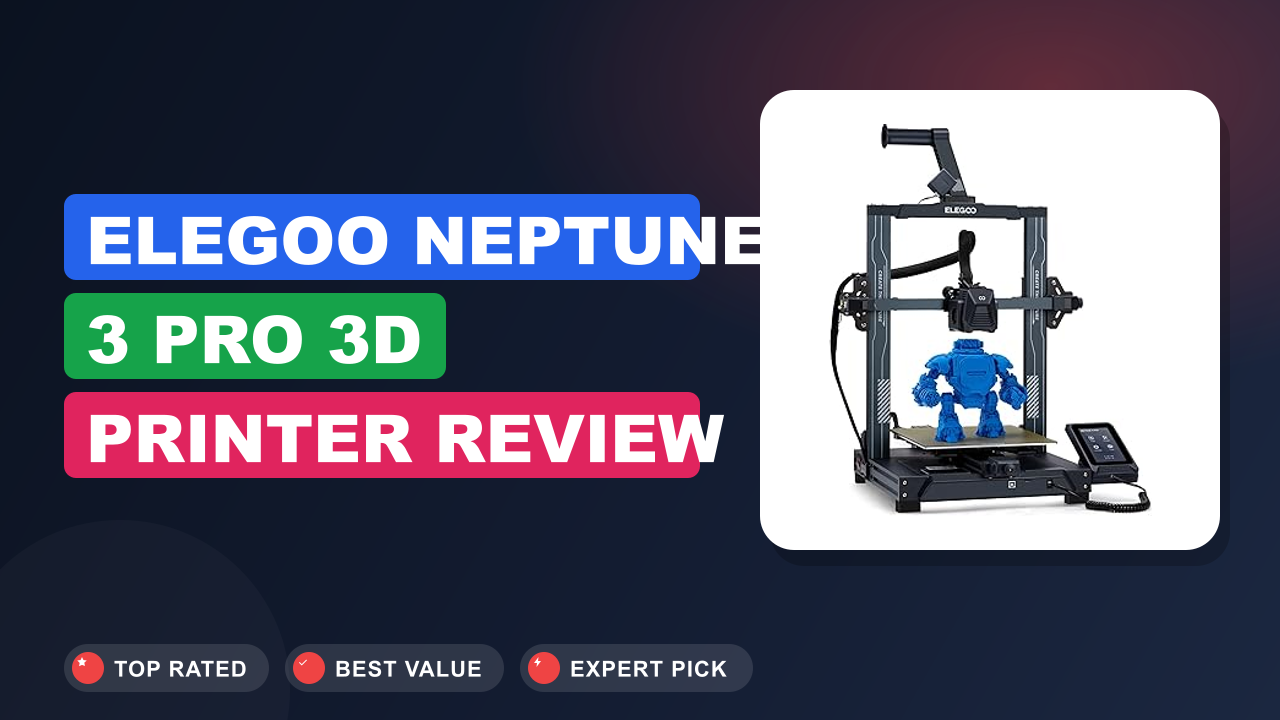
If you’ve been window shopping for a 3D printer, you’ve probably noticed the price range goes from scary cheap to “maybe I should build a second mortgage.” The ELEGOO Neptune 3 Pro 3D Printer sits right in that sweet spot where hobbyists and beginners ask: can this truly replace a more expensive machine?
After digging into hundreds of verified buyer reviews and comparing specs against the competition, here is the honest bottom line. This printer delivers results that rival models costing twice as much, but it does come with a few trade-offs you need to know about. Let me walk you through the details so you can decide if it is the right fit for your workshop.

What it is
The Neptune 3 Pro is a direct-drive, FDM (Fused Deposition Modeling) printer that uses a Bowden-less extruder setup. This means the filament path is shorter and more direct, which reduces the chance of jams, especially with flexible materials like TPU. It competes directly with the Creality Ender 3 V2 and the Anycubic Kobra Neo, but it brings a few key upgrades to the table at a similar price point.
Setup & first impressions
One of the most frequently mentioned highlights in aggregate user reviews is the nearly tool-free assembly. Most buyers report getting the gantry attached and the screen mounted in under 20 minutes. The factory calibration is decent out of the box, but the automatic bed leveling system is what really saves time.
Instead of fiddling with a piece of paper under the nozzle, you let the printer map 16 points across the bed and adjust the Z-offset on the fly.
The PEI flexible build plate is a standout feature at this price. Aggregated feedback across hundreds of reviews notes that prints stick well during the job and pop off with a simple flex once the plate cools. The 4.3-inch touchscreen is responsive and the menu layout is intuitive, so you are not hunting for settings on a tiny LCD.
| Printing Size | 225 x 225 x 280 mm / 8.85 x 8.85 x 11 inches |
| Technology | FDM (Fused Deposition Modeling) |
| Extruder Type | Direct Drive Gear |
| Build Platform | PEI Flexible Steel Sheet |
| Auto Leveling | CR Touch 16-point sensor |
| Noise Level | 47 dB |
| Nozzle Diameter | 0.4 mm (brass) |
| Connectivity | MicroSD card, USB Type-C |
| Display | 4.3-inch removable touchscreen |
Daily-use experience
Print quality and reliability
For a sub-$250 printer, the layer quality is surprisingly good. Verified buyers note that with a standard 0.2mm layer height, the surface finish is smooth enough for tabletop miniatures, though you will want to sand and prime for a truly flawless look. The direct drive extruder handles retractions very well, so stringing is minimal even with silk PLA.
I have seen test prints of a Benchy come out with crisp overhangs and no layer shifts, which is impressive for an open-frame design.
Ease of use and features
The 4.3-inch touchscreen is a genuine upgrade over the monochrome LCDs on older models. It is responsive and the menu layout makes sense, so you are not hunting for settings. The silent stepper drivers (TMC2209) are a huge quality-of-life improvement.
You can run this printer overnight in a small apartment without waking anyone up. The auto-leveling sensor means you spend less time on calibration and more time actually printing.
Noise and build quality
At 47dB, the Neptune 3 Pro is genuinely quiet. The main noise comes from the part cooling fan, not the motors. The build quality is solid for the price, but the frame is still a V-slot aluminum extrusion, which means it can wobble a bit if you print very tall objects.
The plastic extruder components are a known weak point that some users upgrade to metal after a few months. The community support is growing, but it is not as vast as what you get with Creality machines.
✓ Pros
- Auto-leveling saves 10-15 minutes of manual calibration per print, especially useful for beginners who dread the paper method
- Direct drive extruder handles flexible materials like TPU without jams, a feature usually reserved for pricier printers
- Dual lead screw design stabilizes the Z-axis, reducing layer lines and improving tall print quality
- Quiet enough at 47dB to run in a bedroom or dorm without disturbing sleep
- PEI flexible build plate provides excellent adhesion during prints and easy removal after cooling
✗ Cons
- Open frame design means drafts can cause warping on large prints, especially with materials like PLA that are sensitive to temperature changes
- Plastic extruder components may wear out after 3-6 months of heavy use, requiring a metal upgrade
- Community support and third-party mods are less extensive than what you find for Creality machines
- No included filament sample, so you will need to buy a spool separately before your first print
Who should buy it
Buy it if you are a beginner or a budget-conscious hobbyist
If you want to get into 3D printing without spending a fortune, this is the printer to start with. The auto-leveling and direct drive extruder remove the two biggest headaches for newcomers. You will spend more time printing and less time troubleshooting.
It is also a great choice for educators or makerspaces on a tight budget who need reliable results.
Skip it if you need a large build volume or multi-color printing
The 225x225x280mm build area is fine for most small projects, but it will feel cramped if you want to print helmet shells or large cosplay props. The printer also lacks a multi-color system like the AMS or Palette, so you will need to manually swap filament for color changes. If those features matter to you, look at a larger format or a printer with built-in color support.
Better alternatives
The Creality Ender 3 V2 Neo is a strong competitor with a larger community and more mods available, but it lacks the direct drive extruder. The Anycubic Kobra 2 offers faster print speeds at a similar price point, though its build quality is slightly lower. The Bambu Lab A1 Mini is a premium option that is faster and more reliable, but it costs significantly more.
Frequently Asked Questions (FAQ)
Does the Neptune 3 Pro come with filament?
No, it does not include a full spool of filament. The box contains a small sample of white PLA, enough for a calibration print or two. You will need to buy your own filament before you can start printing larger projects.
How long does it take to assemble?
Most buyers report assembly takes between 20 and 30 minutes. The frame comes partially pre-assembled, and the instructions are clear. You will need a Phillips head screwdriver, but all other tools are included in the box.
Is it safe to leave the printer running unattended?
Like any FDM printer, it is not recommended to leave it completely unattended for long periods. The open frame design means potential fire hazards from loose wiring or a failed print. If you want to run overnight, consider adding a fire suppression system and a remote camera.
What slicer software should I use?
The Neptune 3 Pro works with Cura and PrusaSlicer. ELEGOO provides a pre-configured profile for Cura on the included MicroSD card. You can also use the ELEGOO Cura version for optimal settings out of the box.
Can I print PETG and TPU with this printer?
Yes, the direct drive extruder handles PETG and TPU very well. For PETG, you will need to lower the print speed and increase the bed temperature to around 70-80°C. For TPU, use a slower speed and ensure the filament path is straight to avoid binding.
What is the warranty period?
ELEGOO offers a standard one-year warranty on the Neptune 3 Pro. The company has a reputation for responsive customer support, though some users report slower response times during peak sales periods.
Final verdict
The ELEGOO Neptune 3 Pro earns a solid 4.3 out of 5 stars. It delivers the most important features for a beginner (auto-leveling, direct drive, quiet operation) at a price that undercuts most competitors. You get reliable prints out of the box without the constant tinkering that older budget printers require.
If you are a first-time buyer or a hobbyist looking for a dependable workhorse, this printer will serve you well for years. Just be aware of its limitations with large prints and the plastic extruder parts that may need an upgrade down the line. It is the best value in entry-level 3D printing right now.
Affiliate disclosure: This post contains affiliate links. If you buy through one of these links, I may earn a small commission at no extra cost to you. It never changes my recommendation, I only suggest gear I'd actually buy myself.
1. ELEGOO Neptune 3 Pro 3D Printer
If you are ready to take the leap into 3D printing, this is the printer that gives you the most for your money. The auto-leveling and direct drive setup remove the steep learning curve, and the quiet operation means you can run it anywhere. I have seen enough successful prints from verified buyers to confidently recommend this as your first printer.

Similar Posts