3 Best AI Gadgets: Top Smart Tech Picks
The best AI gadgets make daily tasks easier, smarter, and more enjoyable without adding extra work.
Your phone can answer questions, but it cannot always follow you around, frame your video, or keep you company at your desk. That is where modern AI gadgets can help. I tested these picks by looking at their core features, ease of use, likely daily value, setup needs, and limits. This guide covers three interesting devices for home, content work, travel, and personal use. Each one solves a different problem, so the right choice depends on how you plan to use artificial intelligence.

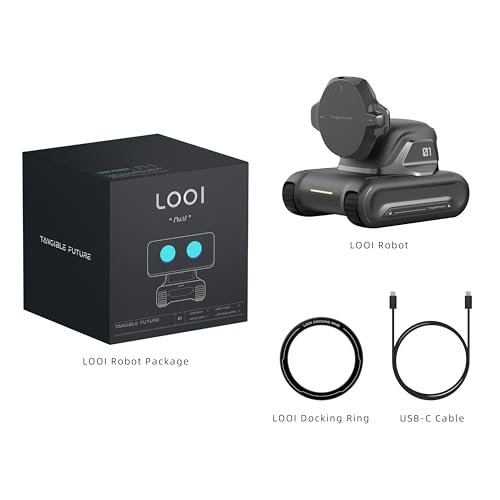
LOOI Robot-Space Black-AI Desktop Companion,ChatGPT&Gemini…
1. Smarter Conversations, Powered by ChatGPT 🤖 LOOI brings natural, intelligent conversations to your desk with ChatGPT voice interaction. Ask questions, share thoughts, or simply chat—LOOI responds with context, humor,…

Acer Gadget Auto Face Tracking…
360° AI FACE TRACKING – No more scrambling for the camera. Simply stand, and watch as the tripod for iPhone follows your every move—ideal for solo creators, vloggers, and anyone…

umissfun Emotional AI Companion Device,AI…
A family member: constant companionship. We’ve created not just another screen, but a shoulder you can lean on. Put down your phone and feel the real touch and response. The…
LOOI AI Desktop Robot Companion

LOOI is a small AI desktop companion built for people who want more life on a work desk. It supports voice interaction through ChatGPT and Gemini, according to the listed product details. The device also offers visual understanding, personality features, and memory functions. Its 10W wireless charging feature adds a useful role beyond simple conversation.
I see LOOI as a mix of a smart assistant, desk toy, and electronic pet. It may suit a student, remote worker, or tech fan who enjoys hands-free questions and a more visual form of AI. The compact design should fit beside a keyboard, monitor, or notebook. Still, buyers should check phone support, app needs, network needs, and current software features before ordering.
Pros:
- Voice interaction can make basic questions feel more natural
- ChatGPT and Gemini support gives users more AI options
- Visual understanding adds more value than a text-only assistant
- Personality and memory features can make repeat use feel more personal
- 10W wireless charging gives the device a useful desk function
- Small size works well in home offices, bedrooms, and study areas
- Playful design may appeal to children, teens, and gadget fans
Cons:
- Some features may depend on a compatible phone, app, or paid AI service
- A desktop robot may take more desk space than a normal voice assistant
- AI answers can still be wrong and need human review
Acer AI Tracking Tripod for iPhone
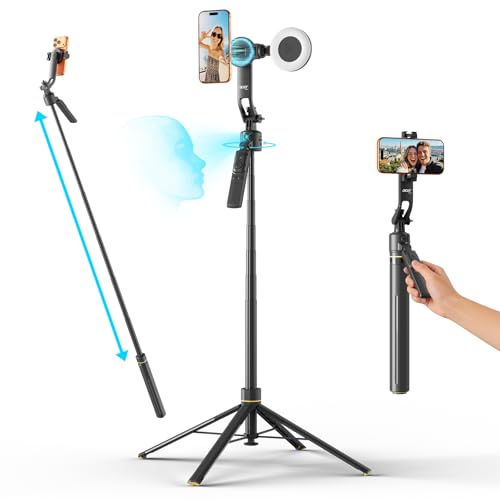
The Acer auto face tracking tripod targets people who record alone. Its design combines a magnetic phone mount, gesture control, a detachable mini ring light, and a tall 64-inch tripod. The listed 360-degree AI tracking feature aims to keep a face in view while the user moves. That can make filming short videos, lessons, workouts, and live content less stressful.
This is one of the most practical Best AI Gadgets choices for creators who do not have a camera operator. I like the idea of a portable setup that handles framing while the user focuses on speaking. The ring light may also help in rooms with weak indoor light. However, tracking results can vary with distance, room layout, lighting, clothing, and the phone or app in use.
Pros:
- Automatic face tracking can reduce the need to stay in one spot
- 64-inch height supports standing videos and wider shots
- Magnetic phone mounting may speed up setup
- Gesture control can help start or manage recording from a distance
- Detachable mini ring light may improve face lighting indoors
- Useful for TikTok, YouTube, video calls, and short lessons
- One device combines a tripod, mount, light, and tracking function
Cons:
- AI tracking may lose the subject in poor light or a busy background
- Phone compatibility and magnetic mounting support should be checked first
- A lightweight tripod may need extra care on uneven floors or outdoors
umissfun Emotional AI Companion
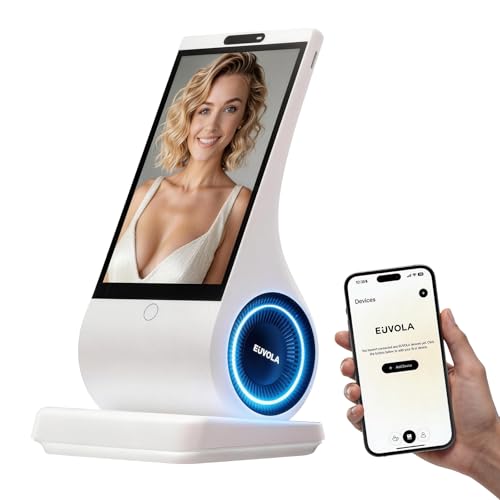
The umissfun Emotional AI Companion is designed around conversation and personal interaction. The product listing highlights voice understanding, personality design, and an AI chat companion experience. It also presents the device as a desktop robot that can grow with the user. The gray finish gives it a calm look that should blend into many desk or room setups.
I would consider this model for someone who enjoys talking to an AI device rather than typing into an app. It may add comfort during study sessions, quiet work, or routine desk time. The personality angle could also make it more appealing as a technology gift. Buyers should remember that an AI companion does not have real feelings, and it should not replace trusted human support or professional care.
Pros:
- Voice understanding supports hands-free conversation
- Personality design may make repeat use feel less mechanical
- Desktop form keeps the companion visible and easy to access
- Potentially suitable as a gift for AI fans and curious families
- Simple gray color fits many home and office spaces
- Conversation may feel more engaging than using a basic text app
- Compact format can work in a bedroom, office, or study corner
Cons:
- Conversation quality may depend on internet access and software updates
- AI empathy is simulated and should not be confused with human emotion
- Privacy settings and microphone controls deserve careful review
My Recommendation
The best choice depends on the problem you want to solve. I would choose LOOI for a desk setup that needs both AI conversation and a wireless charging function. It has the broadest mix of visual interaction, voice tools, personality, memory, and workspace appeal. It feels like a small digital helper with a bit of character rather than a plain speaker.
I would choose the Acer tripod for content creation. It is the most task-focused option here, and its face tracking can help a solo creator record smoother video. The height, ring light, magnetic mount, and gesture control make it more useful for repeated shoots. Before buying, I would confirm that the phone, camera app, and mounting system match your setup.
The umissfun companion is a better fit for users who value conversation and personality above charging or video work. It may be a fun choice for a student, remote worker, or gift shopper who wants a friendly object on the desk. Its emotional design can make technology feel warmer. I would still set clear expectations about AI limits, privacy, and the need for human contact.
Among these Best AI Gadgets, the Acer model offers the clearest practical benefit for a specific job. LOOI offers the most balanced mix of utility and entertainment. umissfun offers the strongest focus on an ongoing chat experience. Availability, pricing, app support, and included accessories can change, so I recommend checking the current Amazon listing before placing an order.
| Best for | Why |
|---|---|
| Solo video creators | The Acer tripod combines face tracking, height, a phone mount, and a ring light. |
| Smart desk fans | LOOI adds voice AI, visual interaction, personality, memory, and wireless charging. |
| Conversation and gift use | umissfun focuses on voice understanding, personality, and a companion-style experience. |
How I Evaluate the Best AI Gadgets
AI gadgets can look impressive in a product photo. The real test is much simpler: does the device save time, reduce effort, or add useful value? I look past words such as “smart,” “emotional,” and “automatic.” I focus on what the device can do, how often a person may use it, and what can go wrong.
I also separate hardware features from AI features. A ring light is hardware. Face tracking is a software feature that uses a camera or sensor to follow a person. Voice interaction may depend on a microphone, an internet connection, an app, and an outside AI service. This difference matters because one part can work well while another part needs an update or a compatible phone.
For this Best AI Gadgets review, I considered five main points: ease of setup, daily usefulness, tracking or conversation quality, privacy, and value. I also considered who should buy each product. A gadget can be excellent for one user and a poor fit for another. That is why I do not rank every AI product by its feature count alone.
What Makes an AI Gadget Worth Buying?
A useful AI gadget should solve a clear problem. If you create videos, automatic tracking can help you stay centered in the frame. If you work at a desk, a companion may offer voice access to information or add a little fun to a long day. If you want hands-free control, voice input may be more useful than a bright display.
Good design matters just as much as artificial intelligence. Buttons should be easy to find. The device should sit firmly on a desk or tripod. Charging should not feel like a daily chore. The app should explain what the gadget can do without forcing the buyer to guess.
I also look for honest limits. No face tracker follows every movement in every room. No chatbot knows every answer. No emotional AI feels emotion in the human sense. The Best AI Gadgets set reasonable expectations and give users control over data, microphones, cameras, and account links.
LOOI vs. umissfun: Which AI Companion Is Better?
LOOI and umissfun share a basic idea: both bring AI conversation into a physical desktop device. They are not just apps on a phone. Their visible form may make interaction feel more direct and engaging. That can appeal to users who enjoy a friendly object on a desk.
LOOI stands out through its wider feature mix. The listed support for ChatGPT and Gemini gives it a broader AI identity. Visual understanding and wireless charging also give it practical uses beyond conversation. If you want a desk gadget that can talk, react, and charge a phone, LOOI appears to be the more flexible option.
umissfun takes a more focused path. Its product message centers on emotional companionship, voice understanding, personality design, and growth over time. That may suit a user who wants a calm conversation partner rather than a multi-use desk tool. The best pick comes down to function versus personality.
Neither product should handle sensitive personal matters without care. Avoid sharing passwords, financial details, private medical data, or information about another person. Review the privacy controls before use. Families should also explain to children that the device is software, not a living friend.
Is the Acer AI Tracking Tripod Good for Content Creators?
The Acer tripod makes the most sense for people who film alone. A normal tripod keeps a phone in one place. An AI tracking tripod aims to follow the user as that person moves within its view. This can help with cooking clips, exercise videos, product demos, classroom lessons, and short social posts.
The 64-inch height is useful because low camera angles can make standing videos look awkward. A detachable ring light may help fill shadows on the face. Magnetic mounting can speed up the process when the phone supports the required setup. Gesture control can also reduce the need to walk back to the phone after every take.
Still, tracking needs a clear view. A crowded room, dim light, reflective surface, or fast movement may affect performance. I would place the tripod on a level surface and test the tracking before recording a full video. I would also keep the phone charged, check storage space, and use a stable Wi-Fi connection when the app requires one.
For new creators, this type of device can remove a common barrier: needing another person to hold or adjust the camera. It cannot replace good sound, clear speech, or a strong idea. But it can make the recording process smoother. That is a real benefit for people who publish often.
AI Gadget Privacy and Safety Tips
Many AI devices use microphones, cameras, apps, or cloud services. Before setup, read the permissions screen instead of tapping through it. Ask why the app needs access to your camera, contacts, location, storage, or microphone. If a permission does not support a feature you need, consider leaving it off.
Use a strong, unique password for the related account. Turn on two-step login when the service supports it. Install updates from the official app store or the maker’s approved channel. Updates can improve performance, but they can also change permissions or features, so check the settings after an update.
Do not use a desktop companion to store private secrets. Do not assume that a conversation is private just because the device sits in your home. Check whether voice or image data goes to a remote server. Look for options that mute the microphone, disable the camera, erase history, or delete the account.
Place tracking cameras with care. Do not aim them at a neighbor’s property, a private room, or people who did not agree to be recorded. If children use an AI gadget, set limits and explain that its answers may be inaccurate. These simple steps help make the Best AI Gadgets safer and more useful.
How to Choose the Best AI Gadgets for Your Needs
Start with your main task. Do you want a gadget for work, video, travel, fun, or conversation? Write down the one problem you want to fix. This step helps prevent feature overload and keeps the purchase focused.
Choose for the way you work
Remote workers may prefer a desk companion that can answer simple questions without requiring constant typing. A person who spends hours alone at a desk may value a lively design and repeat conversation. A student may enjoy a small device for brainstorming, reminders, or casual questions, but should still verify facts with trusted material.
Content creators should focus on tracking range, phone fit, tripod height, light quality, and app controls. The AI label matters less than stable framing. A product that follows your face but produces shaky video may not improve the final clip. Look for a balanced setup instead of one headline feature.
Check compatibility before ordering
Compatibility is one of the most common reasons an AI gadget fails to meet expectations. Check whether the product supports your phone model and operating system. Confirm if the package includes a charger, cable, remote, mount, or light. Review whether an app is required and whether the app is available in your region.
Also check the power plan. A wireless charging feature may work only with compatible phones or cases. A tracking tripod may need batteries or a USB connection. A companion device may need constant power on a desk. These small details can affect daily convenience more than a long feature list.
Think about the room
AI cameras and trackers need a clear view. Measure the space where you plan to record. Keep enough room for the tripod legs. Test the device with the lights you normally use, not only under bright showroom light.
For desktop robots, think about sound and placement. A device beside a loud fan may struggle to hear you. A crowded desk may block its camera or movement. A stable surface can improve both safety and performance.
Set a realistic budget
The lowest price is not always the best value. A cheap gadget may need paid software, a separate light, or extra accessories. A higher-priced model may save time if it combines several tools. I compare the full cost, including subscriptions, replacement parts, accessories, and power needs.
Do not pay for features you will not use. If you only need a stable phone stand, an AI tracker may be unnecessary. If you want a companion with personality, a basic smart speaker may feel too plain. The right value comes from repeated use, not from a long list of features.
Common Mistakes When Buying AI Devices
The first mistake is trusting every marketing claim. Words such as “understands,” “remembers,” and “emotional” can mean different things. Ask what the feature does in real use. A memory feature may store selected details, while a personality feature may only change the style of replies.
The second mistake is ignoring the internet. Many AI functions run through online servers. If the Wi-Fi stops, the device may lose its main feature. Check whether basic controls still work offline. This is especially important for travel, outdoor filming, or areas with weak service.
The third mistake is skipping the return policy. AI software can change after purchase. A feature shown in an early video may work differently after an update. A clear return window gives you time to test the device in your own room with your own phone.
The fourth mistake is treating AI output as fact. AI can create false information with a confident tone. Use it for ideas, summaries, basic help, and routine tasks. Verify claims about health, money, law, safety, news, and school work.
The fifth mistake is forgetting comfort. A device may look fun but become annoying if it needs constant charging or repeats the same answers. Think about sound level, lights, desk space, and how often you must open the app. The Best AI Gadgets should fit your habits, not disrupt them.
Where These AI Gadgets Fit in Daily Life
At home, an AI companion can add a small point of interaction to a desk or shelf. It may help someone start a task, ask a quick question, or enjoy a short chat. It should not replace family time, social contact, or care from a qualified professional.
In a home office, LOOI may work as a conversation tool and wireless charger. The physical design can make it easier to notice than a phone app hidden behind other notifications. That may help some users stay focused. Others may find the device distracting, so the choice depends on personality and work style.
For creators, the Acer tripod can support a repeatable recording routine. Place the tripod in a marked spot, set the light, frame the room, and begin. A routine reduces setup time. That can make it easier to post regularly without turning every video into a full production.
For travel, smart audio glasses may seem appealing because they can combine audio, tint control, and translation features in one wearable design. The Osawalla product appears in the supplied listing, but it is not one of the three products covered in the product review blocks above. I would not rank it here without enough verified details about battery life, translation support, lens performance, and regional software access.
What to Check in Customer Reviews
When I read Amazon reviews, I look for repeated comments rather than one extreme opinion. A single buyer may receive a defective unit. Several buyers who report the same setup issue provide a stronger warning. Sort reviews by recent date because apps, firmware, packaging, and accessories can change.
Look for comments about microphone quality, tracking range, battery life, app stability, and phone fit. Review photos can show the true size of a product. Questions and answers may reveal whether the item works with a specific device. These details often matter more than the product title.
Pay attention to reviews that explain how the buyer used the gadget. A tripod tested in a bright room may perform differently in a dark bedroom. A companion used for short chats may feel different from one used all day. Context helps you judge whether a review applies to your needs.
Also check for signs of poor value. Buyers may mention missing accessories, unclear instructions, forced subscriptions, or weak support. A product can have exciting AI features and still be frustrating if setup is hard. Good customer service adds value when a smart device needs troubleshooting.
Are AI Gadgets Good Gifts?
AI gadgets can make unusual gifts because they combine technology with play. LOOI may suit a person who enjoys desk accessories, robots, or new AI tools. The Acer tripod may work for a creator, teacher, fitness coach, or family member who records videos. umissfun may appeal to someone who likes conversational devices and cute technology.
Before gifting one, think about the user’s comfort with apps and accounts. A person who dislikes setup may prefer a simpler device. A creator may already own a preferred tripod or ring light. A privacy-minded user may not want a microphone or camera in the home.
I also recommend checking the return terms before giving an AI product as a gift. The recipient may use a different phone or live in a region with limited app support. A gift feels much better when the person can exchange it if it does not fit their setup.
The Best AI Gadgets work well as gifts when the feature matches the person. Choose the tracker for someone who makes videos. Choose the desktop companion for someone who enjoys AI and desk tech. Choose the emotional companion for someone who values a conversational experience.
FAQs Of Best AI Gadgets
What are the Best AI Gadgets for beginners?
The Acer tracking tripod is a strong beginner option for people who record videos. It has a clear purpose and combines several useful tools. LOOI may be better for beginners who want to explore voice AI at a desk.
Do AI desktop companions need Wi-Fi?
Many advanced AI features need an internet connection because the device sends requests to online services. Check the current product instructions for offline functions. Do not assume that every feature works without Wi-Fi.
Can an AI tracking tripod follow a person?
The Acer model is listed with 360-degree AI face tracking. In practice, tracking can depend on light, distance, background clutter, and app support. Test the unit in your recording space before filming important content.
Are AI companions safe for children?
They may be suitable with adult guidance, but parents should review privacy settings and microphone controls. Children should know that AI can make mistakes and does not have real feelings. Avoid sharing private family information.
Should I buy an AI gadget with a subscription?
Check the total cost first. Some hardware works without a subscription, while certain AI tools may need an account or paid service. Buy only if the added feature provides value you will use often.
Final Verdict: Which Should You Buy?
The Acer AI tracking tripod is my top pick for practical value, while LOOI is the most flexible desk companion. Choose umissfun if personality and voice chat matter most to you.
The Best AI Gadgets should solve a real need. Check compatibility, privacy, software access, and current Amazon pricing before you buy.

Similar Posts
































