Best AI Voice Recorders: Top Tools For Clear Audio
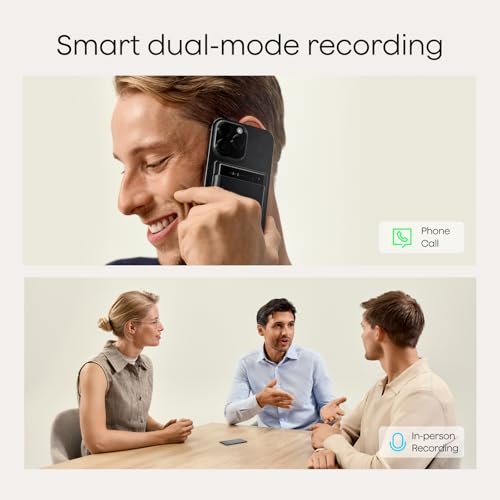
The best AI voice recorders capture clear audio, create useful notes, and save hours of manual work.
Have you ever left a meeting with pages of rough notes but still missed the one detail that mattered? Maybe a class moved too fast, a client call filled your screen with tasks, or a good idea vanished before you could write it down. The best AI voice recorders solve that problem by recording speech and turning it into searchable text, summaries, and action points. I reviewed these models with real daily use in mind, focusing on sound capture, portability, AI note tools, ease of use, and overall value.

Plaud Note Pro AI Voice…
AI-POWERED TRANSCRIPTION & MULTI-DIMENSIONAL SUMMARIES: Plaud Note Pro is your professional voice transcriber, delivering high-accuracy transcription in 112 languages with auto speaker labels. Powered by top AI models and thousands…

Pocket AI Voice Recorder, Auto…
YOUR AI PERSONAL ASSISTANT FOR EVERYDAY PRODUCTIVITY: More than a voice recorder, Pocket works as your AI personal assistant to capture, transcribe, and summarize meetings, calls, and ideas instantly. Core…

Pocket AI Voice Recorder, Auto…
YOUR AI PERSONAL ASSISTANT FOR EVERYDAY PRODUCTIVITY: More than a voice recorder, Pocket works as your AI personal assistant to capture, transcribe, and summarize meetings, calls, and ideas instantly. Core…
Plaud Note Pro AI Recorder

The Plaud Note Pro is built for people who want more than a basic audio file. Its main appeal is the mix of voice recording, transcription, and AI summaries in one compact tool. That makes it a strong choice for meetings, interviews, calls, and quick voice notes. Instead of sorting through a long recording, you can use the written transcript and summary to find the useful parts faster.
The slim shape should fit well in a pocket, bag, or work folder. It also suits users who prefer a dedicated recorder rather than holding a phone up during every conversation. AI output still needs a quick check, especially when people speak over each other or use names, numbers, or technical terms. Even so, this is one of the most complete options in this group for people who want a serious digital note system.
Pros:
- Combines recording, transcription, and AI summaries
- Useful for meetings, calls, interviews, and research
- Compact design is easy to carry every day
- Reduces the need to write notes while listening
- Searchable text makes key details easier to find
- Dedicated hardware feels less distracting than a phone
Cons:
- AI features may depend on an app or service plan
- Transcripts can need edits in noisy rooms
- Small controls may take time to learn
Pocket AI Voice Recorder in Space Gray

This Pocket AI Voice Recorder takes a simple approach to digital note taking. It is aimed at users who want automatic transcription without carrying a larger device. The space gray finish has a quiet, professional look that should blend into a work desk or meeting room. Its small body also makes it a practical backup for sudden ideas, short interviews, and spoken reminders.
The key feature is the auto transcription and AI note-taking workflow. After recording, the device can help turn spoken words into text that is easier to review than raw audio. This can help a student focus on a lecture or help a manager stay present in a meeting. Like all AI recorders, it works best when the microphone has a clear path to the speaker and the room is not too loud.
Pros:
- Small size makes it easy to carry
- Auto transcription saves manual typing time
- AI notes help organize spoken information
- Space gray color looks clean and work-ready
- Useful for school, work, travel, and personal notes
- Less screen use can improve focus during conversations
Cons:
- Very small hardware can be easier to misplace
- AI results may vary with accents and background noise
- Users may need an app for setup and note review
Pocket AI Voice Recorder in Sierra Blue
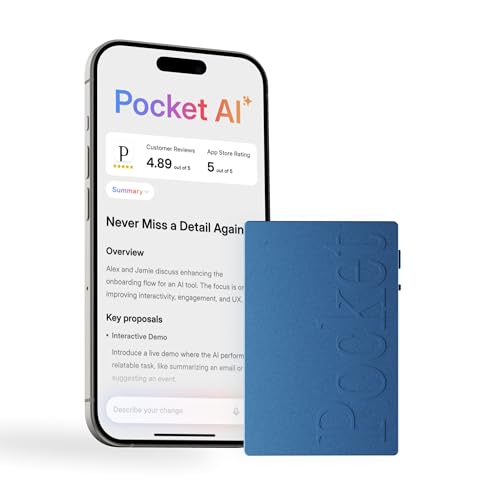
The Sierra Blue version offers the same type of compact AI recording workflow in a more visible color. That difference may sound small, but it can make the device easier to spot in a crowded bag or on a busy desk. It is designed for people who want a portable voice recorder, auto transcription, and AI note support without a bulky setup. The result is a handy tool for capturing ideas before they disappear.
I would consider this model for students, creators, field workers, and anyone who likes a little color in their tech. A recorder like this can act as a bridge between a quick voice memo and a polished written note. It may help turn a brainstorm into a list of tasks or a conversation into a simple record. Keep the microphone close to the main speaker, then review important names, dates, and figures before sharing the final text.
Pros:
- Bright Sierra Blue finish is easy to locate
- Portable design fits daily carry needs
- Auto transcription reduces time spent typing
- AI note tools can turn speech into useful points
- Good match for ideas, interviews, classes, and meetings
- Dedicated device keeps recording separate from phone alerts
Cons:
- Color choice does not change core recording performance
- Speech recognition may struggle in crowded places
- Cloud or app functions may have separate service limits
Plaud Note Pro AI Recorder, Alternate Version

This second Plaud Note Pro listing is worth considering for shoppers who find a different package, finish, or seller option more suitable. The core idea remains the same: capture speech, convert it into text, and use AI to make the result easier to act on. That workflow can be a major help when a meeting contains many details but only a few true decisions. It also gives you an audio reference when a summary does not tell the whole story.
The strongest reason to choose a Note Pro style recorder is its focus on work tasks. It can support call notes, client discussions, interviews, planning sessions, and project reviews. I like this type of device for people who want to listen closely instead of splitting attention between a speaker and a keyboard. Before recording, explain the purpose and follow local consent rules, since recording laws differ by state and situation.
Pros:
- Strong focus on meeting and call notes
- AI summaries can make long audio easier to scan
- Transcripts provide a useful written backup
- Portable body supports work away from a desk
- Can reduce rushed or incomplete handwritten notes
- Helpful for users who need a record of decisions
Cons:
- Different listings may include different package details
- Important transcripts still require human review
- Recording private calls requires clear legal awareness
Plaud NotePin S Wearable AI Recorder

The Plaud NotePin S takes a different path from a pocket recorder. Its wearable design is made for hands-free capture, so you can start a note without reaching for a phone or opening a bag. That can be useful during walks, site visits, brainstorming sessions, and fast-moving work. The black finish also looks discreet and should suit users who prefer a low-key device.
Wearable recording can feel natural because the device stays close to you. Still, placement matters, and nearby voices may not sound equal if speakers stand at different distances. I see this model as a strong fit for people who think out loud or move often during the day. It may also help caregivers, creators, consultants, and professionals who need to capture short details while keeping both hands free.
Pros:
- Wearable design supports hands-free recording
- Useful for walks, visits, and active work
- AI transcription turns spoken notes into text
- Summaries can help sort many short recordings
- Black finish offers a discreet professional look
- Quick capture may prevent ideas from being lost
Cons:
- Wear position can affect voice clarity
- Not every conversation is suitable for wearable recording
- Small wearable controls may be less visible
How I Evaluate the Best AI Voice Recorders
A good AI voice recorder must do more than save sound. I look at the complete path from recording to useful action. That path includes microphone performance, button control, battery habits, app design, transcript quality, summary value, and file access. A device can record excellent audio and still feel poor if its software makes every note hard to find.
I also look at the setting where each recorder makes sense. A pocket model works well in meetings and classrooms. A wearable model makes more sense for walking notes or active jobs. Color, shape, and weight matter because a recorder that stays at home cannot capture the moment that matters.
Audio Capture and Speech Clarity
Clear speech gives AI a better starting point. The recorder should sit near the main speaker, with the microphone away from clothing, hands, and hard table edges. A quiet room helps, but real life includes air conditioners, traffic, keyboard clicks, and side talk.
No AI system can fully repair every bad recording. If a person speaks softly from across a large room, the transcript may miss words. I recommend a short test before an important event. Record ten seconds, check the playback, and adjust the position if needed.
Transcription Quality
Transcription turns audio into words. This is the feature that saves the most time, but it is not magic. Accents, fast speech, mixed languages, uncommon names, and industry terms can cause errors.
I treat an AI transcript as a strong draft, not a legal record. Check names, prices, dates, medical terms, and action items. For normal meetings and personal notes, even an imperfect transcript can still make review much faster.
AI Summaries and Action Points
A summary should help you understand what happened without replaying the entire recording. The best results pull out themes, decisions, tasks, and questions. A useful summary feels like a clean desk after a busy day.
Summary style can vary by app and service. Some users want a short overview. Others need a detailed outline. If your work depends on exact wording, keep the original audio and transcript beside the summary.
Portability and Daily Use
Portability is one of the main reasons to choose a dedicated recorder. A phone can record audio, but a phone also brings calls, alerts, apps, and low storage. A small recorder creates a clearer purpose: press the button, capture the sound, and return your attention to the person in front of you.
Wearable models offer even faster access. They can help when your hands are full or when an idea arrives during a walk. Pocket models may feel more suitable in formal settings because they sit out of sight until needed.
Battery, Storage, and App Dependence
Before buying, check how the device stores audio and how it transfers files. Some AI tools process speech through a connected app or online service. That can make the experience simple, but it also means you should understand account needs, data handling, and any usage limits.
Battery life depends on recording time, wireless use, file transfers, and other functions. Charge the recorder before a long meeting. If the device supports local audio storage, keep backup copies of important files in a secure place.
Privacy and Recording Etiquette
Always tell people when you plan to record them. Recording laws vary across the United States, and some conversations require consent from every participant. Workplace rules, school policies, client agreements, and health privacy duties may also apply.
Privacy does not end when the recording stops. Use a strong account password, protect shared links, and delete sensitive files when you no longer need them. Do not upload confidential audio to an AI service unless you understand how that service handles the data.
Which AI Voice Recorder Fits Your Routine?
The right choice depends on how you capture information. If you sit in meetings, a pocket recorder with strong transcription and summary tools may be the best match. If you move through different locations, a wearable recorder can feel more natural.
Students may value quick review after a lecture. Managers may care more about tasks and decisions. Writers and creators may prefer a device that catches ideas without forcing them to stop and type.
Color is also a small but real factor. The space gray Pocket model has a calm, office-ready appearance. The Sierra Blue version is easier to spot, which may help users who often carry many small devices.
For Meetings and Calls
The Plaud Note Pro options are the clearest match for meetings and calls. Their feature set focuses on recording, transcription, and summaries. This can help you stay engaged instead of staring at a keyboard.
For calls, check the product instructions and use the correct recording method. Tell all participants before recording. Keep the original file until you confirm that the transcript includes the important points.
For Students and Lectures
A Pocket AI Voice Recorder can help students review a lesson at their own pace. Transcribed notes make it easier to search for a term or find the section tied to a test topic. The small size also makes it less distracting than a phone.
Ask the instructor or school for permission first. A recorder should support learning, not create a privacy concern for classmates or teachers.
For Creators and Journalists
Creators often need to capture ideas before they fade. A wearable model like the Plaud NotePin S can help during a walk, a site visit, or a planning session. A pocket model may work better for interviews where you want a clear, visible recording setup.
Always confirm names and quotes against the original audio. AI text is useful for speed, but a final story needs careful human editing.
For Personal Voice Notes
For shopping lists, reminders, reflections, and short plans, a compact Pocket model may be enough. You can speak faster than you type, and an AI note tool can turn a loose thought into a clearer list.
Use folders or labels if the companion app offers them. A simple naming habit can save time later. For example, use the date and topic in each file name.
For Active and Hands-Free Work
The NotePin S is the natural choice for active users. A wearable recorder stays ready when you cannot hold a phone. It can capture observations during a walk-through, delivery route, inspection, or creative session.
Wear it where the microphone has a clear view of your voice. Test the position before relying on it for an important conversation.
My Recommendation
For most work users, I would choose a Plaud Note Pro model because it combines the core needs of the best AI voice recorders: focused recording, transcription, summaries, and easy review. It fits meetings, calls, interviews, and planning better than a simple voice memo tool. Choose the Pocket model if you want a smaller and more casual note device. Choose the NotePin S if hands-free recording matters most.
| Best for | Why |
|---|---|
| Meetings and calls | Plaud Note Pro offers a focused record, transcript, and summary workflow. |
| Portable daily notes | Pocket AI Voice Recorder models are small and easy to carry. |
| Hands-free capture | Plaud NotePin S is designed for wearable, active use. |
Value also depends on service terms. Before ordering, review the current Amazon listing for package contents, app needs, storage details, and any AI plan limits. Product software can change over time, so current account and subscription information matters as much as the hardware.
Tips for Getting Better AI Transcripts
Place the recorder close to the main speaker. A center spot on a table often works better than a bag or jacket pocket. Keep your fingers away from the microphone openings.
Ask speakers to pause between key points. This helps both the recording and the people in the room. If several people talk at once, the transcript may blend their words.
Say names and numbers with care. For important figures, repeat them or confirm them in writing. This small step can prevent a costly mistake.
Use short recordings for separate topics when possible. A ten-minute project note is easier to review than one giant file covering an entire week. Clear file names also make search more useful.
Review the summary while the conversation is still fresh. You can fix errors before they become part of a report. Keep the original audio for reference when the topic is sensitive or important.
FAQs Of Best AI Voice Recorders
What is an AI voice recorder?
An AI voice recorder captures audio and uses software to create a transcript, summary, or action list. It can make spoken information easier to search and review.
Are AI voice recorder transcripts always accurate?
No. Accuracy can drop with noise, accents, fast speech, weak microphone placement, or several people speaking at once. Always check important facts, names, and numbers.
Can I use an AI recorder for phone calls?
Some models support call recording workflows, but the method depends on the device and app. You must also follow applicable federal, state, workplace, and consent rules.
Do AI voice recorders need the internet?
Some features may need an app, an account, or an online service. Check the current product details before buying if offline use is important to you.
Which is better, a pocket or wearable AI recorder?
A pocket model is often better for meetings and formal use. A wearable model is better for hands-free notes, walks, field work, and active routines.
Final Verdict: Which Should You Buy?
The Plaud Note Pro is my top pick for most buyers seeking the best AI voice recorders. It offers the strongest mix of recording, transcription, summaries, and work-focused use.
Choose Pocket for simple daily notes or NotePin S for hands-free capture. Check current Amazon terms, app needs, and privacy rules before purchase.

Similar Posts
































