Best Portable Monitor For Laptop: Top Picks For Work
The best portable monitor for laptop users combines sharp video, simple USB-C setup, low weight, and dependable travel value.
A small laptop screen can feel like a cramped desk when you split work between email, research, calls, and spreadsheets. A portable monitor gives you room to breathe without taking over your bag. I compared screen size, resolution, ports, stand design, color claims, gaming features, and likely travel comfort across these six models. My goal is simple: help you choose the best portable monitor for laptop work, study, gaming, or remote use without paying for features you will not need.

cocopar Portable Monitor 15.6 Inch…
Portable Monitor for Laptops: Cocopar laptop screen extender is the ideal portable monitor for Macbook, Surface Pro, Surface Laptop, Lenovo Laptop, HP Laptop, Dell Laptop, ASUS Laptop, etc. This second…

MNN 15.6″ FHD 60Hz Portable…
Full HD Portable Monitor – MNN 15.6inch portable laptop monitor with 1920*1080 resolution, advanced IPS glossy screen support 178° full viewing angle, it renders accurate and bright color, draws you…

KYY Portable Monitor 15.6″ 1080P…
[ FHD 1080P PORTABLE MONITOR ]: KYY using a 15.6”(8.8″x14.2″) advanced IPS screen with 178° wide viewing angle, Delivers 1920*1080 breathtaking viewing quality and HDR technology, KYY portable gaming monitor…
cocopar 15.6-Inch Portable Monitor

The cocopar 15.6-inch portable monitor uses a familiar 1080p Full HD resolution and a 60Hz refresh rate. That pairing fits office work, school tasks, web browsing, and video playback well. Its listed 85% sRGB coverage should provide a reasonably pleasant color range for daily use, though serious photo editors may want a factory-calibrated professional display. The 15.6-inch size also matches many laptop screens, so the two displays feel balanced side by side.
I like the broad device list here because it supports laptop, MacBook, Surface, PC, game console, and other HDMI or USB-C devices. Built-in speakers help when you want simple audio without reaching for headphones, while the included cover can protect the panel in a backpack. The VESA-mountable design is unusual at this price and adds value for a semi-permanent desk setup. Check your laptop ports before buying, since USB-C display support depends on the computer, not just the cable.
Pros:
- 15.6-inch screen offers useful workspace
- 1080p resolution keeps text clear for daily work
- 60Hz refresh rate suits office use and casual gaming
- 85% sRGB rating supports pleasant general color
- Built-in speakers add convenience
- Cover helps protect the screen during travel
- VESA mounting gives it flexible desk use
Cons:
- Color coverage may not satisfy professional creators
- USB-C video depends on a compatible laptop port
- Some setups may need separate power through USB
My Recommendation
I recommend the cocopar to people who want one monitor for both travel and home use. It is a strong choice for remote workers, students, and console owners who value a protective cover and broad compatibility. The VESA option gives it an edge over many basic travel screens. For many shoppers seeking the best portable monitor for laptop productivity, this model offers a useful mix of size, features, and flexibility.
MNN 15.6-Inch FHD Portable Monitor

The MNN 15.6-inch portable monitor focuses on the features most laptop owners ask for: Full HD resolution, IPS viewing, USB-C, and HDMI input. An IPS panel generally helps maintain more stable color and contrast when you view the screen from an angle. That matters when the display sits beside your laptop on a small café table or hotel desk. The 60Hz rate is not built for high-frame-rate competitive play, but it feels smooth enough for normal work and casual games.
HDR support can make compatible video look more lively, but the final result depends on brightness, source content, and the connected device. I would treat HDR as a bonus rather than the main reason to buy this monitor. Its simple design should appeal to users who want a second screen without a bulky dock. As with other USB-C monitors, one cable may carry video and power only when the laptop supports USB-C DisplayPort Alt Mode and supplies enough power.
Pros:
- IPS panel supports wide viewing angles
- Full HD resolution works well for text and video
- USB-C and HDMI provide useful connection choices
- HDR support can improve compatible media
- 15.6-inch size gives room for split-screen tasks
- Portable form fits mobile offices and study spaces
Cons:
- 60Hz limits appeal for serious gaming
- HDR performance may vary by source and brightness
- Some laptops may require an extra power connection
My Recommendation
The MNN is best for laptop owners who want a straightforward IPS second screen. It suits students, writers, analysts, and remote workers who move between rooms or locations. I also like it for casual console use because HDMI expands its role beyond laptop work. If you want the best portable monitor for laptop use and prefer broad input support over advanced gaming speed, the MNN deserves a close look.
KYY 15.6-Inch 1080p Portable Monitor

The KYY 15.6-inch portable monitor is designed as a simple screen extender for laptop users. Its 1080p resolution gives documents, browser tabs, and chat windows enough detail for daily tasks. A 15.6-inch panel feels less like a phone accessory and more like a real second workspace. That extra room can reduce the constant window switching that makes laptop work feel slow.
The included cover is important for travel because thin portable displays need protection from keys, chargers, and other items in a bag. I see this model as a practical choice for shoppers who want a clean, low-fuss setup rather than a gaming-focused panel. It should work well for presentations, online classes, spreadsheets, and remote support. Before ordering, confirm whether your laptop needs HDMI plus USB power or can send both video and power through USB-C.
Pros:
- Large 15.6-inch workspace for a portable design
- 1080p resolution keeps common text readable
- Cover adds useful protection in transit
- Good fit for school and office tasks
- Simple screen-extender purpose is easy to understand
- Useful for presentations and dual-window work
Cons:
- It may need two cables with some laptops
- It offers fewer specialist features than gaming models
- Color performance may not suit advanced creative work
My Recommendation
I would choose the KYY for students, travelers, and home-office users who want basic second-screen space at a sensible cost. It is especially appealing if the included cover matters as much as the display. The 1080p panel and practical size create a comfortable work surface without adding much bulk. Among affordable options for the best portable monitor for laptop buyers, the KYY is a sensible, focused pick.
InnoView 15.6-Inch Monitor With Stand

This InnoView portable monitor combines a 15.6-inch 1080p display with a built-in 90-degree adjustable stand. That stand can make setup faster because you do not need to fold a separate cover into the right position. It supports a more upright viewing angle on desks, counters, and small travel tables. The Full HD format remains a good middle ground for clear text, modest power use, and broad device support.
The monitor lists USB-C and HDMI compatibility, which gives it a useful range for MacBook, Windows laptops, phones, consoles, and other devices. The included protective sleeve is a nice touch for people who carry their equipment every day. I would still check cable requirements carefully, especially when connecting to a phone or a USB-C laptop with limited power output. Its design suits users who value fast setup and flexible placement more than high refresh rates.
Pros:
- Built-in stand reduces setup time
- 90-degree adjustment helps with viewing comfort
- 15.6-inch Full HD screen supports productive multitasking
- USB-C and HDMI expand device compatibility
- Protective sleeve supports safer travel
- Works with laptops, consoles, and selected phones
Cons:
- Built-in stand adds some design complexity
- Phone compatibility depends on the phone and adapter
- It is not aimed at fast competitive gaming
My Recommendation
The InnoView with the built-in stand is best for commuters and remote workers who set up in different places each day. It removes one small nuisance from travel: finding a stable way to hold the screen upright. I also like it for people who switch between a laptop and a game console. For a shopper comparing the best portable monitor for laptop work, this model stands out when quick setup and a sleeve are top priorities.
InnoView 15.6-Inch FHD External Monitor

This second InnoView model offers a 15.6-inch Full HD screen with HDMI and USB-C inputs. It includes a built-in speaker and a protective case, which makes it useful as a travel display for both work and entertainment. The 1080p resolution is well suited to documents, presentations, streaming video, and general browsing. Its size gives your laptop a genuine second panel instead of a small companion screen that feels cramped.
The device list is broad, covering desktop computers, MacBook systems, phones, tablets, PlayStation consoles, Xbox systems, and Nintendo Switch use with the right connection method. That flexibility can make one display serve several rooms or family members. I recommend checking the power instructions before a trip, since consoles and phones may have different output needs than laptops. The case also helps reduce worry when the monitor rides in a backpack with other tech.
Pros:
- Full HD image suits work and entertainment
- HDMI and USB-C support many common devices
- Built-in speaker adds simple audio playback
- Protective case improves travel readiness
- 15.6-inch size supports comfortable multitasking
- Useful for laptop, tablet, and console owners
Cons:
- Device compatibility can vary by cable and adapter
- Speakers may not replace a dedicated audio system
- It lacks the high refresh rate favored by esports players
My Recommendation
I recommend this InnoView to households that want one portable monitor for many devices. It is a good fit for a laptop worker who also watches media or connects a console. The case and speaker make it feel ready for travel right away. If versatility matters more than specialized color or speed, this model can be a strong best portable monitor for laptop alternative.
EVICIV 18.5-Inch 120Hz Gaming Monitor
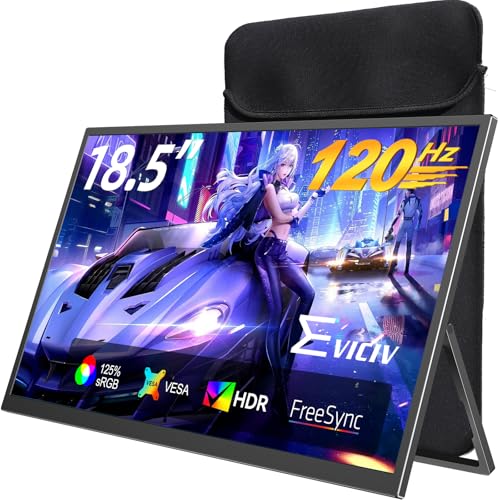
The EVICIV takes a different path from the other screens in this guide. Its 18.5-inch panel is larger, and its listed 120Hz refresh rate targets smoother motion for games and fast scrolling. FreeSync support may help reduce tearing when the connected system and frame rate fall within a compatible range. The listed 125% sRGB coverage also suggests a wider color range than basic office displays, although coverage alone does not guarantee perfect calibration.
This is the model I would consider when a portable monitor must also serve as a serious gaming screen. The 1ms claim looks attractive for responsive play, but actual input lag depends on the whole signal path, game system, and display mode. The larger panel can improve immersion, yet it takes more room in a bag and on a small desk. It is portable in the broad sense, but it is less travel-light than a typical 15.6-inch model.
Pros:
- 120Hz refresh rate supports smoother motion
- FreeSync can help reduce visible tearing
- 18.5-inch display offers an expansive workspace
- 125% sRGB claim appeals to colorful game content
- Listed 1ms response target suits fast play
- Useful for gaming and large multitasking layouts
Cons:
- Larger size reduces backpack convenience
- Gaming features may cost more than office users need
- Source device must support the desired refresh rate
- Color coverage does not replace professional calibration
My Recommendation
The EVICIV is best for gamers, video editors, and power users who want more screen area and faster motion. It makes the strongest case when you will use it at home, in a dorm, or in a gaming setup that sometimes moves. I would not pick it for the lightest business travel kit. However, it may be the best portable monitor for laptop gaming if smooth gameplay matters more than minimum weight.
How I Compare Portable Laptop Monitors
I judge a portable monitor by more than its headline resolution. A screen can list 1080p and still feel poor if its stand slips, its ports confuse buyers, or its power needs do not match the laptop. I first look at the panel size, resolution, refresh rate, input options, and claimed color features. Then I consider the daily details that affect comfort: screen position, cover quality, speaker use, cable needs, and bag space.
For laptop work, I give extra weight to text clarity and connection stability. Full HD remains practical at 15.6 inches because it keeps the system load modest and does not force tiny interface controls. USB-C can make a clean one-cable setup possible, but the port must support video output. HDMI is more universal for video, yet it often needs a second USB cable for power.
I also separate a product claim from a guaranteed experience. A stated refresh rate describes what the panel may support, not what every laptop or console can deliver. A stated color range describes coverage, not color accuracy. This approach helps me recommend a product honestly instead of treating every number as proof that one screen is perfect.
Portable Monitor Buying Guide
Choose the right screen size
A 15.6-inch portable monitor is the safest size for most people. It gives enough room for a browser, document, chat window, or spreadsheet while still fitting many laptop bags. A 14-inch screen can save space, but it may feel less useful beside a 15-inch laptop. An 18.5-inch model gives a more generous view, though the extra width and weight can change what “portable” means for you.
Think about your real travel pattern. If the monitor moves through airports, trains, and coffee shops, every inch matters. If it travels from a home office to a guest room, a larger screen may be worth the trade. The best portable monitor for laptop use should match your routine, not just your wish list.
Understand resolution and text size
Full HD means 1,920 by 1,080 pixels. That resolution works well on a 15.6-inch portable screen and is usually easy for laptops to drive. It gives clear text for email, writing, schoolwork, and spreadsheets when you use a sensible viewing distance. Higher resolution can look sharper, but it can also raise cost, power use, and scaling issues.
For most buyers in 2026, 1080p remains a smart value choice for a travel display. I would spend more on a better stand, brighter panel, or stronger connection system before chasing a resolution that your daily work may not need. Gamers and creators should also consider refresh rate and color behavior, not resolution alone.
Check USB-C before you buy
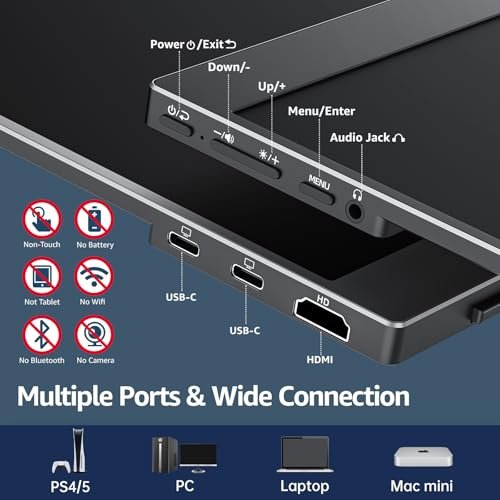
USB-C is a connector shape, not a promise of video output. Some USB-C ports handle charging and data but cannot send a display signal. Look for DisplayPort Alt Mode, Thunderbolt, or a clear statement in your laptop manual. If your laptop lacks video-capable USB-C, use HDMI for video and connect a second USB cable for power when required.
Power delivery also matters. A portable monitor may draw power from the laptop, which can reduce battery life during a long session. A wall charger or power bank with enough output can help, but the power bank must support the monitor’s needs. I always pack the correct cables and a small charger instead of assuming one USB-C lead will work in every situation.
Refresh rate matters most for games
A 60Hz monitor refreshes the image up to 60 times each second. It is fine for documents, video, classes, and casual games. A 120Hz monitor can look smoother during camera movement, fast games, and scrolling, but the laptop or console must produce enough frames to show that benefit. A high refresh rate cannot make a low-powered system run a demanding game well.
For office work, 60Hz often offers the best balance of cost and battery use. For a gaming laptop, the EVICIV’s 120Hz specification makes more sense. I would also confirm which port supports the faster mode, since a cable, adapter, or source device can limit the final result.
Think about brightness and color
Color labels need careful reading. sRGB coverage tells you how much of a color space a display can show. It does not tell you whether the colors are accurate or whether the screen is bright enough for a sunny room. HDR support can help with compatible content, but true HDR quality depends on brightness, contrast, local control, and source support.
For writing and spreadsheets, even brightness and comfortable viewing matter most. For photo or video work, look for measured reviews, color accuracy results, and calibration options. A portable monitor can support creative work on the road, but I would not replace a trusted desktop reference display based on a wide-gamut claim alone.
Do not overlook the stand and cover
A portable monitor needs a stable position. A weak cover can slide, fold, or tip when you touch the screen. A built-in adjustable stand can make setup easier, while a separate folio cover may protect the panel better during travel. Check whether the stand supports the viewing angle you use and whether it works in both portrait and landscape modes.
Ergonomics matter too. Place the second screen close to the laptop and raise it when possible, so you do not bend your neck for hours. If you use two screens every day, a small laptop stand or travel riser can improve the setup. The best portable monitor for laptop productivity should reduce strain, not simply add another glowing rectangle.
Consider speakers and headphones
Built-in speakers are handy for a quick video, a presentation, or a casual game. They usually cannot match a good laptop, headset, or external speaker for bass and volume. Still, speakers can reduce cable clutter when you work in a hotel or shared space. Treat them as a convenience feature rather than a reason to ignore image quality.
If you work near other people, headphones remain the better choice. Also check how audio travels through your connection. HDMI often carries sound, while USB-C behavior may depend on the computer and operating system. Simple testing at home can prevent a frustrating presentation later.
Best Uses for a Portable Laptop Monitor
Remote work and business travel
A second screen helps remote workers keep a video call on one panel while notes, files, or a browser stay on the other. That layout feels calmer than swapping windows every few seconds. A 15.6-inch 1080p model gives enough room for most office tasks without becoming a burden on a train or plane. The cocopar, MNN, KYY, and InnoView models all fit this use well.
Business travelers should pack a short USB-C cable, an HDMI cable if needed, and a compact charger. Test the connection with your work laptop before leaving. Company security settings may also block some display or USB functions, so a quick test is safer than discovering the issue during a client call.
College and school work
Students often study in spaces that change every day. A portable monitor can show a lecture, source article, or notes while the laptop handles writing. The included covers on several models help protect the screen between the dorm, library, and classroom. Weight and setup time matter more than advanced gaming features in this group.
I would favor a 15.6-inch 1080p model with simple HDMI and USB-C support. It is large enough for research but not so large that it takes over a small desk. If the student plays games too, the EVICIV may add value, but only if the extra size fits the budget and bag.
Gaming and console play
Portable monitors can make a useful dorm or travel gaming screen. HDMI support helps with consoles, while a higher refresh rate can improve motion on a gaming laptop. The EVICIV is the clear specialist choice among these products because it lists 120Hz, FreeSync, and a 1ms response target. The other models remain fine for turn-based games, casual play, and console sessions at 60Hz.
Check the console’s output settings before buying. The monitor must accept the desired resolution and refresh rate. You should also plan for audio, since some portable displays have modest speakers and some connection setups may require headphones or a separate audio path.
Creative and content work
A second display can help a photographer keep tools open while viewing an image. It can also give a video editor more room for a timeline or script. However, creative users should look past terms like HDR and wide color. They should seek independent measurements for brightness, color accuracy, contrast, and uniformity.
The cocopar lists 85% sRGB, while the EVICIV lists 125% sRGB. Those figures may guide expectations, but they do not replace a colorimeter or a calibrated reference screen. For casual content work, either can add useful space. For paid color-critical work, I would use the portable display as a utility panel rather than the final color judge.
Best For Comparison
| Best for | Why |
|---|---|
| Remote work and school | 15.6-inch Full HD models offer a clear, balanced second workspace. |
| Gaming and fast motion | The EVICIV adds 120Hz, FreeSync, and a larger 18.5-inch view. |
| Flexible travel setups | Models with covers, sleeves, USB-C, HDMI, and built-in stands adapt well. |
| Multi-device households | HDMI and USB-C models can serve laptops, consoles, tablets, and phones. |
| Simple budget productivity | The KYY keeps the focus on useful 1080p second-screen space. |
| Fast desk setup | The InnoView model with its built-in 90-degree stand needs fewer accessories. |
Setup Tips for Better Results
Start by placing the portable monitor beside your laptop at nearly the same distance from your eyes. In Windows, press the display shortcut and choose Extend rather than Duplicate when you want two separate work areas. On macOS, open Display settings and arrange the screens so the cursor moves naturally from one panel to the other. A few minutes of alignment can make the setup feel far more natural.
Set the monitor to its native resolution when possible. If text looks too small, increase system scaling instead of lowering the resolution. Adjust brightness so the two screens look similar, especially when moving from a bright laptop panel to a darker portable display. Lower brightness can also help preserve laptop battery life.
Use a direct cable when you can. Hubs and adapters add another point of failure, though they can help when your laptop has limited ports. If the display flickers, test a different cable, connect a wall charger, reduce the refresh rate, and confirm that the laptop supports the selected mode. These basic steps solve many portable monitor problems before you need technical support.
Common Mistakes to Avoid
The first mistake is assuming every USB-C port carries video. This is the most common source of surprise for new buyers. The second is overlooking power. A monitor may work perfectly at home with a wall charger but drain a laptop quickly when powered from its battery.
Another mistake is buying a large screen for a tiny travel bag. An 18.5-inch model may be excellent at a desk but awkward on a plane tray. Finally, do not pay for gaming speed if your work consists of writing and email. Match the screen to your real tasks, and your purchase will feel better for longer.
FAQs Of Best Portable Monitor for Laptop
What is the best portable monitor for laptop work?
For most users, a 15.6-inch 1080p monitor with USB-C and HDMI offers the best balance. The cocopar, MNN, KYY, and InnoView models fit common office and school needs. Choose based on stand design, cover, speaker needs, and port compatibility.
Can a portable monitor work with any laptop?
No. HDMI usually carries video, but USB-C must support display output for a one-cable setup. Some laptops also need a separate USB power connection. Check your laptop manual and the monitor’s cable requirements before ordering.
Is 1080p enough for a 15.6-inch portable monitor?
Yes, 1080p is enough for most office work, school tasks, browsing, and streaming. It keeps text clear while avoiding the extra system load and cost of higher resolution. Creators may want a sharper or more color-accurate display for specialized work.
Are portable monitors good for gaming?
Yes, but the right model depends on your games and hardware. A 60Hz screen works for casual play, while a 120Hz screen can show smoother motion when the source supports it. The EVICIV is the strongest gaming choice in this comparison.
Does a portable monitor drain laptop battery?
It can, especially when the laptop powers the monitor through USB-C. A wall charger or suitable power bank can reduce that load. Brightness, refresh rate, and the laptop’s own battery size also affect runtime.
Final Verdict: Which Should You Buy?
The cocopar is my top all-around pick because it blends a useful 15.6-inch 1080p screen, USB-C and HDMI support, speakers, a cover, and VESA flexibility. For gaming, choose the larger EVICIV with its 120Hz panel. The KYY and InnoView models offer strong value for simple travel work.
The best portable monitor for laptop use is the one that matches your ports, bag, and daily tasks. Check USB-C video support, plan for power, and choose a stable stand for a smoother mobile workspace.

Similar Posts




























[…] to run the drive. Some phone file apps handle external drives better than others. Before buying the Best Portable SSD for a phone, check the phone maker’s storage support and test the intended […]
[…] it on low. If you're looking to upgrade your home tech setup, you might also be considering a portable monitor for work or […]