6 Best Portable SSD: Top Picks For Fast, Secure Storage
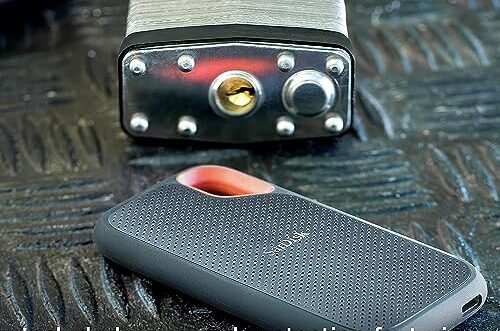
The best portable SSD blends fast transfers, solid build quality, useful capacity, and dependable everyday performance.
Your laptop storage is full, your phone videos keep growing, and your work files need a safe place to travel. A portable SSD can solve that mess without the noise, weight, or slow wait times of an old hard drive. I tested the key features that matter most, including speed, size, cable support, heat, durability, and value. This guide compares six popular models so you can find the Best Portable SSD for work, travel, gaming, photos, or phone storage.

SANDISK 2TB Extreme Portable SSD…
Get NVMe solid state performance with up to 1050MB/s read and 1000MB/s write speeds in a portable, high-capacity drive(1) (Based on internal testing; performance may be lower depending on host…

Samsung T7 Portable SSD 1TB…
MADE FOR THE MAKERS: Create; Explore; Store; The T7 Portable SSD delivers fast speeds and durable features to back up any endeavor; Build your video editing empire, file your photographs…

Samsung T9 Portable SSD 2TB,…
NONSTOP SPEED: Race through projects with our fastest SSD for creators; Load, edit and transfer with sustained read and write speeds of up to 2,000MB/s1; The T9 Portable SSD performs…
SanDisk 2TB Extreme Portable SSD

The SanDisk 2TB Extreme Portable SSD is a strong pick for people who carry large files every day. Its rated speed reaches up to 1,050MB/s through USB 3.2 Gen 2, which makes photo transfers, video backups, and project loads feel quick. The 2TB capacity gives creators room for raw photos, 4K clips, music libraries, and work folders. I also like its small shape because it slips into a pocket without feeling like a burden.
This model adds IP65 water and dust resistance, plus a rugged outer design for travel. That does not mean you should drop it into a pool, but it offers useful protection from rain, dust, and normal outdoor use. The USB-C connection works well with newer computers, while the included cable helps users get started quickly. SanDisk also lists updated firmware for this older model, so checking the drive software before heavy use is a smart step.
Pros:
- Large 2TB capacity for photos, videos, and backups
- Fast read speeds of up to 1,050MB/s
- IP65 water and dust resistance
- Compact body that travels easily
- USB-C connection for modern devices
- Useful choice for creators and field workers
Cons:
- Long sustained transfers may reduce speed as the drive warms
- USB 3.2 Gen 2 cannot reach the full speed of newer USB 3.2 Gen 2×2 drives
- Some older computers may need an adapter or different cable
Samsung T7 Portable SSD 1TB

The Samsung T7 remains one of the easiest portable SSDs to recommend. It reaches up to 1,050MB/s with a compatible USB 3.2 Gen 2 port, so it can move a large folder far faster than a basic portable hard drive. The 1TB size suits students, office users, photographers, and anyone who wants a simple backup drive. Its slim metal body also feels more polished than many low-cost external drives.
I find the T7 especially appealing for daily use because it balances speed and size well. It is quiet, light, and easy to carry between a desk, classroom, studio, and travel bag. The drive may become warm during long file transfers, which is normal for a compact SSD, but good airflow helps. It does not focus on rugged water protection, so I would use a case if you spend much time outdoors.
Pros:
- Fast performance for everyday file transfers
- Slim and light metal design
- Reliable brand with broad device support
- Good fit for laptops, desktops, and game systems
- Simple setup for most users
- Strong balance of speed, size, and price
Cons:
- 1TB may feel small for large video libraries
- No stated IP water or dust rating
- Full speed requires a compatible USB 3.2 Gen 2 connection
Samsung T9 Portable SSD 2TB

The Samsung T9 is the speed leader in this group when the host device supports USB 3.2 Gen 2×2. Samsung rates it for transfers of up to 2,000MB/s, which can save a great deal of time when moving large video projects or game files. The 2TB capacity gives demanding users a generous workspace without forcing them to carry several drives. For modern desktop computers and high-end laptops, this is a serious performance option.
The T9 has a compact body with a textured finish that is easy to grip. Its speed advantage depends on the port, cable, and computer, so buyers should check those details before paying for extra performance. On a regular 10Gbps USB port, it will not deliver the full 2,000MB/s rating. Still, even when limited by the host connection, it remains a capable high-capacity SSD for creative work and fast backups.
Pros:
- Up to 2,000MB/s rated transfer speed
- Large 2TB capacity for demanding workloads
- Excellent choice for video editors and large project files
- Compact design for a high-performance drive
- USB-C connection fits current computers
- Fast access for game libraries and media folders
Cons:
- Full speed needs USB 3.2 Gen 2×2 support
- More expensive than basic 1TB portable SSDs
- Long heavy transfers can create heat
SSK Portable SSD 1TB USB-C

The SSK 1TB Portable SSD targets users who want broad USB-C compatibility at a practical size. Its listed speed reaches up to 1,050MB/s with USB 3.2 Gen 2, making it suitable for backups, documents, photos, and video clips. The product listing also highlights use with iPhone 15, iPhone 16, iPhone 17 Pro, Windows, Mac, and Android devices. That wide focus makes it interesting for people who move files between several device types.
Phone storage is one of this drive’s biggest attractions. A compatible phone can use the SSD for supported file transfers, but the exact experience depends on the phone, operating system, app, cable, and file format. I suggest testing a small folder first before moving a whole photo library. The 1TB capacity gives a useful middle ground, though buyers who record lots of high-resolution video may prefer 2TB.
Pros:
- USB-C design suits many current devices
- Up to 1,050MB/s listed speed
- Useful 1TB capacity for daily storage
- Designed for Windows, Mac, Android, and newer iPhones
- Good option for moving phone photos and videos
- Small size works well in a tech pouch
Cons:
- Phone support can vary by model and operating system
- Some devices may need a suitable USB-C cable
- Brand support and software tools may be less familiar than Samsung or SanDisk
SanDisk 1TB Portable SSD

The SanDisk 1TB Portable SSD is a straightforward choice for users who want solid-state storage without paying for an extreme rugged model. Its listed speed reaches up to 800MB/s through USB-C and USB 3.2 Gen 2. That is more than enough for documents, school work, photo backups, and many home media tasks. It also offers a useful step up from a mechanical hard drive for people who value quiet operation and quick access.
This model works well as a daily carry drive. It is compact, simple to store, and easy to connect to a modern laptop or desktop. The 1TB capacity provides a good starting point for backups, but remember that usable space is lower after formatting. As with all portable SSDs, I would keep a second backup of important files because one external drive should never hold the only copy.
Pros:
- Up to 800MB/s listed speed
- Compact design for everyday travel
- Quiet solid-state operation
- Good fit for documents, photos, and school files
- USB-C and USB 3.2 Gen 2 support
- Simple option for users upgrading from a hard drive
Cons:
- Slower than the 1,050MB/s models in this guide
- 1TB may not suit large video projects
- It lacks the stronger outdoor protection of the Extreme model
SSK Portable SSD 500GB USB-C

The SSK 500GB Portable SSD is the budget-friendly size in this comparison. It lists speeds of up to 1,050MB/s through USB 3.2 Gen 2, so its capacity is modest but its rated connection speed is not. This drive can suit students, office users, and phone owners who need extra room for selected files. It is also easier to fill with a clean backup plan because the smaller space encourages better file control.
At 500GB, this SSD is best for focused tasks rather than a complete media archive. It can hold documents, music, a selection of photos, or a few smaller video projects. Users should check the phone and computer connection before expecting the listed speed. If you need to store years of photos or many large games, the 1TB or 2TB models offer more breathing room.
Pros:
- Fast listed speed of up to 1,050MB/s
- Lower capacity can mean a lower purchase cost
- USB-C design for newer devices
- Useful for selected phone files and documents
- Small and easy to carry
- Good starter SSD for light storage needs
Cons:
- 500GB fills quickly with 4K video
- Phone compatibility depends on the device and cable
- Less suitable for full computer backups
How I Choose the Best Portable SSD
Choosing the Best Portable SSD is not only about the largest speed number on the box. The host port sets a real limit. A drive rated for 2,000MB/s cannot reach that figure when connected to a slower USB port. I look at the full system: the SSD, the cable, the computer, the file type, and the job.
Small files often transfer differently from one large video file. A drive may look very fast in a short benchmark, then slow during a long write when its cache fills or its temperature rises. That behavior is common in compact flash storage. I prefer products that give a good mix of speed, capacity, size, and practical use.
Speed and USB Standards
USB names can confuse buyers. USB 3.2 Gen 2 commonly supports up to 10Gbps at the interface level, while USB 3.2 Gen 2×2 can support up to 20Gbps. The drive’s advertised megabytes per second are lower than the raw gigabit figure after overhead and system limits. In real use, the result also depends on the computer and file type.
The Samsung T9 has the highest rated speed here, but only a compatible USB 3.2 Gen 2×2 computer can unlock its main advantage. The SanDisk Extreme, Samsung T7, and SSK 1TB models sit near the 1,050MB/s class. The SanDisk 1TB model lists up to 800MB/s, which still feels quick for common home and office tasks.
Capacity and Real Storage Needs
Capacity is simple until real files arrive. A 500GB SSD works for documents, smaller photo collections, and selected backups. A 1TB drive is a better all-purpose choice for many users. A 2TB drive makes more sense for photographers, video editors, gamers, and travelers who carry large folders.
Manufacturers use decimal storage measurements, while some operating systems show capacity in a different way. Formatting and system space also reduce the number shown on your computer. I recommend leaving free space on the drive instead of filling it to the last gigabyte. A little breathing room can help keep file management smooth.
Durability for Travel
A portable SSD has no spinning disk, so it handles movement better than a traditional portable hard drive. That does not make every SSD waterproof or drop-proof. A drive can still suffer damage from impact, liquid, heat, a broken connector, or a lost cable.
The SanDisk Extreme stands apart with its IP65 water and dust resistance. This is useful for a camera bag, field work, or travel in uncertain weather. The rating does not cover every accident, and it is wise to close any port cover before exposure. The Samsung T7, Samsung T9, and other models are better treated as indoor or protected travel devices.
Heat and Sustained Transfers
Fast external SSDs create heat. Their small bodies have little room for cooling, so temperature can rise during a long backup or video export. Many drives reduce speed for a time to manage heat. This is not always a fault; it is a normal protection step.
I place portable SSDs on a clear desk rather than under papers or clothing. I also avoid using them in direct sun. If you often move hundreds of gigabytes at once, the faster T9 may save time at the start, but sustained performance still depends on airflow and the host computer.
Compatibility With Computers and Phones
Most of these drives use USB-C, but a USB-C shape does not guarantee the same speed on every device. Some cables carry power and data but do not support the fastest standard. Older laptops may use USB-A ports, so a suitable cable or adapter may be needed.
Phone use requires extra care. A phone must support external storage, and it may need enough power to run the drive. Some phone file apps handle external drives better than others. Before buying the Best Portable SSD for a phone, check the phone maker’s storage support and test the intended cable.
Backup Safety
An SSD is fast storage, not a complete backup plan. I follow the basic rule of keeping important files in at least two places. For irreplaceable photos, a third copy in cloud storage or another physical location adds useful protection.
Always eject the drive before unplugging it when the operating system asks you to do so. Sudden removal during a write can damage files. I also create clear folders by year, project, or client, because a clean file system saves more time than a small speed gain.
Best Portable SSD Buying Guide
The right model depends on your main task. If you need a drive for simple documents, a 500GB or 1TB option may be enough. If you shoot raw photos or 4K video, 2TB gives a better long-term fit. If you travel outdoors, protection matters as much as speed.
For a balanced purchase, I would start with the Samsung T7 or SanDisk 1TB Portable SSD. Both cover everyday storage well. The SanDisk Extreme adds more protection and capacity, while the Samsung T9 aims at users with a fast 20Gbps-class connection. The SSK drives make the most sense when phone support and price are central to the decision.
For Photographers
Photographers need capacity, speed, and confidence during travel. A 2TB drive gives room for raw images and exports. The SanDisk Extreme is attractive because its IP65 rating adds a layer of protection in a camera bag. The Samsung T9 is better for a studio workflow when the computer supports USB 3.2 Gen 2×2.
For Video Editors
Video files grow quickly, so I would avoid making 500GB your only working drive. The Samsung T9 is the performance choice in this list, but its full speed depends on compatible hardware. The SanDisk Extreme 2TB is a strong alternative for editors who want more rugged travel storage. Keep project files backed up before editing on any portable drive.
For Students and Office Users
Students and office users often need a simple drive for assignments, presentations, PDFs, and device backups. The Samsung T7 1TB is a polished all-purpose option. The SanDisk 1TB Portable SSD is also a good match when 800MB/s is enough and the price is right. These drives are quiet and much easier to carry than a large desktop disk.
For Phone Storage
Phone owners may want to move videos off a nearly full device. The SSK 1TB and SSK 500GB models focus on USB-C use with newer iPhones and Android devices. Choose 1TB if you record often. Choose 500GB if you only need a travel drive for selected files.
For Gaming
A portable SSD can hold game files and reduce load times compared with a hard drive, but console support varies. Check the console maker’s rules before buying. A 1TB drive offers a useful balance, while 2TB is better for a large library. The Samsung T7, SanDisk Extreme, and Samsung T9 all make sense for different budgets and port speeds.
My Recommendation
For most buyers, I recommend the SanDisk 2TB Extreme Portable SSD as the Best Portable SSD in this group. It offers fast 1,050MB/s-class performance, useful 2TB capacity, and IP65 protection in a compact body. It suits photographers, travelers, students with large media folders, and creators who work away from a desk. Its speed is not the highest here, but its overall balance is excellent.
I recommend the Samsung T7 for simple daily storage and the Samsung T9 for users with a USB 3.2 Gen 2×2 computer. The SSK 1TB is a practical phone-focused choice, while the SSK 500GB fits lighter storage needs. The SanDisk 1TB Portable SSD remains a sensible entry option for people who want a known brand and basic fast storage.
| Best for | Why |
|---|---|
| Outdoor travel and creators | SanDisk Extreme 2TB adds 2TB of space, fast transfers, and IP65 protection. |
| Maximum speed | Samsung T9 can reach up to 2,000MB/s with a compatible USB 3.2 Gen 2×2 port. |
| Simple everyday storage | Samsung T7 offers a slim body, strong speed, and easy use for common files. |
FAQs Of Best Portable SSD
What is the Best Portable SSD for most people?
The SanDisk 2TB Extreme is the strongest overall choice here. It combines fast performance, large capacity, and IP65 water and dust resistance. The Samsung T7 is a better fit if you want a slim everyday drive and do not need rugged protection.
Is a portable SSD better than a portable hard drive?
An SSD is usually faster, quieter, smaller, and more resistant to movement. A hard drive may offer a lower cost per terabyte. For travel and quick file access, I prefer an SSD.
Do I need USB 3.2 Gen 2×2 for the Samsung T9?
You need USB 3.2 Gen 2×2 to approach its listed 2,000MB/s speed. On a slower port, the drive will work but will not reach its top rating. Always check your computer port before buying for speed.
Can I use these SSDs with an iPhone?
Some models can work with newer USB-C iPhones, including compatible SSK listings. Support depends on the phone, cable, power, file system, and operating system. Test the connection with a small file first.
Is 1TB enough for a portable SSD?
For documents, school files, photos, and moderate backups, 1TB is often enough. Video editors, photographers, and gamers may prefer 2TB. A 500GB drive suits light storage but fills faster.
Final Verdict: Which Should You Buy?
The SanDisk 2TB Extreme is the best portable SSD for most users because it pairs fast speed, large space, and rugged protection. Choose the Samsung T9 only if your computer supports its top USB speed.
For simple daily backups, the Samsung T7 remains a smart value. Compare capacity, ports, and current availability before you buy the Best Portable SSD.

Similar Posts