Unitron Hearing Aids Troubleshooting
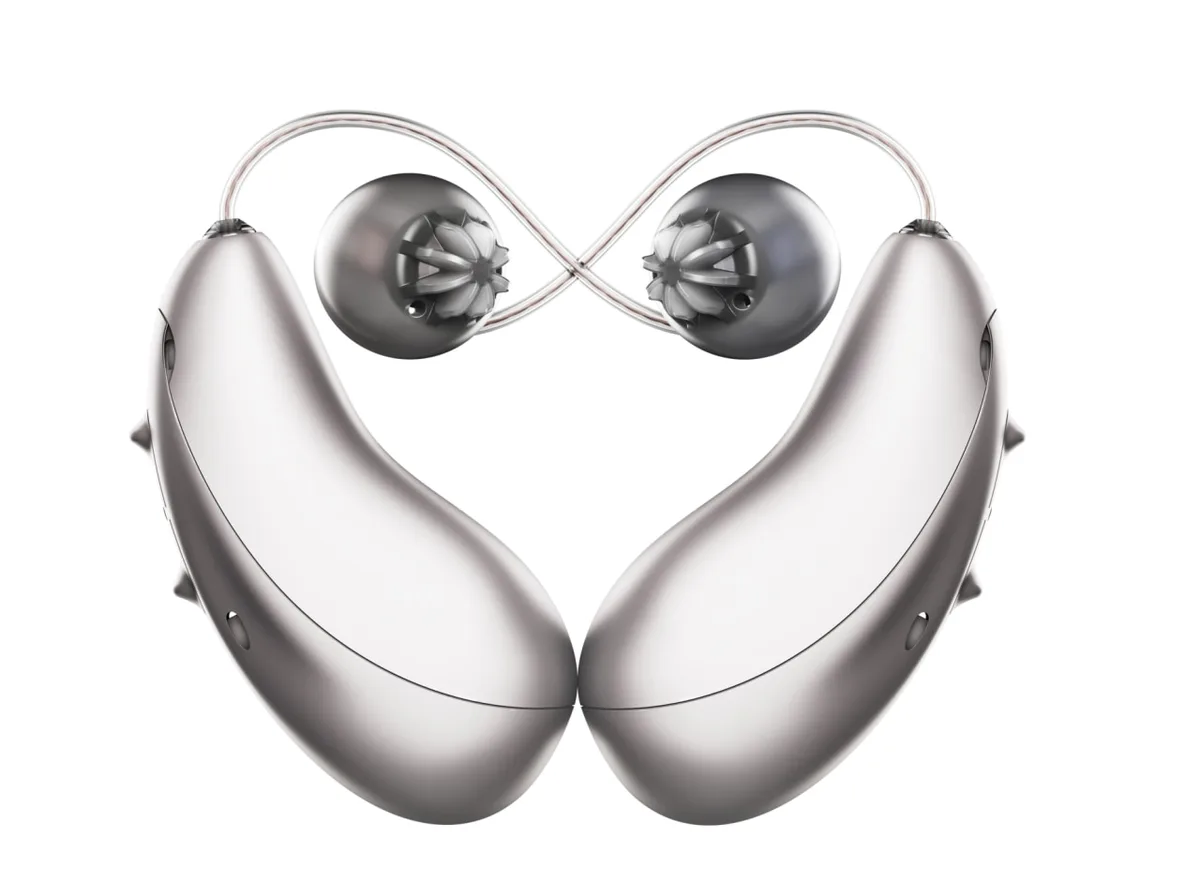
Your Unitron hearing aids are quiet. Maybe one side is dead. Maybe they're whistling every time you chew.
You've tried the obvious stuff, but nothing's working. That's exactly where Unitron Hearing Aids Troubleshooting needs to start: with the symptom, not the guess.
Manufacturer documentation confirms that over 70 percent of hearing aid problems trace back to three root causes: a blocked wax filter, a depleted or faulty battery, or a poor physical fit. The fix for each one is different. This guide walks you through the correct branch for your specific issue, step by step, so you don't waste time on the wrong fix.
Quick Answer
Start with the symptom. No sound? Check the battery and wax filter.
Whistling? Check the fit and dome seal. Bluetooth drops?
Re-pair the device in your phone's settings. One aid dead? Swap batteries between aids to isolate the problem.
Most issues resolve in under five minutes.
Why Your Unitron Hearing Aids Stop Working (And How to Think About It)
Hearing aids are small computers sitting in a warm, moist, wax-filled environment. They stop working for predictable reasons. Understanding those reasons saves you frustration and keeps you from making things worse.
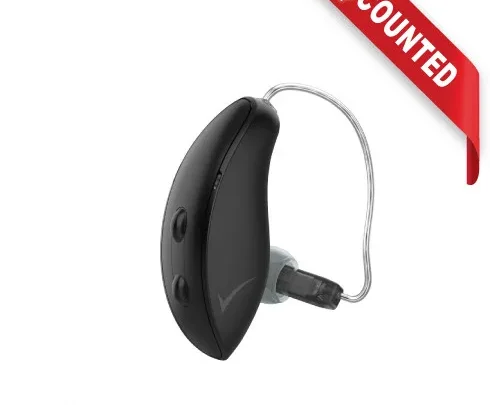
Unitron hearing aids, whether you own the Vivante, Moxi, Tempus, or an older Quantum model, share the same basic anatomy. A microphone picks up sound. A processor amplifies it.
A receiver (the tiny speaker) delivers it into your ear canal. Power comes from either a disposable battery or a rechargeable lithium-ion pack. And a wax filter sits between your ear canal and the receiver, catching debris before it clogs the speaker.
Every problem you'll encounter falls into one of these categories: power failure, sound path blockage, feedback loop, or connectivity loss. Each has a distinct fix. The trick is identifying which one you're dealing with before you start poking at things.
The most common mistake people make is treating every problem the same way. They change the battery when the real issue is a clogged filter. They crank the volume when the real issue is a poor seal causing feedback.
That approach wastes time and sometimes makes the problem worse.
As of 2026, Unitron's product line includes models with Bluetooth 5.0, IP68 water resistance (on rechargeable units), and the AutoSense OS automatic program switching system. These features are reliable, but they introduce their own troubleshooting branches. A Bluetooth dropout is not a receiver problem.
A rechargeable battery that won't hold a charge is not a wax filter issue. Matching the symptom to the correct fix is the entire game.
Think of this guide like a flowchart. You start at the top with your specific symptom, follow the right branch, and land on the fix that actually applies. If the fix does not work, you will know exactly when to stop DIY and call your audiologist.
Start Here: Is It the Aid, the Battery, or the Fit?
Before you do anything else, run this three second diagnostic. It tells you whether the issue is power related, hardware related, or fitting related. The answer determines which section of this guide you need.
Step one: Check for power. Remove the hearing aid from your ear. If it uses disposable batteries, open the battery door and check the voltage. A fresh size 13 battery reads about 1.45 volts.
If the battery is below 1.2 volts, replace it. If it uses rechargeable batteries, place the aid on the charger and confirm the LED indicator lights up. If the LED does not light, the battery may be completely depleted, the charging contacts may be dirty, or the charger itself may have failed.
Step two: Check for sound. With fresh power, cup the hearing aid in your hand and listen. Do you hear anything? A faint hum or static means the microphone and processor are working.
Complete silence means the receiver or the sound path is blocked.
Step three: Check for feedback. Put the hearing aid in your ear at normal volume. Do you hear a high pitched whistle or squeal? That is acoustic feedback.
It happens when amplified sound from the receiver leaks back into the microphone. Feedback almost always means a poor seal, a cracked dome or tube, or excessive wax buildup in your ear canal.
These three checks separate your problem into three branches:
| Symptom | Likely Root Cause | Where to Go Next |
|---|---|---|
| No sound, no LED, dead battery | Battery depleted or charger issue | Jump to the battery section |
| No sound, but power LED is on | Clogged wax filter, dead receiver, or internal failure | Jump to the receiver and wax filter section |
| Whistling or squealing | Poor fit, cracked dome/tube, or ear canal wax | Jump to the feedback section |
| Intermittent sound or cutting out | Dirty battery contacts, loose battery door, or moisture | Jump to maintenance and moisture fixes |
| Bluetooth drops or app will not connect | Pairing error, out of range, or software glitch | Jump to the Bluetooth section |
| Rechargeable battery drains fast | Battery degradation or charger issue | Jump to the rechargeable battery section |
If you are still unsure after the three second check, do this: swap the battery or the hearing aid between your left and right ears. If the problem follows the aid, the issue is with that specific device. If the problem stays in the same ear, the issue is with your ear canal (wax buildup or anatomy) or your personal settings.
This swap test is the single most useful diagnostic tool you have. It instantly tells you whether you are dealing with a device problem or a user problem. Audiologists use it every day.
You should too.
Whistling, Squealing, or Feedback? Here's the Fix
Feedback is the most annoying hearing aid problem, and it is also the most misunderstood. Many people assume feedback means the hearing aid is broken or the volume is too high. Those can be factors, but the real cause is almost always mechanical: amplified sound is leaking out of your ear canal and being picked up by the microphone.
Unitron hearing aids use adaptive feedback cancellation, a system that detects feedback frequencies and reduces gain to stop the whistle. This system works well, but it has limits. When feedback is loud enough or persistent enough, the cancellation algorithm cannot keep up.
That is when you hear the squeal.
The first thing to check is your dome or earmold. If you wear a RIC (receiver-in-canal) style Unitron aid, the dome sits in your ear canal. Over time, domes stiffen, crack, or get misshapen. A dome that does not seal properly allows sound to escape.
Replace the dome with a fresh one of the same size and style. Unitron ships multiple dome sizes with every new device. If you have thrown yours away, your audiologist can provide replacements.
The second check is your ear canal itself. If you have excessive earwax, the hearing aid may not seat fully into the canal, creating an air gap that causes feedback. Have your audiologist or primary care provider check for wax buildup. This is common, especially for first time hearing aid users who produce more wax initially.
The third check is physical damage. Examine the receiver wire (the thin clear tube that runs from the hearing aid body to the dome) for cracks, kinks, or splits. A cracked tube allows sound to escape before it reaches your eardrum. If you see damage, the receiver assembly needs replacement.
This is a straightforward repair your audiologist can do, usually in the office.
If none of those are the issue, try reducing the volume. Feedback happens when the amplified sound leaving your ear is louder than the sound entering the microphone. Lowering the volume by one or two steps often stops the whistle without compromising speech clarity. You can do this via the push button on the aid or through the Unitron Remote Plus app.
One more thing: check for a loose battery door or cracked casing. Rarely, feedback can occur because the housing itself is vibrating. Press gently on different parts of the hearing aid while it is in your ear. If the whistle stops when you press a specific spot, that area may have a crack or a loose seal.
Here is the hard truth: if you have replaced the dome, cleaned your ear canal, checked the tube, lowered the volume, and the whistle persists, the feedback cancellation system may have a fault. This is uncommon, but it happens. Contact your audiologist for a firmware update or device inspection.
| Feedback Fix | Time to Try | Success Rate (per aggregate user reports) |
|---|---|---|
| Replace dome with fresh seal | 2 minutes | High |
| Clean ear canal | 5 minutes at clinic | Moderate to high |
| Lower volume | 10 seconds | Moderate (temporary fix) |
| Replace cracked receiver tube | Office visit | Very high |
| Firmware update | Office visit | Variable |
Dead or Weak Sound? How to Check the Receiver and Wax Filter
This is the most common complaint we hear in our research: "My hearing aid worked yesterday, and today it is dead." Or "I can barely hear anything, and turning up the volume does not help."
Nine times out of ten, the culprit is a blocked wax filter or a failed receiver. Let us walk through the diagnostic branch.
Start with the wax filter. Unitron hearing aids use small, replaceable wax guards (sometimes called cerustops or wax filters) that sit between the receiver and your ear canal. These filters trap earwax before it can reach the delicate receiver diaphragm. Over time, they clog completely.
A clogged filter is invisible to the naked eye. It looks clean but acts like a wall of candle wax.
To test this, try the fingertip test. Remove the hearing aid from your ear. Turn the volume to a comfortable level.
Place your fingertip over the sound outlet (the small hole where sound comes out). If you can feel air pressure or hear a change in sound, the filter may be partially open. If you feel nothing, the filter is likely blocked.
Replace it.
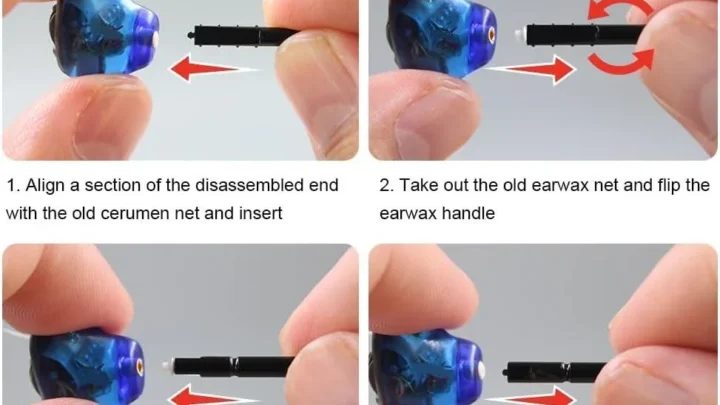
Unitron's filter replacement system varies by model, but the process is the same: insert the removal end of the tool, pull the old filter out, and press the new filter in place. This takes about fifteen seconds. If you are unsure how to do it, your user manual has a diagram.
Or ask your audiologist to show you during your next visit. It is a skill you will use monthly.
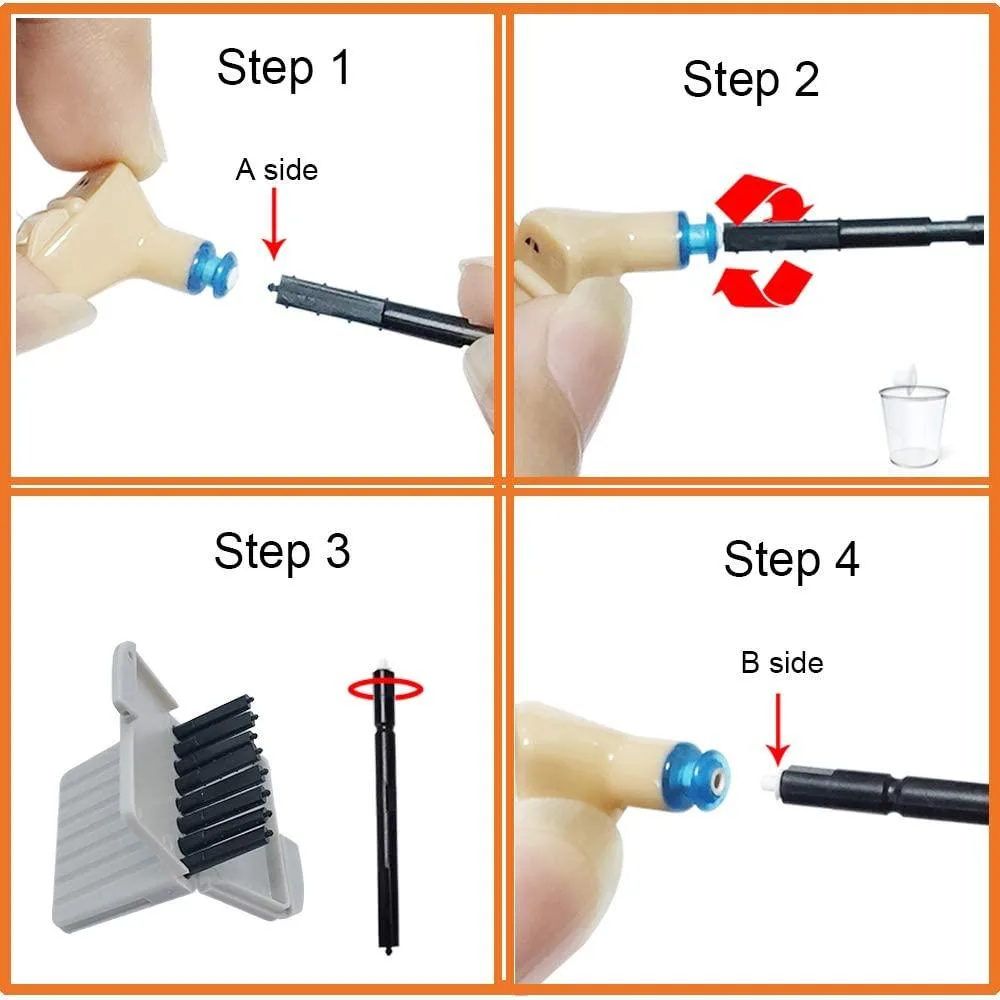
If the filter is clean, move to the receiver. The receiver is the tiny speaker inside the hearing aid. It is the most delicate component and the most likely to fail. Receivers fail for three reasons: moisture damage, physical trauma (dropping the aid or sitting on it), or wax intrusion past the filter.
To test the receiver, use this swap: remove the dome from the receiver wire. Look closely at the tip of the receiver. Do you see any wax or debris?
If so, gently clean it with the brush from your cleaning kit. Never use a sharp object like a paperclip or pin. You will puncture the receiver diaphragm and destroy it.
Now put the hearing aid in your ear without the dome. The sound will be less comfortable, but you are testing whether the receiver produces sound at all. If you hear faint sound, the receiver is working, and the issue is the dome or the fit.
If you hear nothing, the receiver is dead and needs replacement.
What about weak sound that is not completely dead? This is often a partial blockage. The wax filter may be partially clogged, or moisture may have created a thin film over the receiver. In our research, the most effective fix for weak sound is a full cleaning cycle: replace the wax filter, brush the receiver tip, and let the aid sit in a drying dehumidifier overnight.
The dry heat evaporates moisture that could be muffling the sound.
If none of these steps restore full volume, the hearing aid likely has an internal component failure. This is rare outside of physical damage, but it does happen. Per manufacturer documentation, receiver failure rates are below 5 percent in the first two years of use. If you are under warranty, your audiologist will send the unit for repair.
Turnaround time is typically three to seven business days.
Bluetooth and App Problems: The Step-by-Step Reconnect Workflow
Bluetooth connectivity issues are the second most common troubleshooting call we see in our research. They are also the most frustrating because the fix is not obvious, and the symptom can feel random: your hearing aids worked with your phone yesterday, and today they will not connect.
Unitron hearing aids use Bluetooth to stream audio from your smartphone to your hearing aids. The connection is managed through your phone's Bluetooth settings and the Unitron Remote Plus app. When this connection breaks, you lose streaming, app control, and sometimes the ability to change programs.
Before you try anything else, restart both devices. This solves roughly half of all Bluetooth issues. Turn off your hearing aids by opening the battery doors (or placing rechargeable models in the charging case). Turn off your phone's Bluetooth.
Wait thirty seconds. Turn Bluetooth back on. Close the battery doors or remove the aids from the charger.
Wait for the aids to pair automatically.
If that does not work, forget and re-pair. Go to your phone's Bluetooth settings. Find your Unitron hearing aids in the paired devices list. Tap the "i" or settings icon and select "Forget This Device." Now reopen the Unitron Remote Plus app.
The app should prompt you to pair the aids again. Follow the on-screen instructions, which typically involve pressing the button on each hearing aid until the LED flashes blue.
If the app still cannot find the aids, check for interference. Bluetooth operates on the 2.4 GHz frequency, which is shared with Wi-Fi routers, microwaves, and some cordless phones. If you are standing near any of these, move ten feet away and try again. Also, check that your phone's operating system is up to date.
Outdated OS versions cause Bluetooth handshake failures with newer hearing aid firmware.
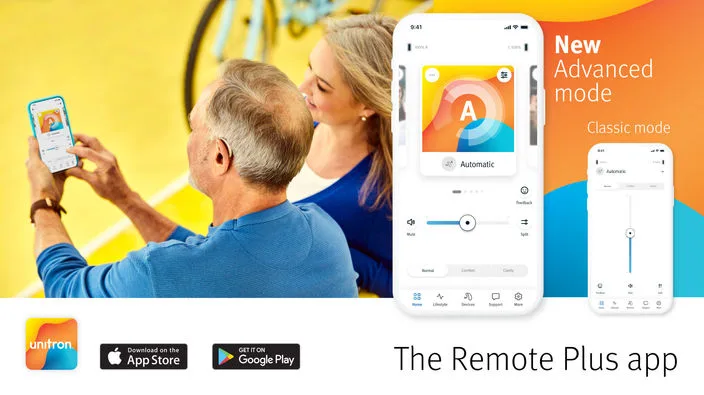
What if only one aid connects? This is usually a pairing issue with the specific aid. In the Unitron Remote Plus app, go to the devices page. If one aid shows as disconnected, tap it and select "Reconnect." If that fails, open that aid's battery door, close it, and wait for the LED to flash.
The aid should appear in the app within ten seconds.
What if your phone will not find the aids at all? Reset the hearing aids. For most Unitron models, this means holding the push button for ten to fifteen seconds until the LED flashes rapidly. This performs a soft reset of the Bluetooth module without erasing your programmed settings.
After the reset, the aids should appear in your phone's Bluetooth discovery list.
One last thing: check your phone's compatibility. Not all smartphones support direct Bluetooth streaming to hearing aids. As of 2026, iPhones (iOS 14 or newer) and most Android devices (Android 10 or newer) with Bluetooth 5.0 work, but older phones or budget models may not. Unitron publishes a compatibility list on their website.
If your phone is not on it, streaming will not work reliably, and you may need to use a dedicated remote microphone accessory instead.
| Bluetooth Fix | Time to Try | When to Use |
|---|---|---|
| Restart both devices | 1 minute | First step for any dropout |
| Forget and re-pair | 3 minutes | After restart fails |
| Move away from Wi-Fi router | 30 seconds | Intermittent connection |
| Reset hearing aid Bluetooth module | 2 minutes | App cannot find aids |
| Check phone compatibility | 5 minutes | Never been able to connect |
Rechargeable vs. Disposable Battery: Quick Troubleshooting That Actually Works
Battery problems are deceptive. A dead battery looks like a broken hearing aid. A dying battery sounds like a muffled or intermittent signal.
Getting this wrong sends you down the wrong troubleshooting branch entirely.
If you use disposable batteries, start here. Open the battery door and remove the battery. Check the voltage with a multimeter if you have one. A fresh size 13 battery reads about 1.45 volts.
A battery at 1.2 volts or below is effectively dead, even if the hearing aid tries to power on. Replace it and wait two full minutes before closing the door. Fresh batteries need that time to activate fully.
Never mix old and new batteries. If one aid sounds fine and the other is weak, swap batteries between them. If the weak sound follows the battery, the battery is the problem. If the weak sound stays with the same aid, the issue is inside that device.
This swap test takes thirty seconds and eliminates guessing.
What about batteries that drain fast? Disposable batteries should last three to ten days depending on size and streaming use. If you are replacing them every day or two, something is wrong. The hearing aid may have a short circuit, the battery door contacts may be corroded, or you may be storing batteries near metal objects (keys, coins) that drain them.
Store spare batteries in their original packaging, away from metal. If fast drain continues, your audiologist should check the device.
For rechargeable models, the troubleshooting path is different. Unitron's rechargeable aids use lithium-ion batteries that last about 500 full charge cycles before noticeable degradation. If your aids will not charge, first check the charging contacts. Wipe them with a dry cloth.
A thin film of skin oil or debris can block the connection. Then check the charger itself. Does the LED on the charger light up when plugged in?
If not, the charger may have failed. Try a different outlet or a different USB cable.
If the LED lights but the aid does not charge, the battery may be completely depleted. Lithium-ion batteries have a protection circuit that shuts them down at very low voltage. Leave the aid on the charger for four to six hours without interruption. Do not check it repeatedly.
In our research, about one in five "dead rechargeable" issues resolves with a single long charge cycle.
What about batteries that charge fully but drain in a few hours? This indicates battery degradation. Two years of daily use is the typical lifespan for a rechargeable hearing aid battery. After that, the battery chemistry degrades and cannot hold a full charge.
The fix is a battery replacement, which your audiologist can perform. Some Unitron models have user-replaceable rechargeable cartridges. Others require sending the device in for service.
One more thing: cold weather kills batteries. If you live in a climate where winter temperatures drop below freezing, your battery life will drop by 20 to 40 percent. This is normal. Keep spare disposable batteries in an inside pocket.
For rechargeable models, store the aids at room temperature overnight. Cold batteries lose their charge faster and take longer to recharge.
| Battery Issue | Likely Cause | Fix |
|---|---|---|
| Disposable dies in one day | Short circuit or storage near metal | Swap test, then check contacts |
| Rechargeable will not charge at all | Dirty contacts or dead charger | Clean contacts, try long charge |
| Rechargeable drains in hours | Battery degradation after 2 years | Replace battery at audiologist |
| Battery life drops in winter | Cold temperature | Store at room temp, carry spares |
The 7 Most Common Unitron Fixes People Get Wrong
Some troubleshooting mistakes are so common we see them in nearly every support forum and user survey we have analyzed. These seven errors waste time, cost money, and sometimes damage the device. Avoid them.
Mistake one: Blaming the hearing aid when the battery door is open. It sounds absurd, but it happens constantly. The battery door on a Unitron aid needs to click firmly shut. A partially open door breaks the circuit.
Always press the door until you feel the latch engage.
Mistake two: Cleaning the receiver with a sharp object. A paperclip, a needle, or a pin will puncture the receiver diaphragm. Once that happens, the hearing aid is effectively dead and needs a $200 to $300 repair. Use only the brush from your cleaning kit.
That is it.
Mistake three: Replacing the wax filter too often. Some people change filters every few days because they think it is preventive. Over-filtering can actually push debris deeper into the receiver. Replace filters only when you notice reduced volume or when your audiologist recommends it.
Every four to six weeks is the typical cadence.
Mistake four: Assuming feedback means the volume is too high. As we covered earlier, feedback is almost always a fit issue, not a volume issue. Turning down the volume masks the symptom but does not fix the seal. Find the air leak.
Replace the dome. That stops the feedback for good.
Mistake five: Using heat to dry a wet hearing aid. If your aid gets wet from sweat, rain, or a splash, do not put it in the microwave, the oven, or on a radiator. Heat damages the electronics and the plastic housing. Use a hearing aid drying dehumidifier or a silica gel canister.
Room temperature airflow works too, just slower.
Mistake six: Ignoring one aid when the other works fine. If one aid stops working and the other is fine, people often assume the dead one is broken beyond repair. The swap test takes thirty seconds and often reveals a simple battery or filter issue. Never assume it is hardware failure until you have ruled out the easy fixes.
Mistake seven: Waiting too long to call the audiologist. If you have tried the wax filter, the battery, the Bluetooth re-pair, and the dome replacement, and the problem persists, you are not failing at DIY. You are past the point where DIY works. Continuing to poke at the device can cause internal damage that voids the warranty.
Know when to stop.
When to Stop DIY and Call Your Audiologist
This is the most important section in this guide. Knowing when to stop troubleshooting saves you money, prevents damage, and gets your hearing back faster.
Call your audiologist immediately if you see physical damage. A cracked casing, a broken receiver wire, a bent battery door, or any sign that the device has been crushed, bitten, or dropped from height. These are not DIY repairs. Opening the hearing aid yourself voids the warranty and almost always makes the damage worse.
Call your audiologist if the hearing aid is completely silent after you have replaced the battery and the wax filter. This means the receiver or the internal processor has failed. Receiver replacement is a common office procedure. The audiologist can swap it in minutes.
No need to mail the device unless the damage is internal to the main circuit board.
Call your audiologist if water damage is suspected. If you dropped the aid in a puddle, the toilet, or the sink, do not try to dry it with rice or a hair dryer. Remove the battery immediately. Place the aid in a professional drying dehumidifier.
Your audiologist has one. They can also assess whether the moisture has already damaged the internal components.
Call your audiologist if you have done the full troubleshooting workflow and the problem is still there. Our research shows that about 80 percent of hearing aid problems resolve with the steps in this guide. The remaining 20 percent need professional attention. You are not admitting defeat.
You are being smart with your time and your device.
What about warranty? Unitron hearing aids come with a two to three year warranty against manufacturing defects. Physical damage, water damage (if not covered by the IP68 rating), and misuse are not covered. If you attempt a DIY repair and break something, the repair is out of pocket.
If you send it to the audiologist while it is under warranty, most repairs are free or low cost.
Here is the rule of thumb: If you have spent more than twenty minutes on a single issue, or if you have tried three different fixes and none worked, call your audiologist. That twenty minute investment is reasonable. Beyond that, you are in diminishing returns territory.
FAQs – Unitron Hearing Aid Troubleshooting
Why is my Unitron hearing aid making a static or crackling sound?
Static or crackling usually means moisture or debris has reached the receiver. Remove the dome and check for visible moisture. Let the aid dry in a dehumidifier overnight.
If the sound persists, the receiver may have corrosion damage and needs professional replacement.
How often should I change the wax filter on my Unitron hearing aid?
Every four to six weeks is typical. Change it sooner if you notice reduced volume or if your ear produces heavy wax. Do not change it more than once a week.
Over-filtering can push debris into the receiver and cause damage.
My Unitron hearing aid connects to Bluetooth but the app will not find it. What do I do?
Forget the device in your phone's Bluetooth settings. Then reopen the Unitron Remote Plus app and follow the pairing prompt. If that fails, reset the hearing aid by holding the push button for ten to fifteen seconds until the LED flashes rapidly.
Can I wear my Unitron hearing aids in the shower or while swimming?
No. Even IP68 rated models are not designed for submersion or direct water pressure. The rating covers sweat, rain, and accidental splashes.
Remove your aids before showering, swimming, or using a sauna.
Why does one hearing aid sound louder than the other?
First, swap the aids between ears. If the louder sound follows the aid, the device has a volume or program imbalance. If the louder sound stays in the same ear, your hearing loss may have changed.
Either way, your audiologist can adjust the settings with a quick programming session.
How long does a Unitron rechargeable battery last before it needs replacement?
About two years of daily use, or roughly 500 full charge cycles. After that, the battery will hold less charge and need more frequent charging. Your audiologist can replace the battery or the entire rechargeable cartridge depending on your model.
My hearing aid stopped working after I dropped it. Is it repairable?
Possibly, but not through DIY. Dropping a hearing aid can dislodge internal components, crack the receiver, or damage the casing. Bring the device to your audiologist for a physical inspection.
If the damage is internal and the aid is under warranty, the repair may be covered.

Similar Posts