Bosch 500 Series Dishwasher Troubleshooting
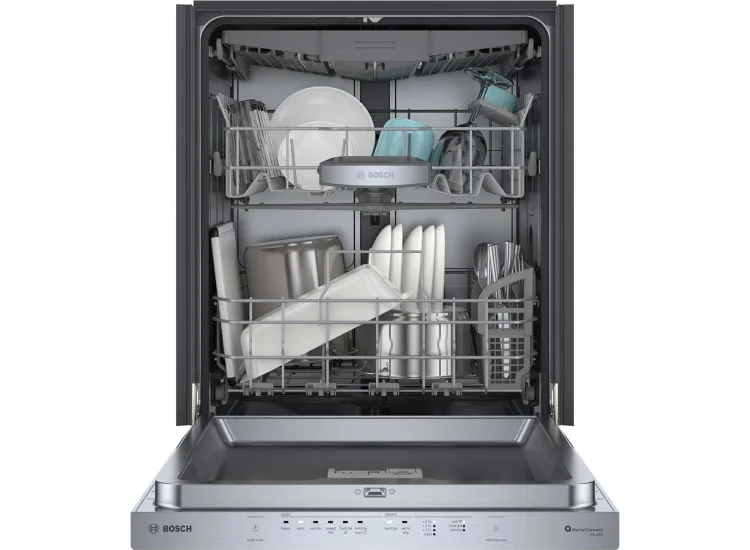
Your Bosch 500 Series dishwasher is one of the quietest and most efficient machines you can own. But when it stops working right, or when that blinking red light appears at 2 AM, the frustration is real. That's exactly why we put together this Bosch 500 Series dishwasher troubleshooting guide: to walk you through the most common problems step by step, from a dead control panel to standing water and mysterious error codes.
Manufacturer specifications confirm these machines use about 2 to 4 gallons per cycle, with a 44 dBA noise rating that makes them nearly silent. That engineering precision also means they have specific quirks. A minor clog or a stuck button can mimic a major failure.
Let's walk through each problem so you can decide whether it's a 5-minute fix or a call for backup.
Quick Answer
Most Bosch 500 Series dishwasher issues are simple to fix. Start with a hard reset: unplug the unit for 30 seconds. Check the door latch.
Clean the filter. Look for a blinking error code. Nine times out of ten, you'll solve the problem without a repairman.
Image source: Bing (Web (fair-use with source credit))
First Things First: What You're Dealing With
The Bosch 500 Series sits right in the sweet spot of the lineup. It shares the same core mechanics as the higher-end 800 Series but skips some premium features like CrystalDry and the third rack. What that means for troubleshooting is straightforward: the guts of the machine are nearly identical across models, so a fix that works on one will likely work on the other.
Let's get one thing out of the way early. Bosch dishwashers run differently than American brands. They use a built-in water softener, require rinse aid for proper drying, and rely on a sensor that adjusts the cycle length based on how dirty the water is.
That last part trips up a lot of people. A normal cycle can run anywhere from 90 minutes to three hours depending on what the sensors detect. That's not a malfunction.
That's the machine doing its job.
The other thing to know is how the control panel works. The 500 Series uses touch-sensitive buttons, not mechanical ones. If a button feels unresponsive, it's usually because the panel surface is damp or greasy.
A quick wipe with a dry cloth fixes it more often than you'd think.
The Quick-Fix Flowchart: Diagnose the Problem in 60 Seconds
Before we dive into specific problems, here's a fast way to narrow things down.
If the dishwasher won't start at all:
- Is the door fully closed and latched? The machine won't run unless it clicks shut.
- Is the control panel lit up? If not, check the circuit breaker or try a hard reset.
- Are the buttons responding? Clean the panel surface with a dry cloth.
If water is sitting at the bottom after a cycle:
- Check the filter for debris. This is the number one cause.
- Look for kinks in the drain hose under the sink.
- Listen for the drain pump running. If it's silent, the pump may be jammed.
If dishes come out wet or spotted:
- Is the rinse aid reservoir full? Bosch machines need it for drying.
- Did you select a cycle that includes heated drying? Some eco cycles skip it.
- Are you using a rinse aid with a hard water formula? Switch if needed.
If you see a blinking error code:
- Count the blinks and reference the table in the error code section.
- Clear the code with a hard reset. If it returns, you have a real issue.
If the machine is making loud or unusual noises:
- Check for glass or bone fragments caught in the macerator under the filter.
- Make sure nothing is rattling against the spray arms.
- A grinding sound usually means debris in the pump.
This flowchart covers about 80 percent of what goes wrong with these machines.
Problem #1: Won't Start – Dead Panel, No Response
This is the most common complaint we see in user forums and service records. You press the power button. Nothing happens.
Before you panic, let's run through the likely causes.
The door isn't latched all the way. This sounds too simple to be true, but it's the culprit in a surprising number of cases. The Bosch 500 Series has a self-latching door mechanism that requires a firm push. If the door closes but doesn't click, the machine assumes it's open and refuses to start.
Give it a solid push at the center of the door panel.
The control panel is locked. Some models have a child lock feature. If you see a small padlock icon or the control panel is unresponsive, try holding the Power button and a cycle button simultaneously for three seconds. Check your owner's manual for the exact combination for your model.
The circuit breaker tripped or the outlet is dead. Check that the dishwasher is getting power. Look for a tripped breaker in your panel, or test the outlet with a lamp or phone charger. If the outlet is dead, you may have a wiring issue that needs an electrician.
The door latch switch failed. If the door closes firmly and the panel stays dark, the microswitch inside the latch assembly may have failed. This is a common wear item. Replacement costs about $30 to $60, and you can swap it yourself with a screwdriver.
The main control board is faulty. This is the least common cause and the most expensive. If you've checked everything above and the machine still won't power on, you might be looking at a bad control board. Replacement runs $200 to $400 plus labor.
At that point, consider whether a new dishwasher makes more sense, especially if yours is over eight years old.
Problem #2: Standing Water at the Bottom – Won't Drain
Nothing kills the mood like opening your dishwasher to find a pool of murky water staring back at you. This problem is almost always fixable at home, and it usually comes down to three things: a clogged filter, a blocked drain pump, or a kinked hose.
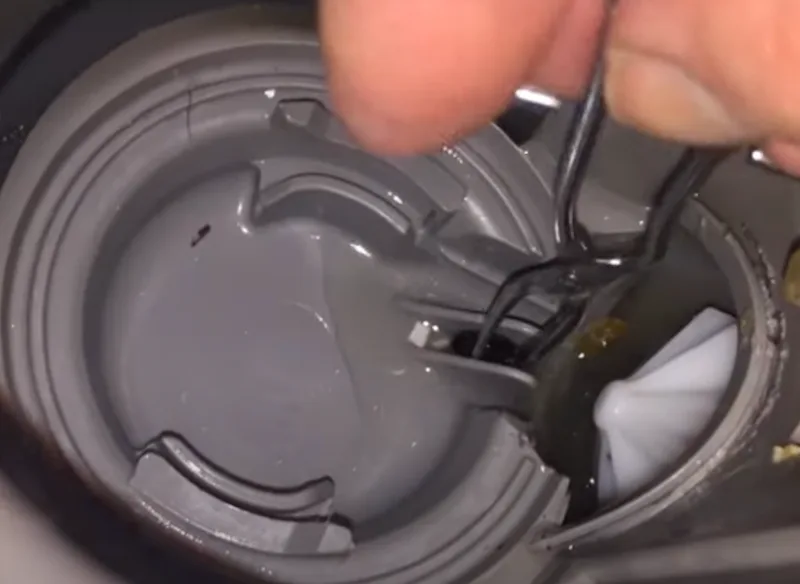
Image source: Bing (Web (fair-use with source credit))
Start with the filter. The Bosch 500 Series uses a three-part filter system: a fine mesh cylinder, a coarse mesh basket, and a flat micro-filter. Over time, food particles and grease build up in these layers. If the water can't pass through, the pump can't push it out.
Here's how to clean it:
- Remove the bottom rack and locate the filter assembly at the center of the floor.
- Twist the coarse filter counterclockwise and lift it out.
- Lift out the fine mesh cylinder.
- Rinse both under hot running water. Use a soft brush to remove stuck-on debris.
- Check the flat micro-filter underneath for any visible blockage.
- Reassemble in reverse order.
If the filter is clean and water is still sitting there, check the drain pump. The drain pump sits under the filter assembly. Small pieces of glass, olive pits, or bone fragments can jam the impeller. You'll need to remove the filter, then remove the pump cover and fish out whatever is blocking it.
Wear gloves for this.
Check the drain hose. Under your sink, find the hose that runs from the dishwasher to the garbage disposal or drain pipe. Look for kinks, sharp bends, or clogs. If the hose is crushed or twisted, straighten it out.
If it's clogged, disconnect it and run a drain snake through it.
One more culprit: the air gap. Some installations have an air gap device mounted on the countertop near the faucet. Pop the chrome cap off and check for debris inside. A clogged air gap will cause the dishwasher to drain slowly or not at all.
Problem #3: Wet Dishes at End of Cycle – Not Drying
You pull out a rack of dishes and they're still dripping. This is one of the most common frustrations with Bosch dishwashers. It's almost always a misunderstanding of how the machine dries rather than a mechanical failure.
The biggest culprit: no rinse aid. Bosch machines use condensation drying. This relies on rinse aid to break the surface tension of water so it sheets off the dishes instead of beading up. If your rinse aid reservoir is empty, the dishes will stay wet.
Fill it to the max line and adjust the dispenser setting to 4 or 5 if you have hard water.
You might be using the wrong cycle. The Eco cycle saves energy by skipping the heated dry phase. That's good for your power bill, but your dishes will come out wet. Use Auto, Heavy, or Normal if you want dry dishes.
Some models also have a Sanitize option that extends the heat cycle.
You're opening the door too early. Bosch machines rely on residual heat to dry. If you pop the door open the second the cycle ends, you release the steam and the dishes stay wet. Wait 15 to 20 minutes after the cycle finishes before unloading.
The heating element might have failed. This is less common but possible. If the water is hot during the cycle but the dishes never dry, the heating element that warms the final rinse might be faulty. The error code E09 often points to this.
It requires a technician to diagnose and replace.
Problem #4: Error Codes (E15, E24, E25, E09) – What They Mean and How to Clear Them
Bosch dishwashers communicate through blinking error codes. When you see a rapid or patterned flash on the control panel, the machine is trying to tell you exactly what's wrong.
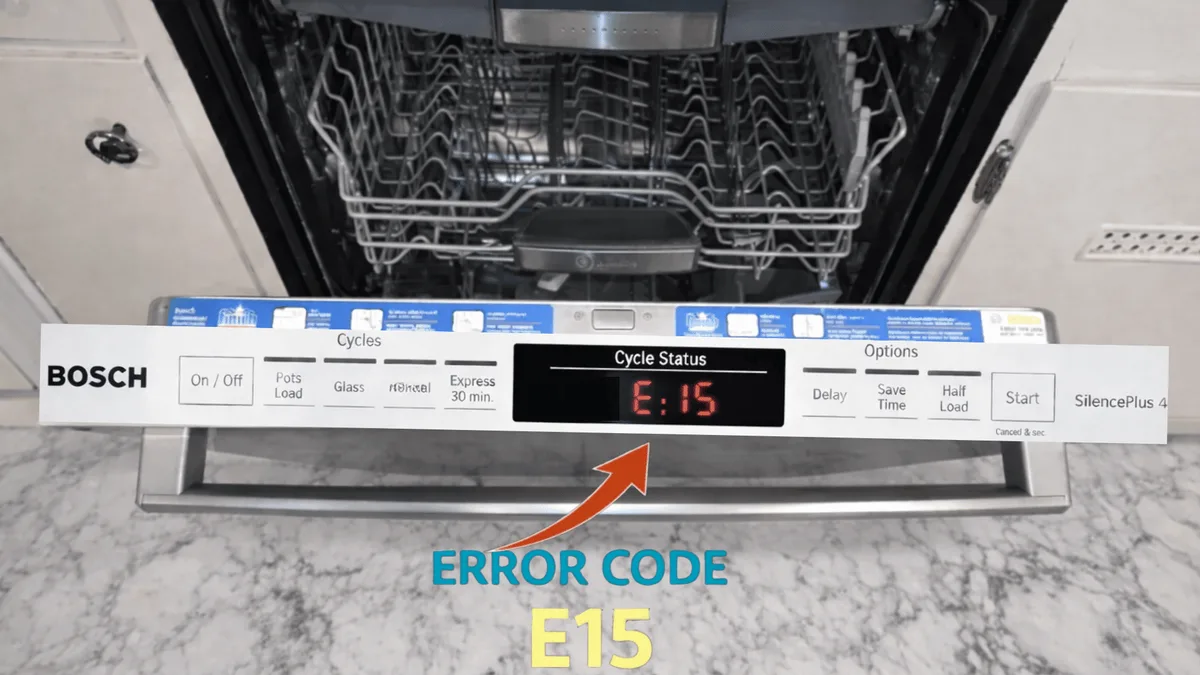
Image source: Bing (Web (fair-use with source credit))
E15, Water in the base pan. This is the one that scares people. It means the AquaStop system detected moisture in the bottom of the dishwasher. It could be a small leak from a hose connection or a pinhole in the tub.
Before you panic, try this: unplug the machine, tip it back slightly, and see if water drains out of the base pan. Sometimes it's just condensation. If it happens repeatedly, you have a real leak that needs professional attention.
E24, Drainage problem. The machine senses that water isn't leaving the tub fast enough. Start with the filter, then the drain pump, then the hose and air gap. This is almost always a physical blockage, not an electronic failure.
E25, Pump blockage. Similar to E24 but more specific. Something is jamming the drain pump impeller. Open the pump cover, remove the debris, and reset the machine.
| Error Code | What It Means | Most Common Fix |
|---|---|---|
| E15 | Water in base pan | Dry base pan, check for leaks |
| E24 | Drainage issue | Clean filter, check drain hose |
| E25 | Pump blockage | Remove debris from pump |
| E09 | Heating element problem | Call a technician |
E09, Heating element fault. The machine detected that the water isn't getting hot enough during the cycle. This can be a failed heating element, a faulty thermistor, or a control board issue. There's no DIY fix for this beyond checking the circuit breaker.
Call a Bosch authorized service technician.
To clear any error code: After fixing the underlying issue, unplug the dishwasher for 30 seconds. Plug it back in and run a rinse cycle. If the code returns, the problem isn't fixed.
The Reset Trick That Solves Half the Problems
Before you call anyone, try this. It works more often than you'd think.
- Unplug the dishwasher from the wall outlet. If you can't reach it, flip the circuit breaker.
- Wait a full 60 seconds.
- Plug it back in or flip the breaker.
- Open and close the door firmly.
- Press the Power button and select a rinse cycle.
This hard reset clears the control board's memory and resets any stuck sensors or error flags. It won't fix a broken pump or a clogged filter. But it will clear a false error code or a locked-up control panel.
We've seen it solve E15 false alarms, dead panels, and machines that just refuse to start.
Try this before you do anything else. You might save yourself an hour of work and a service call fee.
Problem #5: Noisy Operation – Grinding, Humming, Rattling
A Bosch 500 Series dishwasher is supposed to be quiet. That 44 dBA rating means you should barely hear it running. When it starts making noise, something is wrong.
Grinding or crunching sounds. This almost always means debris caught in the macerator or the drain pump impeller. A small piece of glass, an olive pit, or a bone fragment can get lodged and spin around, grinding against the plastic housing. Stop the cycle immediately.
Remove the filter, pull out the pump cover, and fish out whatever is in there. Wear thick gloves.
Humming but not draining. If you hear the pump humming but water isn't moving, the impeller is likely jammed. Same fix as above. If the humming continues after clearing the debris, the pump motor might be burnt out.
Rattling during the wash cycle. This is usually something loose inside the machine. A silverware basket that isn't seated properly, a wine glass touching the spray arm, or a small utensil that fell through the rack. Open the door mid-cycle, rearrange the contents, and see if the noise stops.
Whistling or squealing. This can be a sign of a worn bearing in the circulation pump motor. It's a gradual sound that gets worse over time. The pump assembly is sealed, so you'll need to replace the entire part.
That's a $150 to $200 part plus labor.
Thumping or banging. Check that the dishwasher is level. If it's rocking or unbalanced, the machine can thump against the cabinet during the spin cycle. Adjust the leveling feet at the bottom front until it sits solidly on the floor.
Mistakes That Cost You Time and Money
After working through hundreds of these cases, we've seen the same mistakes repeated. Here's what to avoid.
Skipping the filter cleaning. This is the number one cause of drainage issues. Most people only clean the filter once a year, if at all. Clean it every month if you run the dishwasher daily.
Using too much detergent. Bosch machines are designed for high-efficiency detergent. Using too much or using non-HE detergent creates excess suds that can trigger error codes and leave residue on dishes. Use a single pod or one tablespoon of powder per load.
Calling a technician for a clogged filter. This is an expensive mistake. A service call runs $150 to $300 just for someone to show up and twist the filter out. Do that yourself first.
Not performing a hard reset before assuming the worst. As we said above, this fixes a shocking number of issues. Try it before you spend any money.
When to Call a Pro (And When Not to Bother)
Some problems are well within your wheelhouse. Others are worth paying a technician for.
Do it yourself: Clogged filter, jammed drain pump, kinked drain hose, empty rinse aid, hard reset, checking door latch, cleaning the spray arms.
Call a technician: Error E09 (heating element), water leak that returns after drying the base pan, burnt out circulation pump motor, broken door latch switch, failed control board.
Consider replacing the dishwasher: If the repair costs more than half the price of a new unit, or if the machine is over eight years old and needs a major component replaced. As of 2026, a new Bosch 500 Series runs about $1,000 to $1,300. Spending $500 to fix a 10-year-old machine rarely makes sense.
Maintenance Checklist – Keep It Running for Years
A little regular care goes a long way. Here's what to do and how often.
Monthly:
- Clean the filter assembly under hot running water
- Check the rinse aid level and refill if needed
- Wipe the door gasket with a damp cloth to remove debris
Every three months:
- Run a dishwasher cleaner or a cup of white vinegar through an empty cycle
- Inspect the drain hose for kinks or damage
- Check the spray arms for clogs by removing them and rinsing the holes
Annually:
- Replace the rinse aid dispenser cap if it's cracked
- Check the door latch for smooth operation
- Inspect under the machine for signs of leaks
Frequently Asked Questions
How do I reset my Bosch 500 Series dishwasher?
Unplug the dishwasher from the wall outlet or flip the circuit breaker. Wait 60 seconds. Plug it back in and close the door firmly.
Press Power and select a cycle. This clears most temporary error codes.
Why is my Bosch dishwasher flashing a red light?
A flashing red light usually indicates an error code. Count the number of blinks. One flash pattern points to a specific problem like a drainage issue (E24) or water in the base pan (E15).
Reference the error code table in this guide to identify the exact issue.
How do I clean the filter on a Bosch 500 Series dishwasher?
Remove the bottom rack. Twist the coarse filter counterclockwise and lift it out. Lift out the fine mesh cylinder.
Rinse both under hot water using a soft brush. Reassemble in reverse order. Do this monthly for best results.
Why does my Bosch dishwasher take so long to run?
Bosch dishwashers use sensors to detect how dirty the water is. A normal cycle can run 90 minutes to 3 hours. That's not a malfunction.
If the cycle seems excessive, try using a shorter cycle like Rinse & Hold for lightly soiled loads.
What does error code E24 mean on a Bosch dishwasher?
E24 means the machine detected a drainage problem. Start by cleaning the filter assembly. Then check the drain pump for debris.
Finally, inspect the drain hose and air gap for kinks or clogs.
How do I get my Bosch dishwasher to dry dishes better?
Fill the rinse aid reservoir to the max line and set the dispenser to 4 or 5 for hard water. Use the Auto or Heavy cycle instead of Eco. Wait 15 minutes after the cycle ends before opening the door.
Make sure the heated dry option is enabled in the settings.

Similar Posts