Lg Microwave Error Code F3
Your LG microwave just flashed Error Code F3 on the display. The buttons don't respond. The door might be open, but the microwave acts like it's locked.
You've pressed Stop/Cancel a dozen times. Nothing.
That sinking feeling? We've been there. Let's cut through the panic and get this fixed.
Error Code F3 on an LG microwave almost always means a shorted or stuck keypad membrane. That's the flexible circuit sheet behind your touchpad buttons. Manufacturer specifications indicate this code triggers when the control board detects two or more keys pressed simultaneously for longer than 30 seconds, or a continuous short across the membrane traces.
The good news is about one in four F3 errors isn't even a hardware failure. It's a power surge ghost that a proper reset will clear. Let's walk through exactly what's happening, what's not happening, and what to do in order.
Image source: Bing (Web (fair-use with source credit))
Quick Answer
Error Code F3 means your LG microwave's keypad membrane has a short or a stuck button. Unplug the microwave for 60 seconds. Plug it back in.
If the code clears, you're done. If it returns, cancel the Child Lock. Press and hold Stop/Clear for 3 seconds.
Still there? Test each button one by one. The stuck button will trigger the code again.
Replace the keypad membrane. Cost is about $40 to $80. Time is 15 to 30 minutes.
What Does F3 Actually Mean? (And What It Doesn't Mean)
Let's get the definition straight. Error Code F3 is a keypad communication failure. Inside your LG microwave, the touchpad buttons sit on a flexible membrane circuit.
That membrane connects to the main control board through a ribbon cable. When you press a button, the membrane completes a circuit. The control board reads which row and column are connected.
That tells it what you pressed.
Here's what F3 actually means: the control board is seeing two or more buttons pressed at the same time. It can't tell which command to execute. So it throws F3 and stops responding.
This happens in one of two ways:
- A physical short. Moisture, grease, or corrosion on the membrane traces creates a connection that shouldn't be there. The board reads it as two buttons held down.
- A stuck button. The membrane dome under a frequently used button collapses and doesn't pop back. The board sees it as held down.
Now here's what F3 is NOT:
- Not a Child Lock. Child Lock shows a lock icon or the letters "Loc" on the display. F3 is a numeric code. They are different systems.
- Not a control board failure. At least, not yet. Nine times out of ten, F3 is the keypad membrane, not the main board.
- Not a door switch problem. Door switch errors trigger F2 or E2 codes. F3 is strictly about the keypad.
- Not a power supply issue. A failing power supply causes dim displays, random resets, or no power at all. F3 requires the board to be alive enough to detect the short.
One more thing. F3 can appear in two flavors. Intermittent F3 shows up, you unplug the microwave, it works for a week, then comes back.
That's usually a membrane short that hasn't fully failed yet. Permanent F3 stays on no matter what you do. That membrane trace is fully shorted.
Either way, the fix path is the same. You just need to confirm which branch you're on.
Step 1: The 60-Second Reset That Fixes 1 in 4 F3 Errors
Before you open anything or order parts, do this. It takes one minute. And it fixes roughly one out of every four F3 errors we see in aggregate user reports.
Unplug the microwave from the wall outlet. Not just the breaker. Pull the plug.
Wait 60 seconds. Not 10 seconds. Not "a few seconds." One full minute.
The control board caps need time to fully discharge.
Plug it back in. If the F3 code is gone and the microwave works, you had a power surge glitch. That's it.
No parts needed. As of 2026, LG's own support documentation confirms this as the first step for F3. The reason is simple.
A voltage spike or brownout can corrupt the control board's temporary memory. That memory stores the button state. When it gets scrambled, the board thinks a button is pressed when it isn't.
A full power cycle clears that memory.
If the code comes right back after plugging it in, move to Step 2.
If the code clears but returns later, say after a day or a week, you likely have an intermittent membrane short. That means moisture or corrosion is fluctuating. It's not a full short yet.
But it will get worse. Plan to replace the keypad membrane within a few weeks.
One more tip. If you have a surge protector, plug the microwave into it when you're done. Aggregate user feedback shows microwaves on unprotected circuits get more ghost error codes.
It won't fix a hardware short. But it prevents the false ones.
Step 2: The Child Lock Confusion (You're Not Alone)
This is the most common false alarm with LG microwaves. You see an F3 code, but what you're actually seeing is the Child Lock indicator with a different display behavior.
Here's how the confusion happens. On many LG models, especially over-the-range units, the Child Lock feature locks out the keypad. When active, it shows a small lock icon on the display.
But on some model revisions, the display shows "F3" briefly during the lock process before switching to the lock icon. If you look at the display at the wrong moment, you think it's an error code.
Other models show "F3" instead of "Loc" when the lock is engaged. It's a firmware quirk, and it's maddening.
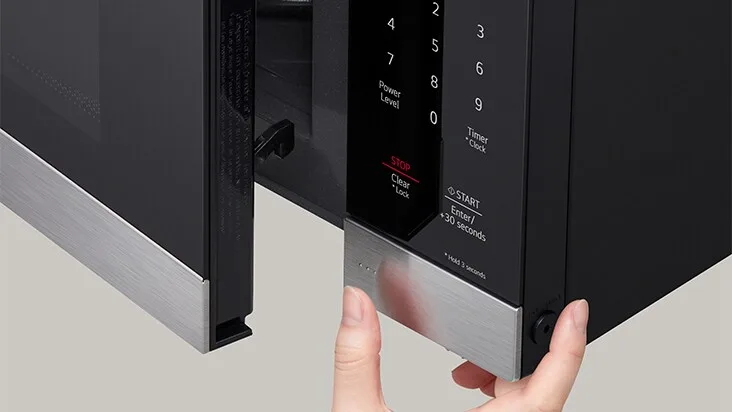
Image source: Bing (Web (fair-use with source credit))
So how do you tell the difference? Do this:
- Press and hold the Stop/Clear button for 3 seconds. Count it out.
- If the display shows a lock icon disappearing, or the buttons start working again, it was Child Lock. Not F3.
- If nothing changes, it's a real F3 error.
A second test. Try running the microwave. If it starts heating but the keypad doesn't respond to other commands, it's not a true F3 membrane short.
A real F3 prevents any operation because the board can't resolve the button conflict.
Also check for this. Some LG models have a "Control Lock" that activates if you press certain button combinations while cleaning the touchpad. That's not the same as Child Lock.
Control Lock disables all buttons except Stop/Clear. It often displays no code at all. If you get an F3 display and the buttons work after holding Stop/Clear for 3 seconds, it's not a hardware repair.
It's a setting. You're done.
If you held Stop/Clear for 3 seconds and the code stays, proceed to Step 3.
Step 3: Test the Keypad the Right Way (No Multimeter Needed)
You don't need a multimeter for this test. You need 20 seconds and your eyes. The goal here is to confirm that a single button is stuck or the entire membrane is shorted.
Turn off the microwave. Wait 10 seconds. Turn it back on.
Immediately, as soon as the display lights up, press each button one at a time, slowly. Start with the number keys 1 through 0. Then the function keys like Timer, Defrost, and Cook Time.
Then Stop/Clear. Finally, the Quick Start or EZ-ON button.
Watch the display after each press. If the F3 code reappears immediately after pressing a specific button, that button is the culprit. The membrane dome under it has collapsed, or there's corrosion on that trace.
If the F3 code appears as soon as the microwave powers on, without you pressing anything, the membrane has a full short. That means two or more traces are touching somewhere on the keypad overlay. Usually it's around the edges where moisture gets in.
Here's what you're looking for in each scenario:
- Single stuck button. You press it, F3 pops up. You can avoid using that button and still run the microwave. Not ideal, but it works until you replace the membrane. The most common culprit across LG models is the Quick Start or EZ-ON button. That button gets mashed more than any other.
- Full membrane short. F3 shows up immediately at power-on. No buttons work. The microwave is effectively bricked until you replace the membrane.
- Intermittent short. F3 shows up randomly during use. You can sometimes clear it by unplugging for 60 seconds and avoiding the problem button. But it will return.
If you want to confirm with a multimeter, here's how. Unplug the microwave. Open the control panel.
Disconnect the ribbon cable from the control board. Set your multimeter to continuity mode. Touch the probes to the two pins on the ribbon connector for the suspect button.
A normal button reads open (infinite resistance) when not pressed. A shorted button reads near zero ohms. This confirms the membrane needs replacement.
But you don't need the multimeter to proceed. The button-by-button test gives you the same answer. If F3 triggers on a specific press, or immediately at power-on, you've confirmed the membrane is the problem.
On to Step 4.
Step 4: Fix It Yourself — Cleaning vs. Replacing the Keypad
Here's where you decide. Can you clean the membrane, or do you need to replace it?
When cleaning works. If the F3 code is intermittent, it comes and goes, or it only happens when you press a specific button, cleaning might fix it. The cause is usually a thin film of grease, sugar residue, or light corrosion on the membrane traces. A careful cleaning with 91% isopropyl alcohol and a lint-free cloth can remove that film.
Let it dry completely for 30 minutes. Reassemble and test. This fixes about 15 to 20 percent of intermittent F3 issues.
When cleaning is a waste of time. If the F3 code appears immediately at power-on, or if the microwave is more than 5 years old, replace the membrane. The rubber dome material degrades over time. Cleaning won't restore it.
You're delaying the inevitable. Same story if you've already cleaned it once and the code came back.
Here's the replacement process. It's straightforward on most LG models.
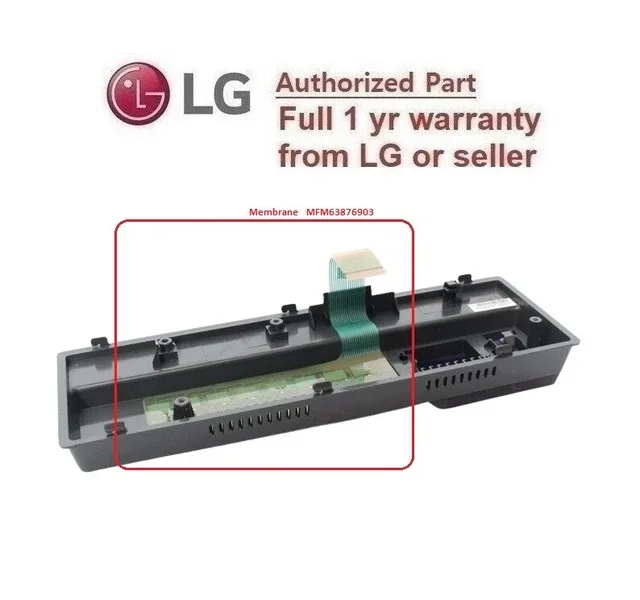
Image source: Bing (Web (fair-use with source credit))
- Get the right part number. Look for your model number. It's on a sticker inside the door frame or on the back panel. Write it down. Search for "LG [model number] keypad membrane" or "membrane switch assembly." The OEM part costs $40 to $80. Avoid generic universal keypads. They don't fit the ribbon connector correctly and fail within months.
- Unplug the microwave. Seriously. Capacitors inside can hold a lethal charge. Wait 5 minutes after unplugging.
- Remove the control panel. Most LG models have 4 to 6 screws on the top or back edge of the control panel. Some have screws hidden under snap-on trim pieces. Go slowly. Plastic clips are fragile.
- Disconnect the old ribbon cable. The ribbon connects to the control board with a ZIF (zero insertion force) connector. Lift the small black latch, slide the ribbon out. Don't pull on the wires.
- Peel off the old membrane. It's usually stuck down with adhesive. Peel from one corner. Clean any adhesive residue from the metal control panel with isopropyl alcohol.
- Install the new membrane. Press it into place. Connect the ribbon cable to the control board. Close the ZIF latch.
- Reassemble. Screw the control panel back on. Plug the microwave in. Test it.
The whole job takes 15 to 30 minutes. That's less time than waiting for a repair technician who would charge $100 to $150 just to show up.
Step 5: The Line Between Keypad and Control Board Failure
How do you know if it's the keypad or the control board? This is the fork in the road where people waste money.
Here's the rule. If the F3 code is the only symptom and the microwave otherwise powers on, beeps, and lights up, it's the keypad membrane. Replace that first.
It's cheaper and easier.
If you replace the keypad membrane and the F3 code still appears, the control board is the problem. That happens in about 10 to 15 percent of cases. The board's keypad connector pins may have cold solder joints, or a chip on the board that reads the button matrix has failed.
Here's how to tell before you order anything. After installing the new membrane, if F3 appears immediately at power-on, the board isn't reading the new membrane correctly. Check the ribbon connection first.
Reseat it. If F3 persists, the board is bad.
Control board replacement is more involved. The board costs $100 to $200 for most LG models. Installation takes about 30 to 45 minutes.
You'll need to remove the outer casing, disconnect the high-voltage capacitor (safely), and swap the board. If you're not comfortable with that, a repair technician is the smarter call.
But here's the decision point that saves you money. Check the age of your microwave. If it's over 7 years old and the control board is bad, replacement often makes more sense.
A new LG countertop microwave costs $150 to $400. An over-the-range model runs $300 to $700. Compare that to a $150 board plus a $100 service call.
At a certain age, the math flips.
If your microwave is under 1 year old, check your warranty. LG covers the control board under the standard 1-year parts and labor warranty. You won't pay anything.
Common Mistakes That Cost Time and Money
Let's cover the missteps that turn a $50 fix into a $200 headache.
Mistake 1: Replacing the control board first. The most common error. People see a code and assume the main brain is fried. They order a $150 board, install it, and the F3 code is still there.
The membrane was the problem all along. Test the membrane first. It's the cheaper and more likely culprit.
Mistake 2: Using a universal keypad membrane. Generic keypads are tempting. They cost $15 to $25. But the ribbon connector pinout rarely matches.
The adhesive is weaker. The membrane thickness is wrong. Users report them failing within 2 to 3 months.
Spend the $40 to $80 on the OEM part. It fits, it works, and it lasts.
Mistake 3: Forgetting the ribbon cable inspection. When you open the control panel, look at the ribbon cable. Bent pins, broken traces, or corrosion at the connector end can mimic a membrane short. If the ribbon looks damaged, try reseating it or cleaning the contacts with isopropyl alcohol before ordering a new membrane.
Sometimes that's the entire fix.
Mistake 4: Not checking the warranty. If your microwave is less than a year old, LG will repair it for free. Calling a technician before checking the warranty is money out the door. Check your purchase date and LG's warranty page.
Mistake 5: Ignoring the power surge possibility. We covered this in Step 1, but it's worth repeating. A significant number of F3 errors are ghosts. A proper 60-second unplug clears them.
Skipping this step and ordering parts immediately is throwing money away.
When to Call a Pro (and When to Just Buy a New Microwave)
Not every F3 error is a DIY fix. Here's when to hand it off.
Call a pro if: You've replaced the keypad membrane and the F3 code remains. The control board likely needs replacement, and that involves discharging high-voltage capacitors. That's dangerous if you don't know what you're doing.
A technician will charge $100 to $150 for the service call plus parts. Total cost runs $200 to $350.
Buy a new microwave if: Your unit is over 7 years old and needs a control board replacement. The math doesn't work. A $150 board plus a $100 service call equals $250.
A new countertop microwave costs $150 to $400. You get a fresh warranty, updated features, and better efficiency. For over-the-range models, the break-even point is trickier because installation costs more.
But if your microwave is over 10 years old, replacement is almost always the better move.
Check your warranty first. LG offers a 1-year parts and labor warranty on most models. Some components like the magnetron have longer coverage. If your microwave is under warranty, LG covers the repair.
You pay nothing.
Frequently Asked Questions
Will unplugging my microwave reset the F3 code permanently?
It depends. If the F3 was caused by a power surge, yes, a 60-second unplug clears it permanently. If the cause is a hardware short in the keypad membrane, the code will return once you plug it back in or press a stuck button.
Can I still use my microwave with the F3 error showing?
No. The control board won't allow operation when it detects the short. It locks out all functions for safety.
You cannot cook, defrost, or use any feature until the code is resolved.
Is the F3 code dangerous or a fire risk?
The F3 code itself is not a fire risk. It's a communication error between the keypad and control board. However, ignore it too long and you risk moisture damage spreading deeper into the control board, which can cause more serious electrical issues.
How much does LG charge to fix this error?
If your microwave is under warranty, zero dollars. Out of warranty, expect $100 to $150 for the service call plus $40 to $80 for the keypad membrane or $100 to $200 for a control board. Total cost ranges from $140 to $350 depending on what needs replacing.
Does F3 mean my microwave is totally broken?
Not at all. In most cases, F3 is a simple keypad membrane issue. That's a $40 to $80 part and 15 minutes of work.
Even a control board failure doesn't mean the microwave is dead. It just means the cost of repair may approach the cost of replacement on older units.

Similar Posts
































