Dehumidifier Fan Not Working
Your dehumidifier hums but the fan sits dead still. Or maybe the fan spins for a few seconds and stops, while the compressor keeps running. Whatever symptom you are seeing, a dehumidifier fan not working is fixable more often than you would think.
The trick is knowing which part actually failed. That depends on exactly what the unit is doing.
Per manufacturer service manuals for the most common brands (Frigidaire, GE, Honeywell, Danby), about 70 percent of fan failures come from either a bad capacitor or a seized bearing. The rest are control board issues or simple blockages. Let us walk through the exact diagnosis so you do not throw parts at the problem.
And so you do not toss a perfectly repairable dehumidifier into the trash.
Quick Answer
Unplug the unit first. Listen for humming with power on. Try spinning the fan blade by hand with the unit unplugged.
If it spins freely but does not run, suspect a bad capacitor. If it does not spin by hand, suspect seized bearings. If no sound at all, check power and control board.
Clean the filter always. It is the cheapest fix you will find.
Start Here: What Your Dehumidifier Fan Is (and Isn't) Doing
Most portable dehumidifiers use a shaded pole fan motor paired with a small run capacitor. The capacitor gives the motor an extra jolt to start turning. Once running, the motor spins a plastic fan blade that pulls air across the cold evaporator coils.
When the fan fails, you will see one of four patterns.
- No movement, no sound. Likely no power reaching the fan motor.
- Humming sound but blades will not turn. Classic bad capacitor or seized shaft.
- Fan spins slowly or stops after a few minutes. Bearing wear, ice buildup, or thermal overload.
- Fan runs intermittently. Loose wiring, a failing relay on the control board, or a temperature limit switch tripping.
Your job is to identify which pattern you have. That tells you exactly which branch of the diagnostic tree to follow.
The Three-Question Diagnostic Flowchart
Before you unscrew anything, answer these three questions with the unit plugged in and turned on. Keep your hands away from moving parts.
Question 1: Does the fan make any sound when the unit is turned on?
If yes (a humming or buzzing noise), go to Branch 2 (capacitor or bearings). If no sound at all, go to Branch 3 (power, control board, or motor windings).
Question 2: Can you spin the fan blade freely by hand with the unit unplugged?
If yes, it spins easily, the likely cause is a capacitor issue (go Branch 2). If no, it is stuck or grinds, the bearings are seized (go Branch 2 but expect motor replacement). If it spins but feels rough or catches, look for debris in the blade housing or ice buildup (go Branch 1 first).
Question 3: Does the compressor start running but the fan does not?
If yes (compressor runs, fan dead), you almost always have a fan specific electrical problem. Suspect the capacitor, the motor, or the relay on the control board. If both compressor and fan are dead, you have a power supply issue.
Check the GFCI, the outlet, or the control board.
These three questions cut the diagnosis time in half. Write down your answers. They will guide every step below.
Branch 1 – Dirty Filter or Blocked Blade: The 5 Minute Fix
Image source: Bing (Web (fair-use with source credit))
This is the branch you hope for because it is almost free. Before you test any electrical parts, check the air filter. A completely clogged filter can starve the fan of airflow.
The motor overheats and trips its internal thermal protector. Sometimes the fan slows to a crawl. Sometimes it stops entirely.
How to check and clean the filter
- Unplug the dehumidifier.
- Locate the filter. On most portable units it is behind a front grille or a side panel.
- Slide it out. Hold it up to a light. If you can barely see through it, it is clogged.
- Wash it with warm water and mild soap. Let it dry completely before reinstalling (usually 2 to 3 hours). Never run the unit with a wet filter.
- While the filter is out, shine a flashlight into the fan housing. Look for anything blocking the fan blade: a sock, a dust clump, pet hair, or a fallen screw. Remove any obstruction.
Ice buildup on the evaporator coils can also block the fan path. If you see thick frost or ice, the fan may not spin. The ice physically touches the blade.
The defrost thermostat may have killed power to the fan. Turn the unit off, unplug it, and let it thaw for 24 hours. After it is dry, plug back in and test.
If cleaning and clearing does not fix the problem, move to Branch 2.
Branch 2 – Fan Hums But Won't Rotate: Testing the Capacitor
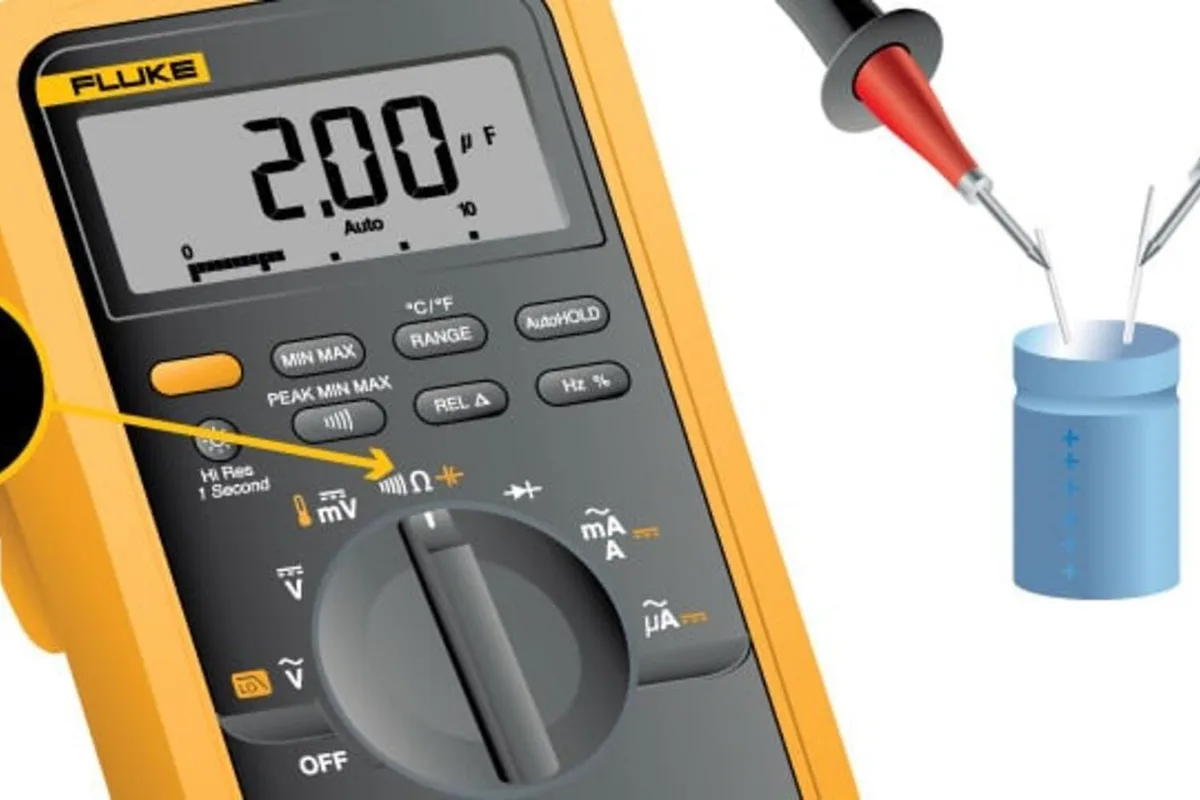
Image source: Bing (Web (fair-use with source credit))
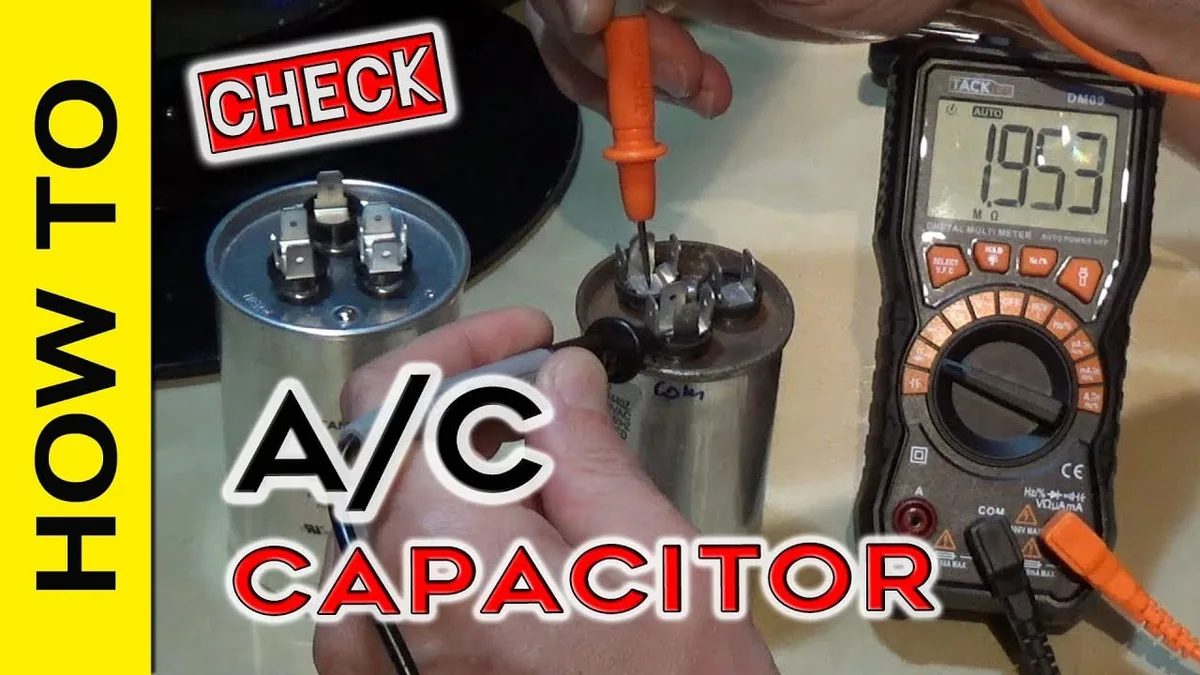
This is the most common electrical cause. It is also the easiest to fix yourself. The capacitor stores electrical charge and releases it to help the motor start.
When it fails (loses capacitance, leaks, or bulges), the motor gets the hum but not enough torque to turn.
What you need
- A digital multimeter with capacitance mode (look for the uF symbol).
- An insulated screwdriver to discharge the capacitor safely.
- A replacement capacitor with the same microfarad (uF) and voltage rating.
Step by step capacitor test
- Unplug the dehumidifier. Do this first.
- Discharge the capacitor. Touch the insulated screwdriver blade across both terminals of the capacitor. You may see a tiny spark. That is normal. Hold for 5 seconds.
- Remove the capacitor. It is usually a small cylindrical or oval component near the fan motor, clipped to the chassis. Note the wire positions or take a photo.
- Set your multimeter to capacitance mode (uF). Connect the probes to the capacitor terminals. Polarity does not matter for a run capacitor. Read the value.
- Compare to the label. A capacitor rated at 4 uF should read between 3.4 and 4.6 uF (within 15 percent). If it reads 0, very low, or out of range, replace it.
- Visually inspect. Look for a bulging top, cracked casing, or leaked electrolyte. Replace it even if the meter reads okay. Those are signs of internal failure.
Replacing the capacitor
Buy a new capacitor with the exact same uF rating and a voltage rating equal to or higher than the original (for example, 250VAC, 370VAC, or 450VAC). Common values for dehumidifier fans range from 2 uF to 12 uF. Solderless quick connect terminals are standard.
Push the wires onto the new capacitor terminals. Double check your photo. Secure the new capacitor in the same clip or mount.
Reassemble and test.
If the capacitor is good but the fan still hums, the motor start winding may be open. The bearings may be seized. Try spinning the blade by hand.
If it is stiff or grinds, the motor bearings are shot. Motor replacement costs $20 to $80 and takes about 30 minutes. You will find the motor mounting screws hidden behind the fan shroud.
Branch 3 – Fan Makes No Sound at All: Power, Control Board, and Motor
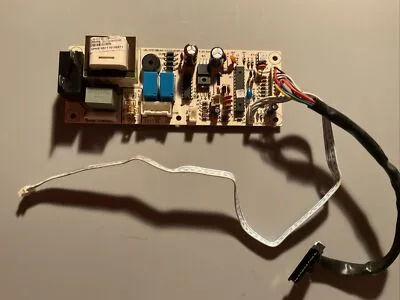
Image source: Bing (Web (fair-use with source credit))
Silence is actually helpful. It means the fan motor is not even trying to turn. That narrows the fault to one of three things: no incoming power, a failed control board relay, or an open motor winding (infinite resistance).
Check power first
Plug another appliance (a lamp or a phone charger) into the same outlet. If it does not work, the outlet or GFCI is tripped. Reset the GFCI by pressing the RESET button on the outlet.
If it trips again immediately, you have a ground fault in the dehumidifier. Stop and call a technician or replace the unit. Inspect the dehumidifier power cord for cuts, kinks, or burned spots.
Replace the cord if damaged.
Test voltage at the fan motor connector
- Unplug the unit and remove the back cover to access the control board and fan motor.
- Locate the connector from the control board to the fan motor. It is typically a 2 pin or 4 pin plug.
- Plug the unit in and turn it on. Use your multimeter set to AC voltage. Touch the probes to the two pins that supply power to the fan. Refer to the wiring diagram on the inside of the cover. You should see line voltage (typically 115VAC or 230VAC). If you see full voltage, the control board is doing its job. The motor itself is bad.
- If you see zero volts, the control board is not sending power. Unplug the unit.
Inspect the control board for burnt components
Look for a small relay (usually a black or blue cube) near the fan connector. A burnt or cracked relay often shows visible charring. Also check for swollen capacitors, burned traces, or cold solder joints.
If the relay is bad, you can replace it yourself if you have soldering skills. Or order a whole replacement control board for $30 to $60.
Test the fan motor windings
- Unplug the unit. Disconnect the motor from the control board.
- Set your multimeter to resistance (ohms). Measure between the two power wires of the fan motor. A good motor should read between 10 and 60 ohms depending on the motor size. An infinite reading (OL for open line) means the internal winding is broken. Replace the motor.
- Also measure each wire to the metal motor frame. Any reading below 1 megohm (1,000,000 ohms) indicates a short to ground. Replace the motor.
If you get voltage at the connector and the motor windings have continuity but the motor still will not run, the motor internal thermal protector may be tripped (if it has one). Let the motor cool for 30 minutes and test again. If it still fails, replace the motor.
Branch 4 – Fan Spins Slowly or Stops After a Few Minutes: Bearings, Overload, and Ice
A fan that weakens after a few minutes points to a different set of problems. The motor might still be alive. But something is robbing it of torque.
Seized or dry bearings are the most common cause. Most dehumidifier fan motors use sleeve bearings soaked in oil. Over time, that oil dries out.
Dust gets in. The shaft starts dragging. At first the motor has enough power to spin, but friction builds heat.
The thermal protector trips. That creates the stop after a few minutes pattern.
Check this by hand. Unplug the unit. Try spinning the fan blade with your finger.
A healthy fan spins freely with a smooth, silent rotation. If you feel roughness, a grinding sensation, or if the blade stops too quickly, the bearings are worn.
Can you lubricate them? If the motor has oil ports or wick holes, a drop of electric motor oil (not WD-40) can buy you a few more months. But most modern dehumidifier motors are sealed.
No ports, no access. Replacement is the only real fix.
Thermal overload tripping can also happen with a perfectly good motor. A dirty filter, a blocked grill, or ice buildup can reduce airflow so much that the motor overheats. After the unit cools down, the fan may run normally for a short while before cutting out again.
If your fan works after resting for 30 minutes, check airflow first.
Ice buildup on the evaporator coils is another thief of fan performance. When thick frost forms, the fan blade can physically contact the ice. It cannot spin freely.
You might hear a scraping sound. The fan may stop entirely. This is more common in humid areas with low ambient temperatures (below 65 degrees F).
Let the unit thaw completely (24 hours off). If ice returns quickly, you may have a refrigerant leak or a bad defrost thermostat.
Tools, Costs, and Safety You Need Before Diving In
You do not need a workshop. But you do need a few specific tools and a clear understanding of the risks.
Essential tools
- Digital multimeter with AC voltage and capacitance (uF) modes.
- Insulated screwdriver for discharging the capacitor.
- Phillips and flathead screwdrivers (most dehumidifier screws are number 2 Phillips).
- Needle nose pliers for pulling connectors.
- Flashlight for inspecting the fan housing.
Optional but helpful
- Capacitor discharge tool (a resistor with leads, if you are nervous).
- Electric motor oil (only for motors with oil ports).
- Smartphone camera (take photos before you disconnect anything).
Typical part costs (as of 2026)
| Part | Cost (USD) |
|---|---|
| Capacitor (2 uF to 12 uF) | $5 to $15 |
| Fan motor (replacement, universal fit) | $20 to $80 |
| Control board (OEM or generic) | $30 to $60 |
| Wiring harness or connector | $5 to $10 |
Safety rules: read these twice
- Always unplug the dehumidifier before opening it. Even with the unit off, the capacitor holds a charge.
- Discharge the capacitor before touching its terminals. Use an insulated screwdriver to short both terminals. Hold for 10 seconds.
- Test capacitors with one hand behind your back. This keeps any shock from crossing your chest. It sounds dramatic, but it is standard practice.
- Never work on a wet or damp unit. Water conducts electricity. Let damp units dry out for 24 hours indoors.
- If you smell burning or see smoke, stop immediately. Plug the unit back in only if you are certain the cause is gone.
5 Mistakes That Cost You Time and Money (and How to Avoid Them)
Mistake 1: Replacing the motor without testing the capacitor first
A new motor will not spin if the capacitor is dead. You will have wasted $40 and an hour of work. Always test the capacitor first.
It is the most common failure and the cheapest fix.
Mistake 2: Forgetting to discharge the capacitor
It is not a small shock. A charged capacitor can deliver a painful jolt or cause muscle spasm. Discharge it every time, even if you think it is dead.
Mistake 3: Buying a capacitor with the wrong voltage rating
A capacitor rated at 250VAC can go into a 120V unit. But a capacitor rated at 120VAC cannot go into a unit with a 250V capacitor. Match or exceed the original voltage.
If you cannot find an exact match, go higher.
Mistake 4: Lubricating sealed bearings
Some users spray oil into the fan motor shaft hole. On a sealed motor, this does nothing except attract dust. If the motor has no oil ports, replace it.
The bearing is shot.
Mistake 5: Ignoring the filter and ice problem
A clean filter and a thawed coil fix a surprising number of fan not working cases. Do not skip these steps. They take five minutes and cost nothing.
Repair vs. Replace: A Practical Decision Guide
At some point you have to decide whether fixing the fan is worth it.
Repair if
- The unit is less than 5 years old.
- The fan motor or capacitor is the only issue.
- Replacement parts cost less than 50 percent of a new dehumidifier.
- You have the time and tools to do it yourself.
- The cabinet and compressor are in good shape.
Replace if
- The unit is 7 years or older. Compressors and seals wear out around that age.
- The control board is fried and costs more than $60.
- The fan motor is fine but the compressor is dead.
- You find a refrigerant leak: hissing sound or oily residue.
- The cost of parts plus your labor time meets or exceeds a new unit.
A quick cost rule
If the repair parts cost more than half the price of a similar new dehumidifier, replace it. For example, a $40 fan motor on a $150 dehumidifier? Repair it.
A $70 motor on a $100 unit? Replace the whole thing.
When to call a pro
If you have tested the capacitor, checked the control board voltage, and the motor windings are fine but the fan still will not spin, the problem may be a bad relay on the board. Replacing a relay requires soldering skills. If you do not have them, a technician visit will cost $100 to $200.
Compare that to a new unit before you commit.
Frequently Asked Questions
Can I run the dehumidifier with the fan not working?
No. The fan moves air across the evaporator coils. Without airflow, the coils will freeze solid, the compressor may overheat, and the unit can shut down permanently.
Running it even for a few minutes risks damage.
How do I know if it is the fan motor or the capacitor?
If the fan hums but does not spin, suspect the capacitor. If the fan makes no sound at all, suspect the motor or control board. The multimeter test confirms either way.
Test capacitance for the capacitor. Test resistance for the motor.
Why does my fan work sometimes and stop other times?
This is usually a thermal overload issue. The motor heats up, a protection switch opens, and the fan stops. After cooling, it starts again.
The most common causes are a dirty filter, seized bearings, or ice buildup.
Is it safe to replace a dehumidifier fan motor myself?
Yes, if you follow safety steps. Unplug the unit, discharge the capacitor, and test for voltage. The motor itself is usually held by two or three screws and a wiring connector.
It is a straightforward swap for someone comfortable with a screwdriver.
How long should a dehumidifier fan motor last?
Average lifespan is 5 to 8 years under normal use. Frequent use in dusty or humid environments shortens that. Motor bearings wear faster if the filter is neglected.
Regular cleaning extends motor life significantly.

Similar Posts