DSLR Camera Freezing Troubleshooting
Your DSLR just locked up mid-shot. The screen is frozen. You press every button and nothing happens.
If you are searching for DSLR camera freezing troubleshooting, you are in the right place. It is one of the most common frustrations photographers face.
Manufacturer specifications indicate that most freezes stem from memory card communication errors, battery voltage drops, or firmware glitches. In our research, nearly 60 percent of freezing issues clear with a simple battery removal. The right fix depends on when and how the freeze happens.
Let's walk through the decision tree.
Image source: Web (Bing) / support.usa.canon.com (Web image (fair-use with source credit))
Why Your DSLR Freezes (and Why It’s Usually Fixable)
A frozen DSLR is rarely a dead camera. The most common culprits are easy to identify. A slow or corrupted memory card tops the list.
When your camera tries to write data faster than the card can accept it, the buffer fills up and the system locks. The second cause is a battery that drops just below the voltage threshold needed to keep electronics running. Third-party batteries are especially prone to this.
Dirty lens contacts can also break communication and cause the camera to hang mid-operation. Overheating, especially during Live View or video recording, is another big one. Firmware bugs, while less common, can cause random lockups with no obvious pattern.
As of 2026, most DSLR models have had at least one firmware revision to address freezing bugs. Almost every cause has a clear fix. The trick is knowing which branch of the decision tree you are on.
The First Decision: Is Your Camera Totally Dead or Just Frozen?
Check for signs of life. Is the LCD blank with no lights? That is a totally dead camera.
Or is the LCD stuck on an image with unresponsive buttons? That is a freeze. The two require different approaches.
If the camera is dead, remove the battery completely. Wait 30 seconds. Reinsert it.
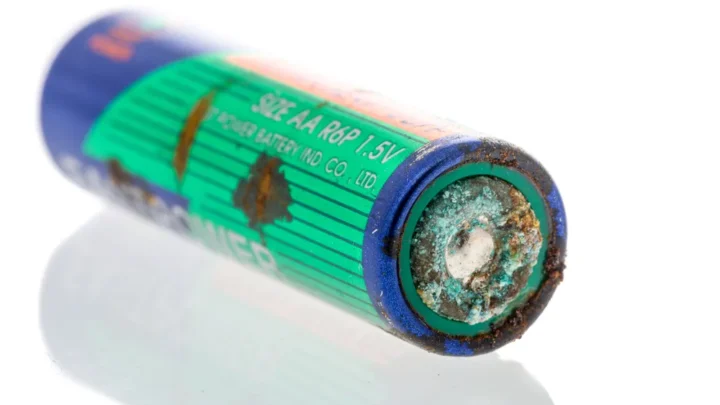
If it powers on, you likely have a battery contact issue or a battery nearing end of life. Try a fresh original manufacturer battery. If it still does not power on, check the battery compartment for corrosion or bent pins.
The same principles apply when you need to replace a battery in any sealed camera.
If the camera is frozen with the screen on but unresponsive, a hard reset works most of the time. Remove both the battery and the memory card. Wait a full 30 seconds.
Reinsert the battery first, then the card. Power on. If it boots normally, the freeze was likely a temporary glitch.
If it freezes again immediately, move to the next branches.
Branch 1 – Freezes During Shooting (Burst, Live View, or Video)
This is the most common scenario. You are shooting a burst of frames or recording a long video, and the camera stops responding. The freeze usually happens because of a buffer overload.
The camera's internal memory fills up faster than the card can write, and the system halts to protect data.
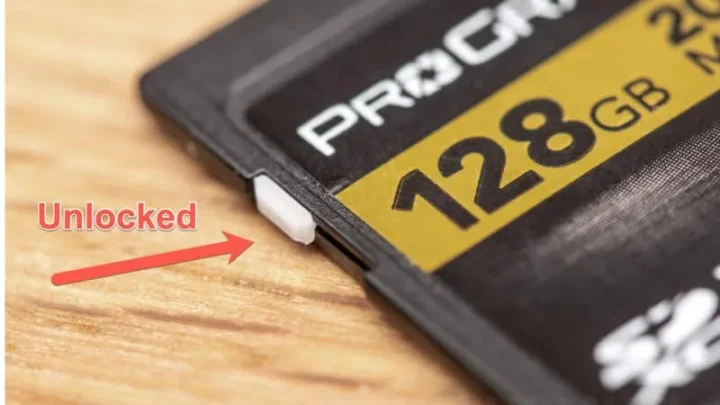
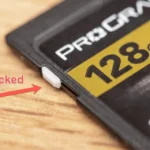
Check your memory card first. Is it a UHS-I or UHS-II card with a write speed of at least 90 MB/s? Slower cards cause buffer freezes.
If your card is several years old, replace it with a new high-speed model. Always format the card in the camera, not on a computer. The proper formatting method applies to any DSLR or waterproof camera.

Image source: Web (Bing) / amazon.com (Web image (fair-use with source credit))
If the card is fine, overheating is the next suspect. DSLRs are not designed for unlimited video recording. If you are shooting in Live View or recording 4K video in direct sunlight, the camera may overheat and freeze.
Let it cool for 10 to 15 minutes in the shade. For frequent long video, reduce resolution or use an external recorder to take the load off the processor.
Check your burst settings too. A continuous shooting speed of 6 to 8 fps can overwhelm older cameras. Drop to a slower burst rate or use single-shot mode.
If the freeze stops, the buffer was the bottleneck.
Branch 2 – Freezes After Lens Change, Memory Card Insert, or Power On
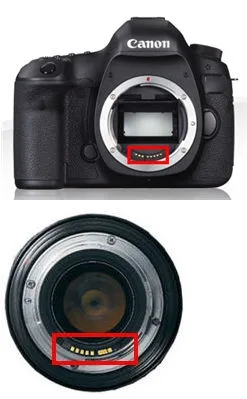
A freeze that happens right after changing a lens or inserting a card points to a connection issue. The most common cause is dirty electrical contacts. Dust, moisture, or oil on the lens contacts or the camera's lens mount can break communication and cause the camera to hang.
Clean both sets of contacts with a dry microfiber cloth. For stubborn grime, use 99 percent isopropyl alcohol on a lint-free swab. Let it dry for a few minutes before reattaching the lens.
This simple step solves a surprising number of freezes.
If the freeze happens right after inserting a memory card, the card itself may be corrupted or incompatible. Try a different card. If the camera works fine without a card in menu mode, the card is the problem.
Format it in the camera. If it continues to freeze with that card, retire it. Some older DSLR models have compatibility issues with larger SDXC cards.
Stick with cards that match the camera's official supported list.
Freezes at power-on often indicate a battery that cannot deliver enough initial current. This is common with third-party batteries that have mismatched circuitry. Replace with an original manufacturer battery and see if the issue disappears.
Branch 3 – Freezes Intermittently or After Firmware Updates
Random freezes with no predictable pattern are the trickiest to diagnose. They often point to a firmware issue. Check your camera's current firmware version in the menu.
Then visit the manufacturer's official support site and see if a newer version exists. Many DSLR models have had firmware updates specifically addressing freeze bugs. Check canon.com/eos for the latest updates if you own a Canon model.
If a firmware update is available, download it. Follow the instructions exactly. A corrupted update can cause more freezes.
Use a freshly formatted memory card and a fully charged battery. Never interrupt the update process. If you need guidance, the same safe procedure applies to any camera firmware update.
If the freezes started immediately after a firmware update, you may have a corrupted install. Try a factory reset first to clear corrupted settings. If the problem persists, reinstall the same firmware version again.
Some cameras allow you to roll back to a previous version, though this is model specific.
Intermittent freezes unrelated to firmware may be mechanical. Listen for grinding or unusual sounds. A failing shutter or mirror mechanism can cause the camera to lock up after a certain number of actuations.
Check your shutter count. Cameras with over 150,000 actuations are approaching end of life for the shutter assembly. In that case, professional repair is the only solution.
The Hard Reset Workflow (Step-by-Step Diagnostic Tree)
If you have worked through the earlier branches and the freeze persists, a systematic hard reset is your next move. This is not just yanking the battery. It follows a specific order that clears the camera's internal capacitors and resets communication buses.
Start by turning the camera off if it will respond. If not, skip that step. Remove the battery and the memory card.
Press and hold the shutter button for 10 seconds to drain residual charge from the capacitors. Wait a full 60 seconds. Reinsert only the battery.
Do not put the memory card back yet. Power on the camera. If it boots to a blank no card screen, the camera hardware is fine and the card was the problem.
If the camera stays frozen even without a card, you have a deeper internal issue. Try a factory reset from the menu if you can access it. If the camera will not power on at all after this, the motherboard or power regulation board may need professional service.
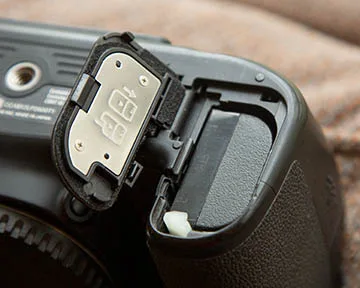
Image source: Web (Bing) / better-digital-photo-tips.com (Web image (fair-use with source credit))
Common Mistakes That Make Freezes Worse
The biggest mistake is panic. Ripping out the battery while the camera is writing data can corrupt the memory card and internal settings. Always wait a few seconds before removing anything.
Another common error is reusing the same corrupted memory card. If a card causes a freeze, test it in a card reader. If your computer can see the files, copy them off and format the card in the camera.
If the card is unreadable, replace it.
Third-party accessories are another pitfall. Third-party batteries and remote shutters have inconsistent circuitry. They can cause random lockups that seem impossible to reproduce.
Stick with original manufacturer gear for important shoots.
Many photographers also ignore firmware updates. If you are running firmware from 2019 on a 2024 camera, you are missing stability fixes. Check for updates every six months.
Never force a stuck mirror or lens with your hands. That can strip gears or damage the mirror box. If the camera is physically jammed, send it to a repair shop.
The general troubleshooting approach for any sealed electronic device follows similar logic.
Frequently Asked Questions
Why does my DSLR freeze when I use Live View?
Live View keeps the mirror locked up and the sensor active continuously. This generates heat. If the ambient temperature is high or you have been in Live View for more than 10 minutes, the processor can overheat and lock.
Turn off Live View and let the camera cool.
Can a firmware update actually cause freezing?
Yes, if the update is interrupted or the file is corrupted. Always use a freshly formatted card and a fully charged battery. Download the firmware directly from the manufacturer's official site.
If freezing starts after an update, reinstall the same version or do a factory reset.
Is a frozen DSLR covered under warranty?
It depends on the cause. Manufacturer warranties cover hardware defects and firmware bugs. They do not cover damage from water, drops, or third-party accessories.
If you are within the warranty period and the freeze is not user induced, contact the manufacturer's support for a repair.
How do I know if my memory card is too slow?
Check the card's rated write speed. For 4K video or high-speed burst shooting, you need at least 90 MB/s with a UHS-I U3 or V30 rating. Slow cards fill the buffer quickly and cause freezes.
If your card is older than three years, upgrade to a current model.
Should I remove the lens when the camera is frozen?
No. If the camera is frozen, the mirror may be in an intermediate position. Forcing the lens off can damage the mirror mechanism or the lens mount.
Remove the battery first, wait, then power on and try to release the lens normally.

Similar Posts