How to Troubleshoot DSLR Camera
Your DSLR just flashed an error code, or worse, it won't turn on. You are about to head out for a shoot, and now this. Learning how to troubleshoot DSLR camera problems saves you time, money, and a lot of frustration.
Most issues are simple once you know where to look.
Manufacturer data shows that over 80 percent of common DSLR failures come from just three sources: the battery, the memory card, or the lens connection. That means you can solve the vast majority of problems without a repair manual. Let's walk through the process step by step.
Quick Answer
To troubleshoot a DSLR camera, check the battery charge and contacts first. Remove and reinsert the memory card. Clean the lens and body contacts with a dry cloth.
Power cycle the camera. If the error persists, reset the camera to factory defaults. For specific error codes, consult your camera manual.
The First Three Things to Check
Start with the easiest fixes. They solve most problems instantly.
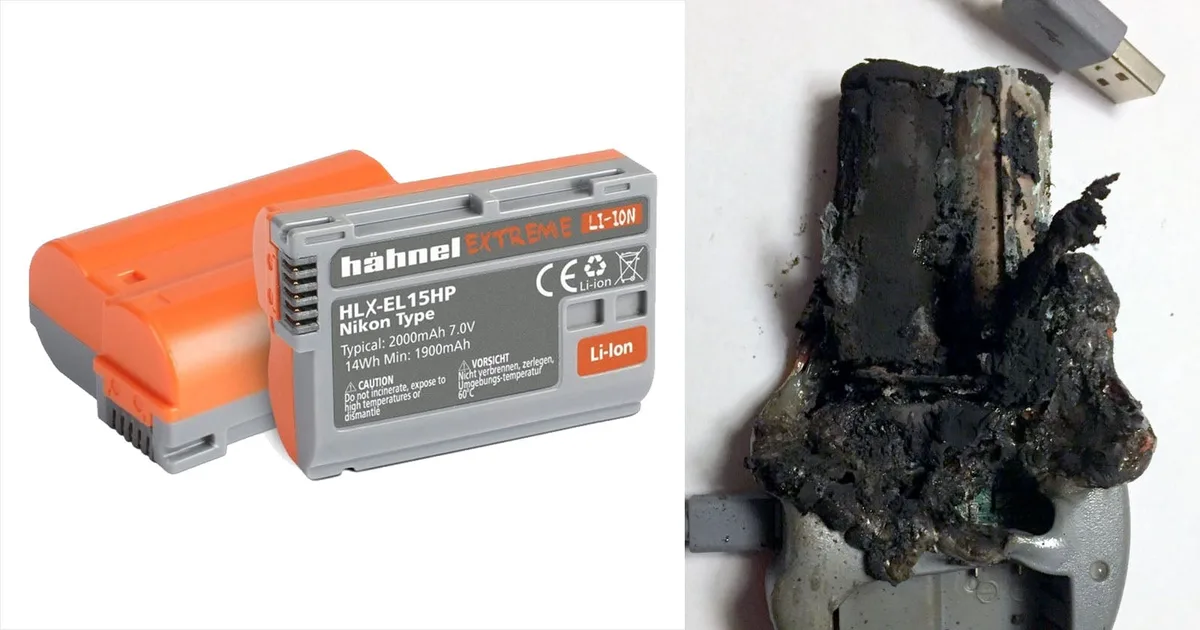
Battery. A dead battery is the number one reason a camera won't power on. But a partially charged battery can also cause weird behavior. The camera may turn on and then shut down immediately.
It might refuse to fire the flash. It could even show a false error code.
Remove the battery. Inspect the contacts on both the battery and the camera. Look for corrosion, dirt, or bent pins.
Clean them gently with a dry cloth. Reinsert the battery and make sure it clicks into place. If you have a spare battery, try that one instead.
Memory card. A corrupted or incompatible card causes "Card Error" or "Card Not Formatted" messages. Remove the card. Check the write-protect switch on the side.
If it is slid down, the card is locked. Slide it back up. Reinsert the card and try again.
If the error persists, format the card in the camera, not in your computer. This step matters more than most people realize.
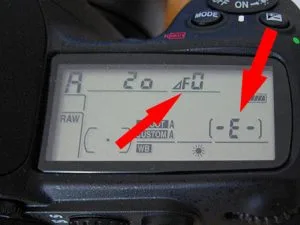
Lens connection. If the lens is not fully seated, the camera may not communicate with it. You might see "F–" or "Err 99" on older Nikon bodies. Remove the lens.
Inspect the electronic contacts on both the lens and the camera body. They should be clean and free of debris. Reattach the lens and twist it until it clicks firmly.
| Problem | Likely Cause | Quick Fix |
|---|---|---|
| Camera won't power on | Dead battery | Charge or replace battery |
| Camera turns off immediately | Weak battery | Try a fully charged battery |
| Card Error | Corrupted card | Format in camera |
| F– or Err 99 | Dirty lens contacts | Clean contacts and reseat lens |
Diagnosing by Symptom
Once you have ruled out the big three, move to symptom-based diagnosis. The error code on your display is your best clue. Common codes include "Err 01" on Canon bodies and "Err 99" or "F–" on Nikon bodies.
Each points to a different issue.
Camera won't focus. First, check the focus mode switch on the lens. If it is set to "M" for manual, the camera will not autofocus. Switch it to "AF." If the lens is already in AF mode, the problem may be low light.
The phase-detect autofocus sensor needs enough contrast to lock on. Try a focus assist light or a brighter scene. For persistent low light issues, you may want to explore cameras with better low light performance.
Blurry images. Motion blur is one cause. The shutter speed may be too slow for handholding. A general rule is to use a shutter speed of 1 over the focal length.
For a 50mm lens, that is 1/50 second. But camera shake is not the only culprit. A dirty sensor creates soft spots at small apertures.
Check your images at f/16 or f/22. If you see dark circular spots, you have sensor dust.
Shutter won't fire. The camera may be in a focus lock state. It will not fire if it cannot achieve focus. Press the shutter button halfway, wait for the focus confirmation, then press fully.
If the camera is in single-shot mode and the subject is moving, switch to continuous AF mode. Another cause is an empty buffer. The camera needs to write the previous image to the card before it can take another.
For action photography, a camera with fast burst shooting can help avoid this bottleneck.
Mistakes That Can Make Things Worse
Some troubleshooting steps do more harm than good. Avoid these common errors.
Using compressed air on the sensor. Canned air contains propellants that can leave residue on the sensor. It can also push the shutter blades out of alignment. Use a blower bulb designed for camera cleaning instead.
Never blow air directly into the mirror box.
Pulling the memory card out during a write. The camera's write light indicates data transfer. If you remove the card while the light is on, you corrupt the file system. The card may become unreadable.
Always wait for the light to go out.
Applying too much force to anything. If a lens is stuck, do not twist it harder. You may damage the lens mount. If a button is stuck, do not pry it.
You may break the switch. If a battery door is jammed, do not force it. You may snap the hinge.
Updating firmware with a low battery. A firmware update can take several minutes. If the battery dies mid-update, the camera's firmware becomes corrupted. The camera may become a brick.
Always use a fully charged battery or an AC adapter when updating firmware. Refer to Nikon's official support page for model-specific update instructions.
When to Call a Professional
Some problems are beyond DIY repair. Know when to stop.
Shutter failure. If the shutter curtain is stuck open or closed, or if you hear a grinding noise, do not attempt to fix it. The shutter mechanism is delicate and requires specialized tools. A replacement costs between $150 and $400 depending on the camera model.
For high-end bodies, the cost may approach the value of a new professional-grade DSLR.
Water damage. If your camera has been submerged or exposed to heavy rain, do not power it on. Water can short-circuit the electronics. Remove the battery and memory card immediately.
Dry the camera with a towel, then place it in a sealed bag with silica gel packets. Send it to a repair shop.
Dropped camera. A drop can misalign the lens mount, damage the image sensor, or break the internal mirror mechanism. If the camera functions but images are blurry at all focal lengths, the lens mount may be bent. This requires professional calibration.
Sensor cleaning gone wrong. If you tried to clean the sensor and now see streaks or scratches, stop. A scratched sensor coating cannot be repaired. It requires a sensor replacement, which is often more expensive than buying a new camera.
Frequently Asked Questions
Why does my DSLR show "Err 99"?
Err 99 is a generic communication error on Nikon cameras. It usually means the camera and lens cannot talk to each other. Clean the contacts on both the lens and the body.
Reseat the lens. If the error persists, try a different lens to isolate the problem.
Can I clean my DSLR sensor myself?
Yes, but with caution. Use a blower bulb first. If the dust remains, use a sensor cleaning swab and a drop of cleaning solution.
Watch a tutorial from a reputable source. Do not use compressed air or household cleaners. They can damage the sensor.
How do I check my camera's shutter count?
Shutter count is the number of times the shutter has fired. You can check it using free software or online tools that read the camera's EXIF data. Some cameras store the count in the file metadata.
Others require a dedicated app. A high shutter count indicates wear.
What does "Card Error" mean?
A Card Error message means the camera cannot read the memory card. The card may be corrupted, locked, or incompatible. Remove the card, check the lock switch, and reformat it in the camera.
If the error persists, try a different card.
Why is my DSLR not focusing in low light?
DSLR autofocus systems rely on contrast and light. In low light, the phase-detect sensor may not have enough information to lock on. Use a flash with a focus assist beam, or switch to manual focus.
For consistent low light shooting, a dedicated low light camera may be a better long-term solution.
Should I update my camera's firmware?
Yes, but only if the update fixes a specific problem you are experiencing. Firmware updates can improve performance and add features. However, they can also introduce new bugs.
Read the release notes before updating. Always use a fully charged battery.

Similar Posts

















[…] the problem continues, a broader look at common camera issues can help you isolate the […]