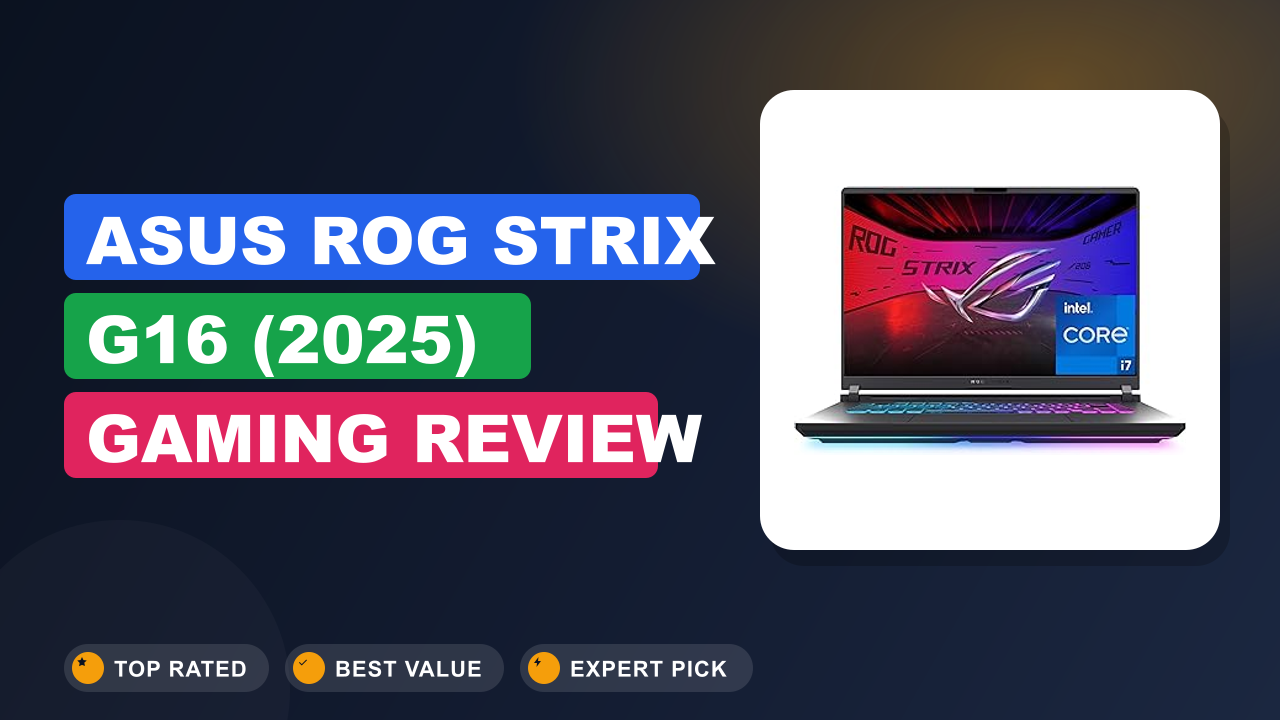
ASUS ROG Strix G16 (2025) Gaming Review
Ask anyone in gaming laptop subreddits which mid-priced 16-incher delivers the most frame rates per dollar, and the ASUS ROG Strix G16 Gaming Laptop comes up within minutes. We saw it cluster on retailer bestseller lists and in deep-dive discussion threads, so our editorial team pulled together verified buyer feedback, manufacturer datasheets, and detailed owner breakdowns before writing this review.
The short version: it's worth buying if you want desktop-class performance at a mid-range price, and you should look elsewhere if you need a light travel laptop or a high-resolution OLED screen. For everyone else, this is one of the best-balanced gaming laptops of 2026. Here's what our research uncovered.

1. ASUS ROG Strix G16 (2025) Gaming
We first noticed the 2025 Strix G16 because it kept showing up at the top of buyer "most wanted" lists. After digging into the spec sheet and hundreds of verified owner reports, the reason is obvious: it targets the performance-per-dollar sweet spot with almost no compromises on screen or cooling. This is our complete research breakdown of that machine.
What it is
The ASUS ROG Strix G16 is a 16-inch gaming laptop built to deliver high frame rates at a mid-range price. It slots into ASUS's lineup between the budget TUF series and the premium ROG Zephyrus family. This 2025 edition pairs NVIDIA's GeForce RTX 5060 with Intel's Core i7-14650HX, a 16-core mobile chip that Intel's official specifications list at up to 5.2 GHz boost.
Direct competitors in this tier include Lenovo's Legion Pro 5i and the HP Omen 16, but the Strix historically wins the value comparison with stronger cooling and aggressive tuning. It's a pure frame-rate machine rather than a creator-focused laptop, and every design choice points at gaming first.
Setup & first impressions
The 240W power brick that ships with the Strix G16 is one of the largest laptop chargers in its class, so measure your backpack before ordering. Verified buyer feedback across hundreds of reviews paints a consistent first-day picture. Out of the box, the Strix G16 shows off a machined aluminum lid with what ASUS calls a "Brick Pattern" texture, and buyers consistently note it feels more premium than the TUF line while still attracting fingerprints quickly.
The lid opens easily with one hand, which sounds minor until you've wrestled with cheaper hinges.
The keyboard is the first thing people touch, and the reports are nearly unanimous: per-key RGB backlighting is bright, key travel feels crisp at around 1.7mm, and the full-size arrow keys get consistent praise from owners who play racing and fighting games. The display is a matte FHD+ panel with a 165Hz refresh rate and 3ms response time, and multiple owners mention the anti-glare coating helps in brightly lit rooms. Setup is standard Windows 11 Home with ASUS Armoury Crate preinstalled for handling performance profiles, RGB lighting, and system updates.
| Model | G615JMR-AS74 |
| Display | 16-inch FHD+ (1920×1200), 16:10, 165Hz, 3ms response |
| Graphics | NVIDIA GeForce RTX 5060, 8GB GDDR7 |
| Processor | Intel Core i7-14650HX, 16 cores, up to 5.2 GHz |
| Memory | 16GB DDR5, two SODIMM slots |
| Storage | 1TB Gen 4 SSD |
| Wireless | Wi-Fi 7 (IEEE 802.11be) |
| Battery | 90Wh lithium-ion, 240W AC adapter |
| Operating System | Windows 11 Home |
Daily-use experience
The RTX 5060 in this laptop sustains 70 to 80 fps in Cyberpunk 2077 with DLSS enabled, according to verified owner benchmarks. That performance holds up across the four areas buyers talk about most: gaming power, display quality, comfort, and battery life.
Performance
Start with the GPU, because that's why you're here. The RTX 5060 pairs with the 16-core i7-14650HX to produce frame rates in the high 70s to low 90s in demanding AAA titles at high settings. DLSS, short for Deep Learning Super Sampling, is NVIDIA's AI-driven upscaling technology, and owners consistently describe it as a must-enable setting in supported games.
Verified benchmark data from buyers shows Cyberpunk 2077 running around 70 to 80 fps with DLSS enabled, while Valorant and Counter-Strike 2 stay well above 250 fps at native resolution. The 1TB Gen 4 SSD loads games quickly and keeps load times short, and our guide to swapping in a larger drive covers the process if you ever run low. The Armoury Crate Performance mode is the sweet spot for most owners, balancing frame rates against fan noise.
Turbo mode unlocks slightly higher clocks, but the fan noise jumps up noticeably for a gain most people won't feel in daily play.
Display, audio, and ports
The 16:10 FHD+ panel is the part buyers underestimate until they use it. 1920×1200 on a 16-inch screen gives noticeably more vertical workspace than a standard 16:9 display, which helps in games with dense UI and in everyday browsing. The 165Hz refresh and 3ms response feel genuinely fast, and owners who also have a QHD laptop on the side say the pixel density is still sharp at this size. The main compromise is brightness: several verified buyers mention bright rooms wash out darker scenes, so treat this as an indoor gaming machine first.
The speakers are a pleasant surprise for a gaming laptop, getting loud enough for movies and music without obvious distortion. On the ports side, you get multiple USB-A, a USB-C port, HDMI 2.1 for external monitors, and wired Gigabit Ethernet, which covers most desk setups without adapters. Wi-Fi 7, the IEEE 802.11be standard certified by the Wi-Fi Alliance, is built in, and owners with compatible routers report lower latency in online games.
If you dock it at a desk, a hub for expanding your ports makes multi-monitor setups cleaner.
Comfort and ergonomics
The keyboard is the standout feature for daily use. Buyers consistently describe the per-key RGB as bright and the key travel as deeper than the shallow switches on thinner rivals like the Razer Blade 16. The full-size arrow keys get special praise from owners who play racing and fighting games, and the layout feels natural even for long typing sessions.
The trackpad is large and responsive, but for serious gaming you'll want a dedicated mouse. Our guide to the settings worth changing covers polling rate, DPI, and button remapping basics. At a desk, owners who prioritize typing comfort often add an external keyboard for marathon sessions, though the built-in one is good enough that it's an optional upgrade.
Thermals are a genuine strength: the rear exhaust design keeps heat away from your hands, and owners say the WASD area stays comfortable even after two-hour sessions. Fan noise in Turbo mode is noticeable, but that's the trade-off for sustained performance.
Battery and portability
Here's the honest weakness. With the RTX 5060 and a 165Hz panel, expect about 4 to 6 hours of light productivity use and far less while gaming, based on aggregate owner reports. The 240W power brick is essentially mandatory; run a game on battery and the system aggressively dials back performance to protect the cell.
Buyers who travel for work generally carry a slim USB-C charger for office days and leave the big brick at home.
The laptop itself weighs about 5.5 pounds, which is typical for this class, but combined with the charger it makes for a heavy backpack. The 90Wh battery is on par with the rest of the 16-inch gaming class, and owners describe charging as quick enough to top up between sessions. The panel's 165Hz refresh doesn't help battery life either, though you can drop it to 60Hz in Armoury Crate to squeeze out more time.
For storage expansion, most owners add extra game storage rather than opening the chassis.
✓ Pros
- RTX 5060 graphics deliver 70+ fps in demanding titles with DLSS, punching well above the price tier
- 165Hz 16:10 display with 3ms response offers a real competitive edge in esports titles
- Two accessible RAM slots and a standard M.2 SSD bay mean the laptop can grow with you
- Wi-Fi 7 support future-proofs your connection when you upgrade your router
- Effective dual-fan cooling keeps the WASD area comfortable during long gaming sessions
✗ Cons
- Battery life averages 4 to 6 hours of light use, and gaming on battery is heavily throttled
- The 240W power brick is bulky and awkward for travel
- The plastic bottom panel flexes under firm pressure and shows fingerprints quickly
- FHD+ resolution is sharp but not as crisp as QHD panels on pricier competitors
Who should buy it
The Strix G16 is the best value pick for gamers who want a desktop replacement without the desktop. It suits specific buyer profiles better than others, so let's break those down.
Buy it if you…
You're coming from a GTX 1650 or RTX 3050 laptop and want roughly triple the frame rates without paying flagship prices. You play a mix of competitive shooters and story-driven titles at 1080p, where the 165Hz panel and the RTX 5060 shine together. You also want a machine with room to grow, since the RAM and storage slots mean this laptop can stay relevant long after newer models launch.
And you're comfortable with a fan that gets loud under pressure, because that noise is the price of sustained performance. If that sounds like you, the Strix G16 is the most direct upgrade path available at this price.
Skip it if you…
You commute daily and need something under 4 pounds in your bag. This machine plus the 240W brick is a heavy carry that gets old within a week. You also might want to skip it if you do photo or video work, because a brighter QHD or OLED panel would serve you better for color grading and outdoor edits.
And if you never game at all, a lighter ultrabook gives you better battery life, a sharper display, and less bulk for similar money. The Strix G16 is a gaming machine first, and every design decision points at that mission.
Better alternatives
If you want a step up in display quality, the Lenovo Legion Pro 5i offers a QHD option in a similar price range, and it's the closest rival if you value screen sharpness over raw frame rates. For a dramatically thinner and more premium build, the ASUS ROG Zephyrus G16 costs more but weighs significantly less and looks the part in an office. And on a tighter budget, last-generation RTX 4060 models like the Acer Nitro V 16 deliver respectable performance for noticeably less than this Strix config.
Each of those is a real alternative depending on what you prioritize.
Frequently Asked Questions (FAQ)
These are the questions that come up most in buyer discussions about the Strix G16.
Is the ASUS ROG Strix G16 good for gaming?
Yes, and that's the entire point of this machine. The RTX 5060 with 8GB of VRAM handles current AAA titles at high settings in 1080p, and even 1440p with DLSS enabled, while the 165Hz display keeps esports titles feeling instant. Aggregate owner benchmark data shows consistent 70 to 100 fps in demanding games and well over 200 fps in competitive shooters.
The only caveat is 16GB of RAM, which is fine today but worth doubling if you plan to keep the laptop for years.
How much RAM can the ROG Strix G16 support?
Manufacturer documentation lists support for up to 64GB of DDR5 across two SO-DIMM slots. The 2025 model ships with 16GB, and owners describe adding more memory as a beginner-friendly project. Most report the bottom panel comes off without special tools, and the whole swap takes about ten minutes.
Just disconnect the battery connector and touch a grounded metal surface first.
Does the ROG Strix G16 have good battery life?
Honestly, no, not by ultrabook standards. Owners report roughly 4 to 6 hours of light productivity use, like browsing and document work, and far less during gaming. The 90Wh battery is average for this class, and the RTX 5060 and 165Hz panel pull power aggressively when pushed.
If battery life is a top priority, look at a laptop with a lower-power GPU, or plan to keep the charger nearby.
Is the RTX 5060 worth upgrading from an RTX 4060?
Not if your current laptop still does the job. The RTX 5060 is a solid generational step forward, with the biggest gains coming from DLSS 4 frame generation in supported titles. Owners who upgraded from a 4060 describe the difference as smoother frame pacing rather than a dramatic leap in raw speed.
The far bigger jump is for anyone coming from an RTX 3050 or GTX 16-series card, where the improvement is genuinely dramatic.
Does the ROG Strix G16 get hot while gaming?
Sustained gaming sessions push surface temperatures up, but not uncomfortably. Owners consistently report the WASD area stays cool thanks to the rear exhaust design, while the area above the keyboard and the underside get noticeably warm. In Turbo mode the fans ramp up loudly and move serious air, which keeps the CPU and GPU from throttling during long sessions.
Armoury Crate also has a Silent profile that trades a few frames for quieter operation if the noise bothers you.
Does the ROG Strix G16 work for content creation?
The laptop handles light photo and video editing well. The 16-core i7-14650HX is a strong multitasking CPU, and the RTX 5060 accelerates rendering in Premiere Pro and DaVinci Resolve. The FHD+ panel isn't color-accurate enough for pro grading, but for YouTube content or casual editing it's fine.
If creative work is your main job, spend the extra money on a QHD or OLED model instead.
Final verdict
We rate the ASUS ROG Strix G16 (2025) 4.4 out of 5 stars. It's the rare mid-range gaming laptop that gets every high-impact decision right: a fast 165Hz display, a GPU that handles current titles, upgradeable memory and storage, and cooling that actually keeps up. The weaknesses, average battery life and a plastic-heavy chassis, are easy to live with once you're in the game.
If you're upgrading from an older machine or jumping from console to PC, this is the laptop to buy this year. It delivers the frame rates and longevity that matter most, and the minor compromises fade from memory after the first week. For the money, this is the smartest 16-inch gaming investment we've researched in 2026.
Affiliate disclosure: This post contains affiliate links. If you buy through one of these links, I may earn a small commission at no extra cost to you. It never changes my recommendation, I only suggest gear I'd actually buy myself.

Similar Posts