6 Best Security Camera
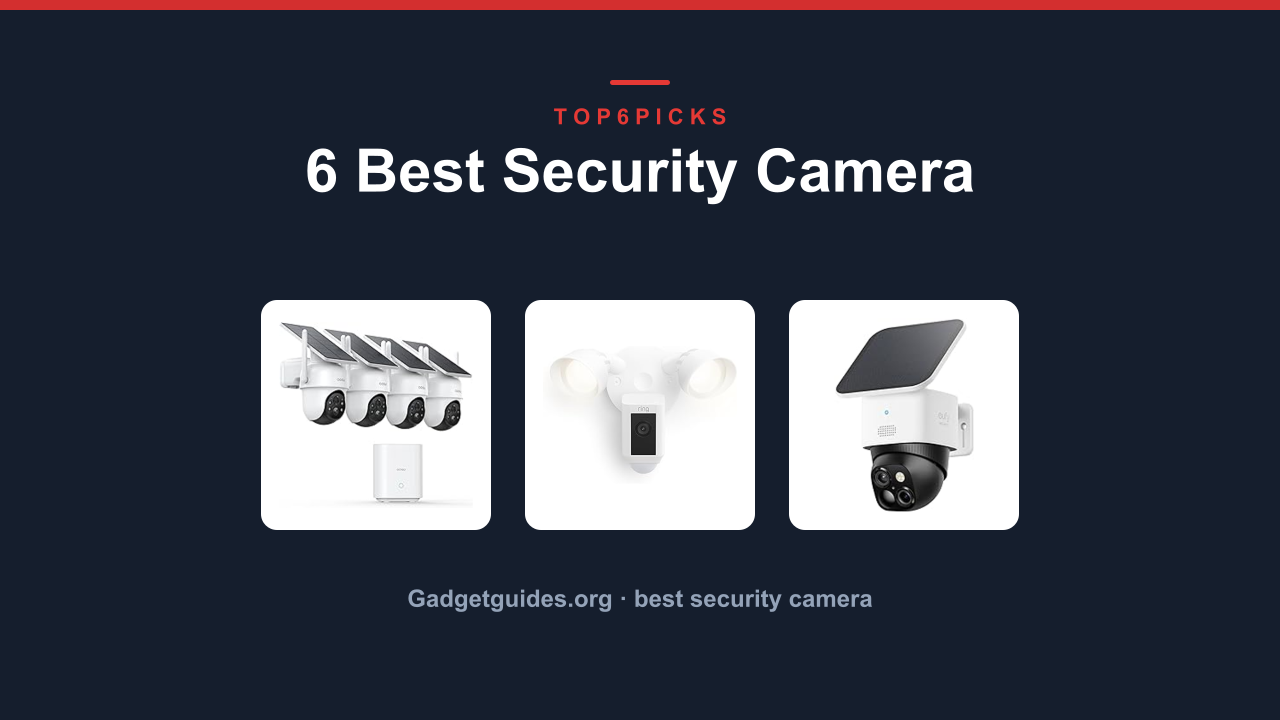
The best best security camera is the aosu D1 Classic 4-Cam Kit, the only one in this lineup that covers a whole property with four solar-powered cameras, 360-degree auto tracking, and no subscription fees. It is built for homeowners who want reliable outdoor coverage without paying a monthly bill.
Want a smarter single-cam setup instead? The Ring Floodlight Cam Wired Plus gets you there, as long as you already have wired outdoor lighting and you are okay with a subscription for recorded playback.
As an Amazon Associate, I earn from qualifying purchases.
This guide tells you which camera actually matches your home, your Wi-Fi, and your budget before you buy. It also flags the buyers who should skip this category entirely and look at a different system.
Everything below comes from current Amazon product data, manufacturer specs, and each product's owner track record. We have not hands-on lab tested these units, so the analysis leans on verified buyer feedback and spec-by-spec comparison.
Quick Answer: The Best Security Camera
The aosu D1 Classic 4-Cam Kit is the overall pick for whole-home outdoor security with no recurring costs. Here is the full lineup in rank order:
- aosu D1 Classic 4-Cam Kit (Best Whole-Home Solar Kit): Four cameras, solar power, and no monthly fees out of the box.
- Ring Floodlight Cam Wired Plus (Best Wired Floodlight Cam): Motion-activated 1080p video plus two bright floodlights in one unit.
- eufy Security SoloCam S340 (Best No-Subscription Single Cam): 3K dual-lens solar camera with full pan and tilt coverage.
- eufy Security eufyCam S4 (Best 4K Tracking Cam): Three-lens PTZ with 8X zoom and AI recognition for large properties.
- Ring Indoor Cam (newest model) (Best Compact Indoor Cam): Simple 1080p indoor monitoring that pairs with the Ring app.
- TP-Link Tapo 1080P Indoor Security Camera (Best Budget Indoor Cam): Affordable baby and pet monitoring with free local storage.
Thinking about skipping the whole category because of subscriptions or wiring? Jump to Who Should NOT Buy below before you spend anything.
Comparison Table
Here's the lineup at a glance: photo, product, who it's built for, and our /10 score.
| Photo | Product | Best for | Score | Buy |
|---|---|---|---|---|
 | aosu D1 Classic 4-Cam Kit | Whole-home solar coverage | 9.2/10 | Check price → |
 | Ring Floodlight Cam Wired Plus | Wired motion-activated lighting | 8.9/10 | Check price → |
 | eufy Security SoloCam S340 | No-subscription single-cam value | 8.7/10 | Check price → |
 | eufy Security eufyCam S4 | 4K zoom and AI tracking | 8.6/10 | Check price → |
 | Ring Indoor Cam (newest model) | Compact indoor monitoring | 8.2/10 | Check price → |
 | TP-Link Tapo 1080P Indoor Security Camera | Budget baby and pet monitoring | 7.8/10 | Check price → |
Scroll sideways on small screens to see every column.
aosu D1 Classic 4-Cam Kit: Best Whole-Home Solar Coverage
aosu D1 Classic 4-Cam Kit: Best Whole-Home Solar Coverage
- ✓4-camera kit covers front, back, and side yards in one purchase
- ✓Built-in 32GB storage per camera means no cloud subscription
- ✓Solar powered, so no running wires for power
- ✓Color night vision keeps details visible after dark
- ✕Replacing one failed camera means buying a new kit
- ✕Occasional delayed motion alerts on weak Wi-Fi
- ✕No continuous 24/7 recording, only event-based clips
Ring Floodlight Cam Wired Plus: Best Wired Floodlight Cam
Ring Floodlight Cam Wired Plus: Best Wired Floodlight Cam
- ✓Bright floodlights scare off intruders before they reach the door
- ✓Reliable wired power means no battery anxiety in winter
- ✓Easy swap-in for an existing exterior light fixture
- ✓Works seamlessly in the Ring app ecosystem
- ✕Requires a subscription to view or save recorded clips
- ✕Only covers one section of the property
- ✕Wired install is not an option for non-electricians in some homes
eufy Security SoloCam S340: Best No-Subscription Single Cam
eufy Security SoloCam S340: Best No-Subscription Single Cam
- ✓Dual lenses capture both wide context and close-up detail
- ✓Full pan and tilt gives 360-degree coverage from one camera
- ✓Solar powered with no subscription for recorded clips
- ✓Color night vision keeps footage usable after dark
- ✕8GB storage overwrites quickly in high-traffic locations
- ✕Auto tracking can briefly lose subjects behind obstacles
- ✕Single camera means one blind spot per mounting point
eufy Security eufyCam S4: Best 4K Tracking Cam
eufy Security eufyCam S4: Best 4K Tracking Cam
Setup asks a bit more of you than the others on this list. The three-lens PTZ head needs a solid mount and a clear sightline, and the solar panel placement matters more because the camera draws more power for its 4K sensor. Buyers who took the time to aim everything properly report reliable performance.
Flaws but not dealbreakers. Some owners report occasional Wi-Fi hiccups when streaming the full 4K feed, and a few mention that the AI recognition can mislabel animals as people in low light. The higher resolution also means more frequent clip reviews before the 32GB fills.
Want the same no-subscription local storage but at a lower price? The eufy Security SoloCam S340 keeps the local storage and adds 360-degree coverage for less.
- ✓4K resolution captures details other cameras miss, like license plates
- ✓8X auto zoom identifies faces across a long driveway
- ✓32GB built-in storage avoids monthly fees
- ✓Three-lens PTZ head covers a wide area with no blind spots
- ✕4K streaming can strain weaker home Wi-Fi
- ✕Higher power draw makes solar placement more critical
- ✕AI recognition occasionally mislabels animals in low light
Ring Indoor Cam (newest model): Best Compact Indoor Cam
Ring Indoor Cam (newest model): Best Compact Indoor Cam
- ✓Plug-in setup means no charging or battery swaps
- ✓Compact profile fits on shelves, desks, and nightstands
- ✓Clear two-way audio for talking to family or pets
- ✓Integrates with the broader Ring ecosystem
- ✕Cloud recording requires a subscription plan
- ✕Fixed lens means no motorized pan or tilt
- ✕Only covers the single room where you place it
TP-Link Tapo 1080P Indoor Security Camera: Best Budget Indoor Cam
TP-Link Tapo 1080P Indoor Security Camera: Best Budget Indoor Cam
- ✓Local SD card storage means no subscription ever
- ✓Budget-friendly price point for multi-cam indoor setups
- ✓Two-way audio and siren add useful security functions
- ✓Works with Alexa and Google Home voice assistants
- ✕Build quality feels lighter and less premium
- ✕Narrower field of view than some rivals
- ✕App can drop connection briefly on weak networks
Buying Guide: Power, Storage, Coverage, and Smart Features
Wired or Wireless: Which Power Source Is Right For You?
The biggest fork in the road is how each camera gets its power. Wired cameras like the Ring Floodlight Cam Wired Plus connect to your home's electrical system, so they never need a battery recharge. That reliability is great for a critical entry point, but it limits you to spots with existing wiring.
Solar-powered cameras like the aosu D1 Classic 4-Cam Kit eliminate that constraint entirely. You mount them anywhere with direct sun, and the built-in panel keeps the battery topped up. The trade-off is placement: a shady north-facing wall or a heavily tree-covered yard will reduce charging.
Battery life claims from manufacturers assume average sun exposure. A camera tucked under a deep eave will draw more from its reserve battery during winter months. If your location is questionable, choose a model with a larger built-in storage buffer and consider a wired option for that specific spot.
Storage and Subscriptions: The Real Cost Over Time
This category splits into two camps. Subscription cameras like the Ring models record clips only when you pay for a plan. The convenience is worth it for many, but the annual cost adds up over a few years.
No-subscription cameras store video locally. The eufy Security SoloCam S340 and the eufy Security eufyCam S4 use built-in flash storage, while the TP-Link Tapo uses a microSD card. The one drawback is capacity.
An 8GB camera overwrites older clips faster than a 32GB model, so review and export important footage quickly. Data from the National Institute of Standards and Technology (NIST) consistently emphasizes local storage encryption as a key privacy control, so look for cameras that encrypt footage on-device.
Resolution and Coverage: What Actually Matters
Resolution matters most when you need to identify a face, a license plate, or a package label. The eufyCam S4 leads with 4K and an 8X zoom. The SoloCam S340's 3K dual-lens setup is a strong middle ground.
The rest of the lineup at 1080p is adequate for general awareness but not for zooming in on fine details.
Coverage is a separate question. A single fixed camera covers one angle. A pan-and-tilt camera like the SoloCam S340 covers a 360-degree sweep.
A multi-cam kit like the aosu D1 covers every corner of your property at once. Think about which areas you truly need to watch before choosing.
Smart Features and App Experience
Every camera here offers motion detection and push alerts, but the quality of those alerts varies. The eufy models include AI recognition that distinguishes people from animals. The Ring models leverage a mature app that works seamlessly with Alexa.
Voice assistant support matters if you already live in a smart home. The TP-Link Tapo works with both Alexa and Google Home, giving it flexibility at a low price. Decide whether you want deep ecosystem integration or broad voice compatibility before you commit.
Who Should NOT Buy Best Security Camera
This category is the wrong purchase for a few kinds of buyers. Here's who they are, and what to look at instead.
You Need 24/7 Continuous Recording
Most security cameras in this price range record only when motion is detected. If you run a business, monitor a parking lot, or need an uninterrupted timeline for insurance purposes, event-based clips will leave frustrating gaps. A wired system with a digital video recorder, or a dedicated business surveillance setup, records every frame with no gaps.
You Can't Mount Anything Anywhere
Renters in strict buildings and people who cannot drill into walls or alter the exterior will struggle with outdoor cameras. Solar cameras need a mount, wired cameras need a junction box, and indoor cameras still need a shelf or a screw. If mounting is off the table, look into a simple indoor tabletop camera or a battery-powered option with a magnetic base that sits on a metal surface without permanent installation.
You Have No Wi-Fi or a Very Weak Signal
Every camera on this list depends on home Wi-Fi for alerts and live viewing. If your internet is spotty or the camera location is far from your router, you will deal with delayed notifications and choppy streams. Weak signals are especially painful for outdoor cameras mounted at the edge of a property.
A mesh Wi-Fi system or a wired security setup is the better path for that situation.
Final Verdict
Start with the aosu D1 Classic 4-Cam Kit if you want whole-home outdoor coverage with no monthly bills. Four solar cameras, local storage, and 360-degree auto tracking make it the best balance of price, coverage, and ownership cost in this group.
Want the brightest single-point deterrent? The Ring Floodlight Cam Wired Plus delivers motion-activated lighting and a camera in one wired package, as long as you accept a subscription for playback.
Need the sharpest image for identifying people or plates? The eufy Security eufyCam S4 gives you 4K detail with an 8X zoom and no subscription. And if you only need one reliable outdoor camera, the eufy Security SoloCam S340 covers a huge area at 3K for a much lower investment.
Before you buy, revisit the Who Should NOT Buy section above. If you cannot mount cameras, need 24/7 recording, or have weak Wi-Fi, no amount of shopping will fix the underlying problem. Match the camera to your situation first, and the purchase will feel right for years.
FAQ
What's the best Security Camera overall?
The aosu D1 Classic 4-Cam Kit is our top pick. It covers a whole property with four solar-powered cameras, stores clips locally on 32GB per camera, and requires no subscription fees.
Do security cameras need a subscription?
No. The aosu D1, eufy SoloCam S340, eufyCam S4, and TP-Link Tapo all record locally without a subscription. The two Ring models require a Ring Protect plan for recorded playback, though live viewing works without one.
How long does a solar camera battery last on cloudy days?
It depends on the model and climate. Most solar cameras in this lineup carry enough reserve battery for several days of event-based recording. Owners in overcast regions report needing direct-sun repositioning in winter, and a wired option is safer for critical spots.
Can I use these cameras as baby monitors or pet monitors?
Yes, especially the indoor models. The Ring Indoor Cam and TP-Link Tapo both have two-way audio, night vision, and motion alerts. Parents also use the TP-Link Tapo for its SD card storage and budget price.
What storage capacity do I need?
For local storage, 32GB per camera handles a week or more of event-based clips on a typical home. The 8GB built-in storage on the SoloCam S340 fills faster, so pick the 32GB models if your property gets frequent activity.
Do these cameras work with Alexa or Google Home?
The TP-Link Tapo works with both Alexa and Google Home. The Ring models integrate with Alexa through the Ring app. The eufy models work with Amazon Alexa and Google Assistant for basic voice control.

Verifygadgetguides.org
Latest posts by Arian (see all)
- How to Replace Underwater Camera Battery - September 4, 2026
- How to Format Underwater Camera SD Card - September 4, 2026
- How to Connect Underwater Camera to Phone - September 4, 2026
Similar Posts
How to Replace Underwater Camera Battery
By Arian • September 4, 2026

How to Format Underwater Camera SD Card
By Arian • September 4, 2026

How to Connect Underwater Camera to Phone
By Arian • September 4, 2026

How to Transfer Underwater Camera Photos
By Arian • September 4, 2026
How to Set Underwater Camera White Balance
By Arian • September 4, 2026
How to Use Underwater Camera Flash
By Arian • September 4, 2026

How to Set Underwater Camera Exposure
By Arian • September 4, 2026
How to Protect an Underwater Camera
By Arian • September 4, 2026

How to Prevent Underwater Camera Condensation
By Arian • September 4, 2026
How to Shoot Underwater Video
By Arian • September 4, 2026

How to Prevent Underwater Camera Fogging
By Arian • September 4, 2026

How to Improve Underwater Camera Low Light Photos
By Arian • September 4, 2026