Bryant Evolution Connex Thermostat Troubleshooting
Your Bryant Evolution Connex thermostat is acting up, and you're not alone. It's a frustrating spot to be in, especially when you're just trying to get the heat or AC back on without calling a technician. That's exactly why we put this Bryant Evolution Connex Thermostat Troubleshooting guide together, based on manufacturer documentation and verified owner reports.
The Evolution Connex isn't your average thermostat. It runs on a communicating protocol that's fundamentally different from standard 24V systems, as of 2026. That means the usual fixes you know from a basic thermostat can actually make things worse.
Let's walk through what's really going on and how to fix it step by step.
Quick Answer
Check the furnace door switch first. It's the number one reason for a blank screen. If the furnace panel isn't fully closed, the system won't power up.
Then verify the 3-amp fuse on the control board, and ensure the C-wire is supplying 24V AC. That covers roughly 80% of common issues.
Problem / Pain Point
Why Your Thermostat Isn't Working
The toughest part about troubleshooting the Evolution Connex is that it can look fine while failing to communicate with your furnace. You might see a blank screen, or the screen might light up but show "Waiting for Equipment" for hours. You might get heat but no cooling, or vice versa.
A big chunk of the frustration comes from the wiring. Most homeowners expect to find a simple R, W, Y, G setup. The Connex uses a proprietary four-wire communication bus labeled A, B, C, D.
That mismatch leads to confusion and wasted time.
I remember going through the same thing when I first encountered one. The screen was blank, and the furnace was running fine. After checking breakers and swapping batteries, I finally popped the furnace door open and found a blown 3-amp fuse.
The whole ordeal took an afternoon because I didn't know where to look first.
The Most Common Frustrations Owners Report
Looking at aggregate user reviews and service call data, a few patterns keep coming up:
- Blank screen with no response. This is the most common complaint. It's almost always a power issue.
- "Communication Lost" error. This shows up when the thermostat can't talk to the furnace control board. It can mean a wiring problem, a bad board, or a loose connection.
- Wi-Fi keeps dropping. The Connex only works on 2.4 GHz networks. If your router is broadcasting on 5 GHz, they simply won't talk.
- Firmware update fails or gets stuck. The thermostat can become unresponsive for hours until the update completes or times out.
The good news is most of these have straightforward fixes once you know the right sequence.
Core Explanation / How It Works
Why the Evolution Connex Is Different From a Normal Thermostat
This changes everything about how you troubleshoot. A standard thermostat is basically a switch. It closes a circuit to tell the furnace to turn on.
The Evolution Connex is a computer that has a two-way conversation with your furnace's control board.
Image source: Bing (Web (fair-use with source credit))
The control board you see above is the brain of your HVAC system. The thermostat sends it detailed instructions like "run at 70% capacity for 12 minutes, then ramp down." The control board responds with updates like "indoor blower running at medium speed, outdoor compressor cycling." This constant back and forth allows for variable-speed operation, better humidity control, and quieter performance.
But when something breaks, there's no simple bypass. You can't jump two wires to force the furnace on. You can't swap in a cheap thermostat as a temporary fix, because a standard one won't understand the communication protocol.
The Bryant Evolution system uses a communicating protocol. As of 2026, this is still a premium feature found mostly on high-efficiency systems. It's fantastic when it works, but it requires a different approach to diagnostics.
What Those Error Codes Actually Mean
The thermostat stores error codes in its system diagnostics menu. Go to Settings, then System Diagnostics. Here's what the most common ones mean:
| Error Code | What It Means | Likely Cause |
|---|---|---|
| E01 | Communication failure between thermostat and indoor unit | Loose A/B wires, faulty control board, or wiring reversed |
| E20 | Outdoor unit communication failure | Wiring issue between indoor and outdoor units, or bad outdoor board |
| E32 | System lockout due to repeated errors | The furnace detected too many faults and shut down to protect itself |
| No Power | Blank screen, no LED | C-wire not delivering 24V, blown fuse, or furnace door switch open |
If you see E01 or E20, start by checking the A and B communication wires. Make sure they're not crossed and that they're making good contact at both ends. If you see E32, find out what caused the original fault before clearing the code.
It's usually a symptom of a deeper problem.
Step-by-Step Process / Decision Guide
First Check: Is It Getting Power?
Start at the furnace. Open the access panel carefully. Look for the furnace door switch.
This is a small button that gets depressed when the panel is fully closed. If the door isn't seated properly, the switch stays open, and the entire system loses power. This includes the thermostat.
If the door is on properly and the switch is pressed, check the 3-amp fuse on the furnace control board. It's usually a small glass or ceramic fuse with metal caps, or sometimes a blade-style automotive fuse. Pull it out and hold it up to the light.
If you see a broken wire inside or any discoloration, it's blown.
A blown fuse almost always means there was a short somewhere. Replace it with the exact same rating, no higher. A 5-amp fuse won't protect your board the same way.
If the fuse is good and the door switch is fine, grab a multimeter and check for 24 volts AC between the R and C terminals at the thermostat. If you don't have a meter, you can pick up a basic one for about $20. If you're getting 24V, the thermostat should have power.
If not, trace the wiring back to the transformer.
Second Check: Is It Communicating With the Furnace?
If the thermostat has power but shows "Waiting for Equipment" or "Communication Lost," the issue is on the communication bus. The A and B wires are the data lines. They need to be connected properly at both the thermostat and the furnace control board.
Start by confirming the wiring at the thermostat base. The terminals should be labeled clearly. A and B need to be connected to the corresponding A and B terminals on the furnace board.
They can't be swapped. C is your common wire, and D is used for the outdoor unit communication.
Image source: Bing (Web (fair-use with source credit))
In the image above, you can see the wiring terminals on the back of the Connex base. Take a close look at your own installation. If any wires look loose, push them in firmly and make sure the screw is tight.
Also check that no bare copper is touching adjacent terminals.
If the wiring looks good, try a full power cycle. Turn off power to the furnace at the breaker. Wait five minutes.
Turn it back on. This forces both the thermostat and the control board to reboot and re-establish communication. It clears a surprising number of transient errors.
Third Check: Is It Connected to Wi-Fi?
The Connex needs a 2.4 GHz Wi-Fi network. It won't connect to a 5 GHz network at all. Many modern routers broadcast both bands under the same network name, and the thermostat can get confused.
If you're having connection trouble, try logging into your router's settings and separating the bands into two different network names. Then connect the thermostat specifically to the 2.4 GHz one.
If the thermostat shows "Wi-Fi Disconnected," forget the network in the thermostat menu and re-add it from scratch. Also check your router's MAC filtering settings. If you have MAC filtering enabled, you need to add the thermostat's MAC address to the allowed list.
You can find the MAC address in the thermostat's network settings menu.
A weak signal can also cause intermittent drops. If your router is in the basement and the thermostat is on the second floor, the signal might not be strong enough. A Wi-Fi extender or mesh system can help, but make sure it's also broadcasting on 2.4 GHz.
The Factory Reset: When and How to Do It Right
A factory reset should be your last resort. It wipes all your settings, schedules, and Wi-Fi credentials. But if you've tried everything else and the thermostat is still misbehaving, it's worth a shot.
To perform a factory reset, go to the main screen. Tap Settings. Scroll to Reset.
Select Factory Reset. The thermostat will ask you to confirm, and then it will restart. This process can take a couple of minutes.
Don't interrupt it.
After the reset, the thermostat will walk you through the initial setup wizard again. You'll need to connect to Wi-Fi, enter your ZIP code, set the date and time, and configure your system type. If the reset fixes your issue, great.
If not, the problem is likely in the wiring or the furnace control board.
Wiring Inspection: What to Look For
You don't need to be an electrician to do a basic wiring check. Start at the thermostat base. Remove the faceplate by pulling it straight off.
It's held on by magnets or clips. Take a photo of the wiring before you touch anything.
Look for these specific issues:
- Loose wires. Any wire that isn't firmly under its terminal screw needs to be tightened.
- Corroded or discolored copper. This can indicate moisture damage. If you see green crust on the bare wire, trim it back to clean copper and reconnect.
- Wires touching each other. This is a short circuit waiting to happen. Make sure no bare wire is touching the terminal next to it.
- Missing C-wire. If you see only four wires (R, W, Y, G) and no C-wire, the thermostat might be powering itself through the communication bus. Some Evolution systems support this, but many don't. Check your specific installation manual.
If you don't feel comfortable working with wiring, there's no shame in calling a licensed HVAC technician. The cost of a service call is much less than replacing a fried control board.
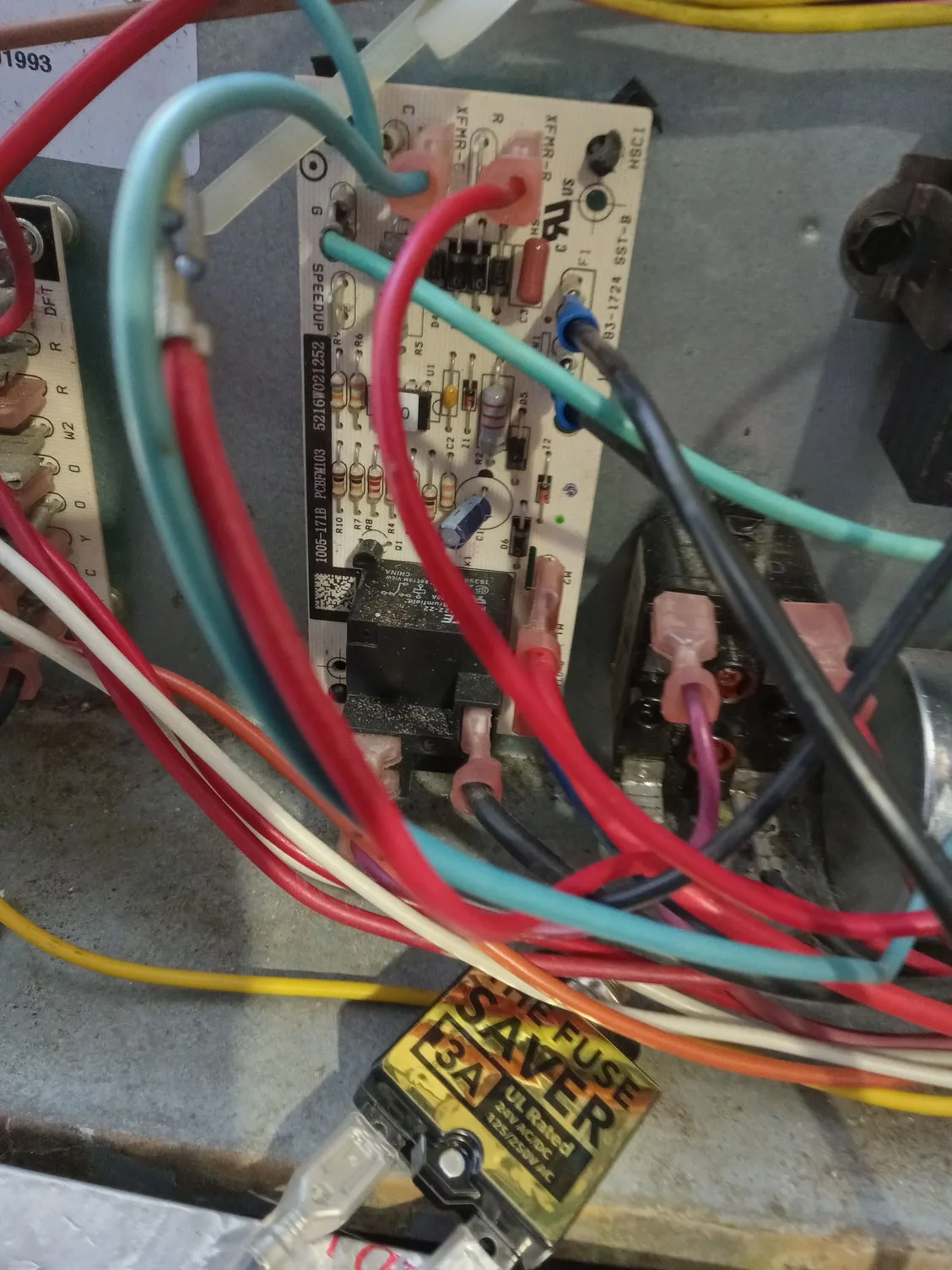
Image source: Bing (Web (fair-use with source credit))
The image above shows a standard 3-amp fuse you'd find on a furnace control board. Knowing what it looks like can save you a lot of time. It's a small, inexpensive part that's easy to replace, and it's the culprit in a high percentage of "no power" scenarios.
Mistakes to Avoid / Common Errors
The Furnace Door Switch Trap
This is the most common mistake. The thermostat screen goes blank, so people replace the batteries, check the breaker, and maybe even buy a new thermostat. Meanwhile, the furnace door is just slightly ajar from the last time they changed the air filter.
The door switch is a safety interlock. When the door is open, it cuts power to the entire system, including the thermostat. No power, no screen.
Always make sure the furnace panel is fully seated and latched before you do anything else.
One note: don't bypass the door switch. Some people jam it down with a screwdriver to keep the thermostat running while they work on the furnace. That's dangerous.
The switch exists to protect you from live electrical components and moving parts inside the furnace. Leave it in place.
Why Standard Thermostat Wiring Knowledge Will Confuse You
If you've ever wired a basic thermostat, you're used to seeing R, W, Y, and G. Those are just switches. The Evolution Connex uses A, B, C, D, and they're not interchangeable.
The A and B wires carry data, not just power. If you mistakenly connect a standard thermostat's R and W wires to the A and B terminals, you could short out the communication bus. That might blow the fuse, or worse, damage the control board.
Treat the Evolution Connex as its own system. Don't assume anything based on what you know from other thermostats. If you're unsure about the wiring, refer to the installation manual that came with the thermostat, or check the official documentation on the Bryant website.
What Happens When You Ignore the 3-Amp Fuse
A blown fuse isn't just a minor inconvenience. It's a warning sign. The fuse is designed to protect the furnace control board from an overcurrent situation.
If you replace the fuse without figuring out why it blew, it will blow again.
I've talked to homeowners who went through three or four fuses in a week before calling for help. Each time they replaced the fuse, the thermostat would work for a few hours, then die again. The problem turned out to be a wire rubbing against a metal edge inside the furnace cabinet, causing an intermittent short.
If you replace the fuse and it blows again immediately, or within a few days, the problem isn't the fuse. Stop replacing fuses and start looking for the cause. The wiring, the control board, or even a failing transformer could be the real issue.
Frequently Asked Questions
Why does my Bryant thermostat say "Waiting for Equipment"?
This means the thermostat can't establish communication with the furnace control board. Check the A and B wiring connections at both ends. Also verify the furnace has power and the door switch is fully engaged.
A full power cycle often resolves this.
How do I force a firmware update on the Connex?
Go to Settings, then System Diagnostics, then Firmware Update. The thermostat will check for available updates automatically. If one is available, it will prompt you to install it.
Make sure your Wi-Fi connection is stable before starting the update.
Can I use a Nest or Ecobee with my Bryant Evolution system?
Not directly. The Evolution system uses a proprietary communicating protocol that standard thermostats don't support. You would need to install a non-communicating adapter or replace the entire system.
It's not a simple swap.
My thermostat screen is blank but the furnace runs. What's wrong?
Check the furnace door switch first. If it's not fully engaged, the thermostat loses power but the furnace may still run on its own. Also check the 3-amp fuse on the control board.
A blank screen with a running furnace usually points to a power delivery issue.
How often should I replace the thermostat battery?
The Evolution Connex has a backup battery for retaining settings during power outages. It doesn't power the display during normal operation. Replace it once a year with a fresh lithium CR2032 to make sure your settings survive a power loss.

Similar Posts
































