Chevy Volt Troubleshooting
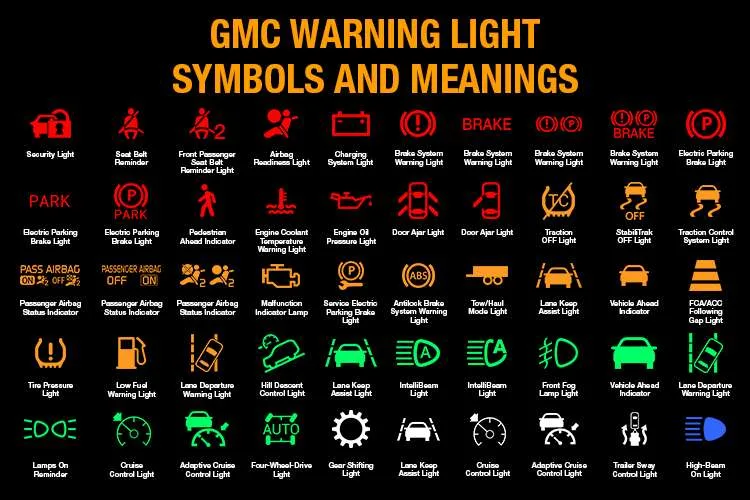
Image source: Bing (Web (fair-use with source credit))
If you're here, you're probably staring at a dashboard warning light or scratching your head over a Volt that won't cooperate. Chevy Volt troubleshooting can feel intimidating because this car isn't a typical gas vehicle. But most issues follow a logical pattern.
Once you understand how the Volt's dual propulsion system works, you'll stop guessing and start diagnosing.
The Volt pairs a 16.0 kWh lithium-ion battery pack (18.4 kWh in later models) with a range-extending gas generator. That means two separate systems can fail independently, which confuses owners who expect traditional car behavior. Most major faults trace back to a handful of known weak points.
Let's walk through them one by one.
The 12V Battery: The #1 Cause of Phantom Failures
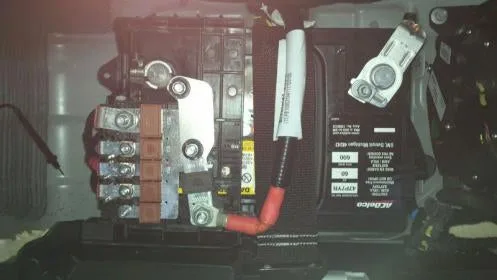
Image source: Bing (Web (fair-use with source credit))
Start here. The 12V auxiliary battery is the most neglected component in the entire Volt, and it's responsible for more mysterious failures than anything else. This battery runs all the computers, relays, and control modules.
The big traction battery just powers the motor.
Here's what happens when the 12V battery weakens: the computers lose stable voltage and start acting erratically. You'll get phantom warning lights. The car might refuse to start.
The infotainment screen might freeze. The traction battery can be fully charged, and the car still won't wake up.
Test it first. Use a multimeter to check resting voltage. It should read 12.4V or higher. Then test under load with a battery tester, not just resting voltage.
A battery that shows 12.6V resting but drops to 9V under load is done.
Replace it every four to five years. Per manufacturer specs, this battery needs regular replacement. Use an AGM battery, not a standard lead-acid. The Volt's charging system is tuned for AGM, and the wrong type shortens lifespan.
Expect to pay $150 to $250 for a quality replacement. The battery sits in the rear cargo area under the floor panel. If you're handy, it's a 30-minute job with a 10mm socket.
One warning: never connect jumper cables directly to the 12V battery terminals. Use the jump posts under the hood. Connecting directly can damage the battery management system.
That's an expensive mistake.
Reading the Warning Messages
The dashboard tells you a lot if you know how to read it. Every warning message maps to a specific system. Don't panic when you see a red light.
Treat it as a clue.
| Warning Message | Most Likely Cause | Next Step |
|---|---|---|
| "Shift to Park" | Shifter switch wear (Gen 2) | Try jiggling the shifter, then replace switch |
| "Reduced Propulsion" | BECM failure or cell imbalance | Scan for P0AA6 or P1E00 codes |
| "Engine Not Available" | Fuel system issue or cold weather | Check fuel level and coolant temps |
| "Service High Voltage Charging System" | Charger or BECM fault | Inspect charge port and cable |
| "12V Battery Low" | Weak auxiliary battery | Test and replace 12V battery |
If your Volt shows multiple warnings at once, that's a strong signal. The 12V battery is likely the root cause. A dying 12V battery starves the computers, and they start throwing unrelated codes.
This is the single most common misdiagnosis.
The logic is simple: if you see any warning at all, start with the cheap and easy checks. Scan for codes with an OBD-II reader that supports GM-specific codes. Generic readers will show you P-codes, but the Volt uses proprietary codes too.
A Bluetooth scanner with the right app or a professional-grade tool gets you the full picture.
The "Shift to Park" Error: Gen 2's Most Notorious Fault
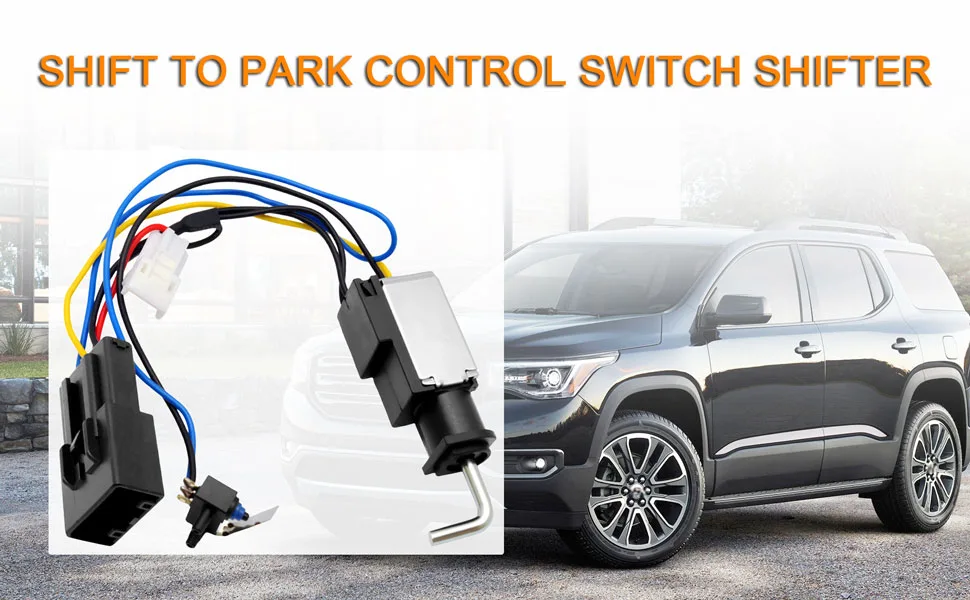
Image source: Bing (Web (fair-use with source credit))
If you own a 2016 or newer Volt, you've probably seen this one. The "Shift to Park" error is the most notorious issue in the Gen 2 community. The car thinks you haven't fully engaged Park, even when you have.
You shift to Park, the screen says "Shift to Park," and the car refuses to turn off. It's maddening when you're sitting in your driveway at 11 PM.
The root cause is mechanical wear. The switch that tells the car the shifter is in Park wears out from normal use. Over time, the contacts don't make a solid connection, and the car loses its signal. It's not a software bug.
If you're stuck right now, jiggle the shifter gently while pressing the button. Often, that's enough to re-establish the contact and let the car shut off. It's not a permanent fix, but it gets you out of the parking lot.
Some owners report that pressing the shifter button in and holding it while shifting to Park works more reliably.
The permanent fix is replacing the shifter assembly or just the switch contacts inside. It's a known DIY job. You'll need a small pick tool and about an hour.
Replacement shifter assemblies cost $100 to $200. If you're not comfortable taking your center console apart, a dealer will do it in about half a day of labor.
Check your warranty coverage first. GM extended the warranty for this specific issue to 10 years or 120,000 miles. Call a Chevrolet dealer with your VIN. If you're covered, the repair is free.
Most dealerships are familiar with this issue now, and the replacement is straightforward. The new switch is designed more durably, so it should last longer than the original.
"Reduced Propulsion" Alarm: BECM and Cell Imbalance
"Reduced Propulsion" is the warning that makes every Volt owner's heart sink. It appears when the powertrain control module detects a problem with the high-voltage battery system. This warning almost always points to one of two culprits.
The Battery Energy Control Module (BECM) is the brain that monitors the battery pack's state of charge, temperature, and cell voltages. When it fails, the car limits power to protect the battery. This is a known issue on Gen 2 Volts (model years 2016, 2019).
GM extended the warranty on the BECM to 10 years or 150,000 miles in response. If you own one of these, check your VIN against the warranty extension.
Cell imbalance is the other suspect. The battery pack has individual cells that can drift out of sync. Over time, one cell gets too low or too high, and the system reduces power.
In some cases, a full discharge and slow recharge balances the cells. If that doesn't fix it, the pack needs service.
Here's how to diagnose it by code:
P1E00 or P0AA6: The BECM is likely failing. This isn't a DIY fix. The module needs replacement, and the high-voltage system requires special training to work on safely. Take it to a Chevrolet dealer or a qualified EV specialist. Under the extended warranty, it's free.
P0B3F or similar cell voltage codes: You have a cell imbalance. Try a full discharge and slow recharge first. If the code returns, the pack needs professional service.
Sometimes you'll see "Reduced Propulsion" alongside battery coolant warnings. The Volt has a dedicated battery cooling system separate from the cabin heater. Low coolant or a failing coolant pump triggers the same protection mode.
Check the coolant reservoir for the battery loop. If it's low, top it off and watch for leaks. A common failure point is the coolant pump.
Don't ignore this warning. The car limits power to protect you and the battery. Continuing to push it can cause further damage and potentially strand you. The Volt will still drive at reduced speed, so you can make it to a safe location or a service center.
But treat it as a real issue, not a suggestion.
Engine Won't Start, Runs Rough, or Won't Turn Off
The gas engine in the Volt doesn't behave like a normal car engine. It only runs when needed, and its startup logic can confuse owners. If the engine won't start at all, work through these branches.
Branch 1: "Engine Not Available" Message
This is typically a fuel system issue. The Volt runs on electric until the battery depletes, then the gas engine kicks in. If you rarely use gas, the fuel can go stale or the system can detect a problem.
The simplest fix: add fresh premium gas and drive in Mountain Mode or Hold Mode. That forces the engine to run and burn through old fuel.
Branch 2: Engine Won't Start in Cold Weather
The engine has a "cold start" logic that requires coolant temperature above a certain threshold before it will fire. In extreme cold, the engine may refuse to start until the electric heater warms the coolant. This is a protective measure.
If you're seeing this, drive on battery until the coolant warms, or plug the car in to precondition.
Branch 3: Engine Runs Rough or Shakes
This is usually a spark plug or ignition coil issue. The Volt's engine doesn't run constantly, so components can degrade from infrequent use. Check the ignition coils first.
They're a known wear item. If you're handy, they're easy to swap. Spark plugs are the next suspect, and a fresh set of iridium plugs solves most rough-running complaints.
Branch 4: Engine Won't Turn Off
If the gas engine keeps running when you park, the system is likely running a maintenance cycle. The Volt burns off old fuel and keeps the engine lubricated every so often. This is normal.
It should stop after a few minutes. If it runs indefinitely, check for a fault in the engine coolant pump or a stuck relay.
Fuel maintenance mode is part of the Volt's design. The car runs the engine periodically to prevent condensation and stale fuel issues. If you drive mostly electric, ignore the "fuel maintenance" mode when it triggers.
It's doing its job. Just keep at least a quarter tank of fresh gas in the car.
Charging Issues: What to Check When the Volt Won't Charge
Charging problems are frustrating, especially when you're counting on a full battery for tomorrow's commute. Work through these checks in order.
Check the charge port and cable first. Inspect the connector pins for corrosion, dirt, or damage. The Volt's charge port is exposed to weather, and a rusty pin can interrupt the connection. Clean the pins with contact cleaner and a soft brush.
If the cable handle feels loose or the locking mechanism doesn't click, that's your problem.
Check the charging timer settings. The Volt has a programmable charge timer. If it's set to charge only during off-peak hours, the car won't start charging immediately when you plug in. Check the instrument cluster for "Timer" vs.
"Charge Now" modes. This is a common source of confusion for new owners.
If the "Service High Voltage Charging System" message appears, you have a fault in the charging circuit. This points to the BECM, the onboard charger, or the charge port itself. Scan for codes.
If you see a code related to the charger, this is dealer territory. The onboard charger sits under the rear seat and isn't a DIY repair.
For Level 1 (120V) charging problems, check the outlet itself. Use a different outlet. If the outlet is on a GFCI circuit, test it with another device.
A bad ground or a tripped GFCI will prevent the car from charging. The Volt's charger is sensitive to voltage quality.
For Level 2 (240V) charging problems, the issue is often the station, not the car. If you're at a public station, try a different handle. If you're on a home station, check that the station's status lights show normal operation.
Most home stations have a diagnostic LED readout.
Common Volt Issues by Model Year
Not all Volts fail the same way. Knowing which problems plague your specific model year helps you prioritize your troubleshooting.
2011, 2015 (Gen 1): The original Volt is generally reliable. Watch for coolant leaks in the battery loop and the cabin heater system. Some Gen 1 cars had issues with the electric drive unit's bearings, which causes a whining noise.
The startup sequence can also feel sluggish if the 12V battery is weak.
2016, 2019 (Gen 2): The BECM failure and the shift-to-park issue are the big ones here. Both have warranty extensions. Check your VIN.
The Gen 2 also had a run of vehicles with faulty battery coolant pumps, which triggers the reduced propulsion warning even though the battery is fine.
2019 (Last year): The final model year is a mix of Gen 2 parts, and it benefits from the same BECM warranty extension. If you own a 2019, check for the battery coolant pump issue specifically.
When to DIY vs. Call a Professional
The Volt is a hybrid of old and new technology. Some repairs are simple. Others require specialized high-voltage training.
Getting this balance wrong can cost you money or, worse, cause an injury.
Safe DIY jobs:
- 12V battery replacement
- Cabin air filter
- Spark plugs on the gas engine
- Ignition coils on the gas engine
- Shifter switch replacement (Gen 2 shift-to-park fix)
- Cleaning the charge port pins
Leave to professionals:
- Any high-voltage battery service
- BECM replacement
- Onboard charger replacement
- Electric drive unit work
- Coolant pump replacement on the battery loop
The high-voltage system uses 300, 400 volts DC. That's lethal. Even with the car off, the battery retains charge.
There's no shame in hiring a pro.
Final Tips for Keeping Your Volt Healthy
Prevention beats troubleshooting. A few habits keep most Volt problems away.
Keep the 12V battery fresh. Replace it every four years, even if it seems fine. It's a cheap insurance policy against phantom issues.
Use the gas engine regularly. The Volt's gas engine needs to run to stay healthy. If you drive mostly electric, use Mountain Mode or Hold Mode once a week for at least 15 minutes. This burns off moisture in the oil and prevents fuel system gunk.
Store it plugged in when possible. The Volt's battery management system prefers to be plugged in, especially in hot or cold weather. It handles thermal management better when connected.
Watch the coolant levels. Low battery coolant triggers reduced propulsion mode. Check both reservoirs every few months. Top off with the correct coolant type for your model year.
Update the software. GM released several software updates over the years that improve battery management and fix subtle bugs. Ask your dealer about the latest updates during any service visit.
The Bottom Line
Chevy Volt troubleshooting comes down to understanding what each system controls and where the known weak points are. Start with the 12V battery, most ghost issues trace back to it. Learn what the warning messages mean.
And don't be afraid to call a dealer for the big stuff.
The Volt is a well-engineered car with predictable failure modes. Once you know what to look for, most problems become manageable. Keep a quality OBD-II scanner in your glovebox, stay on top of the 12V battery, and you'll handle most issues that come your way.

Similar Posts