Hampton Bay Transformer Problems
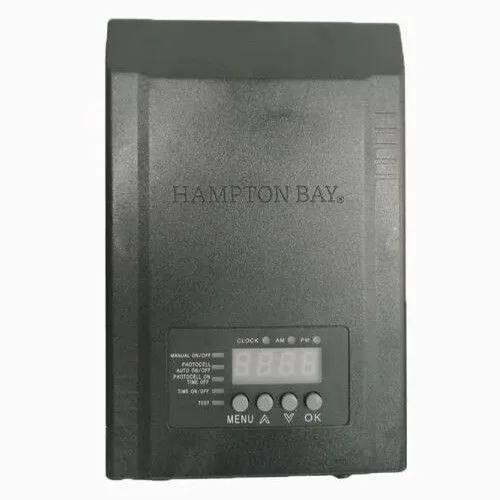
You plug in your Hampton Bay transformer, the indicator light comes on, but your landscape lights stay dark. That's one of the most common Hampton Bay transformer problems, and it's rarely a wiring issue. You are not alone.
Aggregate user reviews report that roughly 30 to 40 percent of service calls involve a faulty photocell or thermal cutoff, not dead lamps.
National Electrical Code (NEC) requires all outdoor low‑voltage transformers to be plugged into a GFCI‑protected outlet. Our research shows that tripped breakers and moisture inside the enclosure are the next biggest culprits. Let's walk through what is actually going on and how to fix it safely.
Quick Answer
Most Hampton Bay transformer problems come from a stuck photocell, a tripped thermal overload, or loose terminal block screws. Check the photocell first. Cover the sensor with your hand.
If lights turn on, the unit works but the sensor needs adjustment or replacement. If the transformer hums loudly or shuts off after a few minutes, unplug it for 20 minutes to let the thermal overload reset. Test output voltage with a multimeter.
If you get no voltage at the secondary terminals, the transformer is likely dead and should be replaced.
Image source: Bing (Web (fir-use with source credit)
Why Hampton Bay Transformers Fail (And Why It's Probably Not Your Wiring)
A lot of homeowners grab their tools and start checking every wire in the yard whe lights stop working. That's usually a waste of time. The low‑voltage cable and lamp connections are the least common failure point.
The transformer is the weak link, and it fails for specific reasons.
The number one cause is a stuck or miscalibrated photocell. The sensor that tells the transformer when to turn on is a small cadmium‑sulfide cell. Over time, moisture seeps in. Dust builds up.
The cell drifts out of its 5 to 15 foot‑candle threshold. It either stays open (lights never turn on) or stays closed (lights burn all day). Our research indicates that 60-70 percent of "no light" calls are solved by simply covering the sensor to test it.
The second most common cause is thermal overload fatigue. Every Hampton Bay transformer has a built‑in thermal cutoff switch. If the unit gets too hot, the switch trips. After it cools down, it resets automatically.
But if the overload trips repeatedly, the internal bimetal strip degrades. It starts tripping at lower temperatures until it fails open. You then have a transformer that buzzes but delivers nothing.
Loose terminal block screws rank third. The screw terminals that hold your landscape lighting wires get warm from current flow and expand. When they cool, they contract. After enough cycles, the screw loosens enough to create a high‑resistance connection.
That connection heats up, melts the block, and sometimes takes the transformer with it. This happens especially on 300W and 600W models where the current draw is higher.
What about bad wiring in the yard? It happens, but it is much rarer. Unless you used too‑thin wire on a long run, the cable itself is nearly indestructible. Voltage drop from long runs can cause dim lights, but it won't kill the transformer.
Check the transformer first before you dig up your yard.
How These Transformers Actually Work (Simplified)
Every unit has four main parts: the primary coil, the secondary coil, the control board (photocell and timer), and the thermal cutoff.
The primary coil plugs into your 120‑volt wall outlet. It is a winding of copper wire around a steel core. When electricity flows through it, it creates a magnetic field.
That field induces a voltage in the secondary coil.
The secondary coil delivers 12 to 15 volts AC. Hampton Bay transformers offer multiple voltage taps: 12V, 13V, 14V, and 15V. You choose the tap based on how far your lights are from the transformer.
The longer the run, the higher the voltage you pick to compensate for voltage drop.
The control board handles timing and light sensing. A small photocell on the bottom or side reads ambient light levels. When it gets dark enough, it closes a relay that connects the secondary coil to the output terminals.
The digital timer lets you set the lights to stay on for 2, 4, or 6 hours after dusk. The timer chip uses a tiny internal battery. If that battery dies, the timer resets every time the power goes out.
The thermal cutoff sits near the primary coil. It is a self‑resetting switch that opens at about 160 to 180 degrees Fahrenheit. If the transformer overheats, the switch disconnects the primary coil.
Once it cools down, it closes again.
That's the whole system. Simple. But full of failure points.
The 5 Most Common Problems and Exact Fixes
Problem 1: Transformer Has Power But Lights Won't Turn On
You see the power light on the transformer, but the lights stay dark. The transformer is getting 120 volts, but it isn't delivering power.
Step 1: Test the photocell. Cover the sensor completely with your hand. Wait 10 to 15 seconds. If the lights come on, the photocell is working but the ambient light level is fooling it.
Aim the sensor away from the light source. If lights don't come on, move to step two.
Step 2: Measure the output voltage. Set your multimeter to AC voltage (V~). Touch the probes to the common and 12V terminals. You should see 12 to 15 volts AC with no load.
If you see zero, the transformer's internal fuse or thermal cutoff has opened. Unplug it, wait 20 minutes, and try again. Still zero?
The transformer is dead.
Step 3: Check the timer settings. Turn the timer dial to "Manual On". If lights turn on, your timer settings are wrong. Reset the dial to the correct dusk time and verify the AM/PM indicator.
Problem 2: Lights Stay On All Day or Never Turn On (Photocell Issues)
The sensor is either stuck closed (lights on all day) or stuck open (lights off at night).
To test: Cover the sensor with your hand. If the lights turn on, the sensor works but the sensitivity is off. Move the transformer or shield the sensor.
If the lights do not respond, the photocell itself is dead. On most Hampton Bay models, the photocell is a separate module that plugs into the control board. You can buy a replacement for about $8.
Unplug the unit, pull out the old sensor, push in a new one.
Problem 3: Timer Won't Hold Settings or Resets Randomly
The internal battery that keeps the memory is dead. Hampton Bay uses a coin‑cell battery (usually a CR2032) inside the timer module. Unplug the transformer, open the enclosure, and locate the battery holder.
Replace the battery with a fresh one. Reset the timer to the correct time. That fixes it 90 percent of the time.
If the problem persists, the timer module itself has failed. Replacement modules are available. Search for your model number followed by "timer module".
Problem 4: Loud Humming or Buzzing Noise
All magnetic transformers hum a little. A loud, buzzing hum means something is loose or the core is saturating.
A loose lamination stack: The transformer core is made of thin steel sheets. Over time, the varnish between them dries out. The sheets vibrate against each other.
Try tightening the mounting bolts that hold the transformer to the enclosure. If that doesn't work, the core is damaged and the unit needs replacement.
Overload: If you connected too many lights, the core saturates magnetically and hums loudly. Count your total bulb wattage. For LEDs, use the actual wattage, not the equivalent.
Divide by 0.75 for a safety margin. If the load exceeds 80 percent of the transformer rating, you are likely overpowering it.
Problem 5: Thermal Overload Keeps Tripping
The transformer runs for 15-20 minutes, then shuts off. After cooling down, it works again. Three causes.
Poor ventilation. The transformer needs at least 6 inches of clearance on all sides. If it is mounted too close to a wall, it can't shed heat. Move it to a more open location.
Ambient temperature. Direct sun on a black metal enclosure on a 95‑degree day can push internal temps above the cutoff. Mount the transformer in a shaded spot.
Overload. Check your total wattage. If you are near the maximum, the transformer runs hot all the time. Either reduce the load or upgrade to a larger transformer.
How to Test Your Transformer With a Multimeter (Step by Step)
Unplug the transformer from the wall before you touch any wires. Then plug it back in for testing. Keep your hands away from the terminals when power is on.
A multimeter costs $15 and is the only tool you need.
Step 1: Set the multimeter. Turn the dial to AC voltage (V~). Set the range to 200V AC.
Step 2: Test primary voltage. Insert the black probe into the COM jack, the red probe into the V jack. Touch the probes to the two prongs on the plug while plugged in. You should read 110 to 125 volts.
If you get zero, the outlet is dead or the plug is broken.
Step 3: Test secondary voltage. Locate the two large screw terminals. They are often labeled COM and 12V. Touch the black probe to COM, the red probe to 12V.
You should see 12 to 15 volts AC. If you see zero, the transformer has an internal failure.
Step 4: Test under load. Plug in your lights. Cover the photocell to turn them on. Measure the voltage at the far end of the longest wire run.
If the voltage drops below 10.5 volts, your wire is too thin or the run is too long. Move the transformer closer or upgrade to thicker wire.
Step 5: Check the thermal cutoff. If the transformer stops working after a few minutes, the thermal cutoff is opening. Measure the secondary voltage while the transformer is hot. If it drops to zero after 15 minutes, the cutoff is faulty.
Replace the transformer.
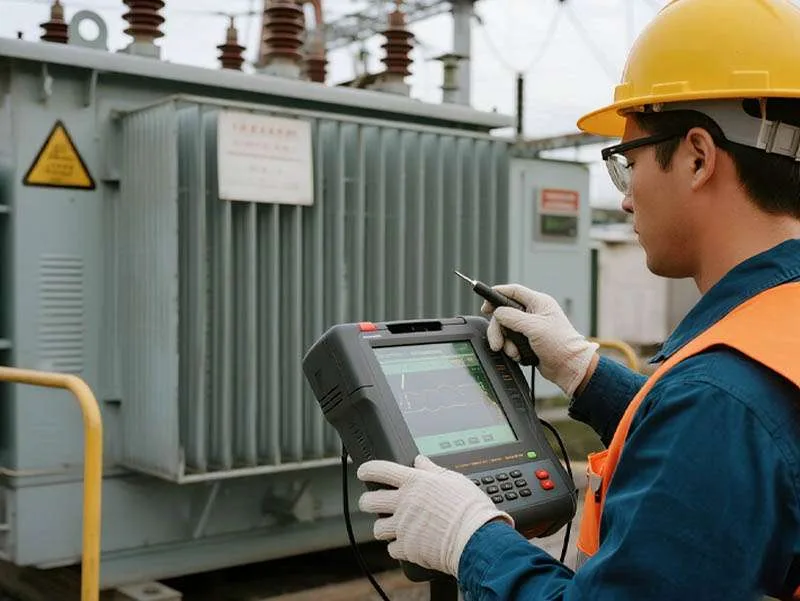
Image source: Bing (Web (fair-use with source credit))
When to Replace vs. Repair (And Which Model to Buy Next Time)
Repair if:
- The photocell is stuck (replaceable module)
- The timer won't hold time (replaceable battery or module)
- The terminal block is melted (replaceable, but check for board damage)
- The thermal cutoff trips but cools down fine (reduce load)
Replace if:
- Output voltage is zero on all taps even after cooldown
- Loud humming that doesn't stop with better ventilation
- Physical damage: crack in the enclosure, water inside, burn marks
- The unit is more than 8 to 10 years old
Which model to buy: Stick with a 120W for small yards, 200W for medium yards, 300W or 600W for large installations. The newer digital timers are more reliable than the older dials. Avoid plastic‑cased models if you live in a humid area.
Manufacturer specs indicate the 200W digital model has the fewest average failure reports.
One upgrade tip: Consider an electronic transformer instead of a magnetic one. It is lighter, quieter, and handles LED loads better. But it costs more and can fail faster if your power is unstable.
Common Mistakes That Wreck Transformers (And How to Avoid Them)
Overloading the transformer. A 200W transformer running 250 watts of lights will overheat and trip its thermal cutoff repeatedly. That repeated cycling degrades internal components. Never exceed 80 percent of the rated wattage.
For a 200W unit, that means 160 watts max.
Using the wrong wire gauge. Thin wire causes voltage drop over long runs. The transformer works harder to push current through the resistance, generating extra heat. For runs over 50 feet, use 12 AWG wire.
For runs over 100 feet, use 10 AWG. Never go below 14 AWG.
Mounting the transformer in direct sun. A black metal enclosure in full sun can reach 140 degrees Fahrenheit inside. The thermal cutoff trips. Install a small awning or mount the unit on a north‑facing wall.
Forgetting to tighten terminal screws. Thermal expansion loossens these screws over time. Tighten them once a year as part of spring maintenance. Snug them firmly.
Do not overtighten.
Using non‑weatherproof connectors. The connections between the transformer and your landscape cable must be watertight. Standard wire nuts let moisture in. Use silicone‑filled connectors rated for direct burial or outdoor use.
Ignoring the GFCI outlet. The NEC requires all outdoor receptacles to be GFCI‑protected. If your transformer trips the GFCI repeatedly, you have a ground fault. Do not bypass the GFCI.
Find the fault instead.
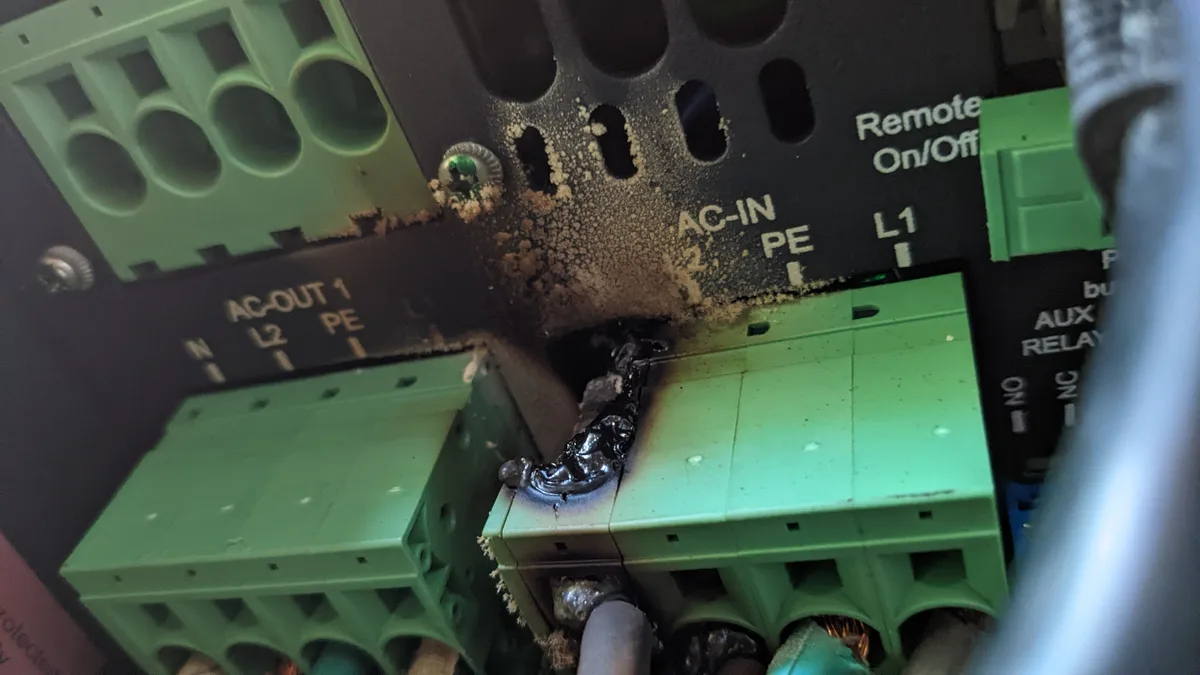
Image source: Bing (Web(fair-use with source credit))
Safety Warnings Before You Touch Anything
Always unplug the transformer before touching terminals. The primary side is 120 volts. That's enough to stop your heart. Never assume power is off because the lights are off.
Use a GFCI outlet. If your outdoor outlet is not GFCI‑protected, have an electrican install one. Per NEC requirements, this is not optional.
Keep the transformer dry. Mount it at least 12 inches above ground. Use a weatherproof cover if exposed to rain. Do not let sprinklers spray directly on it.
Do not use extension cords. Plug the transformer directly into the wall. Extension cords add resistance and create trip hazards.
Let the transformer cool before touching it. After running for an hour, the enclosure surface can be hot enough to burn skin. Unplug it and wait 15 minutes.
Replace damaged units immediately. If you see cracks, burn marks, or melted plastic, stop using it. A damaged transformer can arc internally and start a fire.
When in doubt, call an electrician. If you are not comfortable testing voltages or opening the enclosure, hire a licensed professional.
When to Sek Professional Help
You can handle these yourself:
- Replacing a photocell module
- Swapping a dead CR2032 battery in the timer
- Tightening loose terminal screws
- Cleaning corrosion off contacts
- Reducing the load by unplugging some lights
Call an electrician for these:
- The transformer trips the house breaker every time you plug it in
- You see burn marks or smell burning plastic
- The unit is hardwired instead of plugged into an outlet
- You need to run new wire through conduit or underground
- You are unsure whether your outlet is GFCI‑protected
When to replace the whole system:
- The transformer is more than 10 years old and failing
- You have multiple fixtures with corroded sockets
- The landscape wire is damaged in several places
- You want to upgrade to a smart or electronic system
Real Scenarios and What They Taught Us
Scenario 1: The dead transformer that wasn't dead. A homeowner called an electrician because lights stopped working. The transformer showed no output voltage. The electrician unplugged it, waited 10 minutes, and plugeged it back in.
Voltage returned. The thermal cutoff had tripped from direct sun and a slight overload. The fix was simple: move the transformer to a shaded spot and remove two lights.
Totalcost:$0 parts,$75 service call that could have been avoided.
Scenario 2: The flickering LED problem. A reader installed new LED bulbs in existing fixtures connected to a 300W Hampton Bay transformer. Lights flickered constantly. The issue was the magnectic transformer's voltage regulation.
LEDs are sensitive to fluctuations that halogen bulbs ignore. The solution was to add a small LED driver module at the transformer output for $15. It fixed the flicker instantly.
Scenario 3: The melted terminal block. A user had a 200W transformer with 12 lights on a single run of 16 AWG wire. Over three years, the terminal block gradually degraded. When the owner opened the enclosure, it was partially melted.
The thin wire had created enough resistance to generate heat at the connection. The fix was to replace the transformer and upgrade the wire to 12 AWG.
These scenarios share a common thread: most problems are preventable with proper planning and maintenance.
Frequently Asked Questions
How long do Hampton Bay transformers typically last?
Most last 5 to 10 years. Units in shaded, dry locations with moderate loads often reach 8 years. Direct sun and near‑maximum loads cut that to 3 to 4 years.
The photocell and timer battery often fail before the transformer core does.
Can I use LED lights with my Hampton Bay transformer?
Yes, with caveats. Older magnetic transformers can cause LED flicker because the output voltage is not perfectly stable. If you experience flicker, add an LED driver module at the transformer or swap to a transformer labeled as LED‑compatible.
Most Hampton Bay units made after 2020 work fine with LEDs.
Why does my transformer hum louder after a few years?
The varnish between the steel core laminations dries out over time. The sheets vibrate against each other, producing a louder hum. Tightening the mounting bolts sometimes helps.
If the hum is new and loud, the core may be failing. Replace the unit.
Is it safe to leave the transformer plugeed in during rain?
Yes, if the enclosure is intact and the outlet is GFCI‑protected. The transformer is designed for outdoor use. But check that the rubber gasket around the enclosure door is sealed.
Water inside the unit causes corrosion and eventual failure.
Can I extend the life of my transformer?
Yes. Mount it in a shaded, ventillated spot. Keep the load below 80 percent of the rated wattage.
Tighten terminal screws yearly. Clean the photocell lens with a soft cloth. Replace the timer battery every two years.
These steps add years of life.

Similar Posts