Lg Tromm Dryer Troubleshooting
Your LG Tromm dryer is acting up, and you need answers fast. Whether it is refusing to heat, making noise like a jet engine, or simply refusing to start, this guide walks you through LG Tromm dryer troubleshooting step by step. We will treat your specific symptom as the starting point and follow the right decision branch to the fix.
Per manufacturer specifications, about 80 percent of LG Tromm dryer problems share just five root causes: a blown thermal fuse, a failed heating element, a broken belt, a clogged vent, or a faulty door switch. Thermal fuse failures alone account for roughly 40 percent of all no-heat service calls, according to LG service documentation. Let us diagnose your symptom and get your dryer back online.
The Five Most Common LG Tromm Dryer Problems (and How to Spot Yours)
Before we dig into the step-by-step, let us identify which branch you are on. LG Tromm dryers fail in predictable ways. Your symptom tells you exactly where to start looking.
No heat but the drum turns. This is the most common complaint. Your dryer runs a full cycle, the drum tumbles, but clothes come out cold and damp. The cause is almost always a blown thermal fuse, a failed heating element (electric models), or a bad igniter or gas valve coil (gas models).
We will tackle this in the next section.
Won't start or stops mid-cycle. You press start and nothing happens. Or the dryer runs for a few minutes then shuts off. Primary suspects include a broken door switch, a failed start switch, a tripped breaker, or a broken belt that signals the motor to cut power.
Loud noises. Squeaking, screeching, thumping, or grinding sounds point to mechanical wear. The usual culprits are worn drum rollers, a failing idler pulley, or a loose belt. The noise tells you exactly which part needs replacing.
Takes forever to dry. The dryer runs hot, cycles normally, but clothes stay damp after 90 minutes. This is a vent problem or a sensor problem. Restricted airflow is the leading cause, followed by dirty moisture sensor bars.
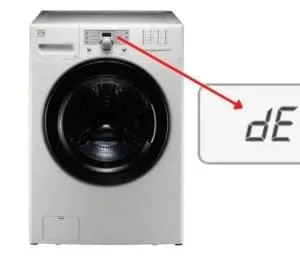
Error codes on the display. Your LG Tromm shows letters and numbers like dE, tE, nE, or OE. These codes are your dryer's way of telling you exactly what failed. We will decode them later.
Identify your symptom and skip directly to the section that matches it. That is the fastest path to a fix.
Quick Safety Check Before You Touch Anything
Dryer troubleshooting involves electricity, gas, heat, and mechanical parts. Skip the safety step and you risk electrical shock, gas leaks, or fire. This is not a place to rush.
Unplug the dryer or shut off the breaker. For electric models, 240 volts at 30 amps can kill you. Always disconnect power before removing any panel. For gas models, also shut off the gas valve at the supply line.
Wait for components to cool. The heating element, exhaust duct, and internal metal parts can stay hot for 30 minutes after a cycle. Burn injuries are common in DIY dryer repair.
Work in a clear area. Pull the dryer away from the wall so you can access the rear panel and vent connection. Make sure the floor is dry. Water and electricity do not mix.
Have a multimeter handy. You cannot troubleshoot a thermal fuse, heating element, or door switch by eyeballing it. A basic digital multimeter costs about 15 dollars and is the single most important tool for LG Tromm dryer troubleshooting.
Set it to continuity mode or resistance mode depending on what you are testing.
One more thing. If you smell gas at any point during troubleshooting, stop immediately. Do not operate any electrical switches.
Do not plug or unplug anything. Open windows, leave the room, and call a professional. Gas leaks are not a DIY situation.
Is It a Power Problem or a Dryer Problem?
Before you open the dryer, rule out the simplest cause: power. It sounds obvious, but power issues trick a lot of people into unnecessary repairs.
Check the breaker first. LG Tromm dryers require a dedicated 30-amp double-pole breaker for electric models. Gas models use a standard 120-volt 15-amp circuit. If the breaker is tripped, reset it.
If it trips again immediately, you have a short circuit inside the dryer or a faulty breaker.
Test the outlet voltage. With the dryer unplugged, use your multimeter to check the outlet. For electric models, you should read 240 volts between the two hot slots and 120 volts from each hot to neutral. For gas models, you should read 120 volts between hot and neutral.
If voltage is low or absent, the problem is in your home wiring, not the dryer.
Check the power cord connection. On electric models, the power cord can loosen at the terminal block inside the dryer. If the dryer was recently moved or the cord was replaced, double-check that all connections are tight. A loose neutral wire causes weird symptoms like the dryer running but not heating.
Test the door switch. This is the most overlooked power issue. If the door switch fails, the dryer thinks the door is open and refuses to run. Open the door and press the switch plunger with your finger.
You should hear a distinct click. Use your multimeter to check continuity across the switch terminals. No continuity means the switch is dead.
If power checks out, move to the symptom-specific section below. If you have no power at all and the breaker is fine, you likely need a new control board or main harness. That is a job for a professional.
Dryer Runs But No Heat? Follow This Branch (Gas vs Electric)
This is the most common LG Tromm dryer troubleshooting scenario. The drum turns, air blows, but no heat reaches your clothes. The fix depends entirely on whether your model is gas or electric.
Image source: Bing (Web (fair-use with source credit))
For electric models. The heat comes from a heating element that sits inside a metal housing behind the rear panel. The element is a coiled wire that glows red hot when power flows through it. If the element breaks, you get no heat.
Use your multimeter to test the heating element resistance. Set the meter to ohms. Touch one probe to each terminal of the element.
A good element reads between 8 and 12 ohms. Infinite resistance means the element is open and needs replacement.
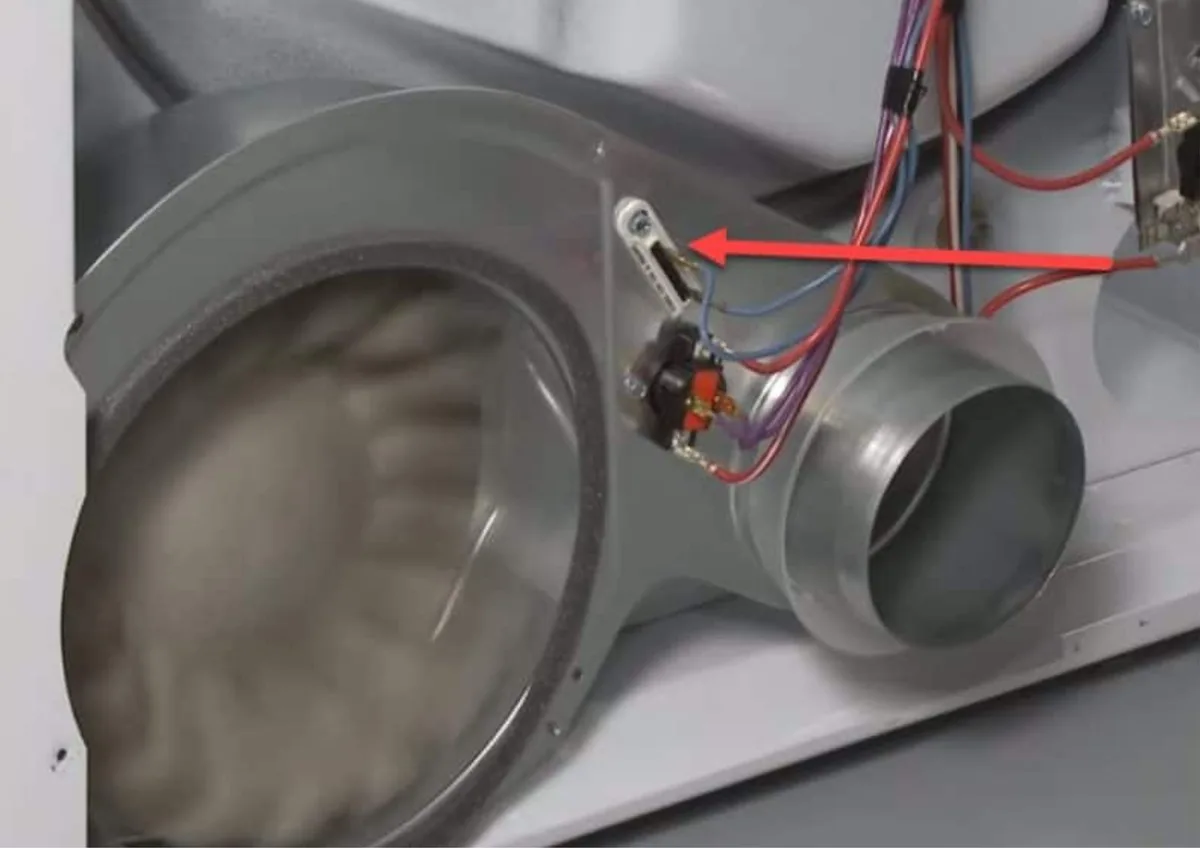
But before you replace the element, check the thermal fuse. The thermal fuse is a small white or brown component mounted on the exhaust duct housing. It looks like a flat rectangle with two wires.
If the dryer overheated from a clogged vent, the thermal fuse blows and cuts power to the heating element. This is a safety feature.
Test the thermal fuse for continuity. Set your multimeter to continuity mode. Touch probes to each terminal.
A good fuse shows continuity (beep or near-zero ohms). No continuity means it is blown. Replace it.
But also check your vent for clogs, because a new fuse will blow again if the underlying airflow problem is still there.
For gas models. The heat comes from a gas burner that ignites inside a combustion chamber. The sequence is: the igniter glows red hot, the gas valve opens, the gas ignites, and the flame heats the air. If any part of this sequence fails, you get no heat.
Start with the thermal fuse. Yes, gas models have them too. It is in the same location as electric models.
Test it for continuity.
Next, test the igniter. The igniter is a ceramic rod with a wire coil. Open the burner access panel.
Start the dryer on a heat cycle. Watch the igniter through the viewing window. It should glow bright orange within 30 seconds.
If it glows dim or not at all, the igniter is bad. Test it with your multimeter. A good igniter reads 50 to 400 ohms depending on the model.
If the igniter glows but no flame follows, the gas valve coils are likely bad. These are two coils mounted on the gas valve. Test each coil for continuity.
Open or shorted coils prevent the valve from opening. Replace both coils together even if only one tests bad.
Common mistake. Replacing the heating element or igniter without checking the thermal fuse first. The fuse blows, you replace the element, the fuse blows again. Always test the fuse first.
Dryer Won't Start or Stops Mid-Cycle? Check These First
Your LG Tromm is dead silent when you press start. Or it starts running, then shuts off after a few minutes. This branch covers both scenarios.
If the dryer is completely dead. No lights, no sounds, nothing. Start with the breaker as we covered earlier. If you have power at the outlet but the dryer is dark, the control board may be dead.
But before you go that far, check the door switch one more time.
A failed door switch is the number one reason an LG Tromm refuses to start. The switch tells the control board that the door is closed. Open the door.
Locate the switch plunger. Press it in. If you do not hear a click or if the switch feels mushy, it is broken.
Test continuity across the switch terminals. Replace it if defective.
If the dryer starts but stops after a few minutes. This is almost always a belt problem. LG Tromm dryers use a long belt that wraps around the drum and around an idler pulley. The belt connects to the motor through a pulley system.
If the belt breaks or slips off, the drum stops turning.
But here is the catch. The dryer has a belt switch (sometimes called a belt tension switch) that detects belt tension. If the belt breaks, the switch opens and the control board shuts off the motor.
This is a safety feature to prevent the motor from running without a load.
Open the top panel of the dryer. You usually remove two or three screws at the back of the top panel, then slide the top forward and lift it. Look at the belt.
If it is frayed, cracked, or broken, replace it. If the belt looks fine but is loose, the idler pulley may be worn.
Another cause for mid-cycle shutdown is the thermal fuse. If the fuse is blown but not completely open, it can cause intermittent shutdowns. Test it for continuity.
The child lock is on. This one trips up a lot of people. If the display shows a lock icon, the child lock is engaged. Press and hold the Start/Pause button for 3 to 5 seconds to disengage it.
No tools required.
If none of these checks work, the control board may have a failed relay or power supply. Unfortunately, control board replacement is not a beginner-friendly job. Consider calling a technician at this point.
Loud Noises from Your LG Tromm? What Each Sound Means
A noisy dryer is annoying, but it is also a helpful diagnostic signal. Different sounds point to different worn parts. Learn to recognize them, and you can order the right part before you even open the dryer.
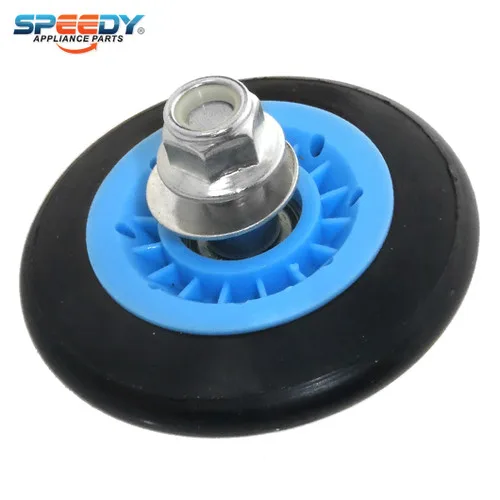
Image source: Bing (Web (fair-use with source credit))
Squeaking or chirping. This usually comes from the drum rollers. LG Tromm dryers have four rollers that support the drum. Each roller has a bearing inside.
When the bearing dries out or wears, the roller squeaks with every rotation. It sounds like a bird chirping in rhythm with the drum. The fix is to remove the drum belt, pull the drum forward, and replace each roller.
Replace all four at once. They wear at the same rate.
Screeching or metal-on-metal grinding. This is a failing drum axle or bearing. The drum rides on a large plastic bearing at the back. When that bearing wears down, the metal drum rubs against the metal bracket.
It is loud and abrasive. If you hear grinding, stop using the dryer right away. The bearing can seize and damage the drum.
Replace the rear bearing support assembly. It is a bigger job but well worth the quiet result.
Thumping or banging. A worn or loose belt causes thumping. The belt has a flat side that rides on the drum. If the belt is frayed or the idler pulley is wobbling, the belt slaps against the drum.
You will hear a rhythmic thump. Open the top panel and inspect the belt. If it is cracked or has missing chunks, replace it.
Also check the idler pulley for side-to-side play.
Rattling or clicking. Small objects like coins, buttons, or loose screws can fall between the drum and the front panel. They rattle against the drum as it turns. Remove the lint filter and feel around the front lip of the drum.
You can often retrieve the object without disassembly. If not, remove the front panel to clear out the debris.
Humming but not turning. This is a seized motor or a broken belt. The motor tries to spin but the drum is stuck or the belt is off. Check the belt first.
If the belt is intact, the motor may have a failed start capacitor or a seized bearing. Motor replacement is a job best left to a technician.
Takes Forever to Dry? The Vent and Sensor Branch
Your dryer runs a full cycle. It gets hot. But clothes come out damp after 90 minutes.
This is almost never a heating element problem. It is an airflow or sensor problem.
Check the vent first. Restricted exhaust is the leading cause of long drying times. Pull the dryer away from the wall. Disconnect the vent duct from the dryer.
Run a cycle on Timed Dry High. If the air blasts out forcefully from the dryer outlet, the dryer itself is fine. The restriction is in your ductwork.
To inspect the house duct, remove the vent cover outside. Reach in with a shop vac hose or a vent cleaning brush. LG recommends vent duct runs no longer than 25 feet total with at least one 90-degree turn.
Longer runs or multiple turns slow airflow significantly.
Clean the lint filter thoroughly. Many people scrape off the surface lint but never wash the filter. Over time, residue from fabric softener coats the screen. This blocks airflow even when the filter looks clean.
Wash the filter with warm water and a soft brush. Let it dry completely before reinstalling.
Check the moisture sensor bars. LG Tromm dryers use two metal bars inside the drum near the lint filter opening. They detect moisture by measuring electrical resistance through the clothes. If the bars are coated with residue, they cannot sense wetness.
The dryer then runs longer than necessary.
Clean the sensor bars with a wet cotton swab or a soft cloth. Use a little rubbing alcohol if they are heavily coated. Do not use steel wool or abrasive pads.
That scratches the sensor and makes it less accurate.
Test in Timed Dry mode. If your dryer works fine on Timed Dry but struggles on Sensor Dry, the sensor is the problem. If it fails on both, the issue is airflow. That simple test tells you exactly where to look.
Error Codes Decoded: Your Dryer Is Trying to Tell You Something
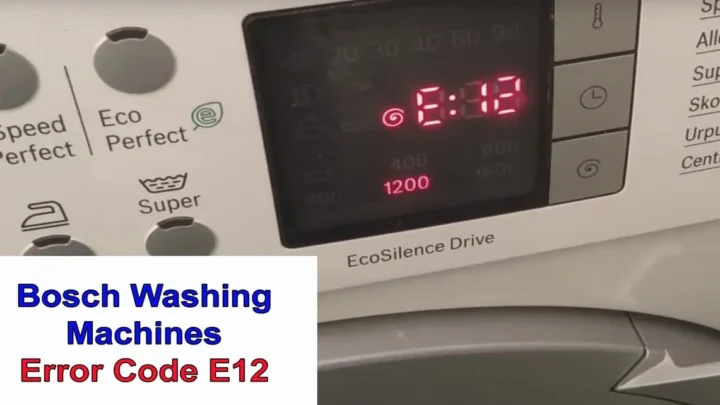
LG Tromm dryers display error codes on the control panel. These codes narrow down the fault to a specific component. Here are the most common ones and what they mean.
dE (Door Error). The control board detects that the door switch is open or shorted. Test the door switch for continuity.
If the switch tests fine, check the wiring harness between the switch and the control board. A loose connector can cause intermittent dE errors.
tE (Thermistor Error). The thermistor is a temperature sensor mounted on the blower housing. It tells the control board how hot the exhaust air is.
If the thermistor fails, the board cannot regulate temperature. Test it with a multimeter. At room temperature, a good thermistor reads about 10 kilohms.
Heat it with a hair dryer and the resistance should drop. If it stays fixed or reads infinite, replace it.
nE (No Heat Error). The control board expects to see a temperature rise within a set time. If no heat is detected, the board shows nE.
This code confirms the problem you already suspected. Follow the no-heat branch from the earlier section, starting with the thermal fuse.
OE (Overcurrent or Condensate Pump Error). On electric models, OE can indicate a shorted heating element drawing too much current. On heat pump models, it means the condensate pump is clogged or failed.
Check the element resistance first. If the element is fine, clear the condensate pump filter.
LE (High Limit Error). The high-limit thermostat (a second thermal fuse) has tripped. This usually means the dryer overheated.
The most likely cause is a clogged vent. Replace the high-limit thermostat and clean the entire vent run before restarting.
PE (Pressure Sensor Error). Some LG models use a pressure sensor to monitor vent backpressure. A PE error means the sensor detects excessive restriction.
This is your dryer telling you the vent is nearly blocked. Clean the vent thoroughly. If the error persists, the pressure sensor itself may be defective.
Mistakes Even Handy People Make (and How to Avoid Them)
DIY dryer repair saves money, but a few common mistakes turn a simple fix into a bigger headache.
Mistake 1: Replacing the thermal fuse without cleaning the vent. The thermal fuse exists to protect against overheating. If your vent is clogged, the new fuse will blow within a few cycles. Always clean the vent before installing a new fuse.
Otherwise you waste time and money.
Mistake 2: Testing the thermal fuse when it is hot. Thermal fuses reset only by cooling down. If you test a thermal fuse immediately after the dryer ran, the fuse may show continuity even if it is blown. Let the dryer sit unplugged for 30 minutes before testing.
Mistake 3: Forgetting to reset the control board. After replacing a part, some LG Tromm models require a reset to clear the error code. Unplug the dryer for five minutes, then plug it back in. Run a short cycle.
If the error persists, the new part may be defective or the root cause is still there.
Mistake 4: Using a generic belt without comparing the exact length. LG Tromm belts are specific to the model. A belt that is even half an inch too short can cause the drum to bind and burn out the motor. Always order using your model number.
The part number is usually printed on the belt itself.
Mistake 5: Ignoring the vent when the dryer is in a tight space. Older homes often have vent ducts that run 30 feet or more with three or four turns. That is too long. You can cut drying time by a third just by shortening the vent path or adding a booster fan.
It is worth the effort.
FAQs – Quick Fixes for the Most-Asked Questions
How do I reset my LG Tromm dryer after a thermal fuse replacement?
Unplug the dryer for five minutes. Plug it back in. Run a test cycle on Timed Dry High for ten minutes.
If the dryer heats and runs normally, the reset worked. If the error returns, double-check the fuse installation and the vent condition.
Why does my LG Tromm dryer keep blowing the thermal fuse?
The most common reason is a restricted vent. Lint buildup prevents hot air from escaping. The temperature rises inside the dryer until the thermal fuse blows.
Clean the entire vent run from the dryer to the outside exhaust. If the fuse still blows, check for a failed exhaust diverter or a collapsed duct.
Can I run my LG Tromm dryer without a thermal fuse?
Never do this. The thermal fuse is a critical safety device that prevents dryer fires. Bypassing it is dangerous and illegal in many jurisdictions.
If the fuse blows, find and fix the root cause. Do not remove the fuse.
What does the LE error code mean on my LG Tromm dryer?
LE stands for high limit error. The dryer overheated and the secondary thermal fuse tripped. This usually happens because the main vent is clogged.
Clean the vent thoroughly. Replace the high-limit thermostat if it fails the continuity test.
How often should I clean my LG Tromm dryer vent?
The National Fire Protection Association recommends cleaning the vent at least once per year. If you dry heavy loads like towels or bedding, do it every six months. A clean vent reduces drying time by 30 percent and prevents fire hazards.

Similar Posts