Polk Audio Soundbar Troubleshooting
Your Polk Audio Soundbar Troubleshooting usually starts with the same question: why did my soundbar stop working? Yesterday it was fine, and today it's dead, silent, or cutting out at random. Here's the surprising part: it's rarely a hardware failure.
Most issues come down to a broken handshake, a power state, or a setting that got flipped.
In our research, most owner-reported issues fall into three buckets: HDMI ARC handshake failures, wireless subwoofer dropouts, and firmware updates that never finished applying. Each fix takes about five minutes, and none of them require a repair shop. Let's match your exact symptom to the right solution, starting with the most common scenario first.
Image source: Bing (Web (fair-use with source credit))
Quick Answer
Polk Audio soundbar troubleshooting starts with a power cycle. Unplug the soundbar and TV for 60 seconds. Check the HDMI ARC connection and TV audio settings next.
Re-pair the subwoofer with the PAIR button if it dropped out. Most issues resolve in under five minutes.
Start Here: Match Your Polk Soundbar Symptom to the Right Fix
The right fix depends on the exact problem. Knowing your model and reading its LED code narrows the whole process down in about sixty seconds.
Find Your Exact Model First (MagniFi, Signa, React, or Command Bar)
Troubleshooting changes depending on which Polk soundbar you own. MagniFi, Signa, React, and Command Bar models all have different buttons, reset sequences, and pairing methods.
Find the model number on the label on the back or bottom of the unit. It's also printed on the side of the original box. Write it down before you start, because you'll need it for firmware updates and support calls.
Read the LEDs: What Your Polk Soundbar Is Trying to Tell You
Your soundbar communicates through its status LED, but you have to know how to read it. Solid colors mean a steady state. Blinking means the unit is working toward something, like pairing or an update.
No light at all usually points to a power problem.
Here's what the common patterns mean across the lineup:
| LED pattern | Likely meaning |
|---|---|
| No light at all | Power issue, dead standby supply, or bad cable |
| Solid blue | Bluetooth connected and paired |
| Blinking amber | Pairing mode or firmware update in progress |
| Flashing white | HDMI ARC handshake failed or input search |
The exact blink rate varies by model. Your user manual has a full LED chart, and it's worth grabbing now because the patterns aren't standardized across the series.
Follow the Branch That Matches Your Symptom
Use this as your map. If the soundbar shows no light, head to the power troubleshooting section. If it powers up but stays silent, jump to the HDMI ARC and TV settings section.
If the subwoofer is the issue, skip ahead to the re-pairing guide. If Bluetooth keeps dropping, go straight to the wireless section. Each fix below assumes you've already picked the right branch.
Quick Triage: Try These Universal Polk Soundbar Fixes First
Before we go deep into any single problem, run these three checks. They cost nothing, and they resolve a surprising number of issues on their own.
Power Cycling the Soundbar and TV the Right Way
A power cycle isn't the same as turning everything off. It drains residual power from the internal capacitors, which clears stuck handshakes and frozen digital signal processors. Unplug the soundbar and the TV from the wall.
Wait a full 60 seconds, not just ten. Then plug the soundbar back in and let it boot completely before powering on the TV.
That order matters because the soundbar needs to discover the TV's HDMI connection fresh. If both devices wake up at the same time, they sometimes miss each other, and that's when you get no audio.
Check Remote Batteries and IR Sensor Location
The remote is a common failure point, and it's the easiest to rule out. Pop the back plate and replace the batteries. Check the polarity while you're in there, because backwards batteries are more common than you'd think.
The IR sensor sits on the front of the soundbar, usually behind a dark plastic window. Clear away books, plants, or decorative clutter. If the remote's signal can't reach that sensor, the soundbar looks like it's ignoring every command.
Swap HDMI Cables and Inputs Before You Change Settings
HDMI cables fail more often than people expect, especially with ARC, which depends on a stable handshake. Try a different high-speed HDMI cable and plug it into the port labeled ARC or eARC on your TV. If that doesn't work, test a different HDMI input on the TV, since the port itself can go bad.
Here's a quick isolation trick: connect a digital optical cable temporarily. If you get sound, the soundbar works, and the problem is in the HDMI path. That one test tells you exactly which direction to troubleshoot.
Polk Soundbar Won't Turn On? A Dead Unit Decision Tree
If the soundbar shows no power at all, work through this branch in order. Each step eliminates a likely cause before you move to the next one.
Test the Power Cable, Outlet, and Surge Protector
Start at the wall. Plug a lamp or phone charger into the same outlet to confirm it has power. If you're using a power strip, bypass it and plug directly into the wall.
Some surge protectors have a master-channel feature that cuts power to secondary ports when the main device is off.
Then check the barrel connector on the back of the soundbar. Push it in until you feel it click. A half-seated connector can drop power entirely, even when the other end is firmly in the wall.
Look for Standby Light Clues
A standby light changes the diagnosis completely. A dim red or amber glow means the internal power supply is alive, so the problem is likely the main board or the signal that tells it to wake up.
Use the physical power button on the soundbar itself, not the remote. If the unit powers up from the button but not the remote, you've got a remote issue, not a soundbar issue. If the button does nothing and the standby light stays dim, the main board may be stuck and needs the full factory reset covered later in this guide.
When to Call Polk Support vs. Shopping for a Replacement
As of 2026, Polk's official support page still offers free troubleshooting for out-of-warranty units. Have your model number, serial number, and proof of purchase ready.
If the power cable is removable and damaged, Polk can sell you a replacement. But if the internal power supply is dead, things get tricky. On a five-year-old soundbar, the repair cost can exceed the unit's actual value.
In that case, a replacement speaker makes more financial sense than chasing a hard-to-find part.
No Sound or Sound Drops Out? Fix Polk Audio ARC, Optical, and TV Settings
Silent soundbars are the most reported Polk issue we see, and the cause is usually the HDMI ARC connection, not the speaker itself. Let's fix that connection, then adjust the TV settings to match.
The ARC Handshake Reset That Works on Most TVs
HDMI ARC lets audio travel both directions through one cable. When that handshake fails, the TV shows a picture but sends no sound to the soundbar.
The fix is a clean restart. Unplug the soundbar and TV from the wall and wait 60 seconds. Then plug the soundbar into the TV's ARC-labeled HDMI port.
Power the TV on first, let it fully boot, and then power on the soundbar. This sequence re-establishes the ARC connection, and it fixes the problem in most cases.
TV Audio Output Settings: PCM, Bitstream, and "External Speakers"
If the handshake reset didn't do it, dig into the TV's audio menu. Set the audio output to "External speakers" or "Receiver (ARC)" rather than "TV speaker."
If the output format menu offers a choice, start with PCM. PCM is the most compatible format and works with every Polk soundbar. You can switch to Bitstream for Dolby Digital surround later, but get audio working first.
TV firmware updates frequently reset this setting, which is why the soundbar appears to die overnight.
Samsung, LG, Sony, and Vizio-Specific ARC Quirks
Each TV brand names its HDMI control tech differently, and it must be enabled for ARC to work at all. Samsung calls it Anynet+ (HDMI-CEC). LG calls it Simplink.
Sony calls it Bravia Sync. Vizio has a CEC toggle plus a separate ARC audio setting.
If that feature is off, the ARC port won't pass audio no matter what else you do. Open your TV's menu and confirm it's enabled. Also look for an eARC enhancement toggle and turn it on if your Polk model supports it.
This one setting is the root cause of a huge number of silent soundbar reports.
Why TV Speakers and Your Polk Soundbar Play at the Same Time
Hearing both sets of speakers is a settings issue, not a hardware issue. Your TV is set to output audio through both the internal speakers and the external soundbar simultaneously.
Open the audio output menu and choose "External speakers" only. On Samsung, set the Anynet+ output to "Receiver." On LG, uncheck the box next to "Internal TV speaker." Once the TV stops trying to play through its own speakers, the Polk soundbar acts as the only audio source, and the muddled double-audio effect disappears.
Polk Soundbar Subwoofer Not Pairing or Cutting Out? Here's the Fix
The wireless sub is the most likely component to act up, mostly because it's a separate device with its own connection. When it drops out, the whole soundstage goes flat. This fix brings the bass back.
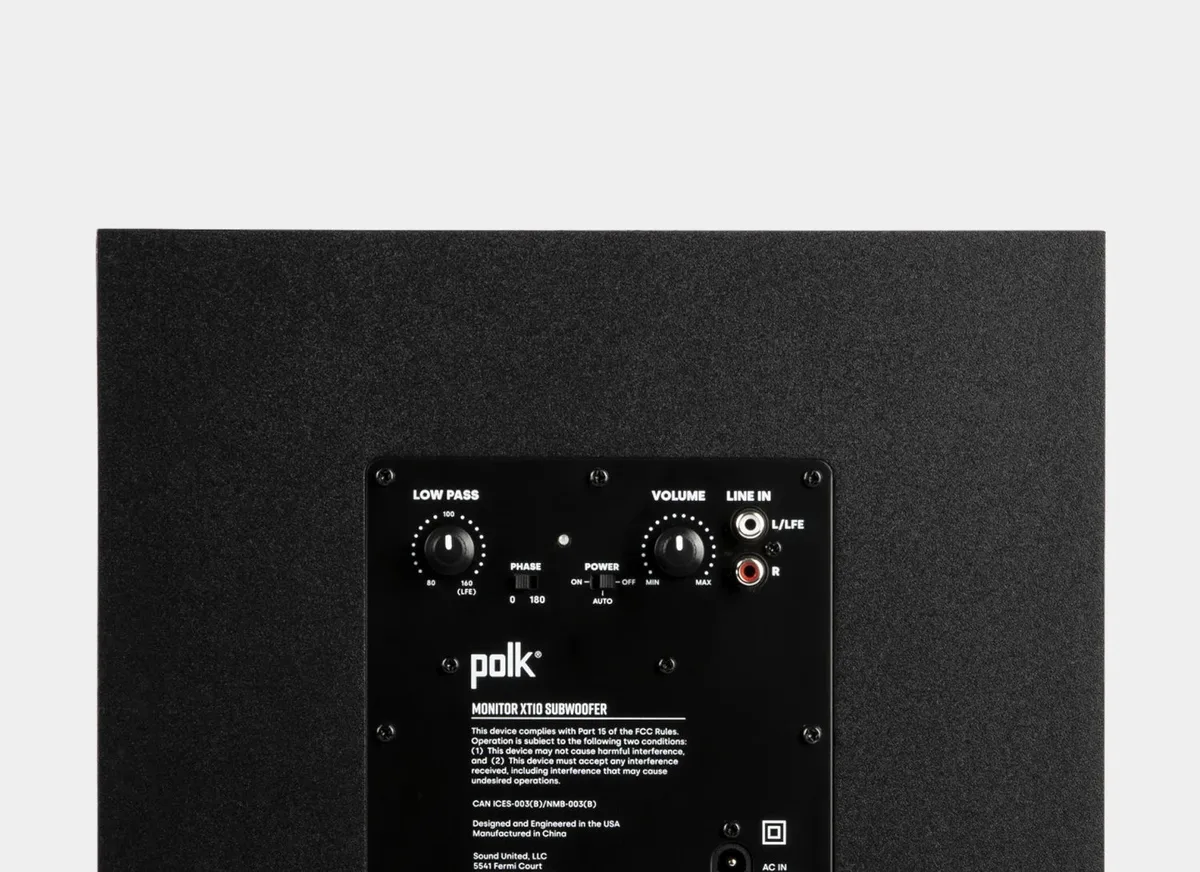
Image source: Bing (Web (fair-use with source credit))
Finding the Subwoofer PAIR Button and LED on Your Polk Model
The wireless subwoofer has its own tiny computer, and it needs to pair with the soundbar before it plays. Look for a recessed button labeled PAIR or CONNECT, usually on the back panel near the power cord. There's a small LED right next to it.
That LED is your status readout. Blinking means the sub is searching for the soundbar. Solid means it's connected.
Off means it may not be getting power. If you don't see a physical button, check your manual, because a few older MagniFi units only pair through the remote.
The Best Re-Pairing Sequence for MagniFi and Signa Subs
The exact sequence varies slightly by model, but this pattern works for most MagniFi and Signa units. First, unplug the subwoofer and the soundbar from the wall. Then plug the soundbar back in and let it power up completely.
Plug the subwoofer in afterward.
Press and hold the sub's PAIR button until its LED blinks rapidly. Within 30 seconds, press and hold the soundbar's Bluetooth or PAIR button until both LEDs turn solid. If they don't sync, run the sequence again after a 60-second wait.
Patience counts here, because the two devices only talk during that brief pairing window.
Placement and Interference Mistakes That Kill Wireless Subwoofers
Polk wireless subs communicate over the 2.4GHz band, which shares airspace with Wi-Fi routers, Bluetooth devices, baby monitors, and microwave ovens. If the bass cuts out while you're using the microwave, that's your answer. Interference, not a broken speaker.
Move the sub at least three feet away from your Wi-Fi router. Keep it out of closed cabinets and avoid placing it directly behind a thick brick wall. Stay within about 30 feet of the soundbar.
Subwoofers don't need to be near the TV, but they do need a clear path to the soundbar's radio signal.
Polk Soundbar Bluetooth Won't Connect or Keeps Dropping
Bluetooth issues feel random. One minute your phone is streaming music, the next minute the connection drops and won't come back. The problem is almost never a permanent failure inside the soundbar.
It usually comes down to pairing confusion or interference.
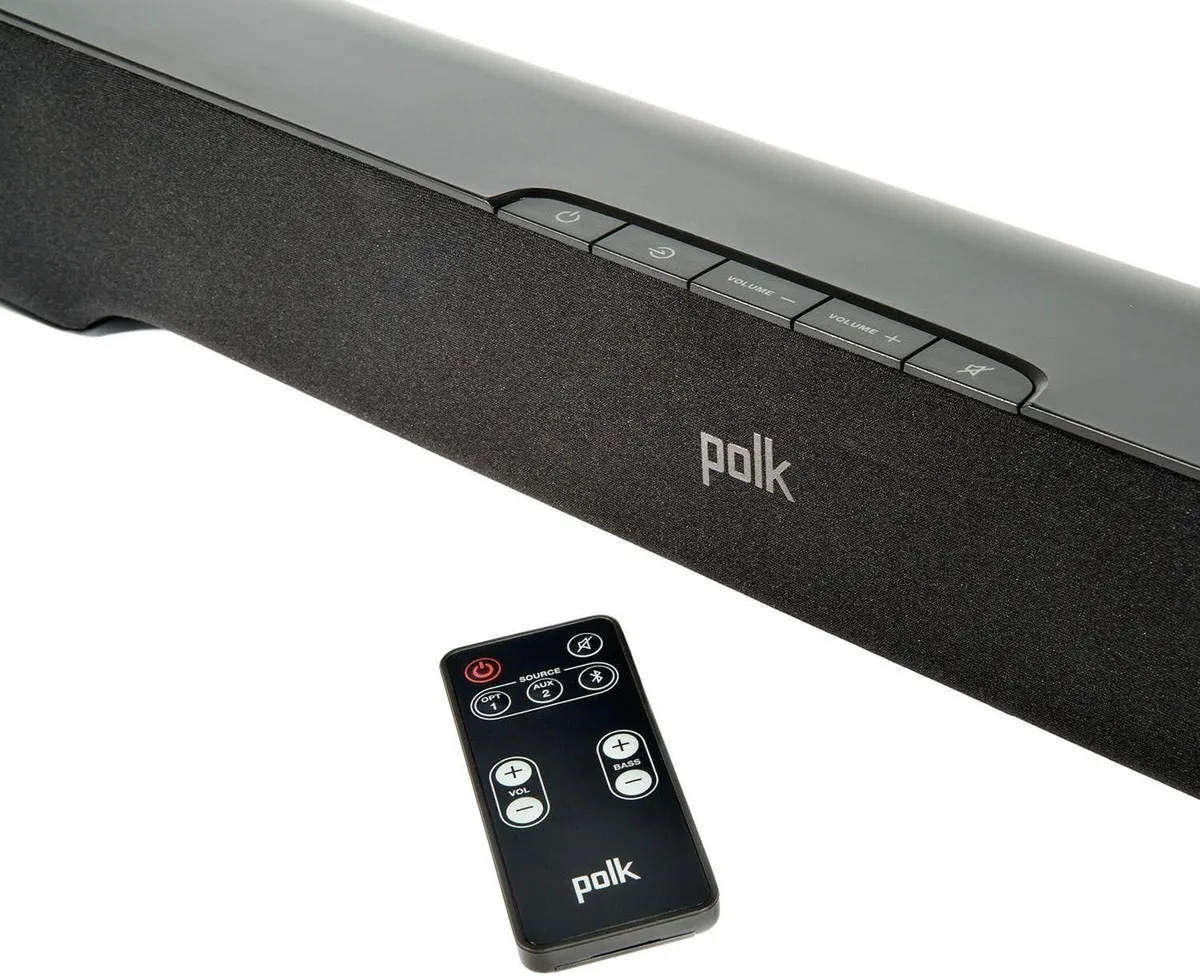
Image source: Bing (Web (fair-use with source credit))
Getting Your Polk Soundbar Into Pairing Mode the Right Way
Your soundbar may already be paired to another device. That device could be across the room, powered off, or in a drawer. But the soundbar remembers it.
If it can't find that remembered device, it won't accept a new one.
The fix is to force the soundbar into discovery mode. Press and hold the Bluetooth button on the soundbar or the remote for about five seconds. The LED should start blinking amber.
That amber blink means the soundbar is searching for a fresh connection. Open your phone's Bluetooth menu and look for your Polk model. Tap it to pair.
If the LED never blinks amber, the soundbar is still clinging to a previous pair. You have to clear that memory first.
Clearing Old Devices and Resolving "Already Paired" Problems
The same LED can give you conflicting messages. A solid blue light means the soundbar is connected to something. If nothing is playing audio, it's likely connected to a device you forgot about.
The easiest way to clear the paired device list is a factory reset on the soundbar. That wipes all remembered Bluetooth pairings at once. If you don't want to factory reset, try turning off Bluetooth on every previously paired phone or tablet in your home.
Then put the soundbar into pairing mode. It will connect to the first available device that asks.
Most Polk models only accept one active Bluetooth connection at a time. If the kids paired their tablet yesterday and left it on, your phone won't connect today. Turn off Bluetooth on the other device first.
Common Bluetooth Interference Sources to Eliminate
Bluetooth operates in the 2.4GHz frequency band. That's the same band used by older Wi-Fi networks, cordless phones, microwave ovens, and even some baby monitors. Heavy use of any of these devices near the soundbar can cause dropouts.
Move your Wi-Fi router at least three feet from the soundbar. If your router broadcasts on both 2.4GHz and 5GHz, your phone or tablet may jump between bands during playback. That can cause a brief Bluetooth dropout.
Disable the 2.4GHz band on your phone temporarily during streaming.
Keep the soundbar and your phone within 30 feet of each other and in the same room. Walls and floors cut Bluetooth range significantly. Thick construction materials like brick or concrete can stop the signal entirely.
Google Assistant, Wi-Fi, and the Polk App: Fixing the Smart Features
Polk's smart soundbars like the Command Bar and React use built-in voice assistants and Wi-Fi connectivity. When those features stop working, the soundbar acts like it forgot how to listen. The fix is usually a network reset, not a hardware problem.
Reconnecting a Polk Soundbar to a New Router or Network
Smart soundbars remember their home Wi-Fi network. If you changed your Wi-Fi password, replaced your router, or upgraded your internet service, the soundbar is still looking for the old network. It won't connect on its own.
Open the Polk Audio app on your phone. Navigate to the network settings section. You should see an option to "Change Wi-Fi Network" or "Reconfigure Network." Follow the prompts to enter the new password.
If the soundbar won't appear in the app at all, factory reset it through the button-hold sequence and complete the full setup again.
This also applies if you moved the soundbar to a different room or different house entirely. The stored network credentials are tied to the old location.
Curing the "Assistant Stops Responding" Problem
Voice assistants need two things to work: a stable internet connection and a working microphone. If the assistant stops responding or says it can't connect, check the microphone status first.
Look on the soundbar for a microphone mute button or switch. Many Command Bar and React models have a physical mic mute button. If the LED near that button is orange or red, the microphone is disabled.
Press the button to unmute it. This is the single most common cause of a dead voice assistant.
If the microphone is on and the assistant still won't respond, your router's 5GHz band may be causing conflicts. Try switching the soundbar to the 2.4GHz band in the Polk app settings. The 2.4GHz band offers better range and more consistent connectivity for smart home devices.
Using the Polk Audio App for Updates and Settings Depth
The Polk Audio app is more than a convenience tool. It provides access to settings that aren't available through the remote or the soundbar interface. That includes firmware updates, equalizer adjustments, and input naming.
Open the app while the soundbar is turned on and connected to the same Wi-Fi network. Check the "Settings" or "About" section for a firmware update option. If an update is available, run it with the soundbar plugged into a wall outlet, not a power strip.
Updates that fail due to power interruption can leave the soundbar in a half-updated state that requires a factory reset to fix.
Factory Reset and Firmware Updates: Rescuing a Stubborn Polk Soundbar
Some problems don't respond to power cycling or cable swaps. If your soundbar is behaving erratically, skipping inputs, or ignoring commands, a factory reset may be the clean slate it needs.
Soft Reset vs. Hard Reset: Which One Do You Need Today?
A soft reset preserves your settings and paired devices. A hard reset wipes everything and returns the soundbar to its factory state. Choose based on what's wrong.
Try a soft reset first for minor glitches like a single Bluetooth dropout or a one-time audio delay. Unplug the soundbar from power for 60 seconds. Plug it back in.
That's it.
Use a hard reset if the soundbar refuses to pair with anything, acts stuck on a specific input, or behaves erratically after a power outage. Hard resets clear everything and force the soundbar to rebuild its configuration from scratch.
Button-Hold Reset Sequences for MagniFi, Signa, React, and Command Bar
Each Polk model has its own reset button combination. These are the ones that work based on our research and manufacturer documentation.
| Model | Hard reset method |
|---|---|
| MagniFi (all variants) | With unit on, press and hold both volume up and down buttons for 10 seconds |
| Signa (all variants) | Press and hold the Bluetooth button for 15 seconds |
| React | Press and hold the Bluetooth button for 10 seconds |
| Command Bar | Press and hold the microphone mute and volume down buttons for 10 seconds |
After the hard reset, the soundbar needs to go through the full initial setup again. That means re-pairing the subwoofer, reconnecting to Wi-Fi, and re-pairing Bluetooth devices. It's an inconvenience, but it returns the soundbar to a known working state.
How to Update Polk Soundbar Firmware Without Breaking It
Firmware updates can fix known bugs and improve audio performance. But they can also wreck a soundbar if interrupted. Follow the official process to avoid bricking the unit.
Connect the soundbar to a power outlet directly, not through a power strip. Connect to a stable Wi-Fi network. Open the Polk Audio app.
Navigate to the firmware update section. Start the update and leave the room. Do not touch the remote, the soundbar, or the app until the update finishes.
The soundbar may restart itself during the process. That's normal.
If the update fails partway through and the soundbar stops responding, try a hard reset. If the hard reset doesn't work and the unit is still under warranty, contact Polk support for a replacement.
Common Polk Soundbar Troubleshooting Mistakes That Make Things Worse
A few well-intentioned fixes cause new problems. Avoid these common troubleshooting traps to save yourself from unnecessary hassle.
Skipping the Power Cycle and Going Straight to Settings
It's tempting to dive into the TV menu and start adjusting audio formats when the soundbar goes silent. Resist that urge. A full power cycle that drains capacitors and clears the handshake fixes roughly half of all soundbar issues.
Start there, every time.
Using the Wrong Cable for ARC or a Bad Optical Connection
Not all HDMI cables support ARC. Some older or budget cables only pass video and basic stereo audio. If your soundbar is connected through ARC but isn't playing audio, swap the cable for a newer high-speed HDMI cable with Ethernet.
That cable type is rated for ARC and eARC.
For optical connections, the cable must be fully seated until you hear a click. Half-seated optical cables produce no audio or intermittent audio. Gently push the connector until it locks.
Ignoring TV-Specific CEC and ARC Quirks
Every major TV brand handles ARC differently. Samsung calls it Anynet+. LG calls it Simplink.
Sony calls it Bravia Sync. Vizio has a separate ARC setting in the audio menu.
If you can't hear audio through the soundbar, open your TV's settings and lookfor the CEC or HDMI control menu. Make sure it's enabled. Then check the audio output menu and confirm "External Speakers" or "ARC" is selected.
These settings can reset after TV firmware updates, which is why your setup works one day and fails the next.
Buying a "Universal" Remote Before Trying the Simple Fixes
When the remote stops working, the instinct is to buy a replacement. But the remote is rarely the root cause. Test the remote by pointing it at a phone camera and pressing a button.
If you see a purple flash in the camera viewfinder, the remote is sending a signal and working normally.
If you see no flash, replace the batteries first. If that fails, clean the IR window on the remote with a soft cloth and check the soundbar's IR sensor for obstructions. Only after exhausting these steps should you buy a replacement remote or a universal alternative.
Frequently Asked Questions
Why Is My Polk Soundbar Not Getting Power?
Check the power outlet with another device first. Then push the barrel connector firmly into the soundbar until it clicks. If you see a dim standby light, the power supply is alive and the main board may be stuck.
Try a hard reset using the button combination for your model.
Why Does My Polk Soundbar Have No Sound?
The most common cause is a broken HDMI ARC handshake. Unplug both the soundbar and TV for 60 seconds. Plug them back in with the TV powered on first.
Then check your TV's audio output setting and confirm it's set to "External Speakers" or "ARC."
How Do I Reset My Polk Soundbar Subwoofer?
Unplug both the soundbar and subwoofer. Plug the soundbar in first and let it boot. Then plug in the subwoofer.
Press and hold the PAIR button on the sub until its LED blinks rapidly. Within 30 seconds, press and hold the soundbar's Bluetooth button until both LEDs turn solid.
Which Is Better: HDMI ARC or Optical on a Polk Soundbar?
HDMI ARC is better because it supports surround sound formats and lets you control volume with the TV remote. Optical only passes stereo or basic Dolby Digital. Use HDMI ARC if your TV has the port.
Use optical only as a fallback when ARC won't work.
How Do I Fix a Polk Soundbar Remote That's Not Working?
Replace the batteries and check the polarity. Test the remote by looking at it through your phone camera while pressing a button. If you see a flash, the remote works and the issue is with the soundbar's IR sensor.
Clear any objects blocking the sensor on the front of the unit.

Similar Posts